
AC 902 - Air conditioner LERAN - Free user manual and instructions
Find the device manual for free AC 902 LERAN in PDF.


Pick your language and provide your email: we'll send you a specifically translated version.
| Product Type | Portable Air Conditioner |
| Model | AC 902 |
| Brand | LERAN |
| Cooling Capacity | 9000 BTU (approx. 2.6 kW) |
| Power Supply | 220-240 V ~ 50 Hz |
| Power Consumption (Cooling) | Approx. 900 W |
| Airflow Rate | 300 m³/h |
| Noise Level | 56 dB(A) (max) |
| Refrigerant | R290 (Propane), 180 g |
| Dimensions (W x D x H) | 35 x 35 x 70 cm |
| Net Weight | 22 kg |
| Modes | Cool, Fan, Dehumidify |
| Fan Speeds | 3 (Low, Medium, High) |
| Thermostat Range | 16 °C - 30 °C |
| Timer | Up to 24 hours |
| Remote Control | Yes, included |
| Air Filter | Washable mesh filter |
| Condensate Drainage | Continuous drain hose (optional) |
| Exhaust Hose Length | 1.5 m (approx.) |
| Window Kit Included | Yes, for vertical or horizontal windows |
| Safety Features | Overheat protection, auto restart, child lock |
| Maintenance | Clean filter every 2 weeks; check drainage |
| Energy Class | Class A (cooling) |
| Operating Temperature Range | 16 °C - 35 °C (room temperature) |
Frequently Asked Questions - AC 902 LERAN
How do I install the AC 902 air conditioner?
Place the unit near a window and attach the exhaust hose to the back. Extend the window kit to fit your window opening and secure the hose. Plug in and adjust settings via remote or control panel.
Can I use the air conditioner without the exhaust hose?
No, the exhaust hose is required to expel hot air. Without it, the unit will not cool properly and may overheat.
How often should I clean the filter?
Clean the washable filter every two weeks under normal use. More frequently in dusty environments. Slide out the filter, rinse with water, dry thoroughly and reinsert.
What does the 'Fan' mode do?
Fan mode circulates air without cooling. Use it to improve air circulation or when cooling is not needed. The compressor does not run, saving energy.
How do I drain condensate water?
The unit has a self-evaporative system, but in humid conditions, water may collect. Use the continuous drain hose (not included) by attaching it to the rear drain outlet. Alternatively, manually empty the internal tank when the 'Full' light appears.
Why is the air conditioner not cooling enough?
Check if the filter is clean, the exhaust hose is properly sealed, and the window kit is secure. Ensure the room size matches the cooling capacity (max ~20 m²). Also, avoid direct sunlight on the unit.
Can I use an extension cord?
It is not recommended. If necessary, use a heavy-duty extension cord rated for at least 15 amps and keep it as short as possible to avoid voltage drop.
How do I set the timer?
Press the 'Timer' button on the remote or control panel. Use '+' or '-' to set the desired hours (1-24). The unit will turn on or off after the set time.
What does the 'Swing' button do?
The 'Swing' button activates the vertical louver oscillation to distribute air evenly across the room. Press again to stop at a desired position.
Is the refrigerant R290 flammable?
Yes, R290 (propane) is flammable. The unit is designed with safety measures. Do not puncture the refrigerant circuit and keep away from ignition sources. Dispose of the unit properly.
User questions about AC 902 LERAN
0 question about this device. Answer the ones you know or ask your own.
Ask a new question about this device
No questions yet. Be the first to ask one.
Download the instructions for your Air conditioner in PDF format for free! Find your manual AC 902 - LERAN and take your electronic device back in hand. On this page are published all the documents necessary for the use of your device. AC 902 by LERAN.
USER MANUAL AC 902 LERAN
natural_image
Technical line drawing of a curved air conditioner unit with labeled component (6), showing internal structure and mounting brackets (no text or symbols beyond label)natural_image
Line drawing of a hand holding a tool or device with an arrow indicating direction (no text or symbols present)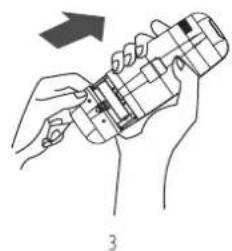
natural_image
Line drawing of a hand holding a small electronic device with a grid pattern, no text or symbols presentflowchart
graph LR
    A["Hand using screwdriver"] --> B["Remote Control with Display"]
    B --> C["Remote Control with Display"]
Использование
flowchart
graph LR
    A["Hand pointing"] --> B["Arrow pointing to icon 5"]
    B --> C["Arrow pointing to icon 4"]
    C --> D["Arrow pointing to icon 3"]
    D --> E["Arrow pointing to icon 2"]
    E --> F["Arrow pointing to icon 1"]
    G["Arrow pointing to icon 1"] --> H["Arrow pointing to icon 1"]
    H --> I["Arrow pointing to icon 1"]
flowchart
graph LR
    A["Hand pointing to ECO"] --> B["75% → 55% → 35%"]
    B --> C["Digital Display with Time: 75% 18:30"]

Блокировка
Режим очистки
natural_image
Illustration of a hand pressing a wall-mounted air conditioner into a panel, with no text or symbols present.

Table of contents
Click a title to access it
Manual assistant
Powered by Anthropic
Waiting for your message
Product information
Brand : LERAN
Model : AC 902
Category : Air conditioner