
BCA209 - Loudspeaker GPX - Free user manual and instructions
Find the device manual for free BCA209 GPX in PDF.


| Product Type | Bluetooth Speaker |
| Brand | GPX |
| Model | BCA209 |
| Dimensions (H x W x D) | 6.3 x 6.3 x 6.3 inches |
| Weight | 1.5 lbs |
| Power Source | Built-in rechargeable battery (USB-C charging) |
| Battery Life | Up to 8 hours |
| Connectivity | Bluetooth 5.0, AUX input |
| Speaker Power | 5W RMS |
| Frequency Range | 100 Hz - 20 kHz |
| Water Resistance | IPX5 (splash proof) |
| Controls | Power, Volume, Play/Pause, Next/Previous track |
| Microphone | Built-in for hands-free calling |
| Material | Plastic with fabric grille |
| Color Options | Black, Red, Blue |
| Charging Time | 3 hours |
| Battery Type | Lithium-ion 1800mAh |
| Included Accessories | USB-C charging cable, AUX cable, User manual |
| Compatible Devices | Smartphones, tablets, laptops, MP3 players |
| Bluetooth Range | 33 ft (10 m) |
| Standby Time | Up to 100 hours |
Frequently Asked Questions - BCA209 GPX
User questions about BCA209 GPX
0 question about this device. Answer the ones you know or ask your own.
Ask a new question about this device
Download the instructions for your Loudspeaker in PDF format for free! Find your manual BCA209 - GPX and take your electronic device back in hand. On this page are published all the documents necessary for the use of your device. BCA209 by GPX.
USER MANUAL BCA209 GPX
Important Safety Instructions
- Read these Instructions.
- Keep these Instructions
• Heed all Warnings
• Follow all instructions
P. Show an instruction - Do not use this apparatus near water.
- Clean only with a dry cloth.
- Do not block any ventilation openings. Install in accordance with the manufacturer's instructions.
- Do not install near any heat sources such as radiators, heat registers, stoves, or other apparatus (including amplifiers) that produce heat.
- Do not defeat the safety purpose of the polarized or grounding - type plug. A polarized plug has two blades with one wider than the other. A grounding type plug has two blades and a third grounding prong. The wide blade or the third prong are provided for your safety. When the provided plug does not fit into your outlet, consult an electrician for replacement of the obsolete outlet.
- Protect the power cord from being walked on or pinched particularly at plugs, convenience receptacles, and the point where they exit from the apparatus.
• Only use attachments/accessories specified by the manufacturer. - Unplug this apparatus during lightning storms or when unused for long periods of time.
- Refer all servicing to qualified service personnel. Servicing is required when the apparatus has been damaged in any way, such as power-supply cord or plug is damaged, liquid has been spilled or objects have fallen into the apparatus, the apparatus has been exposed to rain or moisture, does not operate normally, or has been dropped.
- Use only with a cart, stand, tripod, bracket, or table specified by the manufacturer, or sold with the apparatus. When a cart is used, use caution when moving the cart/apparatus combination to avoid injury from tip-over.

FCC Warnings
Warning: Changes or modifications to this unit not expressly approved by the party responsible for compliance could void the user's authority to operate the equipment.
NOTE: This equipment has been tested and found to comply with the limits for a Class B digital device, pursuant to Part 15 of the FCC Rules. These limits are designed to provide reasonable protection against harmful interference in a residential installation. This equipment generates, uses, and can radiate radio frequency energy and, if not installed and used in accordance with the instructions, may cause harmful interference to radio communications. However, there is no guarantee that interference will not occur in a particular installation. If this equipment does cause harmful interference to radio or television reception, which can be determined by turning the equipment off and on, the user is encouraged to try to correct the interference by one or more of the following measures:
• Reorient or relocate the receiving antenna.
- Increase the separation between the equipment and receiver.
- Connect the equipment into an outlet on a circuit different from that to which the receiver is connected.
- Consult the dealer or an experienced radio/TV technician for help.
Additional Warnings and Precautions
- CAUTION: TO PREVENT ELECTRIC SHOCK, MATCH WIDE BLADE OF PLUG TO WIDE SLOT, FULLY INSERT.
- Mains plug is used as disconnect device and it should remain readily operable during intended use. In order to disconnect the apparatus from the mains completely, the mains plug should be disconnected from the mains socket outlet completely.
- WARNING: Shock hazard - Do Not Open.
- WARNING: To reduce the risk of fire or electric shock, do not expose this apparatus to rain, moisture, dripping, or splashing.
- Objects filled with liquids, such as vases, shall not be placed on the apparatus.
- CAUTION: Use of controls or adjustments or performance of procedures other than those specified may result in hazardous radiation exposure.
- WARNING: Changes or modifications to this unit not expressly approved by the party responsible for compliance could void the user's authority to operate the equipment.
- WARNING: Do not place this unit directly onto furniture surfaces with any type of soft, porous, or sensitive finish. As with any rubber compound made with oils, the feet could cause marks or staining where the feet reside. We recommend using a protective barrier such as a cloth or a piece of glass between the unit and the surface to reduce the risk of damage and/or staining.
- CAUTION: Danger of explosion if battery is incorrectly replaced. Replace only with the same or equivalent type.
- WARNING: There is a danger of explosion if you attempt to charge standard Alkaline batteries in the unit. Only use rechargeable NiMH batteries.
- Warning: Do not ingest battery, chemical burn hazard.
- Battery shall not be exposed to excessive heat such as sunshine, fire or the like.
- Caution marking is located at the rear or bottom of the apparatus.
- The marking information is located at the rear or bottom of apparatus.
- Keep new and used batteries away from children. If the battery compartment does not close securely, stop using the product and keep it away from children.
- If you think batteries might have been swallowed or placed inside any part of the body, seek immediate medical attention.
- Do not mix old and new batteries.
- Completely replace all old batteries with new ones.
- Do not mix alkaline, standard (carbon-zinc), or rechargeable (nicad, ni-mh, etc) batteries.
- Batteries should be recycled or disposed of as per state and local guidelines.

Warning: To reduce the risk of electric shock, do not remove cover (or back). No user-serviceable parts inside. Refer servicing to qualified service personnel.

The exclamation point within an equilateral triangle is intended to alert the user to the presence of important operating and maintenance (servicing) instructions in the literature accompanying the appliance.

The lightning flash with arrowhead symbol, within an equilateral triangle, is intended to alert the user to the presence of uninsulated “dangerous voltage” within the product’s enclosure that may be of sufficient magnitude to constitute a risk of electric shock to persons.

This symbol indicates that this product incorporates double insulation between hazardous mains voltage and user accessible parts.

This product utilizes a Class 1 laser to read Compact Discs. This laser Compact Disc Player is equipped with safety switches to avoid exposure when the CD door is open and the safety interlocks are defeated. Invisible laser radiation is present when the CD Player's lid is open and the system's interlock has failed or been defeated. It is very important that you avoid direct exposure to the laser beam at all times. Please do not attempt to defeat or bypass the safety switches.

WARNING : This product can expose you to chemicals including lead, which is known to the State of California to cause cancer and birth defects or other reproductive harm. For more information go to www.P65Warnings.ca.gov. This product meets and complies with all Federal regulations.
Features & Controls
Features
• CD & Cassette player
• Auto-Stop at end of cassette
• Built-in AM radio antenna
- Extendable FM radio antenna
- Analog volume control
- Aux In (3.5mm audio input)
- Can record from Radio or CD
• AC Power: requires AC Power Cable (included)
- DC Battery Power: requires 6 C batteries (not included)
Skip Fwd. Skip Rev. Program Repeat Play/Pause
Stop

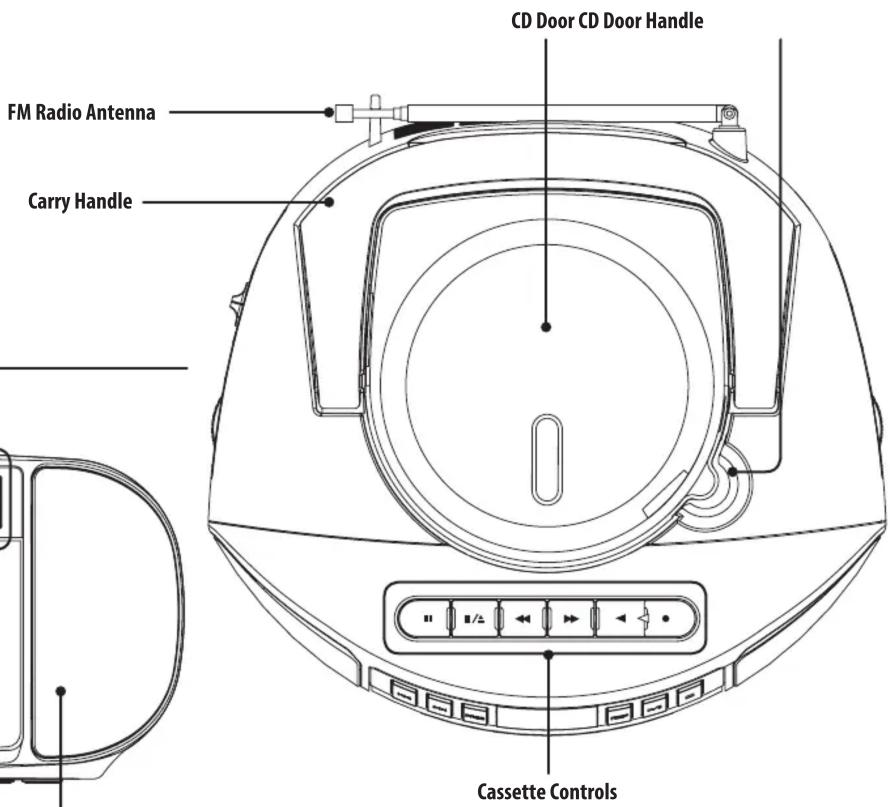
Pause Stop/Eject F. Fwd Rewind Play Record
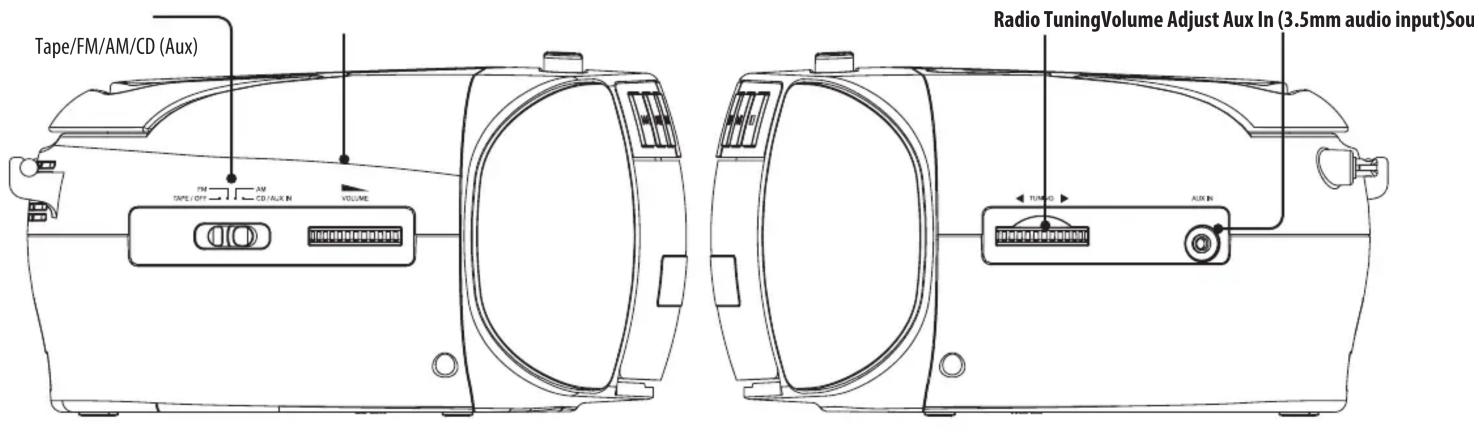
Power
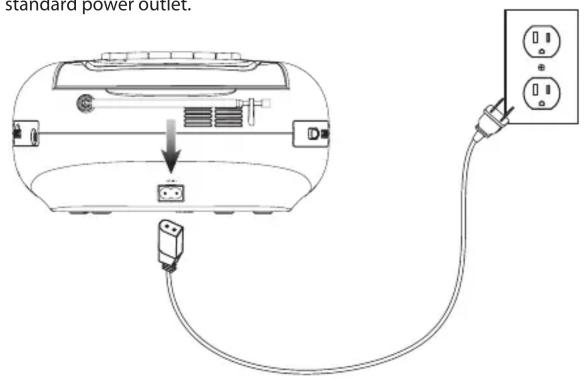
AC Power
Plug the power cord into the AC Power Input on the unit and a standard power outlet.
Battery Power
Requires 6 C sized batteries (not included).

Audio Functions
Loading and Playing a CD
- Lift open the CD door and place a CD in the player, label side facing up.
- Close the CD door.
- Slide the Source Switch to CD mode.
- Press the Play/Pause button to begin playing the loaded disc.
Programming a CD
- Press the Stop button to stop a loaded CD.
- Press the Program button. "P01" will blink on the display.
- Press the Skip Fwd/Rev buttons to select a track.
- Press the Program button to add the selected track to the program.
- Repeat steps 4 and 5 to program up to 20 tracks to play in a specified order.
- Press the Play button to begin the program.
- Press the Stop button to cancel the program.
Aux In
Requires a 3.5mm audio cable (not included).
- Connect a 3.5mm audio cable to the Aux In on the unit and the audio output/headphone jack on an audio device.
- Adjust the Source Switch switch to CD (Aux).
- Use the controls on the connected device to select and play audio.
Playing a Cassette Tape
- Adjust the Source Switch switch to Tape.
- Open the Cassette Door, insert a cassette tape, and close the Cassette Door.
- Use the cassette controls to play, pause, rewind, and fast forward audio from the cassette.
- Turn the Volume dial to turn adjust the volume.
Recording Audio to a Cassette Tape
- Open the Cassette Door, insert a cassette tape, and close the Cassette Door. Make sure the tape is not write protected before beginning a recording.
- Adjust the Source Switch switch to one of the other settings (FM/AM/CD).
- While playing from the Source, press the Record button. Audio from the Source will be copied to the tape.
AM/FM Radio
To Improve FM radio reception, adjust the position of the telescopic antenna. To improve AM radio reception, adjust the position of the unit.
- Adjust the Source Switch switch to FM or AM.
- Adjust the Tuning dial to tune the radio to the desired frequency.
- Turn the Volume dial to turn on the radio and adjust to the desired volume.
International Support
To download this User's Guide in English, Spanish, or French, or to get answers to frequently asked questions, visit the support section at: www.gpx.com
For Warranty Information and the most up-to-date version of this User's Guide, go to www.gpx.com
Customer Service: 1-888-999-4215 | Email Support: prodinfo@dpiinc.com | Email Parts: partsinfo@dpiinc.com
Copyright © 2019 Digital Products International (DPI, Inc.) All other trademarks appearing herein are the property of their respective owners. Specifications are subject to change without notice.

Protect for Today Sustain for Tomorrow


Brand : GPX
Model : BCA209
Category : Loudspeaker