
UT387D - Measurement Uni-T - Free user manual and instructions
Find the device manual for free UT387D Uni-T in PDF.


| Product Type | Cable Length Tester / Network Tester |
| Brand | Uni-T |
| Model | UT387D |
| Dimensions (Approx.) | 140 x 70 x 30 mm |
| Weight (with battery) | 200 g |
| Power Supply | 9V battery (6F22 / NEDA 1604) |
| Battery Life | Approx. 20 hours continuous use |
| Display | Backlit LCD |
| Measurement Range (Twisted Pair) | 0 - 300 m |
| Measurement Range (Coaxial) | 0 - 150 m |
| Resolution | 0.1 m |
| Accuracy | ±5% ± 5 digits |
| Test Functions | Cable length, continuity, pair identification, fault detection (short, open, miswire) |
| Auto Power Off | After 10 minutes of inactivity |
| Operating Temperature | 0°C to 40°C |
| Storage Temperature | -10°C to 50°C |
| Relative Humidity | < 80% RH |
| Safety Rating | CAT II 50V |
| Applicable Cable Types | Cat5, Cat6, RG58, RG59, and similar coaxial/twisted pair |
| Accessories Included | Test leads, alligator clips, carrying case, manual |
| Maintenance | Keep clean, replace battery when low, avoid moisture and extreme temperatures |
Frequently Asked Questions - UT387D Uni-T
User questions about UT387D Uni-T
0 question about this device. Answer the ones you know or ask your own.
Ask a new question about this device
Download the instructions for your Measurement in PDF format for free! Find your manual UT387D - Uni-T and take your electronic device back in hand. On this page are published all the documents necessary for the use of your device. UT387D by Uni-T.
USER MANUAL UT387D Uni-T
UT387D is mainly used to detect the metals (rebar/copper pipe) and cables behind the walls, ceilings, and floors, and it also can detect metals, cables and wood battens under the plasterboard.
2. Safety Instruction
To use the product properly, please read the following instructions carefully before use.
- Only qualified maintenance personnel can repair the instrument. Please contact your local distributor if any damage is found.
- To avoid electromagnetic radiation interference, do not use the instrument near other devices and medical instruments like pacemaker and hearing aids.
- Do not use the instrument in explosive and inflammable environment.
- Do not use the sensor on the airplane.
- Dispose the instrument and accessories properly according to local waste management policy.
3. Appearance
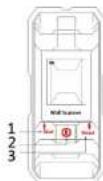
1) Foreign body detection button (Generally for wooden batter)
2) On/off button of detection function
3) Metal and AC detection button
4) Micro-USB charging interface
Warning!
Please charge the instrument by safe charger with output voltage of 5V.
current of 500mA and micro-USB interface. Our company will not be responsible for any accident caused by using wrong charger.
- Specifications
| Measuring Parameters | |
| Maximum depth | Ferrous metals 100mmNonferrous metals (Copper) 50mmCopper wire (4 mm2) 40mmForeign body (wooden batten) 20mm/38mm |
| Operating humidity range | Metal mode 0~85%RH |
| On AC mode 0~30%RH | |
| Foreign body mode 0~60%RH | |
| General Parameters | |
| Auto power off | About 5 minutes |
| Display | 1.8-inch color display |
| Battery type and life | 300mAh built-in Li-on, about 3000 times for fully charging by single test |
| Product size | 135*60*25mm |
| Operating temperature | -10°C~40°C |
| Storage temperature | -20°C~50°C |
The detection results will be affected by the material, shape and size of the detected objects, as well as the material and condition of the detected surface. For uncharged wire, the detecting depth of AC will be reduced.
5. Cautions
- Keep the product dry against moisture, and do not expose the instrument directly to strong sunlight.
- If the instrument was exposed to great difference in temperature, please wait a while for the temperature recovery before use.
• Using or operating a transmitter such as a microwave oven near the sensor may affect the results. - Basically, the detection results may be influenced by environment factors, which refer to strong magnetic or electromagnetic field generating other machines. In addition, moisture, metal building materials, aluminum cladding of insulating materials, and wallpaper carpet or tile with conductivity will also affect. Hence we must check the related information (such as architectural drawings) before the drilling, saving of wallboard, ceiling and floor.
6. For the Best Measurement
- Avoid wearing any jewelry (such as rings or watches) when using sensor Metals may cause inaccuracy.
- Move the tool evenly on the surface without lifting or changing the applied pressure.
- Maintain the contact between the tool and the surface during detection.
- Make sure the holding hand do not touch the scanned surface
- Do not touch the sensor or scanned surface with another hand or any other part of body.
• Always test slowly for maximum accuracy and sensitivity.
7. Detection function
7.1 Metal Calibration
Make sure there is no moisture on the surface of casing before starting the detection function. Dry the instrument with a cloth if it is necessary.
Short press the button 2 to turn on the detection function, and press the button 3 to enter the interface of metal detection:
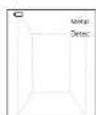
Figure 2
As shown in figure 2, the interface of metal detection function is prepared for detection, and the speaker indicates the current detection mode (if the speaker is turned off, there will be no sound). At this time, if one of the icons of steel bar, copper pipe and stainless steel pipe is displayed on the screen without metal interference, the calibration is required. Place the instrument in an environment free of metal and strong magnetic field interference (such as lift the instrument into the air by hand, etc.), and then press and hold the metal detection button 3 until the screen shows the interface as Figure 2.
7.2 Detection of Metal Objects
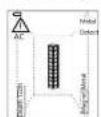
Figure 3
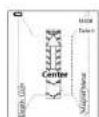
Figure 4
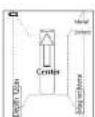
Figure 5
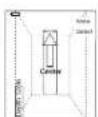
Figure 6
The maximum metal detection depth is 100mm
Short press button 2 to turn on the detection function, and press button 3 to enter the metal detection interface.
- Place the instrument on the detecting surface and move it to the left or right by a consistent direction.
When the instrument gradually detects the metal object, the metal icon will be displayed on the screen and gradually become larger as it is getting close. At the same time, the speaker prompts "metal". When it is closest to the metal object, a central icon will appear on the screen.
- Metal icons: the steel bar icon represents magnetic metal, and the measured object is generally steel bar; the copper pipe icon means non-magnetic metal, the measured objects are generally copper pipe or alloy. When the instrument is judged to be magnetic metal or non-magnetic metal, the distance from the instrument to the metal object will be displayed (as shown in Figure 4 and Figure 5); otherwise, it will not be displayed (as shown in Figure 6).
- When metal substances and AC electrical signals are detected at the same time (as Figure 3). The instrument will emit a rapid "drip drip..." sound.
- When the AC current symbol appears, it indicates that there is an AC current signal nearby.
Note: the detection depth will be displayed synchronously on the screen during metal detection. The accuracy of the depth is related to the shape and material of the measured metal, the distribution of the measured objects, and surrounding media properties. When the measured object is standard steel bar/copper pipe with diameter of 18mm, the accuracy of depth can reach maximum. Otherwise, the depth can only be used as a rough reference value.
Warning
- In some cases, live wires in walls may not be able to accurately indicated because of internal equipment malfunctions or improper operation, so do not identify the presence of dangerous live wires totally dependent on the instrument, other evidences, such as construction drawings or visual identification of wiring or pipe entrance, should also be adopted
- Never take any dangerous operation if there is any live wires in the wall. Be sure to turn off power, gas, and water before turning holes or studding the wall.
- Concrete, brick, and ceramic surfaces have shielding effects on electric field signals of firing line, which means AC signal detection will be affected.
- AC signals can be easier to be detected when the consumer is connected to the required conductor and turned on.
- Signals from live wires will spread from both sides of the actual wire, so sometimes the area of live wire alarms looks much larger than the actual wire.
- AC signals come mainly from live wires, and may also come from static or induced electricity of the environment. Placing your hand on the wall may help eliminate static and inductive electricity.
- The signal strength of a live wire depends on the location of the cable. Therefore, please take further measurements nearby or use other information to check for live wires.
- Non-live wires may be detected as metal objects, and thin wires may not be detected.
7.3 Foreign Body Detection(generally for the wooden batten):
- Maximum detection depth: Accurate mode. 20mm, Deep mode. 38mm. Long press the button 1 to switch between Accurate and Deep modes.
- The foreign body detection mode is for objects in gypsum drywall, plywood, solid wood, and coated wood walls.
- This mode can't detect objects in concrete, mortar, lumps, bricks, carpets, foils, metal surfaces, tiles, glass or any other non-uniform density materials.
- Sensitivity depth and accuracy will vary by moisture, material content, wall texture and paint.
- The foreign body detection mode actually detects more than just wood batten. It can also detect metals and other dense materials.
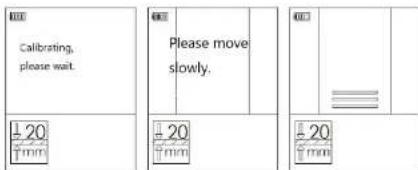
Figure 7 Figure 8 Figure 9
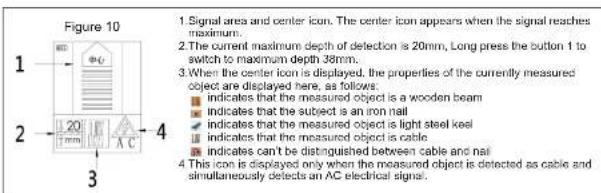
1) Press the wood button to enter the foreign body detection mode (as shown in Figure 7), and speaker will indicate the current detection mode (mute if the sound is turned off).
2) When detecting foreign bodies, the instrument must be vertically attached to the wall and then press the button to detect. Keep the instrument stay for 1-3s and the instrument calibration will be completed (as shown in Figure 7 and Figure 8) before conducting the detection operation. Place the sensor on the surface of object and move it evenly and slowly in the same direction to the left or right, without lifting or applying additional pressure.
3) When the instrument detects foreign matter, the screen displays signal the strength synchronously (as shown in Figure 9).
4) Continue to move the instrument in the same direction. When the instrument is in the middle of wooden batten, icons 1 and 3 in Figure 9 will be displayed.
5) At this time, keep moving in the same direction. When the instrument leaves the center of the measured object, the screen will display the interface as Figure 9. Continues to move the instrument away from wooden block, the signal gradually decreases until there is no signal. The display screen displays as shown in Figure 9, and the detection operation is completed.
Note: repeat the detection, the location will be more accurate.
Please note:
- Sometimes due to various environmental factors, the instrument may not be automatically calibrated, and there may be wrong alarm signal, please calibrate manually. Short press the button of foreign body detection mode, and the screen displays the interface as Figure 9.
- If the instrument has just been calibrated on the wooden batten, move the tool out of the wooden batten scope and only detect it when the wooden batten is tested again.
- If you receive erratic results, it may because of moisture in the wall cavity or drywall, or the recent application of partially dried paint or wallpaper. While moisture may not always be visible, it can interfere with the sensors. Please let the walls dry for a few days.
- For some environmental factors or uneven surfaces, it is difficult to detect wood sluds with foreign body detection mode. It may be easier to detect by the metal detection mode, which can locate the nails that hold the material to the wood nails.
- Depending on how close the wire or pipe is to the wall, the instrument can detect them it as same as foreign body detection. Always be careful when nailing, cutting or drilling walls, floors and ceilings that may contain these items.
8. Maintenance and Cleaning
In order to ensure the good performance of sensor, please follow the instructions below to maintain:
- Please do not expose the instrument to extreme cold or hot environment, and do not put external pressure or vibration on it for a long time.
- The product is required to be stored indoors. When it is not in use, please place it in box.
- Avoid using the product in the dusty and damp environment. Wipe the dirt of the product by a soft damp cloth to clean the product. Do not use corrosion, volatile substances, detergent or solvents.
- Please replace the battery when the battery status is displayed as low on screen.
- Please do not disassemble the instrument without permission to avoid laser damage.
- Do not change any optical component of the lens.
| Phenomenon | Cause | Solutions |
| Power-boot failure | Low battery | charging |
| Poor button reaction | Try to press the power button slightly or send it for maintenance |
- Do not put any label or nameplate on the detection area (front and rear) of instrument. Especially do not put any metal nameplate.
- Store and carry the instrument with the attached protective bag.
9. Disposal of Waste
Damaged instruments, accessories and packaging materials must be recovered and reused in an environmentally friendly manner.
UNI-T.
UNI-TREND TECHNOLOGY (CHINA) CO., LTD.
No. 6, Gong Ye Bei 1st Road,
Songshan Lake National High-Tech Industrial
Development Zone, Dongguan City,
Guangdong Province, China


- Safety Instruction
- Appearance
- Warning!
- Cautions
- For the Best Measurement
- Detection function
- Metal Calibration
- Detection of Metal Objects
- Warning
- Foreign Body Detection(generally for the wooden batten):
- Note: repeat the detection, the location will be more accurate.
- Please note:
- Maintenance and Cleaning
- Disposal of Waste
- UNI-T.
- UNI-TREND TECHNOLOGY (CHINA) CO., LTD.
Brand : Uni-T
Model : UT387D
Category : Measurement