Dynamics - Audio software Blue Cat Audio - Free user manual and instructions
Find the device manual for free Dynamics Blue Cat Audio in PDF.


| Product Type | Audio Dynamics Processor Plugin |
| Developer | Blue Cat Audio |
| Product Name | Dynamics |
| Version (as of 2025) | 2.1 |
| Plugin Formats | VST2, VST3, AU, AAX (Native) |
| Supported Platforms | Windows 7+ (64-bit), macOS 10.9+ (64-bit) |
| Processor Architecture | Intel and Apple Silicon (native) |
| Processing Type | Compression, Limiting, Expansion, Gating |
| Sidechain Support | Yes (internal and external) |
| Lookahead | Up to 10 ms |
| Preset Management | Built-in preset manager with factory presets |
| Sample Rate Support | Up to 192 kHz |
| GUI Features | Resizable interface, real-time visual feedback (gain reduction, envelope) |
| License Type | Free trial (fully functional, watermark after 60 days) / Paid license |
| User Manual | PDF, 39 pages, English |
| Support | Online forum, knowledge base, email support |
Frequently Asked Questions - Dynamics Blue Cat Audio
User questions about Dynamics Blue Cat Audio
0 question about this device. Answer the ones you know or ask your own.
Ask a new question about this device
Download the instructions for your Audio software in PDF format for free! Find your manual Dynamics - Blue Cat Audio and take your electronic device back in hand. On this page are published all the documents necessary for the use of your device. Dynamics by Blue Cat Audio.
USER MANUAL Dynamics Blue Cat Audio
Blue Cat's Dynamics User Manual
"The most flexible all-in-one dynamics processor"
Table Of Content
- Introduction
• Description
- Features
• System Requirements
- Installation
- First Launch
• Using Blue Cat's Dynamics
- Introduction
• The User Interface
- Operation
- Side Chaining
- Tips & Tricks
• Blue Cat Audio Plug-ins Basics
- User Interface Basics
- Controls
- Keyboard
- Mouse
- Presets Management
• MIDI & Automation Control
• More
• Blue Cat's Dynamics Parameters
- Input
• Output
- Plug-in Settings
• The Global Settings Window
• The Preset Settings Window
- About Skins
- Changing the Skin
• Create a Custom Skin
• More
- Extra Skins
- Tutorials
- Updates
- Versions History
Note: An online version of this user manual is available here.
Introduction
Description
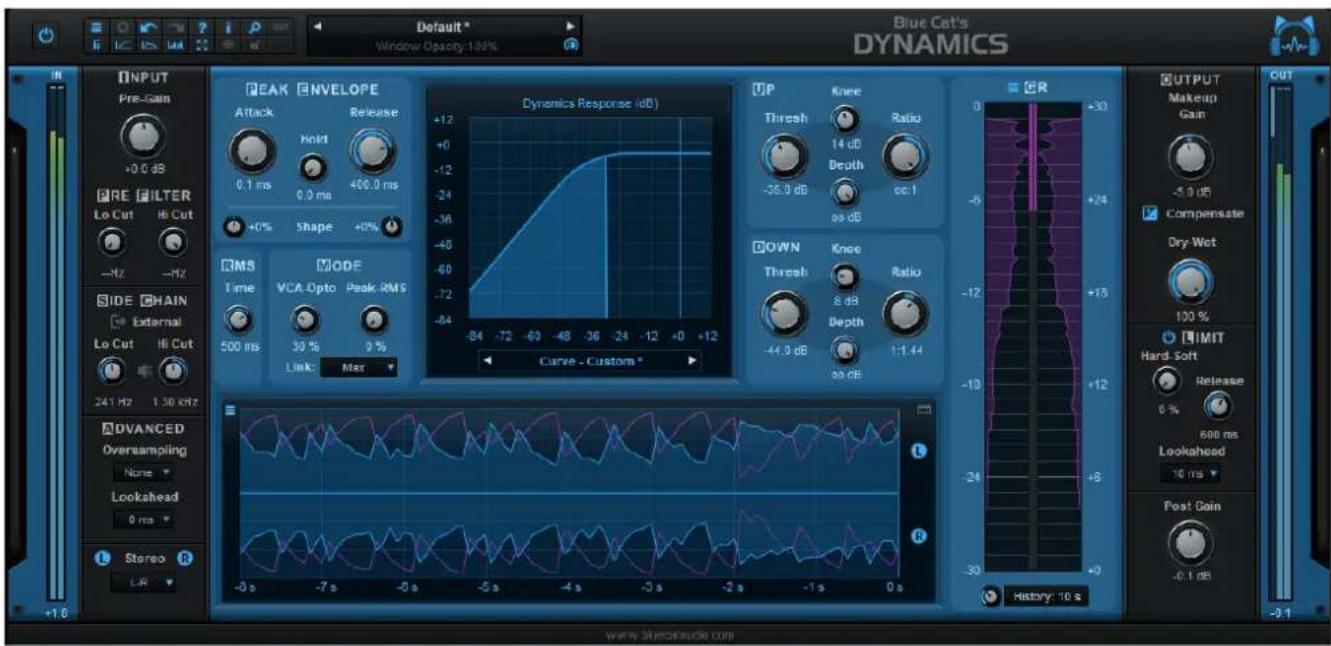
Blue Cat's Dynamics is a full featured dynamics processor: it can be used as a compressor, limiter, gate, expander, waveshaper or all at once! The dynamics response of the plug-in can be tweaked with a unique two-thresholds system, and provides detailed visual feedback about its behavior.
The plug-in includes several filters to control the frequencies affected by the compression. Its continuous VCA/ Opto and Peak/ RMS controls let you smoothly and precisely choose the behavior of the envelope detection like you have never been able to.
The plug-in also provides advanced stereo features, with mid/ side processing capability, multiple stereo linking options and the ability to choose the channels affected by the processor.
An additional brick wall limiter and clipper with optional lookahead protects the output for complete control over the dynamics response.
Three different modes are available for external side chaining, using either the external side chain input, MIDI control or automation lanes.
The configurable visual feedback shows every detail of what is going on inside the plug-in. You can also record this information as automation curves, to monitor the modifications applied to the signal on top of the audio representation of your favorite host application.
All these features can be controlled from a fully configurable user interface, or from any external controller.
The package includes a mono and a stereo version for optimal CPU usage.
If you are looking for a multiband dynamics processor, check out the Blue Cat's MB-5 Dynamix plug-in, or Blue Cat's MB-7 Mixer that can host this plug-in on multiple bands.
natural_image
Four digital audio workstation consoles displaying various waveform and audio controls (no visible text or labels)Credits: this plug-in includes many factory presets created by Sink.
Main Features
- Full featured dynamics processor: compressor, gate, limiter, expander, waveshaper with a unique two thresholds system.
- Total control over the processor: continuous peak/ RMS and Opto/ VCA modes selection, peak envelope shape control, depth control to limit the gain range, lookahead.
- Total control over the signal: dry/ wet control for parallel compression, input and side chain filters.
- Stereo or mid-side processing with multiple channels linking options.
- Post brickwall limiter or clipper with lookahead.
- Optimal monitoring: dynamics response, envelopes and gain reduction real time display with zooming capability. The main compression information can be recorded as automation curves.
- Best quality: up to 4x oversampling for the best sounding quality.
- Multiple side chaining modes: a unique way to perform side chain compression, ducking, gating and much more.
- Fully configurable user interface for optimal experience.
- No latency (except with lookahead).
Blue Cat Audio Standards:
- Available as: Mac- AAX, Mac- AU, Mac- VST, Mac- VST3, Win-AAX, Win- VST, Win- VST3, Win x64- AAX, Win x64- VST, Win x64- VST3.
- Native DSP code for optimal performance.
- Full MIDI control and automation support with silent, zipper-free parameters update, advanced response control and MIDI Learn.
- No CPU load on idle: when the plug-in is fed with silence, the processing smoothly shuts down, to optimize the CPU usage of your Digital Audio Workstation.
- Customizable user interface with transparency management and zoom.
- Automation and MIDI output: record output parameters as automation curves or send MIDI CC messages to other plug-ins for powerful side chain effects.
- Smooth Bypass: activate/ deactivate the plug-in with absolutely no noise.
- Undo/ Redo.
• Full featured integrated presets manager. - Copy/ paste the state of the plug-in between instances using the system clipboard.
• Any sample rate supported.
System Requirements
Windows
- An SSE2- enabled processor (Pentium 4 or newer).
- Microsoft Windows Vista, Windows 7, 8 or 10.
- Any VST / AAX compatible host software (32 or 64 bit).
Mac OS X
- An Intel processor.
• Mac OS 10.7 or newer. - Any VST / Audio Unit (32/64-bit) / AAX compatible application.
For more information about supported platforms, see our FAQ.
Demo Limitations
- 5 instances of the plug-in allowed per session.
- The effect is bypassed for half a second every minute.
Installation
The plug-ins versions cannot be run standalone: they require a host application (see the System Requirements chapter for more information). Depending on which host application you use, you might need to install the plug-ins in different locations.
Before installing one of the plug-in versions, you should close all your host applications.
Windows
Install
All versions of the plug- in provide an installation program. Follow the steps of the wizard to install the software on your machine. During the installation you will be asked where you want the software to be installed. For the VST version, you should install the plug-in inside the VST plug- ins folder used by your host application(s). The default path set in the installer should work for most applications, but you should check your host software documentation to know where it looks for VST plug- ins. For other plug- in types, you should just use the standard path.
Some applications will not automatically rescan the new plug-ins, so you might have to force a refresh of the plug-ins list.
Upgrade
When a new version of the software is released, just launch the new installer: it will update the current installation.
Uninstall
To uninstall the software, simply launch the "Uninstall" program that is available in the start menu or in the configuration panel. It will take care of removing all files from your computer.
Mac
Install
On Mac the plug-ins are available as drive images with an installer. After download, double click on the dmg file to open it. You can then double click on the installer (.pkg file) to install the package.
Upgrade
When a new version of the software is released, just launch the new installer: it will update the current installation.
Uninstall
To uninstall the software, simply remove the component(s) from their install location (move them to the trash):
- AAX plug-ins are installed in the / Library/ Application Support/ Avid/ Audio/ Plug- Ins/ folder
- Audio Units (AU) are installed in the / Library/ Audio/ Plug- Ins/ Components/ folder
- RTAS Plug-ins are installed in the / Library/ Application Support/ Digidesign/ Plug- Ins/ folder
- VST plug-ins are installed in the / Library/ Audio/ Plug-Ins/ VST folder
- VST3 plug-ins are installed in the / Library/ Audio/ Plug-Ins/ VST3 folder
If you want to completely remove all settings and configuration files, you can also remove these additional directories that may have been created on your computer:
- \~/ Library/ Preferences/ Blue Cat Audio/ [Plug-in name and TYPE], where TYPE is VST, AU, RTAS or AAX: global preferences.
- \~/ Library/ Preferences/ Blue Cat Audio/ [Plug- in name]: license information
- \~/ Documents/ Blue Cat Audio/ [Plug-in name]: user data, such as presets, additional skins and user-created plug-in data.
Please be aware that these directories may contain user data that you have created. Remove these directories only if you do not want to reuse this data later.
First Launch
Blue Cat Audio plug-ins cannot be run standalone, they require a host application (see the System Requirements chapter for more information). Some host applications will require you to scan the plug-ins before they are available in the application.
If the plug-in is not available in the application, please check that it has been installed in the appropriate directory (with no host application running), and that the host application has scanned it.
Using Blue Cat's Dynamics
Introduction
Blue Cat's Dynamics is an all-in-one dynamics processor which lets you modify many aspects of the dynamics of your audio signal. It may act as a compressor, limiter, gate, expander or waveshaper. Before we go into the details of the plug-in, let's see what all these words mean.
Dynamics?
The dynamics of a sound refers to the variations of its amplitude. A track is said to have more dynamics than another if the volume difference between the louder and quieter sections of the track is higher. For example classical music is known to have a larger dynamic range than most modern commercial pop music: it usually alternates between very quiet sections with very few instruments and much louder sections when the entire orchestra plays at the same time.
The aim of Blue Cat's Dynamics is to let you alter and precisely control this characteristic in many different ways: you can either increase or reduce the amount of dynamics in your signal, depending on its content.
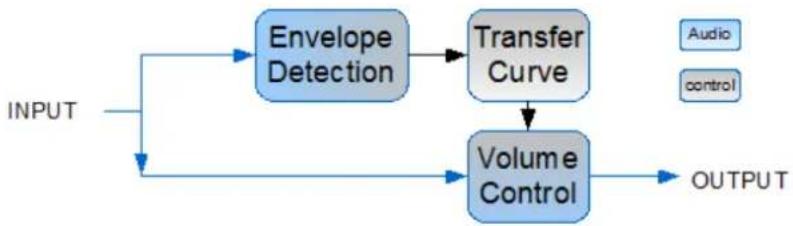
The principle to is to detect the volume of the incoming signal with an envelope follower (that computes the current audio level), and then apply a gain reduction or increase on the input signal, depending on the transfer curve set by the user:
flowchart
graph TD
    INPUT --> A["Envelope Detection"]
    A --> B["Transfer Curve"]
    B --> C["Volume Control"]
    C --> OUTPUT
    style A fill:#cce5ff,stroke:#333
    style B fill:#cce5ff,stroke:#333
    style C fill:#cce5ff,stroke:#333
    style Output fill:#cce5ff,stroke:#333
Types of Dynamics Processing
Blue Cat's Dynamics can produce several types of dynamics processing:
Compression
A signal is compressed when its dynamic range is reduced: it consists in lowering the volume of the louder sections and increasing the volume of quieter sections. The main interest is to increase the overall loudness of a track, but if overused, it may also cause the track to sound flat, lacking dynamics.
Limiting
Limiting is the same as compression, except that it refers to much higher compression ratios. A typical example is "brickwall limiting", where the compression ratio is such that the volume cannot exceed a given threshold.
Expansion
Expansion is the exact opposite from compression: expanding the dynamic range of a sound is making louder the loud passages and quieter the quiet ones.
Gating
When applying a gate effect, the idea is to decrease the gain for the sounds with lower volume, with a specified ratio. A typical application is the "noise gate", to get rid of background noise during silence: the content below a selected threshold will be silenced by the gate, making sure no noise can be heard alone. When the music comes back with sufficient volume, the gate will open and let the music go thru.
Wave shaping
The previous examples use the volume (envelope) of the sound to trigger an effect. If the volume control is based on the waveform instead of the shape of its envelope, the effect is transformed into a "waveshaper", which produces a great amount of distortion.
Technically speaking, the idea here is to reduce the integration time of the envelope followers (attack and release time) to reach values that are close to the period of audible sounds (10 ms or below).
The Effect of Time
Time constants
As described earlier, the gain control is triggered by volume changes of the incoming signal, using the rule described by the transfer curve, which determines the type of the effect (limiter, gate, compressor etc.). It is possible to choose how fast the dynamics processor reacts to volume changes (up: attack time, down: release time). This has a major influence on the effect produced on the incoming sound.
With shorter attack and release times, the effect will get closer to waveshaping and will produce more distortion. The volume control is however more precise as the effect is triggered faster. With longer the time constants, the gain control gets smoother. When used as a compressor, long attack times will also let the transients go thru, while shorter attack times will reduce them.
Attack/ Release Shapes
The shape of the attack and release phases will also greatly affect the sound. The Dynamics plug-in offer specific shape controls for both attack and release.
Lookahead
If you add latency on the input signal, it is possible for the dynamics processor to "predict the future" and apply gain changes in advance. For the brickwall limiter, this option makes a huge difference, as it is possible to obtain strict brickwall limiting with no clipping and less distortion.
Note: when using lookahead, the plug-in adds latency and reports it to the host application. Some host applications will require you to restart transport after such changes to properly compensate the latency.
Side Chaining
A common practice is to use a different signal than the processed signal in order to trigger the dynamics processor. For example use the signal of the kick drums to control the dynamics of the bass or vice versa. This practice is known as "side chaining".
Blue Cat's Dynamics provides two ways to do this, either using the external side chain input that accepts signals routed from the host application, or with its advanced MIDI and automation communication features.
It also provides a way for "internal side chaining": the incoming signal can be filtered before triggering the dynamics processor. A typical application is de-essing on vocals, using only higher frequencies to trigger the gain reduction.
Mid/ Side Processing
Blue Cat's Dynamics offers mid/ side processing capability. With this feature you can process the mid (center) and side (sides) channels instead of the usual left and right channels.
Concept Origin: Mid/ Side Recording
Mid/ Side recording is a famous recording technique that is preferred in some cases to traditional left/right recording (search for "mid side recording" on the web to find tutorials about this technique).
The result of such a recording is a pair of mid/ side (M/ S) channels instead of classic left/ right (L/ R) channels. The mid channel is also often called "Mono" and side "Stereo": the mid channel contains the signal that is in the center of the stereo mix, and the side channel contains the rest (everything that is on the sides of the mix):

(The triangles above represent the listener's head)
From Mid/ Side Recording to Processing
The relationship between L/R and M/S channel can be computed so that you can transform any Mid/ Side recording to standard left/right stereo for you ears. The reverse operation is also possible, which means that you can artificially separate mid/ side information from L/R stereo tracks. That's what is performed by Blue Cat's Dynamics in Mid/ Side mode.

flowchart
graph LR
    A["Left"] --> B["Mid"]
    C["Right"] --> B
    B --> D["Side"]
    D --> E["Process & rearrange"]
    E --> F["Left"]
    E --> G["Right"]
7 Blue Cat's Dynamics User Manual Copyright (c) 2006-2019 Blue Cat Audio
Processing separately the mid/ side channels instead of left/ right channels offers more control over the stereo character of a sound. Reducing the volume of the side channel makes it sound more "mono" and vice versa.
Mid/ Side and Dynamics
Applied to dynamics processing, this lets you dynamically control how "stereo" a track may sound, depending on its content. It offers a much more flexible and intuitive way of managing stereo dynamics processing than the usual left/right technique: processing separately both channels does not alter the L/R balance of the output signal but changes the ratio between the stereo and mono signals instead. The result sounds much more natural and is easier to control.
Signal Flow
Blue Cat's Dynamics includes components to perform all the techniques exposed above and more. The complete signal flow in the Blue Cat's Dynamics plug-in is summarized below:

flowchart
graph TD
    A["SC Filter"] --> B["Envelope Detection"]
    B --> C["Stereo Link"]
    C --> D["Curve"]
    D --> E["Volume Control"]
    E --> F["Dry/Wet Mixer"]
    F --> G["Brickwall Limiter"]
    G --> H["Post Gain"]
    H --> I["Main Out"]
    J["SC Select"] --> K["Preamp"]
    L["SC In"] --> M["Main In"]
    N["Main In"] --> O["Preamp"]
    O --> P["Volume Control"]
    P --> F
- Preamp: amplifies and filters the input signal. This stage also proposes oversampling so that the signal is internally processed at a higher sampling rate, to reduce the potential artifacts.
- Side Chain Select: choose the signal used to drive envelope detection (to select between the internal and external side chain).
Side Chain Filter: filter the signal that is driven to the envelope detection for internal side chain control.3.
Envelope Detection: detect the envelope of the incoming signal.4. - Stereo Link (for the stereo version): controls how both channels envelopes should be linked together. Lets you define the relationship between the effect applied on the left/right or mid/ side channels.
- Curve: determines the gain to apply to the signal, depending on the incoming envelope and the ratios/ gains set by the user. Volume Control: this module applies the gain determined by the transfer curve.7.
Dry/ Wet Mix: mix the dry and wet signals to perform parallel compression.8. - Brickwall Limiter: right after the main dynamics section a brickwall limiter (limiter with infinite ratio) proposes to limit the output volume to 0 dB for output protection or creative limiting effects.
- Post Gain: controls the final gain after the brickwall limiter. When the limiter is on, this stage determines the maximum value for the peak level of the output signal.
For the stereo version, mid/ side splitting and re- arranging is performed at the input and output of the plug- in so that the entire chain processes mid/ side signals instead of left/ right when mid/ side mode is on.
Note: The main toolbar, menus and basic features available with all our plug-ins are detailed in the Blue Cat Audio Plug-ins Basics section.
Overview
The user interface of the Blue Cat's Dynamics plug-in is fully modular and can be configured to best fit your needs using the button in the main toolbar. By default, it opens in the following configuration:
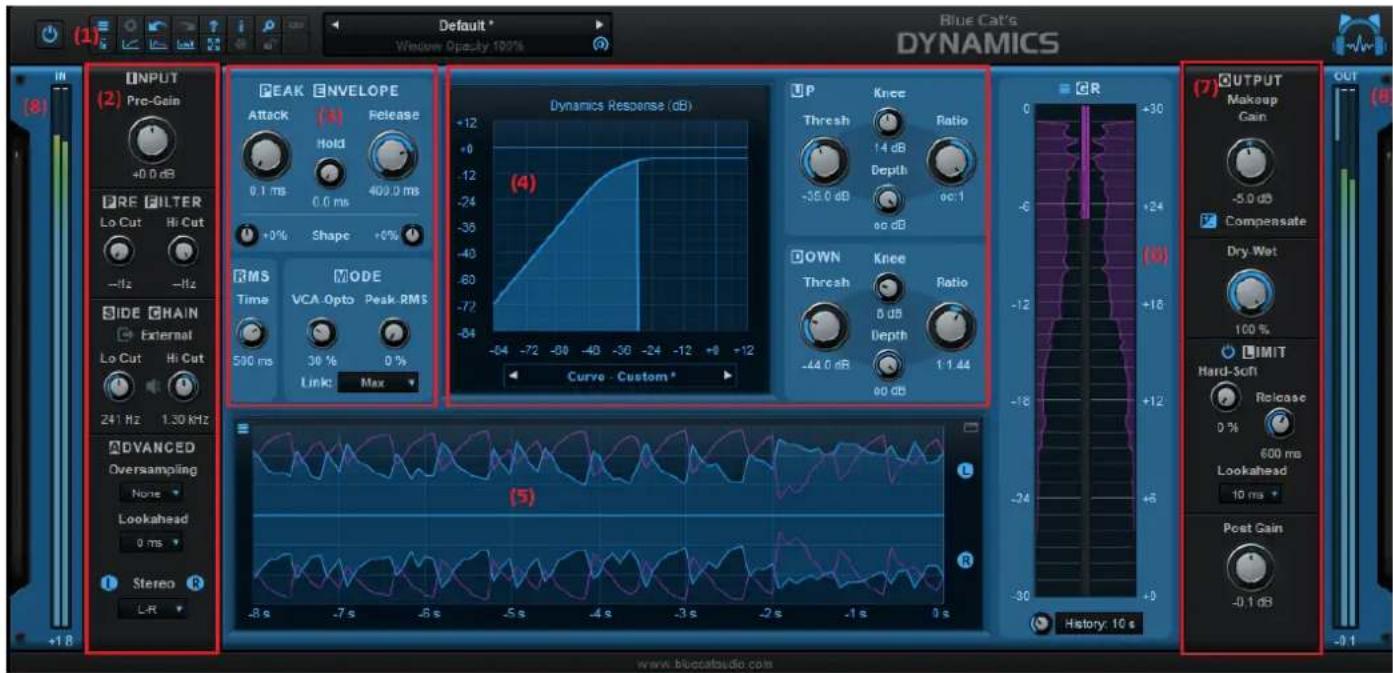
As you can see on the screen shot above, the user interface is structured from left to right, top to bottom, and follows the signal path (see the signal flow in the previous chapter):
This is the main toolbar, to let you configure the user interface (show/ hide elements).1.
-
On the left are the main input preamp (gain, filtering, stereo mode and oversampling) and side chain selection/ filtering controls.
-
The envelope detection controls (to configure the time response of the processor), that let you modify how the envelope is computed, before it is transformed into gain reduction by the next section.
-
The main dynamics processing controls to configure the transfer curve, which transforms the computed envelope into volume control. The dynamics response can be visualized on the graph next to the controls.
-
The envelope view displays the envelope of the incoming waveform as well as the evolution of the gain reduction or increase over time.
Gain reduction/ increase (includes a GR histogram, described below).6.
- Finally, on the right is the output stage (post volume control), with the makeup gain (to compensate the decrease/increase of the volume), and the dry/wet control followed by the brick wall limiter and the output gain.
input and output level meters are provided to monitor the signal as it enters and exits the plug-in.8.
The Main Toolbar
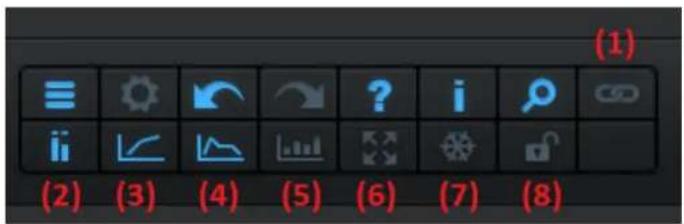
Link pre-gain and makeup gain to compensate volume changes when changing the pre-gain1.
Show/ hide level meters.2.
Show/ hide the dynamics response curve.3.
Show/ hide the envelope view.4.
Show/ hide GR histograms with the GR meter.5.
Enable/ disable zoom mode: zooms GR and envelope display, based on zoom settings for each view.6.
Freeze curves and meters (except level meters).7.
Lock the GUI to prevent display changes when loading presets.8.
For more details about the other icons, see the Blue Cat Audio plug-ins basics section.
The Envelope View
It displays the shape of the waveform and the evolution of the gain over time:

line
| Time (s) | Signal (1) | Signal (2) | |----------|------------|------------| | -8 | ~0 | ~0 | | -7 | ~0 | ~0 | | -6 | ~0 | ~0 | | -5 | ~0 | ~0 | | -4 | ~0 | ~0 | | -3 | ~0 | ~0 | | -2 | ~0 | ~0 | | -1 | ~0 | ~0 | | 0 | ~0 | ~0 |-
Waveform shape (envelope). The upper part shows the envelope for the left or mid channel, and the lower part the right or side channel. For the mono version, both parts show the same envelope.
-
Gain applied by the dynamics processor (pink curve for reduction and green curve for increase) for each channel. The range of the curve is the same as the range of the GR meter.
-
Select the range for the envelope curve when zoom is active (zoom can be activated/deactivated with the magnifying glass button in the main toolbar).
Enlarge or reduce the envelope view.4.
Enable/ Disable the dynamics processor for each channel by clicking on the buttons.5.
- Click on the ruler to select the time scale (2,4 or 8 seconds). When 2 or 4 seconds are selected, it is possible to drag the envelope view (left/ right) with the mouse. Right clicking anywhere on the view will revert back to the default value (8 seconds) to unzoom.
The GR ("Gain Reduction") Meter
It provides instant visual feedback about the gain applied by the dynamics processor, as well as histograms to get a better understanding of its behavior over time.
GR Meter: displays the gain reduction (pink) or increase (green).1.
-
GR histograms: the pink histogram displays the distribution of gain reduction values, and the green curve the distribution of gain increase values. Clicking on the curves reset the histograms.
-
Select the range of the meter when zoomed (also affects the range of the GR curves in the envelope view). Zoom can be activate/ deactivated with the magnifying glass button in the main toolbar. Select the duration for the histograms.4.
With the histograms you can quickly see how the gain affects the signal over time.
Increasing the history length will give you an overview of the gain for longer periods, whereas with shorter history, the histogram will just behave like a meter with additional inertia.

bar
| Region | Value | |--------|-------| | (1) | -18 | | (2) | +30 | | (3) | +30 |The various elements of the user interface (knobs, sliders, buttons...) are simple and intuitive to operate, but more information about how to interact with them is available in the "Plug-ins Basics" chapter of this manual.
Operation
This section will progressively dive deeper into the details of the plug-in, explaining the specificity of each module. A the parameters exposed by the plug-in is available in the next section.
Setting Up the Transfer Curve
Changing the shape of the curve: thresholds, ratios and knees
At the heart of the dynamics processor is the transfer curve which shape can be controlled by the usual threshold, n parameters. This curve describes the relationship (ratio) between the desired output level and the detected input level. you choose what kind of effect (compression, limiting, gating...) you want to create.
The graph displayed in the Blue Cat's Dynamics user interface shows the output level as a function of the input level controls offered to modify the shape of the dynamics response are explained below.

The up threshold and down threshold correspond to the upper part and lower part of the dynamics response curve. specify the upper part (usually for compression) and lower part (usually for gating) of the curve independently:

line
| Response | Value | | -------- | ------ | | Up | -24 | | Down | -84 |For each part of the curve (above the up threshold and below the down threshold), you can choose the ratio, which the ratio between the output and input levels. In the example above, an infinite to one ratio will be applied to the ir as it reaches -18 dB (hard limiting), and a 3 to 1 ratio will be applied as soon as it is below 40 dB (gate).
Once you have chosen the ratio, the knee parameter lets you soften the dynamics response. The difference between graphs below is 10 dB up and down knees:
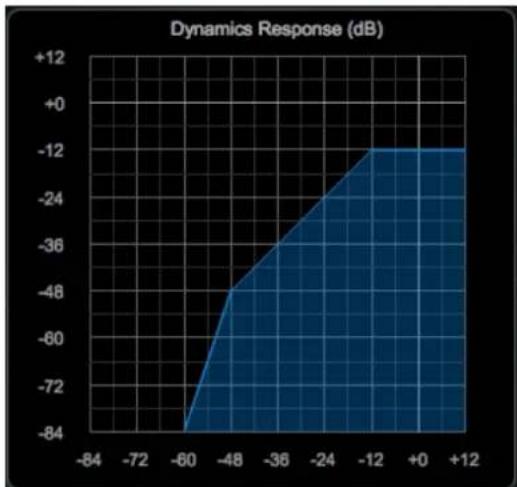
line
| Frequency (dB) | Dynamics Response (dB) | | -------------- | ---------------------- | | -60 | -84 | | -48 | -48 | | -36 | -36 | | -24 | -24 | | -12 | -12 | | +0 | -12 | | +12 | -12 |Default response (knee=0)

line
| Frequency (dB) | Dynamics Response (dB) | | -------------- | ---------------------- | | -60 | -84 | | -36 | -48 | | -24 | -24 | | -12 | -12 | | 0 | -12 | | +12 | -12 |Response with larger knee values
The effect is applied progressively, whereas with no knee the ratio changes as soon as the threshold is reached.
The depth parameter sets a limit to the amount of gain applied: it is by default set to infinite (no limit). If you decr largest amount of gain reduction (or increase) that can be applied by the processor. Once this limit is reached, the p increasing this amount.
Makeup and auto gain
When the shape of the dynamics response curve is changed, the max peak level and perceived volume will increase That's what the makeup gain is for: compensate the gain loss or increase right after the main dynamics processor.

To simplify this task, you can use the compensate (auto- gain) feature that normalizes the response curve (0dB input output). The make- up gain is then applied after the normalization occurs. So beware that activating/ deactivating the when make- up is used might result in a very large volume increase. Be sure to use the output limiter to avoid da speakers or your ears.
Transfer Curve Shapes
Below are example of dynamics response curves for the various dynamics processing techniques described in the previ
Upper Curve
Changing the upper curve ratio and threshold lets you create a compressor (limiter) or an expander:

natural_image
Blue grid background with a diagonal line and grid lines, no text or symbols present.Compressor

natural_image
Abstract geometric pattern with a diagonal blue line dividing a black grid background (no text or symbols)Expander
Lower Curve
With the lower curve controls, it is possible to create a gate or an upward compressor.

natural_image
Abstract geometric design with grid lines and a blue diagonal division (no text or symbols)Gate
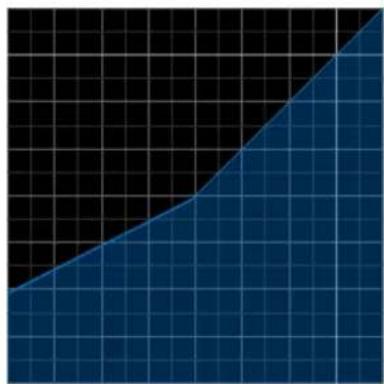
natural_image
Abstract geometric design with blue grid and black background (no text or symbols)Upward Compressor
The upward compressor can create interesting effects but can be problematic in the case of noisy input signals because background noise. In this case you should either first apply a gate in your signal chain to get rid of this noise before parameter to limit the gain increase.
Custom Shapes
One of the interests of Blue Cat's Dynamics is to create your own shapes that mix these usual behaviors to create custom dynamics effects. For example a combination of a gate and a compressor (that can be used to increase the loudness of a noisy signal), including depth setting to limit the gain:

natural_image
Abstract blue line graph on black grid background (no text or symbols)Combined upper and lower curve settings
Time Response: Envelope Parameters
Now that the shape of the transfer curve is ready, you can adjust the parameters that drive the envelope follower (the component that computes the input level).
Blue Cat's Dynamics offers several envelope detection modes. Unlike most dynamics processors, it lets you choose to work in intermediate modes: using only a bit of opto-style envelope detection (feedback) is possible, as well as working with half RMS / half peak envelope computation.

Peak versus RMS
The Peak mode will detect transients (spikes) in the signal, whereas the RMS mode will measure the loudness of the incoming signal. Peak detection will be used to adjust the shape and dynamics response of the sound, while the RMS detection will usually be used to adjust the volume/ loudness of a track.
VCA versus Opto
For the peak level, two modes are available:
VCA: the most common mode. It mimics the Voltage Controlled Amplifiers behavior1.
- Opto: named after opto- electronic detectors with feedback (basically re- injecting the output signal for level detection). It uses a feedback loop and basically measures the envelope at the output of the compressor (instead of the input).
The Opto mode is usually smoother than the full VCA mode: in many cases it will sound a bit like the VCA mode with a longer release time. When you use very low attack and release times, you can smoothen the dynamics response by pushing the VCA- Opto knob.
Please note that with some particular dynamics curves, the 100% opto mode will not work nicely (for example with a very strong gate, 100% opto will never let any sound go thru).
Tip: when the plug-in is used with an external side chain, the opto mode can be a way to blend the detection on the external and internal signals. This allows for much more subtle effects that take into account both the external side chain and input signals.
RMS Envelope Parameters
The length (time) for the RMS envelope can be customized:

Increasing the RMS time makes it more stable but less reactive to loudness changes.
Peak Envelope Parameters
The Peak envelope detection has the usual attack and decay parameters plus an additional "hold" time that lets you the detector waits before it starts decreasing:

If all these parameters are set to 0, you obtain a wave shaper/ distortion unit. We advise you to add a low-pass f you wish to keep a pleasant sound, and use at least 2x oversampling (1 stage) to avoid aliasing.
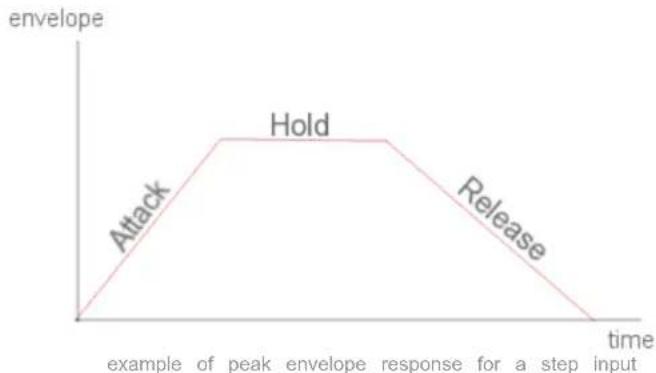
line
| time | envelope | | ---- | -------- | | peak | Hold | | end | Release |For both the attack and release phases, an additional "shape" parameter is available. It changes the shape of the att curves, globally preserving the slope of the curve. Positive values will basically increase the release time, the envelope slower and slower, while negative values will shorten the release time, the envelope decreasing faster and faster. The same for the attack shape.
Below is an example of the resulting GR curve, using a brickwall shape for the dynamics curve.

line
| Shape | Value | |-------|-------| | Blue | -100% |
line
| x | Blue Area | Red Line | |----|-----------|----------| | 0 | 0 | 0 | | 1 | 1 | 1 | | 2 | 2 | 2 | | 3 | 3 | 3 | | 4 | 4 | 4 | | 5 | 5 | 5 | | 6 | 6 | 6 | | 7 | 7 | 7 | | 8 | 8 | 8 | | 9 | 9 | 9 | | 10 | 10 | 10 | | 11 | 11 | 11 | | 12 | 12 | 12 | | 13 | 13 | 13 | | 14 | 14 | 14 | | 15 | 15 | 15 | | 16 | 16 | 16 | | 17 | 17 | 17 | | 18 | 18 | 18 | | 19 | 19 | 19 | | 20 | 20 | 20 | | 21 | 21 | 21 | | 22 | 22 | 22 | | 23 | 23 | 23 | | 24 | 24 | 24 | | 25 | 25 | 25 | | 26 | 26 | 26 | | 27 | 27 | 27 | | 28 | 28 | 28 | | 29 | 29 | 29 | | 30 | 30 | 30 | | 31 | 31 | 31 | | 32 | 32 | 32 | | 33 | 33 | 33 | | 34 | 34 | 34 | | 35 | 35 | 35 | | 36 | 36 | 36 | | 37 | 37 | 37 | | 38 | 38 | 38 | | 39 | 39 | 39 | | 40 | 40 | 40 | | 41 | 41 | 41 | | 42 | 42 | 42 | | 43 | 43 | 43 | | 44 | 44 | 44 | | 45 | 45 | 45 | | 46 | 46 | 46 | | 47 | 47 | 47 | | 48 | 48 | 48 | | 49 | 49 | 49 | | 50 | 50 | 50 | | 51 | nan | nan | | shape=0 | (value) | (value) | | | | | | | | | | | | | | | | | | | | | | | | | | | | | | | | | | | | | | | | | | | | | | | | | | | | | | | | | | | | | | | | | | | | | | | | | | | | | | | | | | | | | | | | | | | | | | | | | | | | | | | | | | | | | | | | | | | | | | | | | | | | | | | | | | | | | | | | | | | | | | | | | | | | | | | | | | | | | | | | | | | | | | | | | | | | | | | | | | | | | | | | | | | | | | | | | | | | | | | | | | | | | | | | | | | | | | | | | | | | | | | | | | | | | | | | | | | | --------------------
line
| x | Blue Area | Red Line | | ---- | --------- | -------- | | 0 | 0 | 0 | | 1 | 10 | 5 | | 2 | 20 | 10 | | 3 | 30 | 15 | | 4 | 40 | 20 | | 5 | 50 | 25 | | 6 | 60 | 30 | | 7 | 70 | 35 | | 8 | 80 | 40 | | 9 | 90 | 45 | | 10 | 100 | 50 |Tip: you will usually want to first adjust the attack and release time with shape set to 0, and when getting close to use the shape parameter to tweak the response (to make the dynamics processor sound slightly faster or slower).
Lookahead
With the lookahead control, you can delay the input signal (it introduces latency) so that the Dynamics plug-in reacts level changes. It can be particularly useful when using slow attack and release time, to make the response smoother
Filters
The plug-in also includes two filters: one for the input signal (preamp filter), and one for the envelope detection ("side chain filter").
Preamp Filter
The input filter is applied to the signal before entering the dynamics processing stage. A typical application is to cut lower frequencies before applying compression, to minimize distortion (lower frequencies will offset the input signal level). You can also use this filter for creative purposes.

The filter is automatically disabled when low and high cut frequencies are set to their default values.
Side Chain Filter
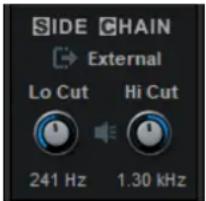
The side chain filter is used to choose which frequencies in the audio content trigger the effect. It is applied to the selected side chain signal (either after the input filter for internal side chain, or to the external side chain signal). It is not directly audible because it processes the side chain signal, only used to trigger the volume control.
Adjust the low and high cut frequencies to enable filtering, and click on the button next to the "SIDE CHAIN" title to listen to the filtered signal.
Side chain filtering can be particularly interesting when working with sounds that have a wide spectrum, such as full drums kits: you can trigger compression on the kick, cymbals or snare drum only by choosing the right cut-off frequencies, without affecting the input signal.
Stereo Control
The stereo version of the plug-in offer multiple ways to process stereo signals. This section shows how to fine tune the stereo behavior of the plug-in.
Stereo Mode
Choose between mid/ side and left/ right processing. In the default stereo mode (left/ right) left and right channels are processed separately, and in mid/ side mode, the plug-in processes the mid and side channels instead. Mid/ side processing is described in the introduction section.
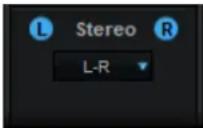
Later in this manual we will refer to channel 1 and channel 2 (respectively left and right or mid and side channels depending on the chosen mode).
Stereo Link
In order to keep the stereo balance coherent or on the contrary to modify the stereo perception of a track, you can choose to link the effect applied to each channel in several ways:

- none: no link. Each channel is independent. The stereo image may be strongly altered in this mode.
- average: mix the left and right (or mid and side) envelopes to compute the dynamics response. The same gain is applied to both channels.
- min: use the minimum of both envelopes to compute the dynamics response. The same gain is applied to both channels.
- max: use the maximum envelope to compute the dynamics response. The same gain is applied to both channels (default).
- flip: use the opposite channel envelope to compute gain. This increases the level differences of each channel.
- ch 1: compute the gain only with the envelope from the first channel only. The same gain is applied to both channels.
- ch 2: compute the gain only with the envelope from the second channel only. The same gain is applied to both channels.
Channels Activation
In addition you can choose to activate or deactivate the dynamics processing chain (from post preamp module to the dry/wet module) for each channel. See the little blue buttons on top of the stereo section.

It is possible for example to apply the effect only to the mid channel, and use the side channel as a side chain source (the source that triggers the effect). Several presets use this technique to modify the stereo image.
Oversampling
You can use Oversampling to reduce the aliasing issues that can be produced by the non-linear nature of the dynamics processor. It can be particularly useful for audio content with higher frequencies, or if you use large compression ratios with short attack and release times.
It is mainly applicable if you work with lower sample rates (such as 44.1 or 48 kHz). With higher sampling rates you will usually not need to work with an oversampled signal.
Beware that each oversampling stage consumes a lot of CPU (more than double CPU usage). You should use 4x oversampling with the stereo version for mastering purposes only, or with very low attack/ release times in Peak mode. This is typically a feature you don't want to activate on every single track of a project.
Brickwall Limiter
The final stage of this plug-in is a brick wall limiter / soft clipper to avoid hard clipping and overshoot at the output of your host software. A common practice is to use a slow-attack compression stage and then apply the brick wall limiter for harder limiting on remaining transients.
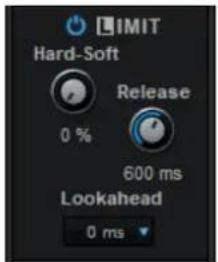
The blue meter on the left of the output level meter shows the amount of limiting applied. The range of this meter is 60 dB:

You can also set the release time to zero. In this case the limiter produces clipping. You can adjust the softness of saturation using the Hard- Soft knob.
If latency is not a problem, the lookahead control allows the limiter to see peaks in advance and perform much smoother brickwall limiting with less distortion (recommended setting for optimal limiting: 10 ms).
Tip: it is strongly recommended to activate the brickwall limiter while experimenting with the parameters of the Blue Cat's Dynamics plug-in. The plug-in gives you great power to modify the dynamics of the incoming signal, which may result in huge audio spikes in some rare cases. The brickwall limiter protects your monitors and your ears against such mistakes!
Side Chaining
Blue Cat's Dynamics lets you use the signal from a track to control the volume of another. This technique is called "side chaining" as explained in the introduction. The plug-in offers three ways to do side chaining. You can choose the appropriate method depending on the capabilities of your host application and your specific needs.
"Traditional" Side Chain
The plug-in has extra audio inputs that can be fed by a side chain signal in most host applications (aka "external side chain input"):

flowchart
graph TD
    A["Control audio signal"] --> D["Audio signal"]
    B["Side Chain Source Track"] --> D
    C["Unchanged control audio signal"] --> D
    D --> E["Destination Track"]
    F["Side Chain Input"] --> G["Audio Signal"]
    H["Modified audio signal"] --> I["Audio Signal"]
To use the extra side chain signal, activate the external mode in the side chain box:

Note: for the VST version, it may be necessary to create a quad buss or group to be able to use the side chain input in some host application such as Cubase or Nuendo.
Once the side chain has been connected, it is possible to filter it (just like when using the internal side chain, i.e. the input signal) and listen to it.
Note: for the stereo version, using the mid/ side mode does not affect the side chain signal - only the processed signal goes thru the dynamics processor in M/ S mode.
Real Time MIDI Side Chaining
In addition to traditional side chain using the host application connection capabilities, it is also possible to use Blue Cat's Dynamics as a MIDI messages generator to perform real time side chaining. In order to use this feature, you need a host application that supports MIDI CC routing between plug-ins. You will also need to download the free Blue Cat's Gain Suite plug-ins.
The idea is that the Blue Cat's Dynamics plug-in is used to perform the envelope detection on the source track, and sends the volume control change messages to the gain plug-in that is instantiated on the destination track:

flowchart
graph TD
    A["Control audio signal"] --> B["Source Track"]
    C["Unchanged control audio signal"] --> B
    B --> D["Real time side chain control"]
    D --> E["MIDI CC"]
    F["Audio signal"] --> G["Destination Track"]
    H["Modified audio signal"] --> I["Blue Cat's Gain (Music)"]
This can be achieved with the following procedure:
- Insert Blue Cat's Dynamics on the audio source track (the audio track used as control signal for the side chain) (mono or stereo).
- Setup the dry/ wet parameter to 0% (all dry) so that the signal on the source track is not affected by the plug-in.
- Insert Blue Cat's Gain on the destination track (mono or stereo).
- Assign the Total Gain (or Total gain(1) and Total Gain(2)) output parameter(s) to a given MIDI channel and CC number.
- Assign the Gain parameter of the Gain plug-in to the same MIDI channel & CC number as the Total Gain parameter.
- Route Blue Cat's Dynamics MIDI output to Blue Cat's Gain (usually using a MIDI track, but this step depends on your host application).
- Setup the Blue Cat's Dynamics plug-in response curve and time constants. The source track controls the effect applied to the destination track.
If you have issues performing the above tasks in your host application, please visit our website and check our step by step tutorials
Note: in this mode, the output brickwall limiter is not used.
"Offline" Side Chaining / Gain Riding
If your host application does not support the methods above, or if you want to be able to tweak the gain reduction "by hand", you can use automation generated by the Blue Cat's Dynamics plug-in to drive a gain plug-in on another track.
You will simply need to record the gain reduction (or increase) as an automation curve and apply it to the other track. You can either use Blue Cat's Gain Suite freeware plug-ins or use your host gain automation feature.

flowchart
graph TD
    A["Control audio signal"] --> B["Source Track"]
    B --> C["Unchanged control audio signal"]
    C --> D["Automation curve (side chain control)"]
    D --> E["Blue Cat's Gain (Music)"]
    E --> F["Modified audio signal"]
    G["Audio signal"] --> H["Destination Track"]
    H --> E
The procedure if the following:
- Insert Blue Cat's Dynamics on the audio source track (the audio track used as control signal for the side chain) (mono or stereo).
- Setup the dry/ wet parameter to 0% (all dry) so that the signal on the source track is not affected by the plug-in.
- Setup the Blue Cat's Dynamics plug- in response curve and time constants to obtain the desired effect.
- Insert Blue Cat's Gain on the destination track (mono or stereo).
- Arm the Total Gain (or Total gain(1) and Total Gain(2)) output parameter(s) to record it as automation curves.
- Play the track and record the automation envelope(s) on the source track.
- Copy/ paste the envelopes to the destination track.
- Assign the envelope(s) to Blue Cat's Gain plug-in gain parameter(s) or to the destination track volume if provided by the host application.
- (Optional) Modify the automation curve to tweak the gain changes if required.
If you have issues performing the above tasks in your host application, please visit our website and check our step by step tutorials.
Note: in this mode, the output limiter is not used either.
Side Chaining Extended
The ability to use MIDI or automation for side chaining in Blue Cat's Dynamics lets you extend the traditional usage of side chaining: you can control any parameter of any automatable or MIDI controllable effect, not just gain!
As a result, you can use the dynamics response of a track to control any kind of effect on any other track!
A very simple and practical example: link the Blue Cat's Dynamics output with the gain of an EQ plug-in to instantly create a side chain dynamic EQ, as shown in this tutorial. Possibilities are endless, so we encourage you to experiment with your own effects.
By the way, if your host application supports it, it is also possible to control MIDI hardware with the plug-in: for example you can control the dynamics of an external hardware synth with a track inside your Digital Audio Workstation (DAW).
Use Factory Presets
The plug-in is bundled with a couple of factory presets to help you get started. Because dynamics processing is highly dependent on the input signal, you will have to tweak the threshold and input gain values to adapt these presets to your own tracks.
Credits: factory presets created by Blue Cat Audio and Sink (www.sinkmusic.com).
Tweak the Time Response With the Shape Parameters
If you are getting close to what you expect but cannot reach the optimal attack or release setting by changing the attack and release times, you should probably start tweaking the attack or shape parameters:

Use attack and release shape to fine tune the time response
Attack seems a bit too short? Increase the attack shape parameter. Release sounds good but the tail of the effect is a bit too long? Decrease the release shape value!
Use a bit of Opto mode with External Side Chain
It can be interesting to use the vca/ opto blend knob when using an external side chain in order to take into account both the external side chain and input signals. Since the "opto" style signal is computed at the output of the processor, it also takes into account the signal being processed.
Note: at 100% opto, external side chain signal is not used anymore, as it used only for the vca envelope computation.
Use Output Automation to Tweak the Effect
As explained in the Side Chaining chapter, it is possible to record the gain output parameter as an automation curve, and assign it to the volume of the track. This can be used to manually tweak the recorded automation to obtain the desired effect.
It is a good way to speed up automation writing: instead of manually drawing automation curves to perform custom manual dynamics processing (gain riding for example), the plug-in can generate the basic envelope for you which can then be optimized manually.
Use Output Automation to Monitor the Effect
Another application of the output automation capabilities of the plug-in is to monitor what exactly happens on a track: recording the "GR" output parameter as an automation curve lets you see directly on a track when the dynamics processor is doing something (gain reduction or increase):

Monitoring heavy compression on a kick drum track using automation in Pro Tools 12
Protect your Ears with the Brickwall Limiter

While tweaking the parameters of the plug-in and learning how to use the software, the output brickwall limiter should be always on.
This will prevent you from damaging your speakers or your ears. You can deactivate it later once you are happy with the settings and you can see that the limiter is not triggered.
Control the Gain With the Depth Parameters
If you want to keep control over the maximum range of the gain applied by the processor, you should adjust the depth parameter: it will ensure that the gain reduction or increase is limited! Separate settings are available for the upper or lower parts of the dynamics response.
Blue Cat Audio Plug- Ins Basics
This chapter describes the basic features that are common to all our plug-ins. If you are already familiar with our products, you can skip this part.
User Interface Basics
About Skins
Like all Blue Cat Audio plug-ins, Blue Cat's Dynamics uses a skinnable user interface. It means that the appearance and behavior of the user interface can be entirely customized.
Especially with third party skins, the experience may be quite different from the one offered by the default skins that we provide. However, our plug-ins and our skinning engine have several standard features that will be available whatever your favorite skin.
More information about custom skins can be found in the skins section.
The Main Toolbar
In most skins, an optional toolbar at the top of the user interface gives you access to the main options and settings of the plug-in:

Smooth Bypass
On the left, the power button can be used to smoothly bypass the plug-in.
Presets Area
At the center of the toolbar, you can see the current preset area (the "Default Settings" box). It displays the name of the current preset, with a "*" at the end if it has been modified since loaded.
The arrows on the left and right let you navigate thru the (factory and user) presets available for the plug-in.
Clicking on the preset name opens the presets menu which lets you manage the presets of the plug-in.
Using the knob on the bottom right of this area, you can reduce the opacity of the window, and make it transparent (the actual result may depend on the host application). Additional messages may appear in the area next to this knob, depending on the plug-in.
Commands
The icons in the toolbar give you access the to the following commands that are detailed in the next paragraph:
Icon Name Function
 | Menu Open the main menu | |
 | Control Settings | Display individual control settings (to manage automation and MIDI control, as described here). |
 | Undo Undo | |
 | Redo Redo | |
 | Manual User Manual | |
 | About About | |
 | Zoom Scale the user interface (from 70% to 200%). | |
The Main Menu
The main menu is available from the main toolbar, or if you right click anywhere on the background of the plug-in:
| Presets |
| Preset Skin |
| Undo |
| Redo |
| Preset Settings... |
| Global Settings... |
| User Manual |
| Check for Updates |
| Get More Skins |
| Legal Information |
| About |
- Presets: opens the presets menu to manage presets.
- Preset Skin: opens the skins menu to choose the skin for the current preset and manage alternative skins for the software.
- Undo/ Redo: undo or redo the latest modifications. This includes all changes made to the current preset settings such as MIDI or automation preferences.
- Presets Settings: open the presets settings window. It lets you change the skin, MIDI and automation settings for the current preset.
- Global Settings: open the global settings window. It lets you change the skin, MIDI and automation settings that are used by default in all instances of the plug-in (if not overridden by the current preset).
- User Manual: open this user manual.
- Check for Updates: opens up our website to let you check if any update for this software is available.
• Get More Skins: get more skins for this software. - Legal Information: browse licensing and misc legal documents.
- About: displays the "about" dialog box.
Controls
Examples
Here are a few examples of typical controls you will encounter in the user interface of our plug-ins:

Interacting with Controls
You can interact with the controls of the plug-in interface either with the mouse or the keyboard.
Setting the keyboard focus on a control (so that it responds to key strokes) may be automatic (when you pass the mouse over it it gets focus) or manual (you have to click on the control to set the focus on it). Note that all host applications behave differently regarding keyboard handling. In some applications you may not be able to use all keys described later in this manual to interact with our plugins. It is usually made obvious to you to know the active surfaces of the skin (the places where you can click with the mouse): the mouse cursor usually changes when you can do something on a control. In the default skins delivered with the plug-in, the cursor changes to a small hand or an arrow to tell you when your mouse is over an active control.
Mouse
Various mouse movements will let you interact with the controls:
Mouse Interaction Action
Left Click Acquire focus and start dragging or push (button)
Left Click + Alt Key Set the value to default
Acquire focus and launch the "fine tuning" edit box (except button):
Left Double Click
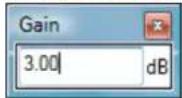
Right Click Set the value to default
Mouse Wheel Increment or decrement the position (focus required)
Mouse Drag Change the control position depending on mouse movement (except button)
Keyboard
All control widgets support the following keys (note that some of them are caught by the host and thus never forwarded to the control. For example in Steinberg Cubase SX you cannot use the arrow keys to control the plug-in):
Keys Common to All Controls
Key Action
Up Arrow Small increment of the position (up or right)
Down Arrow Small increment of the position (down or left)
Left Arrow Same as Down Arrow
Right Arrow Same as Up Arrow
Page Up Large increment of the position (up or right)
Page Down Large decrement of the position (down or left)
+ Small increment of the value of the control
- Small decrement of the value of the control
d Set to default value (same as mouse right click)
Opens the 'fine tuning' window to precisely set the parameter:
e

SHIFT
When the key is down, the fine tuning mode is on, and you can modify the value with better precision when moving the mouse, the mouse wheel or using the keyboard. Just release the key to get back to the normal mode.
Keys Specific to Buttons
Key Action
Enter Pushes the button
Presets
To get started with the plug-in and discover its capabilities, a couple of factory presets are provided. You can also save your own presets and recall them later for other projects. Our plug-ins propose a full-featured preset manager to let you save, browse, organize and recall its presets.
The Presets Menu
The presets menu can be opened from the main menu or the main toolbar. It displays the list of presets available for the plug-in as well as commands to load, save or organize presets:

- Factory Presets: shows the list of factory presets delivered with the plug-in.
- "Folder A" to "User Preset Z": user presets and categories.
- MIDI Program Change: activate MIDI Program Change support (see below).
- Load: load preset from file.
- Save: save current state to last loaded user preset.
- Save As: save current preset to a file.
- Copy copy preset to the system clipboard.
- Paste paste preset from the system clipboard, if available.
- Save As User Default: save the current state as the default preset. This preset is used every time a new instance of the plugin is created.
- Clear User Default: reset the default preset to its factory state: this makes the plug-in forgets the custom settings you might have saved as a default preset.
More about Presets
There are two types of presets: factory presets (read only) that are provided with the plug-in, and user presets that can be created and stored by the user.
The user presets are stored in a subdirectory of the documents folders of your profile ("Documents" on Mac, and "My Documents" on Windows): Blue Cat Audio/ [Plug- in Name]/ Presets. Each preset is stored as an individual file. You can create folders and subfolders in the Presets directory to classify your presets, as shown in the example below:
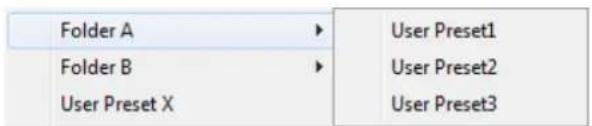
If you save a preset named "Default" in the root Presets directory, it will override the factory default preset (that's what "Save As Default" does). To restore the factory default preset, you can just remove this file or use the "Reset Default" command.
MIDI Program Change
It is possible to load presets remotely using MIDI "Bank Select" and "Program Change" messages. To enable this feature, select a MIDI channel to receive the events from in the MIDI Program Change menu item from the presets menu:

This setting is a global preference (shared across all instances of the plug-in). Once activated, the plug-in menu will display the bank number followed by the preset number for each preset:

Every root folder is considered as a new bank, starting with the factory presets (bank 0). Program and bank numbers may change while you add folders and presets, so you should be careful when naming them if bank and program numbers matter to you. It is recommended to use folders to make this task simpler. As a side note, sub folders do not define additional banks (all presets contained in sub folders are associated with the current bank.
As specified by MIDI, bank select messages are not used until a program is actually selected.
MIDI Implementation note: the software supports all types of Bank Select methods. You can use either MIDI CC 0 or MIDI CC 32 to select banks. If both are used simultaneously, they are combined together so that you can use more banks (in this case CC0 is LSB and CC32 is MSB, and actual bank number is 128*CC0+CC32).
MIDI and Automation Control
Blue Cat's Dynamics can also be remotely controlled via MIDI using MIDI CC ("Control Change") messages or automation curves, if your host application supports it. It is possible to customize the channel, control numbers, range and response curve used for each parameter in the settings panel available from the main menu (see the Plug-in Settings chapter for more details).
MIDI and Automation Settings Menu
Most skins also provide the ability to change MIDI and automation settings for each parameter directly in the main user interface. When this feature is activated using the corresponding toolbarbutton, dropdown menu buttons appears next to main controls:

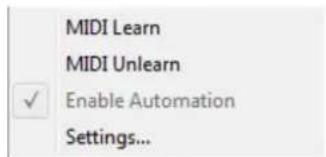
Clicking on this button shows the MIDI/ Automation settings menu:
26 Blue Cat's Dynamics User Manual Copyright (c) 2006-2019 Blue Cat Audio
- MIDI Learn: launches MIDI learn mode for the control: touch your MIDI controller and the control will learn from it the MIDI channel and CC number. To end the learn mode, reopen this menu and deselect the option.
- MIDI Unlearn: deactivates MIDI control for this parameter.
- Settings: launches the advanced settings panel described below. This controls the settings for the current preset.
Advanced MIDI and Automation Settings
You can completely customize the way the plug-in is controlled by automation and MIDI. For a global view of all parameters at a time, you can use the Plug-in Settings window for the current preset which is available from the main menu.

MIDI Settings:
- Enable MIDI: enable/ disable the MIDI control of the parameter.
- Channel: MIDI Channel for the parameter control. If set to 0, the plug-ins will accept Control Change Messages from all MIDI Channels (MIDI Omni mode).
• CC: Control Change Number. - Learn: click on this button to activate the MIDI learn functionality. When it is activated, you can move your MIDI controller, and the plug-in will automatically set the MIDI Channel and CC Number.
MIDI and automation settings:
- Response: response curve of the MIDI or automation control: from very fast to slow control.
- Min: minimal value of the parameter when MIDI controlled or automated.
- Max: Maximum value of the parameter when MIDI controlled or automated.
Note: if the Min value is higher than the Max value, the response curve will be reversed: increasing the control value will decrease the parameter value.
Note: if you double click on the parameter text control boxes for the max and min values, a "fine tuning" edit box will appear and let you change the min and max values with more precision:
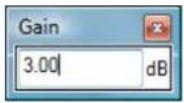
MIDI and Automation Output
Blue Cat's Dynamics can also generate MIDI CC Events or automation curves thanks to its output parameters.
You have access to the same settings for the output parameters as you have for input parameters using the dropdown menu, except that you can also enable or disable automation.
The output parameters MIDI and Automation Menu:

The advanced output parameters MIDI and Automation settings window:
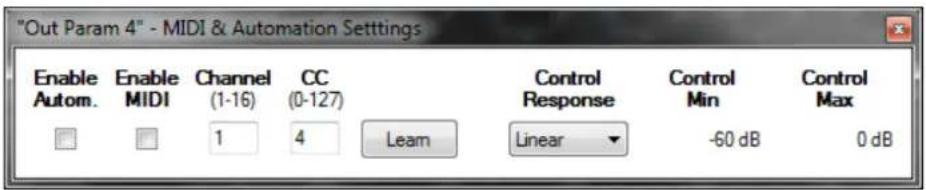
More
Check our online tutorial for more screenshots and more examples of our plug-ins user interfaces.
Blue Cat's Dynamics Parameters
All parameters described below can be automated and controlled via MIDI if your host application supports it. You can precisely define this behavior in the settings panels described later in this manual.
Input
The input parameters of this plug-in are the following:
| Name Unit Description | ||
| General | ||
| Bypass Bypass the effect. | ||
| Pre- Gain dB Input gain, before the dynamics processing stage. The input level meter will reflect input gain changes. | ||
| Input Filter | ||
| Low Cut Hz Low cut frequency for the input filter. Set to minimum value to deactivate the low cut filter. | ||
| High Cut Hz High cut frequency for the input filter. Set to maximum value to deactivate the high cut filter. | ||
| Side Chain ("SC") | ||
| SC Listen Listen to the side chain signal. | ||
| SC Input Select between internal (default) and external side chain. | ||
| SC Low Cut Low cut frequency for the side chain filter. Set to minimum value to deactivate the low cut filter. | ||
| SC High Cut Hz High cut frequency for the side chain filter. Set to maximum value to deactivate the high cut filter. | ||
| Advanced | ||
| Oversample Oversampling for the dynamics processing stage. Beware that oversampling may consume a lot of CPU. | ||
| Envelope modes and parameters | ||
| Attack | ms | Attack time for the peak detection. |
| Hold | ms | Hold time for the peak detection. |
| Release | ms | Release time for the peak detection. |
| Attack Shape | ms | Attack shape for the peak detection. Positive values will slow down the attack, while negative values will speed it up (see the operation chapter for more details). |
| Release Shape | ms | Release shape for the peak detection. Positive values will slow down the release phase, while negative values will speed it up (see the operation chapter for more details). |
| Rms Average | ms | Time for the RMS average computation. |
| VCA- Opto | % | Proportion of VCA and Opto (feedback) envelope detection modes. 0% is full VCA, and 100% is full Opto. |
| Peak- RMS | % | Proportion of Peak and RMS envelope detection modes. 0% is full Peak, and 100% is full RMS. |
Response Curve
| Up Threshold dB Threshold for the upper part of the dynamics response curve. | |
| Up Knee dB Knee for the upper part of the dynamics response curve. | |
| Up Ratio Compression ratio for the upper part of the dynamics response curve. | |
| Up Depth dB Depth for the upper part of the dynamics response curve. Specifies the range (maximum value) for the gain reduction (or increase). | |
| Down Threshold dB Threshold for the lower part of the dynamics response curve. | |
| Down Knee dB Knee for the lower part of the dynamics response curve. | |
| Down Ratio Compression ratio for the lower part of the dynamics response curve. | |
| Down Depth dB Depth for the lower part of the dynamics response curve. Specifies the range (maximum value) for the gain reduction (or increase). | |
| History | |
| Enable History Enable/ Disable gain reduction (or increase) histograms. | |
| History Length seconds Length of the window used for the GR histograms. | |
| Reset History Reset the gain reduction/ increase histograms (triggered by value changes). | |
| Makeup | |
| Makeup Gain dB Gain after the dynamics processing stage and before the output brick wall limiter. | |
| Auto- Gain Auto compute gain for the dynamics processing stage so that output is 0 dB for 0dB input (due to attack time, audio output may be louder than 0dB though). Displayed as "Compensate" in the user interface. This extra compensation gain is added to the makeup gain that can be set manually. | |
| Dry- Wet Amount of wet (processed) signal compared to the dry input signal. Set this value to 0 for MIDI or automation side- chaining. | |
| Limiter On | enable/ disable the output brick wall limiter. |
| Hard- Soft % | Type of the brick wall limiting/ clipping. 0% is for a hard knee limiter and 100% is for a very soft knee limiter. When release time is set to 0 for the brick wall limiter, this parameter controls the softness of the saturation/ clipping. |
| Release ms | Release time for the output limiter. Set this value to zero to transform the limiter into a clipper. |
| Post Gain dB Gain at the output of the plug-in, after the brick wall limiter. | |
| Stereo version only | |
| Stereo Mode | Choose between Stereo (left/ right) and mid/ side processing. |
| Stereo Link | Defines the link between the left/ right or mid/ side channels. 0:None, 1:Average, 2:Min, 3:Max, 4:Flip, 5:Channel 1, 6: Channel 2 |
| Enable Ch1 | Enable dynamics processing for channel 1 (left or mid) |
| Enable Ch2 | Enable dynamics processing for channel 2 (right or side) |
Lookahead ms Lookhead time for the main dynamics section (introduces latency).
Brick Lookahead ms Lookhead time for the brickwall limiter (introduces latency).
Output
Mono and stereo versions of the plugin have similar output parameters, except that the stereo verion duplicates them for both channels (left/right or mid/ side).
Name Unit Description
General
| GR dB Gain reduction or increase applied, not including makeup or compensation gain (you can use this parameter for side chaining without makeup). |
| Total Gain dB Total Gain (Output/ Input ratio) - without the brickwall limter. |
| You can use this parameter for side chaining if you want to include makeup gain. |
Limiter Gain dB Gain reduction applied at the brick wall limiter stage.
In addition to the controls offered in the main user interface, Blue Cat's Dynamics has various settings that let you fine tune the behavior of the plug-in. You can choose to change these settings either for the current preset or globally for all instances of the plug-in.
The Global Settings Window
The settings available in this window apply to all instances of the plug-in, for all presets, if not overridden in the presets settings. Consider these settings as "default" settings.
General
You can change the default skin for all instances of the plug-in: write the skin file path in the text edit box or click on the button to open a file chooser dialog. If you have several instances of the plug-in opened in your session, you will have to re-open the user interfaces of these plug-ins to see the skin change.

The output data refresh rate can also be customized for all instances of the plug-in. It controls the refresh rate of non-audio data produced by the plug-in (parameters, curves...). It also controls the refresh rate of output MIDI CC messages or output automation data. The higher the refresh rate, the better precision, but also the higher cpu usage (some host applications may also have trouble recording MIDI data at high refresh rates). The default value is 50 Hz.
Global Control Input Settings (MIDI and Automation)
The plug-in offers a couple of settings that affect the way it is controlled by MIDI messages or automation. While the first settings only apply to MIDI control, the "Control Response", "Min" and "Max" settings apply to both automation and MIDI control.
For each parameter you can define a default MIDI channel and CC number. You can then control the plug-in with an external MIDI controller or one of our plug-ins that generate MIDI messages.
The settings below are available for each plug-in parameter.
MIDI Settings:
- Enable MIDI: enable/ disable the MIDI control of the parameter.
- Channel: MIDI Channel for the parameter control. If set to 0, the plug-ins will accept Control Change Messages from all MIDI Channels (MIDI Omni mode).
• CC: Control Change Number. - Learn: click on this button to activate the MIDI learn functionality. When it is activated, you can move your MIDI controller, and the plug-in will automatically set the MIDI Channel and CC Number.
MIDI and automation settings:
- Response: response curve of the MIDI or automation control: from very fast to slow control.
- Min: minimal value of the parameter when MIDI controlled or automated.
- Max: Maximum value of the parameter when MIDI controlled or automated.

(generic screen shot, does not correspond to the actual plug-in parameters)
Note: if the Min value is higher than the Max value, the response curve will be reversed: increasing the control value will decrease the parameter value.
Note: if you double click on the parameter text control boxes for the max and min values, a "fine tuning" edit box will appear and let you change the min and max values with more precision:

Global Control Output Settings (MIDI and Automation)
You can set the same properties for the output parameters as for the input parameters: in this case, they may trigger MIDI CC messages or generate automation curves when modified. Since it's output, you cannot set the channel to MIDI Omni, so you must choose a channel.
Output parameters can also generate automation curves in most host applications. You can enable automation for any output parameters you are interested in (see the "Enable Autom." checkbox).

(generic screen shot, does not correspond to the actual plug-in parameters)
Note: if the Min value is higher than the Max value, the response curve will be reversed: increasing the control value will decrease the parameter value.
Note: if you double click on the parameter text control boxes for the max and min values, a "fine tuning" edit box will appear and let you change the min and max values with more precision:

The Current Preset Settings Window
In this window you can change the settings for the current preset of the current instance of the plug-in only.
Preset Skin
You can choose to use the global skin setting or to change the skin for the current preset. This way you can have different skins for different instances of the plug-in in the same session in order to differentiate them.

Preset Control Input Settings (MIDI and Automation)
Use the global settings or override them for the current preset. The parameters are the same as for the global input settings.
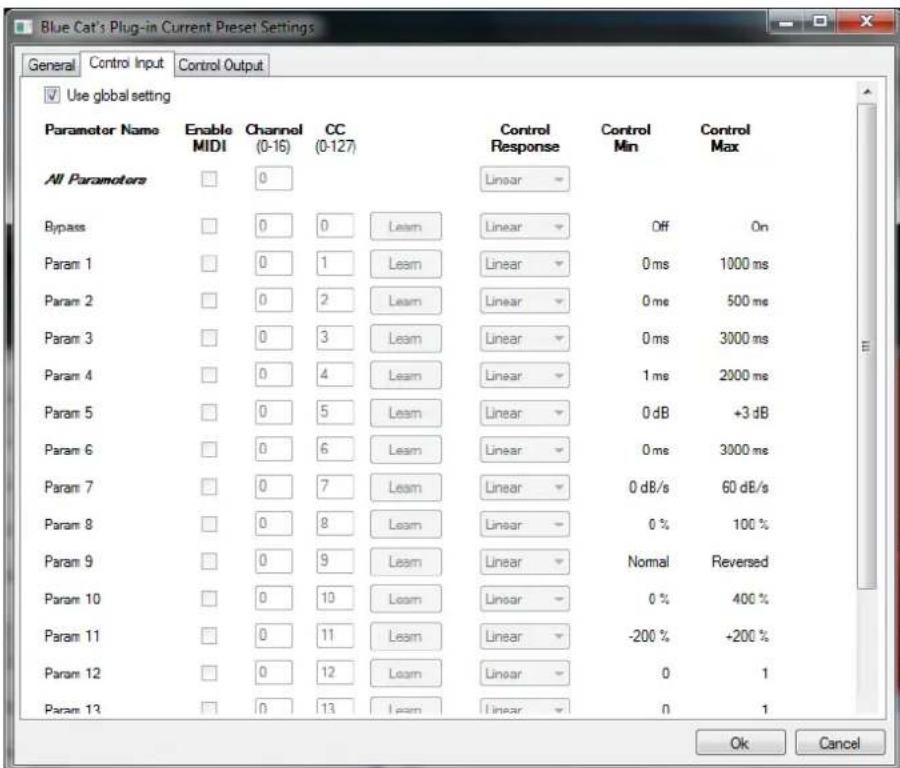
(generic screen shot, does not correspond to the actual plug-in parameters)
Preset Control Output Settings (MIDI and Automation)
Use the global settings or override them for the current preset. The parameters are the same as for the global output settings.

(generic screen shot, does not correspond to the actual plug-in parameters)
About Skins
Blue Cat's Dynamics integrates Blue Cat's skinning engine that allows you to customize the user interface. You can download alternate skins for your plug-in at the following address:
http://www.bluecataudio.com/Skins/Product_Dynamics
If you don't find a skin that fits your need or if you want a custom one, you can choose to create your own skin.
Choosing the Skin
There are two ways to select the skin of your plug-in: you can change the default (or 'global') skin, or change the skin for the current preset only (either in the preset settings page or from the main menu). The global skin applies to all plug-in instances (choose this one if you want to use the skin used by default, regardless of the session or preset), whereas the current preset skin only applies to the current preset of the current plug-in instance (use this one if you want to change only the skin for the current session/preset).
Note: in some host applications, the plug- in window won't resize automatically when you choose a skin with a different size. In this case, just close the window and re- open it: it will be displayed with the right size.
The Skins Menu
The skins menu can be opened from the main menu. It displays the list of skins available for the plug-in as well as commands to manage the skin used by default when no preset skin has been selected:

- First Section - Factory Skins: shows the list of factory skins delivered with the plug-in ("Default" and "Light" in this example).
- Second Section - User Skins: shows the list of user skins that have been installed in the Documents Skins folder for the plugin (see below).
- Use Global Skin: use the global skin for the current preset/ session (unloads any custom skin previously selected for the current preset).
- Load: opens a file browser dialog to manually select the skin from the file system.
- Save As Global Skin: use the current preset skin as the global skin (loaded by default if no preset skin has been defined).
Installing User Skins
To select user skins directly from the skins menu, install them in the "Skins" directory available in the plug-in's documents folder:
[Your Documents Folder]/ Blue Cat Audio/ [Plugin Name]/ Skins/
The skin engine will scan this folder for new skins (xml files) and display them in the menu. The skin files should be in the root skins folder or in a subdirectory inside this folder: subdirectories are not scanned recursively.
Other Methods to Select Skins
You can also select the skins in the settings panels available from the main menu:
The global skin (used by default if no preset skin has been selected) can be changed in the global settings pane. The current preset skin can be changed in the preset settings page.
Create a Custom Skin
You can create custom skins for your plug-in in order to adapt it to your exact needs. You can change its look and feel and make it completely integrated in your virtual studio!
Just read the Blue Cat's Skinning Language manual and download the samples for the tutorial on http://www.bluecataudio.com/Skins. You can get ready to create your own skins in a few minutes. You can then share your skins on our website.
More...
This manual only covers the basics of Blue Cat's Dynamics. Our website offers many additional resources for your Blue Cat's Dynamics plug-in and is constantly updated, so keep an eye on it! You will find below a few examples of available resources.
Tutorials
Many Tutorials are available on our website. They cover a wide range of topics and host applications.
You can find here a list of tutorials related to the Blue Cat's Dynamics plug-in.
Extra Skins
We encourage our customers to propose their own skins for our products and we often propose alternative skins to let you choose the one that best suits your needs. You can check Blue Cat's Dynamics skins page to get the latest skins.
Updates
As you can see in the history log below, we care about constantly updating our products in order to give you the latest technology available. Please visit our website often to check if Blue Cat's Dynamics has been updated, or subscribe to our Newsletter to be informed of the latest news about our products.
Note: minor version updates are available from the same location as the original full version download (link received by email upon purchase). The demo version publicly available on our website will not let you register.
You can also follow us on twitter and facebook for almost real time updates notification, and subscribe to our YouTube channel to watch the latest videos about our software.
Versions History
V4.2 (2019/01/30)
- Brand new GUI design, with improved usability and touchscreen support.
• The GUI can now be zoomed from 70% to 200% - Lock the GUI state to prevent changes when loading presets.
- New lookahead function for the dynamics section.
- New brickwall limiter with optional lookahead.
- Link pre and makeup gain to compensate gain changes.
- Lock GUI state to prevent changes when loading presets.
- Last loaded preset is now remembered in session and displayed in the presets menu.
- Plug-in state can now be reverted to the last loaded preset.
- Save and reload dynamics curves and bands as presets (+copy & paste).
- Now supports retina displays on Mac (text and graphs using high resolution).
• Mac: new installer.
• Mac: fixed minor compatibility issues with Mac OS High Sierra and Mojave. - Changed demo limitations: up to 5 instances allowed, bypass time changed to half a second, and bypass parameter is not affected anymore.
- Dropped support for Windows XP and Mac OS X 10.6 and earlier.
- Dropped support for legacy RTAS and DirectX plug-ins formats.
- Fully compatible with previous versions of the plug-in (except for VST3 on Mac, as explained below).
Warning: because of a bug of the initial VST3 release, this new version may not work with existing sessions that used the VST3 format. See this blog post for more details and how to fix it.
V4.1a (2016/03/04)
• (VST only) Fixed a crash when loading the VST version in Ableton Live.
V4.1 (2016/03/03)
- VST3 plug-in format support, with improved external sidechain compatibility for Cubase and Nuendo.
V4.0 (2015/06/18)
New Features:
• Fully redesigned algorithms.
• External side chain input.
- Control the attack and release shape of the peak envelope.
- Improved monitoring, with gain reduction and increase histograms and new envelopes view.
- Brand new fully customizable user interface:
- New look and feel.
• Show/ hide what you need. - Meters and curves can now be frozen.
- Zoomable GR meters and curves.
- Improved readability.
- Animated transitions.
- New integrated presets manager:
- Load/ save presets from the plug- in's user interface.
- Organize presets with folders.
- Customize the default preset.
• Exchange presets easily. - Load Presets using MIDI Bank Select and Program Change.
- Copy/ paste the plug-in's current state from the presets menu using the system clipboard.
- Automation range and response curve can now be customized for each parameter (in and out).
- Automation and MIDI settings (channel, MIDI learn etc.) are now accessible from the main user interface.
• Audio Suite support for the AAX version for offline dynamics processing in Pro Tools.
• Dynamics response curve is now displayed on the AVID S6 control surface when used with Pro Tools.
Improvements:
- Limiter and output meter now work in L/ R mode when the dynamics section is operating in Mid/ Side mode.
- New presets to get started faster.
- Plug-in name has been shortened for a clearer display in mixer view for most host applications.
- Plug-in now shows in the "Dynamics" section of most DAWs.
- The windows installer now automatically detects the most appropriate VST install path and remembers where the plug-in was initially installed to simplify upgrades.
- License is now shared between plug-ins types (register only once for all formats).
- Improved value display in fine edit window.
- Improved parameters display and response curves on control surfaces.
Optimizations and Performance Improvements:
- Improved parameters precision (now stored as 64-bit).
- More compact presets format (uses less space and loads faster).
- Smaller binaries on Mac (dropped PowerPC support).
Bug Fixes:
• (RTAS) Fixed parameters control with EUCON control surfaces in Pro Tools.
- Fixed user interface issues in Final Cut Pro X.
- Fixed keyboard stealing issue in Digital Performer 7 on Mac.
- Fixed version number reported to host application for VST and Audio Unit versions.
Note: this new version can be installed side by side with the previous version for backward compatibility reasons. Installing this new version won't break your previous projects.
V3.12 (2014/03/20)
- Fixed 64-bit VST MIDI Events not sent for the first output parameter in the list.
- Windows VST installer now detects the VST plug-ins path and remembers previous install location for updates.
- Fixed Audio Unit validation issue on OSX Mavericks/ Logic Pro X.
- Fixed VST plug- in window frame not showing in Cubase 7.5 (32-bit) on Mac.
• Fixed VST version that could not be loaded in Audio HiJack Pro (Mac).
V3.11 (2013/06/27)
• 64- bit AAX support for Pro Tools 11.
V3.11 (2011/02/10)
- Fixed keyboard focus stealing issue in Pro Tools and several other host applications.
- 64-bit Mac VST support.
V3.1 (2010/04/13)
- RTAS plugin format support for Pro Tools (Mac and Windows).
- 64- bit applications support for Windows DX and VST under Windows x64.
• Mac AU 64- bit format support (compatible with 64- bit Logic 9.1 on Snow Leopard) - Space bar does not trigger plug-in buttons anymore (avoids conflict with transport control in most applications).
• Demo version now displays a nag screen only once per session, and only when opening the user interface of the plug-in.
• Fixed MIDI learn issues. - Windows 7: fixed hand cursor that displayed a green square under the hand symbol.
• Mac: fixed user interface crashes in some hosts under Snow Leopard.
• Mac: fixed keyboard/ mouse focus issues in some hosts.
• Mac: fixed multiple screens issue.
• Mac-AU: fixed user interface resizing issue when changing skin in some hosts (Logic).
• Mac-AU: fixed settings lost issue when doing offline rendering in some applications.
• Mac AU: output parameters routing now works for more than one instance in Logic Pro's Environment.
• Mac AU: fixed output parameters that could exceed defined range and not record properly as automation curves.
V3.01 (2009/05/05)
Mac VST update: fixed incompatibility issues with Cubase 5 on Mac.
V3.0 (2009/04/27)
• Mac VST support.
• Mac Audio Unit support
• Mid/ Side processing capability.
- New stereo linking options.
- Enable/ disable processing on each channel.
- Customize the range of the meters and zoom/ navigate in the display.
• Automation output can now be disabled for hosts that do not propose automated parameters choice.
- Improved accuracy of MIDI output.
- New Presets.
- New installer (much faster install, improved upgrades).
• Brand new documentation.
V2.1 (2007/10/18)
- Improved skin loading speed.
- Improved user interface performance.
- Improved the display of parameters values in the MIDI settings panel and the host application.
V2.0 (2007/08/30)
- Smooth Bypass: activate/ deactivate the plugin with absolutely no noise.
- Undo/ Redo.
- Load/ Save presets in a host-independent format: you can now share presets between the directX and VST versions.
- New toolbar to access main functionalities.
• Ratio is now displayed in a standard way.
• Blue Cat's Skinning Language 1.3.4 support.
V1.4 (2007/03/21)
- New user interface design.
• Several ergonomics improvements. - Skin loading performance improvement (up to 80% faster).
- Reduced memory consumption when using several instances.
- Compression graph clarity and rendering performance enhancements.
- Window Opacity Management: make the plugin window transparent and see behind.
• Blue Cat's Skinning Language 1.3 support.
• (Bug fix): on the stereo version the sidechain filter did not work as expected in some situations.
V1.3 (2006/12/19)
- (Bug fix): the frequency and time values were not accurate when using oversampling.
V1.2 (2006/12/11)
- (Bug fix): the preset MIDI output settings were not restored correctly when re- opening a project or changing a preset.
V1.1 (2006/11/29)
- (Bug fix): in some plug-in adapters (such as FxPansion's VST to RTAS adapter) the GUI did not display properly when first loaded.
V1.0 (2006/11/15)
First release.
Thanks again for choosing our solutions!
BLUE CAT AUDIO
See you soon on www.bluecataudio.com!
- Blue Cat's Dynamics User Manual
- Table Of Content
- - Introduction
- • Using Blue Cat's Dynamics
- • Blue Cat Audio Plug-ins Basics
- • Blue Cat's Dynamics Parameters
- - Plug-in Settings
- - About Skins
- • More
- Introduction
- Description
- Main Features
- Blue Cat Audio Standards:
- System Requirements
- Windows
- Mac OS X
- Demo Limitations
- Installation
- Install
- Upgrade
- Uninstall
- Mac
- First Launch
- Using Blue Cat's Dynamics
- Dynamics?
- Types of Dynamics Processing
- Compression
- Limiting
- Expansion
- Gating
- Wave shaping
- The Effect of Time
- Time constants
- Attack/ Release Shapes
- Lookahead
- Side Chaining
- Mid/ Side Processing
- Concept Origin: Mid/ Side Recording
- From Mid/ Side Recording to Processing
- Mid/ Side and Dynamics
- Signal Flow
- Overview
- The Main Toolbar
- The Envelope View
- The GR ("Gain Reduction") Meter
- Operation
- Setting Up the Transfer Curve
- Changing the shape of the curve: thresholds, ratios and knees
- Makeup and auto gain
- Transfer Curve Shapes
- Upper Curve
- Lower Curve
- Custom Shapes
- Time Response: Envelope Parameters
- Peak versus RMS
- VCA versus Opto
- RMS Envelope Parameters
- Peak Envelope Parameters
- Filters
- Preamp Filter
- Side Chain Filter
- Stereo Control
- Stereo Mode
- Stereo Link
- Channels Activation
- Oversampling
- Brickwall Limiter
- "Traditional" Side Chain
- Real Time MIDI Side Chaining
- "Offline" Side Chaining / Gain Riding
- Side Chaining Extended
- Use Factory Presets
- Tweak the Time Response With the Shape Parameters
- Use a bit of Opto mode with External Side Chain
- Use Output Automation to Tweak the Effect
- Use Output Automation to Monitor the Effect
- Protect your Ears with the Brickwall Limiter
- Control the Gain With the Depth Parameters
- Blue Cat Audio Plug- Ins Basics
- User Interface Basics
- About Skins
- Smooth Bypass
- Presets Area
- Commands
- The Main Menu
- Controls
- Examples
- Interacting with Controls
- Mouse
- Mouse Interaction Action
- Keyboard
- Keys Common to All Controls
- Key Action
- Keys Specific to Buttons
- Presets
- The Presets Menu
- More about Presets
- MIDI Program Change
- MIDI and Automation Control
- MIDI and Automation Settings Menu
- Advanced MIDI and Automation Settings
- MIDI and Automation Output
- More
- Blue Cat's Dynamics Parameters
- Input
- Response Curve
- Output
- The Global Settings Window
- General
- Global Control Input Settings (MIDI and Automation)
- MIDI Settings:
- Global Control Output Settings (MIDI and Automation)
- The Current Preset Settings Window
- Preset Skin
- Preset Control Input Settings (MIDI and Automation)
- Preset Control Output Settings (MIDI and Automation)
- Choosing the Skin
- The Skins Menu
- Installing User Skins
- [Your Documents Folder]/ Blue Cat Audio/ [Plugin Name]/ Skins/
- Other Methods to Select Skins
- Create a Custom Skin
- More...
- Tutorials
- Extra Skins
- Updates
- Versions History
- V4.2 (2019/01/30)
- V4.1a (2016/03/04)
- V4.1 (2016/03/03)
- V4.0 (2015/06/18)
- New Features:
- Improvements:
- Optimizations and Performance Improvements:
- Bug Fixes:
- V3.12 (2014/03/20)
- V3.11 (2013/06/27)
- V3.11 (2011/02/10)
- V3.1 (2010/04/13)
- V3.01 (2009/05/05)
- V3.0 (2009/04/27)
- V2.1 (2007/10/18)
- V2.0 (2007/08/30)
- V1.4 (2007/03/21)
- V1.3 (2006/12/19)
- V1.2 (2006/12/11)
- V1.1 (2006/11/29)
- V1.0 (2006/11/15)
Brand : Blue Cat Audio
Model : Dynamics
Category : Audio software