
RB-1750WP - Power bank Rooboost - Free user manual and instructions
Find the device manual for free RB-1750WP Rooboost in PDF.


| Product Type | Portable Power Bank |
| Model | RB-1750WP |
| Brand | Rooboost |
| Battery Capacity | 17500 mAh (est.) |
| Input Port(s) | Micro USB, USB-C (typical) |
| Output Port(s) | USB-A x2 (typical) |
| Output Current | 2.1A per port (typical) |
| Charging Time | 6-8 hours (with 2A charger) |
| Dimensions (approx.) | 150 x 70 x 20 mm |
| Weight (approx.) | 350 g |
| LED Indicator | Yes, for battery level |
| Safety Features | Overcharge, overcurrent, short circuit protection |
| Operating Temperature | 0°C to 45°C |
| Storage Temperature | -10°C to 60°C |
| Compatible Devices | Smartphones, tablets, cameras, GPS |
| Color | Black/White (typical) |
| Material | Plastic casing |
| Accessories Included | Micro USB cable, user manual |
| Certifications | CE, FCC (typical) |
Frequently Asked Questions - RB-1750WP Rooboost
User questions about RB-1750WP Rooboost
0 question about this device. Answer the ones you know or ask your own.
Ask a new question about this device
Download the instructions for your Power bank in PDF format for free! Find your manual RB-1750WP - Rooboost and take your electronic device back in hand. On this page are published all the documents necessary for the use of your device. RB-1750WP by Rooboost.
USER MANUAL RB-1750WP Rooboost
This user manual provides safety and operating instructions.
Please read this user manual thoroughly before using the product.
TABLE OF CONTENTS

PACKAGE CONTENTS
| Important Safety Instructions | 4 | 1 × RB-1750WP |
| Introduction & Features | 5 | 1 × Smart Jumper Cable |
| Getting to Know Your Jump Starter | 6 | 1 × USB Type-C Cable |
| Operation & How to Use | 7 | 1 × Micro USB Cable |
| Safety Indicator of Smart Jumper Cable | 11 | 1 × Cigarette Lighter Socket (EC-5) |
| Troubleshooting | 12 | 1 × Handheld Protective Case |
| Storage & Disposal | 13 | 1 × User Manual |
| Warranty Information | 14 | 1 × Warranty Card |
| Customer Support – Australia | 18 |
PRODUCT SPECIFICATIONS
[Table 1]
| Internal Battery Lithium Polymer (LiPo) | |
| Capacity | |
| Suitable for Vehicles | |
| Start Voltage | |
| Start Current | |
| Peak Current | |
| Inputs | Input 1 USB Type-C: 5 V / 2 A |
| Input 2 Micro USB: 5 V / 2 A | |
| Outputs | Output 1 * USB Quick Charge 3.0: 5 V / 3 A, 9 V / 2 A, 12 V / 1.5 A |
| Output 2 * Ordinary USB Port (USB 2.0): 5 V / 1.5 A | |
| Output 3 EC-5 Port | |
| Operating Temperature | |
| Lifetime | |
| Full Charging Time | |
| Product Dimension | |
| Product Net Weight | |
| Backflow Protection | |
| Short Circuit Fuse Protection | |
| Reverse Polarity Protection | |
* If outputs 1 and 2 are simultaneously in use, only the first USB connection will function as Quick Charge (QC 3.0) and the other one as ordinary USB charging port.
The charging time will differ based on the discharge level, used power source and battery conditions.
THANK YOU FOR CHOOSING TO BUY A ROOBOOST JUMP STATER & POWER BANK
We are here to help you with any questions.
Customer Support – Australia

www.roobost.com.au

support@rooboost.com.au
IMPORTANT SAFETY INSTRUCTIONS
Please read all instructions before use to prevent the risk of explosion, injury, fire, electric shock or other damages.
Use your jump starter safely by following the instructions in this user manual.
- Use jump starter safely with great care.
- Use jump starter only for 12 V vehicles for emergency launch. DO NOT use for different voltage vehicles including aircraft and ships.
- DO NOT use jump starter if the cables or their terminals are damaged.
- DO NOT use jump starter as vehicle battery and as a battery charger.
- DO NOT jump start vehicle while jump starter is charging.
- DO NOT use jump starter in the event of bulges, leaks or strange smells coming from it.
- Only use with the original Rooboost jumper cables and power adapter to avoid possible damages.
- Make sure that the blue jumper connector of the jumper cable is fully inserted into jump start socket of the jump starter. Otherwise the blue jumper connector would melt.
- DO NOT connect two terminals of jumper clamp to each other.
- DO NOT let children, young inexperienced or people with reduced physical or mental capabilities to use jump starter.
- DO NOT expose jump starter to extreme heat or fire.
- DO NOT store jump starter in a place with direct sunlight and where the temperature may exceed 60^ C.
- ALWAYS charge jump starter at ambient temperatures in range of 0^ to 50^ .
- DO NOT charge jump starter immediately after using it to jump start a vehicle or while it is hot.
- DO NOT knock, toss or shake the jump starter and its accessories strongly.
- DO NOT use jump starter if it has been dropped, damaged, liquid leaks, dropped in water or not working properly.
• DO NOT expose jump starter to water or rain.
• DO NOT disassemble and crush the jump starter. - DO NOT let jump starter to be used as a toy. Keep it away from children. It contains battery inside.
- DO NOT use jump starter in an explosive atmosphere with insect repellents, burning incense, toxic fumes, flammable dust or oxygen tank.
- DO NOT use jump starter near gas appliances, fire places, stoves, candles or heating devices.
- DO NOT use a defective jump starter or attempt to repair/adjust any electrical or mechanical functions, this may cause danger and void the warranty.
- ALWAYS remove personal metal objects such as rings, bracelets and necklaces while using jump starter.
- DO NOT use jump starter for commercial purposes.
- This jump starter contains Lithium Polymer battery. At the end of its lifetime, dispose it as instructed in DISPOSAL section of this user manual.
KEEP THESE INSTRUCTIONS IN A SAFE PLACE.
JUMP STARTER
The Rooboost RB-1750WP is a waterproof Lithium Polymer battery jump starter. It is suitable for up to 9.0 L petrol and 7.0 L diesel vehicles including cars, boats, motorcycles, lawn mowers, RVs, tractors, trucks and more. The jump starter features spark proof technology and the smart jumper cable is equipped with reverse polarity protection. The RB-1750WP can instantly jump start most single 12 V lead-acid batteries.
SMART JUMPER CABLE
The RB-1750WP contains smart jumper cable with light indicator signals to show the jump starter's working status. This feature is designed as safety indicator to alert the user operating the jump starter with possible miss connections or abnormal operation.
POWER BANK
The RB-1750WP is equipped with battery pack having a capacity of 16,000 mAh (59.2 Wh). It contains two USB outputs (one quick charge USB 3.0 and one ordinary USB 2.0) and EC-5 output to charge your phones, GPS, camera, tablet, or any other compatible electronic device.
LED LIGHT
The RB-1750WP contains LED light that includes steady torch, SOS signal flash and strobe modes, which makes it the ultimate emergency tool.
WATERPROOF AND DUSTPROOF
RB-1750WP is featured by an improved shell with IP67 to be waterproof and safe in wet, and rainy outdoor environment.
FORCE START FUNCTION
Optional and unique feature of RB-1750WP is enabling force start function when the voltage of vehicle battery is too low, less than 1 V.
GETTING TO KNOW YOUR JUMP STARTER
- Power Button (Multi-Functional)
- Charging Status Indicator Lights (25%, 50%, 75%, 100%)
- Flashlight (Normal, SOS, Strobe)
- Output 1, USB Quick Charge 3.0 (5 V / 3 A, 9 V / 2 A, 12 V / 1.5 A Max)
- Output 2, Ordinary USB Port (USB 2.0)
- Flexible Rubber Cover
- USB C Input (for charging the jump starter)
-
Micro USB Input (for charging the jump starter)
-
Jump Start Port and Output for Cigarette lightor (EC-5)
- Black (-) Smart Clamp
- Red (+) Smart Clamp
- LED Indicator (Operation Status)
- Jumper Connector (blue)
- Force Starter Button
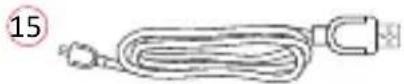
- USB Cable Type C
- USB Cable Micro
- EC-5 Cigarette Lighter Adapter
- Handheld Protective Case
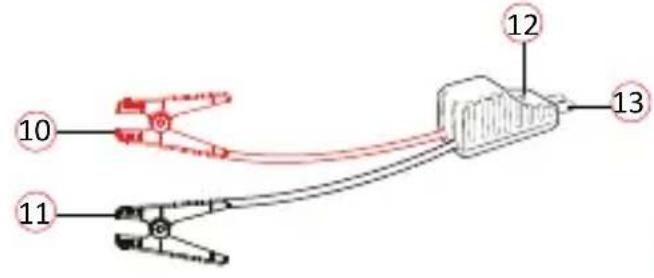



natural_image
Illustration of a USB connector with a U-shaped cable (no text or symbols)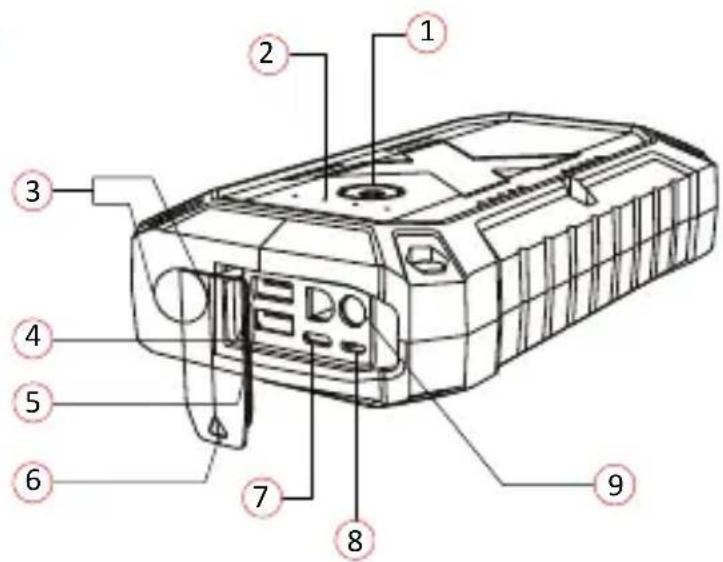

18
- The RB-1750WP comes partially pre-charged and needs to be fully charged before use.
- It will take 5-7 hours to full charge the RB-1750WP. The charging time will differ based on the discharge level, used power source and battery condition.
• Follow the below steps to charge the RB-1750WP.
a. Connect either Type-C connector of charging cable or the micro-USB into jump starter input port.
b. Connect USB connector of charging cable to power adapter (Not included in the Packaging) or cigarette lighter adapter (5 V / 3 A).
c. Plug power adapter into a power source or insert cigarette lighter adapter into a cigarette lighter socket.

flowchart
graph TD
    A["Device with cable"] --> B["Switch"]
    B --> C["Electrical outlet"]
    C --> D["Switch with plug"]
    D --> E["Device with bulb"]
    E --> F["Switch with plug"]
    F --> G["Laptop"]
- It is recommended to charge the RB-1750WP at least once 3 months in order to prolong its battery life even if the unit has not been used.
- DO NOT charge RB-1750WP immediately after using it to jump start a vehicle or while it is hot.
STATE OF CHARGE INDICATOR LIGHT
- By pressing the power button (💡), indicator light will show the battery charge status in four states of 25%, 50%, 75%, and 100%.
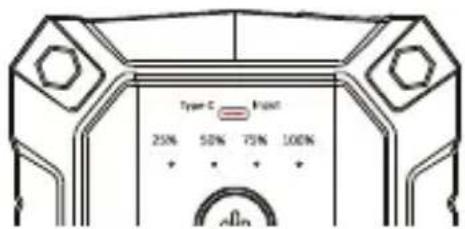
POWER BANK FUNCTION
The RB-1750WP can be used as a power bank through below 3 outputs. Always short press the ( 🔍 ) to turn on the output functions.
- Output1: USB Quick Charge 5 V / 3 A, 9 V / 2 A, 12 V / 1.5 A
- Output2: Ordinary USB Charging Port (USB 2.0) 5 V / 1.5 A
- Output3: EC-5 Port
LED LIGHT FUNCTION
The RB-1750WP contains LED light that includes steady torch, SOS signal flash and strobe modes.
- Steady Torch: Press and hold the ( ⏻ ) for 3 seconds to turn ON the steady torch.
- SOS Mode: Press the ( 🔍 ) again to cycle to SOS mode.
- Strobe Mode: Press the ( ) again to cycle to strobe mode.
- Press and hold the ( ⏻ ) for 3 seconds to turn OFF the LED light.

HOW TO JUMP START A VEHICLE
- Turn on the RB-1750WP by pressing its ( 🔍 ). Make sure it is over 50% charged or 3 to 4 indicator lights are illuminated.
- Make sure all of the vehicle's power loads (headlights, air conditioning, radio, etc.) are turned off before attempting to jump start the vehicle.
- Ensure that the battery is 12 V lead-acid before connecting the jump starter to the battery. The RB-1750WP is not suitable for any other types of batteries.
- Identify the correct polarity of the battery terminals on the vehicle battery.
- Ensure to not make any connections to carburettor, fuel lines or thin-sheet metal parts.
• Follow the below steps carefully to jump start your vehicle.
Step1: Insert the jumper connector (blue) completely into the jump starter, when the green and red-light indicators on the clamp are flashing alternately, you are safe to move to next step

natural_image
Line drawing of a device component with a red arrow pointing to a connector (no text or symbols present)Step2: Connect the red clamp of smart jumper cable to the positive terminal (+) and connect the black clamp to the negative terminal (-) of the vehicle battery. If the green and red light indicators on the battery clamp are flashing alternately, you are safe to move on to the next step. However, if the red indicator light is on:
-
The battery clamp may be connected in reverse. If so, you need to disconnect the battery clamp from the vehicle and the jump starter.
-
Adjust the clamps for maximum contact with the battery terminals.
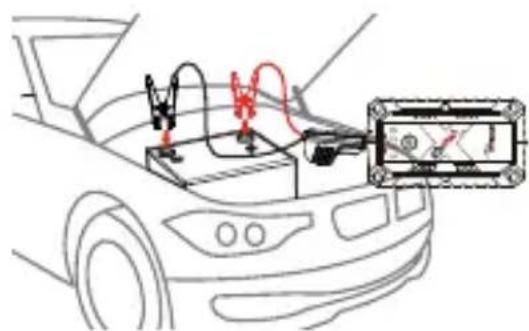
Step3.a: Start your vehicle:
If you failed to start your vehicle, you need to disconnect the battery clamp from the vehicle and the jump starter. Wait for at least 30 seconds, then try again. If you failed to start your vehicle after 2 attempts, you can use the force start function. See step 3.b.

natural_image
Line drawing of a hand holding a flip-flop and a circular object, both on a diagonal line (no text or symbols)Step3.b: Force start function (optional):
First, make sure that the clamps are connected to the correct polarity battery terminals. Then, press and hold the force start button for 3 seconds. When the indicator light of the smart clamp is solid green, you need to start the vehicle within 30 seconds.
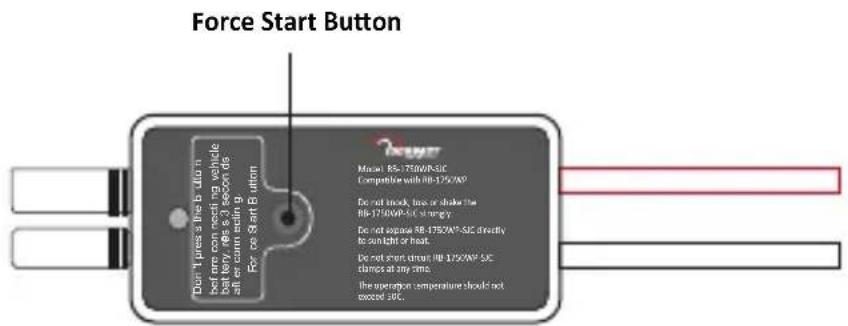
Step4: Once your vehicle is started, remove the battery clamp from the vehicle-battery and the jump starter within 30 seconds.
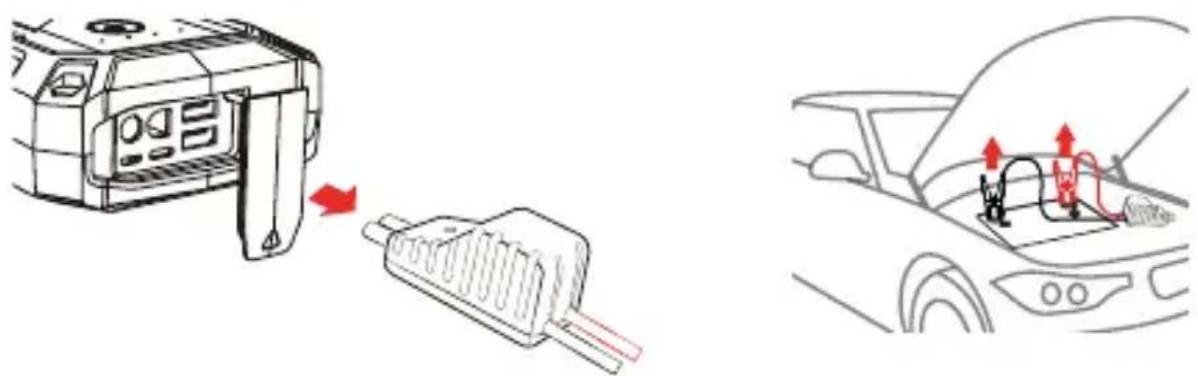
SAFETY INDICATORS OF SMART JUMPER CABLE
[Table 2]
| LED Indicator Status | Indication/Sign of | Solution |
| The red and green light flashes alternatively | Ready to operate. | / |
| The green light is always on | Working status. | / |
| The red light is always on with long alarm | 1. Battery clamp is reversely connected. | Check if the Red clamp is connected to Positive (+) terminal of the car battery and Black clamp to negative (-).Replug EC-5. |
| 2. The clamp is short-circuited. | Check two clamps are not connected with each other or via a piece of metal.Replug EC-5. | |
| 3. Battery voltage is higher than 12.6 V. No jump starter is needed. | Remove the car jump starter, start the car by itself. | |
| The red light flashes and beeps in frequency of 1 beep per second | Reverse charging protection sign, vehicle charges the jump starter. | Replug the EC-5 and clamps. |
| The green light flashes slowly and beeps in frequency of 1 beep per 3 seconds | The battery voltage is low. | Remove EC-5 and check the jump starter battery, if low battery charge, it needs to be charged in time. |
| The red light is always on | 1. The temperature of the clamp exceeds 65 °C ± 10 °C. | Remove the EC-5 clamp till the temperature decrease to 50 °C.Replug and the red-and-green light will be flashing. |
| 2. Start timeout protection. | Replug EC-5, and press force button and start the vehicle within 30s. |
[Table 3]
| Issue | Possible Cause/Reason | Remedy/Solution |
| Cannot Jump Start | 1. Wrong clamp connection.2. 30-Second timer to jump start has expired.3. Low battery status. | 1. Make sure to clamp red jumper cable to the positive (+) terminal and black jumper cable to negative (-) terminal of vehicle battery.2. Jump starter timed out.Disconnect the cables from the vehicle battery and reconnect.3. Recharge the unit via USB cable until at least three charge indicator lights are solid or over 50% is charged. |
| LED light keeps flashing | Protection circuit is working | Refer to the “SAFETY INDICATOR OF SMART JUMPER CABLE” section on page 11. |
| Flash light is not working | Low battery, the unit is charging | Recharge the unit via USB cable.As a safety precaution, the flashlight will not work while the unit is charging. Please unplug the unit from charging or wait until the unit finishes charging before using the light. |
| No wall adapter Charge | via USB cable | Plug the USB cable into computer or any USB 2 A wall adapter. |
| No indicator light | 1. Low battery2. Power bank is in OFF mode | Refer to “STATE OF CHARGE INDICATOR LIGHT” on page 8. Press power ON/OFF. |
STORAGE
- If not using the RB-1750WP for an extended period of time, it is recommended to pack it safely and store in a cool dry place to avoid moisture and overheat damages.
- It is recommended to charge the RB-1750WP at least once in three months in order to extend its battery life.
- DO NOT store the jump starter in a place with direct sunlight and where the temperature may exceed 50°C.
DISPOSAL

To prevent possible harm to the environment or human health from uncontrolled waste disposal, separate the unneeded jump starter and its related accessories from other types of wastes.
Ask your local council where to dispose of your jump starter and its related accessories. You should not throw your jump starter and its related accessories away with the daily normal household waste.
WARRANTY INFORMATION
Rooboost jump starters are designed and manufactured to the highest quality standards. Your jump starter is covered for parts and labour for 2 years, which includes 1 year standard warranty and 1-additional year upon registration (free of charge within 14 days) from the date of purchasing.
[Table 4]
| Product name | Extreme Safe Waterproof Jump Starter & Power Bank |
| Model | RB-1750WP |
| Standard warranty period | 1 Year |
| Additional warranty | Extend your warranty for one additional year;Simply register on toRooboost.com.au/warrantywithin the first 14 days of your purchase. |
| Record your order details here. This will help if you have any warranty questions in the future. | |
| Date of original purchase | |
| Order number | |
This warranty and disclaimer applies to all products purchased via the website www.roobost.com.au (hereinafter “Products”) or a third party seller authorised by Roobost.
Note: When the product is purchased from an authorised third party seller, for warranty claim, return and replacement of a defective product, the enquiry should be lodged via the related third party seller.
(1) Warranty Against Defects
1.1 For Brand-new Products:
We provide a 12-month standard warranty against defects with the Products, from the date of purchase.
We provide an optional additional free 12-month extended warranty against defects with the Products (resulting in a 24-month warranty against defects with the Products, from the date of purchase).
In order to claim the additional 12-month extended warranty, you must register your Product (free of charge) online at www.rooboost.com.au, within 14 days of the date of purchase. While registration, make sure that the related data entry including the date of purchasing are accurate.
In the event of a defect with the Product, you may be entitled to have the Product replaced In order to be entitled to a replacement Product, you must:
- immediately stop using the Product; and
- notify us of the defect during the warranty period.
In order to claim a replacement Product, you must contact us using the details at the CUSTOMER SUPPORT section, to notify us of the defect, providing your proof of purchase and, warranty registration confirmation as well as your contact details.
You may either:
- return the product for our further investigation; or
- send us a video of the defective Product, which demonstrates to our reasonable satisfaction that the Product is defective and undertake to safely dispose the defective Product. For safety reasons you must not continue to use the defective Product.
Upon receipt of the defective Product, or a video of the defective Product, we will inspect it. If the defect is the result of a manufacturer fault, we will determine if the fault requires a replacement or repair and either send you a replacement Product or effect a repair.
This warranty against defects is in addition to any other rights and remedies to which you may be entitled under Australian law.
To Clarify:
What is covered by the warranty:
- The repair or replacement of your Rooboost product (at Rooboost's discretion) if the product is found to be defective due to faulty manufacture. Rooboost reserves the right to determine if the fault requires a replacement or repair.
- Packaging and instructions of a faulty product may also be replaced if damaged.
- This warranty is valid for using your personal use of your device within Australia only.
What is not covered by the warranty:
- Using the products for commercial purposes, or anything other than normal domestic personal use.
• Use of the product outside Australia.
• Accidental damage or faults caused by negligence, misuse, vandalism or neglect. - Damage or faults caused by not following the instructions in the user manual.
• Unsupervised use by children under the age of 18.
• Repairs or alterations carried out by parties other than Rooboost or an authorised agent. - Any other conditions not listed above, are not covered by Rooboost warranty.
1.2 For Renew Products:
A renew Product, which is purchased from a seller that is authorised by Rooboost, is only covered under six months warranty and is not eligible for the free warranty extension.
1.3 For Replacements:
Replacement of a brand-new Product is only covered by the one-year standard warranty from the date of replacement arrangement and is not eligible for the one-additional year free warranty extension.
Replacement of a renew Product that is purchased from a seller and is authorised by Rooboost is only covered by six months warranty from the date of replacement arrangement and is not eligible for the free warranty extension.
(2) Australian Consumer Law
Our goods come with guarantees that cannot be excluded under the Australian Consumer Law. You are entitled to a replacement or refund for a major failure and compensation for any other reasonably foreseeable loss or damage. You are also entitled to have the goods repaired or replaced if the goods fail to be of acceptable quality and the failure does not amount to a major failure.
(3) Disclaimer
You are solely responsible for evaluating the Product and determining whether it is fit for your purpose.
You acknowledge and agree that Product is not safe for use by children.
You acknowledge and agree that working with the Product is dangerous and carries the risk of electric shock, burns, lacerations, other injuries and death.
You acknowledge that you use the Product at your own risk and that you are responsible at all times for evaluating whether or not it is safe to use the Product.
(4) Limitation of Liability
In addition to the requirements set out in clause 1 of this warranty and disclaimer document, the warranty provided under that clause will not apply:
- if a defect with the Product results in any way from some act or omission by you in relation to the appropriate care, maintenance and/or use of the Product; or
- if a defect with the Product results from ordinary wear and tear; or
- if you fail to follow our or the manufacturer's instructions for care, maintenance and/or use of the Product; or
- if you are unable to provide proof of purchase.
Except as otherwise provided by law, we accept no liability for any loss, damage or injury which may arise in any way from the use of the Product by you or by any other person.
Except as otherwise provided in this warranty and disclaimer, to the maximum extent permitted by law, we exclude all conditions and warranties implied by custom, law or statute, and we expressly disclaim all warranties of any kind including but not limited to implied warranties that the Product is fit for a particular purpose.
You hereby agree that we are not liable for any direct, indirect, consequential or incidental loss or damage which may result from your use of the Product.
Except as otherwise provided by law or as otherwise set out in this warranty and disclaimer, our liability to you shall be limited to the cost of replacement of the Product, together with your reasonable costs of postage and/or delivery in connection with your returning of the Product.
(5) Indemnity
You agree to defend, indemnify and hold us and our officers, directors, employees, contractors, members, agents and licensees harmless from and against any and all claims, charges, actions, liabilities, investigations, demands and similar including but not limited to any costs, losses, damages whether direct, indirect, consequential or special and all legal fees resulting from your use of the Product, including but not limited to any third party claims.
CUSTOMER SUPPORT - AUSTRALIA
Feel free to contact our helpful customer support team with any questions or inquiries regarding your product.
Your satisfaction is our priority.
Ausbrilliant Brands
PO Box2, Ermington NSW 1700, Australia
www.roobost.com.au
support@rooboost.com.au
Please provide your order number when you contact customer support.
Alternatively, you may contact us using the contact us form on the website.

www.roobost.com.au

- THANK YOU FOR CHOOSING TO BUY A ROOBOOST JUMP STATER & POWER BANK
- IMPORTANT SAFETY INSTRUCTIONS
- KEEP THESE INSTRUCTIONS IN A SAFE PLACE.
- JUMP STARTER
- SMART JUMPER CABLE
- POWER BANK
- LED LIGHT
- WATERPROOF AND DUSTPROOF
- FORCE START FUNCTION
- GETTING TO KNOW YOUR JUMP STARTER
- STATE OF CHARGE INDICATOR LIGHT
- POWER BANK FUNCTION
- LED LIGHT FUNCTION
- HOW TO JUMP START A VEHICLE
- Step3.a: Start your vehicle:
- Step3.b: Force start function (optional):
- Step4: Once your vehicle is started, remove the battery clamp from the vehicle-battery and the jump starter within 30 seconds.
- SAFETY INDICATORS OF SMART JUMPER CABLE
- STORAGE
- DISPOSAL
- WARRANTY INFORMATION
- Warranty Against Defects
- For Brand-new Products:
- You may either:
- What is covered by the warranty:
- What is not covered by the warranty:
- For Renew Products:
- For Replacements:
- Australian Consumer Law
- Disclaimer
- Limitation of Liability
- Indemnity
- CUSTOMER SUPPORT - AUSTRALIA
Brand : Rooboost
Model : RB-1750WP
Category : Power bank