
89220 - Oven DUALIT - Free user manual and instructions
Find the device manual for free 89220 DUALIT in PDF.


| Product Type | Compact Toaster Oven |
| Brand | Dualit |
| Model | 89220 |
| Dimensions (H x W x D) | 25 x 40 x 30 cm |
| Weight | 4.5 kg |
| Power Supply | 220-240 V, 50/60 Hz |
| Power Consumption | 1500 W |
| Temperature Range | 100°C - 230°C |
| Timer | Up to 60 minutes with automatic shut-off |
| Functions | Toast, Bake, Grill, Defrost, Keep Warm |
| Controls | Rotary dials for temperature, timer, and function selection |
| Capacity | Up to 6 slices of bread or 9-inch pizza |
| Interior Light | Yes |
| Crumb Tray | Removable, easy-clean |
| Non-Stick Interior | Yes |
| Safety Features | Auto shut-off, cool-touch handle, overheat protection |
| Cleaning | Wipe exterior with damp cloth; wash crumb tray and accessories with mild detergent |
| Accessories Included | Baking tray, wire rack, crumb tray, instruction manual |
| Spare Parts Available | Heating elements, thermostat, handle, crumb tray (contact Dualit support) |
| Reparability | Repairable by authorized service centers; spare parts available |
| Warranty | 2 years |
Frequently Asked Questions - 89220 DUALIT
User questions about 89220 DUALIT
0 question about this device. Answer the ones you know or ask your own.
Ask a new question about this device
Download the instructions for your Oven in PDF format for free! Find your manual 89220 - DUALIT and take your electronic device back in hand. On this page are published all the documents necessary for the use of your device. 89220 by DUALIT.
USER MANUAL 89220 DUALIT
Instruction Manual & Guarantee
Dualit®
Since 1945
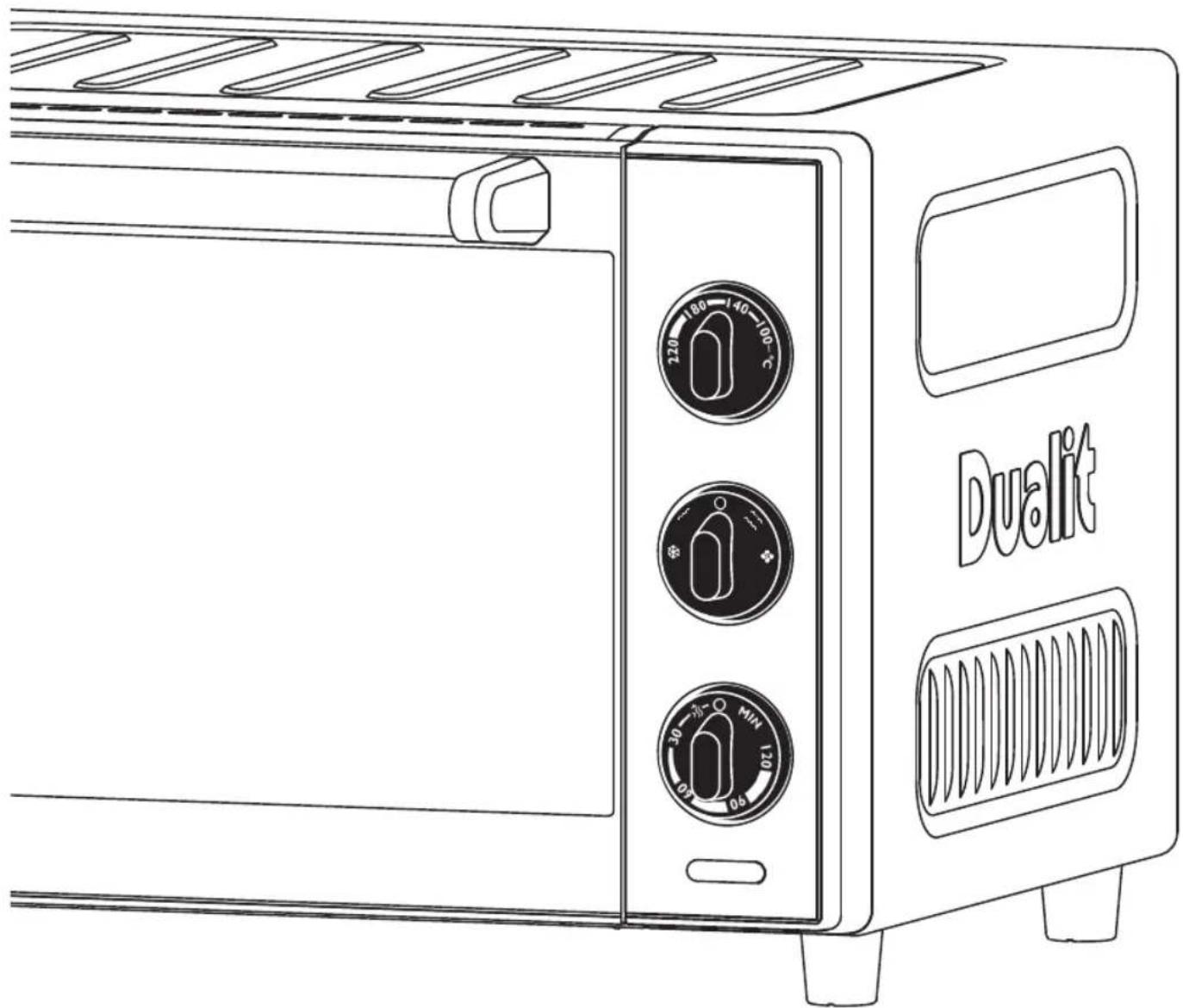
natural_image
Line drawing of a Dualit toaster oven with two rotary gauges and ventilation slots (no text or symbols on the device itself)| DON'T FORGETTO REGISTERYOUR PRODUCT | WWW.DUALIT.COM/REGISTER |  | |
| OR BY POST |  | ||
RECIPE IDEAS
To access a comprehensive database of recipes, giving you lots of ideas for everyday meals and entertaining visit: www.dualit.com/recipes

HONEY ROAST CHICKEN
When you are hungry, a tasty roast chicken with a butter, honey, salt, and cracked peppercorn crust is hard to beat. A good quality chicken is essential for a juicy and flavoursome result. A plump, free range, corn fed chicken is recommended. The result will be melingly tender.

• 2 cloves garlic, finely sliced
• 1 small bunch tarragon or thyme
• 1.2kg (2 ^3 /4 lb) chicken (not larger, or it will not cook in time)
• 30ml (2 tbsp) runny honey
• 25g (1oz) unsalted butter, softened to a dripping consistency
- I tbsp sea salt crystals
- I tbsp coarsely crushed black peppercorns
METHOD
• Preheat oven to 220°C/425°F, set to Bake.
- Place the garlic and herbs in the chicken's cavity. Warm the honey and butter and using your hands, smear it over the bird thoroughly. With fingers still sticky, rub in the salt and pepper.
- Line the Grilling Pan with a silicone mat to prevent any honey drips burning onto the bottom. Put the Rack in the Grilling Pan and place the chicken on the top, breasts towards the door.
- Cook chicken at 220°C/425°F for 10 minutes on Wire Shelf position C, then turn the oven down to 190°C/375°F and allow 45 minutes per kg, plus 20 minutes. Make sure it is cooked through (to do this insert a skewer into the thickest part of the leg if the juices run clear, the chicken is cooked).
CONTENTS
Safety precautions 04
Know your Mini Oven 06
Cooking functions 08
Setting up 10
Using your Mini Oven 11
Cleaning & maintenance 12
Replacing the Bulb 14
Troubleshooting 15
Guarantee 16
| DON'T FORGETTO REGISTERYOUR PRODUCT | WWW.DUALIT.COM/REGISTER | |
| OR BY POST |

IMPORTANT SAFETY PRECAUTIONS

READ ALL INSTRUCTIONS
BEFORE USING THE APPLIANCE KEEP THESE INSTRUCTIONS FOR FUTURE REFERENCE.
IMPORTANT SAFEGUARDS
• THIS IS AN ATTENDED APPLIANCE.
Do not leave unattended during use, unplug after each use (risk of fire if an unattended appliance is left operating or plugged in).
- This appliance must not be used by children younger than 8 years old and persons with very extensive and complex disabilities. Risk of fire, electric shock, burns, scalding or injury to persons.
- Children aged 8-14 years and persons with reduced physical, sensory or mental capabilities or lack of experience and knowledge shall not use this appliance, unless they are supervised and have been given instruction concerning the use of the appliance in a safe way and understand the hazards involved. Risk of fire, electric shock, burns, scalding or injury to persons.
• Children shall not play with the appliance. Risk of fire, electric shock, burns, scalding or injury to persons.
- Cleaning and user maintenance shall not be made by children unless they are older than 8 and supervised. Risk of fire, electric shock, burns, scalding or injury to persons.
- Keep the appliance and its cord out of reach of children less than 8 years old. Risk of fire, electric shock, burns, scalding or injury to persons.
- This appliance is intended for indoor household use only. If the appliance is used improperly or for semi-professional purposes or if it is not used according to these instructions, the guarantee becomes invalid. Dualit refuses any liability for damaged caused. Risk of fire, electric shock, burns, scalding or injury to persons.
Electrical Safety
- Before plugging in, check that the voltage marked on the appliance corresponds with the supply voltage. Risk of electric shock and fire.
• We recommend that the appliance is plugged into a socket that has no other appliance connected to it. Failure to do this may cause an overload, trip a circuit breaker or blow a fuse. Preferably the socket outlet should be protected by a Residual Current Device (RCD). - Unplug from outlet when not in use and before cleaning. Allow to cool before putting on or taking off parts. Risk of fire, electric shock, burns, scalding or injury to persons.
- Should any of the lights remain illuminated after using the appliance, immediately unplug the appliance and call the service centre. Risk of fire.
• The appliance is not intended to be operated by means of an external timer or separate remote-control system. Risk of fire.
• To be protected against electrical hazards, fire and injury to persons, do not immerse the mains lead, plug or appliance in water or any other liquid. Risk of electric shock. - Note: Any plug cut from power supply cord should be disposed of immediately. Inserting any cut off plug into a 13A socket outlet is hazardous. Risk of electric shock, and fire.
- Do not operate any appliance with a damaged lead or plug, or after the appliance malfunctions or has been damaged, cracked or dropped in any manner. Risk of fire, electric shock or injury.
- In order to avoid a hazard, if the power cord is damaged it must, for safety reasons, be replaced by Dualit or by a qualified Electrical Engineer. Call Dualit's Customer Helpline on +44 (0) 1293 652 500 Risk of electric shock and fire.
- Never use the plug without the fuse cover filled. Ensure replacement fuse is the same current value as the original. Risk of electric shock and fire.
- Replacement fuses should be ASTA approved to BS 1362. Risk of electric shock and fire.
• Warning - This appliance must be earthed.
Risk of electric shock and fire.
- Do not clean with metal scouring pads. Pieces can break off the pad and touch electrical parts, creating a risk of electric shock. Do not use abrasive cleaners on the appliance body. Risk of electric shock.
• To disconnect, turn the timer dial to the OFF position to turn off the oven, turn the selector dial to the OFF position, then remove plug from wall outlet.
General Safety
- Do not place on or near a hot gas or electric burner, or in a heated oven. Risk of fire.
- Cumb tray must be in place. Risk of fire.
- Empty and clean the crumb tray on a regular basis. A build up of crumbs, food or oil can burn or cause fire. Pull out the crumb tray and wipe clean using a damp cloth. Risk of fire and injury.
- Do not cover crumb tray or any part of the appliance with metal foil, this will cause overheating of the appliance. Risk of fire, electric shock or injury to persons.
- Do not allow cable to touch hot surfaces, or to hang over edge of a table or counter top. Risk of fire or electric shock.
- Do not use appliance for any purpose other than the intended use. Risk of fire, electric shock, burns, scalding or injury to persons.
- Do not store or use your appliance in an appliance garage or under cupboards. Risk of fire.
- Do not use if dropped, cracked or damaged. Risk of burns and electric shock.
• The use of accessory attachments not recommended by Dual it will result in fire, electric shock or injury. - Do not attempt to dislodge food when the appliance is plugged into electrical outlet. Risk of electric shock.
- Oversized foods, metal foil packages and utensils must not be inserted in the appliance. Risk of fire or electric shock.
- Do not insert anything into the ventilation slots
and do not obstruct them.
• Extreme caution should be exercised when using containers constructed of materials other than metal or oven proof glass in the appliance. Risk of fire or injury
- Do not place any of the following materials in the appliance: paper, cardboard, plastic and similar products. Risk of fire.
- A fire may occur if the appliance is covered or touching flammable materials such as curtains, drapes and walls, when in operation. Never attempt to open the appliance door if the appliance should catch fire.
• The appliance must only be used in an upright position, never lying down, tilted or upside down. Risk of injury or electric shock.
• Use oven gloves to remove any object stored on top of the appliance. Risk of burns, scalding or injury to persons.
• Use recommended temperature settings for baking and roasting.
- Do not rest cooking utensils or baking dishes on glass door. Risk of burns, scalding or injury to persons.
- Do not store materials other than manufacturer's recommended accessories in this appliance when not in use. Risk of fire.
• Always leave the door ajar when grilling. Risk of fire.
- Edges of Inner Window Pane and Brackets may be sharp. Take care when handling/cleaning. Risk of injury.
- Never use the Oven with the Inner Window Pane and/or the Seal removed. Oven Door will become too hot. Risk of burns and injury.
• Make sure the Inner Window Pane and all Brackets are secure. Do not use if any of the following are missing: Inner Window Pane, Seal, Brackets or Screws. Risk of choking.

Accessible surfaces of the toaster may get hot during use. Therefore use handles or knobs.

IMPORTANT SAFETY PRECAUTIONS
SAVE THESE INSTRUCTIONS
In the interest of improving products, Dualit Ltd. reserves the right to change the product specification without prior notice.
INSTRUCTIONS ON ENVIRONMENT PROTECTION
Do not dispose of this product in the usual household garbage a
the end of its life cycle. Please hand it over to a collection point for the recycling of electrical and electronic appliances. The symbol on the product, the instruction of use or the packaging will inform you about the methods of disposal. The materials
are recyclable as mentioned on its marking. By recycling, material recycling or other forms of re-utilization of old appliances you are making an important contribution to protect our environment. Please enquire about the community administration for the authorised disposal location.
- Unpack the box with care, keeping all the packaging materials until you are satisfied everything is present and in working order.
- Once satisfied remove any tags from the appliance body and recycle the packaging appropriately.
- Do not remove tags from the cord.
- You may wish to keep the box to store your appliance.
- All illustrations are for representation only; your model may vary from illustrations shown.
KNOW YOUR MINI OVEN
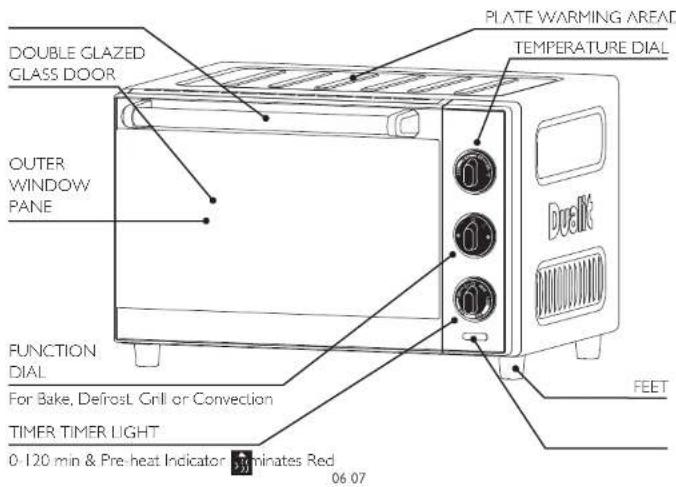
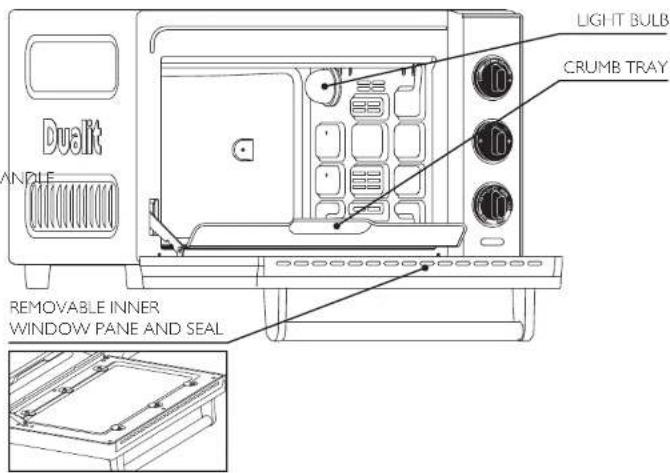

natural_image
Three technical line drawings of a grid-patterned device or tray, shown from different angles (top, front, and side), with no visible text or symbols.GRILLING PAN & RACK
WIRE SHELF PIZZA TRAY
COOKING FUNCTIONS
THESE TABLES ARE ONLY TO BE USED AS A GUIDE, COOKING TIMES MAY VARY. FOLLOW COOKING INSTRUCTIONS AS PER FOOD PACKAGING.

DEFROST
Only the fan activates to speed up the defrosting time. Food is thawed gently and evenly without cooking.
WIRE SHELF POSITION
Use the guide below to select the correct rack position.
The Wire Shelves can be inserted in both orientations for optimal grilling. Always ensure there is at least 30mm between element and items being grilled. Risk of fire.
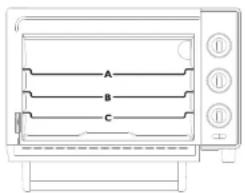
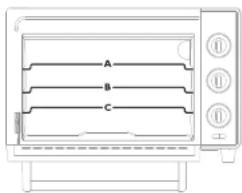
natural_image
Line drawing of a toaster oven with three labeled sections (A, B, C) and control buttons on the right (no text or symbols beyond labels)
GRILL
Only top elements are used - a healthier way to cook meat products. Grill is also used for toasting and top browning. Always leave door ajar when grilling.
*Temperature Dial has no effect on grill temperature. Elements only turn off if oven overheats. If elements turn off when door is ajar, leave door open fully. **Use Wire Shelf on shelf position A when toasting. Tum bread over halfway through.
| FOOD TEMP (°C)* WIRE SHELF | ||
| Toast N/A | A** | |
| Bacon N/A | A | |
| Chicken Breast N/A | B | |
| Fish N/A | B | |

BAKE
The baking function is used for any food product you would put in your large kitchen oven, such as roasting meals, chicken, baking cakes, cookies and more.
| FOOD TEMP (°C) | WIRE SHELF | |
| Bread 190 | C | |
| Chicken Breast 220 | C | |
| Cookies 175 | B | |
| Thin Crust Pizza (Fresh) | 220 | C |

CONVECTION
Convection baking uses an internal fan to circulate heated air around the food. This function produces fast, even cooking results.
Please note the convection function will operate at a slightly cooler temperature than the bake function. Add a few degrees to compensate for this. Some foods may not be ideal for convection cooking.
| FOOD TEMP (°C) WIRE SHELF | ||
| Deep Pan Pizza (Frozen) | 220 | B |
| Sponge Cake | 180 | C |
| Jacket Potato | 220 | C |
| Brownies | 175 | C |
SETTING UP
TURN THE OVEN ON FOR THE FIRST TIME IN A WELL VENTILATED ROOM. A "NEW" SMELL MAY BE GIVEN OFF, THIS WILL DISSIPATE AFTER A FEW USES.

Register your product at Dualit.com, this will only take 60 seconds. You will need the product model and serial numbers that are on the rating label on the base of the product.
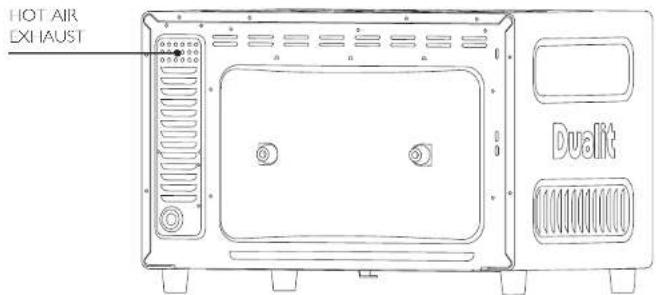
Do not store or use your oven in an appliance garage or under cupboards. Caution: Your oven has a Hot Air Exhaust at the rear. Do not block or obstruct. Risk of fire. Do not touch Hot Air Exhaust. Risk of scalding.
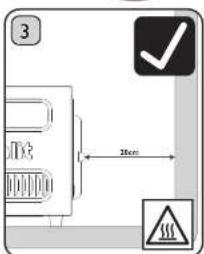
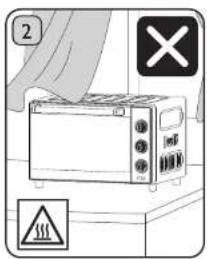
Place the oven on an open, level surface. Ensure there is a 20cm gap between the back of the oven and the wall. Never place below or against a flammable surface. Never block or obstruct the Hot Air Exhaust. Risk of injury.
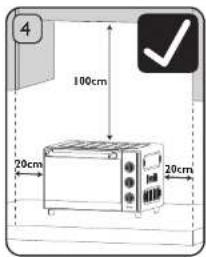
Ensure the oven is positioned at least 100cm clear from any overhanging cupboards and 20cm clear from walls or nearby cupboards on all sides. Risk of fire.
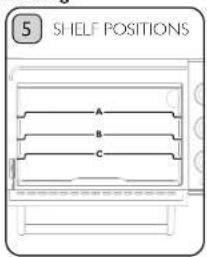
The Wire Shelf can be positioned at 3 different heights. The ideal position will be affected by the food item, temperature and setting (refer to page 9 for a guide on cooking shelf positions).
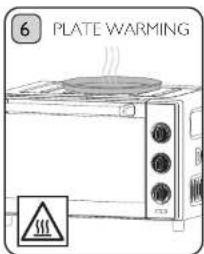
When in use, place plates on top of the oven to warm. The exterior walls get very hot when in use. Use oven gloves to remove any plates on top of the oven. Risk of injury.
USING YOUR MINI OVEN
AVOID CONTACT WITH THE HOT AIR EXHAUST AND ENSURE IT IS 20CM FROM ANY WALLS OR NEARBY CUPBOARDS. CAUTION: RISK OF INJURY OR FIRE.
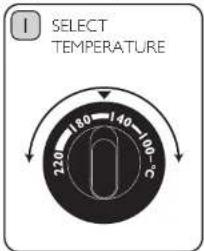
Turn the Temperature Dial to select the required temperature.
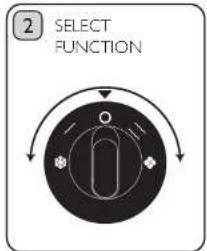
Turn the Function Dial to select Grill, Defrost, Bake or convection.
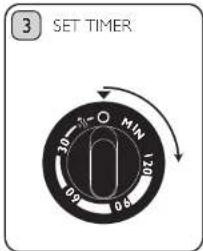
The Timer is the main ON/OFF switch. Turn the dial to the required amount of time. The red light will illuminate when the Timer is running.
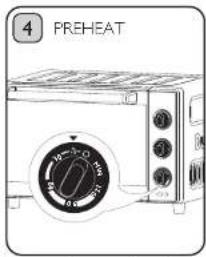
Ensure the oven door is closed. Turn the Timer to the Pre-Heat Indicator. When the Timer reaches '0' the bell will ring and the oven will turn off. The oven is now ready for cooking.
natural_image
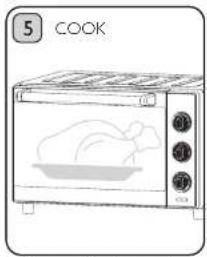
Line drawing of a kitchen oven with a roasted chicken inside, labeled 'COOK' (no text on the device itself)Follow cooking instructions on food packaging or recipe, always check the food is cooked properly. Turn the Timer to the time setting required. When the Timer reaches '0' the bell will ring and the oven will turn off. Check food is cooked through before consuming.
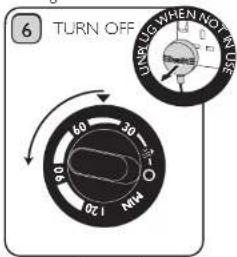
If you need to turn the oven off before the Timer has finished, set the Function Dial to '0' and turn the Timer to '0'. You will hear the bell. Unplug when not in use. Risk of fire.
Note: Empty and clean the Crumb Tray on a regular basis. A build up of crumbs, food or oil can burn or cause a fire. Pull out the Crumb Tray and wipe clean using a damp cloth after each use.
CLEANING & MAINTENANCE
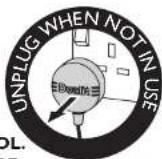
BEFORE CLEANING MAKE SURE THE APPLIANCE IS SWITCHED OFF, UNPLUGGED AND ALLOWED TO COOL. DO NOT SUBMERGE THE BODY, POWER CORD OR PLUG INTO WATER OR OTHER LIQUID, OR POSITION UNDER A WATER TAP.*
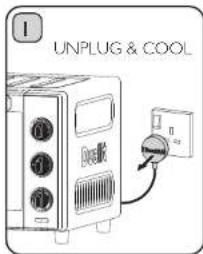
Always switch off, unplug and allow to cool before cleaning. Never use harsh abrasives or corrosive products. These could damage the oven surface.
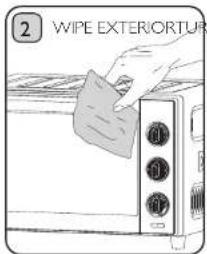
Wipe the exterior with a damp cloth. Dry immediately. Do not immerse in water. Risk of electric shock.
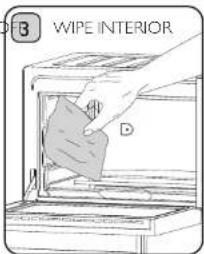
Wipe the interior walls with a damp cloth and a mild liquid soap solution on a sponge. Dry immediately.
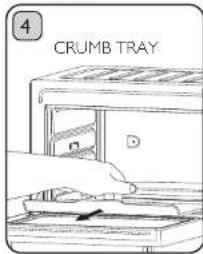
Crumbs, food and oil will accumulate in the Crumb Tray and could catch fire if the tray is not emptied and cleaned frequently. Slide out the Crumb Tray and discard crumbs. Wipe clean and replace.
natural_image
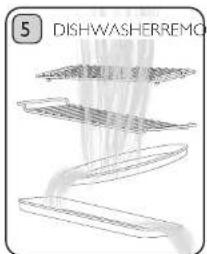
Diagram of a dishwasher's internal structure with layered components (no text or symbols)All attachments excluding the main body are suitable for dishwasher use. Use a wash cycle below 10°C. Remove prior to drying cycle.
*IT IS IMPORTANT TO CLEAN THE OVEN AND ALL PARTS AFTER EACH USE. THIS WILL PROLONG THE LIFE OF YOUR APPLIANCE.
All other servicing or maintenance of the product must be performed by Dualit or a qualified electrical engineer.
CLEANING & MAINTENANCE - INNER WINDOW PANE & SEAL
IF, AFTER A PERIOD OF TIME, THERE IS A BUILD-UP OF GREASE IN BETWEEN THE INNER AND OUTER WINDOW PANES, THE INNER WINDOW PANE CAN BE REMOVED FOR CLEANING. WARNING: GLASS - RISK OF SHARP EDGES THAT COULD CAUSE CUTS. TAKE CARE WHEN HANDLING.
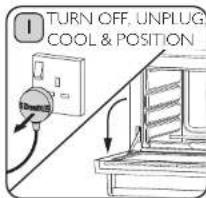
Always switch off, unplug and allow to cool before cleaning. Risk of electric shock and scalding. Position Oven, so Door Handle rests on the work surface. Product may become unstable if overhanging the work surface. Risk of injury.
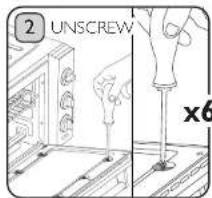
Using a Philips Screwdriver (PH2), remove fixings (x6) and Inner Window Pane. Warning: Do not operate the Oven with the Inner Window Pane or Seal removed. Risk of Burns. Caution: Sharp edges when handling Brackets and Inner Window Pane.
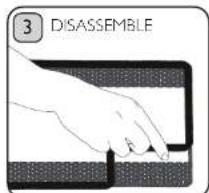
Remove Seal carefully from the edges of the Inner Window Pane. Warning: Sharp edges - Risk of injury. Hand wash Seal and Window Pane with warm, soapy water and a non-abrasive cloth. Risk of damage to coating. Dry thoroughly with clean cloth.
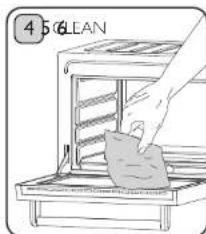
Gently wipe inside the Outer Window Pane and all accessible areas inside the Oven Door with warm soapy water. Ensure fully dry before re-assembly. Risk of injury. Please be cautious when cleaning.
natural_image
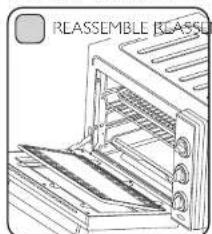
Line drawing of a toaster oven with rack and ventilation slots (no text or symbols)Reassemble Seal around the Inner Window Pane and position into the recessed Oven Door. Black printed surface should face outwards, once Oven Door is closed. Caution: Sharp edges when handling the Inner Window Pane.
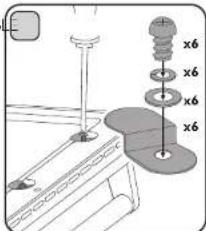
Reassemble the Screws, Washers and Brackets in the order shown (6 of each) and gently tighten. Warning: Risk of choking. Do not use if any of the Screws, Washers or Brackets are missing. Contact Dualit for advice.
REPLACING THE OVEN LIGHTBULB
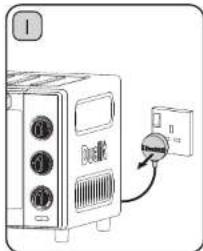
BEFORE STARTING ANY MAINTENANCE INVOLVING ELECTRICAL PARTS OF THE APPLIANCE, IT MUST BE DISCONNECTED FROM THE POWER SUPPLY. RISK OF ELECTRIC SHOCK.
natural_image
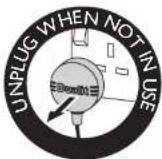
Diagram of a microwave oven connected to a power outlet with a switch (no text or symbols)Switch off the electrical supply and unplug the appliance.
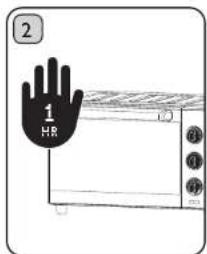
Let the oven cavity, heating elements and protective glass cover cool down for at least an hour after use then remove the wire shelf. Caution: Risk of burns.
natural_image
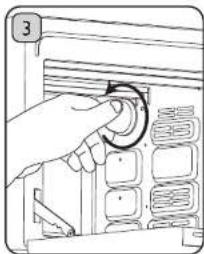
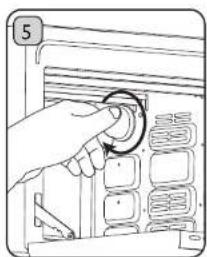
Hand operating a rotary switch on a device panel (no text or symbols visible)Unscrew the protective glass cover anticlockwise.
natural_image
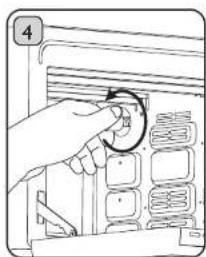
Hand inserting a circular component into a storage unit (no text or symbols visible)Unscrew anticlockwise and replace the Lightbulb with a new bulb suitable for high temperatures (230°C) having the following specifications: type E14, 240V, 25 watt.
natural_image
Hand inserting a circular component into a device panel (no text or symbols visible)Refit the protective cover. Note: Oven bulb replacement is not covered by your guarantee.
TROUBLESHOOTING
*TO CONTACT CUSTOMER SERVICES, PLEASE EMAIL INFO@DUALIT.COM WITH YOUR MODEL AND SERIAL NUMBERS.
| POSSIBLE CAUSE(S) SOLUTION(S) | |
| MY MINI OVEN DOES NOT TURN ON | |
| 1. The Mini Oven may not be properly connected to the power supply. | 1. Check the plug is in the socket. |
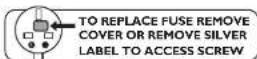
| 2. The Mini Oven plug fuse may have failed. 2. Re | Replace the plug fuse if necessary and check your residual current device (RCD). Note: To replace fuse, remove cover or remove silver label to access screw. Ensure replacement fuse is the same current value as the original. Replacement fuses are available and should be ASTA approved to BS1362. |
| 3. The Mini Oven works but the Timer Light does not illuminate. | 3. The LED Light Bulb may have blown and cannot be replaced. Contact Customer Services® for further information. |
| MY FOOD IS NOT COOKING | |
| 1. The Function Dial may be set incorrectly. 1. Ch | Check that the Function Dial is set to the correct type of food that you are cooking. |
| 2. The preheat temperature may not have been reached. | 2. Ensure that you wait for the Timer to reach '0' and hear the bell ring. |
| 3. The temperature is not right for the food you are cooking. | 3. Either increase the temperature using the Temperature Dial, or increase the time by using the Timer. |
| 4. The power is not working/the oven will not turn on. | 4. Double check that the oven is plugged in correctly, or check that the fuse in the plug has not blown. |
| MY FOOD IS NOT HOT ENOUGH | |
| 1. Your food may not have been in the oven for long enough. | 1. Increase the time by using the Timer. |
| 2. The temperature is not right for the food you are cooking. | 2. Either increase the temperature using the Temperature Dial, or increase the time by using the Timer. |
| 3. The preheat temperature may not have been reached. | 3. Turn the Timer to the Pre-Heat Indicator: When the Timer reaches '0' the bell will ring and the oven will turn off. The oven is now ready for cooking. |
| MY OVEN SMELLS WHEN FIRST USED | |
| 1. A 'new' smell may be given off the first time you use the oven. | 1. The 'new' smell will dissipate after the first few uses. See the Setting Up section on page 10 for more information. |
| MY OVEN LIGHT DOES NOT WORK | |
| 1. The light bulb has blown. 1. Replace the E14 type bulb (240V, maximum 25W). Refer to maintenance section for detailed instructions. | |

TO REPLACE FUSE REMOVE COVER OR REMOVE SILVER LABEL TO ACCESS SCREW
GUARANTEE
This appliance is of excellent quality and construction. However, if any defects in materials or workmanship do appear during the relevant guarantee period, we will, at our discretion, either repair or replace the defective parts, free of charge, subject to the terms and conditions of our Guarantee shown below.
This Guarantee covers both parts and labour. Carriage is not included.
Your Guarantee period is as follows:
• I year
This Guarantee provides benefits which are additional to, and do not affect, your statutory rights. This Guarantee does not cover the cost of returning the product to the dealer from whom it was purchased or to ourselves. This Guarantee applies only to products sold and located in mainland Great Britain. It does not cover liability in respect of or replacement of plugs, cables or fuses and also does not cover defects due to:
- Failure to use or maintain product in accordance with Dualit's instructions.
- The product being connected to an unsuitable electricity supply.
• Accidental damage to or abuse or misuse of the product. - Product modification, except by Dualit or approved agent.
- Dismantling of or interference with the product.
- Theft or attempted theft of the product.
Before returning any product under this Guarantee, please check that: - You have followed the product instructions correctly.
- Your mains electricity supply is functional.
- The defect is not due to a blown fuse.
If you wish to claim under this guarantee you should:
- Send the product, postage or carriage paid, to the dealer from whom it was purchased or to Dualit direct.
- Ensure that the product is clean and packed carefully (preferably in its original carton).
- Enclose details of your name, address and telephone number and when and where the product was purchased, together with proof of purchase (e.g. a till receipt).
- Give exact details of the nature of the defect.
This Guarantee does not cover any other claims whatsoever, including, without limitation, any liability for incidental, indirect or consequential damage, nor does it cover any claims for conversion or modification or for the costs of repair carried out by any third party without the prior consent of Dualit. If replacement parts are fitted to the product this will not extend the period of the Guarantee.
For further advice contact the Dualit customer helpline on +44 (0)1293 652 500 (09:00 to 17:00 Monday to Friday).
Alternatively, email Dualit at info@dualit.com or visit www.dualit.com
Do not throw away the appliance with the normal household waste at the end of its life, but hand it in to an official collection point for recycling. By doing this you help preserve the environment.
- Dualit®
- RECIPE IDEAS
- HONEY ROAST CHICKEN
- METHOD
- CONTENTS
- IMPORTANT SAFETY PRECAUTIONS
- READ ALL INSTRUCTIONS
- IMPORTANT SAFEGUARDS
- Electrical Safety
- Risk of electric shock and fire.
- General Safety
- SAVE THESE INSTRUCTIONS
- INSTRUCTIONS ON ENVIRONMENT PROTECTION
- COOKING FUNCTIONS
- SETTING UP
- USING YOUR MINI OVEN
- CLEANING & MAINTENANCE
- CLEANING & MAINTENANCE - INNER WINDOW PANE & SEAL
- REPLACING THE OVEN LIGHTBULB
- TROUBLESHOOTING
- GUARANTEE
Brand : DUALIT
Model : 89220
Category : Oven