
A23 - Mobile Phone NUU Mobile - Free user manual and instructions
Find the device manual for free A23 NUU Mobile in PDF.


| Product Type | Smartphone |
| Brand | NUU Mobile |
| Model | A23 |
| Dimensions | 165.0 x 76.0 x 8.5 mm |
| Weight | 200 g |
| Display | 6.5-inch IPS LCD |
| Resolution | HD+ (720 x 1600) |
| Processor | Octa-core 1.8 GHz |
| RAM | 4 GB |
| Storage | 64 GB (expandable via microSD) |
| Rear Camera | 13 MP + 2 MP + QVGA |
| Front Camera | 8 MP |
| Battery | 4000 mAh (removable) |
| Operating System | Android 10 (Go Edition) |
| Connectivity | 4G LTE, Wi-Fi, Bluetooth 5.0, GPS |
| SIM | Dual SIM (Nano-SIM) |
| Sensors | Fingerprint (rear), accelerometer, proximity |
| Power Input | 5V/1A (micro USB) |
| Audio Jack | 3.5 mm |
| Color Options | Black, Blue, Green |
| Care Instructions | Clean with soft dry cloth; avoid water and extreme temperatures |
| Safety Warnings | Do not disassemble; use only approved chargers |
| Spare Parts Availability | Battery, screen, charging port (contact support) |
Frequently Asked Questions - A23 NUU Mobile
User questions about A23 NUU Mobile
0 question about this device. Answer the ones you know or ask your own.
Ask a new question about this device
Download the instructions for your Mobile Phone in PDF format for free! Find your manual A23 - NUU Mobile and take your electronic device back in hand. On this page are published all the documents necessary for the use of your device. A23 by NUU Mobile.
USER MANUAL A23 NUU Mobile
Getting Started With Your
A23
A23 Overview 3
Setting Up Your Phone 4
Safety Information 6
Certificate
11
Warranty Information & Registration 14
Customer Support 15
A23 OverviewIndex

Top
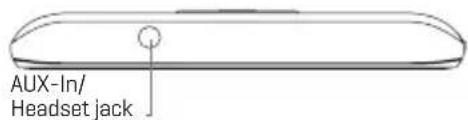
Bottom

Setting Up Your Phone
Follow these step-by-step instructions to set up your A23. Power off the phone before inserting any cards!
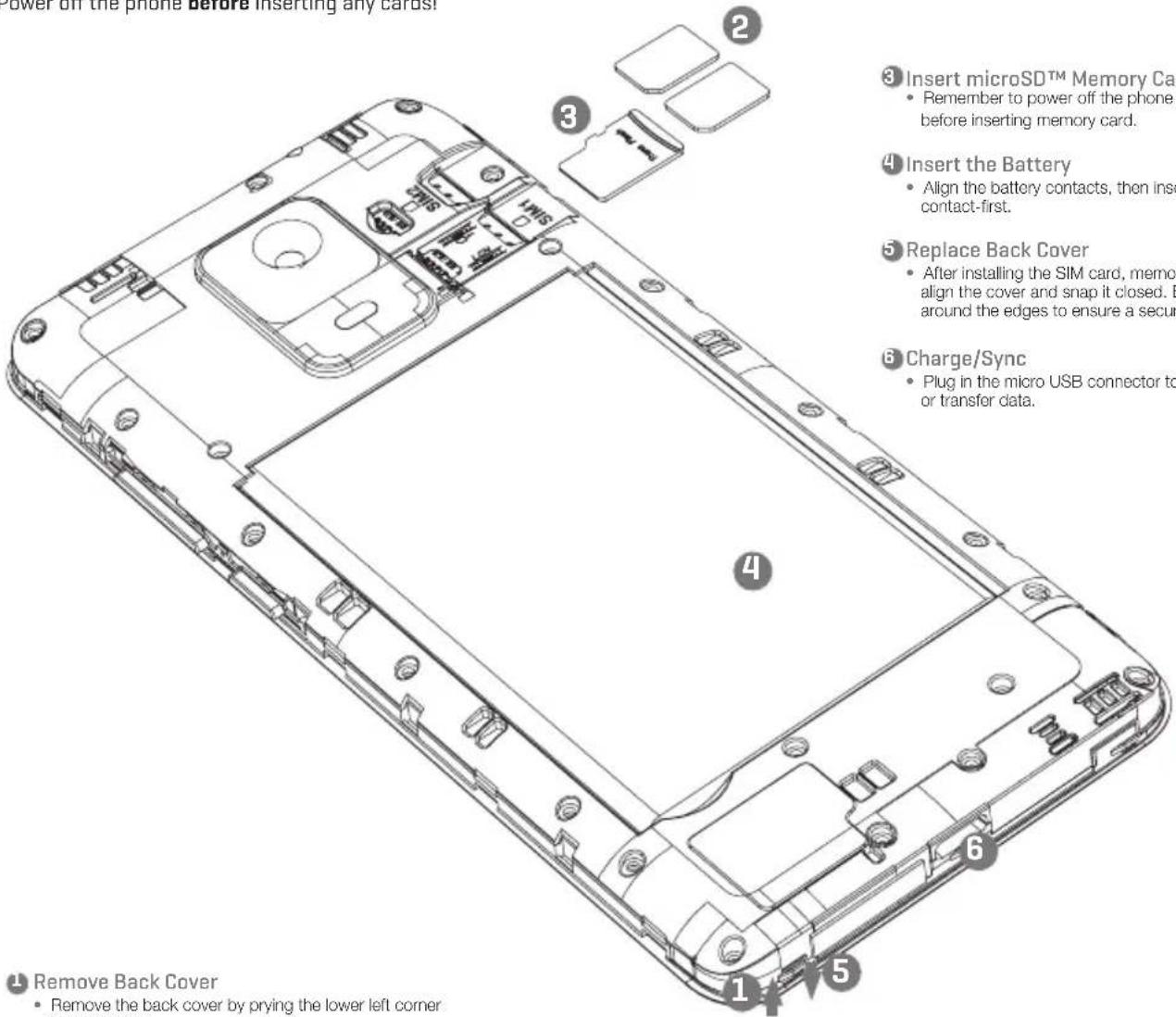
Remove Back Cover
- Remove the back cover by prying the lower left corner of your device.
2 Configuration: Dual SIM Standby
- Orient SIM card to match layout on tray.
- SIM 1 (Nano) supports 4GLTE connections.
• SIM 2 (Nano) supports 4GLTE connections.
Warning:
SIM cards are small enough to become a choking hazard, so please keep them away from children & pets. SIM cards are also quite delicate. Please be careful when handling your card.
Safety Information
- This section contains important information about the operation of your device, it also contains information about how to use the device safely. Read this information carefully before using your device.
Electronic Device
Do not use your device if using the device is prohibited.
Do not use the device if doing so causes danger or interference with other electronic devices.
Interference With Medical Equipment
- Follow rules and regulations set forth by hospitals and health care facilities. Do not use your device where prohibited.
- Some wireless devices may affect the performance of hearing aids or pacemakers. Consult your service provider for more information.
- Pacemaker manufacturers recommend that a minimum distance of 15 cm be maintained between a device and a pacemaker to prevent potential interference with the pacemaker. If using a pacemaker, hold the device on the side opposite the pacemaker and do not carry the device in your front pocket.
Protecting Your Hearing When Using A Headset
- To prevent possible hearing damage, do not listen at high volume levels for long periods.
- Using a headset at high volumes may damage your hearing. To reduce this risk, lower the headset volume to a safe and comfortable level.
- Exposure to high volumes while driving may cause distraction and increase your risk of an accident.
Areas With Flammables And Explosives
- Do not use the device where flammable or explosives are stored (in a gas station, oil depot, or chemical plant, for example). Using your device in these environments increases the risk of explosion or fire. In addition, follow the instructions indicated in text or symbols.
- Do not store or transport the device in containers with flammable liquids, gases, or explosives.
Traffic Security
- Observe local laws and regulations while using the device. To reduce the risk of accidents, do not use your wireless device while driving.
- Concentrate on driving. Your first responsibility is to drive safely.
- Do not hold the device while driving. Use hands-free accessories.
- When you must make or answer a call, pull off the road safely and park the vehicle first.
- RF signals may affect the electronic systems of motor vehicles. For more information, consult the vehicle manufacturer.
- Do not place the device over the air bag or in the air bag deployment area in a motor vehicle. Doing so may hurt you because of the strong force when the air bag inflates.
- Wireless devices may interfere with the airplane's flight system. Do not use your device where wireless devices are not allowed according to the airplane company's regulations.
Operating Environment
- Avoid dusty, damp, or dirty environments. Avoid magnetic fields. Using the device in these environments may result in circuit malfunctions. Do not use your device during thunderstorms
to protect your device against any danger caused by lightning.
- Ideal operating temperatures are 0 °C to 35 °C. Ideal storage temperatures are -20 °C to 45 °C. Extreme heat or cold may damage your device or accessories.
- Do not expose your device to direct sunlight (such as on a car dashboard) for prolonged periods.
- To protect your device or accessories from fire or electrical shock hazards, avoid rain and moisture.
- Keep the device away from sources of heat and fire, such as a heater, microwave oven, stove, water heater, radiator, or candle.
- Do not place sharp metal objects, such as pins, near the earpiece or speaker. The earpiece may attract these objects and result in injury.
- Stop using your device or applications for a while if the device is overheated. If skin is exposed to an overheated device for an extended period, low temperature burn symptoms, such as red spots and darker pigmentation, may occur.
- Do not use your device's camera flash directly in the eyes of people or pets. Otherwise temporary loss of vision or damage to the eyes may occur.
- Do not touch the device's antenna. Otherwise, communication quality may be reduced.
- Do not allow children or pets to bite or suck the device or accessories. Doing so may result in damage or explosion.
- Observe local laws and regulations, and respect the privacy and legal rights of others.
Child Safety
- Comply with all precautions with regard to child's safety. Letting children play with the device or its accessories may be dangerous. The device includes detachable parts that may present a choking hazard. Keep away from children.
- The device and its accessories are not intended for use by children. Children should only use the device with adult supervision.
Accessories
- Using an unapproved or incompatible power adapter, charger or battery may cause fire, explosion or other hazards.
- Choose only accessories approved for use with this model by the device manufacturer. The use of any other types of accessories may void the warranty, may violate local regulations and laws, and may be dangerous.
- If the power cable is damaged (for example, the cord is exposed or broken), or the plug loosens, stop using it at once. Continued use may lead to electric shocks, short circuits, or fire.
- Do not touch the power cord with wet hands or pull the power cord to disconnect the charger.
- Do not touch the device or the charger with wet hands. Doing so may lead to short circuits, malfunctions, or electric shocks.
- If your charger has been exposed to water, other liquids, or excessive moisture, only an authorized service center has the right to inspect.
Battery Safety
- Do not connect battery poles with conductors, such as keys, jewelry, or other metal materials. Doing so may short-circuit the battery and cause injuries or burns.
- Keep the battery away from excessive heat and direct sunlight. Do not place it on or in heating devices, such as microwave ovens, stoves, or radiators. Batteries may explode if overheated.
- Do not attempt to modify or remanufacture the battery, insert foreign objects into it, or immerse or expose it to water or other liquids. Doing so may lead to fire, explosion, or other hazards.
- If the battery leaks, ensure that the electrolyte does not make direct contact with your skins or eyes. If the electrolyte touches your skins or splashes into your eyes, immediately flush with clean water and consult a doctor.
- In case of battery deformation, color change, or overheating while charging or storing, immediately stop using the device and remove the battery. Continued use may lead to battery leakage, fire, or explosion.
- Do not put batteries in fire as they may explode. Damaged batteries may also explode.
- Dispose of used batteries in accordance with local regulations. Improper battery use may lead to fire, explosion, or other hazards.
- Do not allow children or pets to bite or suck the battery. Doing so may result in damage or explosion.
- Do not smash or pierce the battery, or expose it to high external pressure. Doing so may lead to a short circuit or overheating.
- Do not drop the device or battery. If the device or battery is dropped, especially on a hard surface, it may be damaged.
- If the device standby time shortens significantly, replace the battery.
Cleaning And Maintenance
- Keep the device and accessories dry. Do not attempt to dry it with an external heat source, such as a microwave oven or hair dryer.
- Do not expose your device or accessories to extreme heat or cold. These environments may interfere with proper function and may lead to fire or explosion.
- Avoid collision, which may lead to device malfunctions, overheating, fire, or explosion.
- Before you clean or maintain the device, stop using it, stop all applications, and disconnect all cables connected to it.
- Do not use any chemical detergent, powder, or other chemical agents (such as alcohol and benzene) to clean the device or accessories. These substances may cause damage to parts or present a fire hazard. Use a clean, soft, and dry cloth to clean the device and accessories.
- Do not place magnetic stripe cards, such as credit cards and phone cards, near the device for extended periods of time. Otherwise the magnetic stripe cards may be damaged.
- Do not dismantle or remanufacture the device and its accessories. This voids the warranty and releases the manufacturer from liability for damage. In case of damage, contact an authorized service center for assistance or repair.
- If the device screen is broken in a collision, immediately stop using the device. Do not touch or attempt to remove the broken parts. Promptly contact an authorized service center.
Emergency calls
- The availability of emergency calls is subject to your cellular network quality, service provider policy, and local laws and regulations. Never rely solely on your device for critical communications like medical emergencies.
Environmental Protection
- The device and its accessories (if included), such as the power adapter, headset, and battery should not be disposed of with household garbage.
- Disposal of the device and its accessories is subject to local regulations. Support proper collection and recycling.
Safety Precautions
- Use of wireless hands-free system (headphone, headset) with a low power Bluetooth emitter.
• Make sure the cell phone has a low SAR. - Keep your calls short or send a text message (SMS) instead. This advice applies especially to children, adolescents and pregnant women.
- Use cell phone when the signal quality is good.
- People having active medical implants should preferably keep the cell phone at least 15 cm away from the implant.
Disposal And Recycling Information

This symbol on the device or on its packaging indicates that the device (including its electrical accessories) should not be disposed of as normal household garbage. Do not dispose of your device as unsorted municipal waste. The device should be handed over to an authorized collection center for recycling or proper disposal at the end of its life.

Battery Caution
- Use only NUU-approved batteries, chargers, and cables to charge your phone. Unapproved chargers or cables can cause the battery to explode or damage the device.
- Use only NUU-approved batteries, chargers and cables. Use of unapproved batteries, chargers and cables may cause safety issues and the warranty will be cancelled.
- You can recharge your battery many times, but all batteries have a limited lifespan. If you notice a significant deterioration in your phone's battery life, you will need to purchase a replacement battery for replacement. If the battery is built in the phone, do not attempt to remove built-in batteries and contact an authorized NUU service center for a replacement.
- Your phone may become warm after prolonged use or when exposed to high ambient temperatures. If your phone becomes hot to the touch, unplug the USB cable, disable non-essential features, and avoid prolonged skin contact. Place your phone in a cool location and allow it to cool down to room temperature.
- Charging times may vary depending on the ambient temperature and the remaining battery level.
- Avoid using your phone when it is charging. Do not cover your phone or the charger when it is charging.
FCC Statement
- This device complies with Part 15 of the FCC Rules. Operation is subject to the following two conditions:
(1) This device may not cause harmful interference.
(2) This device must accept any interference received, including interference that may cause undesired operation. - Changes or modifications not expressly approved by the party responsible for compliance could void the user's authority to operate the equipment.
NOTE:
This equipment has been tested and found to comply with the limits for a Class B digital device, pursuant to Part 15 of the FCC Rules. These limits are designed to provide reasonable protection against harmful interference in a residential installation.
This equipment generates uses and can radiate radio frequency energy and, if not installed and used in accordance with the instructions, may cause harmful interference to radio communications. However, there is no guarantee that interference will not occur in a particular installation. If this equipment does cause harmful interference to radio or television reception, which can be determined by turning the equipment off and on, the user is encouraged to try to correct the interference by one or more of the following measures:
Reorient or relocate the receiving antenna.
Increase the separation between the equipment and receiver.
Connect the equipment into an outlet on a circuit different from that to which the receiver is connected.
Consult the dealer or an experienced radio/TV technician for help.
SAR Information Statement
Your wireless phone is a radio transmitter and receiver. It is designed and manufactured not to exceed the emission limits for exposure to radiofrequency (RF) energy set by the Federal Communications Commission of the U.S. Government. These limits are part of comprehensive guidelines and establish permitted levels of RF energy for the general population. The guidelines are based on standards that were developed by independent scientific organizations through periodic and thorough evaluation of scientific studies. The standards include a substantial safety margin designed to assure the safety of all persons, regardless of age and health. The exposure standard for wireless mobile phones employs a unit of measurement known as the Specific Absorption Rate, or SAR. The SAR limit set by the FCC is 1.6 W/kg. * Tests for SAR are conducted with the phone transmitting at its highest certified power level in all tested frequency bands. Although the SAR is determined at the highest certified power level, the actual SAR level of the phone while operating can be well below the maximum value. This is because the phone is designed to operate at multiple power levels so as to use only the power required to reach the network. In general, the closer you are to a wireless base station antenna, the lower the power output. Before a phone model is available for sale to the public, it must be tested and certified to the FCC that it does not exceed the limit established by the government adopted requirement for safe exposure. The tests are performed in positions and locations (e.g., at the ear and worn on the body) as required by the FCC for each model. The highest SAR value for this model phone when tested for use at the ear is 1.174W/Kg and when worn on the body, as described in this user guide, is 1.326W/Kg(Body-worn measurements differ among phone models, depending upon available accessories and FCC requirements). The maximum scaled SAR in hotspot mode is 1.326W/Kg. While there may be differences between the SAR levels of various phones and at various positions, they all meet the government requirement for safe exposure. The FCC has granted an Equipment Authorization for this model phone with all reported SAR levels evaluated as in compliance with the FCC RFexposure guidelines. SAR information on this model phone is on file with the FCC and can be found under the Display Grant section of http://www.fcc.gov/ oet/fccid after searching on
FCC ID: 2ADINN6001L Additional information on Specific Absorption Rates (SAR) can be found on the Cellular Telecommunications Industry Association (CTIA) web-site at http://www.wow-com.com. * In the United States and Canada, the SAR limit for mobile phones used by the public is 1.6 watts/kg (W/kg) averaged over one gram of tissue. The standard incorporates a sub-stantial margin of safety to give additional protection for the public and to account for any variations in measurements.
Body-worn Operation
This device was tested for typical body-worn operations. To comply with RF exposure requirements, a minimum separation distance of 10mm must be maintained between the user's body and the handset, including the antenna. Third-party belt-clips, holsters, and similar accessories used by this device should not contain any metallic components. Body-worn accessories that do not meet these requirements may not comply with RF exposure requirements and should be avoided. Use only the supplied or an approved antenna.
Hearing-Aid Compatibility [HAC] Statement
The N6001L (A23 / NUU A23) has been tested for hearing aid compatibility. This device has an M3 and T3 rating. When some wireless devices are used near some hearing devices such as hearing aids and implants, users may detect a buzzing or humming noise. Some hearing devices are more immune than others to this interference noise. Wireless devices may also vary in the amount of interference they generate.
The ratings for compatibility of digital wireless devices with hearing aids are described in the American National Standards Institute (ANSI) C63.19 standard:
M-Rating: Phones rated M3 or M4 meet FCC requirements and are likely to generate less interference with hearing devices than phone that are not labeled. M4 is the better/higher of the two ratings.
N6001L (A23 / NUU A23) is rated M3.
T-Rating: Phones rated T3 or T4 meet FCC requirements and are likely be more usable with hearing devices' telecoil than unrated phones. T4 is the better/higher of the two ratings.
N6001L (A23 / NUU A23) is rated T3.
The more immune the hearing aid device is, the less likely one is to experience interference noise from the wireless phone. Hearing aid devices may also be rated. Adding the rating of the hearing aid and the phone would determine probable usability:
-
Any combined rating equal to or greater than six offers the best use.
-
Any combined rating equal to five is considered normal use.
The ratings are not guarantees. Results will vary depending on the user's hearing device and hearing loss. If your hearing device happens to be vulnerable to interference, you may not be able to use this device successfully. Trying out this device with your hearing device is the best way to evaluate it for your personal needs. This device has been tested and rated for use with hearing aids for some of the wireless technologies that it utilizes. However, there may be some newer wireless technologies used in this phone that have not been tested yet for use with hearing aids. It is important to try the different features of this phone thoroughly and in different locations, using your hearing aid or cochlear implant, to determine if you hear any interfering noise. Consult your service provider or the manufacturer of this phone for information on hearing aid compatibility.
For information about hearing aids and digital wireless phones
FCC Hearing Aid Compatibility and Volume Control:
http://www.fcc.gov/cgb/dro/hearing.htm
Warranty Information
Please visit our website for details on warranty information.
www.nuumobile.com
Warranty Registration
Register Your Device
Thank you for choosing NUU. To receive helpful tips and faster tech support, register your device online at
US:
us.nuumobile.com/register/
Customer Support
Questions? Let us help. We're here to support you.
US
Phone: Toll Free: 844-NUU-3365
U.S. hours: 9am-6pm ET, chat: M-F 24hrs
Email: support@nuumobile.com
MEDIATEK
everyday genius
Made in China


natural_image
Simple gray circular arc symbol on white background (no text or symbols)Learn more about NUU products, features and accessories at

www.nuumobile.com
- Getting Started With Your
- A23
- Setting Up Your Phone
- Remove Back Cover
- Configuration: Dual SIM Standby
- Warning:
- Safety Information
- Electronic Device
- Interference With Medical Equipment
- Protecting Your Hearing When Using A Headset
- Areas With Flammables And Explosives
- Traffic Security
- Operating Environment
- Child Safety
- Accessories
- Battery Safety
- Cleaning And Maintenance
- Emergency calls
- Environmental Protection
- Safety Precautions
- Disposal And Recycling Information
- Battery Caution
- FCC Statement
- NOTE:
- SAR Information Statement
- Body-worn Operation
- Hearing-Aid Compatibility [HAC] Statement
- Warranty Information
- Warranty Registration
- Register Your Device
- US:
- Customer Support
- US
Brand : NUU Mobile
Model : A23
Category : Mobile Phone