
PPM4301 - Massage device PHILIPS - Free user manual and instructions
Find the device manual for free PPM4301 PHILIPS in PDF.


| Product Type | Handheld Massage Device |
| Model | PPM4301 |
| Brand | Philips |
| Dimensions (L x W x H) | 15 cm x 8 cm x 10 cm |
| Weight | 450 g |
| Power Supply | Rechargeable Lithium-ion battery, USB-C charging |
| Battery Capacity | 2000 mAh |
| Charging Time | 2 hours |
| Battery Life | Up to 3 hours on low speed |
| Motor Speed | 2 speeds: 2000/3000 rpm |
| Massage Heads | 3 interchangeable heads: large ball, small point, acupressure |
| Main Functions | Deep tissue massage, muscle relaxation, trigger point therapy |
| Heat Function | No |
| Water Resistance | No (keep dry) |
| Material | ABS plastic, silicone massage heads |
| Cleaning and Maintenance | Wipe with damp cloth, mild soap; store in dry place |
| Safety Features | Auto shut-off after 15 minutes, overheat protection |
| Spare Parts | Replacement massage heads available; contact Philips support |
| Repairability | Battery replaceable by professional service center |
| Included Accessories | USB-C cable, manual, 3 massage heads |
| Warranty | 2 years limited |
Frequently Asked Questions - PPM4301 PHILIPS
User questions about PPM4301 PHILIPS
0 question about this device. Answer the ones you know or ask your own.
Ask a new question about this device
Download the instructions for your Massage device in PDF format for free! Find your manual PPM4301 - PHILIPS and take your electronic device back in hand. On this page are published all the documents necessary for the use of your device. PPM4301 by PHILIPS.
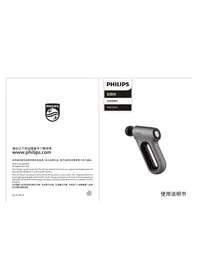
USER MANUAL PPM4301 PHILIPS
This product has been manufactured by and is sold under the responsibility of HongKong AquaShield Health Technology Company Limited and HongKong AquaShield Health Technology Company Limited is the warrantor in relation to this product.
User Manual 使用說明書
Contents
1 Instructions for User 1 Symbol Description 1 People restricted or prohibited from use 1 Precautions for Use 3 Precautions for Operation Place 4 Precautions for Maintenance 5
2 Product Features 6
3 Parts Name 6
4 How to Use 7
Preparations for Use 7
Operation 7
Applicable Parts 8
Charging Method 9
5 Maintenance 10
Cleaning Method 10
6 Diagnosis 11 7 Main Specification 13 8 Service Guideline for Warranty 14 Warranty and Service 14 Warranty Regulations 15 Warranty Card 16
9 Packing List 16
1 Instructions for User
Please read this manual carefully before using the product and keep this manual properly.
Symbol Description
To avoid personal injury or property damage, be sure to observe the following.
- The following symbols respectively illustrate the items that you must observe.

Indicate prohibition

Indicate that you should do as instructed
People restricted or prohibited from use

The following groups shall use the product with caution
People under treatment at a medical institution or in the following conditions, should consult with a doctor or physiotherapist before using the product.
- Those implanted with a pacemaker or other related medical electrical devices • People diagnosed with malignant tumor or suffering from heart disease
- Pregnant women or maternal women • People suffering from a highly nerve ending disorder caused by diabetes • People suffering from skin trauma
1
• People having a body temperature above 38° • People suffering from back pain or used to have pain in head, waist and feet - Those who are easy to suffer from numbness of feet and hands • People having difficulty with respirator • People suffering from hypertension - People having acute symptoms such as visceral diseases (gastritis, hepatitis, and gastroenteritis) • People suffering from lumbar disc herniation, spondylitis, etc. • People suffering from degenerative arthritis, arthritis, and gout • People suffering from spine fractures, and swollen bones - People lost skin temperature sensation - People having low temperature burns - People having abnormal back bones • People having diseases related to vascular disorders - People in use of restorer • People having abnormal body sensation

The following groups are prohibited from using the product
Those who are prohibited from exercising or stretching as advised by doctors.
For example, those suffering from thrombosis, severe aneurysm, acute venous aneurysm, various dermatitis, or skin infections, as these diseases can easily result in deterioration.
- Those who cannot express their will or cannot operate the device by themselves. Children aged 14 and younger are prohibited from using this product or getting close to the
- operating product.
2
- Do not apply the product on the head or chest.
- If you experience abnormal body reactions such as back pain, dizziness, vomiting, throbbing, etc. during use, please stop the product immediately.
- This product is timed for 15 minutes of operation at a time. Please do not use it for more than 30 minutes each time. Leave the product to rest for 30 minutes after each use.
- People who do not have much confidence in their own body or who use the product for the first time should never force themselves to exercise stretching.
- Do not apply the product to any part other than the neck.
- Use is prohibited under the following circumstances:
- When you are severely tired
- Within an hour before and after meals
- When you are drunk
- Those suffering from impaired skin perception or those who are not sensitive to heat are prohibited from using the product.
Precautions for Use
Never use other power adapters except for the original ones. Before use, check whether the product is intact. If any damage regardless of its extent is found, stop using the product immediately. Please remove the dust from the charger regularly. The accumulated dust on the plug is likely to induce moisture and cause poor insulation, eventually leading to fire. Before use, check if the switch and timer can work normally. If the product cannot work or you feel any abnormality, please stop using it immediately and unplug the power cord. In the event of a power outage, unplug the power cord.
3
The surface of the product can become hot. Thus, people who are not sensitive to heat should use with caution. Do not stand on the product or use the product as a toy to avoid accidents. Never disassemble, modify or repair the product or open the zipper by yourself. Do not use this product when your body is wet, or it is easy to get an electric shock. Do not wear too much to use the product, and do not let the surface of the product directly contact your skin during use. Do not use the product with its cover removed. This is likely to cause accidents. Do not pull the product with force, or stab the product with a knife or sharp object.
Precautions for Operation Place
Do not use the product near a stove, in electric heating quilts or on electric blankets and other heating appliances, otherwise a fire or disaster may occur. Do not cover the product with a towel, cloth or other objects. Do not use this product near water-filled bathtubs, showers, washbasins, or other high-humidity vessels.
4
Precautions for Maintenance
During maintenance, be sure to disconnect the power supply. Do not drop the product or charger, or hit them with strong force. Do not put too much weight on the product. This product cannot be used for two persons simultaneously. Do not spray water on the product. Do not use the product in direct sunlight or at places where the room temperature is above 35°C. Do not use the product in bathrooms or places with high humidity. If the product has not been used for a long time, you have to check in advance whether the switch is normal prior to re-use. During maintenance, do not clean the product with volatile oil, diluent, alcohol, strong alkaline detergent, bleach and other cleaning agents. Simple blackening prevention facilities are provided for the product so that it can be transported by air, rail, road and ship. Avoid rain and snow, inversions and collisions during transport. Keep this product out of the reach of children. When storing, make sure the product cools down. Frequently check the product for signs of wear or damage. If there are such signs or the product has been misused, you must return the product to the supplier before reuse.
2 Product Features
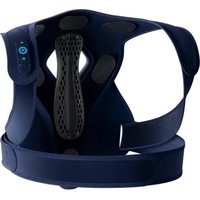
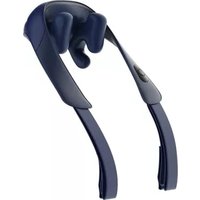
This product can be used in two postures: sitting and standing. It can help blood circulation and relieve muscle soreness and discomfort by tapping with artificial hands. There are multiple massage modes and tapping intensities available to meet the massage needs of different groups of people.
3 Parts Name

4 How to Use
Preparations for Use
Check whether the cover is damaged. Check that the product and accessories are complete. Always remove the pendant and decorations before use to avoid affecting the massage part.
Operation![graph TD A["Kneading from outside to inside + heating (orange indicator)"] -->|Press| B["Kneading from inside to outside + heating (orange indicator)"] B -->|Press| C["Kneading from inside to outside without heating (blue indicator)"] C -->|Press| D["Hold"] D -->|Hold for 2 s| E["Kneading from outsi…](/content/2026/05/983241/images/703f1585c1812391a7b9271628da4598585e0939e07fa0b7b027941e49b05c5b.jpg)
Kneading from outside to inside without heating (blue indicator)
- Hold the "ON/OFF" button for 2 s to start up. The device runs in mode 1 (kneading from outside to inside + heating) by default, and the ring indicator light is illuminated in orange at this time.
- Press the "ON/OFF" button to switch to mode 2 (kneading from inside to outside + heating), press again to switch to mode 3 (kneading from outside to inside without heating), and continue pressing to switch to mode 4 (kneading from inside to outside without heating). This is the cycle way of the device if you press the ON/OFF button.
- This product is set to shut down within 15 minutes by default. To suspend massaging, you can hold the "ON/OFF" button for 2 s.
- If the heating is enabled, the ring indicator light will be illuminated in orange, otherwise the indicator light will be illuminated in blue.
Applicable Parts
Charging Method
- When the power is low, the blue indicator flashes, prompting you to charge the product.
- Connect one end of DC12.6V/1A adapter to the product, and plug the other end into the power supply to start charging.
Tips:
- Please use the power adapter supplied by the manufacturer instead of other ones for charging.
- When the power is insufficient, the blue indicator will flash quickly and go out 3 s later, indicating that the product stops working.
- The blue indicator is breathing to flash during charging and it remains on when the product is charged for about 3 hours to the full state.
Precautions for Battery
- Do not replace the battery without authorization.
- The battery must be removed before scrapping the device. The removal steps are as follows:
- Remove the product cover;
- Disconnect relevant wires inside, and then take out the battery;
- The product must be powered off when you want to remove the battery;
- The battery should be disposed of safely.
5 Maintenance
Cleaning Method
- Do not remove the cover of the product when cleaning.
- Remove the dust from the cloth cover of the product with a vacuum cleaner rather than by patting;
- Wipe off the dirt from the surface with a clean rag;
- Where the dirt accumulates in relatively deep places, dampen the cloth with neutral detergent, and then wipe gently;
- Prevent water from entering the product;
- Let product dry naturally.
- Do not put the product in direct sunlight or at places with high humidity after use. If the product is left to be unused for a long time, remember to cover it with a cloth after removing dirt, so as to avoid dust.
- Disposal: Do not discard the product at random. Please scrap it according to the disposal method for each part to protect the environment.

Ensure to unplug the power cord without using wet hands during maintenance.
6 Diagnosis
This chapter lists the most common problems to the product. If the problems you encounter are not included in the following tables, please call our service hotline or contact the authorized service center at the region where you are located.
| Fault Symptom | Cause | Solution |
| "Pinging" and "clapping" sound generated in operation | The sound made by the product during normal operation or the friction sound between the massage ball and the cloth cover | No treatment is required |
| Start-up failure | Product overheating protection | Turn off the product for 30 min before re-use |
| Low battery power | Please charge | |
| Sudden stop in the halfway of use | The product stops automatically for protection due to core over-heating | Turn off the power switch and start after the core cools down |
| Automatic shutdown time is up | Restart the device |
| If the product has been left unused for a long time, be sure to confirm that its function is normal before using it again. | ||
| Regular check | Check for the following faults | In the event of the above faults, stop using the product immediately and cut off the power supply to avoid accidents. Please send the defective product to Philips's service center. |
| ·Whether the power adapter is heating·Whether the power cord is deeply scratched or deformed, and has a burnt smell·Whether there is abnormal sound or vibration during operation·Whether the product can work properly after the switch is turned on·Whether there are other abnormalities or faults | ||
Note: If the fault cannot be eliminated or the product still cannot operate satisfactorily, contact the after-sales service personnel. Do not disassemble or attempt to repair by yourself.
7 Main Specification
| Product name | Philips back massager |
| Product model | PPM4301GN/90 |
| Adapter | Input 100-240V~ 50/60Hz 0.6A |
| Output DC12.6V =+0A | |
| Working voltage | 11.6V = |
| Working Power | 24W |
| Charging Voltage | 12.6V = |
| Charging Current | 1A |
| Battery Capacity | 2000mAh |
| Net weight | 1.4kg |
| Adapter wire length | 1.6m |
| Dimension | 290mm×290mm×110mm |
8 Service Guideline for Warranty
Warranty and Service
The product is a household appliance with exquisite design and high-quality components. Within two years from the date of purchase, you will receive free warranty service for any damage caused by the manufacturing process or components under normal operation, as confirmed by our maintenance service.
The warranty service does not include consumable components, transportation fees, and door-to-door service. Please show the proof of purchase to the service personnel during maintenance.
You cannot receive free warranty service under the following conditions:
- Damage caused by improper operation, such as improper component connection, improper installation, failure to follow the manual, or misoperation.
- Negligence and damage caused by transportation or other accidents.
- Maintenance and modification without approval.
- Other damage caused by force majeure (such as natural disasters, abnormal voltage, etc.).
- Damage caused by general use outside the home (e.g., industrial and commercial use).
- Aging, wearing, and tearing caused by normal operation of the product without affecting its normal operation. This statement serves as a publicity for free maintenance within the specified time limit and conditions and does not limit the legal rights of consumers.
Please contact our local maintenance service center for any information or difficulties, or you can consult through the hotline.
Hong Kong
Hotline: 852-3188-4987
Service Email: Philips.Massage.hk@centuryfield.com
Taiwan
Hotline: 0800-661-600
Service Email: Philips.Massage.hk@centuryfield.com
Warranty Card
| Product Model | Customer Name | ||
| Seller | Contact Number | ||
| Date of Purchase | Serial Number | ||
| Service Center | Customer Address | ||
| Maintenance Content | Date | service personnel | |
9 Packing List
| Main Unit | 1× | Power adapter | 1× |
| User Manual | 1× | Quick Start Guide | 1× |
| Certificate | 1× |
Table of Contents
1 User Must Read 16
Symbol Description 16
Contraindicated Persons 16
Usage Precautions 18
Place of Use Precautions 19
Maintenance Precautions 19
2 Product Functions 20
3 Part Names 20
4 Usage Methods 21
Preparations Before Use 21
Usage Operation 21
Applicable parts 22
Charging method 22
5 Maintenance 23
Cleaning method 23
6 Troubleshooting 24
7 Main technical parameters 25
8 Product repair service guide 26
Warranty and service 26
Warranty card 27
9 Packing list 27
1 User must read
- CONTENTS
- INSTRUCTIONS FOR USER
- SYMBOL DESCRIPTION
- PEOPLE RESTRICTED OR PROHIBITED FROM USE
- PRECAUTIONS FOR USE
- PRECAUTIONS FOR OPERATION PLACE
- PRECAUTIONS FOR MAINTENANCE
- PRODUCT FEATURES
- PARTS NAME
- HOW TO USE
- PREPARATIONS FOR USE
- CHARGING METHOD
- TIPS
- PRECAUTIONS FOR BATTERY
- MAINTENANCE
- CLEANING METHOD
- DIAGNOSIS
- MAIN SPECIFICATION
- SERVICE GUIDELINE FOR WARRANTY
- WARRANTY AND SERVICE
- TABLE OF CONTENTS
- USER MUST READ
Brand : PHILIPS
Model : PPM4301
Category : Massage device