Súper 8 - Receiver Heritage Audio - Free user manual and instructions
Find the device manual for free Súper 8 Heritage Audio in PDF.


| Product Type | 8-Channel Transformer Class A Microphone Preamplifier with 24-bit/192kHz ADC |
| Brand | Heritage Audio |
| Model | Súper 8 |
| Dimensions (W x H x L) | 280 mm x 88 mm (2U) x 482 mm |
| Weight | 9.450 kg |
| Power Supply | External HA-PSU02 (gold plated XLR5 connector) |
| Number of Channels | 8 mic/line preamps; channels 1-2 with JFET DI |
| Microphone Input Impedance | 1200 Ω (high), 300 Ω (low, channels 1-2 only) |
| Line Input Impedance | 10 kΩ, transformer balanced |
| DI Input Impedance (channels 1-2) | >2 MΩ, unbalanced |
| Output Impedance | <75 Ω, transformer balanced |
| Maximum Output Level | >+26.5 dBu into 600 Ω |
| Maximum Gain | >80 dB |
| THD | <0.025% @ 1 kHz, <0.05% @ 100 Hz |
| Frequency Response | 20 Hz (+0.3 dB) to 20 kHz (-0.2 dB) |
| Equivalent Input Noise | <-125 dBu |
| Output Stage Noise | <-100 dBu |
| ADC Sample Rates | 44.1, 48, 88.2, 96, 176.4, 192 kHz |
| Digital Output Formats | ADAT (optical), AES/EBU (XLR), SPDIF (RCA) |
| Word Clock | BNC input/output with switchable 75 Ω termination |
| Phantom Power | +48V per channel, switchable |
| High-Pass Filter | -3 dB @ 82 Hz; sweepable on channels 1-2 |
| Input Pad | -20 dB per channel |
| Phase Reverse | Yes, per channel |
| Warranty | 2 years limited (non-transferable) |
Frequently Asked Questions - Súper 8 Heritage Audio
User questions about Súper 8 Heritage Audio
0 question about this device. Answer the ones you know or ask your own.
Ask a new question about this device
Download the instructions for your Receiver in PDF format for free! Find your manual Súper 8 - Heritage Audio and take your electronic device back in hand. On this page are published all the documents necessary for the use of your device. Súper 8 by Heritage Audio.
USER MANUAL Súper 8 Heritage Audio
8 CHANNEL TRANSFORMER CLASS A MIC PREAMP WITH PREMIUM 24 BIT 192 kHz ADC RACKMOUNT

USER MANUAL
Thank you for choosing the Súper 8. Heritage Audio is dedicated to bringing you 'the sound of yesterday for tomorrow'. We specialize in capturing that unique, enticing sound that everybody has fallen in love with. For years engineers, producers and musicians have been yearning for that classic vibe. Usually the only option is to search for old, used original equipment that is almost always in a questionable state of operation. This brings with it a whole lot of other issues, making the experience less than desirable. Not to mention the very high prices asked for this equipment, which makes them virtually unobtainable for the great majority. Now it's possible to obtain that same sound with a brand new piece that will give you all the problem-free, heavy-duty use you'll need for years of music making history.
Peter Rodriguez
CEO
Heritage Audio - Madrid, Spain

© 2022 Heritage Audio S.L. is the sole owner of the copyright of all information and drawings contained in this manual which are not to be copied or reproduced by any means or disclosed in part or whole to any third party without written permission.
Heritage Audio reserves the right to alter specifications without notice. The information in this manual has been carefully checked and is believed to be accurate at the time of publication. However, no responsibility is taken by us for inaccuracies, errors or omissions nor any liability assumed for any loss or damage resulting either directly or indirectly from use of the information contained within it.
TABLE OF CONTENTS
| INTRODUCTION | 2 |
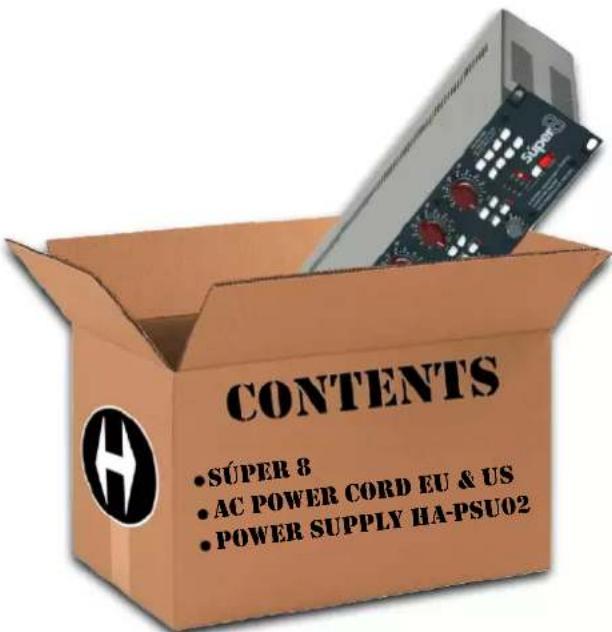
| CONTENTS | 2 |
| DESCRIPTION | 3 |
| GETTING STARTED | 4 |
| APPLICATIONS | 6 |
| WIRING FOR DB25 CONNECTORS | 10 |
| SPECIFICATIONS | 11 |
| SIGNAL FLOW | 12 |
| TROUBLE SHOOTING | 13 |
| WARRANTY STATEMENT | 14 |
| REGISTRATION | 14 |
| RECALL SHEETS | 15 |
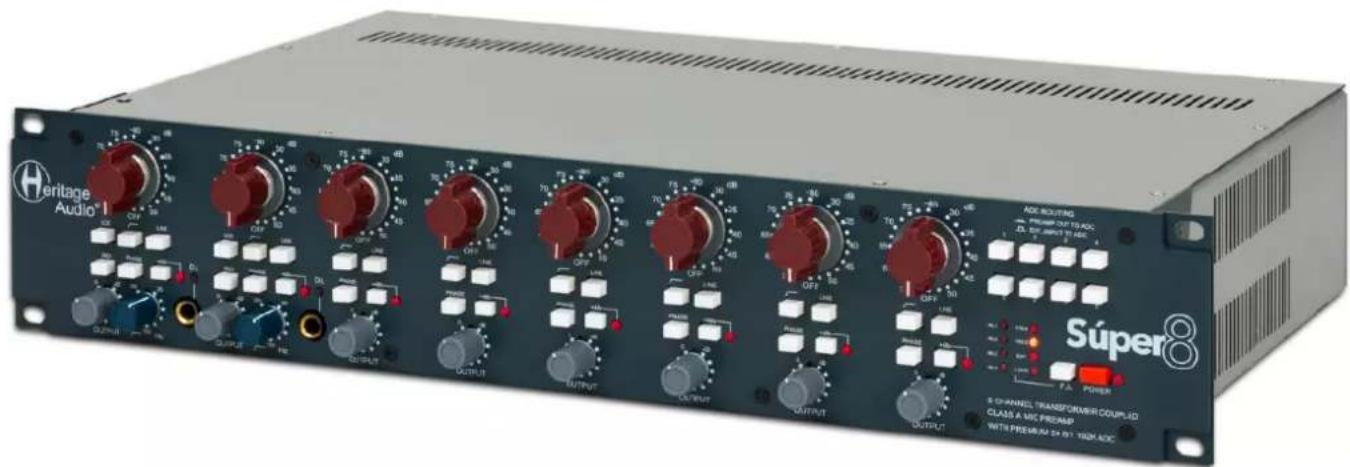
The Súper 8 offers a fantastic, compact solution for when several high quality preamps and top class conversion is needed.
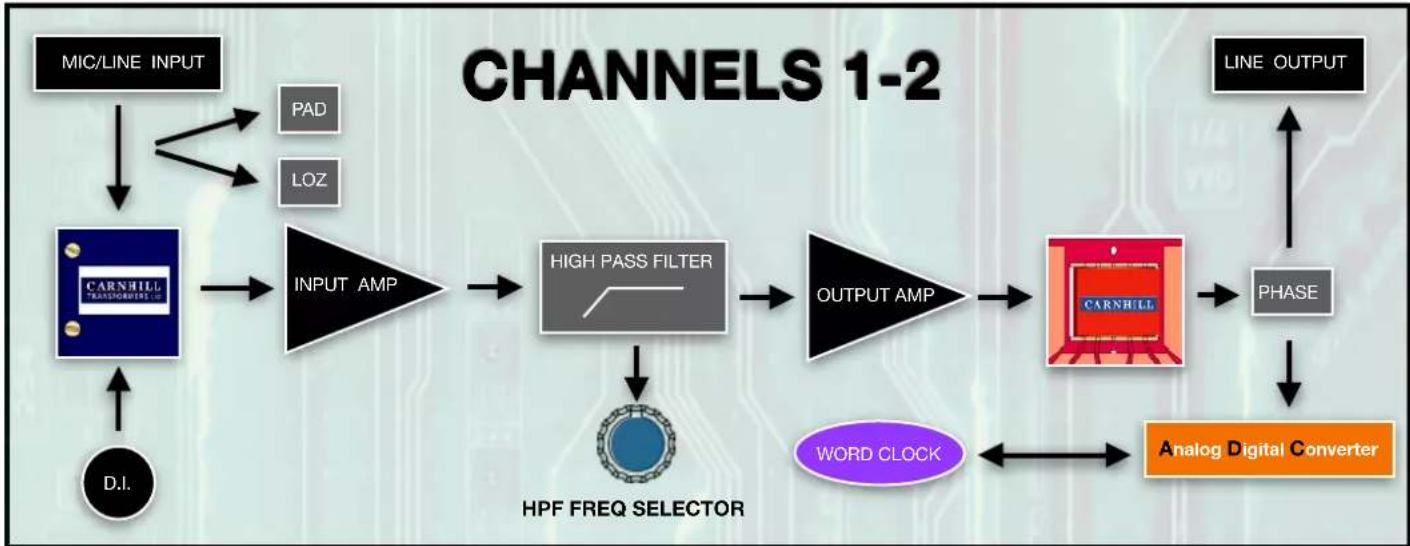
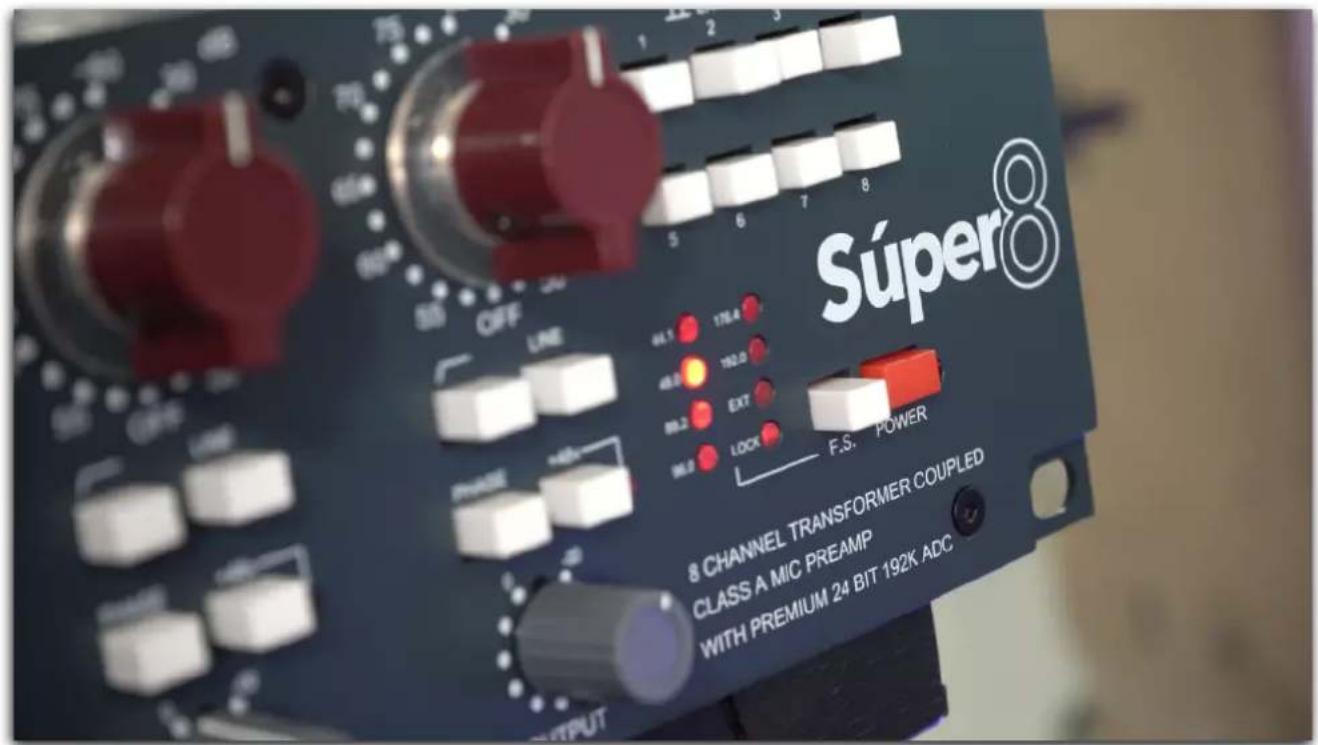
Using our Class A 73 Preamp building experience we were able to fit 8 MIC/Line preamps into a sturdy 2 unit rack. All 8 are faithful to our 3 stage all Class A design with Carnhill transformers fitted at the input and the output. The first two channels also include our high quality JFET DI as well as a fully sweepable Lo-cut filter. All 8 channels include switches for 48 V, Line, Lo-cut(-3 dB at 82 Hz) and Phase.
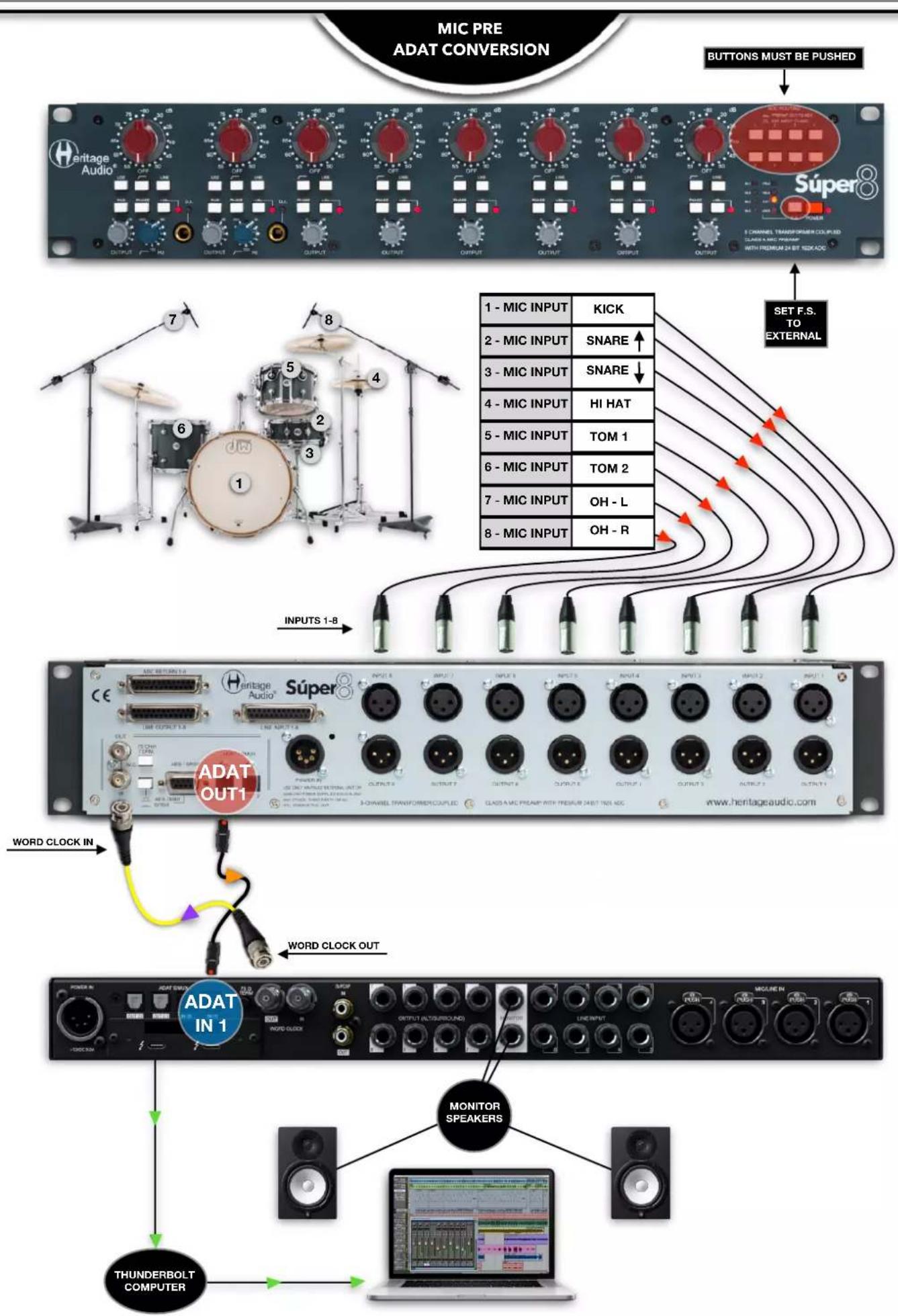
There is built in analog to digital conversion available on 3 different digital formats: ADAT, AES/EBU and SPDIF with BNC connectors for reliable word clock syncing.
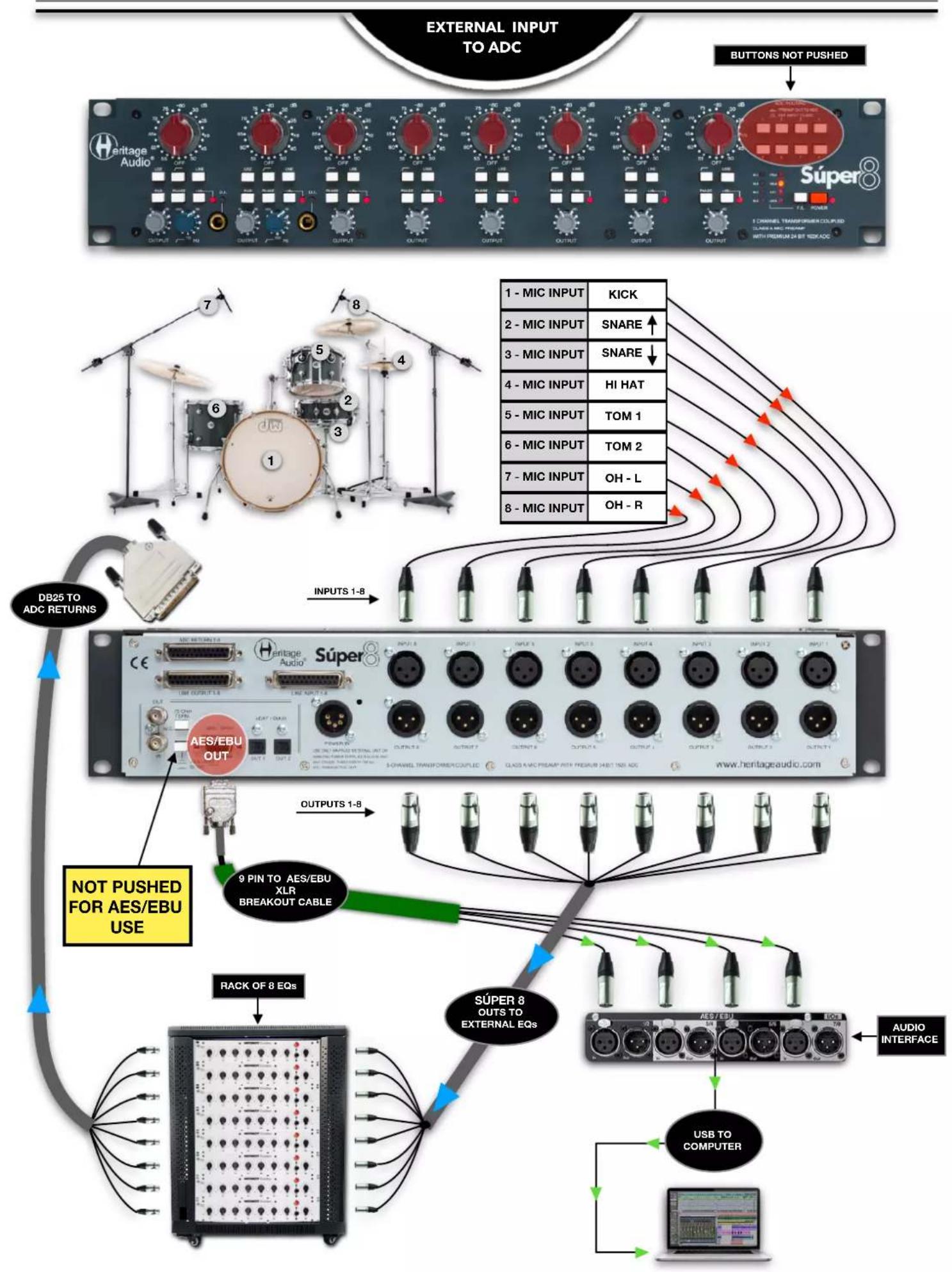
Selectable sampling frequencies from 44.1 kH to 192 kH. Not only can the MIC/Line Preamp outputs be directly sent to the DAC, but there also exists the possibility of choosing an alternative input, per channel, for the digital conversion, making this an extremely flexible unit. This can really come in handy if you need to output the preamps to an EQ or compressor before returning them for digital conversion.
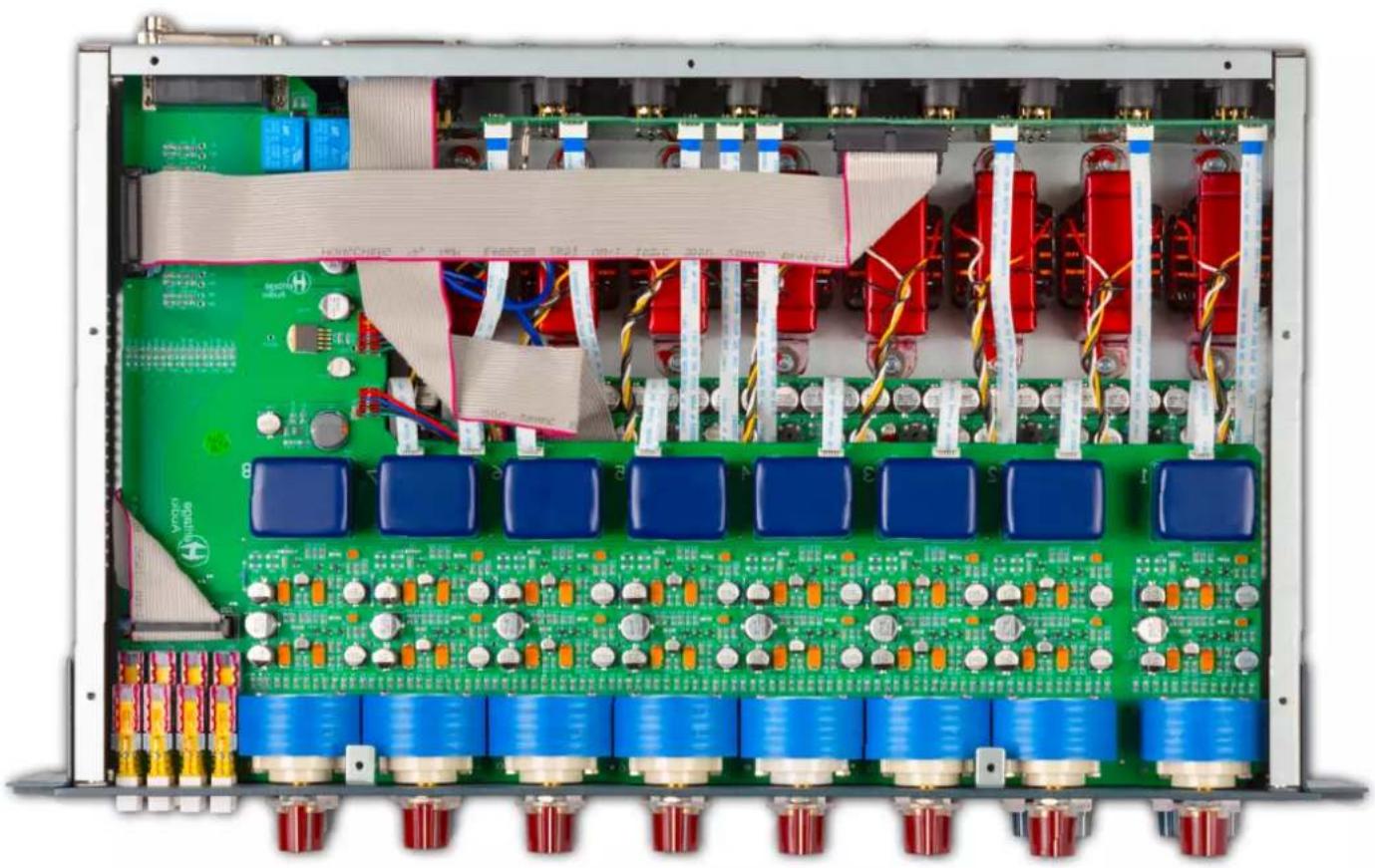
natural_image
Interior view of an electronic control module with green circuit board, blue modules, and red components (no visible text or symbols)FRONT
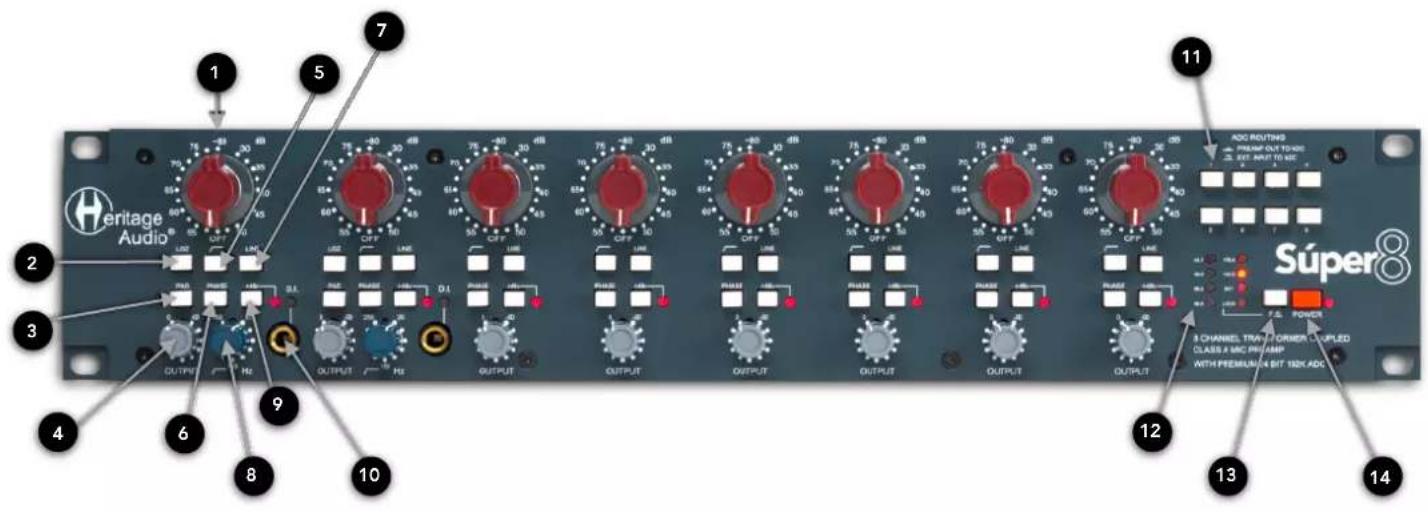
| 1 | 2 | 3 | 4 | 5 |
| INPUT GAIN SWITCH5 dB Steps From 30 to 80 | MIC INPUT IMPEDANCE(Lo z)1200 Ω or 300 Ω when pressed | MIC PAD PUSH BUTTON- 20 dB Pad, Ahead of the Input Transformer | OUTPUT ATTENUATORAttenuates from 0 to Infinity | HIGH PASS FILTER-3 dB at 82 Hz, Discrete Class A |
| 6 | 7 | 8 | 9 | 10 |
| PHASE PUSH BUTTONFlips phase 180° | LINE PUSH BUTTONSwitches from MIC/D.I. to Line | HIGH PASS FREQUENCY SELECTORContinually Adjustable CutOff for HPF | PHANTOM POWER SWITCHTurns Phantom Power On | D.I. INPUTHigh Impedance Class A JFET |
| 11 | 12 | 13 | 14 | |
| ADC ROUTING BUTTONSSwitch Between the Preamp Or the Returned Signal for ADC | FREQUENCY INDICATORSampling Frequency of the ADC | FREQUENCY SELECTOR FOR ADCTo Choose the Desired Sampling Frequency of the ADC | POWER BUTTON ON/OFFTurns the Unit On |
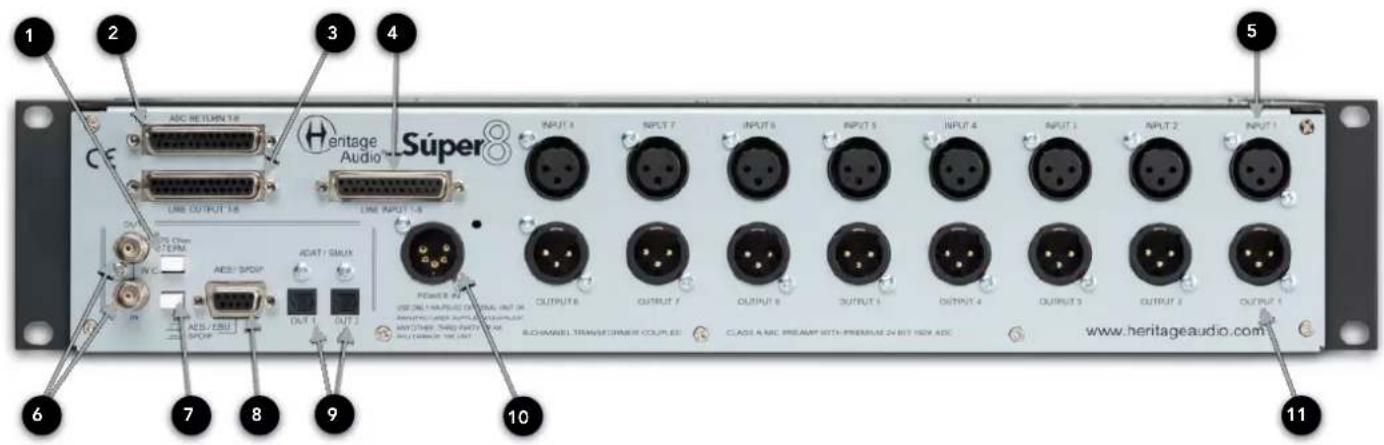
| 1 | 2 | 3 | 4 | 5 |
| 75 Ohm TERM PUSH BUTTONPush to Activate Termination | 25 PIN D-SUB(DB25) CONNECTORADC Returns 1-8 | 25 PIN D-SUB(DB25) CONNECTOR OUTPUTSLine Outputs 1-8 | 25 PIN D-SUB(DB25) CONNECTOR INPUTSLine Inputs 1-8 | INPUTSOn Gold Plated XLRs |
| 6 | 7 | 8 | 9 | 10 |
| BNC IN & OUT CONNECTORConnect for Wordclock Syncing | AES/EBU or SPDIF PUSH BUTTONAlternates Between AES/EBU and SPDIF Formats | AES/EBU & SPDIF 9-PIN CONNECTORConnect Cable to Use Either Format | ADAT - S/MUX Optical PortsOutputs on Digital ADAT Format | EXTERNAL POWER INPUT HA-PSU02On Gold Plated XLR5 |
| 11 | ||||
| OUTPUTSOn Gold Plated XLRs | ||||
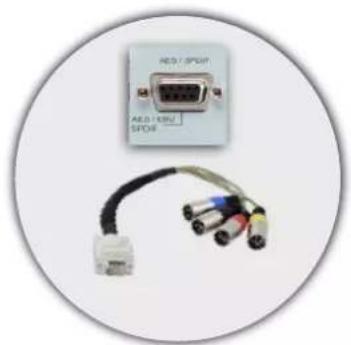
natural_image
Close-up of an electronic device labeled 'AOS / SPORT' connected to a multi-pin cable (no visible text or symbols beyond label)AES/EBU
DIGITAL CONNECTION OPTIONS
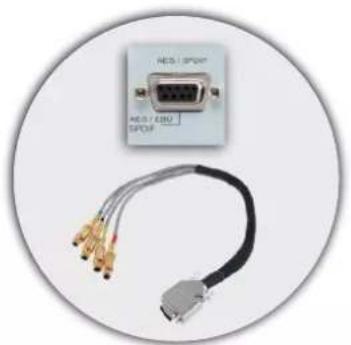
natural_image
Close-up of an electronic device with a USB port and three connected cables (no visible text or symbols)SPDIF
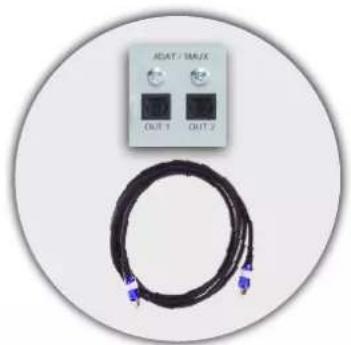
natural_image
Circular device with two black buttons labeled 'ADAT / MAX' and two blue connectors attached to a black cable (no text or symbols on main components)ADAT/SMUX
MIC PRE
WITHOUT CONVERSION
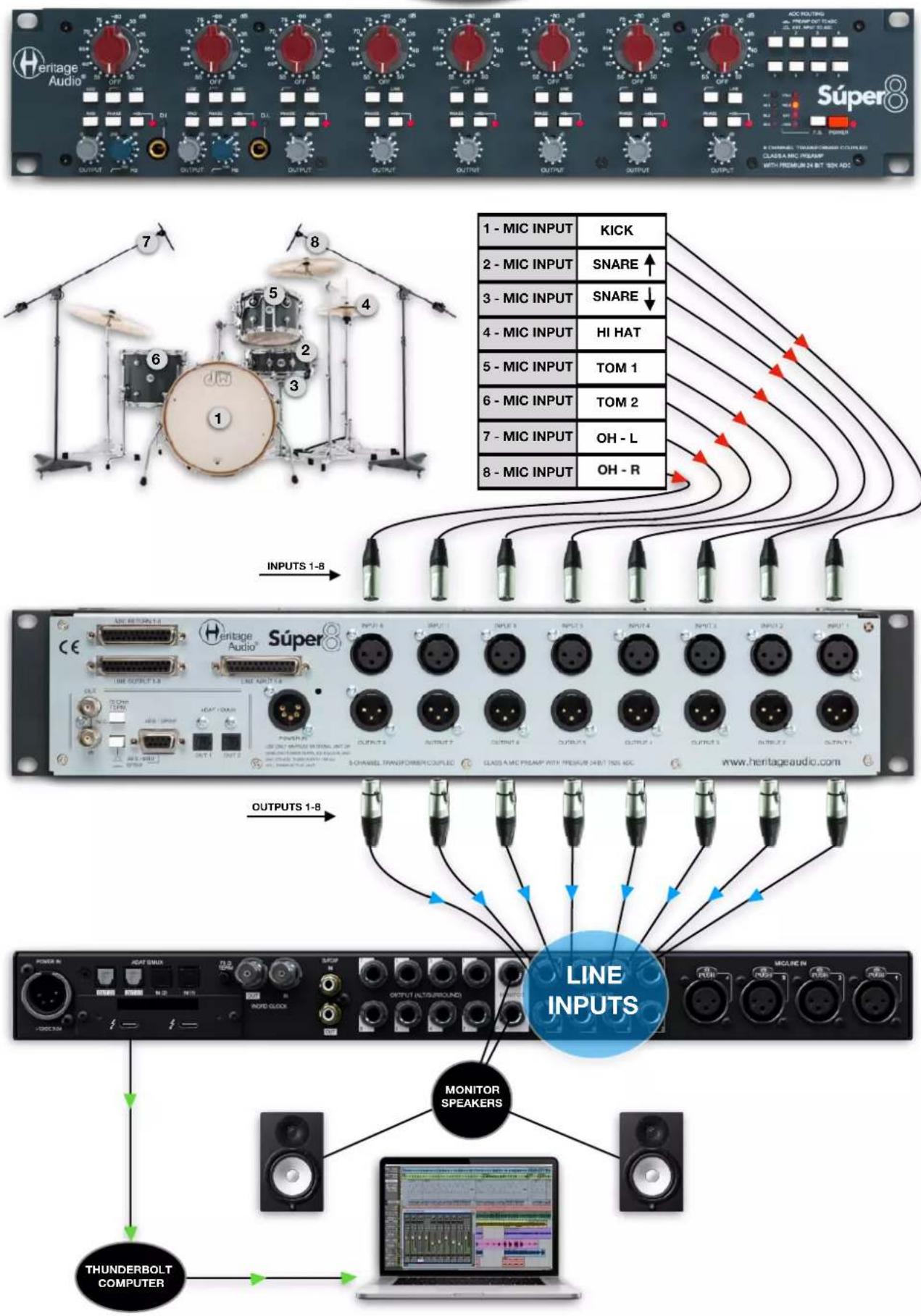
flowchart
graph TD
    A["Line Inputs"] --> B["MONITOR SPEAKERS"]
    B --> C["THUNDERBOLT COMPUTER"]
    C --> D["Output 1-8"]
    D --> E["Line Inputs"]
    E --> F["MONITOR SPEAKERS"]
    F --> G["THUNDERBOLT COMPUTER"]
    G --> H["Output 1-8"]
    H --> I["Line Inputs"]
    I --> J["MONITOR SPEAKERS"]
    J --> K["THUNDERBOLT COMPUTER"]
    K --> L["Output 1-8"]
    L --> M["Line Inputs"]
    M --> N["MONITOR SPEAKERS"]
    N --> O["THUNDERBOLT COMPUTER"]
    O --> P["Output 1-8"]
    P --> Q["Line Inputs"]
    Q --> R["MONITOR SPEAKERS"]
    R --> S["THUNDERBOLT COMPUTER"]
    S --> T["Output 1-8"]
    T --> U["Line Inputs"]
    U --> V["MONITOR SPEAKERS"]
    V --> W["THUNDERBOLT COMPUTER"]
    W --> X["Output 1-8"]
    X --> Y["Line Inputs"]
    Y --> Z["MONITOR SPEAKERS"]
    Z --> AA["THUNDERBOLT COMPUTER"]
    AA --> AB["Output 1-8"]
    AB --> AC["Line Inputs"]
    AC --> AD["MONITOR SPEAKERS"]
    AD --> AE["THUNDERBOLT COMPUTER"]
    AE --> AF["Output 1-8"]
    AF --> AG["Line Inputs"]
    AG --> AH["MONITOR SPEAKERS"]


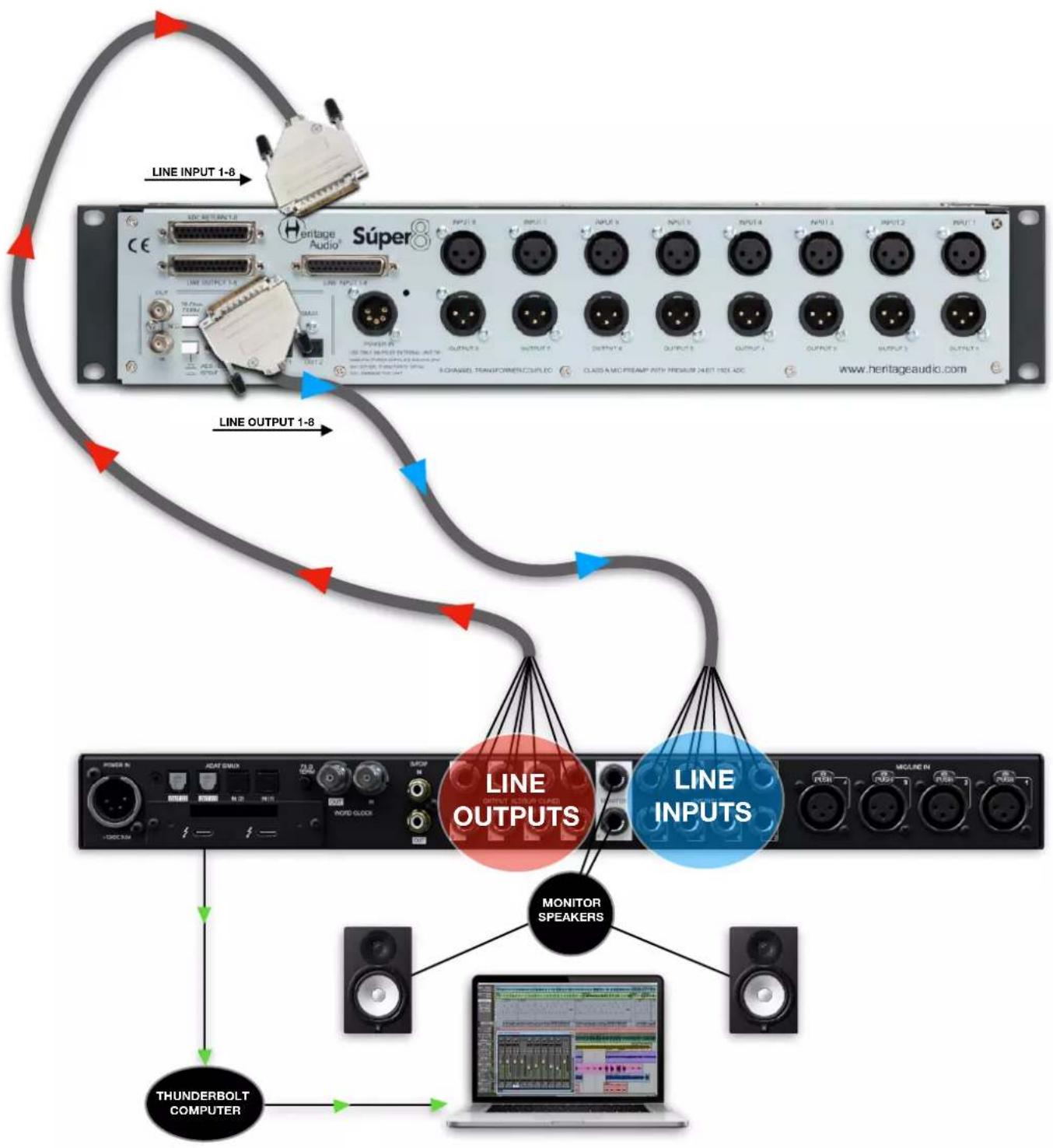
flowchart
graph TD
    A["Line INPUT 1-8"] --> B["Super Audio Súper®"]
    B --> C["LINE OUTPUT 1-8"]
    C --> D["LINE OUTPUT 1-8"]
    D --> E["LINE OUTPUTS"]
    D --> F["LINE INPUTS"]
    E --> G["MONITOR SPEAKERS"]
    F --> H["MONITOR SPEAKERS"]
    G --> I["THUNDERBOLT COMPUTER"]
    H --> I
    I --> J["Laptop with monitor"]
flowchart
graph TD
    A["Input 1-8"] --> B["ADAT OUT1"]
    B --> C["WORD CLOCK OUT"]
    C --> D["THUNDERBOLT COMPUTER"]
    D --> E["MONITOR SPEAKERS"]
    E --> F["Output (ALTOUROUND)"]
    F --> G["LINE INPUT"]
    G --> H["NOTED OUTPUT"]
    H --> I["NOTED OUTPUT"]
    I --> J["NOTED OUTPUT"]
    J --> K["NOTED OUTPUT"]
    K --> L["NOTED OUTPUT"]
    L --> M["NOTED OUTPUT"]
    M --> N["NOTED OUTPUT"]
    N --> O["NOTED OUTPUT"]
    O --> P["NOTED OUTPUT"]
    P --> Q["NOTED OUTPUT"]
    Q --> R["NOTED OUTPUT"]
    R --> S["NOTED OUTPUT"]
    S --> T["NOTED OUTPUT"]
    T --> U["NOTED OUTPUT"]
    U --> V["NOTED OUTPUT"]
    V --> W["NOTED OUTPUT"]
    W --> X["NOTED OUTPUT"]
    X --> Y["NOTED OUTPUT"]
    Y --> Z["NOTED OUTPUT"]
    Z --> AA["NOTED OUTPUT"]
    AA --> AB["NOTED OUTPUT"]
    AB --> AC["NOTED OUTPUT"]
    AC --> AD["NOTED OUTPUT"]
    AD --> AE["NOTED OUTPUT"]
    AE --> AF["NOTED OUTPUT"]
    AF --> AG["NOTED OUTPUT"]
    AG --> AH["NOTED OUTPUT"]
    AH --> AI["NOTED OUTPUT"]
    AI --> AJ["NOTED OUTPUT"]
    AJ --> AK["NOTED OUTPUT"]
    AK --> AL["NOTED OUTPUT"]
    AL --> AM["NOTED OUTPUT"]
    AM --> AN["NOTED OUTPUT"]
    AN --> AO["NOTED OUTPUT"]
    AO --> AP["NOTED OUTPUT"]
    AP --> AQ["NOTED OUTPUT"]
    AQ --> AR["NOTED OUTPUT"]
    AR --> AS["NOTED OUTPUT"]
    AS --> AT["NOTED OUTPUT"]
    AT --> AU["NOTED OUTPUT"]
    AU --> AV["NOTED OUTPUT"]
    AV --> AW["NOTED OUTPUT"]
    AW --> AX["NOTED OUTPUT"]
    AX --> AY["NOTED OUTPUT"]
flowchart
graph TD
    A["External Input TO ADC"] --> B["Chamber 1-8"]
    B --> C["Chamber 7-8"]
    C --> D["Chamber 5-6"]
    D --> E["Chamber 4-3"]
    E --> F["Chamber 3-2"]
    F --> G["Chamber 2-1"]
    G --> H["Chamber 1-0"]
    H --> I["Chamber 0-1"]
    I --> J["Chamber 0-2"]
    J --> K["Chamber 0-3"]
    K --> L["Chamber 0-4"]
    L --> M["Chamber 0-5"]
    M --> N["Chamber 0-6"]
    N --> O["Chamber 0-7"]
    O --> P["Chamber 0-8"]
    P --> Q["Chamber 0-9"]
    Q --> R["Chamber 0-10"]
    R --> S["Chamber 0-11"]
    S --> T["Chamber 0-12"]
    T --> U["Chamber 0-13"]
    U --> V["Chamber 0-14"]
    V --> W["Chamber 0-15"]
    W --> X["Chamber 0-16"]
    X --> Y["Chamber 0-17"]
    Y --> Z["Chamber 0-18"]
    Z --> AA["Chamber 0-19"]
    AA --> AB["Chamber 0-20"]
    AB --> AC["Chamber 0-21"]
    AC --> AD["Chamber 0-22"]
    AD --> AE["Chamber 0-23"]
    AE --> AF["Chamber 0-24"]
    AF --> AG["Chamber 0-25"]
    AG --> AH["Chamber 0-26"]
    AH --> AI["Chamber 0-27"]
    AI --> AJ["Chamber 0-28"]
    AJ --> AK["Chamber 0-29"]
    AK --> AL["Chamber 0-30"]
    AL --> AM["Chamber 0-31"]
    AM --> AN["Chamber 0-32"]
    AN --> AO["Chamber 0-33"]
    AO --> AP["Chamber 0-34"]
    AP --> AQ["Chamber 0-35"]
    AQ --> AR["Chamber 0-36"]
    AR --> AS["Chamber 0-37"]
    AS --> AT["Chamber 0-38"]
    AT --> AU["Chamber 0-39"]
    AU --> AV["Chamber 0-40"]
    AV --> AW["Chamber 0-41"]
    AW --> AX["Chamber 0-42"]
    AX --> AY["Chamber 0-43"]
    AY --> AZ["Chamber 0-44"]
    AZ --> BA["Chamber 0-45"]
    BA --> BB["Chamber 0-46"]
    BB --> BC["Chamber 0-47"]
    BC --> BD["Chamber 0-48"]
    BD --> BE["Chamber 0-49"]
    BE --> BF["Chamber 0-50"]
    BF --> BG["Chamber 0-51"]
    BG --> BH["Chamber 0-52"]
    BH --> BI["Chamber 0-53"]
    BI --> BJ["Chamber 0-54"]
    BJ --> BK["Chamber 0-55"]
    BK --> BL["Chamber 0-56"]
    BL --> BM["Chamber 0-57"]
    BM --> BN["Chamber 0-58"]
    BN --> BO["Chamber 0-59"]
    BO --> BP["Chamber 0-60"]
    BP --> BQ["SUPER 8 OUTS TO EXTERNAL EQs"]
    BQ --> BR["SUPER 8 OUTS TO EXTERNAL EQs"]
    BR --> BS["SUPER 8 OUTS TO EXTERNAL EQs"]
    BS --> BT["SUPER 8 OUTS TO EXTERNAL EQs"]
    BT --> BU["SUPER 8 OUTS TO EXTERNAL EQs"]

    subgraph External Inputs
        C1["DB25 TO ADC RETURNS"] --> D1["AES/EBU OUT"] & E1["RACK OF 8 EQs"] & E2["SUPER 8 OUTS TO EXTERNAL EQs"] & E3["SUPER 8 OUTS TO EXTERNAL EQs"] & E4["SUPER 8 OUTS TO EXTERNAL EQs"] & E5["SUPER 8 OUTS TO EXTERNAL EQs"] & E6["SUPER 8 OUTS TO EXTERNAL EQs"] & E7["SUPER 8 OUTS TO EXTERNAL EQs"] & E8["SUPER 8 OUTS TO EXTERNAL EQs"] & E9["SUPER 8 OUTS TO EXTERNAL EQs"] & E10["SUPER 8 OUTS TO EXTERNAL EQs"] & E11["SUPER 8 OUTS TO EXTERNAL EQs"] & E12["SUPER 8 OUTS TO EXTERNAL EQs"] & E13["SUPER 8 OUTS TO EXTERNAL EQs"] & E14["SUPER 8 OUTS TO EXTERNAL EQs"] & E15["SUPER 8 OUTS TO EXTERNAL EQs"] & E16["SUPER 8 OUTS TO EXTERNAL EQs"] & E17["SUPER 8 OUTS TO EXTERNAL EQs"] & E18["SUPER 8 OUTS TO EXTERNAL EQs"] & E19["SUPER 8 OUTS TO EXTERNAL EQs"] & E20["SUPER 8 OUTS TO EXTERNAL EQs"] & E21["SUPER 8 OUTS TO EXTERNAL EQs"] & E22["SUPER 8 OUTS TO EXTERNAL EQs"] & E23["SUPER 8 OUTS TO EXTERNAL EQs"] & E24["SUPER 8 OUTS TO EXTERNAL EQs"] & E25["SUPER 8 OUTS TO EXTERNAL EQs"] & E26["SUPER 8 OUTS TO EXTERNAL EQs"] & E27["SUPER 8 OUTS TO EXTERNAL EQs"] & E28["SUPER 8 OUTS TO EXTERNAL EQs"] & E29["SUPER 8 OUTS TO EXTERNAL EQs"] & E30["SUPER 8 OUTS TO EXTERNAL EQs"] & E31["SUPER 8 OUTS TO EXTERNAL EQs"] & E32["SUPER 8 OUTS TO EXTERNAL EQs"] & E33["SUPER 8 OUTS TO EXTERNAL EQs"] & E34["SUPER 8 OUTS TO EXTERNAL EQs"] & E35["SUPER 8 OUTS TO EXTERNAL EQs"] & E36["SUPER 8 OUTS TO EXTERNAL EQs"] & E37["SUPER 8 OUTS TO EXTERNAL EQs"] & E38["SUPER 8 OUTS TO EXTERNAL EQs"] & E39["SUPER 8 OUTS TO EXTERNAL EQs"] & E40["SUPER 8 OUTS TO EXTERNAL EQs"] & E41["SUPER 8 OUTS TO EXTERNAL EQs"] & E42["SUPER 8 OUTS TO EXTERNAL EQs"] & E43["SUPER 8 OUTS TO EXTERNAL EQs"] & E44["SUPER 8 OUTS TO EXTERNAL EQs"] & E45["SUPER 8 OUTS TO EXTERNAL EQs"] & E46["SUPER 8 OUTS TO EXTERNAL EQs"] & E47["SUPER 8 OUTS TO EXTERNAL EQs"] & E48["SUPER 8 OUTS TO EXTERNAL EQs"] & E49["SUPER 8 OUTS TO EXTERNAL EQs"] & E50["SUPER 8 OUTS TO EXTERNAL EQs"] & E51["SUPER 8 OUTS TO EXTERNAL EQs"] & E52["SUPER 8 OUTS TO EXTERNAL EQs"] & E53["SUPER 8 OUTS TO EXTERNAL EQs"] & E54["SUPER 8 OUTS TO EXTERNAL EQs"] & E55["SUPER 8 OUTS TO EXTERNAL EQs"] & E56["SUPER 8 OUTS TO EXTERNAL EQs"] & E57["SUPER 8 OUTS TO EXTERNAL EQs"] & E58["SUPER 8 OUTS TO EXTERNAL EQs"] & E59["SUPER 8 OUTS TO EXTERNAL EQs"] & E60["SUPER 8 OUTS TO EXTERNAL EQs"] & E61["SUPER 8 OUTS TO EXTERNAL EQs"] & E62["SUPER 8 OUTS TO EXTERNAL EQs"] & E63["SUPER 8 OUTS TO EXTERNAL EQs"] & E64["SUPER 8 OUTS TO EXTERNAL EQs"] & E65["SUPER 8 OUTS TO EXTERNAL EQs"] & E66["SUPER 8 OUTS TO EXTERNAL EQs"] & E67["SUPER 8 OUTS TO EXTERNAL EQs"] & E68["SUPER 8 OUTS TO EXTERNAL EQs"] & E69["SUPER 8 OUTS TO EXTERNAL EQs"] & E70["SUPER 8 OUTS TO EXTERNAL EQs"] & E71["SUPER 8 OUTS TO EXTERNAL EQs"] & E72["SUPER 8 OUTS TO EXTERNAL EQs"] & E73["SUPER 8 OUTS TO EXTERNAL EQs"] & E74["SUPER 8 OUTS TO EXTERNAL EQs"] & E75["SUPER 8 OUTS TO EXTERNAL EQs"] & E76["SUPER 8 OUTS TO EXTERNAL EQs"] & E77["SUPER 8 OUTS TO EXTERNAL EQs"] & E78["SUPER 8 OUTS TO EXTERNAL EQs"] & E79["SUPER 8 OUTS TO EXTERNAL EQs"] & E80["SUPER 8 OUTS TO EXTERNAL EQs"] & E81["SUPER 8 OUTS TO EXTERNAL EQs"] & E82["SUPER 8 OUTS TO EXTERNAL EQs"] & E83["SUPER 8 OUTS TO EXTERNAL EQs"] & E84["SUPER 8 OUTS TO EXTERNAL EQs"] & E85["SUPER 8 OUTS TO EXTERNAL EQs"] & E86["SUPER 8 OUTS TO EXTERNAL EQs"] & E87["SUPER 8 OUTS TO EXTERNAL EQs"] & E88["SUPER 8 OUTS TO EXTERNAL EQs"] & E89["SUPER 8 OUTS TO EXTERNAL EQs"] & E90["SUPER 8 OUTS TO EXTERNAL EQs"] & E91["SUPER 8 OUTS TO EXTERNAL EQs"] & E92["SUPER 8 OUTS TO EXTERNAL EQs"] & E93["SUPER 8 OUTS TO EXTERNAL EQs"] & E94["SUPER 8 OUTS TO EXTERNAL EQs"] & E95["SUPER 8 OUTS TO EXTERNAL EQs"] & E96["SUPER 8 OUTS TO EXTERNAL EQs"] & E97["SUPER 8 OUTS TO EXTERNAL EQs"] & E98["SUPER 8 OUTS TO EXTERNAL EQs"] & E99["SUPER 8 OUTS TO EXTERNAL EQs"] & F00["SUPER 8 OUTS TO EXTERNAL EQs"] & F01["SUPER 8 OUTS TO EXTERNAL EQs"] & F02["SUPER 8 OUTS TO EXTERNAL EQs"] & F03["SUPER 8 OUTS TO EXTERNAL EQs"] & F04["SUPER 8 OUTS TO EXTERNAL EQs"] & F05["SUPER 8 OUTS TO EXTERNAL EQs"] & F06["SUPER 8 OUTS TO EXTERNAL EQs"] & F07["SUPER 8 OUTS TO EXTERNAL EQs"] & F08["SUPER 8 OUTS TO EXTERNAL EQs"] & F09["SUPER 8 OUTS TO EXTERNAL EQs"] & F10["SUPER 8 OUTS TO EXTERNAL EQs"] & F11["SUPER 8 OUTS TO EXTERNAL EQs"] & F12["SUPER 8 OUTS TO EXTERNAL EQs"] & F13["SUPER 8 OUTS TO EXTERNAL EQs"] & F14["SUPER 8 OUTS TO EXTERNAL EQs"] & F15["SUPER 8 OUTS TO EXTERNAL EQs"] & F16["SUPER 8 OUTS TO EXTERNAL EQs"] & F17["SUPER 8 OUTS TO EXTERNAL EQs"] & F18["SUPER 8 OUTS TO EXTERNAL EQs"] & F19["SUPER 8 OUTS TO EXTERNAL EQs"] & F20["SUPER 8 OUTS TO EXTERNAL EQs"] & F21["SUPER 8 OUTS TO EXTERNAL EQs"] & F22["SUPER 8 OUTS TO EXTERNAL EQs"] & F23["SUPER 8 OUTS TO EXTERNAL EQs"] & F24["SUPER 8 OUTS TO EXTERNAL EQs"] & F25["SUPER 8 OUTS TO EXTERNAL EQs"]
All DB25 multi pin connectors are TASCAM protocol. This same protocol is also used by AVID amongst many others, and is a follows:
Pin-out for TASCAM DB25 8 Channel Balanced Connector
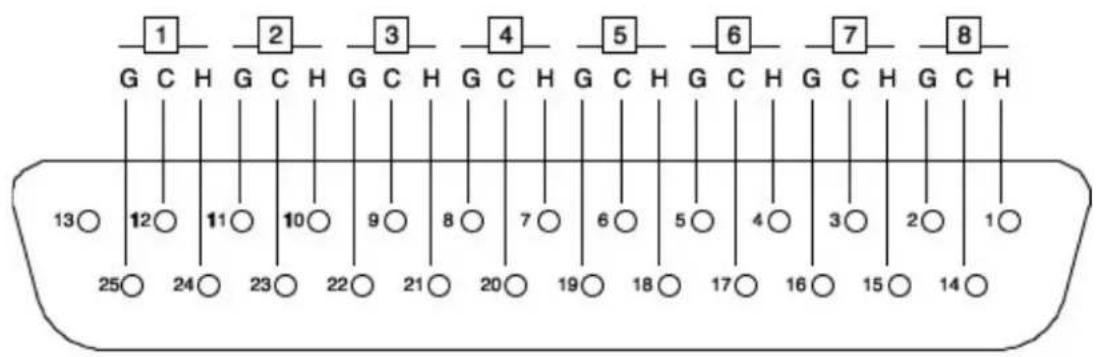
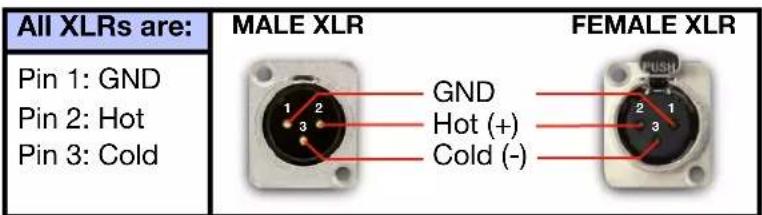
$$ G = G R O U N D $$
The list of the DB25 connectors used and their corresponding channels are as follows:
CHANNEL INPUTS 1-8:
| TASCAM DSUB CHANNEL # | CHANNEL I/P 1-8 |
| 1 | INPUT # 1 |
| 2 | INPUT # 2 |
| 3 | INPUT # 3 |
| 4 | INPUT # 4 |
| 5 | INPUT # 5 |
| 6 | INPUT # 6 |
| 7 | INPUT # 7 |
| 8 | INPUT # 8 |
CHANNEL OUTPUTS 1-8:
| TASCAM DSUB CHANNEL # | CHANNEL O/P 1-8 |
| 1 | OUTPUT # 1 |
| 2 | OUTPUT # 2 |
| 3 | OUTPUT # 3 |
| 4 | OUTPUT # 4 |
| 5 | OUTPUT # 5 |
| 6 | OUTPUT # 6 |
| 7 | OUTPUT # 7 |
| 8 | OUTPUT # 8 |
ADC RETURNS 1-8:
| TASCAM DSUB CHANNEL # | ADC RETURNS 1-8 |
| 1 | ADC RETURNS # 1 |
| 2 | ADC RETURNS # 2 |
| 3 | ADC RETURNS # 3 |
| 4 | ADC RETURNS # 4 |
| 5 | ADC RETURNS # 5 |
| 6 | ADC RETURNS # 6 |
| 7 | ADC RETURNS # 7 |
| 8 | ADC RETURNS # 8 |
It is worth noting that, in order to avoid ground loops, the DB25 ground connections are lifted on the Súper 8 side, leaving the ground paths of your DB25 snakes only acting as shields and preventing any current returns.
ANALOG I/O
- Microphone input impedance only channels 1 & 2: High=1200 Ω minimum; Low=300 Ω minimum. Higher gain positions gradually have greater impedances, optimum for low gain ribbon mics. Input is transformer balanced and floating.
- Microphone input impedance only channels 3-8: High=1200 Ω minimum.
• Line input impedance: 10 kΩ bridging, transformer balanced and floating. - Output impedance: Less than 75 Ω, transformer balanced and floating, to drive a load of 600 Ω.
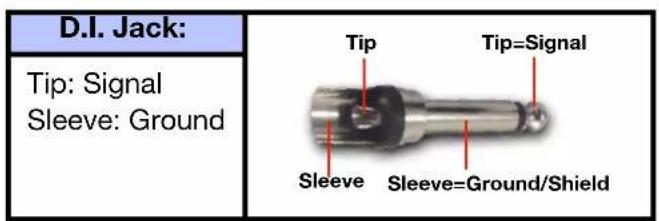
• D.I. input impedance: Greater than 2 MΩ, unbalanced (Only Channels 1 & 2).
• Maximum output: Greater than +26,5 dBu into 600 Ω (internally terminated).
• THD: Less than 0,025 % at 1 kHz, Less than 0,05 % at 100 Hz.
• Frequency response: 20 Hz (+0,3 dB) to 20 kHz (-0,2 dB).
• Maximum Gain: Slightly greater than 80 dB.
• Equivalent Input Noise: Less than -125 dBu. - Output stage noise: Less than -100 dBu.
DIGITAL CONNECTIONS
S/PDIF
- Connector Type: 9 PIN Breakout Cable (RCA).
- Format: IEC 958.
• Supported Sample rates (kHz): 44.1, 48, 88.2, 96, 176.4, 192.
AES/EBU
- Connector Type: 9 PIN Breakout Cable (XLR).
- Format: IEC 60958.
• Supported Sample rates (kHz): 44.1, 48, 88.2, 96, 176.4, 192.
ADAT
- Connector Type: Optical TOSLINK JIS F05.
- Format: ADAT Digital Lightpipe with S/MUX.
• Supported Sample rates (kHz): 44.1, 48, 88.2, 96, 176.4, 192. - Channel Assignments @ 44.1 kHz, 48 kHz: Port 1 = Channels 1 - 8, Port 2 = 1 - 8 (mirrored).
- Channel Assignments @ 88.2 kHz, 96 kHz: Port 1 = Channels 1 - 4, Port 2 = Channels 5 - 8.
- Channel Assignments @ 176.4 kHz, 192 kHz: Port 1 = Channels 1 - 2, Port 2 = Channels 3 - 4.
Word Clock
- Connector Type: BNC.
- Word Clock Input Termination: 75 Ω, switchable.
Synchronization Sources
- Internal, Word Clock (EXTERNAL).
Dimensions/Weight
- Dimensions (W x H x L): 280 mm x 88 mm (2 Rack units) x 482 mm.
- Weight: 9,450 Kg
flowchart
graph TD
    A["MIC/LINE INPUT"] --> B["CARNHILL TRANSPORTERS LLC"]
    C["D.I."] --> B
    D["PAD"] --> E["INPUT AMP"]
    F["LOZ"] --> E
    B --> G["HIGH PASS FILTER"]
    G --> H["OUTPUT AMP"]
    H --> I["CARNHILL"]
    J["HPF FREQ SELECTOR"] --> G
    K["WORD CLOCK"] --> I
    L["ANALOG DIGITAL CONVERTER"] --> I
    M["LINE OUTPUT"] --> I
    I --> N["PHASE"]
    N --> O["Output"]
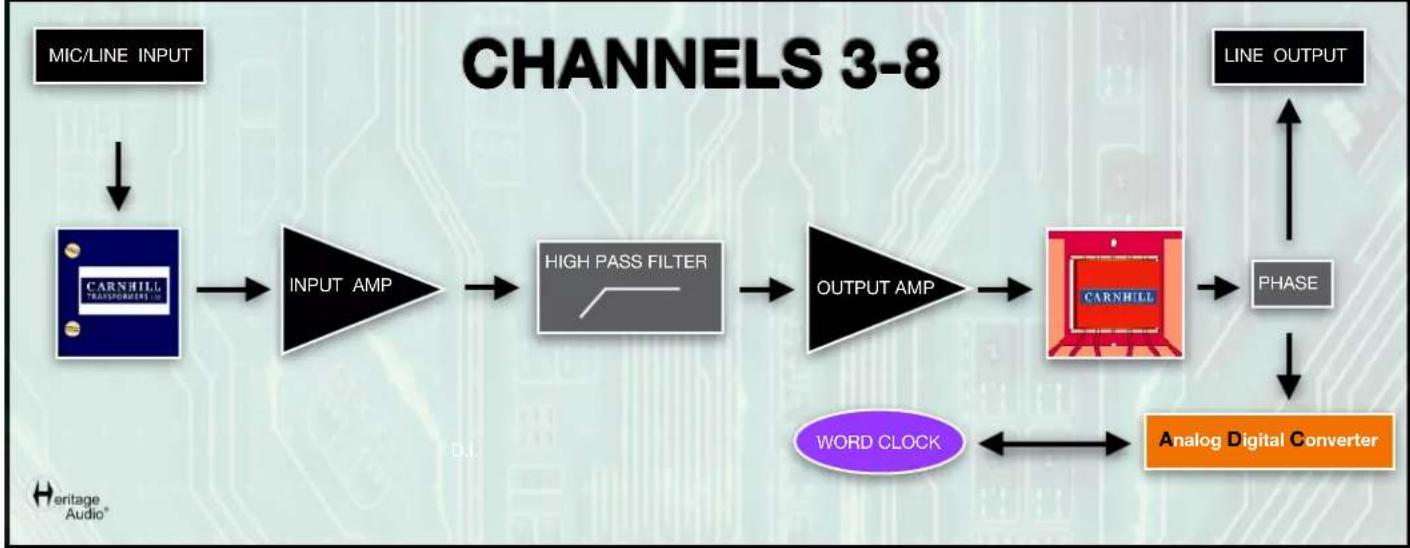
flowchart
graph LR
    A["MIC/LINE INPUT"] --> B["CARNHILL TRANSPORTERS"]
    B --> C["INPUT AMP"]
    C --> D["HIGH PASS FILTER"]
    D --> E["OUTPUT AMP"]
    E --> F["CARNHILL"]
    F --> G["PHASE"]
    G --> H["Analog Digital Converter"]
    H --> I["WORD CLOCK"]
    I --> F
    J["LINE OUTPUT"] --> G
    style A fill:#000,stroke:#fff,color:#fff
    style B fill:#000,stroke:#fff,color:#fff
    style C fill:#000,stroke:#fff,color:#fff
    style D fill:#000,stroke:#fff,color:#fff
    style E fill:#000,stroke:#fff,color:#fff
    style F fill:#000,stroke:#fff,color:#fff
    style G fill:#000,stroke:#fff,color:#fff
    style H fill:#000,stroke:#fff,color:#fff
    style I fill:#000,stroke:#fff,color:#fff
    style J fill:#000,stroke:#fff,color:#fff

natural_image
Abstract black-and-white graphic of a question mark with a human head silhouette and a small symbol below (no text or symbols present)
natural_image
Illustration of a light bulb with a black double-headed symbol inside, no text or labels present.| PROBLEMS | SOLUTIONS |
| There doesn't appear to be any signal at all arriving at the back XLR. | Make sure the GAIN knob is not in the 'Off' position. |
| There still doesn't appear to be any signal at all arriving at the back XLR. | Check to see if a jack cable has been left plugged into the front panel D.I. |
| Even at the lowest position on the GAIN knob I still have too much gain. | When this happens you should activate the PAD button. This will reduce the input by 20dB ahead of the input transformer. |
| Condenser microphones don't seem to work with Súper 8. | Make sure the red +48 V button is pressed in to activate the phantom power sent to the microphone. |
| There doesn't seem to be any output at all from the unit. | Check to see if the OUTPUT knob is fully turned down as this will attenuate the signal completely. |
| Sending a signal to the unit from a DAW overloads it terrible. | It is necessary to press the LINE button when sending it a line level source.If not, it is expecting a Microphone signal with a very different impedance. |
| There is no signal arriving from the ADC. | Make sure the corresponding button in the ADC Routing is pressed if the Preamps direct out is desired. |
| There is still no signal arriving from the ADC. | Double check that the appropriate connector is indeed inserted properly. |
| There are clicks being generated. | Make sure you have selected the correct Sampling Frequency. |
| There are clicks being generated. | Make sure you are using a BNC cable to connect the Word Clock if being slaved. |
| There are unexpected noises and/or jitter being produced. | If your unit is the last in a group of digitally synced u you should press the '75 Ohm Term' button. |
| I have everything connected correctly but I'm still not receiving any signal in my DAW. | Make sure you have selected the correct INPUT routing in your DAW. |
| I have everything connected correctly to use the SPDIF output but there is no signal arriving at the DAW. | Make sure you have correctly selected the button that choose either SPDIF or AES/EBU. |
* For any further doubts or questions please get in contact with us at: support@heritageaudio.com
LIMITED 2 YEAR WARRANTY
Heritage Audio Súper 8 is warranted by Heritage Audio SL to be free from defects in materials and workmanship for the period of 2 years to the original purchaser. In the event of such defects, the product will be repaired without charge or, at our option, replaced with a new one if delivered to Heritage Audio prepaid, together with a copy of the sales slip or other proof of purchase date. The warranty excludes problems due to normal wear, abuse, shipping damage or failure to use the product in accordance with the specifications.
Heritage Audio shall not be liable for damages based upon inconvenience, loss of use of the product, loss of time, interrupted operation or commercial loss or any other damages, whether incidental, consequential or otherwise.
This warranty is not transferable.
Heritage Audio and the Heritage Audio "H" logos are registered Trademarks owned and/or licensed by Heritage Audio.
REGISTRATION
Please visit our website: https://heritageaudio.com/registration/

Session / Title: ____ Track: ____ Connected Equipment:
Switch ON Switch OFF
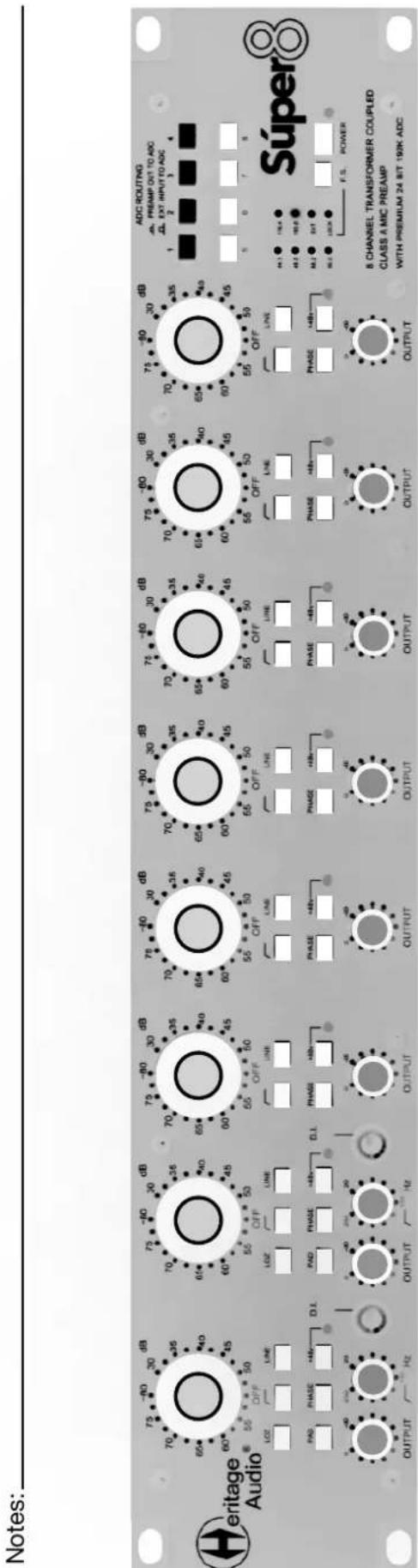
Session / Title: ____ Track: ____ Connected Equipment:
Switch ON Switch OFF
Notes:

natural_image
Abstract black and white diagonal line design (no text or symbols)
www.heritageaudio.com
HERITAGE AUDIO. C/ Alfonso Gómez, 38, 3C. 28037 Madrid – Spain. Tel: +34 917 266 189
info@heritageaudio.com
Brand : Heritage Audio
Model : Súper 8
Category : Receiver