
SPK6303 - Keyboard PHILIPS - Free user manual and instructions
Find the device manual for free SPK6303 PHILIPS in PDF.


Pick your language and provide your email: we'll send you a specifically translated version.
| Product Type | Keyboard |
| Brand | Philips |
| Model | SPK6303 |
| Connectivity | Wired USB |
| Layout | Full-size (104 keys) with numeric keypad |
| Dimensions (W x D x H) | 440 x 140 x 30 mm |
| Weight | 600 g |
| Cable Length | 1.5 m |
| Compatibility | Windows, macOS, Linux |
| Key Switch Type | Membrane |
| Key Life | 10 million keystrokes |
| Power Source | USB bus power (5V, 100mA) |
| Color | Black |
| Special Features | Multimedia keys, splash-resistant design |
| Cleaning | Wipe with a damp cloth; avoid liquids entering the keyboard |
| Safety Certifications | CE, FCC, RoHS |
| Spare Parts Availability | Not sold separately; replace entire unit if faulty |
| Repairability | Low; sealed construction intended for replacement |
Frequently Asked Questions - SPK6303 PHILIPS
How do I clean my Philips SPK6303 keyboard?
Unplug the keyboard. Use a soft, lint-free cloth slightly dampened with water or a mild cleaning solution. Gently wipe the keys and surface. Avoid using alcohol or abrasive cleaners. Do not let any liquid drip into the keys.
Is the SPK6303 compatible with Mac computers?
Yes, the SPK6303 is a standard USB HID keyboard and works with macOS out of the box. No additional drivers are needed. The multimedia keys may require configuration in System Preferences.
How can I adjust the typing angle?
The keyboard has fold-out legs at the back. Flip them out to raise the keyboard to a desired angle for ergonomic typing. The legs have two positions: a lower and a higher angle.
Why is my keyboard not working in BIOS/UEFI?
Ensure the keyboard is connected directly to a USB port on the motherboard (not a front panel or hub). Some BIOS settings require legacy USB support to be enabled. Check your motherboard manual.
Can I use the SPK6303 wirelessly?
No, the SPK6303 is a wired keyboard. It connects via a USB cable and does not have Bluetooth or wireless capabilities.
How do I use the multimedia keys?
The multimedia keys (play/pause, volume, etc.) are dedicated function keys. Press them directly; no special software is required. Their functionality may vary depending on your operating system and media player.
What should I do if some keys are sticking or not responding?
First, try cleaning underneath the sticky key with compressed air or a keycap puller if available. If the issue persists, the keyboard may have a hardware defect. Contact Philips support for warranty assistance.
Does the SPK6303 come with a warranty?
Yes, Philips typically offers a 1-year limited warranty on keyboards. Proof of purchase is required. Check your local Philips website for details on warranty coverage.
Can I connect this keyboard to a tablet or smartphone?
Yes, if your tablet or smartphone has a USB port (OTG support) and can connect to a wired keyboard. For devices without USB-A, you'll need an appropriate adapter. However, full functionality depends on the device.
Does the keyboard have a backlit feature?
No, the SPK6303 does not include backlighting. The keys are not illuminated, so it is best used in a well-lit environment or with external lighting.
User questions about SPK6303 PHILIPS
0 question about this device. Answer the ones you know or ask your own.
Ask a new question about this device
No questions yet. Be the first to ask one.
Download the instructions for your Keyboard in PDF format for free! Find your manual SPK6303 - PHILIPS and take your electronic device back in hand. On this page are published all the documents necessary for the use of your device. SPK6303 by PHILIPS.
USER MANUAL SPK6303 PHILIPS
尺寸:65*100mm
平面展开:195*200mm
材质:70克书写纸
颜色:单黑印刷/无表面处理
料号:
正面1
正面2
正面3
 使用说明书 使用说明书 | SPK6303蓝牙无线键盘使用说明书 | 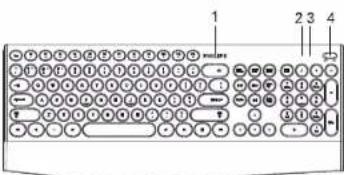 | 功能概述1.产品丝印LOGO 5.电池槽2.2.4G蓝牙状态指示灯 6.固定螺丝3.大小写指示灯 7.键盘底贴4.电源开关 8.键盘脚撑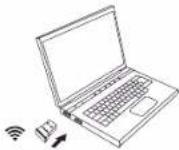 模式切换方法1.按Fn+主键区数字键1为切换无线2.4G(指示灯闪灯灯)2.按Fn+主键区数字键2为切换蓝牙1(指示灯闪蓝灯)3.按Fn+主键区数字键3为切换蓝牙2(指示灯闪绿灯) 模式切换方法1.按Fn+主键区数字键1为切换无线2.4G(指示灯闪灯灯)2.按Fn+主键区数字键2为切换蓝牙1(指示灯闪蓝灯)3.按Fn+主键区数字键3为切换蓝牙2(指示灯闪绿灯) |
 2019 © Top Victory Investments Limited 保留所有权利。Philips 和 Philips 面就是 Koninklijke Philips N.V. 的注册商标,并经许可后使用。本产品由 Top Victory Investments Limited 或其附属公司或者其授权公司制造和销售。Top Victory Investments Limited 是此产品的相关担保人。中国制造通过下面网站,注册你的产品以获取支持www.philips.com/welcome 2019 © Top Victory Investments Limited 保留所有权利。Philips 和 Philips 面就是 Koninklijke Philips N.V. 的注册商标,并经许可后使用。本产品由 Top Victory Investments Limited 或其附属公司或者其授权公司制造和销售。Top Victory Investments Limited 是此产品的相关担保人。中国制造通过下面网站,注册你的产品以获取支持www.philips.com/welcome | 完整套件包括-蓝牙无线键盘-无线接收器-使用说明书/保修卡系统要求-1×USB端口或蓝牙4.0及以上版本-蓝牙连接要求:Windows 8、Windows 10或更高版本;Android 5.0或更高版本;Mac OS X10.5或更高版本-2.4G连接要求:Windows 7、Windows 8、Windows 10、Windows XP、Windows Vista、Mac OS系统故障排除问题提示1.确保蓝牙功能打开并能正常使用。2.确保电接满足最低系统要求。3.遇有不能解决的问题,请不要自行拆卸,登陆官网寻求解决方法或还原近经销商处理。注意:清洁键盘请使用干燥、柔软的棉织品等,键盘不能用水冲洗。环境信息旧产品处理您的产品使用优质原材料和部件设计制造,可以回收和再利用。产品上标有“打叉的垃圾塔”符号时,表示该产品符合 European Directive 2002/96/EC的要求。请注意了解有关当地电子电气产品分类回收系统的信息。请按照当地的有关规章制度行动且不要将旧产品与日常家居废物一起丢弃。正确处理旧产品将有助于防止对环境和人类健康造成潜在的负面后果。 | 注意:1.不宜折叠弯曲本产品2.不宜强行拆卸本产品3.不宜淋浴4.不宜暴晒5.不宜火烤6.不宜直接用水冲洗 | |
背面1
背面2
背面3