
OST-4 v2.0 - Professional audio equipment Heritage Audio - Free user manual and instructions
Find the device manual for free OST-4 v2.0 Heritage Audio in PDF.


| Product Type | Optical Stereo Compressor/Limiter |
| Channels | 4 (Stereo pairs or independent) |
| Rackmount Size | 19 inches, 1U |
| Dimensions | 482 mm x 44 mm x 250 mm |
| Weight | 4.5 kg |
| Power Supply | 100-240 V AC, 50/60 Hz, 30W |
| Compression Type | Optical (photoresistor-based) |
| Gain Reduction | Up to 20 dB |
| Threshold Range | -40 dB to +10 dB |
| Ratio | 2:1, 4:1, 10:1, N (NLA) |
| Attack Time | 0.1 ms to 50 ms |
| Release Time | 50 ms to 1.5 s |
| Input Impedance | 10 kΩ |
| Output Impedance | 100 Ω |
| Frequency Response | 20 Hz - 20 kHz ±0.5 dB |
| Maximum Input Level | +24 dBu |
| Maximum Output Level | +24 dBu |
| Noise | < -80 dBu (unweighted) |
| THD+N | < 0.05% (1 kHz, 0 dBu) |
| Input Connectors | XLR (female) balanced |
| Output Connectors | XLR (male) balanced |
| Sidechain | Rear-panel sidechain insert (TRS) |
| Metering | Gain reduction LEDs and VU meter |
| Bypass | True hard-wired bypass per channel |
| Warm-Up Time | 15 minutes for optimal performance |
| Operating Temperature | 0°C to 40°C |
| Storage Temperature | -20°C to 60°C |
| Cleaning Instructions | Use a soft, dry cloth. Avoid solvents and abrasives. |
| Safety Precaution | Disconnect power before cleaning or servicing. |
| Spare Parts Availability | Contact Heritage Audio or authorized dealers |
| Warranty | 2 years limited warranty |
| Country of Origin | Spain |
Frequently Asked Questions - OST-4 v2.0 Heritage Audio
User questions about OST-4 v2.0 Heritage Audio
0 question about this device. Answer the ones you know or ask your own.
Ask a new question about this device
Download the instructions for your Professional audio equipment in PDF format for free! Find your manual OST-4 v2.0 - Heritage Audio and take your electronic device back in hand. On this page are published all the documents necessary for the use of your device. OST-4 v2.0 by Heritage Audio.
USER MANUAL OST-4 v2.0 Heritage Audio
USER MANUAL
Thank you for choosing the 500 Series Rack OST-4 v2.0. Heritage Audio is dedicated to bringing you 'the sound of yesterday for tomorrow'. We specialize in capturing that unique, enticing sound that everybody has fallen in love with. For years engineers, producers and musicians have been yearning for that classic vibe. Usually the only option is to search for old, used original equipment that is almost always in a questionable state of operation. This brings with it a whole lot of other issues, making the experience less than desirable. Not to mention the very high prices asked for this equipment, which makes them virtually unobtainable for the great majority. Now it's possible to obtain that same sound with a brand new piece that will give you all the problem-free, heavy-duty use you'll need for years of music making history.
Peter Rodriguez
CEO
Heritage Audio - Madrid, Spain

© 2022 Heritage Audio S.L. is the sole owner of the copyright of all information and drawings contained in this manual which are not to be copied or reproduced by any means or disclosed in part or whole to any third party without written permission.
Heritage Audio reserves the right to alter specifications without notice. The information in this manual has been carefully checked and is believed to be accurate at the time of publication. However, no responsibility is taken by us for inaccuracies, errors or omissions nor any liability assumed for any loss or damage resulting either directly or indirectly from use of the information contained within it.
TABLE OF CONTENTS
| INTRODUCTION | 2 |
| CONTENTS | 2 |
| DESCRIPTION | 3 |
| GETTING STARTED | 4 |
| APPLICATIONS | 5 |
| SPECIFICATIONS | 7 |
| TROUBLE SHOOTING | 8 |
| REGISTRATION | 9 |
| WARRANTY STATEMENT | 9 |
| RECALL SHEETS | 10 |

The OST-4 V2.0 500 series enclosure is designed for racking any and all 500-series modules and devices, including 'double wide' modules and even the most demanding class-A and vacuum tube designs.
The OST-4 V2.0 enclosure features Heritage Audio's On Slot Technology, providing maximum protection, filtering, and isolation to each channel. While most 500-series enclosures on the market have a relatively simple power supply design essentially feeding every channel in parallel, each channel of the OST-4 V2.0 enclosure has its own power supply, individually regulated and isolated from the rest.
This ensures that every 500-series module installed will perform at its peak potential, and that no ‘ power hungry’ or even a faulty module will compromise the performance of another. In addition to reducing interference, many 500-series devices actually exhibit lower self-noise and better performance when racked in the OST-4 V2.0 enclosure, specially mic preamps.
A new and exciting feature in the V2.0 model is the Link feature, allowing each channel to be linked over to the next at the push of a button (on back panel), no patch cables required!
As with all Heritage Audio products; the 500 Series OST-4 V2.0 enclosures are built utilizing the most cutting edge methods in manufacturing and design, without ever compromising audio quality or cutting corners — all at the Heritage Audio headquarters in Spain.
The 500 format is here to stay, be set up for it!
With the popularity of 500 Series modules showing no signs of waning, it makes more sense than ever for both professional and home studios alike to have plenty of slots available to house their growing collection of new and old 500 Series toys.
Don't just house your 500 series modules, bring out the best in them!
While a 500 Series enclosure may not seem like the most exciting thing in the studio, you've got to have them. It only makes sense to get one that is durable, not overpriced, compatible with any 500 Series module you may have, and most importantly, one that will bring out the cleanest and very best performance in your gear. With the OST-4 V2.0, you have a perfect solution for housing 500 Series modules in an enclosure which brings out the best of their sonic potential, in a portable, rugged enclosure that won't break the bank.
Safer, cleaner, more compatible!
Many experienced engineers are aware of certain ‘power hungry’ class A or vacuum tube based modules which could cause banks of 500 Series modules to ‘brown out’ or not function, or that simply would not work in some standard enclosures. The OST-4 V2.0 offers the widest range of compatibility with all 500 Series modules, ensuring both that ‘demanding’ modules receive the power they need, and that adjacent modules remain unaffected. Your 500 Series modules have simply never had it so good!
Each slot features test LEDs for checking correct power operation (red for +16 V, green for -16 V), located aside of the slot connector.
FRONT

| 1 | 2 | 3 | 4 |
| ON SLOT TECHNOLOGYIndividual power per slot | SLOTS (4)On Gold Plated Edge Connectors | COMPRESSION LINKSJumpers used to determine the Compression Linking between adjacent slots | VOLTAGE LEDsVerify that the correct voltage is arriving at each slot ( ± 16 V) |
REAR

| 1 | 2 | 3 | 4 |
| INPUTSOn Gold Plated XLRs | OUTPUTSOn Gold Plated XLRs | AUDIO LINKSLink Output With Input of Adjacent Slot | EXTERNAL POWER INPUTOn Gold Plated XLR5 |
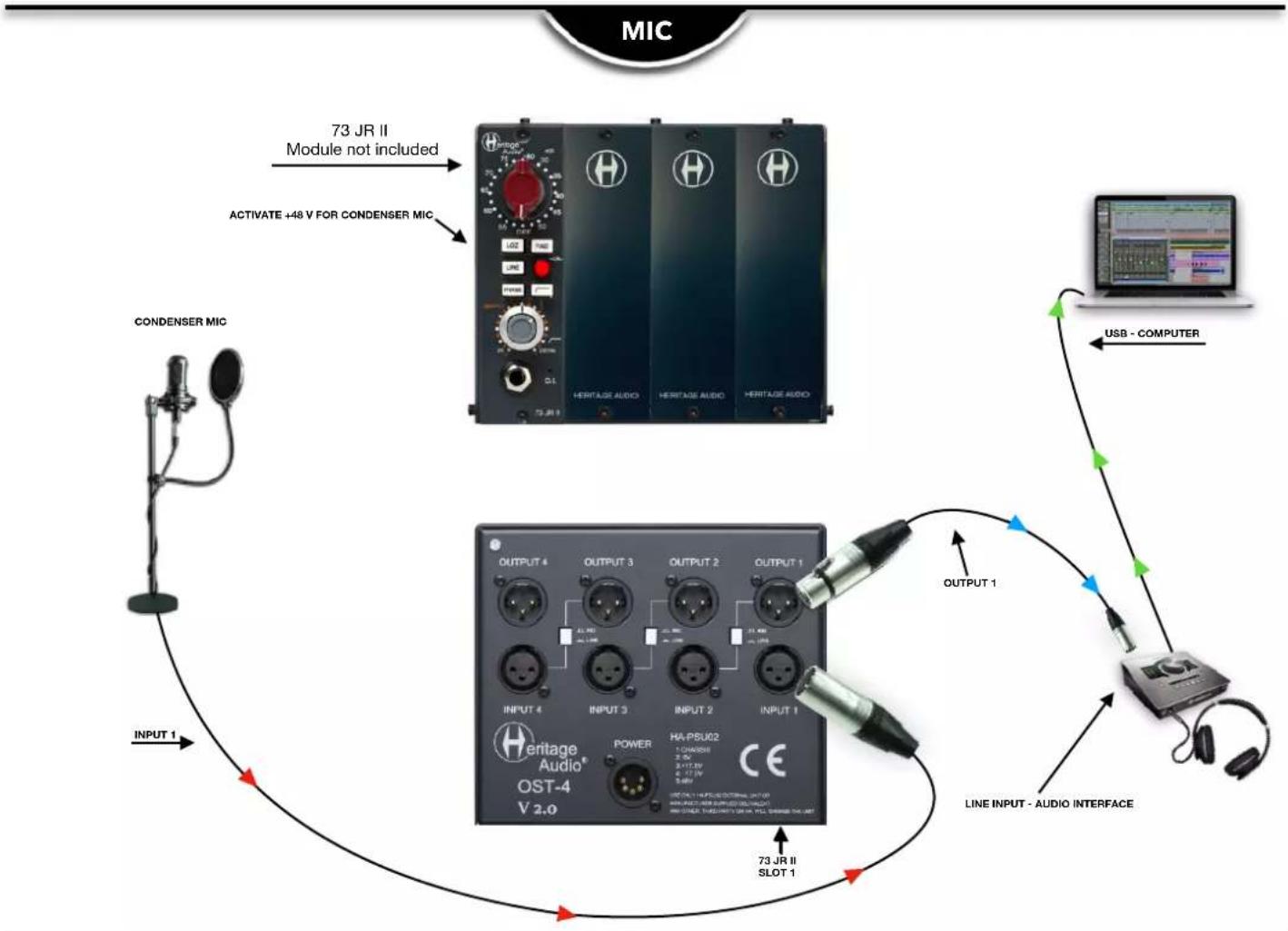
flowchart
graph TD
    A["73 JR II Module not included"] --> B["ACTIVATE +48 V FOR CONDENSER MIC"]
    B --> C["CONDENSER MIC"]
    C --> D["OUTPUT 1"]
    D --> E["LINE INPUT - AUDIO INTERFACE"]
    E --> F["OUTPUT 1"]
    F --> G["USB - COMPUTER"]
    G --> H["Line INPUT - AUDIO INTERFACE"]
    H --> I["73 JR II SLOT 1"]
    I --> J["OUTPUT 1"]
    J --> K["Line INPUT - AUDIO INTERFACE"]
    K --> L["OUTPUT 1"]
    L --> M["Line INPUT - AUDIO INTERFACE"]
    M --> N["OUTPUT 1"]
    N --> O["Line INPUT - AUDIO INTERFACE"]
    O --> P["OUTPUT 1"]
    P --> Q["Line INPUT - AUDIO INTERFACE"]
    Q --> R["OUTPUT 1"]
    R --> S["Line INPUT - AUDIO INTERFACE"]
    S --> T["OUTPUT 1"]
    T --> U["Line INPUT - AUDIO INTERFACE"]
    U --> V["OUTPUT 1"]
    V --> W["Line INPUT - AUDIO INTERFACE"]
    W --> X["OUTPUT 1"]
    X --> Y["Line INPUT - AUDIO INTERFACE"]
    Y --> Z["OUTPUT 1"]
    Z --> AA["Line INPUT - AUDIO INTERFACE"]
    AA --> AB["OUTPUT 1"]
    AB --> AC["Line INPUT - AUDIO INTERFACE"]
    AC --> AD["OUTPUT 1"]
    AD --> AE["Line INPUT - AUDIO INTERFACE"]
    AE --> AF["OUTPUT 1"]
    AF --> AG["Line INPUT - AUDIO INTERFACE"]
    AG --> AH["OUTPUT 1"]
    AH --> AI["Line INPUT - AUDIO INTERFACE"]
    AI --> AJ["OUTPUT 1"]
    AJ --> AK["Line INPUT - AUDIO INTERFACE"]
    AK --> AL["OUTPUT 1"]
    AL --> AM["Line INPUT - AUDIO INTERFACE"]
    AM --> AN["OUTPUT 1"]
    AN --> AO["Line INPUT - AUDIO INTERFACE"]
    AO --> AP["OUTPUT 1"]
    AP --> AQ["Line INPUT - AUDIO INTERFACE"]
    AQ --> AR["OUTPUT 1"]
    AR --> AS["Line INPUT - AUDIO INTERFACE"]
    AS --> AT["OUTPUT 1"]
    AT --> AU["Line INPUT - AUDIO INTERFACE"]
    AU --> AV["OUTPUT 1"]
    AV --> AW["Line INPUT - AUDIO INTERFACE"]
    AW --> AX["OUTPUT 1"]
    AX --> AY["Line INPUT - AUDIO INTERFACE"]
    AY --> AZ["OUTPUT 1"]
    AZ --> BA["Line INPUT - AUDIO INTERFACE"]
    BA --> BB["OUTPUT 1"]
    BB --> BC["Line INPUT - AUDIO INTERFACE"]
    BC --> BD["OUTPUT 1"]
    BD --> BE["Line INPUT - AUDIO INTERFACE"]
    BE --> BF["OUTPUT 1"]
    BF --> BG["Line INPUT - AUDIO INTERFACE"]
    BG --> BH["OUTPUT 1"]
    BH --> BI["Line INPUT - AUDIO INTERFACE"]
    BI --> BJ["OUTPUT 1"]
    BJ --> BK["Line INPUT - AUDIO INTERFACE"]
    BK --> BL["OUTPUT 1"]
    BL --> BM["Line INPUT - AUDIO INTERFACE"]
    BM --> BN["OUTPUT 1"]
    BN --> BO["Line INPUT - AUDIO INTERFACE"]
    BO --> BP["OUTPUT 1"]
    BP --> BQ["Line INPUT - AUDIO INTERFACE"]

flowchart
graph TD
    A["73 JR II Audio Module"] -->|D.J. INPUT| B["73 JR II Module not included"]
    B --> C["Heritage Audio Module"]
    C --> D["USB - COMPUTER"]
    D --> E["Line Input - Audio Interface"]
    E --> F["Output 1"]
    F --> G["Line Input - Audio Interface"]
    G --> H["OUTPUT 1"]
    H --> I["Line Input - Audio Interface"]
    I --> J["Output 2"]
    J --> K["Line Input - Audio Interface"]
    K --> L["OUTPUT 3"]
    L --> M["Line Input - Audio Interface"]
    M --> N["Output 4"]
    N --> O["Line Input - Audio Interface"]
    O --> P["Output 1"]
    P --> Q["Line Input - Audio Interface"]
    Q --> R["Output 2"]
    R --> S["Line Input - Audio Interface"]
    S --> T["Output 3"]
    T --> U["Line Input - Audio Interface"]
    U --> V["Output 4"]
    V --> W["Line Input - Audio Interface"]
    W --> X["Output 1"]
    X --> Y["Line Input - Audio Interface"]
LINE

flowchart
graph TD
    A["73 JR II Module not included"] --> B["HERITAGE AUDIO"]
    B --> C["73 JR II"]
    D["Line MONO OUTPUT - KEYBOARD"] --> E["HERITAGE Audio® OST-4 V 2.0"]
    E --> F["OUTPUT 1"]
    F --> G["HA-PSUK2 1 CHAMOS"]
    G --> H["OUTPUT 2"]
    H --> I["HERITAGE AUDIO"]
    I --> J["OUTPUT 3"]
    J --> K["HERITAGE AUDIO"]
    K --> L["OUTPUT 4"]
    L --> M["HERITAGE AUDIO"]
    M --> N["OUTPUT 1"]
    N --> O["LINE INPUT- AUDIO INTERFACE"]
    O --> P["USB - COMPUTER"]
    P --> Q["73 JR II SLOT 1"]
    Q --> R["OUTPUT 1"]
    R --> S["Line INPUT- AUDIO INTERFACE"]
    S --> T["OUTPUT 1"]
    T --> U["Line MONO OUTPUT - KEYBOARD"]
    U --> V["73 JR II Module not included"]
    V --> W["ACTIVATE LINE SWITCH"]
LINK-EQ
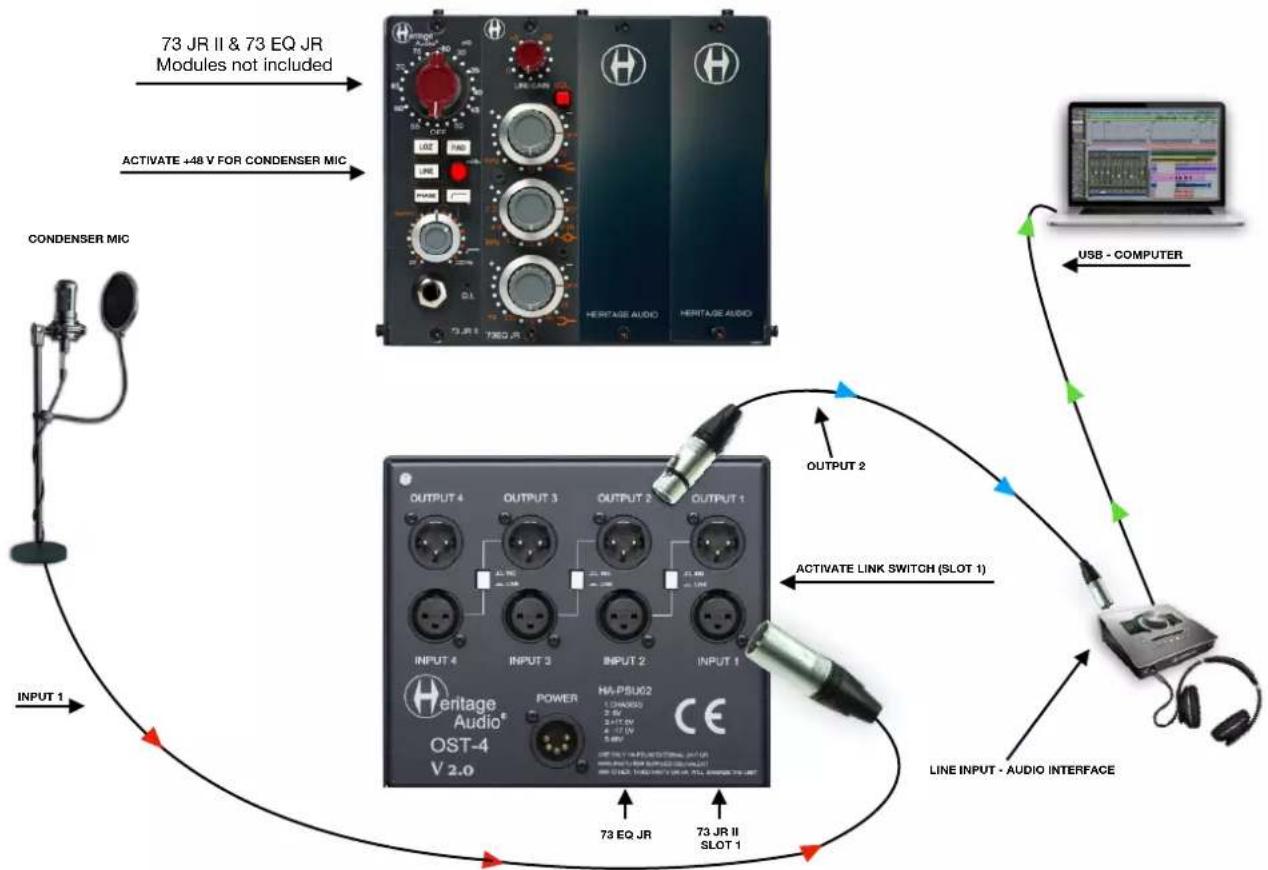
flowchart
graph TD
    A["CONDenser MIC"] -->|73 JR II & 73 EQ JR Modules not included| B["HERITAGE AUDIO"]
    B -->|ACTIVATE +48 V FOR CONDENSER MIC| C["73 JR I T3EQ JR"]
    C --> D["OUTPUT 2"]
    D --> E["HA-PSUK2"]
    E --> F["OUTPUT 1"]
    F --> G["OUTPUT 3"]
    G --> H["OUTPUT 4"]
    H --> I["OUTPUT 5"]
    I --> J["OUTPUT 6"]
    J --> K["OUTPUT 7"]
    K --> L["OUTPUT 8"]
    L --> M["OUTPUT 9"]
    M --> N["OUTPUT 10"]
    N --> O["OUTPUT 11"]
    O --> P["OUTPUT 12"]
    P --> Q["OUTPUT 13"]
    Q --> R["OUTPUT 14"]
    R --> S["OUTPUT 15"]
    S --> T["OUTPUT 16"]
    T --> U["OUTPUT 17"]
    U --> V["OUTPUT 18"]
    V --> W["OUTPUT 19"]
    W --> X["OUTPUT 20"]
    X --> Y["OUTPUT 21"]
    Y --> Z["OUTPUT 22"]
    Z --> AA["OUTPUT 23"]
    AA --> AB["OUTPUT 24"]
    AB --> AC["OUTPUT 25"]
    AC --> AD["OUTPUT 26"]
    AD --> AE["OUTPUT 27"]
    AE --> AF["OUTPUT 28"]
    AF --> AG["OUTPUT 29"]
    AG --> AH["OUTPUT 30"]
    AH --> AI["OUTPUT 31"]
    AI --> AJ["OUTPUT 32"]
    AJ --> AK["OUTPUT 33"]
    AK --> AL["OUTPUT 34"]
    AL --> AM["OUTPUT 35"]
    AM --> AN["OUTPUT 36"]
    AN --> AO["OUTPUT 37"]
    AO --> AP["OUTPUT 38"]
    AP --> AQ["OUTPUT 39"]
    AQ --> AR["OUTPUT 40"]
    AR --> AS["OUTPUT 41"]
    AS --> AT["OUTPUT 42"]
    AT --> AU["OUTPUT 43"]
    AU --> AV["OUTPUT 44"]
    AV --> AW["OUTPUT 45"]
    AW --> AX["OUTPUT 46"]
    AX --> AY["OUTPUT 47"]
    AY --> AZ["OUTPUT 48"]
    AZ --> BA["OUTPUT 49"]
    BA --> BB["OUTPUT 50"]
    BB --> BC["OUTPUT 51"]
    BC --> BD["OUTPUT 52"]
    BD --> BE["OUTPUT 53"]
    BE --> BF["OUTPUT 54"]
    BF --> BG["OUTPUT 55"]
    BG --> BH["OUTPUT 56"]
    BH --> BI["OUTPUT 57"]
    BI --> BJ["OUTPUT 58"]
    BJ --> BK["OUTPUT 59"]
    BK --> BL["OUTPUT 60"]
    BL --> BM["OUTPUT 61"]
    BM --> BN["OUTPUT 62"]
    BN --> BO["OUTPUT 63"]
    BO --> BP["OUTPUT 64"]
    BP --> BQ["OUTPUT 65"]
    BQ --> BR["OUTPUT 66"]
    BR --> BS["OUTPUT 67"]
    BS --> BT["OUTPUT 68"]
    BT --> BU["OUTPUT 69"]
    BU --> BV["OUTPUT 70"]
    BV --> BW["OUTPUT 71"]
    BW --> BX["OUTPUT 72"]
    BX --> BY["OUTPUT 73"]
    BY --> BZ["LINE INPUT - AUDIO INTERFACE"]

- On Slot Technology version v2.0.
• Maximum audio rails current: 400 mA per rail per slot, for a total of 1.6 Amps, 1.8 non continuous.
• Maximum phantom power current: 140 mA. - Operating voltage: Universal 100-240 V AC.
- Dimensions (W x H x L): 155 mm x 134 mm x 185 mm.
- Weight: 1 Kg.

natural_image
Abstract black-and-white graphic of a question mark with a human profile silhouette and a small 'H' symbol below (no text or symbols present)
natural_image
Illustration of a glowing incandescent light bulb with a stylized 'H' symbol on its side (no text or labels)| PROBLEMS | SOLUTIONS |
| There doesn’t seem to be any power feeding the OST v2.0. | Make sure the HA-PSU02 has been connected. |
| No audio seems to be getting to the modules. | Double check that you have correctly connected the Inputs and Outputs for the slot. |
| There is no signal present at the slot’s Output. | Check to see if the LINK button has been pushed sending the output to the adjacent slot’s Input instead. If so, push again to return to the ‘IND’, individual status for that slot. |
| There is no signal present at the slot’s Input. | Check to see if the LINK button has been pushed on the slot before, which would send that slot’s output to this slot’s Input instead of the desired signal. If so, push the button again to return to the ‘IND’, individual status fo that slot. |
| Trying to use several adjacent 500 series modules with just one set of Input and output cables. | Make sure you have inputted into the first slot and activated its ‘LINK’ button to internally direct the signal to the next slot. Also, push ‘LINK’ button for any other modules used. Take the signal from the last slot’s Output connector making sure that slot’s ‘LINK’ is not pushed. |
* For any further doubts or questions please get in contact with us at: support@heritageaudio.com
LIMITED 2 YEAR WARRANTY
Heritage Audio OST-4 v2.0 is warranted by Heritage Audio SL to be free from defects in materials and workmanship for the period of 2 years to the original purchaser. In the event of such defects, the product will be repaired without charge or, at our option, replaced with a new one if delivered to Heritage Audio prepaid, together with a copy of the sales slip or other proof of purchase date. The warranty excludes problems due to normal wear, abuse, shipping damage or failure to use the product in accordance with the specifications.
Heritage Audio shall not be liable for damages based upon inconvenience, loss of use of the product, loss of time, interrupted operation or commercial loss or any other damages, whether incidental, consequential or otherwise.
This warranty is not transferable.
Heritage Audio and the Heritage Audio "H" logos are registered Trademarks owned and/or licensed by Heritage Audio.
REGISTRATION
Please visit our website: https://heritageaudio.com/registration/
natural_image
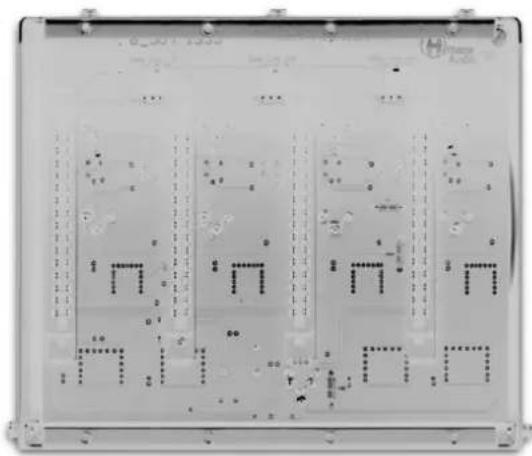
Close-up of a printed circuit board with multiple rectangular components and no visible text or symbols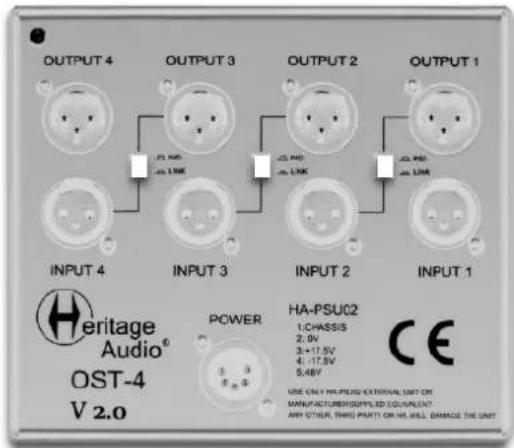
Session / Title: ____ Track: ____ Connected Equipment: ____

Switch
ON

Date: ____ Instrument: ____ Notes: ____ □ Switch OFF □

natural_image
Close-up of a printed circuit board with multiple rectangular components and no visible text or symbols
Session / Title: ____ Track: ____ Connected Equipment: ____

Switch
ON

Date: ____ Instrument: ____ Notes: ____ □ Switch OFF □

natural_image
Abstract black and white diagonal line design (no text or symbols)
www.heritageaudio.com
HERITAGE AUDIO. C/ Alfonso Gómez, 38, 3C. 28037 Madrid – Spain. Tel: +34 917 266 189
info@heritageaudio.com


Brand : Heritage Audio
Model : OST-4 v2.0
Category : Professional audio equipment