
PS609 - Paper shredder Duronic - Free user manual and instructions
Find the device manual for free PS609 Duronic in PDF.


| Product Type | Paper Shredder |
| Brand | Duronic |
| Model | PS609 |
| Shred Type | Cross-cut |
| Shred Size | 4 x 30 mm |
| Sheet Capacity | 6 sheets (70 gsm) |
| Bin Capacity | 13 liters |
| Continuous Run Time | 2 minutes |
| Cool Down Time | 30 minutes |
| Power | 120 W |
| Input Voltage | 220-240 V ~ 50/60 Hz |
| Noise Level | 55 dB |
| Dimensions (W x D x H) | 30 x 20 x 40 cm |
| Weight | 3.5 kg |
| Safety Features | Overheat protection, auto reverse when jammed |
| Shreds | Paper, credit cards, staples, paper clips |
| Operation Mode | Auto start, manual reverse, off switch |
| Cooling Fan | Yes, for extended motor life |
| Maintenance | Oil blades every 30 minutes of use or monthly |
| Spare Parts Available | Yes, replacement blades and motor on request |
| Repairability | Serviceable by qualified technician |
| Warranty | 2 years |
| Certifications | CE, RoHS |
Frequently Asked Questions - PS609 Duronic
User questions about PS609 Duronic
0 question about this device. Answer the ones you know or ask your own.
Ask a new question about this device
Download the instructions for your Paper shredder in PDF format for free! Find your manual PS609 - Duronic and take your electronic device back in hand. On this page are published all the documents necessary for the use of your device. PS609 by Duronic.
USER MANUAL PS609 Duronic
Creative Consumer Electronics
natural_image
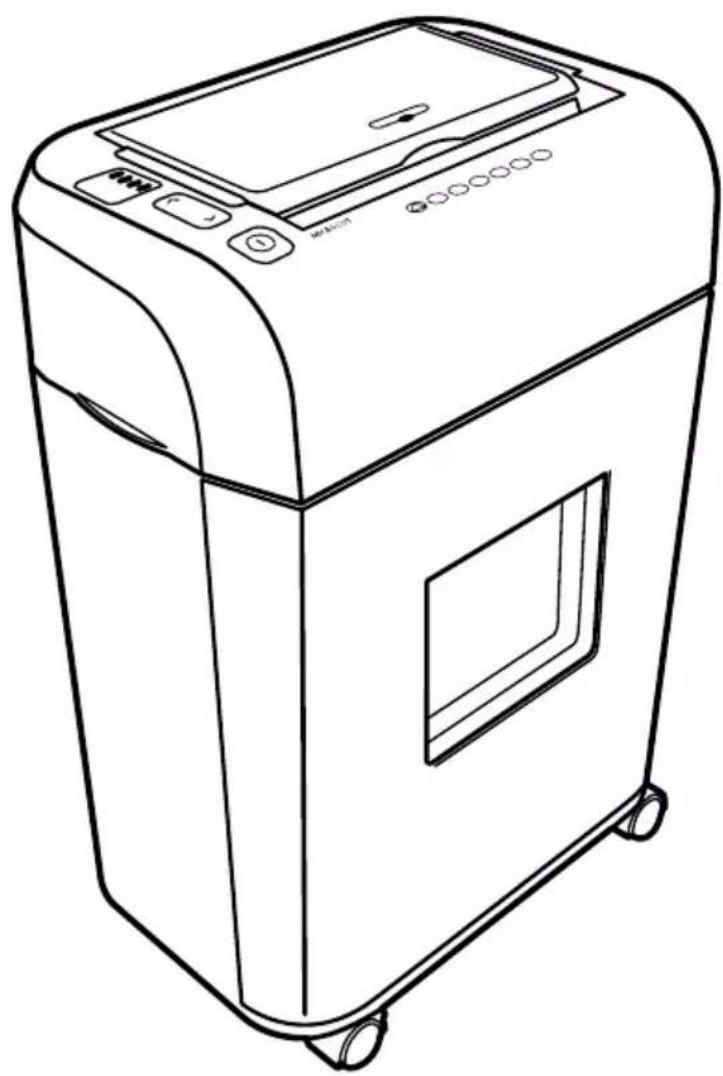
Line drawing of a portable electronic device with control panel and wheels (no text or symbols)PS609 - Shredder
PLEASE READ ALL THE INSTRUCTIONS BEFORE USE

duronic.com

duronic

@duronicmedia

Duronic

@duronicmedia
DURONIC
Contents
Specifications 4
Safety Instructions 5
Warning Icons 7
Cleaning and Maintenance 7
Setup 8
Operation 8
Special Features 9
Capacity 10
Paper Jams & Overloads 10
Warranty 13
Specifications
natural_image
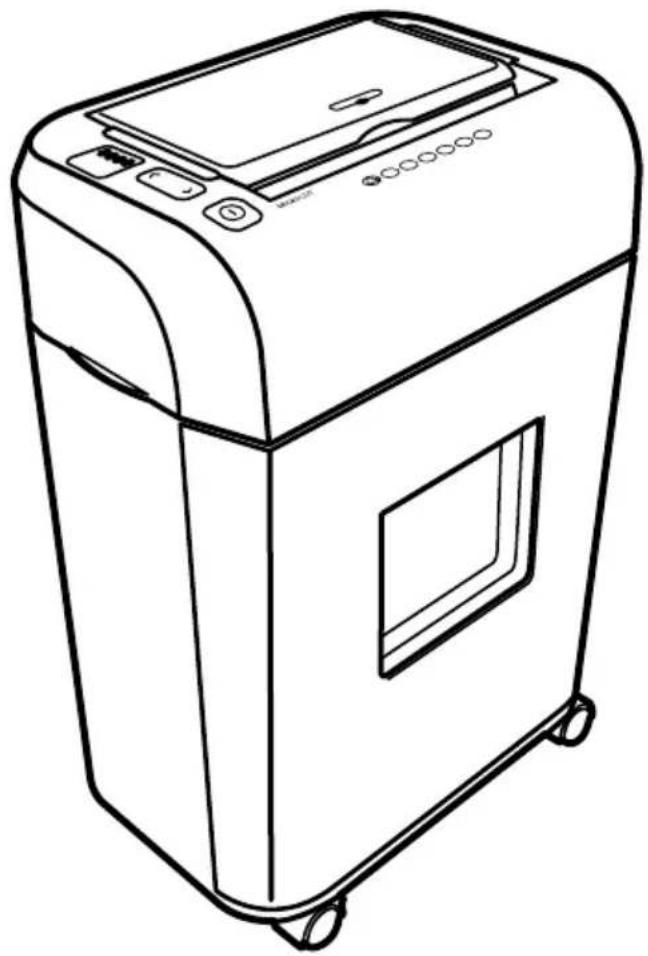
Line drawing of a portable electronic device with control panel and wheels (no text or symbols)| Shred Type: Micro-Cut | |
| Shred Size: 4mm x 10mm | |
| Shredding Capacity: 7-9 | Sheets of paper (80gsm A4) OR 1 bank card |
| Paper Tray Capacity: 100 | Sheets |
| Duty Cycles: 10 min on / | 40 min off for auto shred3 minute on / 40 off for manual shred |
| Feed Opening: 220mm / | 22cm |
| Dimensions: 337 x 218 x | 506 mm |
| Bin Size: 17 Litre | |
| Weight: 8.3kg | |
| Input Input: 220 - 240V, 50-60Hz, 2.4A | |
DURONIC
Safety Information
Please read these instructions fully and keep for future reference.
Before Use
- Dispose of all packaging carefully and responsibly.
- This appliance is designed for indoor use only. Do not use outdoors.
- Do not use this shredder for industrial and commercial use, or any other purpose.
- The shredder MUST be positioned on a firm level base before and during use.
- Ensure the power cable is not caught under the appliance.
- Ensure the correct power supply is used (220-240V AC).
- Keep the power cable away from hot surfaces.
- Do not place the shredder near a heat source or in direct sunlight.
- Do not operate under or near curtains or other combustible materials.
- Do not immerse the machine in water or any other liquid to protect against electric shock.
- Do not spray any flammable synthetic oil, petroleum-based or aerosol products onto this shredder as it may cause a fire.
- Do not allow the shredder to be exposed to rain or any other moisture.
- Do not attempt to repair the shredder by yourself. If for any reason your shredder stops working properly, contact Duronic Customer Care Team for advice.
During Use
- WARNING! Keep loose articles of clothing; ties, jewellery, hair or other objects away from the feed opening in order to prevent injury.
- Never insert fingers into the feed opening. Serious injury may result!
- This appliance is not intended for use by persons (including children) with reduced physical, sensory or mental capabilities, or lack of experience and knowledge, unless they have been given supervision or instruction concerning use of the appliance by a person responsible for their safety.
• DO NOT leave children unattended with the shredder.
- ALWAYS keep the shredder off and unplugged when not in use.
- DO NOT attempt to feed more sheets of paper into the feeder than specified.
- ALWAYS limit continuous shredding to the specified time as suggested in the instruction manual. See section titled 'Capacity'.
- DO NOT attempt to shred materials other than paper and credit cards in the provided feed slots.
- To avoid overheating the shredder, limit continuous shredding to the specified time as suggested in this instruction manual.
- Do not operate the shredder if the cable or plug are damaged or if the shredder has malfunctioned in any way.
- ALWAYS unplug the shredder when moving, cleaning or emptying the waste basket.
- DO NOT attempt to operate the shredder if the shredder is experiencing any kind of problem.
- If your machine stops working, do not attempt to repair it yourself! Contact Duronic (Shine-Mart) for assistance.
DURONIC
Warning Icons
Please take note of these warnings displayed on the machine:

WARNING

READINSTRUCTION
BEFORE USE

NOFINGERS
ORHANDS

NOHAIR
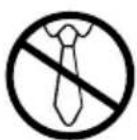
NOLOOSE
CLOTHING

NOCHILDREN
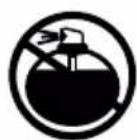
NOAEROSOL PRODUCTS
Cleaning and Maintenance

IMPORTANT: Always unplug the appliance from the power socket during cleaning and maintenance.
- Never use any sharp instruments or abrasive substances, soap, household cleaner, detergent or wax polish for cleaning.
- Never clean the appliance with flammable fluids. It could cause a damage and fire hazard.
- Use lukewarm water on a cloth to clean the cabinet and waste basket of the appliance and wipe it dry.
- Ensure the unit is dry before connecting to the mains.
DURONIC
Setup
-
Carefully place the PS609 shredder on a dry, flat, level surface.
-
Slide the waste basket into the shredder cabinet ensuring that it is completely inserted into the shredder fits flush with the cabinet.
-
Be careful not to place your fingers near the cutter blades.
-
Plug the power cord into any standard 220-240-Volt AC mains outlet / plug socket which shall should be located near the equipment and should be easily accessible.
-
Press the ON/OFF button. The 'ready' LED indicator should light up blue.
-
This means that the shredder is now ready to use.
You are now ready to start shredding.
Note: It is recommended that when the auto sheet feed tray is not in use, the paper tray should remain in the closed position.
Operation
For Manual Feed:
To use the manual feed for shredding, a maximum of 9 sheets at one go or a single credit card is recommended. Exceeding the maximum 9 sheet capacity or by inserting multiple credit cards in one go could result in unnecessary paper jams.
When paper is inserted into the feed opening, the shredding process will start automatically and stop when the paper has completed its travel through the feed opening.
For Auto-Sheet Feed:
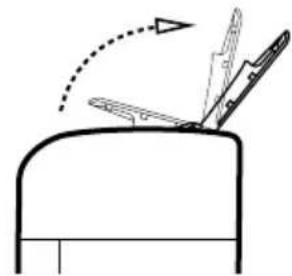
Grasp the front edge of the paper tray lid and open fully as in Diagram 1. Staples and paperclips should be removed prior to inserting any paper into the tray.
Place up to 100 sheeds of paper, neatly stacked, into the paper tray as in Diagram 2. The feeding of the paper should begin immediately automatically.
Diagram Diagram
natural_image
Simple line drawing of a mailbox with an arrow indicating rotation (no text or symbols)Open paper table fully Remove Staples and Clips
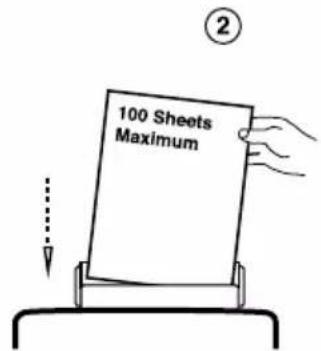
before inserting paper
Special Features
Ready LED This lets you know when the shredder is working and ready to shred.
Overheat LED This will light up when the motor temperature has reached its maximum allowed temperature and will automatically shut off the power to the motor. When the motor cools down, the shredder will be ready to resume shredding.
Overload LED This will light up when the shredder has exceeded the maximum sheet capacity (more than 9 sheets of paper / 1 credit card)
Bin Full LED This will light up when the waste bin is full and should be emptied.
DURONIC
Capacity
On manual feed the PS609 will shred up to 9 sheeds of A4 (80GSM) paper or one credit card. When shredding small material like credit cards, envelopes or reciepts, insert them through the middle of the feed opening.
On auto-sheet feed the PS609 will shred up to 100 sheets neatly stacked in the paper tray.
Paper Jams & Overloads
How to Resolve a Manual Feed Paper Jam:
- Turn off or unplug the cable from the mains plug and wait for at least 40 minutes for the thermal overload to reset.
- Press the reverse button and gently pull the remaining sheets of paper out of the feed opening.
- Remove the unshredded papers from the top and clear any excess paper shreds from the feed opening.

CAUTION: Be careful not to place your fingers near the feed opening as serious harm could occur.
How to Resolve an Auto Feed Paper Jam:
- Press the reverse button and remove the jammed paper.
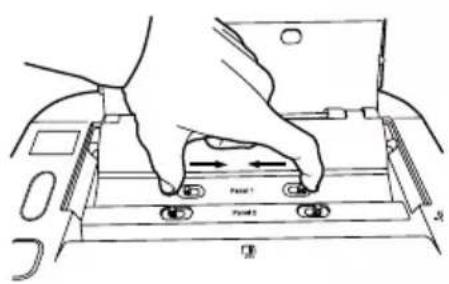
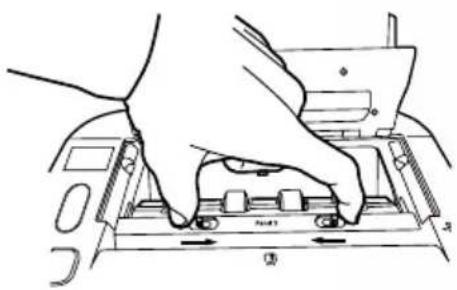
- If the papers have travelled further into the feed rollers and cutters, open Panel 1 by squeezing the access levers together and lifting Panel 1 (as shown in Diagram 3).
DURONIC
Diagram ③
natural_image
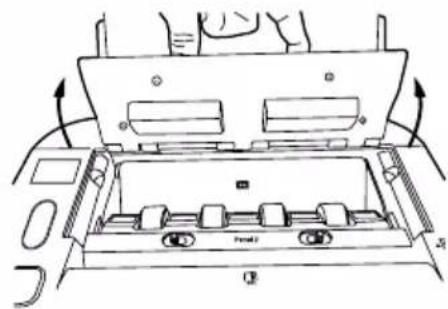
Top-down schematic of a vehicle's internal compartments and dashboard (no text or labels)- If further access to the jam is required, open Panel 2 (as shown in Diagram 4) to allow better access to the cutter assembly.
Diagram ④
natural_image
Illustration of hands operating a computer keyboard (no text or symbols visible)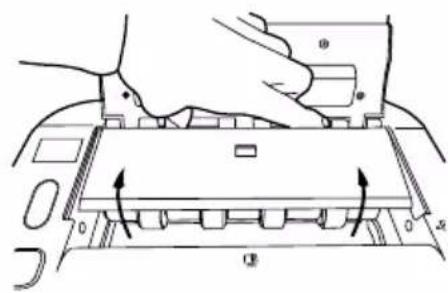

CAUTION: Be careful when approaching the cutter blades; they are very sharp and could harm you if mishandled.
- After the jam has been removed, push down Panel 2 and Panel 1 back into their original secured positions.
DURONIC
DURONIC
Warranty
1 Year Guarantee from Shine-Mart Ltd, Trademark owners of Duronic Products.
NOTE: THESE STATEMENTS DO NOT AFFECT YOUR STATUTORY RIGHTS AS A CONSUMER
This product has been manufactured under the strictest or quality control procedures, and using the highest quality of materials, to ensure excellent performance and reliability. It will give very good and long lasting service, provided it is properly used and maintained. The product is guaranteed for 1 years from the date of original purchase. If any defect arises due to a faulty materials or poor workmanship, the faulty product must be returned to the original place of purchase. Refund or replacement is at the discretion of that company.
Duronic Products are offered with a 1 year guarantee under the following conditions:
- The product must be returned to the retailer with original proof of purchase.
- The product must be installed and used in accordance with the instructions contained in this operating manual.
- It must be used only for domestic purposes.
- It does not cover wear and tear, malicious damage, misuse, neglect, inexpert repairs or consumable parts.
- Shine-Mart Ltd has no responsibilities for accidental or consequential loss or damage.
- Shine-Mart Ltd are not liable to carry out any type of servicing work, under the guarantee
- Valid in the UK only
This product is fitted with CE:1363 plug and fuse Imported by Shine-Mart Ltd, RM3 8SB

Information on waste Disposal for Consumers of Electrical & Electronic Equipment.
This mark on a product and/or accompanying documents indicates that when it is to be disposed of, it must be treated as Waste Electrical & Electronic Equipment, (WEEE).
Any WEEE marked products must not be mixed with general household waste, but kept separate for the treatment, recovery and recycling of the materials used.
For proper treatment, recovery and recycling; please take all WEEE marked waste to your Local Authority Civic waste site, where it will be accepted free of charge.
If customers dispose of Waste Electrical & Electronic Equipment correctly, they will be helping to save valuable resources and preventing any potential negative effects upon human health and the environment, of any hazardous materials that the waste may contain.
Follow Us

duronic.com

duronic

@duronicmedia

Duronic

@duronicmedia
- Creative Consumer Electronics
- PS609 - Shredder
- Contents
- Specifications
- DURONIC
- Safety Information
- Before Use
- During Use
- Warning Icons
- Cleaning and Maintenance
- Setup
- Operation
- For Manual Feed:
- For Auto-Sheet Feed:
- Special Features
- Capacity
- Paper Jams & Overloads
- How to Resolve a Manual Feed Paper Jam:
- How to Resolve an Auto Feed Paper Jam:
- Diagram ③
- Diagram ④
- Warranty
- Follow Us
Brand : Duronic
Model : PS609
Category : Paper shredder