Smartscan SR-183C - Induction hob Mr. Induction - Free user manual and instructions
Find the device manual for free Smartscan SR-183C Mr. Induction in PDF.


| Product Type | Induction Hob |
| Brand | Mr. Induction |
| Model | Smartscan SR-183C |
| Number of Cooking Zones | 2 |
| Power Consumption | 1800 W |
| Voltage | 220-240 V |
| Frequency | 50/60 Hz |
| Dimensions (W x D x H) | 36 x 28 x 6 cm |
| Weight | 2.5 kg |
| Main Functions | Power Boost, Timer, Child Lock, Auto Shut-off, Overheat Protection |
| Control Type | Touch Control |
| Cooking Surface Material | Glass Ceramic |
| Cleaning Instructions | Wipe with a damp cloth and mild detergent after use |
| Safety Features | Automatic Shut-off, Overheat Protection, Child Lock, Pan Detection |
| Spare Parts | Power cord (detachable), control panel (replaceable) |
| Repairability | Service centers available; DIY repairs not recommended |
| Energy Efficiency Class | A (typical) |
| Included Accessories | User manual |
Frequently Asked Questions - Smartscan SR-183C Mr. Induction
User questions about Smartscan SR-183C Mr. Induction
0 question about this device. Answer the ones you know or ask your own.
Ask a new question about this device
Download the instructions for your Induction hob in PDF format for free! Find your manual Smartscan SR-183C - Mr. Induction and take your electronic device back in hand. On this page are published all the documents necessary for the use of your device. Smartscan SR-183C by Mr. Induction.
USER MANUAL Smartscan SR-183C Mr. Induction
If this product is found to be faulty as a result of faulty materials or workmanship within one year from date of purchase, it will be repaired free of charge.
This guarantee is subject to the following terms:
- Sunpentown must be notified of the fault.
- Proof of purchase must be presented to Sunpentown's nominated representative.
- The warranty will be void if the product if modified, misused or repaired by an unauthorized person.
- The warranty after repair will not be extended beyond the original one-year period.
- All replacement parts will be new or reconditioned.
- Parts, which are replaced, become the property of Sunpentown.
- The warranty applies for the use of the product in the USA only.
What is NOT COVERED:
- Warranty does not include freight charges.
- Incidental or consequential damage caused by possible defects with this product.
- Damage to product caused by improper power supply voltage, accident, fire, floods or acts of nature.
- Failure of product resulting from unauthorized modifications to the product.
- Improper installation or failure to perform the necessary maintenance.
This GUARANTEE is in addition to your Statutory Rights
SUNPENTOWN INTERNATIONAL INC. 14625 Clark Ave. City of Industry, CA 91745 Tel: 800-330-0388 service@sunpentown.com www.sunpentown.com
Mr. Induction ^® SMARTSCAN ^®
natural_image
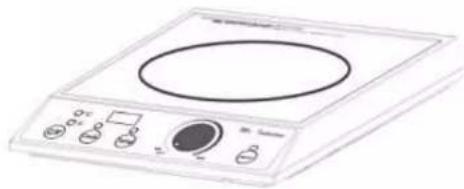
Illustration of a standard electrical induction cooker with control buttons and a rotary top (no text or symbols visible)SR-183C (120V / 1800W) SR-652C (208-240V / 2700W)
INSTRUCTION MANUAL

SUNPENTOWN®
Thank you for purchasing your SMARTSCAN induction cooker by Sunpentown. Make full use of your new induction range. Please carefully read this manual and keep on hand for future reference.
IMPORTANT SAFEGUARDS
A. Read all instructions.
B. Do not touch hot surfaces. Use handles or knobs.
C. To protect against electrical shock, do not immerse cord or appliance in water or other liquid.
D. Close supervision is necessary when any appliance is used by or near children.
E. Unplug from outlet when not in use and before cleaning. Allow to cool before putting on or taking off parts.
F. Do not operate any appliance with a damaged cord or plug or after the appliance malfunctions or has been damaged in any manner. Return appliance to the nearest authorized service facility for examination, repair or adjustment.
G. The use of accessory attachments not recommended by the appliance manufacturer may cause injuries.
H. Do not use outdoors.
1. Do not let cord hang over edge of table or counter, or touch hot surfaces.
J. Do not place on or near a hot gas or electric burner, or in a heated oven.
K. Extreme caution must be used when moving an appliance containing hot oil or other hot liquids.
L. Always attach plug to appliance first, then plug cord into the wall outlet. To disconnect, turn any control to "off", then removed plug from wall outlet.
M. Do not use appliance for other than intended use.
N. Save these instructions.
NOTE: Do not use extension cord. If one must be used, use a cord with a minimum of 14 gauge and no longer than 10 feet.
SPECIFICATIONS
| Model SR-183C SR-652C | ||
| Voltage 120V~60Hz 208-240V~50/60Hz | ||
| Consumption 1800W 2700W | ||
| Dimension 12.6W x 15.16D x 4.53H in. | ||
| Weight 13.45 LBS | ||
| Power Range | 350~1800W | 250~2700W |
| Cord Length | 5.9 feet | |
| Protection Designs | Overheat protection. Automatic hazard detection. Circuit protection sensor. High voltage. 20A fuse. Small object heat prevention. Thermostat. Pan material detection | |
Warning: Changes or modifications to this unit not expressly approved by the party responsible for compliance could void the user's authority to operate the equipment.
NOTE: This equipment has been tested and found to comply with the limits for a consumer ISM equipment, pursuant to Part 18 of the FCC Rules. These limits are designed to provide reasonable protection against harmful interference in a residential installation. This equipment generates, uses, and can radiate radio frequency energy and, if not installed and used in accordance with the instructions, may cause harmful interference to radio communications. However, there is no guarantee that interference will not occur in a particular installation. If this equipment does cause harmful interference to radio or television reception, which can be determined by turning the equipment off and on, the user is encouraged to try to correct the interference by one or more of the following measures:
- Reorient or relocate the receiving antenna.
- Increase the separation between the equipment and receiver.
- Connect the equipment into an outlet on a circuit different from that to which the receiver is connected.
- Consult the dealer or an experienced radio TV technician for help.
This device complies with part 18 of the FCC rules.
Operation is subject to the following two conditions:
-
This device may not cause harmful interference, and
-
This device must accept any interference received, including interference that may cause undesired operation.
TROUBLESHOOTING
INDEX
If LED displays any of the following error codes. unit needs to be sent in for service: E0, E1, E2, E3, E5, E6.
| PROBLEM CHECK POINTS | |
| No power or cooktop does not read the command | Is the cooktop plugged firmly into a correct outlet?Does the cooktop have a dedicated 20-amp line? The cooktop needs 15 amps to operate and should be on a 20-amp dedicated circuit. If the circuit is not 20-amps or if there are other electrical draws on the circuit, the unit is not getting enough power.Has the unit been dropped or handled roughly? If so, we suggest sending it in for evaluation.Are the buttons broken?Was there a power shortage in the building? |
| Cook / Temp indicator continues to flash even with a pan on the unit and the unit does not heat up | Is the pan an induction compatible pan? These symptoms suggest the cooktop is not sensing a pan.The pan may be too small or too large for the electromagnetic field. The pan should be no smaller than 4.5" or larger than 12".Is the pan centered in the electromagnetic field? |
| Cooktop suddenly stops heating during normal operation | There may have been a power shortage (blow out) at the facility where the unit is being used and starving the unit of power. This may also occur if you are not using a dedicated line.Has another electrical appliance begun to draw from the same circuit therefore starving the cooktop of power?Check the fan to see if it is still running.Are the air vents blocked? The vents can be blocked on the outside by a wall or something similar OR on the inside by dust, grease and food residue. The unit must have a 2" clearance for air circulation around the sides and back. Otherwise, the internal temperature will become too high. The unit has a Safety Shut-Off, which lasts for 15-20 minutes before returning to full power. If it is necessary to leave an empty pan on the unit, the power must be set below 300 watts.Was the unit on cook mode for more than 2 hours but with no settings changed? |
| Pan does not get hot enough even though temperature is set on high | Check if the "TEMP" button is on, which means the cooktop will generate no more than 1100watts of power. If so, switch to COOK.Are you using an extension cord? Any use of an extension cord over 10 feet will affect the power reaching cooktop.It is possible that the internal coil supports may have "dropped" due to the cooktop being mishandled or frequently moved. If this is the case, please send in for repair. |
| Pan cooks unevenly or does not maintain heat level and overheats | Is it an induction compatible pan?Pan may be the wrong shape (too convex/concave) or the wrong size (smaller than 4.5" or larger than 12").Pan may not be centered on the cooktop. |
| Fan continues to run when the unit is turned off | The fan will continue to run until unit is completely cooled down. This is a safety feature. It is designed to help preserve the life of the cooktop. |
Page 1 – Important Safegaurds
Page 2 - Index
Page 3 - Installing the Control Knob
Page 4 - Attention
Page 5 - How to Use
Page 6 - Key Points Before Using the Cooktop
Page 7 – List of Suitable & Unsuitable Cookware
Page 9 - Troubleshooting
Page 10 - Specifications
Installing control knob
- Rotate the turning shaft counter-clockwise to the end.
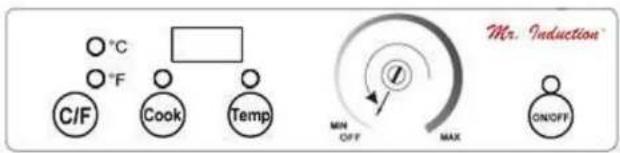
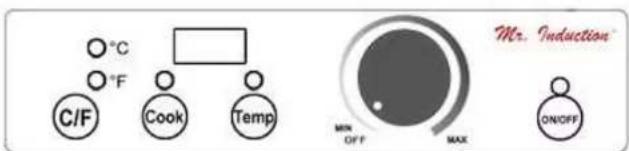
- Align the knob scale point to "OFF" position and firmly push the knob into shaft.
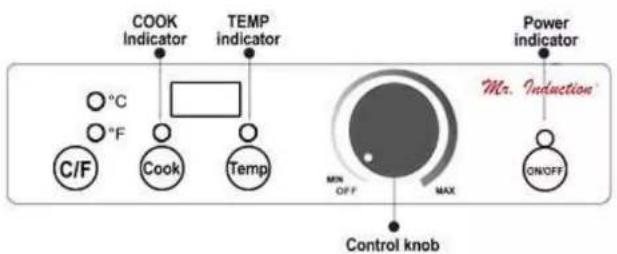
Control panel
Unsuitable Cookware
Ceramic, GLASS, copper, bronze, aluminum bottom, or bottom of less than 12cm(4.5in) cookware.
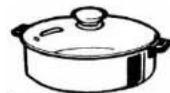
Copper, bronze and aluminum cookware
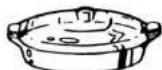
Glass cookware
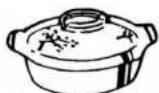
Ceramic cookware (without special coating)
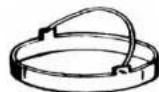
Pans with legs or with a concave bottom
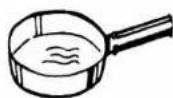
Bowl-shaped cookware
Cookware with diameter less than 12cm(4.5in)
Maintaining the product
■ Unplug the cord before any cleaning is done.
- To clean the ceramic plate, use a soft sponge with dishwashing liquid. Then wipe clean with damp towel.
■ Clean fan intake with vacuum whenever necessary.
DO NOT IMMERSE THE COOKTOP IN WATER TO SOAK. THIS WILL DAMAGE THE COOKTOP.
Mr. Induction
Mr. Induction
- Please plug this cooktop in the correct 20-amp outlet.
- Do not share the outlet with other appliances and make sure it is correctly plugged in.
- Do not touch the ceramic plate immediately after cooking, the plate may remain hot due to heat transferred from the cookware.
- Do not insert any object in the inlet or outlet to prevent electric shock.
- Do not damage the ceramic plate.
- If the ceramic plate is broken, please turn unit off and unplug from outlet immediately.
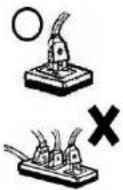
IMPORTANT:
- If the electric cord is damaged, please contact our service technician for a replacement.
This appliance is equipped with overheat protection feature. - Those with a pacemaker should consult they physician before using this item.
If the cooktop surface is broken or cracked, do not use the product as it may cause electric shock.
EMERGENCY PROCEDURES
If the cooktop is not working properly, please contact our service technician for assistance. Do not disassemble the unit by yourself.
LIST OF SUITABLE / UNSUITABLE COOKWARE
Suitable Cookware
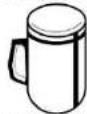
Iron, cast iron, stainless steel and enamelled wares with diameter over 12cm(4.5in) are recommended.
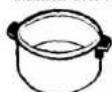
S/S Multi-ply
Cookware
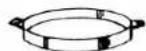
Iron/Steel
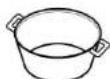
Cast Iron pot
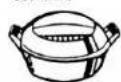
Iron pan
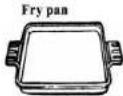
Iron/Steel Tray
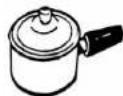
Enameled ware
Attention
- Do not drop the cookware on the top plate while cooking. The ceramic plate may crack.
- Please use suitable cookware, otherwise abnormal cooking or damage may occur.
The self-protect circuit will protect appliance while power is unstable. The power red light will be flashing and cooking will stop.
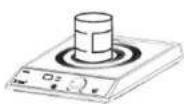
Do not place any other articles on the cooktop plate except proper cookware.
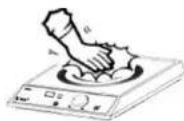
Do not touch the ceramic plate after cooking as surface may retain heat from cookware.
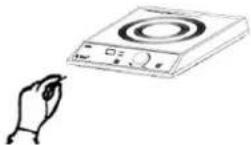
Do not insert screwdriver or other metal parts into vent hole.
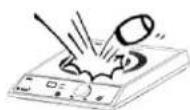
Do not damage the ceramic plate. If the ceramic plate is broken, please turn off the unit and unplug the outlet immediately.
COOK vs TEMP
The operation of this induction cooktop has two functions: COOK and TEMP.
In
■ LED displays a one or two digit number, indicating the power level (1-20)
Unit will continuously cook until: manually shut off.
In
- LED displays a two or three digit number, indicating cooking temperature. (90°F to 440°F in 10°F increments)
Unit will cook until set temperature is reached and will keep warm. - When set temperature is reached, unit will stop heating. Unit starts heating again when it senses temperature has dropped below setting.
- Temperature difference: when cooking a large pot of soup or other contents, please be advised that the temperature inside the pot will vary from point to point. For example, the bottom section (closest to cooktop) will be a bit hotter than the middle section. The type and quality of cookware can affect temperature transfer.
HOW TO USE
- Plug in power cord - unit will beep once.
- Please use suitable cookware and add food contents.
- Press ON/OFF button (red indicator light will illuminate) AND turn knob clockwise away from OFF position. (COOK mode by default)
- Press COOK/TEMP button to select setting
■ COOK mode: LED displays power level: 1\~20
TEMP mode: LED displays temperature: 90\~440°F.
- Turn knob clockwise/counter-clockwise to set power level or temperature.
- When cooking is done, turn unit off by pressing ON/OFF button or turn knob all the way left to "OFF" position.
NOT
If unit is off and knob is turned to OFF position, you must press ON/OFF button AND turn knob clockwise pass OFF position to turn on unit.
- If unit is off and knob is not in the OFF position, simply press ON/OFF button to turn on unit.
Safety feature: if no cookware is placed, unit will shut off after 2 minutes.
■ To avoid temperature jump, please cook at least 1 quart of food/content.
- Actual temperature (in TEMP mode) may vary slightly due to different variables, such as: surrounding temperature, food content and volume, and if using a lid, etc.
- When using cookware that is not flat or with an uneven bottom, the set temperature will be VERY different from the actual temperature.
KEY POINTS BEFORE USING THE COOKTOP
Before Use :
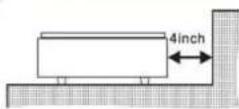
Place cooktop on flat surface, but keep away from the wall or other articles. For best results, leave at least 4 inches from all sides. When the air entrance or the air outlet is blocked, the internal temperature of the cooktop rises and may automatically shut off during cooking.
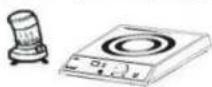
Keep away from gas range or coal oil stove. If the surrounding temperature is high, cooker will stop heating.
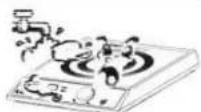
Keep away from water source; the cooktop will not work if the air inlet and the air outlet are wet.
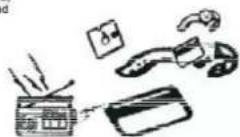
Please do not use this cooktop near credit card, disc, watch or radio.
During use :
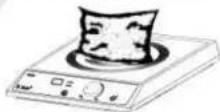
Do not place a sealed can on the cooktop. It may explode.
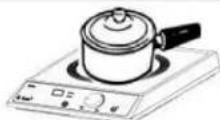
Do not place paper or cloth in between the cooktop and cookware to prevent over heating.
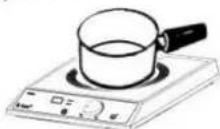
If the cooking oil is not enough or an empty pan is left on the cooktop for too long, it will damage the cookware.
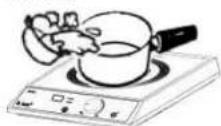
Do not put heated oil in the pan while cooking.
Do not place one cooktop on top of another while plugged into power source.
- If this product is found to be faulty as a result of faulty materials or workmanship within one year from date of purchase, it will be repaired free of charge.
- What is NOT COVERED:
- IMPORTANT SAFEGUARDS
- SPECIFICATIONS
- TROUBLESHOOTING
- INDEX
- Installing control knob
- Unsuitable Cookware
- Maintaining the product
- Mr. Induction
- IMPORTANT:
- EMERGENCY PROCEDURES
- LIST OF SUITABLE / UNSUITABLE COOKWARE
- Suitable Cookware
- Attention
- COOK vs TEMP
- HOW TO USE
- NOT
- KEY POINTS BEFORE USING THE COOKTOP
Brand : Mr. Induction
Model : Smartscan SR-183C
Category : Induction hob