
MS-X265BT - Loudspeaker Moonki - Free user manual and instructions
Find the device manual for free MS-X265BT Moonki in PDF.


| Product Type | Portable Bluetooth Speaker |
| Model | MS-X265BT |
| Brand | Moonki |
| Dimensions (W x H x D) | Approx. 160 x 60 x 60 mm |
| Weight | Approx. 350 g |
| Power Source | Built-in rechargeable lithium-ion battery, 5V DC via USB |
| Battery Capacity | 1200 mAh |
| Playback Time | Up to 6 hours at moderate volume |
| Charging Time | Approx. 2-3 hours |
| Bluetooth Version | 5.0 |
| Wireless Range | Up to 10 meters |
| Speaker Output Power | 5W RMS |
| Frequency Response | 100 Hz - 20 kHz |
| Driver Unit | Full-range 52 mm |
| Connections | Bluetooth, AUX 3.5 mm, USB charging port |
| Controls | Power, Volume +/-, Play/Pause, Bluetooth pairing button |
| Functions | Hands-free calling, TF card playback, TWS pairing |
| Protection | IPX4 water-resistant (splash-proof) |
| Cleaning | Wipe with a soft, dry cloth. Do not use abrasive cleaners. |
| Safety Warnings | Do not expose to extreme heat or moisture. Use only supplied charger. |
| Spare Parts & Repairability | Contact customer support for battery replacement. Speaker not user-serviceable otherwise. |
| General Information | Compact design, suitable for indoor and outdoor use. |
Frequently Asked Questions - MS-X265BT Moonki
User questions about MS-X265BT Moonki
0 question about this device. Answer the ones you know or ask your own.
Ask a new question about this device
Download the instructions for your Loudspeaker in PDF format for free! Find your manual MS-X265BT - Moonki and take your electronic device back in hand. On this page are published all the documents necessary for the use of your device. MS-X265BT by Moonki.
USER MANUAL MS-X265BT Moonki
- To pair the speaker with a bluetooth phone or audio device, press "MODE" repeatedly on the MP3 player until select this mode.
- Put your phone or device to be used in bluetooth device discovery mode.
- When your phone or device shows the "BLUETOOTH" device, confirm the link.
Conexão Bluetooth
Avoid exposing the speaker box to moisture. If they are set up outdoors, Be Sure they are under cover.
Do not use nor store the equipment near wet or dap places. It may cause a malfunction or shock hazard.
If the power cord is broken, it must be replaced by the manufacturer or service agent or qualified personnel to avoid risks.
To reduce the risk of fire or electric shock, do not expose this equipment to rain or moisture. Clean only with a soft, dry cloth.

MS-X265BT

moonki®
SPEAKER
MS-X265BT
HECHO EN RPC

MANUAL DE USUARIO | USER MANUAL | MANUAL DO USUÁRIO


Welcome to choose our seaker
1. Packing Contents
1 x Speaker
1 x Remote control.
1 x User manual
1 x USB - TYPE C cable
2. specs:
2-Way Bluetooth Powered Speaker
PMPO Power: 900W
RMS Power: 60W
Noise/Signal Ratio:76.1dB
Response Frequency: 65HZ-18KHZ
Woofers: 2 x 6.5'
Tweeters: 1 x 1"
Bluetooth version: 5.0
Equalization: Normal (Nor), Classic
(cla), Popular (pop), Rock (roc),
Jazz (jaz), Vocal (voc).
Inputs: Bluetooth, Auxiliary, DC
Input
Charging input: USB TYPE-C 5V
Battery type: lithium
Battery Life: 3 HRS (depending on usage
mode)
Charging time: 4.5 HRS
Unit measurements: 240*257*641CM
Unit Weight: F
Box Measurements: 29.5*29.5*73CM
Box Weight: 5.7kg
Includes: USB Type-C Cable Remote
Control
3. Control remoto

The manufacturer reserves the right to modify specifications without prior notice.
1- Press to play a song or pause while
playing a song.
2- In play mode press to set one
equalizer mode,
3- Vol+/Vol -
4- Previous: Press once to jump previous
song, press and hold to rewind.
5- Next / : Press once to jump next song,
press and hold to fst-froward.
6/7/8- The buttons have no function.
9- Model: Select and operating modality,
the options are AUX, bluetooth.
10- Battery compartment (CR2025)
- Panel Specifications
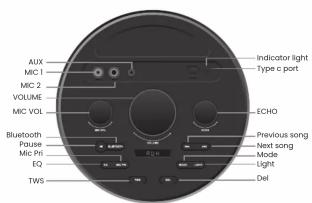
MIC1/ MIC2: 6.3.5mm input for wired
microphones
AUX: 3.5mm AUX IN
OFF/ON: switch on/off
Indicator light: When using the Type-C
charging cable to charge audio through
the Type-C port, the charging indicator is
red. When the battery is full, the charging indicator is green
Type-c port: Charge by this 5V type-c
port
MIC VOL: adjust the volume of the
microphone
VOLUME: Adjust the master volume
ECHO: Adjust the ECHO effect
BLUETOOTH: press the button to enter bluetooth mode.
bluetooth mode
Pause button: When playing music, press this button to pause playback.
EQ button: In music playing mode, you can switch between normal, classic, pop, rock, jazz and rock modes by pressing this button.
Mic PRI Button: Press this button to set the phone's priority mode.
TWS button: enter the Bluetooth mode first, then press the TWS button, the master
screen flashes, and when the slave does not flash, the pairing is successful.
Bluetooth devices can be connected through the main speaker to play music synchronously between the two devices.
Del Button: In "TWS" mode, the paired device can be deleted by pressing this button. Previous song button: In music play mode, you can switch to the previous song by pressing this button.
*only two units of the same model can be paired
Next song button: In music play mode, you can switch to the next song by pressing this button.
this button.
Mode Button: Press this button to switch between "aux", "bluetooth".
Light button: short press to control the "volume" potentiometer blue backlight and two subwoofer red light at the same time.

Brand : Moonki
Model : MS-X265BT
Category : Loudspeaker