TOF620SS - Oven Cookology - Free user manual and instructions
Find the device manual for free TOF620SS Cookology in PDF.


| Product Type | Built-in Electric Oven |
| Brand | Cookology |
| Model | TOF620SS |
| Energy Source | Electric |
| Dimensions (HxWxD) | 595mm x 595mm x 560mm |
| Weight | Approx. 32 kg |
| Power Supply | 230V ~ 50Hz, 16A |
| Energy Consumption | Conventional: 0.79 kWh, Fan: 0.69 kWh |
| Oven Capacity | 71 Liters |
| Number of Functions | 8 Cooking Modes |
| Functions | Convection, Grill, Fan Grill, Upper Heat, Lower Heat, Full Grill, Pizza, Defrost |
| Temperature Range | 50°C - 250°C |
| Timer | Programmable with End of Cooking Alarm |
| Interior Light | Yes |
| Door Type | Cool Touch Door with Double Glazing |
| Cleaning | Manual Cleaning Required |
| Safety Features | Auto Shut-Off, Overheat Protection, Child Lock |
| Accessories Included | 1 Wire Shelf, 1 Baking Tray, 1 Grill Rack |
| Spare Parts Availability | Available via Cookology or Authorized Dealers |
| Warranty | 2 Years Manufacturer Warranty |
| Installation Type | Built-in under counter or in a column |
Frequently Asked Questions - TOF620SS Cookology
User questions about TOF620SS Cookology
0 question about this device. Answer the ones you know or ask your own.
Ask a new question about this device
Download the instructions for your Oven in PDF format for free! Find your manual TOF620SS - Cookology and take your electronic device back in hand. On this page are published all the documents necessary for the use of your device. TOF620SS by Cookology.
USER MANUAL TOF620SS Cookology
Built-in Electric Oven
User Manual
TOF620SS
CONTENTS
3 SAFETY INFORMATION
3 Intended use
3 Warning
4 Causes of Damage
6 INSTALLATION
7 KNOW YOUR APPLIANCE
7 Control Panel
7 Operating Modes
10 Accessories
12 OPERATE YOUR APPLIANCE
12 First use
13 Selecting Modes
14 USING THE CLOCK/PROGRAMMER-ELEC
17 ENERGY EFFICIENT USE
17 ENVIRONMENT
18 HEALTH
18 MAINTENANCE YOUR APPLIANCE
Cleaning Agent
Appliance Door
25 CURE YOUR APPLIANCE WHEN NEEDED
29 CUSTOMER SERVICE
30 TIPS AND TRICKS
32 TYPICAL RECIPES
32 Cakes
33 Bread
34 Meat
34 TEST FOOD ACCORDING TO EN 60350-1
35 ENERGY EFFICIENCY ACCORDING TO EN 60350-1
36 DATASHEET (EU 65/2014 & EU 66/2014)
SAFETY INFORMATION
Intended Use
Thank you for buying Midea Built-in Oven. Before unpacking it, please read these instructions carefully. Only then will you be able to operate your appliance safely and correctly. Warmly recommend retain the instruction manual and installation instructions for future use or for subsequent owners.
The appliance is only intended to be fitted in a kitchen. Observe the special installation instructions.
Check the appliance if there is any damage after unpacking it. Do not connect the appliance if it has been damaged. Only a licensed professional may connect appliances without plugs. Damage caused by incorrect connection is not covered under warranty. Only use this appliance indoors. The appliance must only be used for the preparation of food and drink. The appliance must be supervised during operation.
This appliance may be used by children over the age of 8 and by persons with reduced physical, sensory or mental capabilities or by persons with a lack of experience or knowledge if they are supervised or are instructed by a person responsible for their safety how to use the appliance safely and have understood the associated hazards.
Children must not play with, on, or around the appliance. Children must not clean the appliance or carry out general maintenance unless they are at least 8 years old and are being supervised.
Keep children below the age of 8 years old at a safe distance from the appliance and power cable.
And please always slide accessories into the cavity the right way round.
WARNING
Risk of electric shock!
- Incorrect repairs are dangerous. Repairs may only be carried out and damaged power cables replaced by one of our trained after-sales technicians. If the appliance is defective, unplug the appliance from the mains or switch off the circuit breaker in the fuse box. Contact the aftersales service.
- The cable insulation on electrical appliances may melt when touching hot parts of the appliance. Never bring electrical appliance cables into contact with hot parts of the appliance.
- Do not use any high-pressure cleaners or steam cleaners, which can result in an electric shock.
- A defective appliance may cause electric shock. Never switch on a defective appliance. Unplug the appliance from the mains or switch off the circuit breaker in the fuse box. Contact the after-sales service.
Risk of burns!
- The appliance becomes very hot. Never touch the interior surfaces of the appliance or the heating elements.
- Always allow the appliance to cool down.
- Keep children at a safe distance.
- Accessories and ovenware become very hot. Always use oven gloves to remove accessories or ovenware from the cavity.
- Alcoholic vapors may catch fire in the hot cooking compartment. Never prepare food containing large quantities of drinks with high alcohol content. Only use small quantities of drinks with high alcohol content. Open the appliance door with care.
Risk of scalding!
- The accessible parts become hot during operation. Never touch the hot parts. Keep children at a safe distance.
- When you open the appliance door, hot steam can escape. Steam may not be visible, depending on its temperature. When opening, do not stand too close to the appliance. Open the appliance door carefully. Keep children away.
- Water in a hot cavity may create hot steam. Never pour water into the hot cavity.
Risk of injury!
- Scratched glass in the appliance door may develop into a crack. Do not use a glass scraper, sharp or abrasive cleaning aids or detergents.
- The hinges on the appliance door move when opening and closing the door, and you may be trapped. Keep your hands away from the hinges.
Risk of fire!
- Combustible items stored in the cavity may catch fire. Never store combustible items in the cavity. Never open the appliance door if there is smoke inside. Switch off the appliance and unplug it from the mains or switch off the circuit breaker in the fuse box.
- A draught is created when the appliance door is opened. Greaseproof paper may come into contact with the heating element and catch fire. Do not place greaseproof paper loosely over accessories during preheating. Always weight down the greaseproof paper with a dish or a baking tin. Only cover the surface required with greaseproof paper. Greaseproof paper must not protrude over the accessories.
Hazard due to magnetism!
Permanent magnets are used in the control panel or in the control elements. They may affect electronic implants, e.g. heart pacemakers or insulin pumps. Wearers of electronic implants must stay at least 10 cm away from the control panel.
Causes of Damage
- Accessories, foil, greaseproof paper or ovenware on the cavity floor: do not place accessories on the cavity floor. Do not cover the cavity floor with any sort of foil or greaseproof paper. Do not place ovenware on the cavity floor if a temperature of over 50 °C has been set. This will cause heat to accumulate. The enamel will be damaged.
- Aluminum foil: Aluminum foil in the cavity must not come into contact with the door glass. This could cause permanent discoloration of the door glass.
- Silicone pans: Do not use any silicone pans, or any mats, covers or accessories that contain silicone. The oven sensor may be damaged.
- Water in a hot cooking compartment: do not pour water into the cavity when it is hot. This will cause steam. The temperature change can cause damage to the enamel.
- Moisture in the cavity: Over an extended period of time, moisture in the cavity may lead to corrosion. Allow the appliance to dry after use. Do not keep moist food in the closed cavity for extended periods of time. Do not store food in the cavity.
- Cooling with the appliance door open: Following operation at high temperatures, only allow the appliance to cool down with the door closed. Do not trap anything in the appliance door. Even if the door is only left open a crack, the front of nearby furniture may become damaged over time. Only leave the appliance to dry with the door open if a lot of moisture was produced while the oven was operating.
- Fruit juice: when baking particularly juicy fruit pies, do not pack the baking tray too generously. Fruit juice dripping from the baking tray leaves stains that cannot be removed. If possible, use the deeper universal pan.
- Extremely dirty seal: If the seal is very dirty, the appliance door will no longer close properly during operation. The fronts of adjacent units could be damaged. Always keep the seal clean.
- Appliance door as a seat, shelf or worktop: Do not sit on the appliance door or place or hang anything on it. Do not place any cookware or accessories on the appliance door.
- Inserting accessories: depending on the appliance model, accessories can scratch the door panel when closing the appliance door. Always insert the accessories into the cavity as far as they will go.
- Carrying the appliance: do not carry or hold the appliance by the door handle. The door handle cannot support the weight of the appliance and could break.
- If you use the residual heat of the switched off oven to keep food warm, a high moisture content inside the cavity can occur. This may lead to condensation and can cause corrosion damage of your high quality appliance as well as harm your kitchen. Avoid condensation by opening the door or use “Defrost” mode.
INSTALLATION
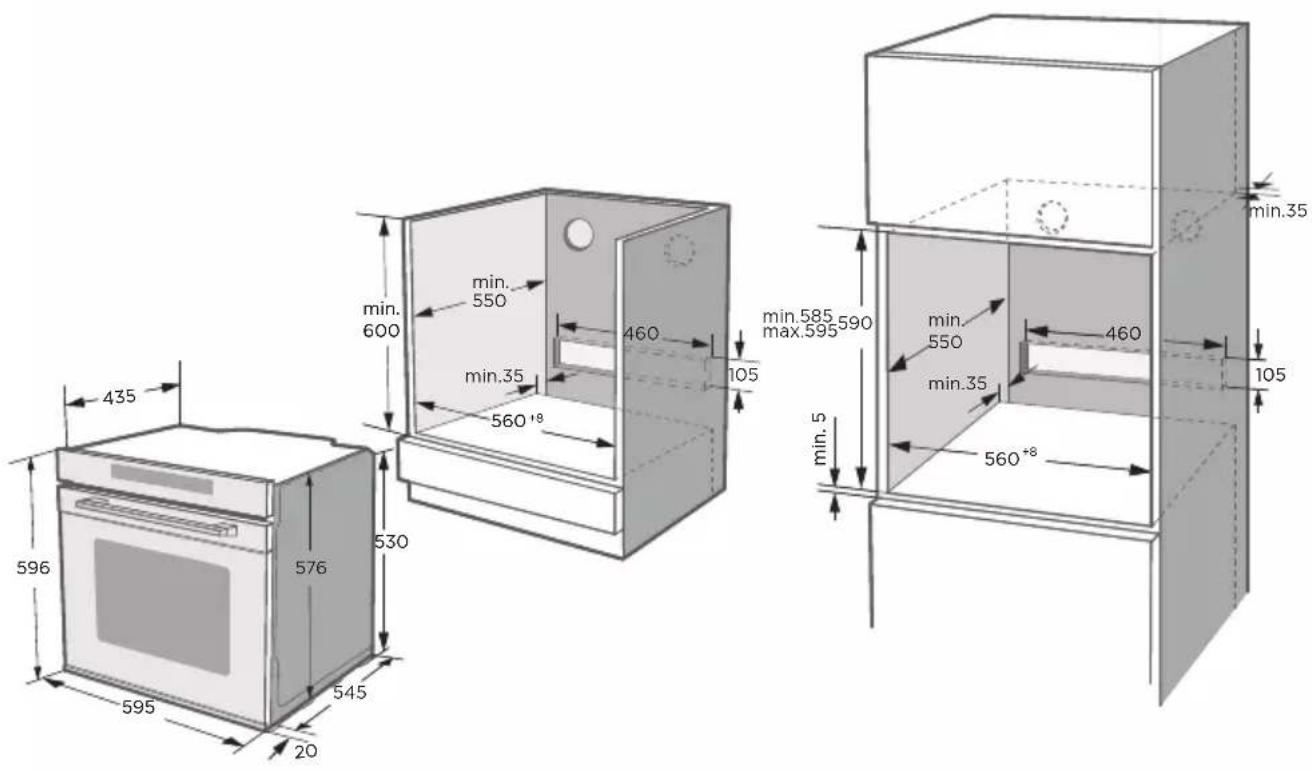
To operate this appliance safe, please be sure that it has been installed to a professional standard respecting the installation instructions. Damages occur because of incorrect installation are not within the warranty.
While doing the installation, please wear protective gloves to prevent yourself from getting cut by sharp edges.
Check the appliance if there is any damage before installation and do not connect the appliance if there is.
Before turning on the appliance, please clean up all the packaging materials and adhesive film from the appliance.
The dimensions attached are in mm.
It is necessary to have the plug accessible or incorporate a switch in the fixed wiring, in order to disconnect the appliance from the supply after installation when necessary.
Warning: The appliance must not be installed behind a decorative door in order to avoid overheating.
KNOW YOUR APPLIANCE
IDENTIFYING THE APPLIANCE
In this chapter, we will explain the control panel and accessories. At the same time you will also find out about the various functions of your appliance.
Note: Depending on the appliance model, individual details and colors may different.
CONTROL PANEL
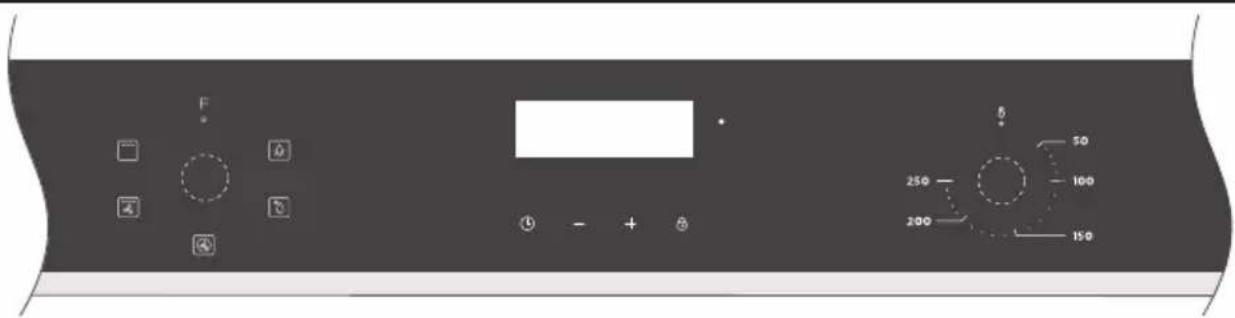
Knobs
Turn these knobs to set operating mode, each knob is well fitted with the nearby silk-screening icons on the control panel glass so that you can easily operate your appliance with your fingers.
Indicator light
Indicator is sort of a light that notice you if heaters inside the appliance are working or not, while the appliance is switched on, the indicator will be on and off intermittently.
Controls
The individual controls are adapted for the various functions of your appliance. You can set your appliance simply and directly. There is no constraint for the orders of operating the knobs, making your-self fully free while using the appliance.
→"Operate Your Appliance" on page 12
OPERATING MODES
Your appliance has various operating modes which make your appliance easier to use. To enable you to find the correct type of heating for your dish, we have explained the differences and scopes of application here.
The symbols for each type help you to remember them.
Types of heating
| Heating Mode | Temperature | Use | |
 | Lamp | / | For lightening the cavity without any heating element switch on. |
 | Defrost For gently defrosting frozen food. | ||
 | Radiant Heat | 50°C~250°C | For grilling small amounts of steaks or sausages.The center area under the heating heating element becomes hot |
 | Grill + Fan | 50°C~250°C | For baking and roasting on one or more levels.(But no more than 3)The fan distributes heat from heating elements evenly around the cavity. |
 | Convection | 50°C~250°C | For baking and roasting on one or more levels. Heat comes from the ring heater surrounding the fan evenly. |
Notes
- To defrost big portions of food, it is possible to remove the side-racks and place the container on the cavity floor.
- To warming tableware, it is beneficial to remove the side-racks and the heating modes "Hot Air Grilling" and "Fan Heating" with temperature setting of 50^ C are useful. "Hot Air Grilling" should be used, if more than half of the cavity floor is covered by the tableware.
- Due to an optimum evenness of heat distribution inside the cavity during “Fan Heating”, the fan will work at certain times of the heating process, to guaranty the best possible performance.
Caution
- If you open the appliance door during an on-going operation, the operation will not be paused. Please be especially careful with the risk of burns.
- Do not cover the ventilation slots. Otherwise, the appliance may overhea. To make the appliance cools down more quickly after the operation, the cooling fan may continue to run for a period afterwards.
Lighting
When you switch the appliance on to any mode, the lamp will be always on until the operation has finished. You can use the main mode: "Lamp" during different operations, i.e. cleaning, preparing the cooking process, pause heating modes during opening the door.
Cooling fan
The cooling fan switches on and off as required. The hot air escapes above the door.
ACCESSORIES
Your appliance is accompanied by a range of accessories. Here, you can find an overview of the accessories included and information on how to use them correctly.
Accessories included
Your appliance is equipped with the following accessories:
natural_image
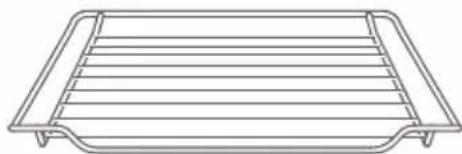
Line drawing of a rectangular tray with horizontal slats and side handles (no text or symbols)Wire Rack Baking Tray
For ovenware, cake tins and ovenproof dishes. For roasts and grilled food
natural_image
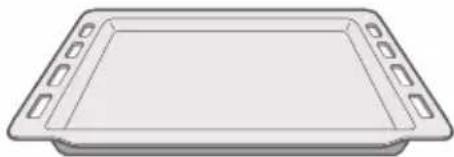
Simple line drawing of a rectangular tray with side handles (no text or symbols)For tray bakes and small baked products.
You can use the tray to place liquid or cooking food with juice.
Only use original accessories. They are specially adapted for your appliance.
You can buy accessories from the after-sales service, from specialist retailers or online.
Note
The accessories may deform when they become hot. This does not affect their function. Once they have cooled down again, they regain their original shape.
Inserting accessories
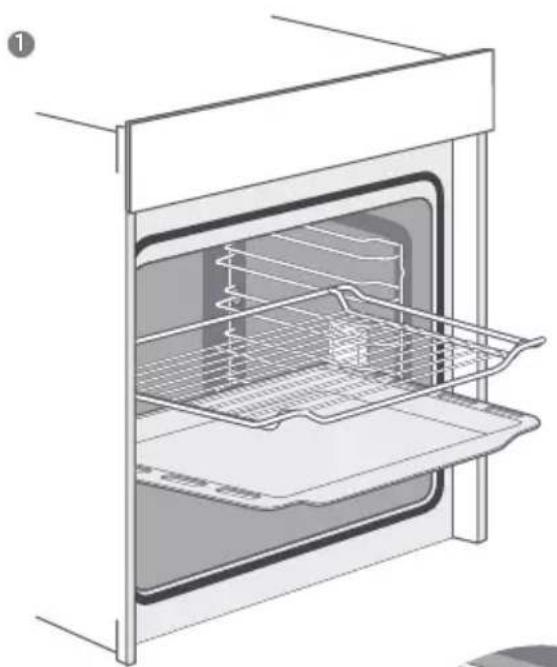
The cavity has five shelf positions. The shelf positions are counted from the bottom up. The accessories can be pulled out approximately halfway without tipping.
Notes
- Ensure that you always insert the accessories into the cavity the right way round.
- Always insert the accessories fully into the cavity so that they do not touch the appliance door.
natural_image
Line drawing of an oven with internal rack and tray (no text or symbols)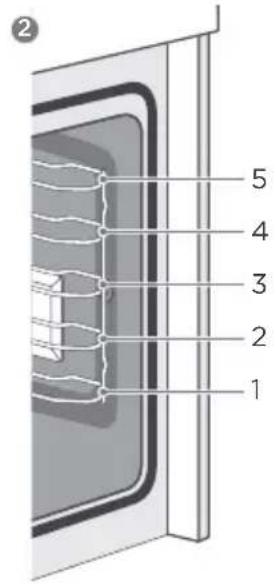
natural_image
Close-up of a steel rebar grid structure with no visible text or symbols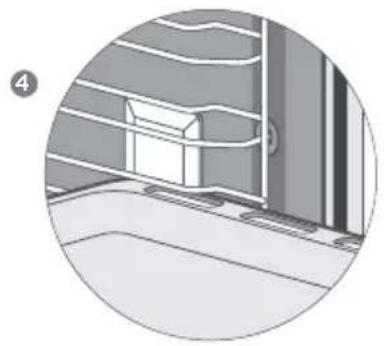
natural_image
Interior view of a building corner with structural beams and a window (no text or symbols visible)Locking function
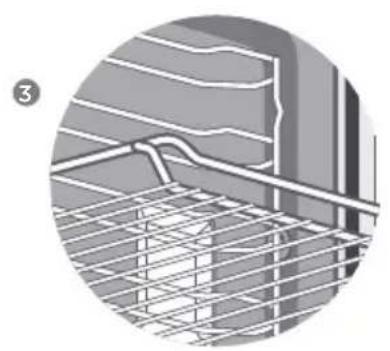
Accessories can be approximately pulled halfway out until they lock in place. The locking function prevents accessories from tilting with the gravity of food and accessories themselves while they get pulled out. Accessories should be inserted into cavity correctly for the tilt protection. When inserting the wire rack, ensure the wire rack is onto the right facing direction like the picture ①③
When inserting the backing tray, ensure the backing tray is onto the right facing direction like the picture 1 4.
Optional accessories
You can buy optional accessories from the after-sales service, from specialist retailers or online. Please see your sales brochures for more details.
When purchasing, please always quote the exact order number of the optional accessory.
OPERATE YOUR APPLIANCE
First use
Before using the appliance to prepare food for the first time, you must clean the cavity and accessories.
- Remove all stickers, surface protection foils and transport protection parts.
- Remove all accessories and the side-racks from the cavity.
- Clean the accessories and the side-racks thoroughly using soapy water and a dish cloth or soft brush.
- Ensure that the cavity does not contain any leftover packaging, such as polystyrene pellets or wooden piece which may cause risk of fire.
- Wipe the smooth surfaces in the cavity and the door with a soft, wet cloth.
- To remove the new-appliance smell, heat up the appliance when empty and with the oven door closed.
- Keep the kitchen highly ventilated while the appliance is heating up first time. Keep children and pets out of the kitchen during this time. Close the door to the adjacent rooms.
- Adjust the settings indicated. You can find out how to set the heating type and the temperature in the next section.
| Settings | |
| Heating Mode |  |
| Temperature | 250°C |
| Time | 1h |
After the appliance has cooled down:
- Clean the smooth surfaces and the door with soapy water and a dish cloth.
- Dry all surfaces.
- Install the side-racks.
Selecting Modes
The default operating mode is switching off. If you would like to select a cooking operating mode, you can do so using left mode-control knob. There is a pointer on the knob, turn this knob to make the pointer to point to the mode which you would like to choose.
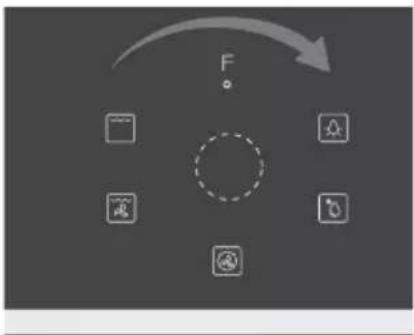
flowchart
graph TD
    A["Input Icon"] --> B["Process Unit"]
    B --> C{F}
    C --> D["Output Icon"]
    style C stroke-dasharray: 5 5
Temperature Setting
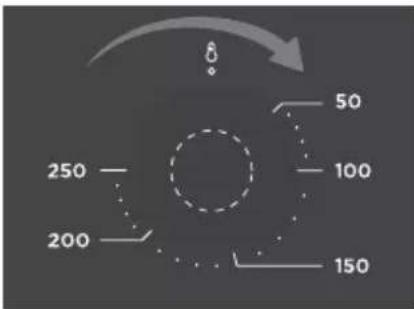
If you would like to select a temperature for cooking, the way to operate is similar with the way to select the operating mode. You can do so using right temperature-control knob. There is a pointer on the knob, turn this knob to make the pointer to point to the temperature which you would like to choose.
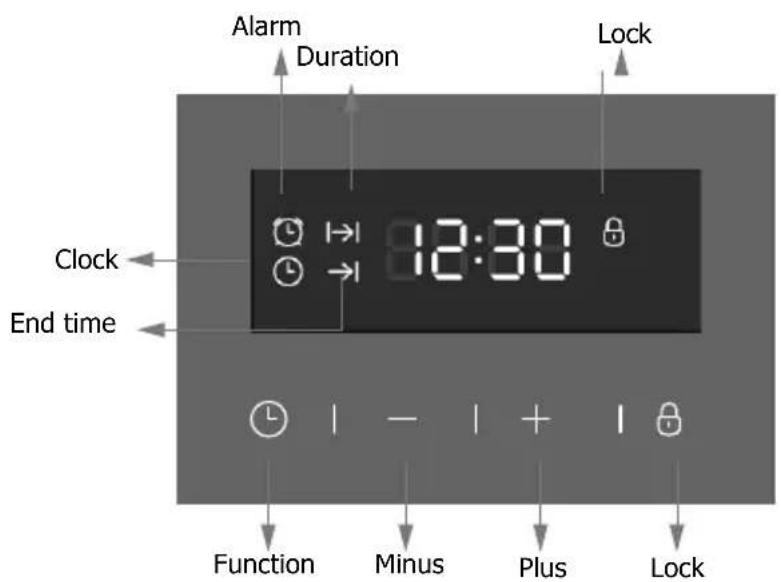
Afterpower on, '0:00' and the clock icon will flash on the screen, press any button to quit.
Button 1:* clock >alarm setting >duration >setting >endtime setting >clock setting >*clock (*: default)
Button 2: minus(-) Button 3: plus Button 4: Lock
1、Set alarm
1) Pressbutton 1, alarm icon flashing means alarmfunction chosen."0:00"willdisplay. Press button 2 and 3 to set alarm time. Time adjust range is "0:01\~23:59". Press once to plus or minus 1, and hold for 3 seconds for quick-adjust. Waiting for 5 seconds to confirm setting, the alarmicon will be display, alarm time will be shown and alarm starts. After the count down, "0:00"willdisplay, buzzing starts 4 times every 5 seconds. Press any button to stop.
2) If there's no operation for 2 minutes, buzzing will stop.
2、Duration setting
1) Press button 1, choose 'duration' function, duration icon will flash, "0:00" display. Pressbutton2 and 3 to set duration time, adjusting range is "0:01-23:59".
Press once to plus or minus 1, hold for 3 seconds for quick adjust. The flashing will last for 5 seconds, so the settings must be done within this time framer the time of day will show again. After setting, the durationicon will display, countingdown starts. When counting down stops, power will turn off 'Duration' icon will flash, "0:00" will display, buzzing will starts for twice every 5 seconds. Press any button to stop buzzing, and pressbutton1 to show the time of day.
2) During the cooking duration, press button1 can check and change the cooking time.
3) After counting down stopping, if there's no operation for 2 minutes, buzzing will stop.
4) If set duration time before end time, end time can only be added, not decreased. (The max time added can be after 23h 59m. When end time is longer than duration time+ current time, end time can be decreased by pressing button 2. It will be decreased until end time equals to duration time+ currenttime equals to duration time+ 1 minute). If end time is longer than duration time+ current time, power will be off, end time icon will display. When end time equals to duration time+current time, power will be on again, end time icon will turn off.
3、time function
1) Press button 1 to choose time function. Time icon will flash, press button 2 or 3 to set time. The range is 24hrs. Press once to plus or minus 1, hold for 3 seconds for quick-adjust. No operation for 5 seconds, the time of day will show, time icon will turn off.
2) If time setting is changed after setting alarm, duration and end time, the alarm will not be changed, and duration and end time will reset.
4、lock function.
Press lock button for 3 seconds any time, the lock function will active, and lock icon will display. Press lock button for 3 seconds again, it will be unlock.
The icon turns off.
During the lock condition, press button will cause buzzing, meanwhile the lock icon will flash for 3 seconds.
5、Other notification
1) If setting alarm, duration time and endtime, alarm time will display, and alarm, duration, end time icons will display.
2) After setting alarm, duration, and end time, Button 1 can be pressed to check and change alarm time, duration time, end time and day time.
3) If duration time is later than alarm time, there will be only buzzing for alarm. If duration is earlier than alarm time, there will be only buzzing for alarm.
Indicator
While the appliance starts to cook food or drink, the indicator will be switched on to notice you. During the period of cooking, the indicator will be on & off intermittently. This depends on if the heating elements are working or not.
Changing
During the period of appliance operating, knobs on the control panel can be turned again to meet your needs or changing.
Turn the mode-control knob from the present mode to another one while the appliance is operating means to get the mode changed while food is being cooked. By this time, if you turn the knob to LAMP or DEFROST, the heating elements will be switched off. If you turn the knob back to the original position, the appliance will be switched off but the timer will still count.
Turn the temperature-control knob from present to others while the appliance is operating means to get the cooking temperature changed while food is being cooked. By this time, if you turn the knob back to the original position, the heating elements will be switched off. Lamp and timer will still be switched on, if cooking fan works depends on the temperature of the circumstance inside the appliance.
Turn the time-control knob from present to others while the appliance is operating means to get the rest cooking time changed while food is being cooked. By this time, if you turn the knob back to the original position, it means the appliance is officially switched off. You will see the indicator also be switched off to notice you about this.
Caution!
After the appliance switched off, it becomes very hot especially inside the cavity. Never touch the interior surfaces of the appliance or the heating elements. Use oven gloves to remove accessories or ovenware from the cavity, and allow the appliance to cool down. Keep children at a safe distance at the same time to avoid the injury of burns.
Note
Changing modes/temperature/rest cooking time may have some negative influences for the result of cooking, we warmly recommend you not to do so unless you are well experienced on cooking.
ENERGY EFFICIENT USE
- Remove all accessories, which are not necessary during the cooking & baking process
- Do not open the door during the cooking & baking process.
- If you open the door during cooking & baking, switch the mode to "Lamp" (Without change the temperature setting).
- Decrease the temperature setting in not fan assisted modes to 50^ C at 5min to 10min before end of cooking & baking time. So you can use the cavity heat to complete the process.
- Use "Fan Heating", whenever possible. You can reduce the temperature by 20°C to 30°C.
- You can cook and bake using "Fan Heating" on more than one level at the same time.
- If it is not possible to cook and bake different dishes at the same time, you can heat one after the other to use the preheat status of the oven.
- Do not preheat the empty oven, if it is not required. If necessary put the food into the oven immediately after reaching the temperature indicated by switching off the indicator light the first time.
- Do not use reflective foil, like aluminum foil to cover the cavity floor.
- Use the timer and or a temperature probe whenever possible.
- Use dark matt finish and light weighted baking molds and containers. Try not to use heavy accessories with shiny surfaces, like stainless steel or aluminum.
ENVIRONMENT
The packaging is made for protect your new appliance against damages during transport. The materials used are selected carefully and should be recycled. Recycling reduces the use of raw materials and waste. Electrical and electronic appliances often contain valuable materials. Please do not dispose of it with your household waste.
HEALTH
Acrylamide occurs mainly by heating up starchy food (i.e. potato, French fries, bread) to very high temperatures over long times.
Tips
- Use short cooking times.
- Cook food to a golden yellow surface color, do not burn it to dark brown colors.
- Bigger portions have less acrylamide.
- Use "Fan Heating" mode if possible.
- French fries: Use more than 450g per tray, place them evenly spread and turn them time by time. Use the product information if available to get the best cooking result.
MAINTENANCE YOUR APPLIANCE
Cleaning Agent
With good care and cleaning, your appliance will retain its appearance and remain fully functioning for a long time to come. We will explain here how you should correctly care for and clean your appliance.
To ensure that the different surfaces are not damaged by using the wrong cleaning agent, observe the information in the table. Depending on the appliance model, not all of the areas listed may be on/in your appliance.
Caution!
Risk of surface damage
Do not use:
- Harsh or abrasive cleaning agents.
- Cleaning agents with a high alcohol content.
- Hard scouring pads or cleaning sponges.
- High-pressure cleaners or steam cleaners.
- Special cleaners for cleaning the appliance while it is hot.
Wash new sponge cloths thoroughly before use.
Tip
Highly recommended cleaning and care products can be purchased through theafter-sales service.
Observe the respective manufacturer's instructions.
| CleaningArea Appliance exterior | |
| Appliance exteriorStainless steel front | Hot soapy water:Clean with a dish cloth and then dry with a soft cloth.Remove flecks of limescale, grease, starch and albumin (e.g. egg white) immediately.Corrosion can form under such flecks.Special stainless steel cleaning products suitable for hot surfaces are available from our after-sales service or from specialist retailers.Apply a very thin layer of the cleaning product with a soft cloth. |
| Plastic | Hot soapy water:Clean with a dish cloth and then dry with a soft cloth. Do not use glass cleaner or a glass scraper. |
| Painted surfaces | Hot soapy water:Clean with a dish cloth and then dry with a soft cloth. |
| Control panel | Hot soapy water:Clean with a dish cloth and then dry with a soft cloth. Do not use glass cleaner or a glass scraper. |
| Door panels | Hot soapy water:Clean with a dish cloth and then dry with a soft cloth.Do not use a glass scraper or a stainless steel scouring pad. |
| Door handle | Hot soapy water:Clean with a dish cloth and then dry with a soft cloth.If descaler comes into contact with the door handle, wipe it off immediately. Otherwise, any stains will not be able to be removed. |
| Enamel surfaces and self-cleaning surfaces | Observe the instructions for the surfaces of the cooking compartment that follow the table. |
| Glass cover for the interior lighting | Hot soapy water:Clean with a dish cloth and then dry with a soft cloth.If the cooking compartment is heavily soiled, use oven cleaner. |
| Door sealDo not remove | Hot soapy water:Clean with a dish cloth. Do not scour. |
| Stainless steel door cover | Stainless steel cleaner:Observe the manufacturer's instructions.Do not use stainless steel care products.Remove the door cover for cleaning. |
| Accessories | Hot soapy water:Soak and clean with a dish cloth or brush.If there are heavy deposits of dirt, use a stainless steel scouring pad. |
| Rails | Hot soapy water:Soak and clean with a dish cloth or brush. |
| Pull-out system | Hot soapy water:Clean with a dish cloth or a brush.Do not remove the lubricant while the pull-out rails are pulled out. It is best to clean them when they are pushed in.Do not clean in the dishwasher. |
| Meat thermometer | Hot soapy water:Clean with a dish cloth or a brush. Do not clean in the dishwasher. |
Notes
- Slight differences in color on the front of the appliance are caused by the use of different materials, such as glass, plastic and metal.
- Shadows on the door panels, which look like streaks, are caused by reflections made by the interior lighting.
- Enamel is baked on at very high temperatures. This can cause some slight color variation. This is normal and does not affect operation. The edges of thin trays cannot be completely enameled. As a result, these edges can be rough. This does not impair the anti-corrosion protection.
- Always keep the appliance clean and remove dirt immediately so that stubborn deposits of dirt do not build up.
Tips
- Clean the cooking compartment after each use. This will ensure that dirt cannot be baked on.
- Always remove flecks of lime scale, grease, starch and albumin (e.g. egg white) immediately.
- Remove flecks of food with sugar content immediately, if possible, when the fleck is still warm.
- Use suitable ovenware for roasting, e.g. a roasting dish.
APPLIANCE DOOR
With good care and cleaning, your appliance will retain its appearance and remain fully functional for a long time to come. This will tell you how to remove the appliance door and clean it.
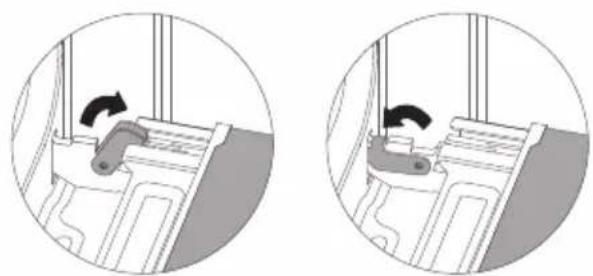
For cleaning purposes and to remove the door panels, you can detach the appliance door. The appliance door hinges each have a locking lever.
When the locking levers are closed, the appliance door is secured in place. It cannot be detached. When the locking levers are open in order to detach the appliance door, the hinges are locked. They cannot snap shut.
natural_image
Two circular diagrams showing a mechanical component with rotation arrows, no text or symbols present.Warning - Risk of injury!
- If the hinges are not locked, they can snap shut with great force. Ensure that the locking levers are always fully closed or, when detaching the appliance door, fully open.
- The hinges on the appliance door move when opening and closing the door, and you may be trapped. Keep your hands away from the hinges.
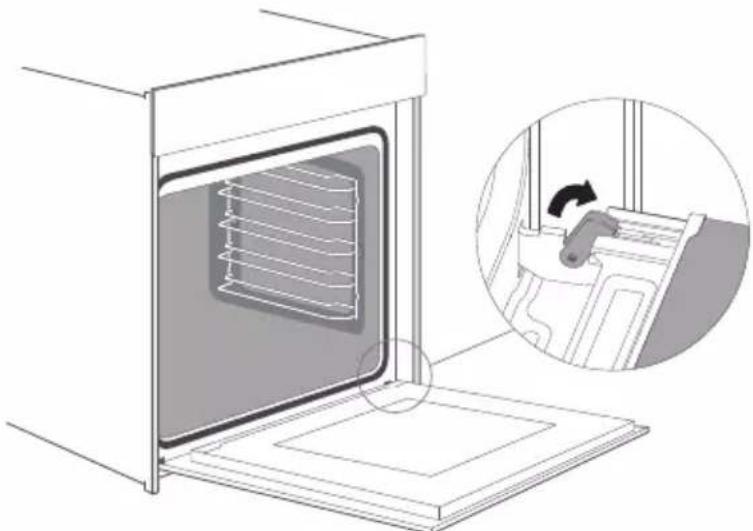
Removing the appliance door
- Open the appliance door fully.
- Fold open the two locking levers on the left and right
- Close the appliance door as far as the limit stop.
- With both hands, grip the door on the left- and right-hand side, and pull it out upwards.
natural_image
Illustration of a kitchen oven with a rack inside and an inset showing a hand washing a bed (no text or symbols present)Fitting the appliance door
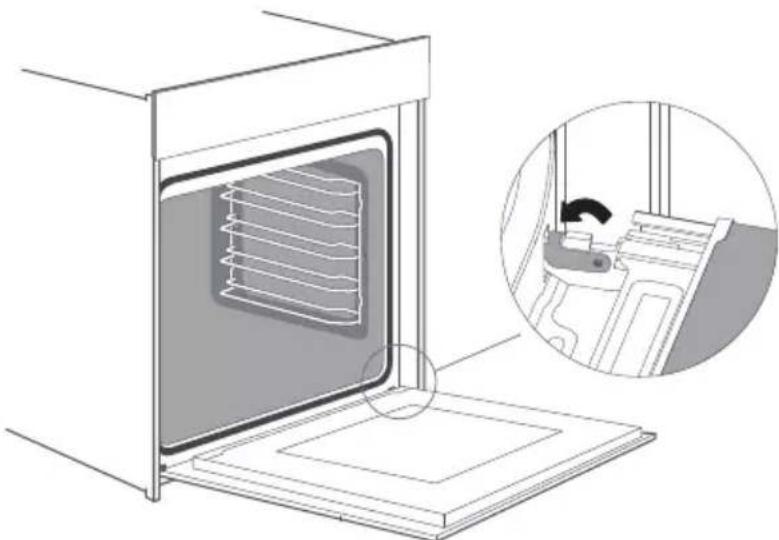
Reattach the appliance door in the opposite sequence to removal.
- When attaching the appliance door, ensure that both hinges are placed right onto the installing holes of the front panel of the cavity.
Ensure that the hinges are inserted into the correct position. You must be able to insert them easily and without resistance. If you can feel any resistance, check that the hinges are inserted into the holes right.
- Open the appliance door fully. While opening the appliance door, you can make another check if the hinges are onto the right position. If you make the fitting wrong, you will not be able to make the appliance door fully opened.
Fold both locking levers closed again.
- Close the cooking compartment door. By the same time, we warmly recommend you to check one more time, if the door is onto the right position and if the ventilation slots are not half-sealed.
natural_image
Diagram of a kitchen oven with a rack inside, showing internal airflow and a close-up inset of the interior (no text or symbols)Removing the door cover
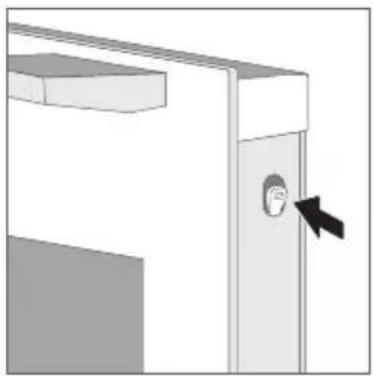
The plastic inlay in the door cover may become discolored. To carry out thorough cleaning, you can remove the cover.
Remove the appliance door like instructed above.
- Press on the right and left side of the cover.
- Remove the cover.
- After removing the door cover, that rest parts of the appliance door can be easily taken off so that you can go on with the cleaning. When the cleaning of the appliance door has finished, put the cover back in place and press on it until it clicks audibly into place.
- Fitting the appliance door and close it.
natural_image
Diagram of a door with a face inset and arrow indicating direction (no text or symbols)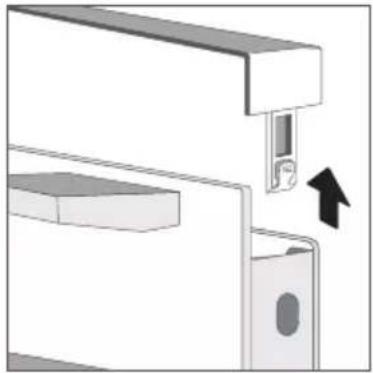
natural_image
Mechanical assembly diagram showing a bracket with a close-up of a component and an arrow indicating direction (no text or symbols)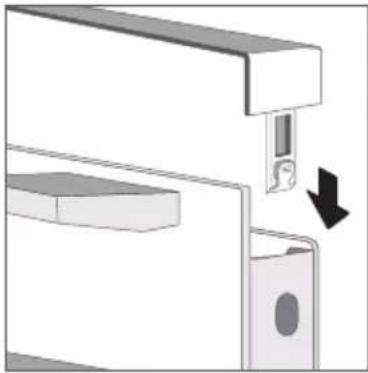
natural_image
Diagram of a mechanical assembly with a lock and housing, showing a directional arrow (no text or symbols present)Change the power cord
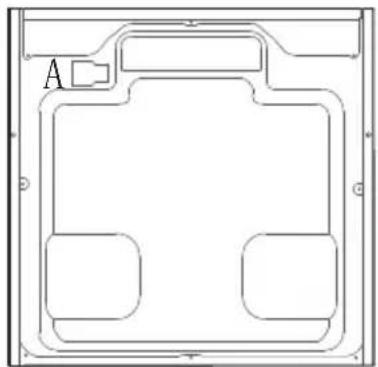
Position A show the terminal box position on the back of the back outer case and it's closed.
Steps: a. cut off the power, use small flat screwdriver to open two snap 1, 2.
b. use Phillips crewdriver to take off screws 3, 4, 5 and 6.
c. change the new power cord, fix the yellow/green wire on 3, brother wire on 4, blue wire on 5.
d. twist screw 6 closed the terminal box cover finish the changing.
natural_image
Pure technical line drawing of a rectangular frame with internal compartments and a labeled section 'A' (no text or symbols beyond label)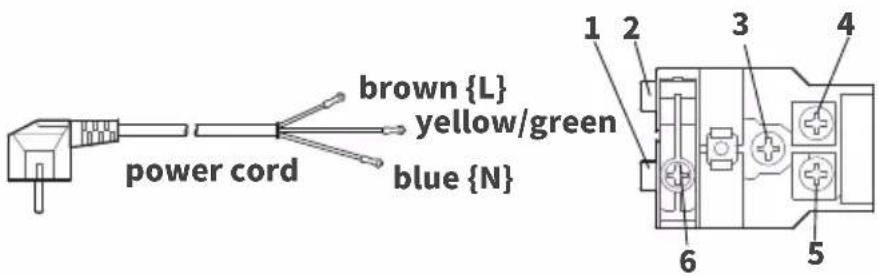
terminal boxback outer c
Rails
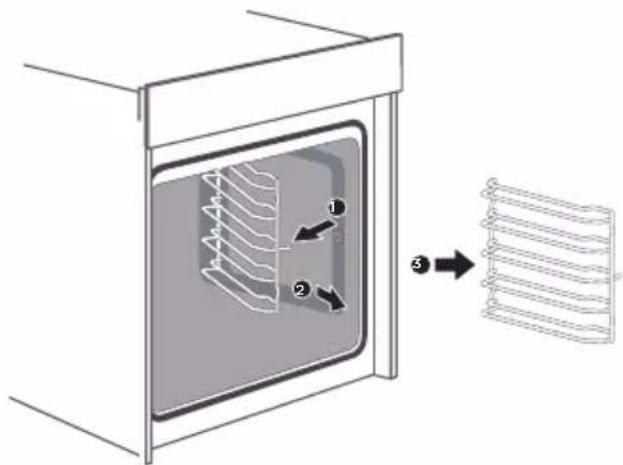
When you want have a good cleaning for the rails and cavity, you can remove the shelves and clean it. In this way your appliance will retain its appearance and remain fully
functional for a long time to come.
Detaching and refitting the rails
Inserting the holders
Attaching the rails
Caution!
While the appliance door is well installed, the door cover can also be taken off, by this time.
- Removing the door cover means to set the inner glass of the appliance door free, the glass can be easily moved and cause damage or injury.
- As removing the door cover and inner glass means to reduce the overall weight of the appliance door. The hinges can be easier to be moved when closing the door and you may be trapped. Keep your hands away from the hinges.
Because of the 2 points above, we strongly recommend you not to remove the door cover unless the appliance door removed. Damage caused by incorrect operation is not covered under warranty.
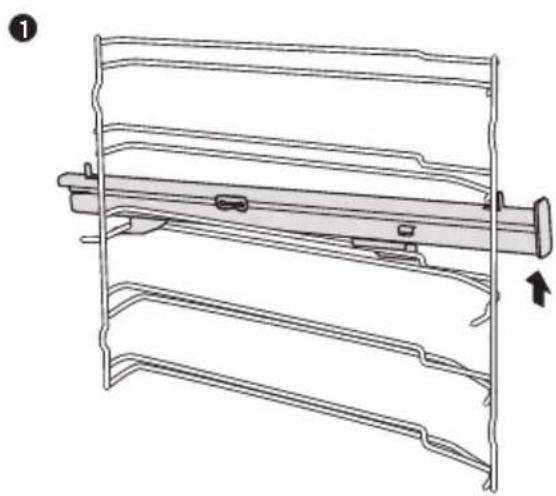
Remove the telescopic runners ( take the left side for example same for right side)
- Lift up one end of the telescopic runners hard.
- Lift up the whole telescopic runners and remove backward.
natural_image
Technical line drawing of a mechanical component with no visible text or symbols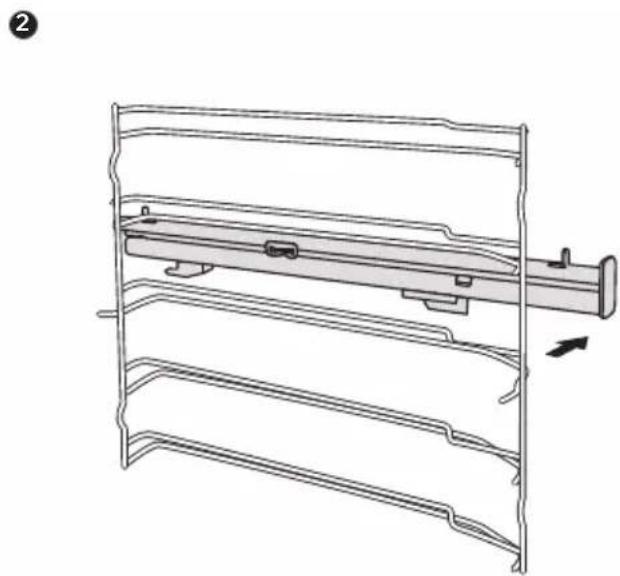
natural_image
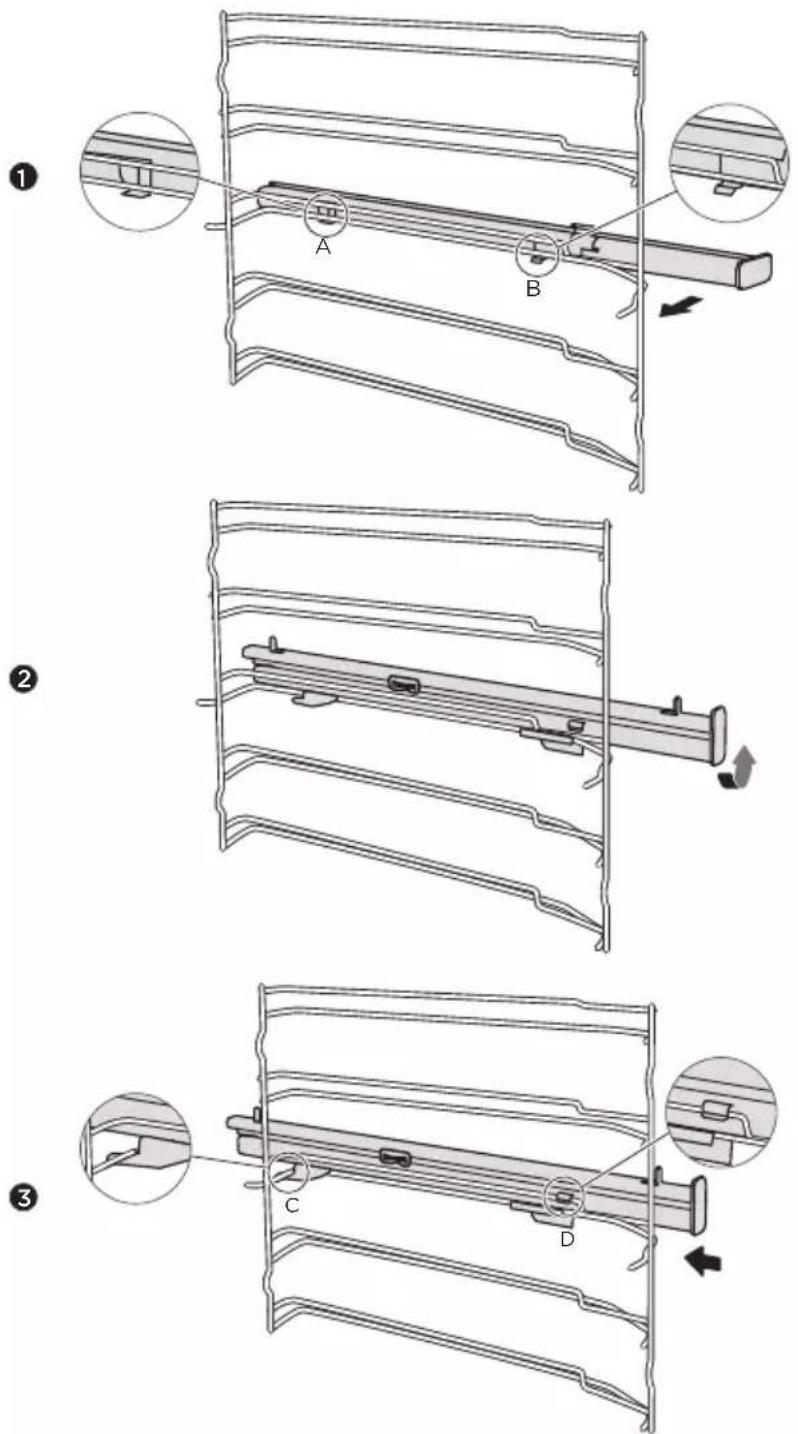
Technical line drawing of a mechanical assembly with no visible text or symbolsFix the telescopic runners
( take the left side for example same for right side)
- Put the point A and B of the telescopic runners horizontally on the outer wire.
- Rotate the telescopic runners anti-clockwise (clockwise for right side) by 90 degrees.
- Push forward the telescopic runners, make the point C buckled onto the lowerwire and the point D buckled onto the upper wire.
CURE YOUR APPLIANCE WHEN NEEDED
If a fault occurs, before calling the after-sales service, please ensure that is not because of incorrect operations and refer to the fault table, attempt to correct the fault yourself.
You can often easily rectify technical faults on the appliance yourself.
If a dish does not turn out exactly as you wanted, you can find many tips and instructions for preparation at the end of the operating manual.
Fault Possible Cause Notes/remedy
| The appliance does not work. | Faulty fuse. | Check the circuit breaker in the fuse box. |
| Power cut | Check whether the kitchen light or other kitchen appliances are working. | |
| Knobs have fallen out of the support in the control panel. | Knobs have been accidentally disengaged. | Knobs can be removed.Simply place knobs back in their support in the control panel and push them in so that they engage and can be turned as usual. |
| Knobs can no longer be turned easily. | There is dirt under knobs | Knobs can be removed.To disengage knobs, simply remove them from the support.Alternatively, press on the outer edge of knobs so that they tip and can be picked up easily.Carefully clean the knobs using a cloth and soapy water.Dry with a soft cloth.Do not use any sharp or abrasive materials.Do not soak or clean in the dishwasher.Do not remove knobs too often so that the support remains stable |
| Fan does not work all the time in the mode: “Fan Heating” | This is a normal operation due to the best possible heat distribution and best possible performance of the oven. |
| After a cooking process a noise can be heard and a air flow in the near of the control panel can be observed. | The cooling fan is still working, to prevent high moisture conditions in the cavity and cool down the oven for your convenience. The cooling fan will switch off automatically. |
| The food is not sufficient cooked in the time given by the recipe . | A temperature different from the recipe is used. Double check the temperatures. The ingredient quantities are different to the recipe. Double check the recipe. |
| Uneven browning | The temperature setting is too high, or the shelf level could be optimized. Double check the recipe and settings. The surface finish and or color and or material of the baking ware were not the best choice for the selected oven function. When use radiant heat, such as “Top & Bottom Heating” mode, use matt finished, dark colored and light weighted oven ware. |
| The lamp doesn’t turn on The lamp needs to be replaced. | |
Warning-Risk of electric shock!
Incorrect repairs are dangerous. Repairs may only be carried out and damaged power cables replaced by one of our trained after-sales technicians. If the appliance is defective, unplug the appliance from the mains or switch off the circuit breaker in the fuse box. Contact the after-sales service.
Maximum operating time
The maximum operating time of this appliance is 9 hours, to prevent that you forget shot off the power.
Replacing the lamp on the corner of the cavity
If the cavity lamp fails, it must be replaced. Heat-resistant, 25 watt, 230 V halogen lamps are available from the after-sales service or specialist retailers.
When handling the halogen lamp, use a dry cloth. This will increase the service life of the lamp.
WARNING
Risk of electric shock!
When replacing the lamp, the lamp socket contacts are live. Before replacing the lamp, unplug the appliance from the mains or switch off the circuit breaker in the fuse box.
Risk of burns!
The appliance becomes very hot. Never touch the interior surfaces of the appliance or the heating elements. Always allow the appliance to cool down. Keep children at a safe distance.
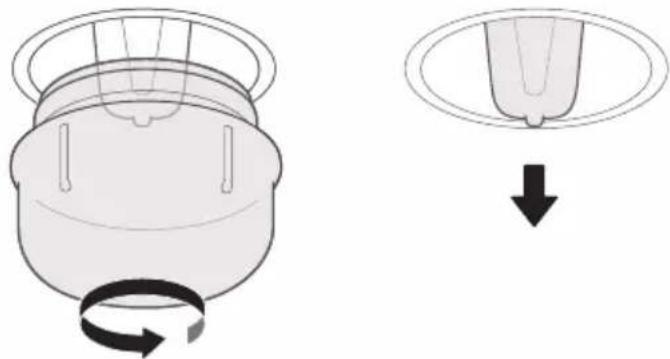
- Place a towel in the cold cavity to prevent damage.
- Turn the glass cover anti-clockwise to remove it.
- Pull out the lamp - do not turn it.
-
Screw the glass cover back in.
-
Remove the towel and switch on the circuit breaker to see if lamp switches on.
Insert the new lamp, making sure that the pins are in the correct position. Push the lamp in firmly.
natural_image
Diagram showing a mechanical component with rotational motion and a separate view of a circular component (no text or symbols)Glass cover
If the glass cover of the halogen lamp is damaged, it must be replaced. You can obtain a new glass cover from the after-sales service. Please specify the E number and FD number of your appliance.
CUSTOMER SERVICE
Our after-sales service is there for you if your appliance needs to be repaired. We will always find an appropriate solution. Please contact the dealer where you by this appliance. When calling us, please give the model number and S/N so that we can provide you with the correct advice. The rating plate bearing these numbers can be found when you open the appliance door.
Model: TOF620SS
Rated voltage: 220-240V\~
Rated frequency: 50Hz-60Hz
Electric power: 1.9 kW
To save time, you can make a note of the model of your appliance and the telephone number of the aftersales service in the space below, should it be required.
MAINTENANCE CARD
| Model number | Purchasing date |
| Serial number | Purchasing store |
Warning
This appliance shall be installed in accordance with the regulations in force and only used in a well ventilated space. Read the instructions before installing or using this appliance.
Note
Please note that a visit from an after-sales service engineer is not free of charge, even during the warranty period.
Rely on the professionalism of the manufacturer. You can therefore be sure that the repair is carried out by trained service technicians who carry original spare parts for your appliances.
Above, thank you again for buying Midea Built-in Oven, and we wish that our appliance will bring you delicious food and happy life.
TIPS AND TRICKS
| You want to cook your own recipe | Try to use settings of similar recipes first and optimize the cooking process due to the result. |
| Is the cake baked ready? | Put a wooden stick inside the cake about 10 minutes before the given baking time is reached. If there is no raw dough at the stick after pulling out, the cake is ready. |
| The cake loses massive volume during cooling down after baking | Try to lower the temperature setting by 10°C and double check the food preparing instructions regarding the mechanical handling of the dough. |
| The height of the cake is in the middle much higher than at the outer ring | Do not grease the outer ring of the spring form |
| The cake is too brown at the top | Use a lower shelf level and or use a lower set temperature (this may lead to a longer cooking time) |
| The cake is too dry | Use a 10°C higher set temperature (this may lead to a shorter cooking time) |
| The food is good looking but the humidity inside is too high | Use a 10°C lower set temperature (this may lead to a longer cooking time) and double check the recipe |
| The browning is uneven | Use a 10°C lower set temperature (this may lead to a longer cooking time). Use the “Top & Bottom Heating” mode on one level. |
| The cake is less browned on the bottom | Choose a level down |
| Baking on more than one level at the same time: One shelf is darker than the other. | Use a fan assisted mode for baking at more than one level and take out the trays individually when ready. It is not necessary that all trays are ready at the same time. |
| Condensing water during baking | Steam is part of baking and cooking and moves normally out of the oven together with the cooling air flow. This steam may condensate at different surfaces at the oven or near to the oven and build water droplets. This is a physical process and cannot be avoid completely. |
| Which kind of baking ware can be used? | Every heat resistant baking ware can be used. It is recommended not to use aluminum in direct contact with food, especially when it is sour.Please ensure a good fitting between container and lid. |
| How to use the grill function? | Preheat the oven for 5 minutes and place the food in the level given by this manual.Close the oven door when you use any grilling mode. Do not use the oven when the door is open, except for load / remove / check the food. |
| How to keep clean the oven during grilling ? | Use the tray filled with 2 liter of water in at level 1. Nearly all fluids drip down from the food placed on the rack will captured by the tray. |
| The heating element in all grilling modes are switching on and off over the time. | It is a normal operation and depends on the temperature setting. |
| How to calculate the oven settings, when the weight of a roast is not given by a recipe? | Choose the settings next to the roast weight and change the time slightly.Use a meat probe if possible to detect the temperature inside the meat.Place the head of the meat probe carefully in the meat, due to the manufacturer instructions.Make sure, that the head of the probe is placed in the middle of the biggest part of the meat, but not in the near of a bone or hole. |
| What happens if a fluid is poured to a food in the oven during the baking or cooking process? | The fluid will boil and steam will arise as a normal physical process.Please be careful, because the steam is hot. See also “Condensing water during baking” for more information.If the fluid contains alcohol, the boiling process will be quicker and can lead to flames in the cavity. Make sure, that the oven door is closed during such kind of processes. Please control the baking or cooking process carefully. Open the door very gentle and only if necessary. |
TYPICAL RECIPES
| CAKE | LevelForm Mode Temp. in °C | Duration in minutes | |||
| Sponge Cake (simple) in a Box shape | Box | 2 | Conventional with Fan | 170 | 50 |
| Sponge Cake (simple) in a Box shape | Box | 1 | Conventional 70 | 140 | |
| Sponge Cake with Fruits in a round Form | Round form Conventional with Fan | 150 | 50 | ||
| Sponge Cake with Fruits on a Tray | Tray Conventional | 140 | 70 | ||
| Raisins Brioche Muffins (Yeast Cake) | Muffin form p.h.t.:19:00 Conventional | 220 | b.t.: 11:00 | ||
| Gugelhupf (with Yeast) | Tray p.h.t.:11:00 1 | Conventional | 150 | b.t.:60:00 | |
| Muffins | Muffin form | 1 | Conventional | 160 | p.h.t.: 8:30 b.t.: 30:00 |
| Muffins | Muffin form | 1 | Conventional with Fan | 150 | p.h.t.: 8:30 b.t.: 30:00 |
| Apple Yeast Cake on a Tray | Tray p.h.t.: 10:001 | Conventional with Fan | 160 | b.t.: 42:30 | |
| Water Sponge Cake (6 Eggs) | Spring form | 1 | Conventional | 160 | p.h.t.: 9:30 b.t.: 41:00 |
| Water Sponge Cake (4 Eggs) | Spring form | 1 Conventional | 160 | p.h.t.: 9:00 b.t.: 26:00 | |
| Water sponge Cake | Spring form | 1 | Convention | 160 | 35 |
| Apple Yeast Cake on a Tray | Tray 2 p.h.t.: 8:00 | Conventional with Fan | 150 | b.t.: 42:00 | |
| Hefezopf (Callah) | Tray | 2 | Conventional with Fan | 150 | 40 |
| CAKE | LevelForm Mode Temp.in °C | Duration in minutes | |||
| Small Cakes 20 | Tray | 2 | Convention | 150 | 36 |
| Small Cakes 40 | Tray | 2+4 | Convention | 150 | p.h.t:10:00b.t.:34:00 |
| Butter Yeast Cake | Tray | 2 | Conventional | 150 | p.h.t.: 8:00b.t.: 30:00 |
| Shortbread 170 | Tray | 2 | Conventional | p.h.t.: 8:00b.t.: 13:00 | |
| Shortbread 2 Trays | Tray | 2+4 | Conventional with Fan | 160 | p.h.t:8:20b.t.: 12:00 |
| Vanilla Cookies | Tray | 2 | Conventional | 160 | p.h.t.: 8:00b.t.: 10:00 |
| Vanilla Cookies | Tray | 2+4 | Conventional with Fan | 150 | p.h.t.:8:00b.t.: 14:00 |
| BREAD | LevelForm Mode Temp.in °C | Duration in minutes | |||
| White Bread (1 kg Flour) Box shape | Box 1 170 | p.h.t.: 9:20 | Conventional | b.t.: 50:00 | |
| White Bread (1 kg Flour) Box shape | Box 1 170 | p.h.t.: 12:00 | Conventional with Fan | b.t.: 45:00 | |
| ConventionalTray 2 170Fresh | Pizza (thin) p.h.t.: 9:30b.t.: 21:00 | ||||
| ConventionalTray 2 170Fresh | Pizza (thick) p.h.t.: 10:00b.t.: 45:00 | ||||
| Fresh Pizza (thick) | Tray | 2 | Conventional with Fan | 170 | p.h.t.:8:00b.t.: 41:00 |
| ConventionBread | Tray | p.h.t:9:100b.t.:30:00 | |||
Note : p.h.t means preheat time, b.t. means baking time.
| MEAT | LevelForm | Mode Temp.in °C | Duration in minutes | ||
| Beef Tender Loin 1,6 KG | Tray | 2 | Double Grill with fan | 180 55 | |
| Meatloaf 1 kg Meat | Tray | 1 | Conventional | 180 | 75 |
| Chicken 1 kg | Tray | L2:Rack L1:Tray | Double Grill with fan | 180 | 50 |
| Fish (2,5 kg) | Tray | 2 | Conventional | 170 | 70 |
| Ribs Tomahawk Cooked B.T. | Tray | 3 | Convention | 120 | 85 |
| Pork Roast of the neck (1,2kg) | Tray | 1 | Convention | 160 | 82 |
| Chicken 1,7kg | Tray | L2:Rack L1:Tray | Convention | 180 | 78 |
TEST FOOD ACCORDING TO EN 60350-1
| RECIPESA | Accessories | F | °C | Level | Time(min) | Pre-heat |
| Sponge cake | Springform Φ26cm |  | 170 | 1 | 30-35 | No |
| Sponge cake | Springform Φ26cm |  | 160 | 1 | 30-35 | No |
| Small cake | 1 tray |  | 150 | 2 | 30-40 | Yes |
| Small cake | 1 tray |  | 150 | 2 | 40-50 | Yes |
| Small cake | 2 trays |  | 150 | L2&L4 | 30-35 | Yes |
| Cheese cake | Springform Φ26cm |  | 150 | 1 | 70-80 | No |
| Apple pie | Springform Φ20cm |  | 170 | 1 | 80-85 | No |
| Apple pie | Springform Φ20cm |  | 160 | 1 | 70-80 | No |
| Bread | 1 tray |  | 210 | 1 | 30-35 | Yes |
| Bread | 1 tray |  | 190 | 1 | 30-35 | Yes |
| Toast | Rack |  | Max | 5 | 6-8 | Yes 5min |
| chicken | Rack & tray |  | 180 | Rack 2 Tray 1 | 75-80 | Yes |
- In chicken recipe, begin with the backside on top and turn the Chicken after 30 min. to the top side
- Use a dark, frosted mold and place it on the rack
- Take out the trays at the moment, when the food is ready, even when it is not at the end of the given baking time.
- Choose the lower temperature and check after the shortest time, given in the table.
- If using the tray to capture fluids dripping from the food placed on the rack during any grilling mode, the tray should be set to level 1 and filled with some water.
- The burger patties should turned around after 2/3 of the time.
ENERGY EFFICIENCY ACCORDING TO EN 60350-1
Please note the following information:
- The measurement is carried out in the "ECO" mode to determine the data regarding the forced air mode and the label-class
- The measurement is carried out in the "Top & Bottom Heating" mode to determine the data regarding the conventional mode
- During the measurement only the necessary accessory is in the cavity. All other parts have to be removed
- The oven is installed as described in the installation guide and placed in the middle of the cabinet
- It is necessary for the measurement to close the door like in the household, even when the cable disturbs the sealing function of the gasket during the measurement. To make sure, that there are no negative effects regarding the disturbed sealing due to the energy data, it is necessary to close the door carefully during the measurement. It is may be required to use a tool to guaranty the sealing of the gasket like in the household, where no cable disturbs the sealing function.
- The determination of the cavity volume carried out for the usage "Defrost" as described on page 14. To ensure an efficient use of the oven, all accessories including side-racks are removed.
DATASHEET (EU 65/2014 & EU 66/2014)
| TOF620SS | |
| No of Cavities | 1 |
| Heat Source | Electric |
| Usable Volume | 72L |
| ECelectric, cavity (Forced Air) | 0.78kWh/cycle |
| EEICavity | 81 |
| Energy Efficiency Class (A+++ to D) | A |
Note
All oven modes described on Page 7 are main functions of the oven.
- CONTENTS
- SAFETY INFORMATION
- Intended Use
- WARNING
- Risk of electric shock!
- Risk of burns!
- Risk of scalding!
- Risk of injury!
- Risk of fire!
- Hazard due to magnetism!
- Causes of Damage
- INSTALLATION
- KNOW YOUR APPLIANCE
- IDENTIFYING THE APPLIANCE
- CONTROL PANEL
- Knobs
- Indicator light
- Controls
- OPERATING MODES
- Notes
- Caution
- Lighting
- Cooling fan
- ACCESSORIES
- Accessories included
- Note
- Inserting accessories
- Locking function
- Optional accessories
- OPERATE YOUR APPLIANCE
- First use
- Before using the appliance to prepare food for the first time, you must clean the cavity and accessories.
- After the appliance has cooled down:
- Selecting Modes
- Temperature Setting
- 1、Set alarm
- 2、Duration setting
- 3、time function
- 4、lock function.
- 5、Other notification
- Indicator
- Changing
- Caution!
- ENERGY EFFICIENT USE
- ENVIRONMENT
- HEALTH
- Tips
- MAINTENANCE YOUR APPLIANCE
- Cleaning Agent
- Risk of surface damage
- Do not use:
- Tip
- APPLIANCE DOOR
- Warning - Risk of injury!
- Removing the appliance door
- Fitting the appliance door
- Removing the door cover
- Change the power cord
- Rails
- Remove the telescopic runners ( take the left side for example same for right side)
- Fix the telescopic runners
- ( take the left side for example same for right side)
- CURE YOUR APPLIANCE WHEN NEEDED
- Warning-Risk of electric shock!
- Maximum operating time
- Replacing the lamp on the corner of the cavity
- Glass cover
- CUSTOMER SERVICE
- ENERGY EFFICIENCY ACCORDING TO EN 60350-1
- Please note the following information:
Brand : Cookology
Model : TOF620SS
Category : Oven