
ESG K7 Silent-Ninja - Keyboard ENERGY SISTEM - Free user manual and instructions
Find the device manual for free ESG K7 Silent-Ninja ENERGY SISTEM in PDF.


| Product Type | Mechanical Gaming Keyboard |
| Brand | Energy Sistem |
| Model | ESG K7 Silent-Ninja |
| Layout | QWERTY Spanish |
| Number of Keys | 88 |
| Switch Type | Mechanical Red |
| Anti-ghosting | Up to 25 keys |
| Multimedia Keys | 12 (via Fn + F1-F12) |
| Polling Rate | 1000 Hz |
| Lighting | Rainbow LED, 12 effects |
| Brightness Adjustment | Yes (Fn + Brightness +/-) |
| Speed Adjustment | Yes (Fn + Speed +/-) |
| Winlock Key | Yes |
| Connectivity | Wired USB 2.0 |
| Cable Length | 150 cm |
| Power Requirements | 5V / 500 mA |
| Compatibility | PC, PS5, Xbox Series X/S |
| Dimensions (approx) | 360 x 130 x 40 mm |
| Weight (approx) | 800 g |
| Care Instructions | Avoid impacts, dust, humidity, high temperatures. Clean with dry cloth. Do not disassemble. |
| Spare Parts & Reparability | Repairs by qualified staff only. No user-serviceable parts. |
Frequently Asked Questions - ESG K7 Silent-Ninja ENERGY SISTEM
User questions about ESG K7 Silent-Ninja ENERGY SISTEM
0 question about this device. Answer the ones you know or ask your own.
Ask a new question about this device
Download the instructions for your Keyboard in PDF format for free! Find your manual ESG K7 Silent-Ninja - ENERGY SISTEM and take your electronic device back in hand. On this page are published all the documents necessary for the use of your device. ESG K7 Silent-Ninja by ENERGY SISTEM.
USER MANUAL ESG K7 Silent-Ninja ENERGY SISTEM
Care and maintenance 3
Features 4
Technical specifications 4
Keyboard 4
Lighting 4
Interface 4
Power requirements 4
Compatible with 4
Product content 4
General overview 4
Main Functions 5
Multimedia keys 5
Keyboard lighting 6
Selecting a light mode 6
Adjusting brightness 6
Adjusting the light-changing speed 6
Anti-ghosting 6
Warranty 7
Declaration of conformity 7

Introduction
- Thank you for trusting our company and buying the new Gaming Keyboard ESG K7 Silent-Ninja. We hope you enjoy the product.
Care and maintenance
- Do not expose your Gaming Keyboard ESG K7 Silent-Ninja to impacts, dust, humidity or high temperatures.
- Do not use neither corrosive nor abrasive cleaning products.
- Do not disassemble the device. All repair works should be carried out exclusively by qualified staff of Energy Sistem Technology, S.A.
Features
Technical specifications
Keyboard
• Keyboard layout: QWERTY Spanish layout
• Technology: mechanical
- Switch type: red
• Number of keys: 88
- Anti-ghosting: 25 keys
• 12 multimedia keys
- Polling rate: 1000 Hz
- Winlock key
Lighting
- LED colour: rainbow
• 12 different lighting effects
Interface
- Connectivity: wired
- Connector: USB 2.0
- Cable length: 150 cm
Power requirements
- 5 V / 500 mA
Compatible with
- PC/PS5/XBOX S/X *
- The keyboard is compatible with PS5 and XBOX S/X games supporting this type of device.
Product content
• Gaming Keyboard ESG K7 Silent-Ninja
General overview
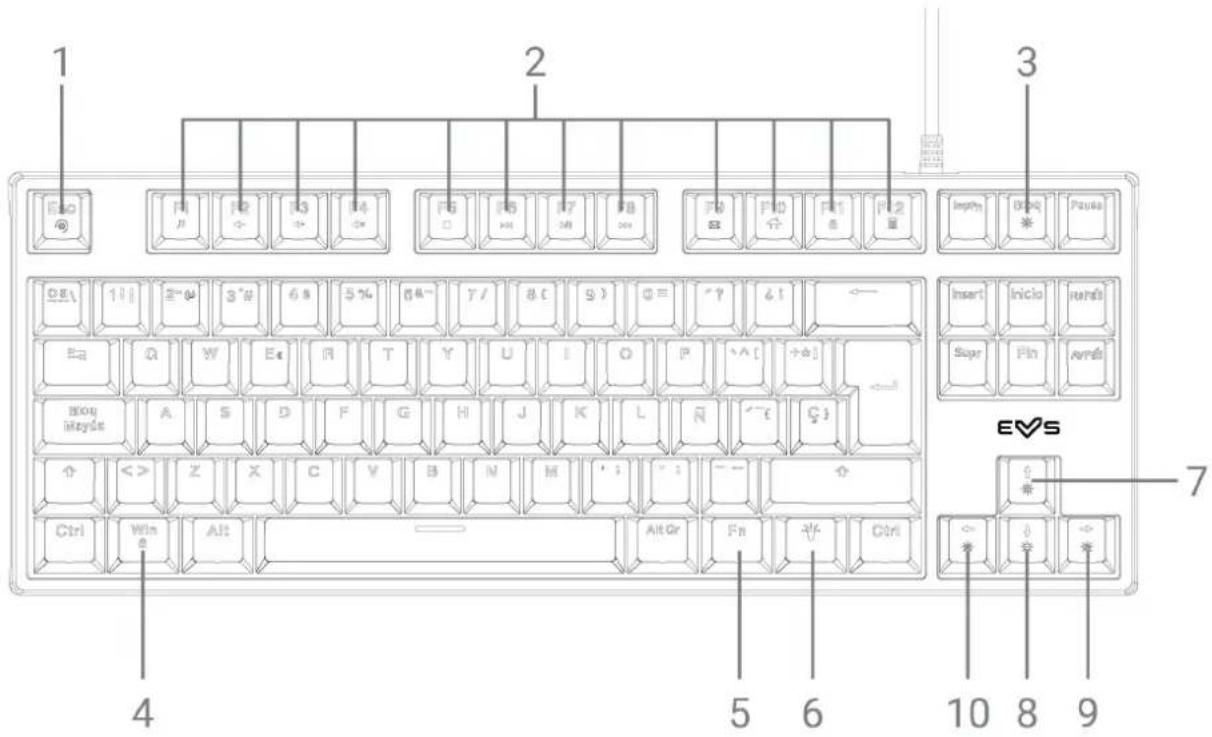
Use the multimedia shortcuts of your Gaming Keyboard ESG K7 Silent-Ninja. To perform the preferred action, press the corresponding Multimedia key (2) while holding down the Fn key (5). The multimedia keys are listed below:
F1: Media player
F2: Volume -
F3: Volume +
F4: Mute
F5: Stop
F6: Back
F7: Pause/Resume
F8: Forward
F9: E-mail
F10: My computer
F11: Lock the keyboard
F12: Calculator
Keyboard lighting
Selecting a light mode
The Gaming Keyboard ESG K7 Silent-Ninja features up to 12 rainbow LED modes. To see all lighting effects, press repeatedly the Light mode key (6). Select the one that suits your gaming style best.
If you do not want your keyboard to light up, press Lights on/off (3) while holding down the Fn key (5). The lights will turn off. Press the very same key to turn the keyboard lights back on.
To return to the default lighting effect (static rainbow lights), press the Reset key (lights) (1) while holding down the Fn key (5).
Adjusting brightness
Adjust the Gaming Keyboard ESG K7 Silent-Ninja brightness to create the best gaming atmosphere in your room. To increase or decrease brightness, press Brightness + (7) or Brightness - (8) while holding down the Fn key (5).
Adjusting the light-changing speed
To adjust the light-changing speed to your liking, press Speed + (9) or Speed - (10) while holding down the Fn key (5).
Anti-ghosting
![Esc @ F1 P F2 #- F3 C# F4 C# F5 O F6 H1 F7 M# F8 H4 F9 S# F10 #- F11 O F12 B# Insert Inclio Itare? E# D# IY E# A# Y Y U I O J# ^[] ## ←# Blog style A S D F G H J K L N "# C# ↑> <> Z Z C Y B M M ^ ; - — ↑ C# Win R AR = AllOr Fin 半 Ctrl EVS](/content/2026/05/980777/images/625ef675df8d7260589632550d986782af969f6bcccb9599b9df78df80a390d4.jpg)
The Gaming Keyboard ESG K7 Silent-Ninja features anti-ghosting technology allowing you to press the following keys at a time:
"Tab", "Q", "W", "E", "R", "T", "A", "S", "D", "F", "G", "Shift", "Z", "X", "C", "V", "B", "M", "Ctrl", "Alt", "Space bar" and "Arrow keys".
Warranty
You can check the warranty terms here
Declaration of conformity
Issuer's name: Energy Sistem Technology, S.A. - CIF: A53107488
Address: C/ Calpe, 1 - 03509 Finestrat, Alicante (Spain)
Tel: +34 966 830 324
We declare under our sole and exclusive responsibility that the product:
Description: keyboard
ENERGY♥SISTEM
Brand: Energy Sistem
Model: Gaming Keyboard ESG K7 Silent-Ninja
Manufacturer: Energy Sistem Technology, S.A.
Manufacturing country: China
referred to in this declaration complies with the essential norms and standards:
EN 55032:2015+AC:2016
EN 55024:2010+A1:2015
in conformity with the provisions of the Directive 2014/53/EU of the European Parliament and of the Council of 16th April 2014.
Finestrat, 15th December 2021

Miguel Ángel Aragüez García
Innovation and Technology Director
CE
- INTRODUCTION
- CARE AND MAINTENANCE
- FEATURES
- TECHNICAL SPECIFICATIONS
- KEYBOARD
- LIGHTING
- INTERFACE
- POWER REQUIREMENTS
- COMPATIBLE WITH
- PRODUCT CONTENT
- GENERAL OVERVIEW
- KEYBOARD LIGHTING
- SELECTING A LIGHT MODE
- ADJUSTING BRIGHTNESS
- ADJUSTING THE LIGHT-CHANGING SPEED
- ANTI-GHOSTING
- WARRANTY
- DECLARATION OF CONFORMITY
- ENERGY♥SISTEM
Brand : ENERGY SISTEM
Model : ESG K7 Silent-Ninja
Category : Keyboard