
PWMA825BT - Hi-Fi System Pyle - Free user manual and instructions
Find the device manual for free PWMA825BT Pyle in PDF.


| Product Type | Bluetooth PA Amplifier System |
| Model | PWMA825BT |
| Brand | Pyle |
| Dimensions (W x H x D) | 25.6 x 17.7 x 28.3 inches |
| Weight | 48.5 lbs |
| Power Supply | AC 120V, 60Hz |
| Total Peak Power | 800 Watts |
| Speaker Size | 2 x 8 inches |
| Bluetooth Version | 5.0 |
| Wireless Range | Up to 30 feet |
| Audio Inputs | Bluetooth, USB, SD Card, FM Radio, 1/4" Mic Input |
| Media Playback | MP3, WMA, WAV |
| FM Frequency Range | 87.5 – 108 MHz |
| Controls | Volume, Bass, Treble, Echo, Input Select |
| Included Accessories | Wireless Microphone, Remote Control, Power Cable |
| Maintenance | Wipe with a dry cloth; avoid moisture and dust |
| Safety | Do not open the device; keep away from liquids |
| Spare Parts Availability | Contact Pyle customer support for replacement parts |
| Repair | Refer to a qualified technician for servicing |
| General Information | Suitable for indoor/outdoor events, karaoke, and public speaking |
Frequently Asked Questions - PWMA825BT Pyle
User questions about PWMA825BT Pyle
0 question about this device. Answer the ones you know or ask your own.
Ask a new question about this device
Download the instructions for your Hi-Fi System in PDF format for free! Find your manual PWMA825BT - Pyle and take your electronic device back in hand. On this page are published all the documents necessary for the use of your device. PWMA825BT by Pyle.
USER MANUAL PWMA825BT Pyle
natural_image
Black and white photo of a black DYLE portable speaker with front panel, no visible text or symbols on bodyRead this manual before use

▶: Stop lighting when reading USB or TF card data U/TF
U/TF : Lighting when playing in USB or TF mode.
: Single Cycle
88:88 : Shows "FM Frequenc!when operating in FM mode Shows "LINEIN"when operating in Line in mode Shows "Time"when operating in USB & TF mode Shows "BT"when operating in Bluetooth mode Shows"———"when standby. Shows "PAUS"when stop.
: Flashing when the power is low, charging is needed.
Mic : Lighting when Microphone is plugged, it is flashing when operate in Microphone VIP function.
Specification
| Power Output : | 30 W |
| Speaker Size : | 12"*1+3"*1 |
| R. Frequency : | 90HZ-20KHz |
| S/N Ratio : | ≥ 60 dB |
| Adapter Input : | AC100-240V |
| Adapter Output : | 13.5V A |
| Battery | 4000mAh |
| Dimension : | W370*D265*H518mm |
Packing
| PWMA825BT Speaker | *1 |
| Adapter | *1 |
| Wireless Microphone | *2 |
| Aux In Cable | |
| Manual |
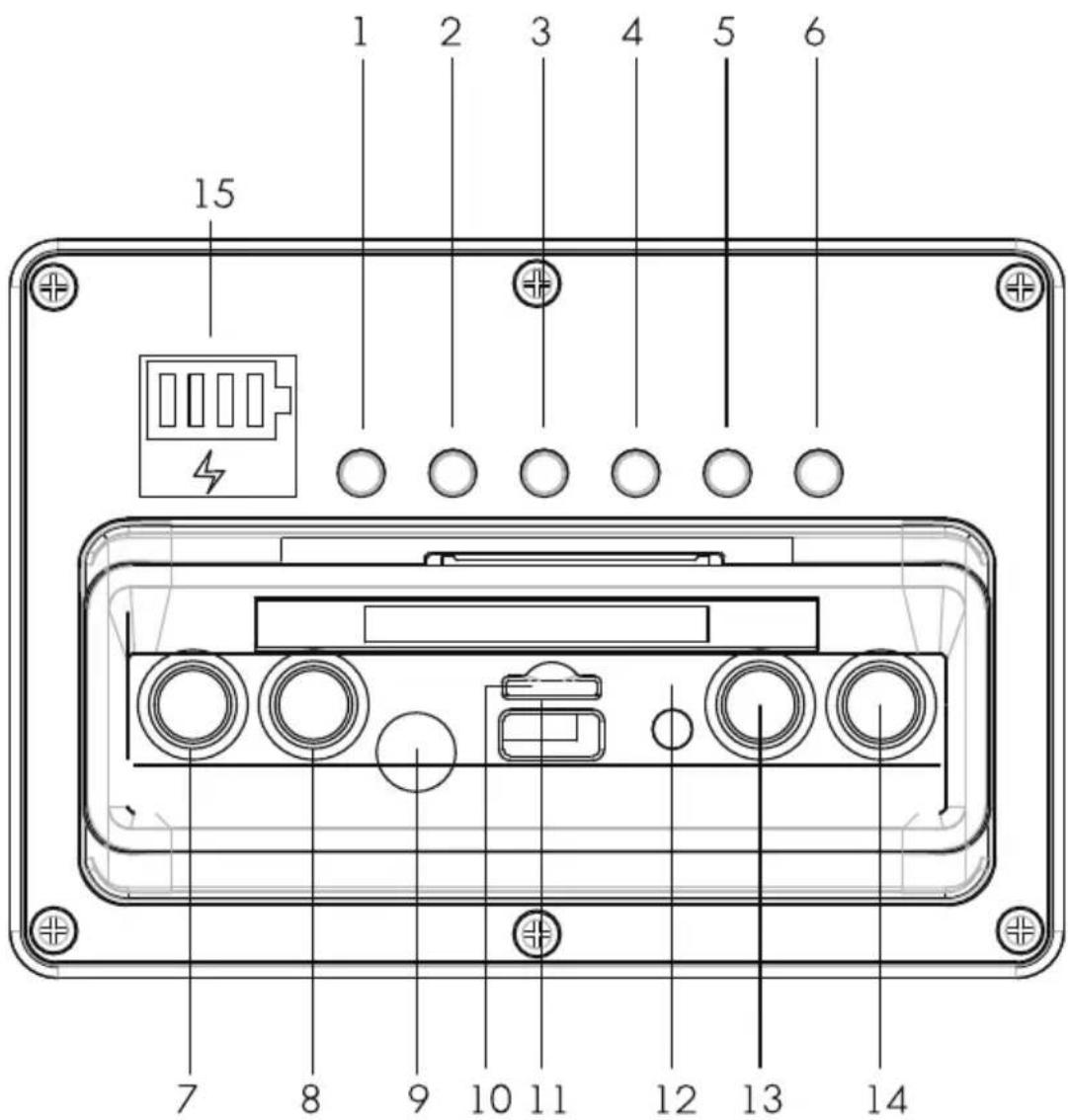
- Mode Button
- Repeat Button
- Microphone VIP
- Skip - Button
- Play/Pause Button
- Skip + Button
-
Echo Function Control Dial
-
Microphone Volume Control Dial
- Microphone Port
- TF Card Slot
- USB Card Slot
- Line-In Aux. Port
- Master Volume Control Dial
- Bass Volume Control Dial
- Charging & Battery Volume Indicator Light
General Function Description
- Master Volume : Turn to adjust master volume .
- Treble Volume : Turnto adjust treble volume .
- Echo Effect : Turn to adjust echo effect .
- Mic Volume : Turn to adjust mic volume .
- Mode : To choose other mode when operating, sequence : BT - Line in - USB - TF - FM, Priority to play in USB or TF card mode when insert the USB or TF card
MP3 Function Description
- USB : Playing when insert the USB which save with MP3 music
- TF Card : Playing when insert the TF card which save with MP3 music
- Repeat : While playing music in USB or TF mode ,press to repeat single music or all music .
- Play/Pause Button : In USB or TF mode, press to play or pause, in Line mode, press to mute.
- Skip - & + Button : While playing music in USB or TF mode, short press to go back or forward music, long press to adjust volume.
Bluetooth Function Description
-
Pairing : Press mode button to Bluetooth mode, speaker will be under automatic pairing mode and call out "Power on", LED display shows "Br, pair the Bluetooth compatible device by selecting "M31" from the listed devices, speaker will call out "Connected" after paired successful, Bluetooth pairing system will be off if there is no device connecting after 5 minutes.
-
Music Playing : Press Play/Pause, Skip + / - Button to play music.
Microphone VIP Function
- Microphone VIP : Whiling music playing and plugged microphone , it will enlarge the voice received from mic and lower the music volume after pressed Microphone VIP button . Music volume will go back originally if there is voice received from microphone , press Microphone VIP button again to cancel the function .
Battery Volume And Charging Indication
- Four green light shows the battery volume, starting from left one - around 20%, second - around 40%, Third - around 80%, All lighting - full.
- Should charging when the left one lighting only, the red lightning symbol is on when charging, it is off when battery full.
- Speaker is setting to be battery protection mode when all power indication light is off, and the music volume will be lower to 70% automatically.
External Battery Function
- Speaker designed with external 12V battery function, it can be used after connecting the Red (+), Black (-) of speaker to external battery 1+1 , (-) correctly.
Feature
- Stylish, fashionable and elegant appearance.
- High-performance lithium battery with long play time.
- Strong Bass, clear and rich vocal
- New Bluetooth solution, compatible with most of market devices
- Support USB and TF card Playing, Microphone Input.
- Cool Design With Battery Volume Indicator.
Brand : Pyle
Model : PWMA825BT
Category : Hi-Fi System