
Dual Levelar - Hi-Fi System ART - Free user manual and instructions
Find the device manual for free Dual Levelar ART in PDF.


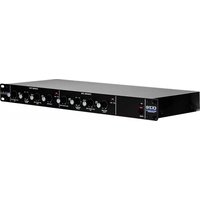
| Product Type | Two-channel tube compressor/leveling amplifier |
| Dimensions | 19"W x 6.50"D x 1.75"H (standard rack mount) |
| Weight | 5.5 lbs (2.5 kg) |
| Power Requirements | 95-125VAC, 10W (USA); internal fuse |
| Frequency Response | 10 Hz to 20 kHz (±0.5 dB) |
| Dynamic Range | >105 dB (20-20kHz) |
| THD (Typical) | <0.1% @ 0 dB out |
| Input Connections | Balanced XLR and 1/4" TRS (line level -30dBm to +15dBm) |
| Output Connections | Balanced XLR and 1/4" TRS |
| Input Impedance | XLR: 20k ohms, 1/4": 1M ohms |
| Output Impedance | XLR: 600 ohms, 1/4": 300 ohms |
| Maximum Input Level | +15dBm (XLR and 1/4") |
| Maximum Output Level | XLR: +26dBm, 1/4": +20dBm |
| Attack Time | 6.5 ms |
| Release Time | Fast: 200ms, Auto: 70ms-1sec (program dependent) |
| Compression Ratios | Comp: 2.3:1, Limit: >6:1 |
| Maximum Attenuation | 28 dB |
| Tube Type | Hand-selected 12AX7 |
| Design Features | VCA-less, electro-optical (Vactrol) design for musical compression |
| Stereo Linking | Yes, via built-in stereo link function |
| Controls | Threshold, Output, Active/Bypass, Limit/Comp, Auto/Fast switches, gain reduction LED meter |
| Construction | All steel, designed and manufactured in USA |
| Included Accessories | Power cord, user manual, user registration card |
Frequently Asked Questions - Dual Levelar ART
User questions about Dual Levelar ART
0 question about this device. Answer the ones you know or ask your own.
Ask a new question about this device
Download the instructions for your Hi-Fi System in PDF format for free! Find your manual Dual Levelar - ART and take your electronic device back in hand. On this page are published all the documents necessary for the use of your device. Dual Levelar by ART.
USER MANUAL Dual Levelar ART
DUAL LEVELAR

Two Channel Tube Compressor/Leveling Amplifier
USER'S GUIDE
Introduction
Thank you for purchasing the Dual Levelar and congratulations! You now own one of the most sophisticated pieces of audio signal processing gear available. Similar in design philosophy to classic tube limiters, the Dual Levelar utilizes a VCA-less design for premium, musical performance. This design features electro-optical (Vactrol) and vacuum tube electronics which deliver classic sound without the “old” noise.
Features
Two channel tube and Vactrol-based Leveling Amplifier
Stereo linking of channels
Hand selected 12AX7 Tubes
Vactrol - Optical electronic isolators
Non-VCA design = transparent, classic sound
Balanced XLR and 1/4" TRS inputs
Balanced XLR and 1/4" TRS outputs
Limiting and Compression ratios
Auto or Fast release characteristics
Variable Threshold rotary controls
Variable Output level rotary controls
Gain reduction LED ladder
10Hz to 20kHz Frequency Response
100dB Dynamic Range
Extremely low noise
All steel construction
Designed and manufactured in the USA
Fill in the following for your future reference:
Date of purchase: ____
Purchased From: ____
Serial Number: 256-
This a great time to fill out the User Registration card included with your Dual Levelar to become a completely informed A R T Artist. Returning the card to us ensures you of becoming the first to know about new A R T products as well as any further developments from A R T.
11
256-5004-101
Overview
Compression is used to alter the dynamic range of a signal. In recording and live sound situations, compression and limiting is necessary to manage sounds with wide dynamic ranges. Dynamic Range is measured as the difference between the loudest and softest level of a signal. (i.e. from a scream to a whisper). Once a signal rises above or falls below the set threshold (selectable signal level), the compressor automatically changes its gain to raise or lower the overall signal level. Think of this as manually moving a fader up and down to try to keep a signal at a consistent level.
Limiting can be described as a "ceiling". When using a limiter, once the signal level reaches the threshold, it is unable to go any louder - it is limited to a desired level.
In addition to making signal levels more manageable, it is common practice to apply compression or limiting to a signal to make it louder or more "in-your-face". The benefit of using the Dual Levelar for these applications is in its design. By utilizing opto-electronics, the Dual Levelar allows you to add more compression without sounding like you're squashing the daylights out of the signal. Unlike typical compressors that use VCA's to control level detection, the Dual Levelar is very musical. The nature of its operation is much like the way your eye adjusts to light. Just as your eye transparently adjusts to changes in light, the Dual Levelar adjusts to changes in signal level.
Connections
It's easy to interface the Dual Levelar with other equipment. All connections are made at the back of the Dual Levelar. Standard XLR and 1/4" inputs and outputs make patching simple.
Note: for best audio quality, always use high quality cables.
Inputs
The Dual Levelar provides both an XLR and 1/4" input jack. Both jacks are balanced. The 1/4" jack can be used with
unbalanced signals by simply plugging in an unbalanced cable. The inputs are designed for use with line level signals ranging from
-30dBm to +15dBm. While it is possible to plug an instrument directly into the Dual Levelar, it is desirable to run the instrument into a preamp before the signal runs into the Dual Levelar. This will provide a stronger signal and will keep noise to a minimum. Microphones must be run into a microphone preamplifier (like A R T's Tube MP) before being run into the Dual Levelar. Use the XLR input for use with equipment that provides an XLR output (like the Tube MP). Use the 1/4" input jack for balanced or unbalanced 1/4" applications.
XLR pin configuration: pin 1 = Ground, pin 2 = Positive (hot), pin 3 = Negative (cold). The 1/4" TRS configuration is: Tip = Positive (hot), Ring = Negative (cold), Sleeve = Ground.
Do not use both inputs at the same time.
Outputs
The outputs of the Dual Levelar are active balanced. You may use it in an unbalanced configuration without harm to the output circuitry. Use the unbalanced 1/4" jack for sending your signal to amps, processors or other unbalanced configurations. Use the XLR output to send signals to equipment which accepts XLR connections. Both outputs may be used at the same time.
**Note: If you experience a grounding hum when using both output connectors (one to the console, one to an instrument amp) simultaneously, a ground loop may be the problem. To remedy this problem, disconnect (lift) the ground wire (pin 1) from the XLR cable plugged into the Dual Lvelar's output. This interrupts the ground path and therefore breaks the loop.
Controls, Switches and Indicators
Power
The Dual Levelar is powered by an internal power supply. The Power switch and indicator LED are located on the front panel. If the attached power cord ever becomes damaged, discontinue use until you can have it repaired or replaced.
Like all tube equipment, the Dual Levelar must be allowed to warm up before use. Upon power up you will see all the LEDs light, then turn off. This is normal and the Dual Levelar is ready for use once the LEDs have turned off. The 12ax7 tubes will reach normal operating temperature within one to three minutes.
During this warm up period you may experience variations due to the THD of the tubes stabilizing. Again, this is normal and the Dual Levelar will provide consistent results once this warm up period is over.
Threshold Control
The Threshold control sets the point at which the Dual Levelar will act on a signal. Turning this control counterclockwise lowers the threshold (adding more compression to a signal). Turning this control clockwise raises the threshold.
Setting the Threshold control is dependent on the input signal. The output from a guitar might be -20dB to -10dB, where the level from an insert on a console might be -10dB to +10dB. The easiest way to set the threshold control is to start with the control fully clockwise. Slowly turn the control counter-clockwise (lowering threshold) until you see the Threshold LED light. Now adjust the control (either lower or higher) until you have the amount of compression you desire.
Active/Bypass Switch
The Active/Bypass switch must be pressed "in" for the Dual Levelar to process a signal. In its "out" position, the Dual Levelar is bypassed and signal runs from the input jacks to
the output jacks with no processing. Use the Active/Bypass switch when setting the Dual Levelar's output level to achieve unity (no boost or cut) gain. Unity gain is achieved when the active level is the same as the bypassed level.
Limit/ Comp Switch
In its “out” position, the Dual Levelar’s compression ratio is an active 2.3:1 ratio. This means that for every 2.3dB over the threshold the input signal rises, the Dual Levelar’s output will change by 1dB. This is a very mild and musical compression ratio which is ideal for smoothing all types of signals.
In its “in” position, the Dual Levelar’s compression ratio is greater than 6:1. This is typically called “soft limiting” as it allows only a 1dB change in signal level for any signal reaching over 6dB over the set threshold. This setting is ideal for applications where exceeding a set level is not desirable (mixing, popping bass, etc.).
Auto/Fast Switch
The position of the Auto/Fast switch selects the release characteristics of the Dual Levelar. The “out” position allows the Dual Levelar to recover quickly once the signal falls below the threshold. The “in” position allows the Dual Levelar to adjust itself depending on the characteristics of the signal being processed (sometimes called “program dependent”). Use the “fast” setting when the signal has repetitive, consistent characteristics (kick drum, snare, vocals, etc.). Use the “auto” setting when the signal has varying characteristics (long decaying notes alternating with quick notes, mix material, etc.).
Output Control
The Output control sets the output gain of the Dual Levelar. When the control is fully counterclockwise, the output level of the Dual Levelar is attenuated by -83dB (off). Turning the control clockwise adds gain (sometimes called “make-up” gain). Since levels can be decreased when compression is applied, the Dual Levelar has the ability to
apply gain to bring the processed signal back up to unity (same as input level). To properly set the output level, adjust the control while switching between Active and Bypass. When these two levels are equal in volume, the output control is set properly.
Gain Reduction Meter
The four-LED meter is provided to give a visual indication of how much compression is taking place. The Threshold LED will light when the input signal reaches the set threshold level. The remaining three LEDs indicate how much the signal is being compressed. Their values are -3dB, -6dB and -12dB.
Applications
Compressor/ limiter
The main application of the Dual Levelar is to control the dynamic range of a signal level. Plug a line level (post pre-amplifier or other gain stage) source into either input and set the threshold and output controls to provide the desired amount of compression to the input signal.
Stereo mix and mastering
Because of its low noise and excellent tonal qualities, the Dual Levelar is ideal for running mixes through before recording to DAT or cassette. Used as a mastering device, the Dual Levelar is capable of adding warmth and impact to the overall signal level.
Vocal and instrument levelling
The musical nature of the Dual Levelar makes it ideal for use on a wide range of instruments and vocals. Place the Dual Levelar into a channel insert, after a preamplifier, or from a direct output of a channel of a mixer. Adjust the controls of the Dual Levelar to achieve the desired amount of compression.
A R T Dual Levelar Specifications
Dimensions 19"W X 6.50"D X 1.75"H
Weight 5.5 Lbs
Input Connections balanced XLR & 1/4" TRS
Output Connections balanced XLR & 1/4" TRS
Input Impedance XLR, 1/4" 20K ohms, 1M ohms
Output Impedance XLR, 1/4" 600 ohm, 300 ohms
Maximum Input Level, XLR +15dBm
Maximum Input Level, 1/4" +15dBm
Maximum Output Level, XLR +26dBm
Maximum Output Level, 1/4" +20dBm
Frequency Response 10Hz to 20KHz (+/- .5dB)
Dynamic Range >105dB (20-20kHz)
THD @ 0dB out: <0.1% (typical)
Equivalent Input Noise (EIN)
XLR to XLR -100dBm ('A' weighted)
1/4" to 1/4" -100dBm ('A' weighted)
Attack Time 6.5ms
Release Time Fast-200ms, Auto-70ms-1sec.
Slope Comp - 2.3:1, Limit >6:1
Max. Attenuation 28dB
Power Requirements 95-125VAC 10 W (USA)
Internal fuse. Other power requirements configured for country of destination.
A R T retains a policy of constant product improvement; therefore, specifications are subject to change without notice. A R T reserves the right to make changes in design or make additions to or improvements upon this product without any obligation to install the same on products previously manufactured.
We're Online!
For Product information, questions, applications, tips, answers and general discussion with A R T employees look for A R T on the Internet. Check out our Web Page at: http://www.artroch.com.
email: artroch@aol.com
Warranty & Service Information
Limited Warranty
Warranty service for this unit will be provided by Applied Research & Technology, Inc. in accordance with the following warrant statement.
Applied Research & Technology, Inc. (A R T) warrants to the original purchaser that this product and the components thereof will be free from defects in workmanship and materials for a period of three years from the date of purchase. Applied Research & Technology, Inc. will, without charge, repair or replace, at its option, defective product or component parts upon prepaid delivery to the factory service department or authorized service center, accompanied by proof of purchase date in the form of a valid sales receipt.
EXCLUSIONS: This warranty does not apply in the event of misuse or abuse of the product or as a result of unauthorized alterations or repairs. This warranty is void if the serial number is altered, defaced, or removed.
A R T reserves the right to make changes in design or make additions to or improvements upon this product without any obligation to install the same on products previously manufactured.
A R T shall not be liable for any consequential damages, including without limitation damages resulting from loss of use. Some states do not allow limitation of incidental or consequential damages, so the above limitation or exclusion may not apply to you. This warranty gives you specific rights and you may also have other rights which vary from state to state.
For units purchased outside the United States, service will be provided by an authorized distributor of Applied Research and Technology, Inc.
Service
The following information is provided in the unlikely event that your unit requires service.
1) Be sure that the unit is the cause of the problem. Check to make sure the unit has power supplied, all cables are connected correctly, and the cables themselves are in working condition.
2) If you find the unit to be at fault, write down a complete description of the problem, including how and when the problem occurs. Please write down a description of your complete setup before calling Customer Service.
3) Call our Customer Service department for a Return Authorization (RA) number or questions regarding technical assistance. Customer Service hours are 9:00am to 6:00pm Eastern Time, Monday through Friday.
4) Pack the unit in its original carton or a reasonable substitute. The packing box is not recommended for a shipping carton. Put the packaged unit in another box for shipping. Print the RA number clearly on the outside of the shipping box. Print your return shipping address on the outside of the box.
5) Include with your unit: a return shipping address (we cannot ship to a P.O. Box), a copy of your purchase receipt, a daytime phone number, and a description of the problem. Keep your manual!
6) Ship your unit to:
APPLIED RESEARCH AND TECHNOLOGY, INC. 215 TREMONT STREET
ROCHESTER, NEW YORK 14608
ATTN: REPAIR DEPARTMENT
RA#


- DUAL LEVELAR
- Introduction
- Features
- Overview
- Connections
- Inputs
- Outputs
- Controls, Switches and Indicators
- Power
- Threshold Control
- Active/Bypass Switch
- Limit/ Comp Switch
- Auto/Fast Switch
- Output Control
- Gain Reduction Meter
- Applications
- Compressor/ limiter
- Stereo mix and mastering
- Vocal and instrument levelling
- A R T Dual Levelar Specifications
- We're Online!
- Warranty & Service Information
- Limited Warranty
- Service
Brand : ART
Model : Dual Levelar
Category : Hi-Fi System