
RBL-N - Remote control REVO - Free user manual and instructions
Find the device manual for free RBL-N REVO in PDF.


| Product Type | Remote control |
| Brand | REVO |
| Model | RBL-N |
| Dimensions (approx.) | 16.5 x 4.5 x 2.5 cm |
| Weight (without batteries) | 75 g |
| Power Source | 2 x AAA batteries |
| Battery Life (typical) | Up to 12 months |
| Transmission Type | Infrared (IR) |
| Range | Up to 10 meters |
| Operating Angle | ±30° |
| Key Count | 38 buttons |
| Compatible Devices | Most TV, set-top boxes, and audio systems |
| Main Functions | Power, volume, channel, input, navigation, numeric keypad |
| Programmable Keys | Yes, learning function for additional devices |
| Backlight | Yes, with motion sensor |
| Material | ABS plastic |
| Cleaning Instructions | Wipe with a soft, dry cloth; avoid liquids and solvents |
| Safety Precautions | Remove batteries if not used for extended periods; do not expose to heat or water |
| Spare Parts Availability | Batteries only (user-replaceable) |
| Reparability | Not user-serviceable; no internal user-replaceable parts |
| Warranty | 1 year from purchase date |
| Manual Languages | English, French, German, Spanish, Italian, Dutch |
Frequently Asked Questions - RBL-N REVO
User questions about RBL-N REVO
0 question about this device. Answer the ones you know or ask your own.
Ask a new question about this device
Download the instructions for your Remote control in PDF format for free! Find your manual RBL-N - REVO and take your electronic device back in hand. On this page are published all the documents necessary for the use of your device. RBL-N by REVO.
USER MANUAL RBL-N REVO
Bluetooth®
Remote Shutter Control
for Nikon
REVO®
Thank you for choosing Revo.
The Revo Bluetooth® Remote allows you to trigger your camera and access functions from up to 32 feet away. Use Bluetooth® low-energy technology to wirelessly shoot photos and start and stop videos. Adjust your zoom from wide-angle to telephoto and navigate camera functions and menus. Carry the compact remote in your pocket, so you can keep it handy when you're on the job.
Functions vary depending on camera make and model.
Specifications
Operating distance: 32 ft. (10 m)
Battery type: 3 V CR2032
Operating temperature: 32°F to 104°F (0°C to 40°C)
Dimensions (H × W × D): 0.5 × 1.25 × 4.3 in. (12.7 × 32 × 110 mm)
Weight: 0.75 oz. (21 g)
Precautions
- Please read and follow these instructions, and keep this manual in a safe place.
- There are no user-serviceable parts inside the devices. Do not attempt to disassemble or perform any unauthorized modification.
- Do not operate in the presence of flammable gases, vapors, or water.
- Batteries are prone to leakage when fully discharged. To avoid damage to the product, be sure to remove the battery when leaving the product unattended for prolonged periods or when no charge remains.
- When disposing of batteries, insulate the electrical contacts with tape. Contact with metal objects or other batteries may cause a fire or explosion.
- Do not use or leave the device in conditions of extreme heat or cold.
- Avoid exposing this product to water or extreme humidity, and keep it in a cool, dry place.
- Keep out of reach of children. This device contains small parts which may pose a shock hazard.
- All images are for illustrative purposes only.
Trademarks
The Bluetooth ® word mark and logos are registered trademarks owned by Bluetooth SIG, Inc. and any use of such marks by Revo is under license. Other trademarks and trade names are those of their respective owners.
Overview
1. Indicator LED
| Pairing in process | |
| Connection is established between the remote and cameraVideo recording | |
| Shooting still image | |
| Video stop |
- Shutter release button
- Video start/stop
You may need to set your camera to video mode.
- Wide-angle zoom button (-)
- Telephoto zoom button (+)
- Multi-selector
Functions the same as on the camera and varies between camera models.
- OK button
Confirms menu selection and pauses video recordings.
- Fn1 button
Function is the same as the Fn1 button on the camera. Refer to the camera's manual for the Fn1 button setup instructions.
- Fn2 button
Function is the same as the Fn2 button on the camera. Refer to the camera's manual for the Fn2 button setup instructions.
- Power/Pairing switch
- Battery compartment cover Uses a CR2032 type battery.


Inserting the Battery
- Place a coin or similar object into the groove of the battery cover, and turn to the open position to remove the cover.

- Remove the plastic separator from underneath the battery before use.
- Insert the CR2032 battery with the (+) facing up.

- Return the battery cover and turn to the close position.

Pairing the Remote and Camera
Important: See your camera's manual for instructions on setting your camera to remote pairing mode.
Once your camera is ready to pair with the remote, slide and hold the switch down to the pairing position 📄 until confirmation appears on the camera's LCD. The remote's indicator LED will flash green during pairing.
Note: If the remote is unused for a period of time, the Bluetooth icon on the camera's screen may turn gray. Slide the remote to the pairing position 📁 until confirmation appears on the camera's LCD.
If the Camera Won't Trigger
- Make sure the plastic separator is removed from the battery.
- Make sure the battery is installed with the correct polarity.
- Set your camera for remote triggering.
- Make sure the camera and remote are paired together, and you are within range.
- Make sure the lock switch is not engaged.
One-Year Limited Warranty
This Revo product is warranted to the original purchaser to be free from defects in materials and workmanship under normal consumer use for a period of one (1) year from the original purchase date or thirty (30) days after replacement, whichever occurs later. The warranty provider's responsibility with respect to this limited warranty shall be limited solely to repair or replacement, at the provider's discretion, of any product that fails during normal use of this product in its intended manner and in its intended environment. Inoperability of the product or part(s) shall be determined by the warranty provider. If the product has been discontinued, the warranty provider reserves the right to replace it with a model of equivalent quality and function.
This warranty does not cover damage or defect caused by misuse, neglect, accident, alteration, abuse, improper installation or maintenance. EXCEPT AS PROVIDED HEREIN, THE WARRANTY PROVIDER MAKES NEITHER ANY EXPRESS WARRANTIES NOR ANY IMPLIED WARRANTIES, INCLUDING BUT NOT LIMITED TO ANY IMPLIED WARRANTY OF MERCHANTABILITY OR FITNESS FOR A PARTICULAR PURPOSE. This warranty provides you with specific legal rights, and you may also have additional rights that vary from state to state.
To obtain warranty coverage, contact the Revo Customer Service Department to obtain a return merchandise authorization ("RMA") number, and return the defective product to Revo along with the RMA number and proof of purchase. Shipment of the defective product is at the purchaser's own risk and expense.
For more information or to arrange service, visit revocinegear.com or call Customer Service at 212-594-2353.
Product warranty provided by the Gradus Group.
www.gradusgroup.com
Revo is a registered trademark of the Gradus Group.
© 2021 Gradus Group LLC. All Rights Reserved.
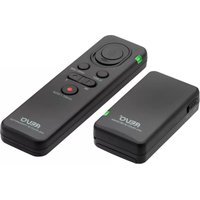


Brand : REVO
Model : RBL-N
Category : Remote control