
GSC250 - Slow cooker GEMINI - Free user manual and instructions
Find the device manual for free GSC250 GEMINI in PDF.


User questions about GSC250 GEMINI
0 question about this device. Answer the ones you know or ask your own.
Ask a new question about this device
Download the instructions for your Slow cooker in PDF format for free! Find your manual GSC250 - GEMINI and take your electronic device back in hand. On this page are published all the documents necessary for the use of your device. GSC250 by GEMINI.
USER MANUAL GSC250 GEMINI
Multi-functional Baby Pot
嬰兒粥湯煲
Model No.型號:GSC250
250-300W
Before using your product for first time, please read this instruction manual.
- Please read these instructions carefully and retain them for reference.
- This appliance is not intended for use by persons (including children under 8 years old) with reduced physical, sensory or mental capabilities, or lack of experience and knowledge, unless they have been given supervision or instruction concerning use of the appliance by a person responsible for their safety. Children should be supervised to ensure that they do not play with the appliance.
- All the repairs carried out solely by a qualified electrician. Never try to repair the appliance yourself.
- Use this appliance solely in accordance with these instructions.
- Never use the appliance at outdoors or in a humid room.
- Before start use, ensure the power supply same as indicate at the appliances. The power supply should have earth wired.
- Appliances should place at a stable platform, and keep away from children.
- When power cable damages, please contact service center for replacement. Do not replace it by own.
- While selecting the features, do not press the button with great force, it will damage the button and control panel.
- Any faulty operation, must switch off power and unplug the power supply. Do not unplug while your hand is wet, because will get electric shock.
- Do not pull the line along sharp object / sharp edges, crimp the wire or let it hang down. Also put away from hot heating and wet condition.
- Do not insert any metal object into to the heat dissipation holes / gaps, otherwise it cause electric shock.
- Do not place the product on the surface or beside extreme heat condition, such as oven.
-
It is forbidden to use this product on an unstable / inclined platform to avoid accident such as injury or fire cause by products falling over.
-
Keep away from children or in-experienced person to operate this product.
- While in process, it is normal that the pot body is hot when pouring water or soup out, please lift the pot by holding the handle. Do not touch the pot body with hands directly, this would get hurt.
- Please keep the surface of the heating plate clean. After using it for a period of time, please clean the dirt on the surface of the heating plate.
- The product will generate steam when it is working. It is easy to cause burns from the steam port. Please be careful while using it.
- Do not allow liquid to flow into the product during cleaning, and to avoid danger do not allow the power cord, plug, main body, etc. to dip in the water.
- The ceramic container is specially designed ONLY for this product and cannot be used on a naked flame.
PRODUCT REVIEW
This unit is for HOUSEHOLD USE ONLY
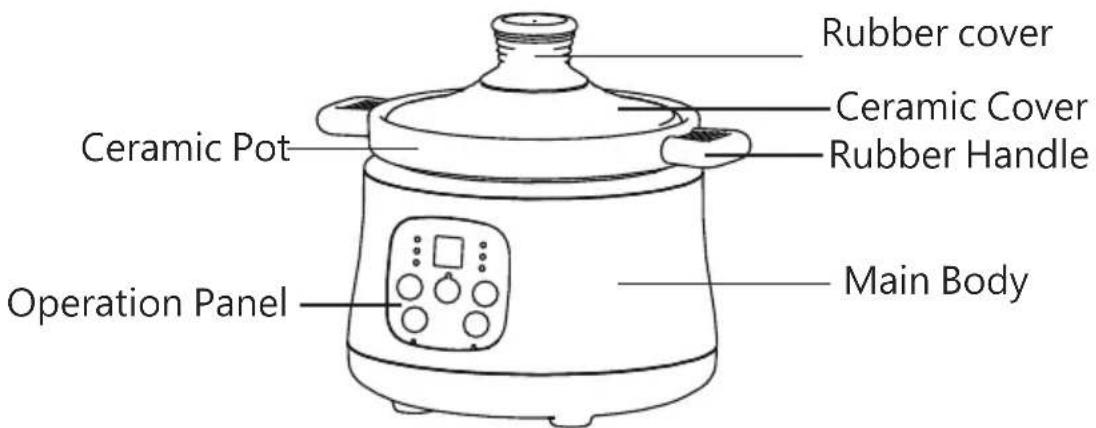
Note : The pictures are for reference only, assemblies maybe different from the picture.
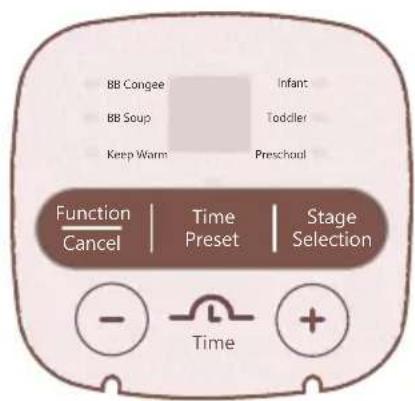
PANEL INSTRUCTION
-
Function / Cancel button: In the standby mode, press this key to select the corresponding functions in sequence : BB Congee, BB Soup, Keep Warm, after selecting function, the corresponding indicator light flashes, the panel will display the default working time, and if no other operation is performed, it will automatically operate after 10 seconds (After 10 flashes ), the function indicator light becomes steadily ; Press this button during process, the product will stop operating, the panel displays "OF", and returns to the standby mode.
-
Stage Selection button: After selecting "BB Congee" or "BB Soup" function, press this button to select individual phase in sequence, the corresponding indicator light flashes, and the panel displays its default working time. If there is no other further selection, it will automatically operate after 10 seconds (After 10 flashes), the function display light becomes permanently on; If do not press this key, the process for "BB Congee" or "BB Soup" defaults to the Infant Stage.
3.Time Setting button:Press the "+", "-" button to adjust the reserved working time of each function. Each time you press the "+" or "-" button, the reservation time is increased or decreased by 0.5 hours; while for the function time or keep warm function is increased or decreased by 0.1 hours.
4.Preset button :In standby mode, press this button to enter the preset setting. The preset indicator flashes, the panel displays the default time "2:00", press "+", "-" button to adjust the time, after set the preset time, press the "function / cancel" key to select the desired function. (The preset time available is from 0.5 - 9.5 hours) At this time, the reservation indicator light is always on. After 10 seconds (After 10 flashes), the product will automatically enter the preset countdown. If only the reservation time is set, and without any function selection within 10 seconds (After 10 flashes), the reservation function will be automatically cancelled and the product will return to standby mode. When the function is selected, press the "Preset" button to enter the reservation setting. At this time, the function indicator is always on. Press the "Preset" button again to cancel the reservation and return to the process stage selection.
OPERATION METHOD
- According to different cooking requirements, ingredient processing and preparation will be different: Put all ingredients that need to be stewed into a ceramic pot and add an appropriate amount of water then cover with the lid, and put into the mainbody. (As shown below).
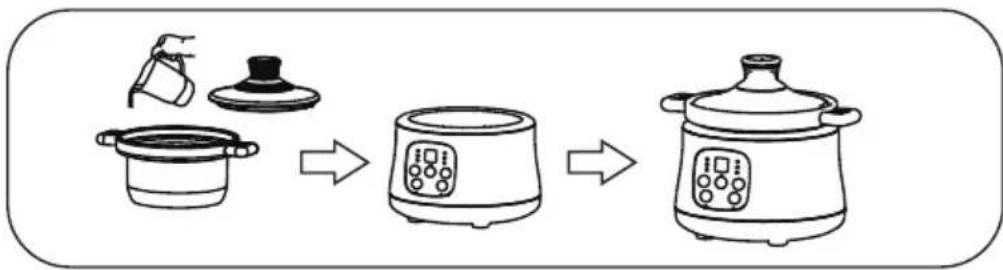
flowchart
graph LR
    A["Preparation: Pot with lid"] --> B["Cleaning: Plate with cloth"]
    B --> C["Processing: Cooker with digital timer"]
    C --> D["Cleaning to Dish with digital timer"]
Tips:
-To cook congee, the recommended ratio of rice to water is 1:14.
-The total amount of water and ingredients should not exceed the max level of the ceramic pot to avoid overflow during stewing.
-It is suggested to stir the congee regularly to avoid stewing.
-Put the ceramic pot into the main body, make sure it is in place and before power on.
2.Preset settings:
A)Turn on the power, the product enters the standby mode, the panel displays "OF".
B) Press the "Preset" button, the product enters the preset mode, the panel displays the default PRESET time at 2:00 hours, then press the "+", "-" keys to adjust the PRESET time.
Tips:
-Do not set long PRESET time for those ingredients are spoilage easily or during the season is hot and humid, to avoid spoilage of the ingredients.
-You can make preset settings after selecting the features.
-Product process time = Preset time + feature program time.
Example: Soup needs to be cooked for 4 hours. If you want to have soup after 7 hours, then you need to set the PRESET time to 3 hours and the "Soup" program setting time to 4 hours.
Reference Cooking Time of Each Function
| Feature/Stages | Default Cooking time(hr) | Max Cooking Time(hr) | Min Cooking Time(hr) | |
| BB Congee | Infant Stage | 2.5 | 3.5 | 0.5 |
| Toddler Stage | 2.4 | 3.5 | 0.5 | |
| Preschool Stage | 2.3 | 3.5 | 0.5 | |
| BB Soup | Infant Stage | 3.0 | 5.0 | 0.5 |
| Toddler Stage | 3.5 | 5.0 | 0.5 | |
| Preschool Stage | 4.0 | 5.0 | 0.5 | |
| Keep Warm | / | 8.0 | / | |
Tips:
-Different ingredients have different stewing times, please set according to the actual condition.
-Different features have different heating procedures, please select the appropriate features according to the ingredients.
-If the preset has been set, keep warm function cannot be selected.
-If you do not want to preset, you can directly press the "Function / Cancel" button to skip the preset setting operation.
-Stages cannot be selected in Keep Warm Function.
-When lifting the ceramic pot during the stewing process, the product will stop heating, the panel will display "00" and flash; if the ceramic pot is not put back within 10 minutes, the product will return standby mode automatically.
Status after cooking is completed
After the stewing process is completed, press the "Function / Cancel" button, the panel displays "OF", the indicator light is off; if you do not press the "Function / Cancel" button, the product will beep, and enter to keep warm function automatically. At this time, the keep warm indicator light always turns on, and the panel displays the keep warm time.
- Before cleaning and maintenance, please be sure to unplug the power plug and wait for the main body to cool down before cleaning. Do not use steel wool to clean the ceramic pot.
- Wipe the inner surface with a soft cloth or sponge. After wiping it clean, make sure no liquid remains. Do not wash it with water directly
- Do not wipe with lacquer thinner, gasoline, detergent powder, hard brush or steel wool, etc., to avoid damage the surface.
- Do not put the whole unit in water for washing. The outer part of the product can be wiped with wet towel, and must not be washed with water to avoid leakage and malfunction.
- When using ceramic products, please handle them lightly to lengthen the lifespan.
- When the product is not used, please clean and dry it, pack it in the box, and put it in a ventilated and dry place to prevent moisture from affecting the performance of the products.
FREQUENTLY ASKED QUESTION
- The panel has no display and the product cannot be used normally:
-Whether there is a power shortage
-Whether the power plug is plug-in
-Whether the power socket is turned off
-The power cord is install at the product, whether well connected to the main body. - The food is not well cooked:
-Whether the stewing time is too short
SPECIFICATIONS
Model No.: GSC250
Mains Voltage & Frequency: 220-240V\~ 50-60Hz
Power: 250-300W
Capacity: 0.8 liters Max.
Product Dimension: 236(W) x 200(H) x205(D) mm (With ceramic pot)
*The final product specification may be varied according to a different lot of material and actual input voltage power of the usage area.
安全指引
flowchart
graph LR
    A["Preparation: Cook pot, lid, lid"] --> B["Mixing: Plate with digital kitchen appliance"]
    B --> C["Discharge: Cooking pot, digital kitchen appliance"]
温馨提示:
Proudly Serviced by:
ToolBox
a Gilman Group Company
太平家庭電器
订单号:BE2348
Brand : GEMINI
Model : GSC250
Category : Slow cooker