
StageBug SB-4 - DJ Equipment Radial Engineering - Free user manual and instructions
Find the device manual for free StageBug SB-4 Radial Engineering in PDF.


| Product Type | Active Direct Box (DI) optimized for piezo transducers |
| Brand | Radial Engineering |
| Model | StageBug SB-4 |
| Dimensions (approx.) | 4 x 2 x 1 inches (10 x 5 x 2.5 cm) |
| Weight (approx.) | 0.5 lbs (225 g) |
| Power Requirement | 48V phantom power from mixer or audio interface |
| Input | 1/4" instrument jack (unbalanced) |
| Output | XLR (balanced) to PA or recorder |
| Auxiliary Output | 1/4" aux output for tuner or stage amplifier |
| Input Impedance | Ultra-high (optimized for piezo pickups) |
| High-Pass Filter | Low-cut filter to reduce resonance and feedback |
| Polarity Reverse | 180° polarity reverse switch to combat feedback |
| Ground Lift | Recessed GND LIFT switch to eliminate ground loops |
| Phantom Power Indicator | LED illuminates when phantom power is active |
| Construction | Compact, rugged design |
| Maintenance & Cleaning | Wipe with a dry, soft cloth; avoid liquids and solvents |
| Safety Features | Recessed switches prevent accidental changes |
| Spare Parts & Repairability | Contact Radial Engineering for service and replacement parts |
| Warranty | 3-year transferable warranty |
| Intended Use | Acoustic instruments with piezo pickups (violin, mandolin, cello, upright bass, acoustic guitar) |
| Package Contents | StageBug SB-4, user guide |
Frequently Asked Questions - StageBug SB-4 Radial Engineering
User questions about StageBug SB-4 Radial Engineering
0 question about this device. Answer the ones you know or ask your own.
Ask a new question about this device
Download the instructions for your DJ Equipment in PDF format for free! Find your manual StageBug SB-4 - Radial Engineering and take your electronic device back in hand. On this page are published all the documents necessary for the use of your device. StageBug SB-4 by Radial Engineering.
USER MANUAL StageBug SB-4 Radial Engineering
StageBug™ SB-4 piezo optimized direct box
USER GUIDE
Thank you for purchasing your very own StageBug SB-4 Piezo direct box! We are excited about producing a personal DI that is so small, it can actually fit inside a violin case! With an SB-4 in hand, you can be 'at the ready' anytime you need to connect to a PA or recording system. Although the SB-4 Piezo is designed to be plug & play easy to use, please take a minute to read this short manual. It will give you insight on how to best use your Radial direct box and get the most out of it.
OVERVIEW
The StageBug SB-4 is an active direct box that has been optimized for use with acoustic instruments that commonly employ passive piezo transducers like a violin, mandolin, cello and upright bass. Part of the magic is the ultra-high input impedance that tames piezo transducers by smoothing out their response. This warms up the tone, eliminates squawk and does away with the peaks that can make piezo equipped instruments sound unpleasant. The rest is of course the magic that is built into every Radial DI box! With the SB-4, you do not need a preamp in between the pickup and the PA. Just plug in and play!
CONNECTING TO THE PA SYSTEM
Before making connections, always turn audio levels down or the PA off. This will help eliminate turn-on transients that can damage more sensitive components like tweeters. Connect your instrument to the SB-4 input using a standard 14 " instrument cable. The SB-4 is designed to capture the sound right from the pickup without requiring an instrument preamp in between. In fact, you will find the SB-4 to produce a much warmer and richer tone than when using most instrument preamps. Simply connect to the PA system's microphone input using a standard XLR cable and then set the levels as needed.

flowchart
graph LR
    A["Phantom LED"] --> B["Radial"]
    B --> C["StageBot"]
    C --> D["Vinyl"]
    D --> E["Virtual Camera"]
    C --> F["Antenna"]
    style A fill:#f9f,stroke:#333
    style B fill:#ccf,stroke:#333
    style C fill:#cfc,stroke:#333
    style D fill:#fcc,stroke:#333
    style E fill:#ffc,stroke:#333
As an active direct box, the SB-4 requires 48V phantom power from the console to make it work. Phantom power is a standard feature that is readily available on all consoles and must be turned on. Once activated, the LED on the SB-4 will illuminate to let you know that it is powered and ready for use.
ADDING A TUNER OR STAGE AMPLIFIER
The SB-4 is equipped with an AUX output that lets you plug in a tuner for quick adjustments on stage. The AUX output can also be used to feed a stage amplifier if you so desire or a separate monitoring system. This lets you create a comfortable sound on stage that is completely unaffected by the PA system.
Sometimes when connecting to both the PA and your stage amplifier via the SB-4, you can encounter hum and buzz caused by a ground loop. If you encounter noise, try using the side-access GND LIFT switch. The switch is recessed to prevent hitting it accidentally. Use a small screwdriver or paper clip to push in the switch. If noise persists, connect your stage amp's power cable to the same AC outlet that is feeding the PA using a power bar. This brings all of the electrical grounds together and often helps to eliminate ground loops.
USING THE FILTER
When using acoustic instruments on a live stage, the low frequencies generated by the PA system can often cause the top of the instrument to resonate and create feedback. This is all the more acute when using a piezo transducer affixed to the top or bridge. The StageBug SB-4 is equipped with a high-pass (low-cut) filter that gently reduces the low frequency content and eliminates the resonance. This not only solves the feedback problem, but also helps clean up the mix for a more natural sounding performance.
USING THE 180° POLARITY REVERSE
Sometimes the sound from the PA system and reverberant field in the room will combine to create hot-spots on stage. These hot spots are known as room modes and form when two 'like' frequencies combine at a certain location on stage. When the two frequencies are in phase this causes them to amplify which in turn, can cause resonant feedback.

In-phase frequencies from the floor monitor (A) and the stage amp (B) combine and create a feedback hotspot.
Reversing the phase can often reduce the feedback by electronically moving the problem out of the way. To use, make sure you are standing where you intend to perform. Have someone reverse the polarity while you are playing to find the setting that works best. Keep in mind that since each venue is a different size, the phase issues will be different. Adjust to suit.
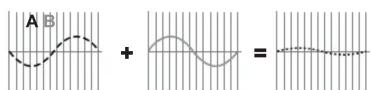
Inverting the phase of the floor monitor (A) in relation to the stage amp turns the feedback hotspot into a null.
RECORDING DIRECT WITH THE SB-4
Using a direct box to match the impedance will produce a warmer more natural tone versus plugging the instrument directly into the recording system. The StageBug SB-4 is well suited for this as it both balances the signal and matches the impedance simultaneously. Simply connect the SB-4's output to the mic input on your recording system. Top engineers will often combine the sound of a direct recording with a mic and blend them to suit. You will find the SB-4 will work very well with piezo equipped acoustic guitars and other instruments too!
To view the 3-year transferable warranty details and product specifications please visit www.radialeng.com

Brand : Radial Engineering
Model : StageBug SB-4
Category : DJ Equipment