
SC202 - Scale ACME - Free user manual and instructions
Find the device manual for free SC202 ACME in PDF.


| Product Type | Smart Scale |
| Model | SC202 |
| Brand | Acme |
| Dimensions | 284 x 284 x 25 mm |
| Power Supply | DC 6 V (4 x AAA batteries) |
| Weight Capacity | 5 - 180 kg |
| Readability | 50 g |
| Precision | 100 g |
| Body Fat Measurement | BIA (Bioelectrical Impedance Analysis) technology |
| Display | LED |
| Surface Material | Toughened glass |
| Connectivity | Bluetooth 4.0 (or higher) |
| Compatible App | Feelfit (iOS and Android) |
| Weight Units | kg, lb (via app) |
| Multiple Users | Yes (data tracking for multiple users via app) |
| Battery Low Indicator | Lo display |
| Overload Protection | EER display if overloaded |
| Storage Temperature | Room temperature recommended |
| Safety Warnings | Not for use with pacemakers, during pregnancy, by children under 10 or professional bodybuilders |
| Maintenance | Clean with soft cloth; avoid abrasive solvents; keep away from sharp objects and water |
| WEEE Symbol | Product should not be disposed as household waste; recycle properly |
Frequently Asked Questions - SC202 ACME
User questions about SC202 ACME
0 question about this device. Answer the ones you know or ask your own.
Ask a new question about this device
Download the instructions for your Scale in PDF format for free! Find your manual SC202 - ACME and take your electronic device back in hand. On this page are published all the documents necessary for the use of your device. SC202 by ACME.
USER MANUAL SC202 ACME
Body fat measurement: BIA technology
Power: DC 6 V (4 x AAA)
Dimensions: 284 x 284 x 25 mm
Surface: Toughened glass

WARNING:
- Do not use if you have a pacemaker, lung, ECG or any other internal medical device.
• Do not use if you are pregnant.
• These smart scales are intended for home use only. The device should not be used to diagnose or treat any medical conditions.
• Always consult your physician to determine what is ideal for you.
• Not intended for use by children under the age of 10 and a professional bodybuilder.
CAUTION: Body fat scale readings can thrown off by the following factors:
- Hydration. If you are dehydrated or dr much fluid, an electric current flow and measurements might be affected.
- Movement. Wiggling around or quickly hoping on the scales can interfere with your readings.
- Sports. Your body composition data measurements may not be accurate when using the immediately after heavy physical activities.
- Foot calluses. Thick calluses on your feet prevent the electric current from flowing accurately.
- Time. The time of the day plays a role in a fluctuating body-fat percentage reading. If you weigh yourself in the morning one day and in the next, you are more likely to get a different number than the day before. The body's daily weight varies with change in eating food and drinking water and the weight change value is from 0.5 to 2 kg.
For the best measurement results:
- Be aware of what affects your fluid retention.
- Always stand on the same area of stand still.
-
Weigh yourself once a day and at wear the same clothes or none at all.
-
Measure weight correctly: Place the scales on a flat and hard floor. The LED should display "0.0." before stepping on the scales.
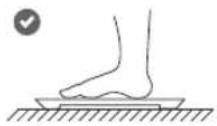
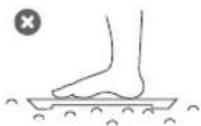
- Measure body fat correctly: scales and have both feet electrodes as shown below. taken off.
Stand straight of uniformly touched Socks should also
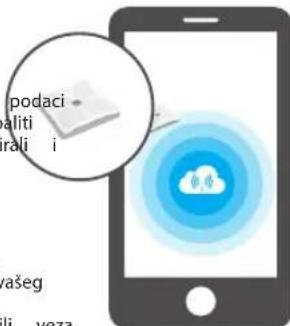
- Download "Feelfit" application from "App Store" or "Google Play" to your smartphone. (Accept security requests of the application.)
QR CODES FOR QUICK DOWNLOAD:

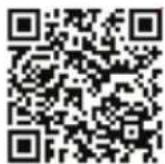
Android version
iOS version
- Enable Bluetooth on your smartphone.
- Open the application and allow all security requests by the application.
- Go to the application and create your person profile.
- Press "+" and enter "Device management".
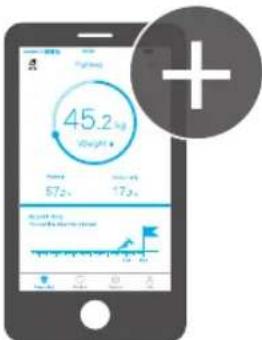
- Step on the scales and complete pairing thr the app.
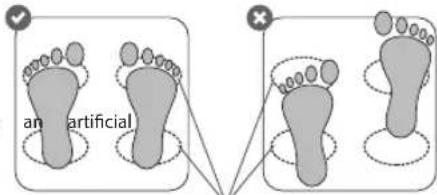
Conductive areas
POWER ON THE SCALES
Put 4*AAA batteries into the battery compartment and power on your scales by taping.
SYNCHRONIZATION OF MEASUREMENT DATA
Before using the scales for the first time, you have to link too pair them with your smartphone or tablet via "Feelfit" your application, otherwise only weight data will be measured.
Real-time data synchronization: After power on, the scales will display weight only. To measure other body scaling parameters and to update your data in real-time, you need to use "Feelfit" app while standing
on the scales.
Postponed data synchronization: You can weight the app yourself without turning on the app every time you are measuring yourself. You have to step on the scales, and your data will be saved in the internal scales memory. After a while, the data will be deleted, so you need to turn your "Feelfit" app at least twice a week to synchronize and save your data.
INSTALLATION OF THE APP AND MEASUREMENT
This device is designed to work with smartphones supporting Bluetooth 4.0 or higher versions. Be sure that your smartphone's Bluetooth hardware and software are working properly; otherwise, it may not be able to pair with the smart scales or the connection may be unstable.

-
Step on again and stand until measurement values on the display of the scales get stable.
-
Check your body composition data in the app.
If you want to track all your data, you have to use "Feelfit" app on your smartphone or tablet.
Weight units can be changed from pounds (lb) to kilograms (kg), or vice versa, by the mobile app. The height units will also change accordingly (meter or foot/inch).
DISPLAY INDICATIONS
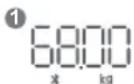


Digits flashing twice mean the weight test finished. The digit 0 rolling to stable means the body fat test finished.
If weight is 50.00 kg, when you stand on the scales, "50.00 kg" will blink for about 3 times, the screen shows "0", which moves from left to right and repeats the course for 2-3 times, and then the screen will skip to show "50.00 kg" for about 5 seconds, and finally the screen of the scales will be automatically turned off, ending the measurement.
DATA TRACKING FOR MULTIPLE USERS
If you want to weigh and track data of more than one person, you have to:
- Open your app and go to "My account" menu.
- Create your friend's personal data in "Add a member" section.
- Do the same steps like measuring yourself.
Do not forget to change your account before weighing next time in "My account" menu!
THE BIA METHOD
The smart scales use the BIA (bioelectrical impedance analysis) technique. Using this method, a safe, low-level electrical passed through the body. It is difficult for the signal to flow through fat in the human body, but easy to flow through moisture in the muscle and other body tissues. The difficulty with which the through a substance is called impedance. So, the more resistance impedance the signal encounters, the higher the body fat reading is.
BODY FAT
A body fat percentage is the percentage of fat in your body. Too much body fat has been linked to conditions such as high blood pressure, heart disease, diabetes, cancer and other disabling conditions. is a special tissue and is a complex substance in the body, including subcutaneous fat, visceral fat and the like, and is widely various parts of the body.
BMR (BASAL METABOLIC RATE)
Your basal metabolic rate (BMR) is the amount of energy you expend every day when at rest. Gender, age, height and weight are important for this calculation.
This is simply the energy required to keep your heart beating, your lungs taking in oxygen, your brain functioning, and all the other
everyday tasks your body does to maintain life. As the name suggests, basal means fundamental. If you sat in bed all day long and did not move a muscle, this shows how many calories you burnt.
BMI (BODY MASS INDEX)
Your body mass index (BMI) is a measure of body fat based on height and weight, which applies to adult men and women. If a person's BMI is out of the healthy BMI range, their health risks may increase significantly. However, the BMI may not correspond to the same degree of fatness in different populations due to different body proportions.
The metric BMI formula: weight (kg) / height (sq. m).
TROUBLE SHOOTING
| Problem Solution | |
| The LED does not display | Please check whether the battery still has electric power. Please re-install the battery. If the LED does not display, it is suggested to replace the battery. |
| The LED displays Lo | Please carefully check whether the battery is installed correctly and make sure that the battery still has electric power. If the LED still displays Lo, it is suggested to replace the battery. |
| The LED displays EER | The sensor of the scales has been overloaded or even damaged. Please do not measure the weight that is higher than that described in the technical specifications. |
| Bad Bluetooth connectivity | 1. Open the Bluetooth settings on your device, tap on your device model and select “Forget”. Now you can try the pairing operation again.2. It is possible that you are not able to connect because your device is paired with another nearby device. You will have to disconnect the other device or even turn off its Bluetooth function. Now you can try again to pair or reconnect.3. Turn on/off the Bluetooth function in your device or restart the device itself. |
| Measurement data did not appear in the app | Restart your app and turn on the Bluetooth function of the device. Make sure you are connected with the scales (settings/device management/add device) and the application. Make sure your app is synchronizing your data while you are on the scales. |
SCARE AND MAINTENANCE
- Do not use abrasive cleaning solvents to clean the device. - Do not expose the device to extremely high or low temperatures as this will shorten the life of electronic devices, destroy the battery or distort certain parts.
Do not expose the device to contact with sharp objects as this will cause scratches and damage.
• Overloading the scale beyond its maximum capacity will damage the sensitive load cell.
• Digital scales are designed to operate at the room temperature.
• A low battery can affect a proper function of the digital scales.
ure, Digital scales are not waterproof.
ns. Overloading the scales beyond their maximum capacity will damage the sensitive load cell.
ing
y present in

Waste Electrical and Electronic Equipment (WEEE) Symbol
The use of the WEEE symbol indicates that this product may not be household waste. By ensuring this product is disposed of correctly, you will help protect the environment. For more detailed information about the recycling of this
product, please contact your local authority, your household waste disposal service provider or the shop where you purchased the product.
LT IŠMANIOSIOS SVARSTYKLĖS NAUDOTOJO INSTRUKCIJA
PAKUOTĖS TURINYS
Strāva DC 6 V (4 x AAA)
Izmēri: 284 x 284 x 25 mm
Moc: DC 6 V (4 x AAA)
Wymiary: 284 x 284 x 25 mm
INSTALACJA APLIKACJI | POMIAR
natural_image
Illustration of a smartphone displaying a cloud icon with a magnified inset showing a small document or folder (no text or symbols present)He
natural_image
Illustration of a smartphone displaying a document icon and a circular loading control symbol (no text or labels)Tip: Cântar inteligent, Bluetooth 4.0
Model: SC202
Interval de greutate: 5–180 kg
Lizibilitate: 50 g
Precizie: 100 g
Măsurarea grăsimii corporale: Tehnologia BIA
Putere: DC 6 V (4 x AAA)
Dimensiuni: 284 x 284 x 25 mm
IMC (INDICE DE MASĂ CORPORALĂ)
na vagu i završite uparivanje putem
| Product Product model | |
| Product purchase date Seller name, address | |
| Failures (date, description, position of the person who accepts the product, first name, last name and signature) | |
1. Warranty period
Warranty enters into force starting with the day when the buyer acquires the product from the seller. Warranty period is indicated on the product.
2. Warranty conditions
The warranty is valid only by providing an original document of the product acquisition and this warranty sheet, which includes name of the product model, product purchase date, name and address of the seller.
If it is noticed during the warranty period that the product has faults and these faults where not caused by any of the reasons when the warranty is not applied as indicated in the paragraphs below, manufacturer undertakes to replace the product.
The warranty is not applied to regular testing, maintenance replacement of the parts which are worn out naturally.
The warranty is not applied if damage or failures occurred due to the following reasons:
• Corrosion, mud, water and sand.
• Repair works, modifications or cleaning, which were performed by a service packaget authorised by the manufacturer.
• Usage of the spare parts, software or consumptive materials which do not apply to the product.
- Accidents or events or any other reasons which do not depend manufacturer, which includes lightning, water, fire, magnetic field and inappropriate ventilation.
- If the product does not meet standards and specifications of a country, in which it was not bought. Any attempt to adjust the product in order to meet technical and safety requirements such as those in the other countries withdraws all the rights to the warranty service.
and repairfailures are detected in the product, all the expenses in re service are covered by the buyer.
- Inappropriate installation of the product, inappropriate usage and/or operating the product without following the manual, technical requirements and safety standards as provided by the manufacturer, and additionally, inappropriate warehousing, falling from heights as well as hard strikes.
GB EU DECLARATION
ACME Europe hereby declares that this equipment is in compliance with the essential requirements and other relevant provisions of:
RED 2014/53/EU Directive
RoHS 2011/65/EU Directive
The declaration of conformity can be accessed at:
http://www.acme.eu/en-us/declarations-conformity
LT ES ATITIKTIES DEKLARACIJA
- WARNING:
- For the best measurement results:
- POWER ON THE SCALES
- SYNCHRONIZATION OF MEASUREMENT DATA
- INSTALLATION OF THE APP AND MEASUREMENT
- DISPLAY INDICATIONS
- DATA TRACKING FOR MULTIPLE USERS
- THE BIA METHOD
- BODY FAT
- BMR (BASAL METABOLIC RATE)
- BMI (BODY MASS INDEX)
- SCARE AND MAINTENANCE
- Waste Electrical and Electronic Equipment (WEEE) Symbol
- LT IŠMANIOSIOS SVARSTYKLĖS NAUDOTOJO INSTRUKCIJA
- PAKUOTĖS TURINYS
- INSTALACJA APLIKACJI | POMIAR
- IMC (INDICE DE MASĂ CORPORALĂ)
- Warranty period
- Warranty conditions
- GB EU DECLARATION
- RED 2014/53/EU Directive
- RoHS 2011/65/EU Directive
- LT ES ATITIKTIES DEKLARACIJA
Brand : ACME
Model : SC202
Category : Scale