
LA4J - Binder Exibel - Free user manual and instructions
Find the device manual for free LA4J Exibel in PDF.


| Product Type | Binding Machine |
| Brand | Exibel |
| Model | LA4J |
| Binding Capacity (pages) | Up to 20 sheets per binding |
| Binding Method | Comb binding |
| Max Document Size | A4 (210 x 297 mm) |
| Punch Capacity (sheets) | 10 sheets per punch |
| Punch Holes | 19 or 21 holes (selectable) |
| Dimensions (L x W x H) | 380 x 250 x 120 mm |
| Weight | 2.1 kg |
| Power Supply | Manual operation, no power needed |
| Material | Plastic and metal |
| Color | Black |
| Included Accessories | 20 binding combs (12.7 mm diameter), user manual |
| Warranty | 1 year |
| Maintenance | Clean with dry cloth; keep away from moisture |
| Safety Features | Non-slip base, safety lock on punch handle |
| Spare Parts Available | Replacement punching dies and binding combs |
| Repairability | Repairable with standard tools; parts available online |
Frequently Asked Questions - LA4J Exibel
User questions about LA4J Exibel
0 question about this device. Answer the ones you know or ask your own.
Ask a new question about this device
Download the instructions for your Binder in PDF format for free! Find your manual LA4J - Exibel and take your electronic device back in hand. On this page are published all the documents necessary for the use of your device. LA4J by Exibel.
USER MANUAL LA4J Exibel
Please read the entire instruction manual before use and save it for future reference. We reserve the right for any errors in text or images and for making any necessary technical changes to this document. If you should have any questions concerning technical problems please contact our Customer Services.
Safety
- Place the laminator on a dry and level surface.
- Do not dismantle the machine or try to repair it yourself.
- Do not touch any of the hot surfaces on the machine, or you could burn yourself.
- This machine must not be used by children without the supervision of an adult. This machine must not be used by anyone (including children) suffering from physical or mental impairment. This machine should not be used by anyone without sufficient experience or knowledge unless they have been instructed in its use by someone who will take full responsibility for their safety.
- Never let children play with the machine.
- Never use the machine outdoors or near water.
- Never insert anything into the machine other than laminating paper and the documents to be laminated. Make sure that no metal objects enter the machine.
- Keep loose-hanging hair, clothes, jewellery away from the machine. Do not stick your fingers into any of the machine's openings.
- Always unplug the machine when it is not in use or if it emits any unusual odours.
- Do not use the machine close to a source of heat or in a humid environment.
- Do not abuse the lead. Never use the lead to carry the tool or pull the plug from the wall socket.
- Keep the lead away from heat, oil, sharp edges and movable parts. Damaged or tangled leads increase the risk of electric shock.
Operation
- Only use laminating film designed for heated roll laminating.
- Suitable for laminating photographs, membership cards, documents, papers, etc. Note! No thicker than 0.60 mm.
- Connect the plug to a wall socket and set the power switch to the ON (I) position. The red LED will be lit while the machine warms up.

natural_image
Technical line drawing of a cylindrical device with internal components and labeled parts (no text or symbols)-
When the green LED comes on after approx. 3 minutes, the machine has warmed up and is ready for use. Make sure that there is sufficient space behind the machine to allow the lamination to exit the machine freely.
-
Lift up one corner of the lamination film and place the paper to be laminated between the two sheets of film. Leave at least 3–5 mm of space at the edges when positioning the paper. Make sure the paper is not crooked.
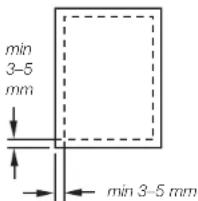

- Feed the sealed end of the lamination film pocket into the film feed slot first. Note! This is very important; otherwise, the lamination film can become caught in the rollers.
- Let the entire lamination exit freely. Do not pull it out with force. Let the lamination cool before handling it.
- Select the correct size of lamination film so that it fits the object to be laminated.
- We recommend that you do not place several smaller pieces of paper in the same lamination film.
- Never laminate an empty laminate film pocket.
- Do not cut the lamination film into smaller pieces before feeding it through the machine.
- Do not feed a laminate film into the machine at an angle; it might get stuck during lamination.
- Use only lamination film. Never try to feed in any other type of material.
- Set the power switch to OFF (0) and unplug the laminator when you have finished using it.
Care and maintenance
Wipe the laminator with a soft moist cloth when necessary remembering to unplug it first. Never use strong detergents or solvents. Clean the interior of the machine at regular intervals by folding an A4 sheet of paper in half and running it through the machine. This should remove any dirt that has stuck to the rollers. Repeat several times if necessary. If the document that you are laminating gets stuck, turn the machine off, pull out the plug and contact customer services.
Disposal
Follow local ordinances when disposing of this product. If you are unsure of how to dispose of this product, please contact your local authority.
Specifications
Rated voltage 220-240V AC, 50/60 Hz
Power 300 W, 1.4 A
Laminates up to A4, 230 mm
Temperature 120–140 °C
Size
340 × 90 × 96 mm
Recommended lamination
film thickness
80–100 μm (micron)
Warm-up time
≤ 3 minutes
Speed
250 mm/min
Lamineringsmaskin
Art.nr 18-2360 Modell LA4J-UK
36-4409 LA4J
natural_image
Technical line drawing of a cylindrical device with internal components and labeled parts (no text or symbols present)natural_image
Technical line drawing of a cylindrical device with internal components and labeled parts (no text or symbols)natural_image
Technical line drawing of a rectangular device with internal components and labeled parts (no text or symbols present)Brand : Exibel
Model : LA4J
Category : Binder