
RMR-1000 - Uncategorized GEMINI - Free user manual and instructions
Find the device manual for free RMR-1000 GEMINI in PDF.


| Product Type | Audio Receiver |
| Model | RMR-1000 |
| Brand | Gemini |
| Dimensions (W x H x D) | 200 x 150 x 50 mm |
| Weight | 0.5 kg |
| Power Supply | AC 110-240V, 50/60Hz |
| Power Consumption | 15 W |
| Frequency Range | FM 87.5-108 MHz, AM 530-1700 kHz |
| Bluetooth Version | 5.0 |
| Output Power | 2 x 10 W RMS |
| Input Connections | AUX 3.5 mm, USB, MicroSD |
| Display | LED screen with clock and frequency |
| Functions | Radio, Bluetooth streaming, USB playback, alarm clock |
| Remote Control | Included |
| Antenna | Built-in FM antenna, external AM loop |
| Material | Plastic casing with metal grille |
| Operating Temperature | 0°C to 40°C |
| Maintenance | Clean with a soft, dry cloth. Do not use solvents. |
| Safety | Keep away from water, heat sources, and ensure proper ventilation. |
| Spare Parts | Contact authorized service centers for replacement parts. |
| Warranty | 1 year limited warranty |
| Manual Language | English |
Frequently Asked Questions - RMR-1000 GEMINI
User questions about RMR-1000 GEMINI
0 question about this device. Answer the ones you know or ask your own.
Ask a new question about this device
Download the instructions for your Uncategorized in PDF format for free! Find your manual RMR-1000 - GEMINI and take your electronic device back in hand. On this page are published all the documents necessary for the use of your device. RMR-1000 by GEMINI.
USER MANUAL RMR-1000 GEMINI
Thank you for purchasing our RMR-1000 Digital Rackmount Recorder. We are confident that the Gemini platform of products will not only make your life easier through the use of the latest technological advancements in cross-platform connectivity and sound reproduction but will raise the bar for DJ and pro audio products. With the proper care & maintenance, your unit will likely provide years of reliable, uninterrupted service. All Gemini products are backed by a 1-year limited warranty*.
REGISTRATION
Please go to www.geminisound.com to register your RMR-1000. Registering your product allows Gemini to keep you up-to-date with any new product developments such as product updates or enhancements.
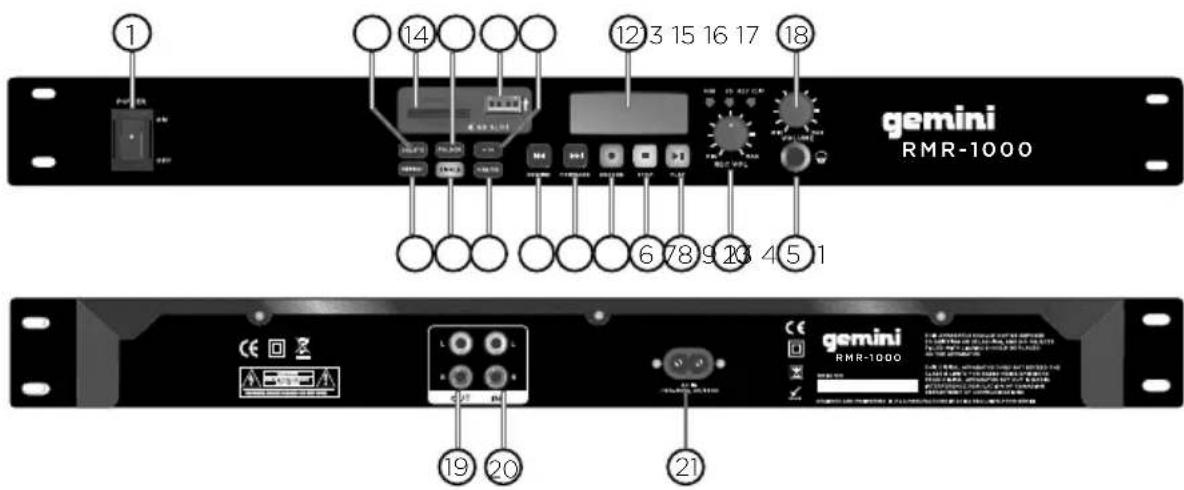
- POWER BUTTON: Press the power switch to turn the unit on. To switch the POWER off press the POWER switch again.
- RECORD VOLUME: Used to adjust the level of volume which is recording.
- SKIP BUTTON BACK: Use this switch to restart the track or to select the last track.
- SKIP BUTTON FORWARD: Use this button to select the next track.
- RECORD BUTTON: Enter the recording mode.
- STOP BUTTON: Pressing the CUE button during play provides a return to the position at which play was started.
-
PLAY BUTTON: Each time you press the PLAY/PAUSE button, the operation changes from play to pause or from pause to play.
-
REPEAT BUTTON: Use this button to repeat one track or all the tracks.
- CONT. / SINGLE BUTTON: Press this button to switch between the SINGLE and CONTINUOUS play mode. The selected mode is indicated on the LCD. In SINGLE mode, after each track the unit stops playing. In CONTINUOUS mode, the unit plays all tracks and then stops,
- SD / USB BUTTON: Press this button to choose SD or USB mode while a USB stick is connected and an SD card is inserted.
- HEADPHONE INPUTS: 3.5 mm jack for connecting headphones.
- DISPLAY: Displays the current status.
- DELETE BUTTON: Delete songs on the SD or USB stick.
- SD CARD SLOT: Slot for inserting the SD card. The contacts of the card must point downwards. The unit cannot read cards with a capacity of more than 4GB. The unit is not compatible to SDHC cards.
- FOLDER: Allows you to navigate through folders or tracks similarly in either USB or SD mode.
- USB PORT: Allows the connection of any USB memory stick.
- +10 BUTTON: Use this button to jump 10 tracks in one press.
- HEADPHONE VOLUME: Adjust the headphone volume.
- LINE OUT: The audio for each SD/USB player is outputed for these jacks.
- LINE IN: Audio input for external audio source playback.
- AC CORD: Use this cable to connect product to a power source.
Warranty and Repair:
All Gemini products are designed and manufactured to the highest standards in the industry. With proper care and maintenance, your product will provide years of reliable service.
LIMITED WARRANTY
A. Gemini guarantees its products to be free from defects in materials and workmanship for One (1) year from the original purchase date. Exceptions: Laser assemblies on CD Players, cartridges, and cross-faders are covered for 90 days.
B. This limited warranty does not cover damage or failure caused by abuse, misuse, abnormal use, faulty installation, improper maintenance or any repairs other than those provided by an authorized Gemini Service Center.
C. There are no obligations of liability on the part of Gemini for consequential damages arising out of or in connection with the use or performance of the product or other indirect damages with respect to loss of property, revenues, of profit, or costs of removal, installation, or reinstallation. All implied warranties for Gemini, including implied warranties for fitness, are limited in duration to One (1) year from the original date of purchase, unless otherwise mandated by local statutes.
RETURN/REPAIR
A. In the U.S.A., please call our helpful Customer Service Representatives at (732) 346-0061, and they will be happy to give you a Return Authorization Number (RA#) and the address of an authorized service center closest to you. B. After receiving an RA#, include a copy of the original sales receipt, with defective product and a description of the defect. Send by insured freight to: Gemini and use the address provided by your customer service representative. Your RA# must be written on the outside of the package, or processing will be delayed indefinitely! C. Service covered under warranty will be paid for by Gemini and returned to you. For non-warrantied products, Gemini will repair your unit after payment is received. Repair charges do not include return freight. Freight charges will be added to the repair charges. D. On warranty service, you pay for shipping to Gemini, we pay for return shipping within the continental United States. Alaska, Hawaii, Puerto Rico, Canada, Bahamas, and the Virgin Islands will be charged for freight.
E. Please allow 2-3 weeks for return of your product.
Under normal circumstances your product will spend no more than 10 working days at Gemini.
We are not responsible for shipping times.
Gemini
Worldwide Headquarters
107 Trumbull Street
Building F8
Elizabeth, NJ 07206 USA
Tel: (732) 346-0061
Fax: (732) 346-0065
Register your product online at GEMINISOUND.COM to be stay up to date with product updates!
In the USA: if you experience problems with this unit, call 732-346-0061 for Gemini customer service.
Do not attempt to return this equipment to your dealer.
Parts of the design of this product may be protected by worldwide patents.
Information in this manual is subject to change without notice and does not represent a commitment on the part of the vendor. Gemini shall not be liable for any loss or damage whatsoever arising from the use of information or any error contained in this manual. No part of this manual may be reproduced, stored in a
retrieval system or transmitted, in any form or by any means, electronic, electrical, mechanical, optical, chemical, including photocopying and recording,
for any purpose without the express written permission of Gemini It is recommended that all maintenance and service on this product is performed by Gemini or its authorized agents. Gemini will not accept liability for loss or damage caused by maintenance or repair performed by unauthorized personnel.
Worldwide Headquarters
107 Trumbull Street, Building F8 • Elizabeth, NJ 07206
• USA
Tel: (732)346-0061 • Fax: (732)346-0065
gemini®
Brand : GEMINI
Model : RMR-1000
Category : Uncategorized