
FSCW - Towel Warmer DIMPLEX - Free user manual and instructions
Find the device manual for free FSCW DIMPLEX in PDF.


| Product Type | Towel Warmer |
| Brand | Dimplex |
| Model | FSCW |
| Dimensions (H x W x D) | 800 mm x 600 mm x 100 mm |
| Weight | 8.5 kg |
| Power Supply | 220-240 V ~ 50 Hz |
| Power Consumption | 200 W |
| IP Rating | IP24 |
| Heating Type | Electric, dry thermal |
| Number of Bars | 4 |
| Material | Steel with white powder coating |
| Installation | Wall-mounted |
| Controls | On/Off switch (optional thermostat) |
| Functions | Heating and drying towels |
| Safety Features | Overheat protection, IP24 splash-proof |
| Maintenance | Wipe with damp cloth; do not use abrasive cleaners |
| Spare Parts | Available from Dimplex authorized dealers |
| Reparability | Repairable by qualified technician |
Frequently Asked Questions - FSCW DIMPLEX
User questions about FSCW DIMPLEX
0 question about this device. Answer the ones you know or ask your own.
Ask a new question about this device
Download the instructions for your Towel Warmer in PDF format for free! Find your manual FSCW - DIMPLEX and take your electronic device back in hand. On this page are published all the documents necessary for the use of your device. FSCW by DIMPLEX.
USER MANUAL FSCW DIMPLEX
Please note that some of the contact details on this PDF document may not be current.
Please use the following details if you need to contact us:
Telephone: 0844 879 3588 Email: customer.services@gdcgroup.co.uk
The customer support section of our website also features a wide range of information which may be of use to you and is available 24 hours a day. It includes:
- Operating and installation instructions
- Easy 'How to use' guides for storage heaters
• Service and repairs
• Where to buy our products
• Literature downloads
• Heating requirement calculator
Visit - www.dimplex.co.uk/support
Towel Rail Controller
Thank you for purchasing this towel rail controller. Before attempting to install the product, please read the instructions thoroughly, taking particular note of the 'Safety' section below. These instructions should be retained for future reference.
Basic Safety Advice
Installation should be undertaken by a suitably qualified individual in accordance with the latest IEE Wiring Regulations and Building Regulations.
The electrical supply MUST be isolated before installation or any subsequent work is undertaken on the controller. The product MUST be used on a 230 - 240V 50Hz supply only.
Installation Instructions
A fused spur is required in the supply circuit to the controller, fitted with the correctly sized fuse.
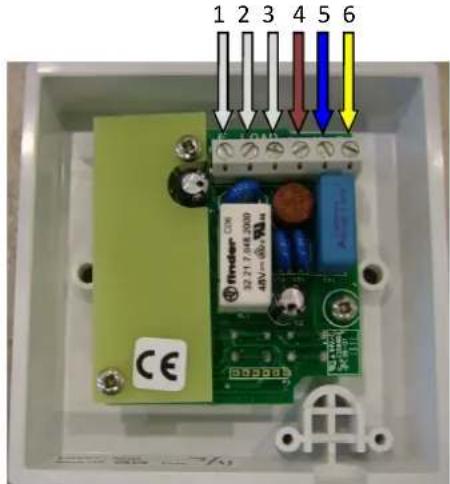
Mains cable wires (in)
Looking at the back of the unit, from left to right, terminals four, five and six correspond to the incoming mains cable.
The mains wires should be connected as follows:
⇒ Brown Live to terminal 4 (L)
⇒ Blue Neutral to terminal 5 (N)
⇒ Green/Yellow Earth to terminal 6 (E)
THIS UNIT MUST BE EARTHED
Electric towel rail wires (out)
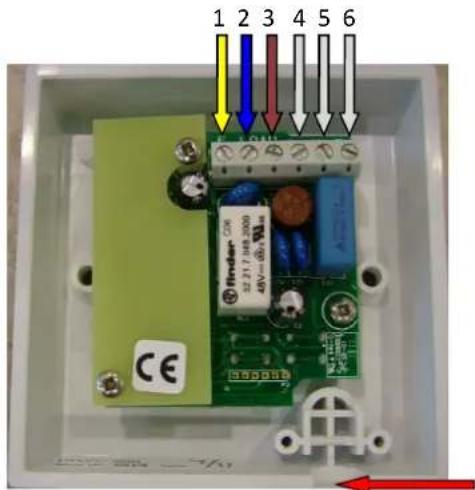
Looking at the back of the unit, from left to right, terminals one, two and three correspond to the outgoing towel rail cable.
The towel rail wires should be connected as follows:
⇒ Green/Yellow Earth to terminal 1 (E)
⇒ Blue Neutral to terminal 2 (N)
⇒ Brown Live to terminal 3 (LT)
THIS UNIT MUST BE EARTHED
Flex Access
Knock through the thinned access point in the lower right hand corner of the unit and securely clamp the incoming towel rail cable using the fixings provided.
Fitting to Wall
Carefully fit the unit into a suitable back-box (minimum depth 25mm), ensuring that no cables are trapped when correctly seated. Use the two screws provided to fix the control to the back-box, completing the installation.
Operating Instructions
There are four buttons on the controller. These are:
1 - Power
2- Temperature Increase
3 - Temperature Decrease
4 - Eco
Basic operation
When off, the Power LED will be blue.
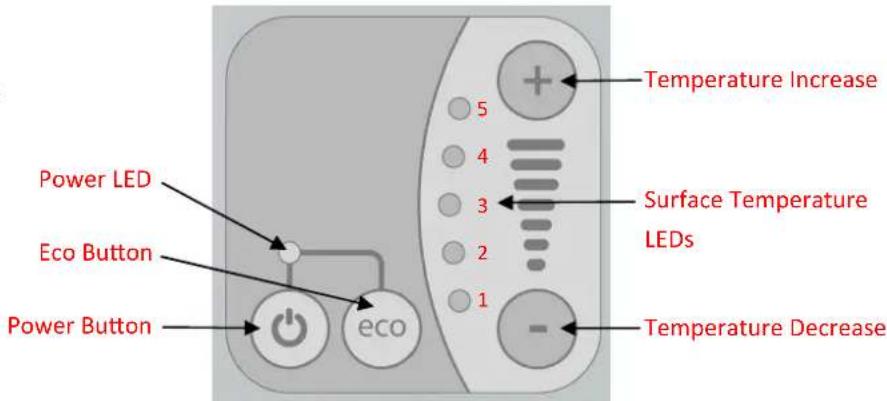
To turn the unit on, press the Power button and release it. The LED will turn red, and the orange LED bank will show between one and five LEDs.
To change the surface temperature, press the Temperature Increase or Temperature Decrease buttons the required number of times. Each of the orange LEDs represents the following output from the element, expressed as a percentage of the units total output:
5 lights—100% 4 lights—85% 3 lights—70% 2 lights—55% 1 light—40%
To turn the unit off, press the Power button and release. The controller has memory that will remember the power level selected and resume operation at this power when the unit is next turned on.
Eco function
Press the Eco button; the Power LED will turn green.
This function allows you to dry towels by using a higher power function for 30 minutes, and then a lower level for 90 minutes. The temperature for the two settings can be selected during their operation by pressing the Temperature Increase or Temperature Decrease buttons the required number of times. These power levels will be remembered by the unit for future operation.
After the two hours of operation the towel rail will turn off automatically, and the Power LED will turn blue. This function allows you to dry a towel without having to remember to turn off the rail afterwards, helping to save energy.
Technical Specification
230—240V\~AC 50Hz
Maximum output 800W
CE, tested to EN55014-1:2006
IPX4 rated
After Sales Service
Your product is guaranteed for one year from the date of purchase. Within this period we undertake to repair or replace this product free of charge (subject to availability) provided it has been installed and operated in accordance with these instructions. Your rights under this guarantee are additional to your statutory rights, which in turn are not affected by this guarantee. Should you require after sales service you should contact our costumer services help desk on 0844 879 3588. It would assist us if you can quote the model number, date of purchase and nature of fault at the time of your call. Please do not return a faulty product to us in the first instance, as this may result in loss or damage and delay in providing you with a satisfactory service.
Please retain your receipt as proof of purchase.
GDC Group Ltd
Millbrook House
Grange Drive
Hedge End
Southampton
SO30 2DF
Customer Services Help Line
Tel:(0844) 879 35 88
Fax (0844) 879 35 82
E-Mail: customer.services@gdcgroup.co.uk
Republic of Ireland Tel: 01 842 4833

Brand : DIMPLEX
Model : FSCW
Category : Towel Warmer