
NSZ-GU1 - Smart TV Stick SONY - Free user manual and instructions
Find the device manual for free NSZ-GU1 SONY in PDF.


| Product Type | Smart TV Stick (Google TV) |
| Model Number | NSZ-GU1 |
| Brand | Sony |
| Dimensions (H x W x D) | 80 x 25 x 10 mm |
| Weight | 30 g |
| Power Supply | 5V 1A via micro-USB port |
| Operating System | Google TV (Android-based) |
| Video Output | HDMI (up to 1080p) |
| Audio Output | HDMI (stereo, Dolby Digital) |
| Wireless Connectivity | Wi-Fi 802.11 b/g/n, Bluetooth 2.1 + EDR |
| Remote Control | IR/RF hybrid remote with QWERTY keyboard |
| Storage | 4 GB internal flash |
| RAM | 1 GB |
| Processor | Marvell Armada 1500-mini |
| Key Functions | Streaming video, apps, web browsing, voice search |
| Safety Precautions | Use only supplied adapter; keep away from water and heat sources |
| Cleaning Instructions | Wipe with soft dry cloth; do not use liquids or abrasives |
| Spare Parts / Repairability | No user-serviceable parts; battery internal |
| Warranty | 1 year limited |
Frequently Asked Questions - NSZ-GU1 SONY
User questions about NSZ-GU1 SONY
0 question about this device. Answer the ones you know or ask your own.
Ask a new question about this device
Download the instructions for your Smart TV Stick in PDF format for free! Find your manual NSZ-GU1 - SONY and take your electronic device back in hand. On this page are published all the documents necessary for the use of your device. NSZ-GU1 by SONY.
USER MANUAL NSZ-GU1 SONY
Sony Customer Support
Please Call Before Returning the Product to the Store
Owner's Record
The model and serial numbers are located at the side of the unit. Record the serial number in the space provided below. Refer to them whenever you call upon your Sony dealer regarding this product.
Model No. NSZ-GU1
Serial No.
WARNING
Batteries or batteries installed apparatus shall not be exposed to excessive heat such as sunshine, fire or the like.
Precautions
The nameplate is located on the side of the player.
FCC WARNING
You are cautioned that any changes or modifications not expressly approved in this manual could void your authority to operate this equipment.
This transmitter must not be co-located or operated in conjunction with any other antenna or transmitter. The shielded Interface cable recommended in this manual must be used with the equipment in order to comply with the limits for a digital device pursuant to Subpart B of Part 15 of FCC Rules.
NOTE
This equipment has been tested and found to comply with the limits for a Class B digital device, pursuant to Part 15 of the FCC Rules. These limits are designed to provide reasonable protection against harmful interference in a residential installation. This equipment generates, uses, and can radiate radio frequency energy and, if not installed and used in accordance with the instructions, may cause harmful interference to radio communications. However, there is no guarantee that interference will not occur in a particular installation. If this equipment does cause harmful interference to radio or television reception, which can be determined by turning the equipment off and on, the user is encouraged to try to correct the interference by one or more of the following measures:
- Reorient or relocate the receiving antenna. - Increase the separation between the equipment and receiver.
- Connect the equipment into an outlet on a circuit different from that to which the receiver is connected. - Consult the dealer or an experienced radio/TV technician for help.
This device complies with part 15 of the FCC Rules. Operation is subject to the following two conditions: (1) This device may not cause harmful interference, and (2) this device must accept any interference received, including interference that may cause undesired operation.
FCC Radiation Exposure Statement: For Internet Player
This equipment complies with FCC radiation exposure limits set forth for an uncontrolled environment and meets the FCC radio frequency (RF) Exposure Guidelines in Supplement C to OET65. This equipment should be installed and operated keeping the radiator at least 20 cm or more away from person's body (excluding extremities: hands, wrists, feet and ankles).
For remote control
This equipment complies with FCC radiation exposure limits set forth for an uncontrolled environment and meets the FCC radio frequency (RF) Exposure Guidelines in Supplement C to OET65. This equipment has very low levels of RF energy that are deemed to comply without testing of specific absorption ratio (SAR).
Precautions
On placement
- Place the player in a location with adequate ventilation to prevent heat build-up in the player.
- Do not place the player in a location near heat sources, or in a place subject to direct sunlight, excessive dust, or mechanical shock.
- If the player is brought directly from a cold to a warm location, or is placed in a very damp room, moisture may form on the outer surface and on interior of the player.
Should this occur, the player may not operate properly. In this case, leave the player turned on for about half an hour until the moisture evaporates.
- Do not place the player in a place where medical equipment is in use. It may cause a malfunction of medical instruments.
- If you use a pacemaker or other medical device, consult your physician or the manufacturer of your medical device before using the wireless LAN function or the remote control.
On adjusting volume
Do not turn up the volume while listening to a section with very low level inputs or no audio signals. If you do, your ears and the speakers may be damaged when a peak level section is played.
On cleaning
Clean the cabinet, panel, and controls with a soft cloth. Do not use any type of abrasive pad, scouring powder or solvent such as alcohol or benzine.
On replacement of parts
In the events that this player is repaired, repaired parts may be collected for reuse or recycling purposes.
Others
Do not hold the player when moving the TV.
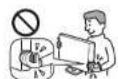
If you have any questions or problems concerning your player, please consult your nearest Sony dealer.
Specifications
Input/Output jacks
| MHL OUT HDMI 19-pin standard connector | |
| MHL version: MHL 2Video: 720/60pAudio: Linear PCM, Dolby Digital, Dolby Digital Plus | |
| HDMI IN HDMI 19-pin micro connector | |
| Video: 480p, 720/60pAudio: Linear PCM, Dolby Digital | |
| USB USB jack (For power supply from BRAVIA)* | |
| IR Blaster 2.5 mm jack (For connecting the IR Blaster cable) | |
| Power and others | |
| Power requirements 5 V DC supplied from the MHL connector and the Micro USB connector | |
| Dimensions (approx.) 109 mm × 42 nm × 22.5 mm (4 38 in. × 1^11/_16 in. × 2180 in.) (length/width/height) incl. projecting parts | |
| Mass (approx.) 0.07 kg (2.5 oz) | |
| Operating temperature 5 °C to 35 °C (41 °F to 95 °F) | |
| Operating humidity 25% to 80% | |
| Wireless LAN | |
| Wireless LAN standard IEEE 802.1TB/g/n | |
| Frequency range 2.4 GHz band: Channels 1-11 | |
| Modulation DS-SS Modem and OFDM Modem | |
| Bluetooth | |
| Communication system Bluetooth specification version 3.0 | |
| Frequency range 2.4 GHz band: 79 channels with 1 MHz BW | |
| Modulation FHSS | |
| Compatible Bluetooth profiles* 2 | HID (Human Interface Device Profile) |
| Accessories | |
| Supplied accessories | Remote control NSG-MR9U (1)/Size AA batteries*3 (2)/Micro HDMI cable (1)/Micro USB cable (1)/IR Blaster cable (1)/Quick Start Guide, Reference Guide and Warranty card |
^21 Use the supplied Micro USB cable.
*2 Bluetooth profiles are standardized according to the purpose of the Bluetooth device.
^*3 Alkaline batteries. Do not use manganese or lithium batteries when replacing old batteries.
Additional Information
About wireless LAN security
Since communication via the wireless LAN function is established by radio waves, the wireless signal may be susceptible to interception. To protect wireless communication, this player supports various security functions. Be sure to correctly configure the security settings in accordance with your network environment.
- No Security
Although you can easily make settings, anyone can intercept wireless communication or intrude into your wireless network, even without any sophisticated tools. Keep in mind that there is a risk of unauthorized access or interception of data.
• WEP
WEP applies security to communications to prevent outsiders from intercepting communications or intruding into your wireless network. WEP is a legacy security technology that enables older devices, which do not support TKIP/AES, to be connected.
• WPA-PSK (TKIP), WPA2-PSK (TKIP)
TKIP is a security technology developed to correct for the deficiencies of WEP. TKIP assures a higher security level than WEP.
• WPA-PSK (AES), WPA2-PSK (AES)
AES is a security technology that uses an advanced security method that is distinct from WEP and TKIP.
AES assures a higher security level than WEP or TKIP.
Trademark Information
- MPEG Layer-3 audio coding technology and patents licensed from Fraunhofer IIS and Thomson.
- The terms HDMI ^TM and HDMI High-Definition Multimedia Interface, and the HDMI Logo are trademarks or registered trademarks of HDMI Licensing LLC in the United States and other countries/regions.
- MHL™, Mobile High-Definition Link and the MHL Logo are trademarks or registered trademarks of MHL Licensing, LLC.
- Manufactured under license from Dolby Laboratories. Dolby and the double-D symbol are trademarks of Dolby Laboratories.
- The Bluetooth® word mark and logos are registered trademarks owned by Bluetooth SIG, Inc. and any use of such marks by Sony Corporation is under license.
- WPA ^TM and WPA2 ^TM are marks of the Wi-Fi Alliance.
-
Music and video recognition technology and related data are provided by Gracenote*. Gracenote is the industry standard in music recognition technology and related content delivery. For more information, please visit www.gracenote.com.
CD, DVD, Blu-ray Disc, and music and video-related data from Gracenote, Inc., copyright © 2000-present Gracenote. Gracenote Software, copyright © 2000-present Gracenote. One or more patents owned by Gracenote apply to this product and service. See the Gracenote website for a nonexhaustive list of applicable Gracenote patents. Gracenote, CDDB, MusicID, MediaVOCs, the Gracenote logo and logotype, and the "Powered by Gracenote" logo are either registered trademarks or trademarks of Gracenote in the United States and/or other countries/regions. -
Windows Media is either a registered trademark or trademark of Microsoft Corporation in the United States and/or other countries/regions. This product is protected by certain intellectual property rights of Microsoft Corporation. Use or distribution of such technology outside of this product is prohibited without a license from Microsoft or an authorized Microsoft subsidiary.
- Contains Flash®, Flash® Lite® and/or Reader® technology by Adobe Systems Incorporated. This Sony Product contains Adobe® Flash® player software under license from Adobe Systems Incorporated, Copyright© 1995-2013 Adobe Systems Incorporated. All rights reserved. Adobe, Flash, Flash Lite and Reader are either registered trademarks or trademarks of Adobe Systems Incorporated in the United States and/or other countries/regions.
- Designed with UEI Technology™
Under License from Universal Electronics Inc. Portions © UEI 2000 - 2012 - Other system and product names are generally trademarks or registered trademarks of the manufacturers. ^™ and ^® marks are not indicated in this document.
HDMI
MHL Mobile High-Definition Link

DOLBY DIGITAL PLUS

gracenote.

Bluetooth®

- Sony Customer Support
- Owner's Record
- WARNING
- Precautions
- FCC WARNING
- NOTE
- FCC Radiation Exposure Statement: For Internet Player
- On placement
- On adjusting volume
- On cleaning
- On replacement of parts
- Others
- Specifications
- Additional Information
- About wireless LAN security
- - No Security
- • WEP
- • WPA-PSK (TKIP), WPA2-PSK (TKIP)
- • WPA-PSK (AES), WPA2-PSK (AES)
- Trademark Information
Brand : SONY
Model : NSZ-GU1
Category : Smart TV Stick