SO111GM - Oven Caple - Free user manual and instructions
Find the device manual for free SO111GM Caple in PDF.


| Product Type | Built-in Electric Oven |
| Brand | Caple |
| Model | SO111GM |
| Dimensions (H x W x D) | 595 x 595 x 575 mm |
| Net Weight | 38 kg |
| Power Supply | 220-240 V, 50-60 Hz |
| Power Consumption | 2.99 kW |
| Energy Efficiency Class | A |
| Oven Capacity | 65 L |
| Temperature Range | 50 °C - 250 °C |
| Control Type | Mechanical dials and timer |
| Functions | Conventional, Grill, Fan-assisted, Defrost, Bottom heat |
| Cleaning | Hydrolysis cleaning function |
| Safety Features | Child lock, Automatic shut-off, Cool-touch door |
| Interior Light | Yes, with replaceable bulb |
| Spare Parts Availability | Genuine Caple parts via authorized service centers |
| Repairability Index | 7.5/10 (modular design, DIY-friendly) |
| Warranty | 2 years standard |
Frequently Asked Questions - SO111GM Caple
User questions about SO111GM Caple
0 question about this device. Answer the ones you know or ask your own.
Ask a new question about this device
Download the instructions for your Oven in PDF format for free! Find your manual SO111GM - Caple and take your electronic device back in hand. On this page are published all the documents necessary for the use of your device. SO111GM by Caple.
USER MANUAL SO111GM Caple
Combination Steam Oven Instruction Manual
S0111
natural_image
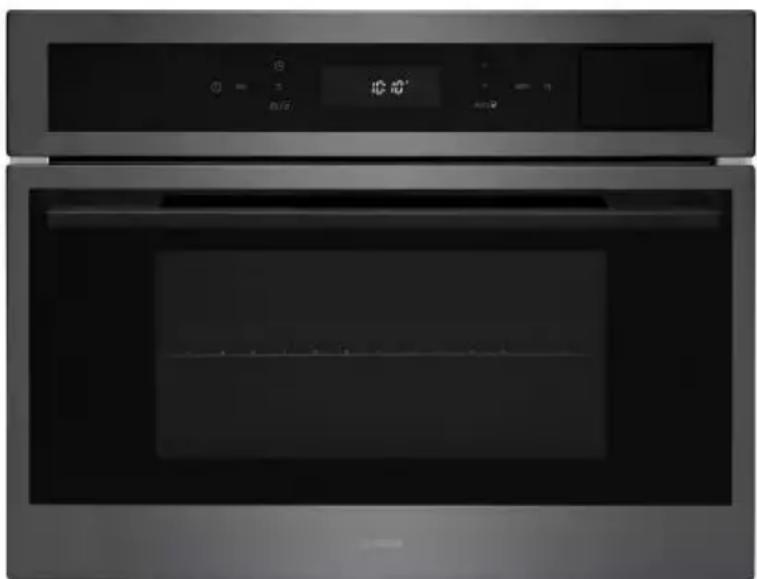
Exterior view of a modern stainless steel oven with digital display and control panel (no visible text or symbols)CONTENTS
Safety Warnings 3
Product Overview 12
Installation 13
Dimensions 16
Electrical Connection 17
Control Panel and Display 19
Operation 20
Functions 23
Demo Mode 24
Introduction of Functions and Settings 25
Suggested Steaming Times 26
Steam Cooking Tips 27
Useful Tips 28
Replacing the Oven Lamp 29
Fitting Oven Shelves 29
Care and Maintenance 30
Troubleshooting 31
Caple Contact Details 32
SAFETY INSTRUCTIONS
Read these instructions carefully and completely before using your appliance, keep it in a convenient place for reference when necessary.
- This appliance can be used by children aged from 8 years and above.
- Persons with reduced physical, sensory or mental capabilities or lack of experience and knowledge must be supervised and given appropriate instruction concerning the use of the appliance in a safe way and understand the hazards involved.
- Children shall not play with the appliance.
- Cleaning and user maintenance should not be carried out by children without supervision.
- The appliance is not intended to be operated by means of an external timer or separate remote control system.
WARNING:
- The appliance and its accessible parts become hot during use. Care should be taken to avoid touching heating elements.
- Children less than 8 years of age should be kept away unless continuously supervised.
- To prevent fire hazards do not store items on the cooking surfaces.
- During use, handles can get hot.
- Do not use harsh abrasive cleaners or sharp metal scrapers to clean the oven door glass or any other surface of the appliance as it can scratch the surface which may result in the glass shattering or permanent damage to the surface.
- Do not use steam cleaners for cleaning the appliance.
- Ensure the appliance is switched off before replacing the lamp to avoid the possibility of electric shock.
CAUTION:
- Accessible parts may be hot when the cooking or grilling is in use. Young children should be kept away.
- Your appliance is produced in accordance with all applicable local and international standards and regulations.
- Maintenance and repair work must be made only by authorised Caple service technicians. Installation and repair work that is carried out by unauthorised technicians may endanger you.
- It is dangerous to alter or modify the specifications of the appliance in any way.
- Prior to installation, ensure that the local distribution conditions (electricity voltage and frequency) and the requirements of the appliance are compatible. The requirements for this appliance are stated on the rating label.
- This appliance is designed only for cooking food and is intended for indoor use.
This appliance is intended to be used in household and similar applications such as:
Staff kitchen areas in shops, offices and other working environments.
Farm Houses.
By clients in hotels, motels and other residential type environments.
Bed and breakfast type environments.
- Do not try to lift or move the appliance by pulling the door handle.
- All possible security measures have been taken to ensure your safety. Since the glass may break, you should be careful while cleaning to avoid scratching.
- Avoid hitting or knocking on the glass with accessories.
- Ensure that the supply cord is not wedged during the installation. If the supply cord is damaged, it must be replaced by a Caple service technician or similarly qualified persons in order to prevent a hazard.
- While the oven door is open, do not let children climb on the door or sit on it.
- Do not open the oven door immediately after cooking end to avoid scald by the steam.
INSTALLATION WARNINGS
- Do not operate the appliance before it is fully installed.
- The appliance must be installed by an authorised technician.
- Caple is not responsible for any damage that may be caused by defective placement and installation by unauthorised persons.
- When unpacking the appliance, make sure that it is not damaged during transportation. In the case of any defect; do not use the appliance and contact your retailer or Caple Service immediately.
- Materials used for packaging (nylon, staplers, styrofoam etc.) may cause harmful effects to children they should be disposed of immediately.
- Protect your appliance against atmospheric effects. Do not expose it to effects such as sun, rain, snow etc.
- The surrounding materials of the appliance (i.e. kitchen cabinet or furniture) must be able to withstand a minimum temperature of 120^ C.
DURING USAGE
- Before using the oven for the first time, heat the empty oven at max. temperature for 1 hour – removing any unpleasant smells and smoke caused by working residues and thermal insulation. Make sure you do this in a well ventilated area.
- During usage, the outer and inner surfaces of the oven get hot. While opening the oven door, step back to avoid the hot steam coming out of the oven as there may be a risk of burns.
- Do not put flammable or combustible materials in or near the appliance when it is operating.
- Always use oven gloves to remove and replace food in the oven.
- Pay close attention to the oven while cooking with solid or liquid oils as they could potentially catch fire when oven is hot.
- Never pour water on flames that are caused by oil. Cover the saucepan or frying pan with its lid in order to choke the flame and turn the oven off.
- If you know you will not be using the appliance for a while switch it off from the main supply and unplug it.
- The oven shelves and trays incline when pulled out. Be careful not to let hot liquid spill over.
- When the door of the oven is open, do not leave anything on it. It may unbalance your appliance or damage the door.
- Do not put anything heavy, flammable or ignitable (nylon, plastic bag, paper or cloth etc) into the oven. This includes cookware with plastic accessories (e.g. handles). Do not hang towels, dishcloths or clothes from the appliance or its handles.
- Do not use the oven for storage purposes.
- Do not touch the appliance with wet hands.
- Do not obstruct the ventilation openings.
- Do not allow supply cords from other small appliances to come into contact with the oven.
DURING CLEANING AND MAINTENANCE
- Always switch off the appliance from the mains isolating the electrical supply before any cleaning or maintenance.
- To maintain the efficiency and safety of your appliance, we recommend you always use original spare parts and to call only our authorised Caple Service agents in case of need.
ENVIRONMENTAL PROTECTION
Waste electrical products should not be disposed of with household waste.
Please recycle where facilities exist. Check with your Local Authority or retailer for recycling advice.
This appliance is marked according to the European directive on Waste Electrical and Electronic Equipment (WEEE). By ensuring this product is disposed of correctly, you will help prevent potential negative consequences for the environment and human health, which could otherwise be caused by inappropriate waste handling of this product. The symbol on the product indicates that this product may not be treated as household waste. Instead it shall be handed over to the applicable collection point for the recycling of electrical and electronic equipment. Disposal must be carried out in accordance with local environmental regulations for waste disposal.
For more detailed information about treatment, recovery and recycling of this product, please contact your local council, your household waste disposal service or the retailer where you purchased the product.
TECHNICAL FICHE
This appliance conforms to all current and applicable energy regulations. To view the Technical Fiche that supports the energy labelling data, please visit the product page on our website www.caple.co.uk
CE DECLARATIONS OF CONFORMITY CE
This appliance has been designed, constructed and marketed in compliance with safety requirements in force. This appliance has been manufactured to the strictest standards and complies with all applicable legislation.
UKCA DECLARATIONS OF CONFORMITY UK CA
This appliance has been manufactured to the strictest standards and complies with all applicable legislation.
WARRANTY
Your new appliance is covered by warranty. The warranty card is enclosed - if it is missing, you must provide the following information to your retailer in order to receive a replacement: date of purchase, model and serial number. Registration can also be completed online by visiting www.caple.co.uk.
Ensure you keep your warranty card safe, you may need to show it to Caple Service together with proof of purchase.
If you fail to show your warranty card you will incur all repair charges.
Spare parts are only available from Caple Service and spare parts authorised centres.
ATTENTION
Before use, remove all plastic films protecting some parts of the appliance (fascia - panel, parts in stainless steel, etc)
Do not use the appliance to heat a room.
When the appliance is not in use, we recommend you turn it off, and isolate it from the electrical supply.
PRODUCT OVERVIEW
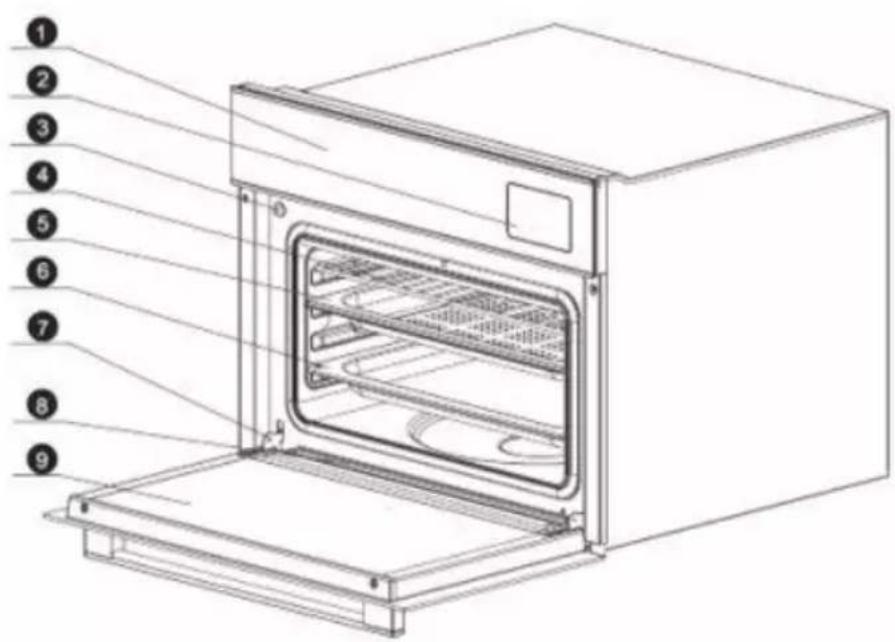
- Control Panel
- Water Tank
- DoorSwitch (controls internal light)
- Wire Rack
- Steam Tray
- Grill Pan and handle
- Door Hinge
- Water Collection Tray
- Oven Door
ACCESSORIES
1 x Steam tray 1 x Cleaning sponge
1 x Grill pan and handle 1 x Instruction manual
1 x Wire rack 1 x Water absorber
To purchase additional or replacement accessories, please visit www.caple.co.uk
PRODUCT SPECIFICATION
| Model | SO111, SO111SS, SO111GM |
| Voltage | 220V - 240V 50HZ |
| Rated power | 3050W |
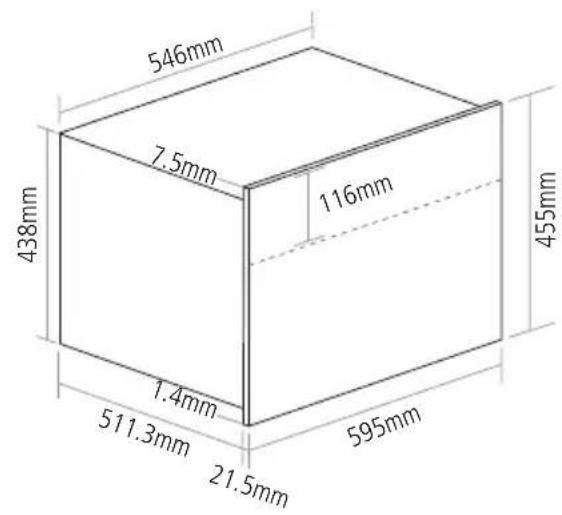
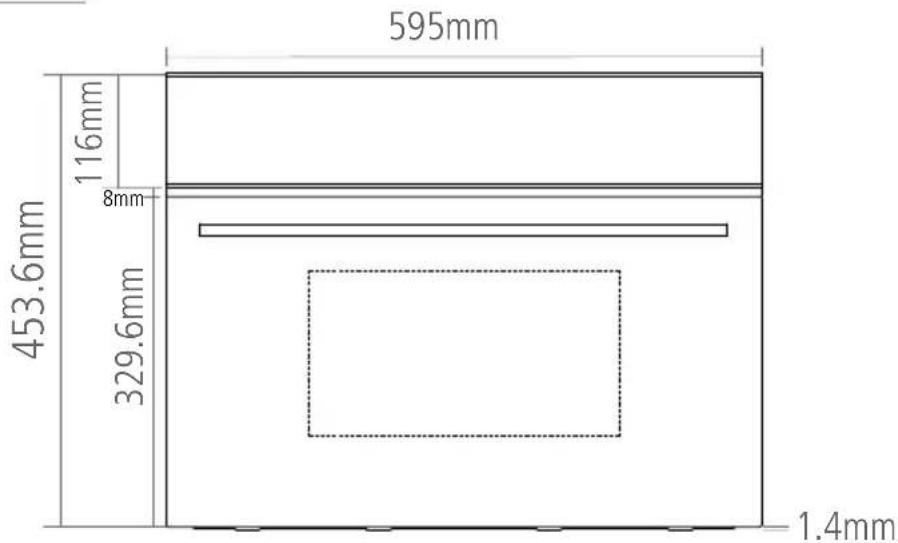
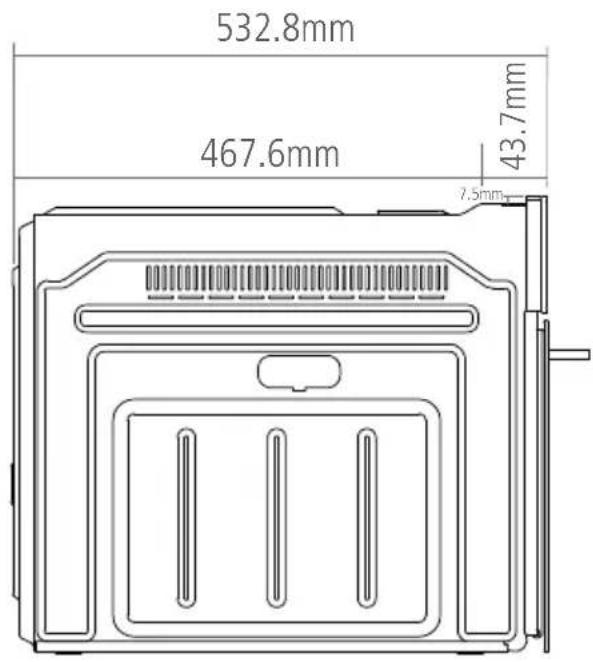
| Product dimension W x H x D | 595 X 455 X 533mm |
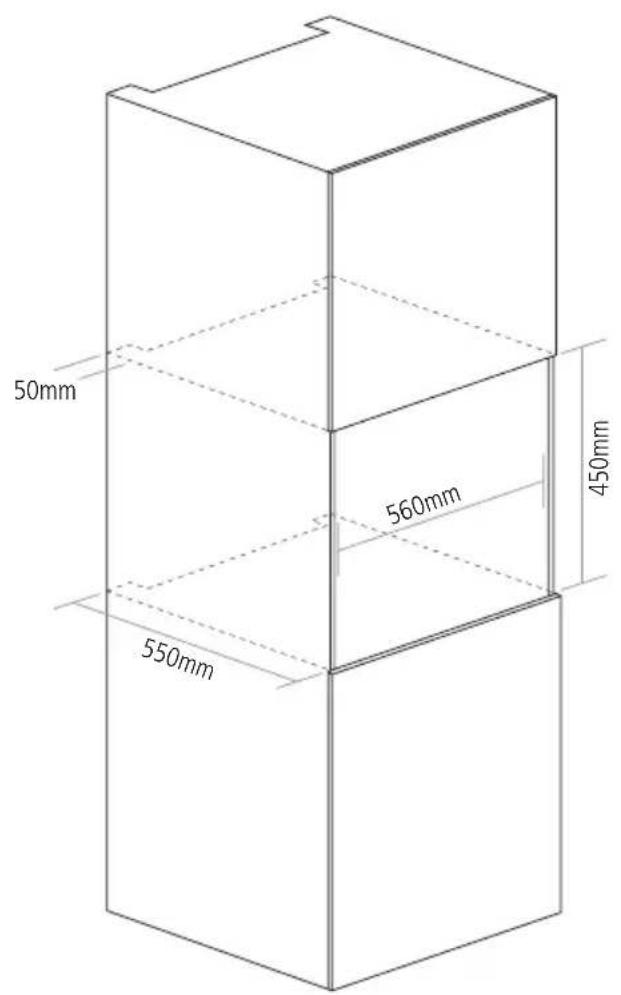
| Aperture dimension W x H x D | 560 X 450 X 550mm |
| Packing dimension W x H x D | 660 X 512 X 650mm |
INSTALLATION
IMPORTANT:
Isolate your Steam Oven from the electrical supply before performing installation or maintenance.
Installation should be carried out according to the instructions by a professionally qualified person only.
The manufacturer declines all responsibility for any damage to persons, animals or materials due to incorrect installation.
FITTING THE APPLIANCE
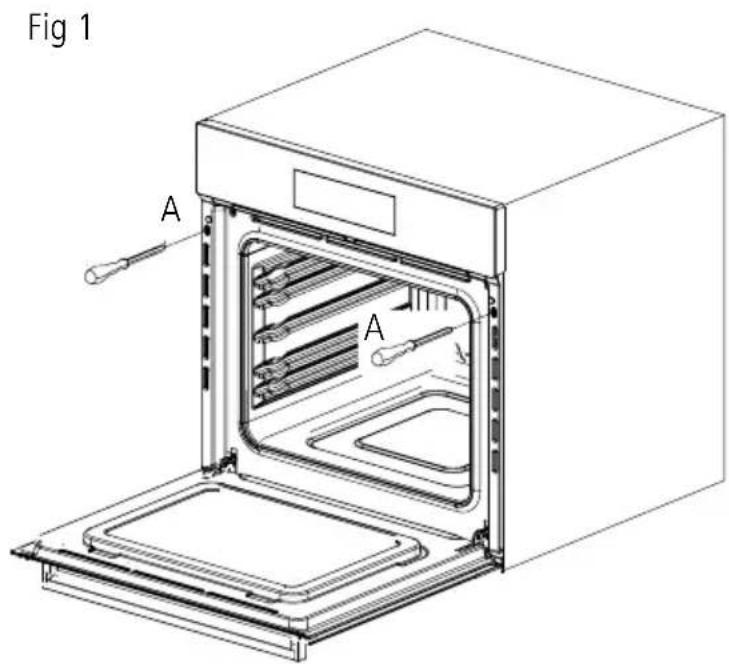
Fit the appliance into its surround (beneath a worktop or above another appliance in a tall housing) by inserting screws into the 2 holes (A - fig.1) that can be seen in the frame of the oven when the door is open.
For the most efficient air circulation, the steam oven should be fitted according to the dimensions shown in fig. 2.
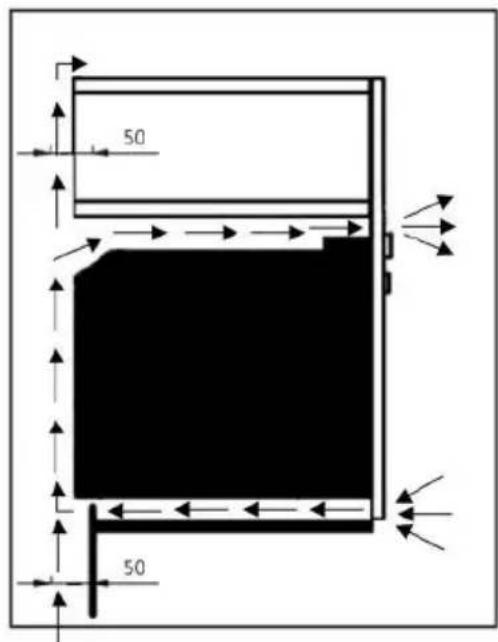
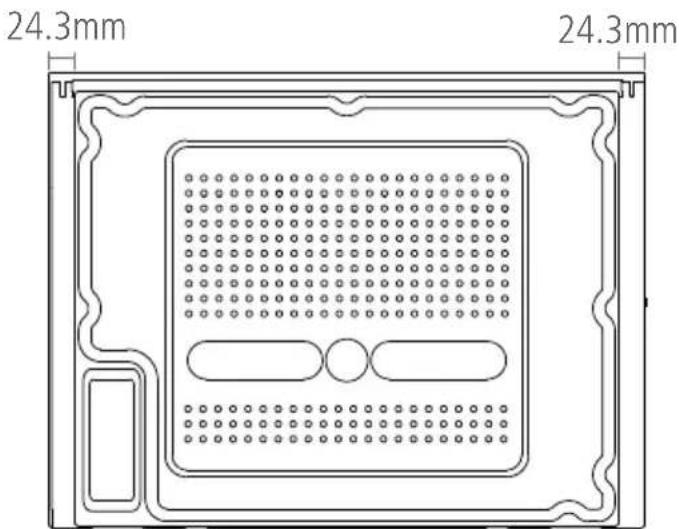
The rear panel of the cabinet must be removed so that air can circulate freely. The panel to which the oven is fitted should have a gap of at least 50mm at the rear for ventilation (fig.3 & fig.4).
Fig 2
NOTE:
To aid ventilation, we suggest leaving a small gap of around 3mm between the top of the plinth and underside of the cabinet to allow fresh air to circulate around the oven.
Fig 3
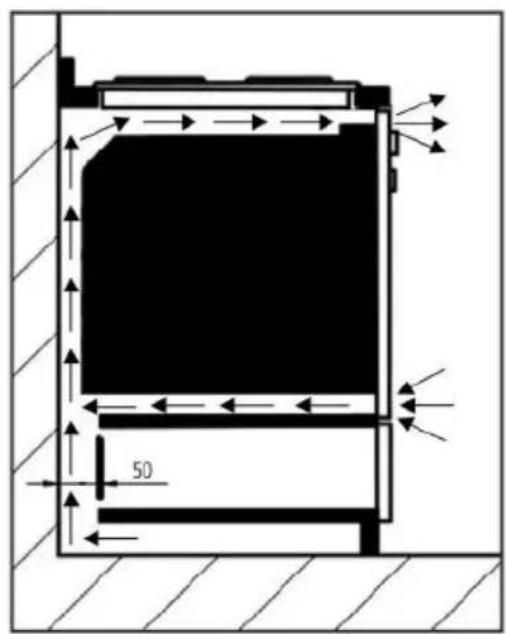
Fig 4
See page 16 for full dimensional drawings of your steam oven to help with installation.
For a built-in steam oven to work well the cabinet must be of the right type.
The panels of the adjoining furniture should be heat resistant. Particularly when the adjoining furniture is made of veneered wood, the adhesives should be able to withstand a temperature of 120^ . Plastic materials or adhesive which cannot withstand this temperature may become deformed or unstuck.
To comply with safety regulations, once the appliance has been fitted it should not be possible to make contact with the electrical parts.
All parts which offer protection should be fixed in such a way that they cannot be removed without the use of a tool.
DIMENSIONS
WARNING: THIS APPLIANCE MUST BE EARTHED
Check that the power rating of the mains supply is suitable for the maximum power of the appliance as indicated on the rating label.
The fuse rating for this appliance is 16amp.
The appliance is supplied with a mains lead it should be "Hard wired" as follows:
The “yellow/green” earth wire, which must be connected to a terminal, and has to be about 10mm longer than the other wire.
The neutral wire has to be connected to the terminal marked with a letter N.
The Live wire should only be connected to the terminal marked L.
Mains connection can also be made by fitting a double pole switch with a minimum gap between the contacts of 3mm, proportionate to the load and complying with the regulations in force.
When a double pole switch is used for mains supply connection it should be easily accessed, once the appliance is in position.
IMPORTANT:
The mains supply cable should be positioned so that it is never subjected to temperatures which are more than 50^ C above ambient temperature.
The electrical safety of the appliance can only be guaranteed when it has been correctly connected to a properly earthed mains electrical supply, as laid down in the current regulations for electrical safety.
The manufacturer cannot be held responsible for any damage to persons or objects due to lack of an earth connection.
The ovens are designed to operate with a mono-phase alternating current of 220-240V, 50Hz.
BEFORE THE INSTALLATION OF THE APPLIANCE, CHECK THE SPECIFICATIONS ON THE RATING LABEL.
IMPORTANT NOTES
- If you want to remove food from the oven immediately after cooking, please use oven gloves or other tools to avoid burning yourself.
- Water droplets will form on the unit when it is in use, please wipe them away during cooking being careful on the glass which may be hot.
- Do not open the oven door immediately after cooking to avoid scalds or burns by the steam.
- Always clean or descale the cavity and food tray or racks.
- If the power socket is damaged, to avoid hazard, please Caple service to replace.
- If the product will not be used for a long period of time, please clean away the water in the oven, and disconnect with power supply.
- Do not put excess food in the oven, to avoid uneven steam circulation in the cavity.
- The yellow/green earth wire should not be controlled by the switch.
- To prevent water overflowing from the tank, the water suction tool can be used to remove excess water. After steam cooking, please empty the remaining water in the tank and remove any excess water in the base of the oven using the suction tool supplied.
- Fill the tank with water. The water level must not be higher than the 'MAX' mark on the water tank. A full tank of water will last you up to 2 hour and 30 mins.
- During steam cooking, do not cover the food, as this will prevent steam from cooking the food.
- If the water tank is empty when a steam programme is started, the ⚠ symbol will appear on the display, the tank will eject, an alarm will sound and the steam function will not start.
- When the water tank is removed, wait for at least 10 seconds before reinserting it.
- When inserting the water tank, ensure it is fully pushed in, otherwise the cooking programme will not start.
CONTROL PANEL AND DISPLAY
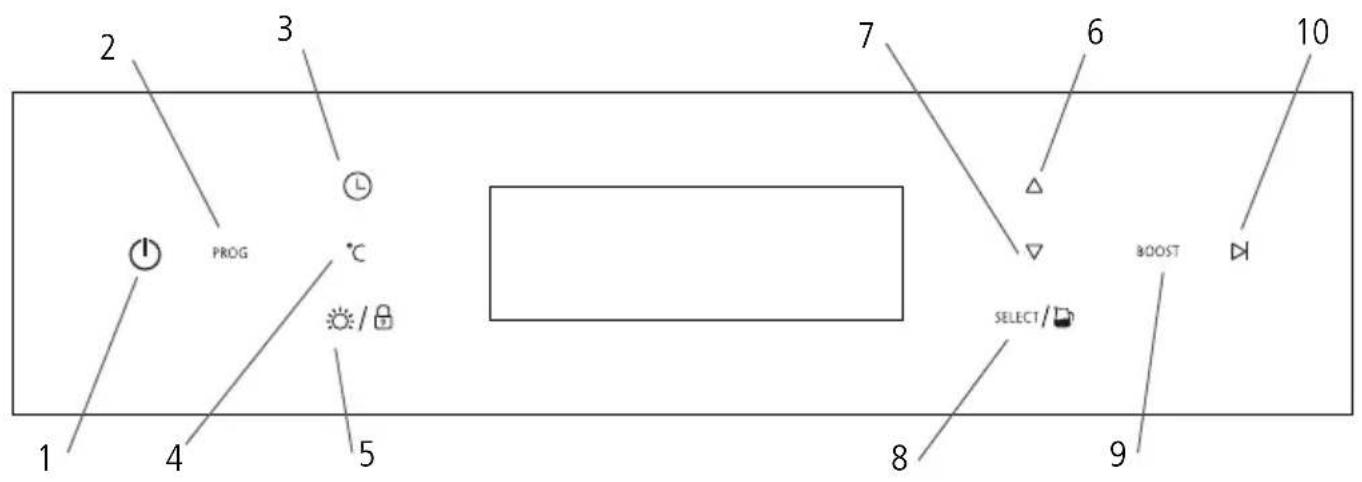
BUTTON DESCRIPTION
- Power
- Programme
- Timer
- Temperature Settings
- Light / Safety Lock
- Up (+)
- Down (-)
- Select / Water Tank
- Boost
- Start / Pause
OPERATION
-
POWER BUTTON ⏻ to turn on/off the display panel. When turned on, the time of day will be shown.
-
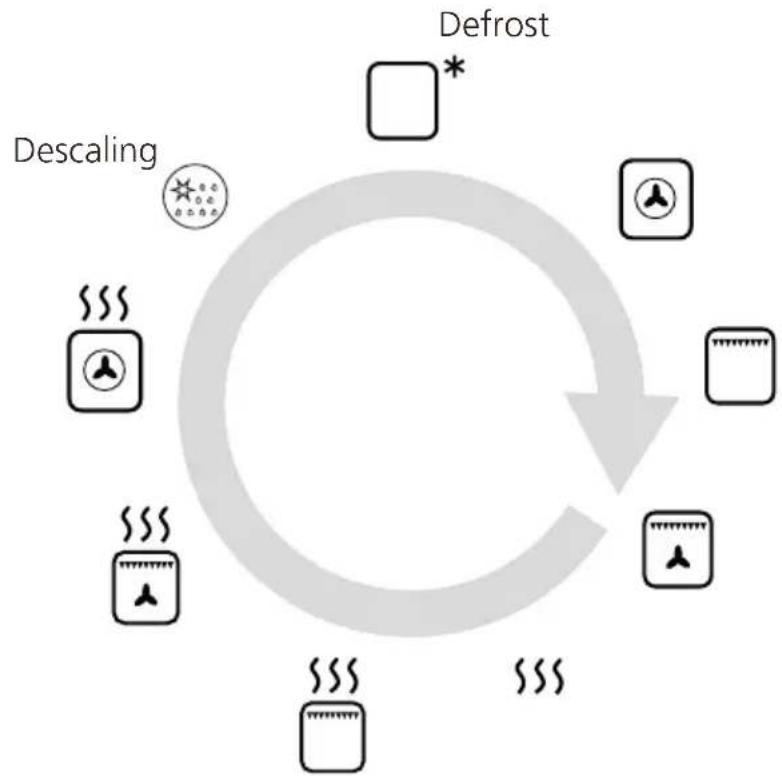
PROGRAMME BUTTON: 'PROG' Press to shift between functions. When you shift to a new function, the current function will stop and the cooking time must be reset. The Function list is as per the below order:
flowchart
graph TD
    A["Defrost"] --> B["Descaling"]
    B --> C["Atmos"]
    C --> D["Storage Tank"]
    D --> E["Atmos"]
    E --> F["Atmos"]
    F --> G["Atmos"]
    G --> H["Atmos"]
    H --> I["Atmos"]
    I --> J["Atmos"]
    J --> K["Atmos"]
    K --> L["Atmos"]
    L --> M["Atmos"]
    M --> N["Atmos"]
    N --> O["Atmos"]
    O --> P["Atmos"]
    P --> Q["Atmos"]
    Q --> R["Atmos"]
    R --> S["Atmos"]
    S --> T["Atmos"]
    T --> U["Atmos"]
    U --> V["Atmos"]
    V --> W["Atmos"]
    W --> X["Atmos"]
    X --> Y["Atmos"]
    Y --> Z["Atmos"]
    Z --> AA["Atmos"]
    AA --> AB["Atmos"]
    AB --> AC["Atmos"]
    AC --> AD["Atmos"]
    AD --> AE["Atmos"]
    AE --> AF["Atmos"]
    AF --> AG["Atmos"]
    AG --> AH["Atmos"]
    AH --> AI["Atmos"]
    AI --> AJ["Atmos"]
    AJ --> AK["Atmos"]
    AK --> AL["Atmos"]
    AL --> AM["Atmos"]
    AM --> AN["Atmos"]
    AN --> AO["Atmos"]
    AO --> AP["Atmos"]
    AP --> AQ["Atmos"]
    AQ --> AR["Atmos"]
    AR --> AS["Atmos"]
    AS --> AT["Atmos"]
    AT --> AU["Atmos"]
    AU --> AV["Atmos"]
    AV --> AW["Atmos"]
    AW --> AX["Atmos"]
    AX --> AY["Atmos"]
    AY --> AZ["Atmos"]
    AZ --> BA["Atmos"]
    BA --> BB["Atmos"]
    BB --> BC["Atmos"]
    BC --> BD["Atmos"]
    BD --> BE["Atmos"]
    BE --> BF["Atmos"]
    BF --> BG["Atmos"]
    BG --> BH["Atmos"]
    BH --> BI["Atmos"]
    BI --> BJ["Atmos"]
    BJ --> BK["Atmos"]
    BK --> BL["Atmos"]
    BL --> BM["Atmos"]
    BM --> BN["Atmos"]
    BN --> BO["Atmos"]
    BO --> BP["Atmos"]
    BP --> BQ["Atmos"]
    BQ --> BR["Atmos"]
    BR --> BS["Atmos"]
    BS --> BT["Atmos"]
    BT --> BU["Atmos"]
    BU --> BV["Atmos"]
    BV --> BW["Atmos"]
    BW --> BX["Atmos"]
    BX --> BY["Atmos"]
    BY --> BZ["Atmos"]
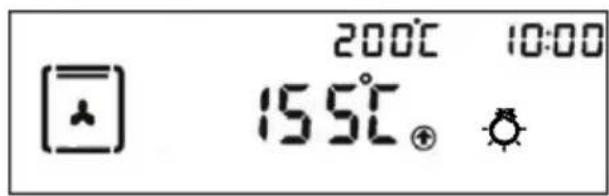
- START/PAUSE BUTTON: ▶ . Once the required function has been selected, press ▶ to start cooking. Once cooking has started the display will show the current oven temperature. For example;
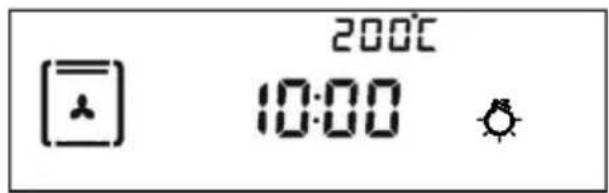
When the oven is paused, the display will show the current time. For example;
- TIMER BUTTON: Ⓛ
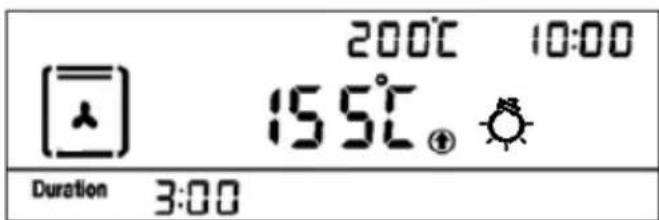
- SETTING THE TIME: When the appliance is first turned on or in standby mode, press and hold Ⓛ until the time starts to flash. Adjust the time by pressing △/▽ and press 'SELECT' to confirm.
- SETTING TIMER/ALARM: Press ⏻ to bring up duration. The display will flash "0:00". Adjust time by pressing △/▽ and then press SELECT to set the duration. Once the timer is up, an alarm will sound and the oven will switch off. Press any button to cancel the alarm. If you wish to cancel the alarm before it sounds, set timer back to "0:00" to cancel.
- SAFETY LOCK: ☐ Press 'SELECT' for 5 seconds to enter or cancel the safety lock function.
- TEMPERATURE SETTING: Once the function is selected, press °C to set the temperature. Adjust temperature by pressing △/▽ and press SELECT to confirm. Press the ▶ button to start cooking.
- BOOST FUNCTION: BOOST If the temperature is set to more than 100^ C, you can press this key to heat up the oven faster. Once activated the display will show The Boost function will stop when the oven reaches the required temperature.
- LIGHT FUNCTION: Press the light button to turn the internal oven light on/off. The light will automatically turn off if no operation in 3 minutes.
-
SETTING THE ALARM/MINUTE MINDER: Pressing the ⏻ button twice takes you to the minute minder function and the 🔊 will appear. Press the △/▽ button to select the time and press SELECT to confirm. Once the time runs out, an alarm will sound, press any button to turn the alarm off. The oven will continue to run.
-
DESCALING FUNCTION. Take out the water tank by pressing pour in descaler and add water until it is half full. Put the water tank back in place and close the door. Press the Programme button until the descaling function appears and press select to confirm. This symbol will also show in the display screen once the programme has started. When the symbol shows and alarm sounds, take out the water tank, and pour in water again until it is half full. Reinsert water tank, close door and press to start the second part of the cleaning. Repeat this process for a third time, and then the descaling process is complete.
Descaler kits can be purchased directly at www.caple.co.uk.
STANDBY MODE:
To save energy, the display will automatically turn off after a few minutes of no use.
Press the programme button continuously to scroll through the below functions.
 | LIGHTSPress the light button on the control panel to turn on and off the internal oven lights. |
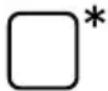 | DEFROSTThe air at ambient temperature is distributed inside the oven for defrosting food more quickly. |
 | FAN HEATBoth the fan and circular heating element operate together for the most even air distribution. This is the ideal cooking method for several types of food (meat & fish, pastries etc.). |
 | GRILLThe Grill function is used for grilling small or large quantities of food. The door must always be closed when using this function. |
 | TURBO GRILLUsing just the grill element, the heated air is then circulated around the oven by the fan for faster and more even cooking. |
 | STEAM COOKINGThis function is used for steaming food. Its low cooking temperatures are also ideal for reheating foods. |
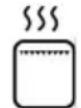 | GRILL & STEAM COOKINGThis function allows you to cook with the grill function, with the added steam to help preserve moisture and flavours. |
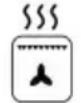 | TURBO GRILL & STEAM COOKINGThis function allows you to cook food with the turbo grill function, with the added steam to help preserve moisture and flavours |
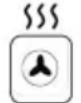 | FAN HEAT & STEAM COOKINGThis function uses normal Fan heat with the added steam to help cook the food and preserve moisture and flavours. |
 | DESCALINGThis function is used for descaling the water system. See page 22 for more information. |
NOTE:
When using a steam function, ensure the water tank is suitably filled depending on cooking times.
DEMO MODE
TO TURN ON DEMO MODE:
Press the ⏻ button to turn the oven on (in standby mode). Press and hold the ▷ button for 5 seconds. The alarm will beep 3 times, and ⌘ will appear in the top right of the display to confirm the oven has entered demo mode.
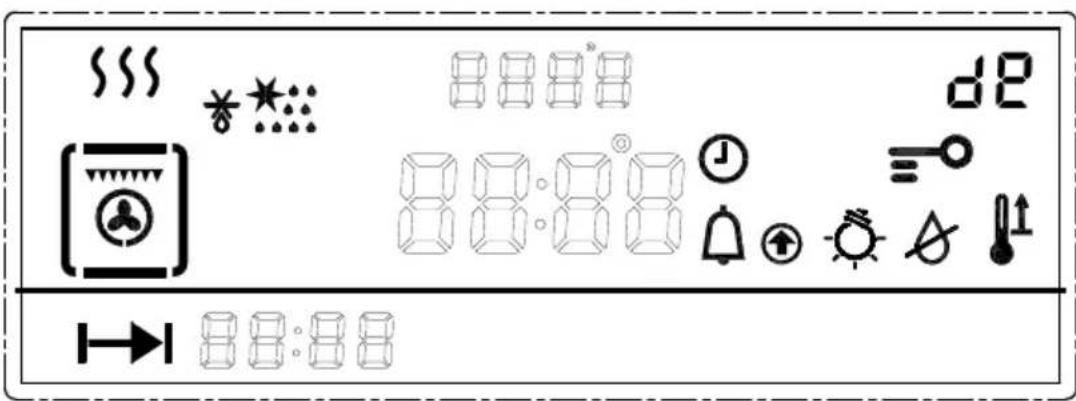
In demo mode, the normal operation of the cooling fan, circulation fan, and lighting work normally, however all heating elements and other functions are disabled.
If the oven is turned off, it will remain in Demo mode when the oven is turned back on.
TO TURN OFF DEMO MODE:
Press the ⏻ button to enter standby mode, then press and hold the ▶ button for 5 seconds. The alarm will beep 3 times, and the dE will disappear from the display to confirm the system has exited Demo mode, and is ready for normal use.
| FUNCTION | |||
| WORKING PARTS | DEFAULT TEMPERATURE | ADJUSTABLE TEMPERATURE RANGE | POWER |
| DEFROST | 60°C 50 - 60°C | ||
| FAN HEAT 200°C 50 - 220°C 1680W | |||
| FULL GRILL 200°C 50 - 220°C 1450W | |||
| TURBO GRILL 200°C 50 - 220°C 1480W | |||
| TURBO GRILL AND STEAM COOKING | 200°C 110 - 220°C 1980W | ||
| GRILL STEAM COOKING 110°C 110 - 220°C 1960W | |||
| STEAM COOKING 100°C 40 - 100°C 1740W | |||
| FAN HEAT AND STEAM COOKING | 200°C 110 - 220°C 2180W | ||
| DESCALING | 1200W | ||
Select the right cooking trays/containers etc:
Please select the correct cooking tray or container for different kinds of foods. All the trays and racks included in the oven are heat resistant. Below you can find our suggestion:
- For food such as sweet potatoes, corn, tomato and egg, please place on the steam tray, do not put it directly on the metal rack.
- Foods such as seafood, chicken wings, chicken steak or pumpkin, which can be cooked with sauces, you can use the steam tray.
- For food such as fish, ribs, whole chicken or beef, where you do not want to keep the juices or oils, then you can use the grill rack with the steam tray beneath to catch any oils or juices.
SUGGESTED STEAMING TIMES
| FOOD TYPE WEIGHT TIME | ||
| Fish | 650g 15 minutes | |
| Crab | 500g 25 minutes | |
| Shrimp | 500g 12 minutes | |
| Chicken leg | 5pcs around 650g 30 minutes | |
| Chicken | 1100g 35 minutes | |
| Beef | 350g 40 minutes | |
| Pork | 400g 20 minutes | |
| FOOD TYPE WEIGHT TIME | ||
| Soup | 450g 15 minutes | |
| Egg | 10pcs around 650g 15 minutes | |
| Pumpkin | 850g 20 minutes | |
| Tomato | 550g 30 minutes | |
| Corn | 550g 30 minutes | |
| Bread | 10 18 minutes | |
| Rice | 400g 30 minutes | |
STEAM COOKING
Steam cooking is one of the healthiest options for cooking as it does not require fat to cook with and preserves the original flavours of the food. In this case, the food is not cooked with water but with water vapour. Steam cooking is different than boiling. In fact, the water vapour works on the inside of the cells, which is fundamentally different from the effect of boiling water.
In fact, steam also cooks the food completely but, except for the fat, nothing else comes out of the food. The cell walls and tendons gradually soften, the protein coagulates without coming out, the starches swell and combine and the sugars and minerals remain unchanged.
The same goes for odours, which are reduced to a minimum, or coloured substances. Only the fat liquefies due to the heat and, for this reason, it is almost never a good idea to steam cook large cuts of meat or fish.
The foods that benefit to this cooking method are generally those with no fat such as, fish, some types of meat, potatoes, cereals, eggs, pudding, vegetables, etc. It is not good for vegetables with tough fibres or fruits in general.
NOTE:
Any cooking time duration will only begin when the oven has reached the set temperature.
USEFUL TIPS
- When using the steam oven, always start with the oven cold. Using steam in a hot oven (immediately after traditional cooking) is not recommended because the benefits of cooking with steam will be cancelled out.
- For steam cooking try to use the perforated stainless steel tray together with the lower stainless steel drip tray as much as possible.
- The first, resting with its support on the flat grill, allows the steam to fully cook the food while draining everything released by the food during cooking through the holes.
- The second, lower tray, slid under the grill on its guides, will collect the drippings and keep the oven chamber cleaner.
REPLACING THE OVEN LAMP
- Disconnect with power supply
- Unscrew the glass cover attached to the lamp holder
- Unscrew the lamp and replace it with another high-temperature lamp (300°C) with the following characteristics:
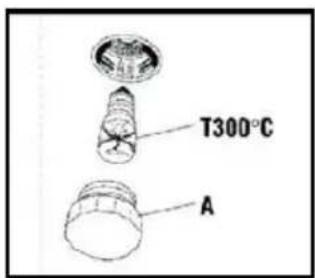
- Voltage: AC220V-240V
- Wattage: 25W
- Socket: E14
- Remount the glass cover and reconnect the appliance to the power supply
WARNING:
Ensure that the appliance is unplugged before replacing the lamp to avoid the possibility of electric shock.
WARNING:
Do not operate appliance if the supply cord is damaged or after the appliance malfunctions, or has been damaged in any manner. if so, contact Caple service to arrange a service call.
FITTING OVEN SHELVES
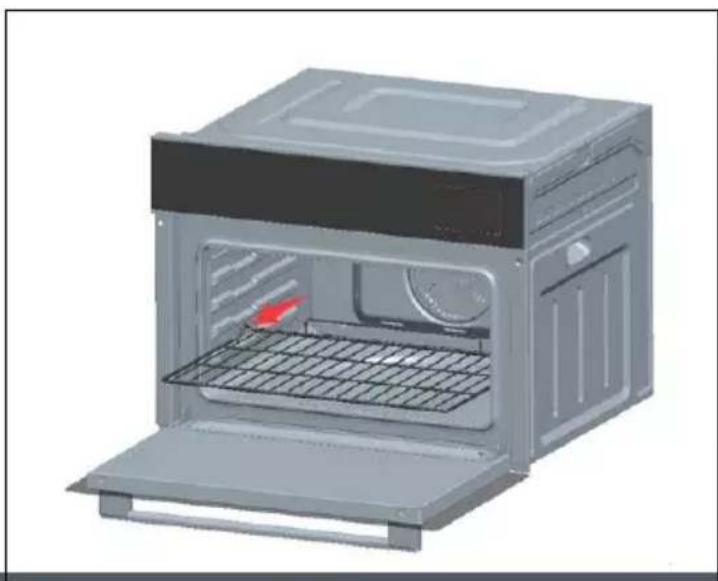
The deep pan and wired shelf have a side edge, these edges match with the moulded sides of the cavity. This can prevent the rack or tray from slipping out from the oven.
natural_image
3D rendering of a microwave oven with open door, side panel, and internal tray (no text or symbols visible)CARE AND MAINTENANCE
Your appliance has been designed to give years of trouble-free use provided it is installed and maintained correctly. Please disconnect the power supply before cleaning or maintenance is performed.
- Do not pull the cable to disconnect power.
- When cleaning the cavity, please remove everything in the cavity including the shelves and use a clean cloth to clean it.
- Do not use water to spray on the unit directly. Do not use abrasive material.
- The cavity must be cleaned after every use, wait until the cavity has fully cooled down, use a dry cloth to clean the cavity, or keep the oven door open to let the cavity dry out.
- It is recommended to descale the steam oven once every three months. For details you can refer to the descaling function section.
- Please clear the water tank regularly. When you clean the water tank. Please remove the cover and use a dry cloth to wipe it.
If your steam oven is found to be operating abnormally, please stop using it. Disconnect the power and follow the following instruction.
| TROUBLES REASON SOLUTION | ||
Lack of water sign No water in water tank. Bad pumps. | Fill water into the tank. Replacement of pump, please contact Caple service. | |
| Control panel is not working | Child Lock is on. Defective control panel. | Unlock the unit.Please contact service agent . |
| Food is not cooked after steaming | The food is sealed with a cover. No steam is generated. | Remove the cover. Contact service agent. |
| E1 appear on display Heating plate error. Contact Caple service. | ||
| E2 appear on display Interior sensor error. Contact Caple service. | ||
| E4 appear on display Steam heating plate sensor error. Contact Caple service. | ||
| E5 appear on display Steam heating plate overheat. Contact Caple service. | ||
| E8 appear on display Water tank motor error Contact Caple service. | ||
If the problem still persists, please contact Caple service for assistance:
T - 0117 938 7420
E - service@caple.co.uk

caple
Caple Service
Fourth Way
Avonmouth
Bristol
BS11 8DW
T: 0117 938 1900
E: service@caple.co.uk
www.caple.co.uk
- Combination Steam Oven Instruction Manual
- S0111
- CONTENTS
- SAFETY INSTRUCTIONS
- WARNING:
- CAUTION:
- INSTALLATION WARNINGS
- DURING USAGE
- DURING CLEANING AND MAINTENANCE
- ENVIRONMENTAL PROTECTION
- TECHNICAL FICHE
- CE DECLARATIONS OF CONFORMITY CE
- UKCA DECLARATIONS OF CONFORMITY UK CA
- WARRANTY
- ATTENTION
- PRODUCT OVERVIEW
- ACCESSORIES
- INSTALLATION
- IMPORTANT:
- FITTING THE APPLIANCE
- NOTE:
- DIMENSIONS
- WARNING: THIS APPLIANCE MUST BE EARTHED
- BEFORE THE INSTALLATION OF THE APPLIANCE, CHECK THE SPECIFICATIONS ON THE RATING LABEL.
- IMPORTANT NOTES
- CONTROL PANEL AND DISPLAY
- BUTTON DESCRIPTION
- OPERATION
- STANDBY MODE:
- DEMO MODE
- TO TURN ON DEMO MODE:
- TO TURN OFF DEMO MODE:
- SUGGESTED STEAMING TIMES
- STEAM COOKING
- USEFUL TIPS
- REPLACING THE OVEN LAMP
- FITTING OVEN SHELVES
- CARE AND MAINTENANCE
- caple
Brand : Caple
Model : SO111GM
Category : Oven