CCG-U021-KUS - Coffee grinder Cosori - Free user manual and instructions
Find the device manual for free CCG-U021-KUS Cosori in PDF.


| Product Type | Coffee Grinder |
| Model | CCG-U021-KUS |
| Brand | Cosori |
| Grind Mechanism | Conical Burr |
| Number of Grind Settings | 35 |
| Bean Hopper Capacity | 12 oz (340 g) |
| Grounds Container Capacity | 4 oz (113 g) |
| Power | 150 W |
| Voltage | 120 V / 60 Hz |
| Dimensions (L x W x H) | 4.7 x 4.7 x 8.3 in (12 x 12 x 21 cm) |
| Weight | 2.2 lb (1 kg) |
| Materials | Stainless Steel Burr, BPA-Free Plastic Hopper, Glass Container |
| Safety Features | Overload Protection, Non-Slip Base, Auto Shutoff After Grinding |
| Cleaning & Maintenance | Removable Burr and Container for Easy Cleaning; Use Brush Included |
| Noise Level | < 75 dB |
| Warranty | 1 Year Limited |
| Compatible with | All Coffee Brewing Methods (Drip, French Press, Espresso, etc.) |
| Included Accessories | Cleaning Brush, User Manual |
Frequently Asked Questions - CCG-U021-KUS Cosori
User questions about CCG-U021-KUS Cosori
0 question about this device. Answer the ones you know or ask your own.
Ask a new question about this device
Download the instructions for your Coffee grinder in PDF format for free! Find your manual CCG-U021-KUS - Cosori and take your electronic device back in hand. On this page are published all the documents necessary for the use of your device. CCG-U021-KUS by Cosori.
USER MANUAL CCG-U021-KUS Cosori
natural_image
Line drawing of a COSORI blender with red handle, no text or symbols on the device itselfThank you for your purchase!
(We hope you love your new coffee grinder as much as we do.)
join the Cosori Cooks Community on Facebook facebook.com/groups/cosoricooks
join the Cosori Cooks Community on Facebook facebook.com/groups/cosoricooks


explore our recipe gallery www.cosori.com/recipes

enjoy weekly, featured recipes made exclusively by our in-house chefs

natural_image
Simple line icons of a chef's hat, mask, and kitchen appliance on red background (no text or symbols)CONTACT OUR CHEFS
Our helpful, in-house chefs are ready to assist you with any questions you might have!
Email: recipes@cosori.com
Toll-Free: (888) 402-1684
M-F, 9:00 am-5:00 pm PST/PDT
On behalf of all of us at Cosori,
Happy cooking!
Table of Contents
Package Contents 3
Specifications 3
Important Safeguards 4
Getting to Know Your Coffee Grinder 5
Before First Use 6
Grinding Coffee 6
Care & Maintenance 7
Troubleshooting 7
Warranty Information 9
Customer Support 10
Package Contents
1 × Pulse 2-in-1 Coffee Grinder
1 × Single-Blade Grinding Chamber
1 × Double-Blade Grinding Chamber
1 × Grinder Lid
2 × Chamber Cover
1 × Cleaning Brush
1 × User Manual
1 × Quick Reference Guide
Specifications
| Power Supply AC 120V, 60Hz | |
| Rated Power 200W | |
| Capacity 2.5 oz / 70 g | |
| Weight 1.85 lb / 840 g | |
| Dimensions | 4 × 4 × 7.6 in /102 × 102 × 193.5 mm |
READ AND SAVE THESE INSTRUCTIONS
IMPORTANT SAFEGUARDS
Follow basic safety precautions when using your coffee grinder. Read all instructions.
General Safety
- This coffee grinder was designed to process normal household quantities.
- The coffee grinder should not be used by children. Keep the coffee grinder and its cord out of reach of children.
- Never remove the transparent lid before the blades have stopped rotating.
- Unplug the coffee grinder from the outlet when not in use, before putting on or taking off parts, and before cleaning.
- Do not use your coffee grinder if it is damaged, not working, or if the cord or plug is damaged. Contact Customer Support (see page 10).
- The use of attachments not recommended or sold by Cosori may cause fire, electric shock, or injury.
- Always check the grinding chamber for foreign objects before using.
- Do not operate the coffee grinder with an empty grinding chamber.
- Your coffee grinder should only be used with 120V, 60Hz electrical systems. Do not plug into another type of outlet.
- Not for outdoor or commercial use. Household use only.
GETTING TO KNOW YOUR COFFEE GRINDER
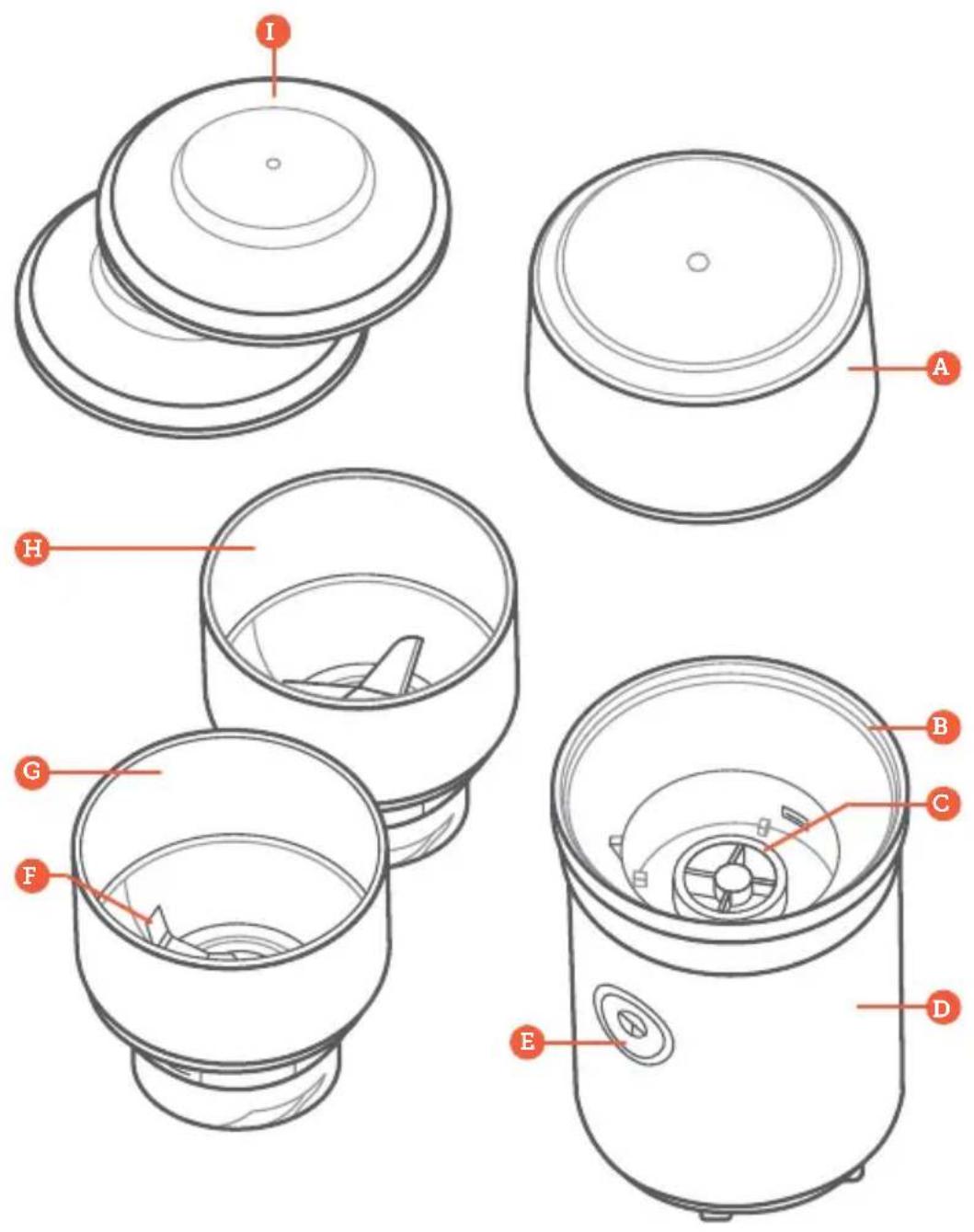
A. Grinder Lid
B. Upper Body
C. Clutch
D. Base
E. On/Off Button
F. Stainless Steel Blade
G. Single-Blade Grinding Chamber
H. Double-Blade Grinding Chamber
I. Chamber Covers
Setting Up
- Remove all plastic and labels from all parts of the coffee grinder.
- Place the coffee grinder on a hard, flat surface.
- Plug in the coffee grinder.
GRINDING COFFEE
- Insert the grinding chamber into the grinder base. Twist to lock into place.
- Measure out the desired amount of whole coffee beans and place into the grinding chamber.
Note: Do not fill the grinding chamber past the MAX fill line.
-
Place the grinder lid on top of the grinding chamber, aligning the marker on the lid with the unlock symbol on the chamber. Twist clockwise to lock into place.
-
Press and hold the ON/OFF button until the coffee grounds reach the desired grind size.
Note:
- Grinding coffee beans for a longer duration of time will result in finer grounds. Grinding for a shorter duration of time will result in coarser grounds.
- During grinding, if coffee grounds start collecting on the edge of the grinding chamber, gently shake the coffee grinder so that the coffee grounds fall back inside.
- To prevent overheating, do not operate the coffee grinder continuously for more than 1 minute. Let the coffee grinder cool for 3 minutes before using it again.
Please refer to the Coffee Grinding Chart below for guidance on choosing a grind size for your preferred brewing method.
Coffee Grinding Chart
| Duration Grind Size Brewing Methods | |
| 8–10 seconds Coarse French Press, Cold Brew | |
| 10–12 seconds Medium Pour Over, Drip | |
| 12–15 seconds Fine Espresso, Moka Pot |
CARE & MAINTENANCE
Cleaning the Coffee Grinder
The coffee grinder should be thoroughly cleaned after each use and before storing.
- Unplug the coffee grinder.
- Wash the grinder lid and chamber covers by hand or in the dishwasher.
Note: If using a dishwasher, place the grinder lid and chamber covers on the top rack.
-
Carefully clean the blade area of the grinding chamber with the included cleaning brush.
-
Wipe the outside of the coffee grinder with a damp cloth.
- Dry all parts with a cloth. Make sure all parts are completely dry before reassembling or storing.
Storage
Follow the cleaning instructions above and allow all parts to dry completely before storing. Store in a cool, dry location with both grinding chambers covered with the chamber covers.
TROUBLESHOOTING
| Problem Possible Solution | |
| The coffee grinder will not turn on. | Make sure the plug is connected to a power outlet. |
| Make sure the grinder lid is locked into place. | |
| The coffee grinder has stopped working after using for more than 1 minute. | Unplug the coffee grinder and allow it to cool for 30 minutes before using it again. |
| Coffee grounds are getting stuck and not circulating during grinding. | Stop grinding and gently shake the coffee grinder up and down to redistribute the grounds. |
| Coffee grounds are being ground too finely. | Hold the ON/OFF button down for a shorter period of time for a coarser grind size. |
| The grind sizes are inconsistent. | Hold the ON/OFF button consistently without letting go for consistent grind sizes. |
FEDERAL COMMUNICATION COMMISSION INTERFERENCE STATEMENT
This device complies with Part 15 of the FCC Rules. Operation is subject to the following two conditions:
[1] This device may not cause harmful interference, and
[2] This device must accept any interference received, including interference that may cause undesired operation.
NOTE: This equipment has been tested and found to comply with the limits for a Class B digital device, pursuant to Part 15 of the FCC Rules. These limits are designed to provide reasonable protection against harmful interference in a residential installation. This equipment generates, uses and can radiate radio frequency energy and, if not installed and used in accordance with the instructions, may cause harmful interference to radio communications. However, there is no guarantee that interference will not occur in a particular installation. If this equipment does cause harmful interference to radio or television reception, which can be determined by turning the equipment off and on, the user is encouraged to try to correct the interference by one or more of the following measures:
- Reorient or relocate the receiving antenna.
- Increase the separation between the equipment and receiver.
- Connect the equipment into an outlet on a circuit different from that to which the receiver is connected.
- Consult the dealer or an experienced radio/TV technician for help.
FCC Caution: Any changes or modifications not expressly approved by the party responsible for compliance could void the user's authority to operate this equipment.
| Product | Pulse 2-in-1Coffee Grinder |
| Model | CCG-U021-KUS |
| For your own reference, we strongly recommend that you record your order ID and date of purchase. | |
| Order ID | |
| Date of Purchase | |
TERMS & POLICY
Arovast Corporation ("Arovast") warrants this product to the original purchaser to be free from defects in material and workmanship, under normal use and conditions, for a period of 1 year from the date of original purchase.
Arovast agrees, at our option during the warranty period, to repair any defect in material or workmanship or furnish an equal product in exchange without charge, subject to verification of the defect or malfunction and proof of the date of purchase.
There is no other express warranty. This warranty does not apply:
- If the product has been modified from its original condition;
- If the product has not been used in accordance with directions and instructions in the user manual;
- To damages or defects caused by accident, abuse, misuse or improper or inadequate maintenance;
- To damages or defects caused by service or repair of the product performed by an unauthorized service provider or by anyone other than Arovast;
- To damages or defects occurring during commercial use, rental use, or any use for which the product is not intended;
• To damages or defects exceeding the cost of the product.
Arovast will not be liable for indirect, incidental, or consequential damages in connection with the use of the product covered by this warranty.
This warranty extends only to the original consumer purchaser of the product and is not transferable to any subsequent owner of the product regardless of whether the product is transferred during the specified term of the warranty.
This warranty does not extend to products purchased from unauthorized sellers. Arovast's warranty extends only to products purchased from authorized sellers that are subject to Arovast's quality controls and have agreed to follow its quality controls.
All implied warranties are limited to the period of this limited warranty.
This warranty gives you specific legal rights and you may also have other rights which vary from state to state. Some states do not allow the exclusion or limitation of incidental or consequential damages, so the above limitation or exclusion may not apply to you.
If you discover that your product is defective within the specified warranty period, please contact Customer Support via support@cosori.com. DO NOT dispose of your product before contacting us. Once our Customer Support Team has approved your request, please return the product with a copy of the invoice and order ID.
Extend Your Warranty by 1 Year
Register your product within 14 days of purchase at www.cosori.com/warranty to extend your 1-year warranty by an additional year.
This warranty is made by:
Arovast Corporation 1202 N. Miller St., Suite A Anaheim, CA 92806
CUSTOMER SUPPORT
If you have any questions or concerns about your new product, please contact our helpful Customer Support Team.
Arovast Corporation
1202 N. Miller St., Suite A
Anaheim, CA 92806
Support Hours
Mon–Fri, 9:00 am–5:00 pm
PST/PDT
Email: support@cosori.com
Toll-Free: (888) 402-1684
*Please have your order invoice and order ID ready before contacting Customer Support.
SHOW US WHAT YOU'RE MAKING
We hope this manual has been helpful. We can't wait to see your beautiful results, and we think you'll want to share glam shots! Our community awaits your uploads—just pick your platform of choice below. Snap, tag, and hashtag away, Cosori chef!
Considering what to cook? Many recipe ideas are available, both from us and the Cosori community.
iCookCosori

@cosoricooks

Cosori Appliances
MORE COSORI PRODUCTS
If you're happy with this coffee grinder, the line doesn't stop here. Check out www.cosori.com for a line of all our beautiful and thoughtfully designed cookware. They might be right at home in your kitchen, too!
COSORI®
Questions or Concerns?
support@cosori.com | (888) 402-1684
Mon–Fri, 9:00 am–5:00 pm PST/PDT
JJ041421CW-M1_0321CCG-U021-KUS
- Thank you for your purchase!
- CONTACT OUR CHEFS
- Table of Contents
- Package Contents
- Specifications
- READ AND SAVE THESE INSTRUCTIONS
- IMPORTANT SAFEGUARDS
- General Safety
- GETTING TO KNOW YOUR COFFEE GRINDER
- Setting Up
- GRINDING COFFEE
- Note:
- Coffee Grinding Chart
- CARE & MAINTENANCE
- Cleaning the Coffee Grinder
- Storage
- TROUBLESHOOTING
- FEDERAL COMMUNICATION COMMISSION INTERFERENCE STATEMENT
- TERMS & POLICY
- Extend Your Warranty by 1 Year
- CUSTOMER SUPPORT
- Arovast Corporation
- Support Hours
- SHOW US WHAT YOU'RE MAKING
- iCookCosori
- MORE COSORI PRODUCTS
- COSORI®
Brand : Cosori
Model : CCG-U021-KUS
Category : Coffee grinder