
CBF 215 W - Refrigerator LERAN - Free user manual and instructions
Find the device manual for free CBF 215 W LERAN in PDF.


Pick your language and provide your email: we'll send you a specifically translated version.
| Product Type | Refrigerator with freezer compartment |
| Brand | LERAN |
| Model | CBF 215 W |
| Total Capacity | Approx. 140 liters (95 L fridge + 45 L freezer) |
| Dimensions (H x W x D) | 85.0 x 55.0 x 60.0 cm |
| Weight | Approx. 32 kg |
| Energy Class | F (EU energy label) |
| Power Consumption | Approx. 220 kWh per year |
| Voltage / Frequency | 220-240 V / 50 Hz |
| Climate Class | N (16°C - 32°C) |
| Noise Level | 40 dB(A) |
| Refrigerant | R600a (Isobutane) |
| Defrosting | Manual (fridge) and manual (freezer) |
| Thermostat | Mechanical dial with 1-7 settings |
| Interior Light | Yes, LED |
| Shelves | 4 adjustable glass shelves |
| Salad Crisper | 1 transparent vegetable bin |
| Freezer Compartment | Star rating: 2-star (effective at -12°C) |
| Door Reversibility | Yes, reversible door hinge |
| Color | White |
Frequently Asked Questions - CBF 215 W LERAN
How do I set the temperature on my CBF 215 W refrigerator?
Use the internal thermostat dial. Setting '1' is warmest, '7' is coldest. Recommended setting for normal use is 3-4. Adjust according to ambient temperature and load.
Why is my fridge making unusual noises?
Fridge noises can be caused by the compressor cycling, expansion/contraction of piping, or ice build-up. If noise is excessive, check that the fridge is level and not in contact with walls or cabinets.
How do I defrost the freezer compartment?
Turn off the appliance and remove all food. Leave the door open to allow ice to melt. Do not use sharp tools to scrape ice. Clean and dry thoroughly before restarting.
Can I reverse the door opening direction?
Yes, the door can be reversed. Refer to the user manual for detailed steps. You will need a screwdriver and typically you swap hinge brackets and door handle to the opposite side.
How to clean the interior of the refrigerator?
Unplug the fridge. Remove all items and shelves. Wash interior with mild soapy water and a soft cloth. Rinse with clean water and dry. Avoid abrasive cleaners or solvents.
What should I do if the fridge stops cooling?
First, check if it's plugged in and the thermostat is on. Ensure the condenser coils at the back are clean and free of dust. If still not cooling, the compressor or thermostat may be faulty; contact service.
How much clearance is needed around the fridge?
Leave at least 10 cm space at the back and sides for proper ventilation. Do not install near heat sources or in direct sunlight. The fridge should be level to ensure door seals properly.
Can I store hot food in the fridge?
Allow hot food to cool to room temperature before placing in the fridge. Placing hot food can raise internal temperature, causing other items to spoil and increasing energy consumption.
How can I save energy with my fridge?
Keep the fridge away from heat sources, ensure door seals are tight, avoid leaving the door open for long, and defrost regularly. Also, set the thermostat to recommended settings (3-4).
What is the warranty period for LERAN CBF 215 W?
Warranty is typically 2 years for domestic use. For exact terms, refer to the warranty card included with the product or contact LERAN customer support.
User questions about CBF 215 W LERAN
0 question about this device. Answer the ones you know or ask your own.
Ask a new question about this device
No questions yet. Be the first to ask one.
Download the instructions for your Refrigerator in PDF format for free! Find your manual CBF 215 W - LERAN and take your electronic device back in hand. On this page are published all the documents necessary for the use of your device. CBF 215 W by LERAN.
USER MANUAL CBF 215 W LERAN
natural_image
Symbol of a trash bin crossed with no visible text or labelsnatural_image
Isometric line drawing of a mechanical bracket with a circular hole and curved end (no text or symbols)natural_image
Technical line drawing of a mechanical bracket component (no text or symbols)natural_image
Technical line drawing of a mechanical clamp or bracket component (no text or symbols)natural_image
Technical line drawing of a mechanical clamp or bracket with a screwdriver inserted (no text or symbols)
natural_image
Technical line drawing of a mechanical assembly with mounting bracket and railings (no text or symbols)
natural_image
Line drawing of a screwdriver inserted into a component on a flat surface (no text or symbols)
natural_image
Technical line drawing of two mechanical components with mounting holes and a cylindrical base (no text or symbols)
natural_image
Technical line drawing of two mechanical components with mounting holes and a central knob (no text or symbols)natural_image
Pure mechanical diagram showing two symmetrical components with circular features, no text or symbols present
natural_image
Line drawing of a simple rectangular frame with vertical supports and a small inset panel (no text or symbols)
natural_image
Line drawing of a simple rectangular frame with vertical supports and a small inset panel (no text or symbols)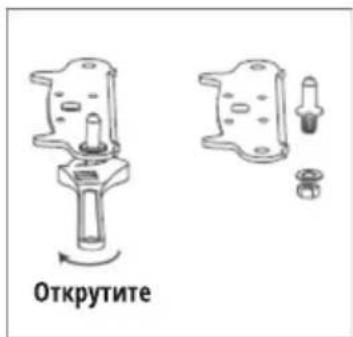
natural_image
Simple line drawing of a rectangular frame with supports and a small inset panel (no text or symbols)
natural_image
Line drawing of a rectangular frame with mounting feet and a small square component on top (no text or symbols)
natural_image
Line drawing of a computer monitor with an attached cable (no text or symbols)
natural_image
Line drawing of a computer drive casing with ports and cable (no text or symbols)natural_image
Abstract diagram with overlapping geometric shapes and arrows, no readable text or symbols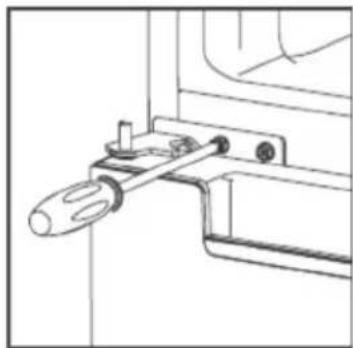
natural_image
Technical line drawing of a mechanical clamp or bracket assembly (no text or symbols)
natural_image
Technical line drawing of a screwdriver inserted into a bracket (no text or symbols)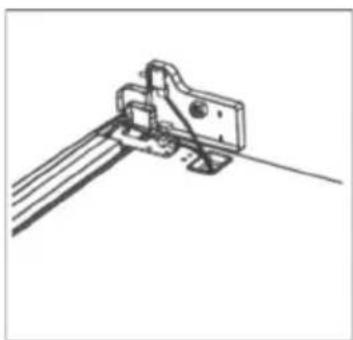
natural_image
Technical line drawing of a mechanical bracket or clamp assembly (no text or symbols)
natural_image
Technical line drawing of a screwdriver inserted into a clamp or bracket (no text or symbols)Панель управления
Кнопки
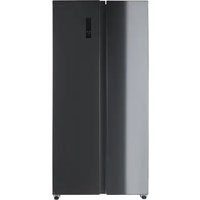

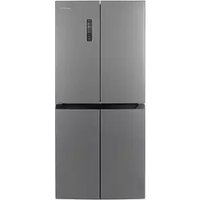
Table of contents
Click a title to access it
Manual assistant
Powered by Anthropic
Waiting for your message
Product information
Brand : LERAN
Model : CBF 215 W
Category : Refrigerator