200-365 - Receiver Steren - Free user manual and instructions
Find the device manual for free 200-365 Steren in PDF.


| Product Type | Audio/Video Receiver |
| Brand | Steren |
| Model | 200-365 |
| Dimensions (W x H x D) | 17.3 x 5.9 x 11.8 in (440 x 150 x 300 mm) |
| Weight | 17.6 lb (8 kg) |
| Power Supply | AC 100-240V, 50/60 Hz |
| Power Consumption | 500 W (max) |
| Output Power (per channel) | 100 W (8 ohms, 20 Hz - 20 kHz, THD 0.08%) |
| Number of Channels | 5.1 |
| Frequency Response | 10 Hz - 100 kHz |
| Signal-to-Noise Ratio | 98 dB |
| Audio Inputs | 4 x HDMI, 2 x Optical, 2 x Coaxial, 1 x AUX |
| Audio Outputs | 1 x HDMI (ARC), 1 x Subwoofer Pre-out, 1 x Headphone |
| Video Features | 4K Pass-through, HDR10 |
| Tuner | FM/AM with 30 presets |
| Bluetooth | Yes, version 4.2 |
| Remote Control | Included, with batteries |
| Safety Features | Overheat protection, short circuit protection |
| Cleaning Instructions | Wipe with dry soft cloth; avoid solvents |
| Spare Parts Availability | Contact Steren customer service for remote, power cord, etc. |
| Warranty | 1 year limited |
Frequently Asked Questions - 200-365 Steren
User questions about 200-365 Steren
0 question about this device. Answer the ones you know or ask your own.
Ask a new question about this device
Download the instructions for your Receiver in PDF format for free! Find your manual 200-365 - Steren and take your electronic device back in hand. On this page are published all the documents necessary for the use of your device. 200-365 by Steren.
USER MANUAL 200-365 Steren
Before using your new Steren's product, please read this instruction manual to prevent any damage.
IMPORTANTE / IMPORTANT
- Do not try to open the device, may cause damages and warranty will be void.
- Do not expose to extreme temperatures.
- Do not place the device or accessories on surfaces that are tilted, unstable or subject to vibration.
- Do not expose the device or accessories to dust, smoke or steam.
- Clean with a soft, dry cloth.
- Do not use solvents or other chemicals to clean the exterior of the device.
CARACTERÍSTICAS | HIGHLIGHTS
The ABCD selector has four RCA AV inputs, four S-Video inputs and one RCA and S-video AV output, allowing the connection of several devices to your TV in one single input and control which one you want to watch.
One input is located in front panel for an easy access and connection, plus the front panel includes a 3.5mm audio output.
CONTROLES / CONTROLS
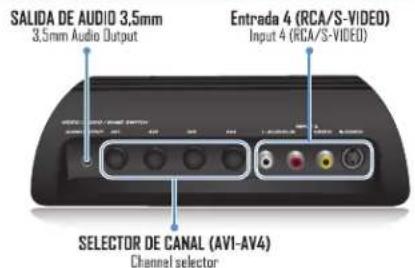

Video (amarillo)
Video (yellow)
Insert the connector on one end of audio / video cable into the ABCD inputs of the switch. Connect the other end of the audio / video cable into the outputs of your video/audio source, using the color code as a guide.
Repeat this for each of the device you want to connect.
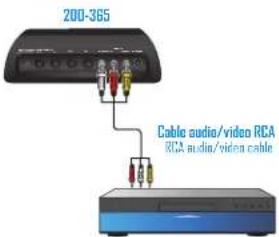
DVD/BLU-RAY
Some devices have S-Video inputs and outputs. If your audio / video device has this connector and want to use it, you must use cables with 2 RCA connectors to connect the audio and a S-Video cable to connect video.
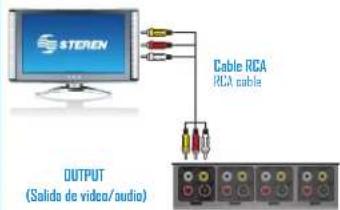
Connect an audio/video or S-Video cable (not included) into the OUTPUT connectors and plug the other end of the cable to the TV.
To use alternative audio output, use a 3.5mm cable and plug it in this connector and the other end to your external audio device.
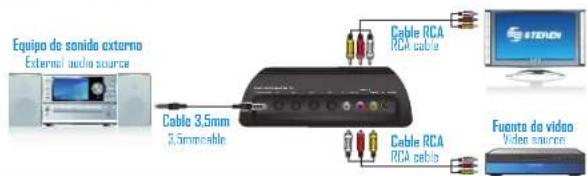
MODO DE USO / HOW TO USE
1.- Turn on your TV and select channel A / V
2.- Turn on the video source.
3.- Select the ABCD switch channel to watch the selected source.


STEREN
Product: Four-port ABCD AV selector
Part number: 200-365
Brand: Steren
WARRANTY
This Station product is warranted under normal usage against defects in workmanship and materials to the original purchaser for one year from the date of purchase.
CONDITIONS
- This warranty card with all the required information, invoice or purchase ticket, product box or package, and product, must be presented when warranty service is required.
- If the product stills on the warranty time, the company will retain a free of charge.
- The repairing time will not exceed 30 natural days, from the day the claim was received.
4 - Steron soil parts, components, consumables and accessories to customer, as well as warranty service, at any of the addresses mentioned later.
THIS WARRANTY IS VOID IN THE NEXT CASES:
If the product has been damaged by an accident, acts of God, mishandling, leaky batteries, failure to follow enclosed instructions, improper repair by unauthorized personnel, improper safe keeping among others.
a) The consumer can also claim the warranty service in the purchase establishment.
b) If you lose the warranty card, we can reise it. If you show the invoice or purchase ticket.
RETAILER INFORMATION
Name of the retailer
Produc
Serial number
Address
Brand
Date of delivery
In case your product fails or have questions, please contact your nearest dealer. If you are in Mexico, please give a call to our Call Center.
01 800 500 9000
Brand : Steren
Model : 200-365
Category : Receiver