
SB-K100 - Soundbar Infiniton - Free user manual and instructions
Find the device manual for free SB-K100 Infiniton in PDF.


| Product Type | Soundbar |
| Brand | Infiniton |
| Model | SB-K100 |
| Colour | Black |
| Dimensions (W x H x D) | 80.0 x 6.0 x 8.0 cm |
| Weight | 2.0 kg |
| Power Supply | AC 220-240V, 50/60Hz |
| Power Consumption | 30 W (standby < 0.5 W) |
| Audio Channels | 2.0 |
| RMS Power Output | 40 W |
| Bluetooth Version | 5.0 |
| Bluetooth Range | 10 m |
| Connectivity | Bluetooth, USB, AUX, Optical |
| USB Playback | MP3, WAV |
| Remote Control | Included (CR2025 battery) |
| Wall Mountable | Yes (brackets included) |
| Equaliser Modes | Standard, Movie, Music, News |
| Speaker Drivers | 2 x full-range, 2 x passive radiators |
| Care & Cleaning | Wipe with a soft, dry cloth; do not use solvents |
| Safety Warnings | Do not expose to water or moisture; no user-serviceable parts inside |
| Spare Parts / Repairability | Remote control and power adapter available; repair by qualified service only |
| Box Contents | Soundbar, remote control, power adapter, 2x AAA batteries, wall mount kit, user manual |
Frequently Asked Questions - SB-K100 Infiniton
User questions about SB-K100 Infiniton
0 question about this device. Answer the ones you know or ask your own.
Ask a new question about this device
Download the instructions for your Soundbar in PDF format for free! Find your manual SB-K100 - Infiniton and take your electronic device back in hand. On this page are published all the documents necessary for the use of your device. SB-K100 by Infiniton.
USER MANUAL SB-K100 Infiniton
For your Attention....3
Panel....4-5
Wall-mounting....6
Connections....7-8
Remote Control....9-10
Basic Playback....11
Trouble shooting....12
Specifications....13
Features
Thanks for your purchase of our product. Please read through this manual before making connections and operating this product. Retain this manual for future reference.
● Line input
● Optical input
- USB slot
● Bluetooth playback
Package Contents:
User manual(1x)
AC adaptor(1x)
Wall plug(2x) and screw(2x)
Remote control(1x)
Battery(1x)
For Your Attention
IMPORTANT NOTES:
- Please read through this manual before making connections and operating this product. Retain this manual for future reference.
●Don't open the cabinet of this unit. No user-serviceable parts inside. Refer servicing to qualified personnel only. - Switch off the unit when you don't use it. Switch off the unit and disconnect it from the AC power supply when it is not being used for a long time.
- Don't install the unit in a place exposed to heating sources or direct sunshine.
- Don't install the unit in a place exposed to moisture or rain.
The apparatus shall not be exposed to dripping or splashing and any object filled with liquids, such as vases shall not be placed on it.
● Install the unit on a horizontal, flat and firm surface with good ventilation. Never block the vents which will cause malfunction resulted from overheating.
- Use a soft and clean rag to clean the outside of the unit. Never clean it with chemicals or detergent.
●This book is only a guide for user's operation, not a criterion for configuration.
● Only use attachments/accessories specified by the manufacturer.
●Where the Mains plug is used as the disconnect device, the disconnect device shall remain readily operable.
WARNING: The batteries shall not be exposed to excessive heat such as sunshine, fire or the like.
The MAINS plug is used as the disconnect device, the disconnect device shall remain readily operable;
CAUTION: Danger of explosion if battery is incorrectly replaced. Replace only with the same or equivalent type


The lightning flash is intended to alert the user to the presence of dangerous voltage within the product's enclosure, and touching the internal components may result in a risk of electric shock to persons.
The exclamatory mark is intended to alert the user to the presence of important operating instructions.
To reduce the risk of electric shock or fire, do not open the cover. Refer servicing to qualified service personnel.

Refers to alternating current (AC).
Refers to direct current (DC).
Refers to class II equipment.
Use only power supplies listed in the user manual


This symbol on the product or in the instructions means that your electrical and electronic equipment should be disposed at the end of its life separately from your household waste.
There are separate collection systems for recycling in the EU.
For more information, please contact the local authority or your retailer where you purchased the product.
Panel
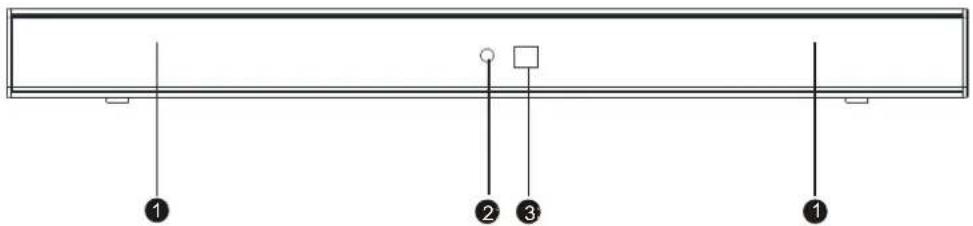
FRONT PANEL:
natural_image
Pure electrical circuit lines without any symbols1 SPEAKER
2 INDICATOR LIGHT
3 REMOTE SENSOR
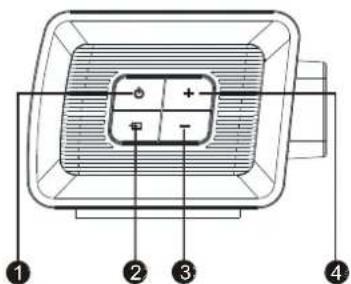
SIDE PANEL:
1 STANDBY
2 SOURCE
3 VOLUME-
4 VOLUME+
INDICATOR LIGHT
● Red colour: In STANDBY mode.
● Green colour: In LINE IN mode.
● Red +Green=Yellow colour: In Optical mode.
● Blue colour: In Bluetooth mode.
● Red + Blue=Purple colour: In USB mode.
Panel
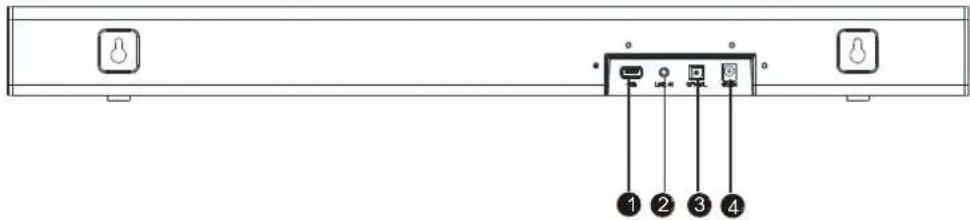
REAR PANEL:
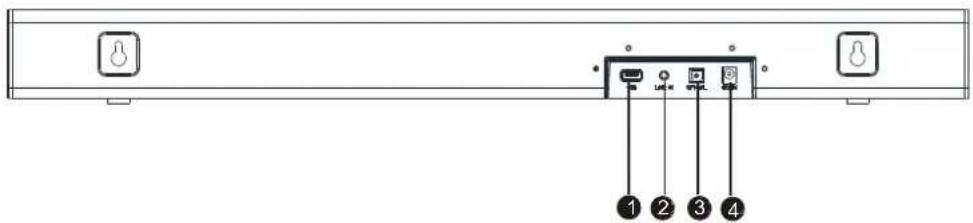
1 USB SLOT
2 LINE IN
3 OPTICAL DIGITAL AUDIO INPUT
4 DC IN(DC18V/2.2A)
Wall-mounting
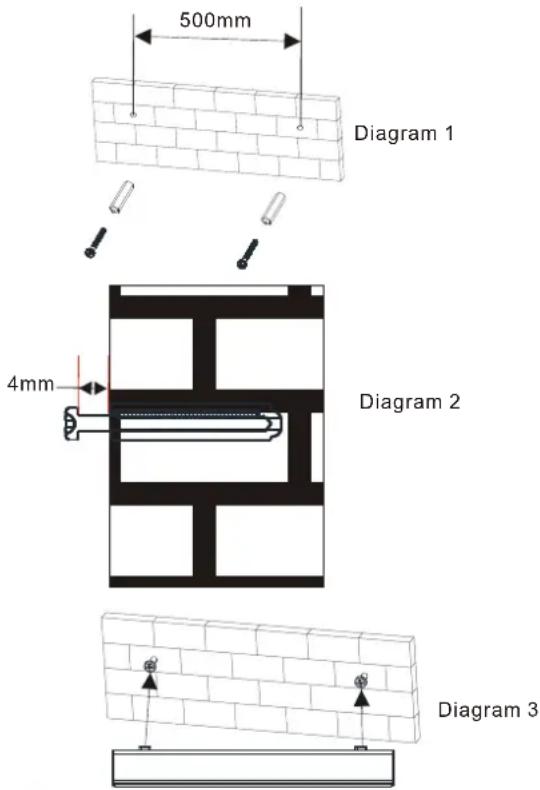
Mounting soundbar on a wall
In order to prevent injuries, the sound bar device must be securely fasten to the wall in accordance with the below installation instructions.
-
Drill the two holes (about 6mm diameter) in the wall and keep the distance between drill holes of the sound bar is 500 mm. As shown in the picture on the right.
Insert the two plugs supplied into two drilled holes and then insert two screws supplied into two holes and tighten. As shown in the picture on the right (diagram 1). -
Take care to leave 4 mm between the screw heads and wall. As shown in the picture on the right (diagram 2).
-
Use the assembled sound bar to hang on the setscrews on the wall. As shown in the picture on the right (diagram 3).
Connections
LINE IN
This sound bar has an extra groups of audio input terminals. You can input the analogue stereo audio signals from extra devices such as VCD, CD, VCR, DVD player, etc.
Use the audio cable to connect the stereo audio output terminals of a VCD, CD, VCR, DVD player to the stereo input terminals LINE IN of this sound bar. Its corresponding signal source is LINE IN which can be available while the indicator light keep solid green by pressing [LINE/USB] on the remote control.
Optical Input
Use the optical cable to connect the optical input of this sound bar to the optical output of VCD, CD, VCR, DVD player.
AUDIO INPUT
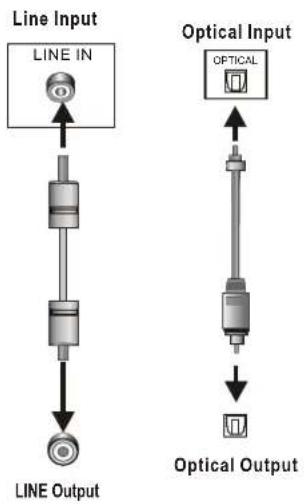
flowchart
graph TD
    A["LINE IN"] --> B["Component"]
    B --> C["Output Line"]

    D["Optical Input"] --> E["OPTICAL"]
    E --> F["Output Optical"]
AUDIO OUTPUT
Connections
BLUETOOTH
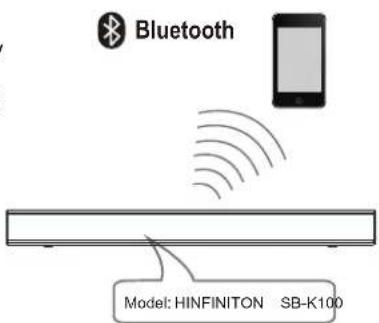
Press STANDBY button on the remote control to power on the sound bar, then press BT button on the remote control to switch the bluetooth mode, the blue bluetooth indicator will be flashing quickly, the sound bar is in searching bluetooth signal status use your smart phone to search the bluetooth signal of the sound bar, select INFINITON SB-K100 on your list, input the password 0000 if need the password prompt, the sound bar will synchronize to play songs on your mobile phone while the bluetooth indicator light keep solid blue light means to be connected successfully.
Disconnected the bluetooth on the smart phone to switched off the bluetooth connection.
Note: Bluetooth connection range in 10 meters.
● The model INIFINUTQNDSide was not deleted.
● In bluetooth mode, [PLAY/PAUSE], [NEXT], [PREVIOUS], [VOLUME+/-] etc. are also active.
Remote control
Remote Control Operation
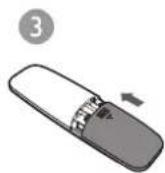
Insert the battery into the remote control. Point the remote control at the remote sensor on the front panel. The remote control works within a distance of about 8 metres from the sensor and within an angle of about 30 degrees from the left and right side.
Battery Installation
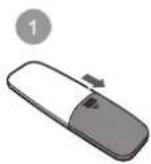
1 Remove the battery compartment cover on the back of the remote control.
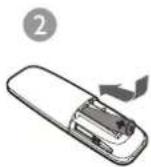
2 Load one AAA/1.5V battery into the battery compartment making sure that the battery have been inserted with the correct polarities matching the symbols +, - as indicated inside the battery compartment.
3 Replace the cover.
Note:
- Remove the battery when you do not intend to use the remote control for a long time.
● Weak battery can leak and severely damage the remote control.
● The battery must not be exposed to excessive heat source, such as sunshine, fire or any other things like that.
● Be environmentally friendly and dispose of batteries according to your government regulations.
Remote Control
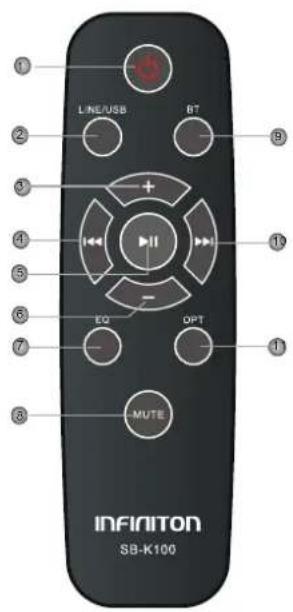
1 STANDBY
2 LINE/USB
3 VOLUME+
4 PREVIOUS
5 PLAY/PAUSE
6 VOLUME-
7 EQ
8 MUTE
9 BT
10 NEXT
11 OPTICAL
Basic Playback
Operation
STANDBY


LINE/USB


- Press to switch on the unit. Press it again to put the unit in standby mode.(STANDBY mode-red indicator)
● Press to enter the bluetooth mode.(bluetooth mode -blue indicator)
●Press to enter the OPTICAL IN mode.(OPTICAL mode-red and green indicator.)
- Press repeatedly to switch among Eq1,Eq2 and Eq3 equalizer modes. Eq1 (mode indicator white light flashing 2 seconds) stands for MUSIC,Eq2(mode indicator green light flashing 2 seconds) stands for MOVIE,Eq3(mode indicator yellow light flashing 2 seconds) stands for NEWS.
●Press repeatedly to switch between LINE IN and USB mode. (LINE IN mode-green indicator; USB mode-red and blue indicator)
●Press to temporarily pause a playback. Press it again to resume the playback.
●Hold down this button for 3 seconds to disconnect bluetooth.
- Press to skip to the next track.
- Press to return to the previous track.
● Press to temporarily switch off the sound. Press it again to switch it on.
●Press [VOLUME+] to turn up the volume.
●Press [VOLUME-] to turn down the volume.
Troubleshooting
Before resorting to maintenance service, please kindly check by yourself with the following chart.
| Symptom Cause(s) | Remedy | |
| No Power | ●The AC adaptor power cord is not connected to the power supply or is not connected to a power supply securely. | ●Please check that the AC adaptor power cord is connected securely. |
| SoundThere is no sound on the sound is distorted. | ●The audio cables aren't connected securely.●The volume is set to the minimum level.●The sound is switched off. | ●Connect the audio cables securely.●Turn up the volume.●Press [MUTE] on the remote control to switch on the sound.●Press [PLAY/PAUSE]. |
| The buttons on the unit doesn't work. | ●The unit is being interfered with static electricity etc. | ●Switch off and unplug the unit. Then connect the plug to the power supply and switch it on again. |
| The remote control does not function. | ●There is no battery in the remote control.●The battery is out of charge.●The remote control isn't pointed to the remote sensor.●The remote control is out of its operating area.●The unit is shut down. | ●Install one AAA/1.5V battery in it.●Replace the battery with new ones.●Make sure that the remote control is pointed to the remote control sensor.●Make sure the remote control is within the operating area.●Switch off the unit and disconnect it from the AC outlet. Then power on the unit again |
Specifications
| Sound bar power supply | AC ~100-240V,50/60Hz DC18V/2.2A | |
| Working environment | Temperature | -10~+35°C |
| Relative humidity | 5%~90% | |
| Sound bar power output (Max) | 50WX2 | |
| Frequency response | ±3dB(20Hz~20kHz) | |
Note:
To save more power efficiently in standby, unplug any idle USB device connected to the product since standby mode is not intended with a USB device connected.

natural_image
Abstract geometric shape with a curved gray line and white circle on a gray background (no text or symbols)INFINITON
SoundBar
SB-K100
SB-K100
MANUAL DE USUARIO
Contenido
Características ......2
Control remoto....9-10
natural_image
Pure electrical circuit lines without any symbols1 ALTAVOZ
2 INDICADOR DE LUZ
3 SENSOR REMOTO
LUZ INDICADORA
Panel
PANEL TRASERO:
1 RANURA USB
2 ENTRADA DE LÍNEA
3 ENTRADAS DE AUDIO DIGITAL ÓPTICA
4 ENTRADA DE CORRIENTE (DC18V / 2.2A)
Montaje en pared
1STANDBY
2 USB/LINE
3 VOLUMEN+
4 RETROCEDER
5 PLAY/PAUSE
6 VOLUMEN
7 EQ
8 SILENCIAR
9 BT
10 SIGUIENTE
11 SALIDA ÓPTICA
Reproducción básica
Operation
STANDBY


LINE/USB


natural_image
Abstract geometric shape with a curved gray line and white circle on a gray background (no text or symbols)INFINITON
SoundBar
SB-K100
SB-K100
MANUAL DO USUÁRIO
Conteúdo
Características ......2
Controle remoto....9-10
natural_image
Pure electrical circuit lines without any symbols1 ALTO-FALANTE
2 LUZ INDICADORA
3 SENSOR REMOTO
PAINEL LATERAL:
1 STANDBY
2 FONTE
3 VOLUME-
4 VOLUME +
LUZ INDICADORA
Panel
PAINEL TRASEIRO:
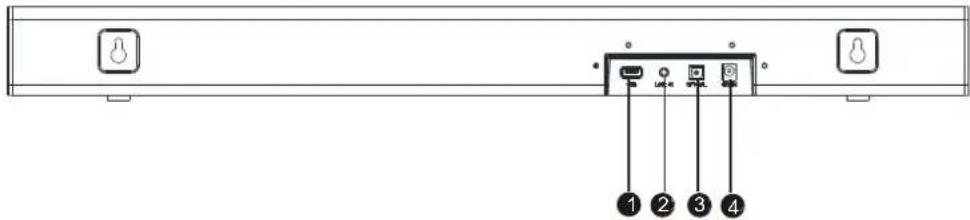
1 SLOT USB
2 LINE IN
3 ENTRADA DE ÁUDIO DIGITAL ÓPTICA
4 DC IN (DC18V / 2.2A)
Parede de montagem
1 STANDBY
2 USB / LINE
3 VOLUME +
4 RETROCED
5 PLAY / PAUSE
6 VOLUME- 7 EQ
8 SILÊNCIO
9 BT
10 PRÓXIMO
11 SAÍDA ÓPTICA
Basic Playback
Operation
STANDBY


LINE/USB


natural_image
Symbol of a trash bin crossed with two crossed lines and a solid black rectangle below (no text or labels)natural_image
Abstract geometric shape with a curved gray line and white circle on a gray background (no text or symbols)- Features
- Package Contents:
- For Your Attention
- IMPORTANT NOTES:
- Panel
- FRONT PANEL:
- SIDE PANEL:
- INDICATOR LIGHT
- REAR PANEL:
- Wall-mounting
- Mounting soundbar on a wall
- Connections
- LINE IN
- Optical Input
- BLUETOOTH
- Remote control
- Remote Control Operation
- Battery Installation
- Note:
- Basic Playback
- Operation
- Troubleshooting
- Specifications
- INFINITON
- SoundBar
- Contenido
- PANEL TRASERO:
- Montaje en pared
- Reproducción básica
- Conteúdo
- PAINEL LATERAL:
- LUZ INDICADORA
- PAINEL TRASEIRO:
- Parede de montagem
Brand : Infiniton
Model : SB-K100
Category : Soundbar