Beacon 310 - Docking Station ROBERTS - Free user manual and instructions
Find the device manual for free Beacon 310 ROBERTS in PDF.


| Product Type | Docking Station with Clock Radio |
| Brand | Roberts |
| Model | Beacon 310 |
| Dimensions (approx.) | 200 mm x 150 mm x 100 mm |
| Weight (approx.) | 0.8 kg |
| Power Supply | AC adapter (included) with battery backup (CR2032) |
| Main Functions | Alarm clock, FM radio, charging for mobile devices |
| Compatible Devices | iPod, iPhone, other iOS devices with Lightning connector |
| Alarm Features | Dual alarms, snooze, gradual wake-up sound |
| Radio Band | FM with presets |
| Display | LED digital clock with dimmer |
| Audio Output | Built-in stereo speakers |
| Maintenance | Clean with soft dry cloth; avoid liquids |
| Safety | Keep away from water and heat sources; use only supplied adapter |
| Spare Parts | Contact Roberts customer service for replacement parts |
| Repairability | User-replaceable backup battery; other repairs by qualified technician |
| General Information | Manufactured by Roberts Radio Ltd., UK |
Frequently Asked Questions - Beacon 310 ROBERTS
User questions about Beacon 310 ROBERTS
0 question about this device. Answer the ones you know or ask your own.
Ask a new question about this device
Download the instructions for your Docking Station in PDF format for free! Find your manual Beacon 310 - ROBERTS and take your electronic device back in hand. On this page are published all the documents necessary for the use of your device. Beacon 310 by ROBERTS.
USER MANUAL Beacon 310 ROBERTS
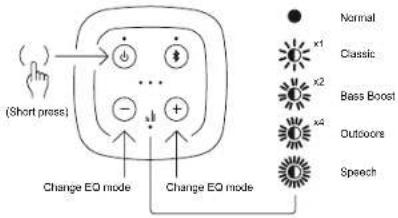
EQ SETTINGS - Beacon 330 only
The Beacon 330 speaker offers a number of sound profiles.
- Give a short press on the ON/OFF button to access EQ settings.
- The EQ LED will light or flash according to the current setting. The current battery status will also be shown.
- Press the Volume buttons to step through the settings.
- The sound will change as you step through the options. After a few seconds without button presses the speaker will store the new setting
- The stored setting is remembered even if the speaker is switched off.
flowchart
graph TD
    A["Hand gestures"] --> B["Change EQ mode"]
    A --> C["Change EQ mode"]
    B --> D["○"]
    B --> E["●"]
    B --> F["+"]
    C --> G["○"]
    C --> H["●"]
    C --> I["+"]
    D --> J["○"]
    E --> K["●"]
    F --> L["○"]
    G --> M["○"]
    H --> N["●"]
    I --> O["○"]
    J --> P["○"]
    K --> Q["●"]
    L --> R["○"]
    M --> S["○"]
    N --> T["●"]
    O --> U["○"]
    P --> V["○"]
    Q --> W["○"]
    R --> X["○"]
    S --> Y["○"]
    T --> Z["○"]
    U --> AA["○"]
    V --> AB["○"]
    W --> AC["○"]
    X --> AD["○"]
    Y --> AE["○"]
    Z --> AF["○"]
STEREO MODE - Beacon 330 only
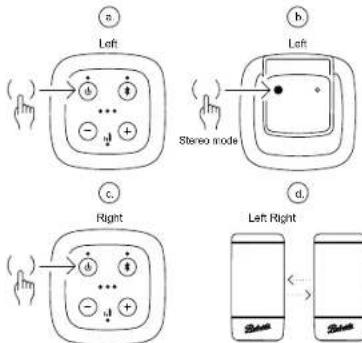
Two Beacon 330 speakers may be linked to form a stereo pair with one playing the left channel and the other playing the right.
- Take the speaker that your device is paired with (or the one that you will plug into using the Aux-In socket). This will become the left channel speaker.
- Switch on that speaker and then press the Stereo Mode button on its base.
- Switch on the other speaker. The two speakers should then discover each other and connect.
flowchart
graph TD
    A["Left"] --> B["Hand icon: finger pointing to 'a'"]
    C["Left"] --> D["Hand icon: finger pointing to 'b'"]
    E["Right"] --> F["Hand icon: finger pointing to 'c'"]
    G["Left Right"] --> H["Phone icon: screen with 'd'"]
    style A fill:#f9f,stroke:#333
    style C fill:#f9f,stroke:#333
    style E fill:#f9f,stroke:#333
    style G fill:#f9f,stroke:#333
- Ideally the speakers should be not more than about 4 metres apart and located in the same room.
- The volume, EQ and power off functions may be controlled by either speaker and will operate on both.
- It will be necessary to press ON/OFF buttons on both speakers to turn on a previously connected pair, but they should then reconnect automatically.
- To cancel stereo mode pairing give a long press on the Stereo Mode button on either speaker while they are connected.
- When using the auxiliary input both speakers will play in mono.
USB DEVICE CHARGING - Beacon 330 only
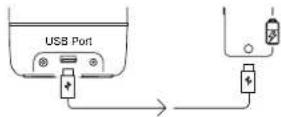
The Beacon 330 has a USB type A socket on the back into which the user may plug a charging lead for another device (such as a phone). USB output 5.0V DC, 1.0A (maximum).
- The speaker's battery will be used to charge the connected device.
- Charging a device from the speaker will shorten the play-time available from the speaker's battery before it needs charging.
- The battery in the speaker may not have sufficient capacity in all cases to fully charge the connected device.
IMPORTANT - SAFETY INSTRUCTIONS
GENERAL SAFETY
- Your product or AC/DC adaptor should not be exposed to liquids, steam, sand, dripping or splashing and no objects filled with liquids, such as vases, shall be placed on the product or adaptor.
- It is recommended to operate the product such that there is a minimum distance (10cm recommended) to adjacent objects in order to ensure good ventilation. The ventilation of the product should not be restricted by covering it or its ventilation openings with items such as newspapers, tablecloths, curtains etc.
- No naked flame sources such as lighted candles should be placed on the product.
- It is recommended to avoid using or storing the product at extremes of temperature. Avoid leaving the unit in cars, on window sills, in direct sunlight etc.
- There are no user serviceable parts inside this product. Do not attempt to disassemble any part of the product.
• The product must be used in a moderate climate. Operating temperature range +5°C to +35°C
• The name plate is located underneath the unit.

BATTERY SAFETY
- Do not puncture, crush, modify, or cause any unnecessary shock to the battery. The battery may present a risk of fire, explosion or chemical burn if mistreated.
- Do not dispose of the battery in a fire or incinerator.
- Do not leave, charge or expose the battery to a heat source such as
in a car under direct sunlight. Do not expose the battery to moisture. - Do not use or charge the battery if it appears to be abnormally hot, swollen, leaking or damaged in any way.
- Do not leave a charging battery unattended. Do not use any alternative power source as a charger.
- Check the room temperature range is between 5-35°C (41-95°F) before charging the product / battery.
MAINS ADAPTOR
The mains adaptor is used as the means of connecting the product to the mains supply. The mains socket and any multi-way mains block used for the product must remain accessible during normal use. In order to disconnect the product from the mains, the mains adaptor should be removed from the mains socket outlet completely. Use only the mains adaptor provided with the product, or a genuine replacement provided by Roberts Radio. The use of alternative adaptors will invalidate the guarantee.
SPECIFICATIONS
Bluetooth: version 5.0; frequencies: 2.402 - 2.480GHz; power 0dBm; profile A2DP; codec SBC. Rechargeable battery: Lithium-ion 7.4V 2500mAh 18.5Wh (Beacon 310/320); 7.2V 3250mAh 23.4Wh (Beacon 330). The company reserves the right to amend the specification without notice.
Manufacturer of AC Adaptor: Dongguan Tummax Electronic Co., Ltd., Model: TM-K018VP-00503000PE-03, Input voltage: AC100 - 240V, Input AC frequency: 50/60Hz, Output voltage: DC 5.0V, Output current: 3.0A, Output power: 15.0W, Average active efficiency ≥ 81.39%, Efficiency at low load (10%): 78.76%, No-load power consumption: < 0.1W
ELECTRO-MAGNETIC COMPATIBILITY ADVICE
In the event of a malfunction due to electrostatic discharge, mains power supply transients or short interruptions, reset the product to resume normal operation. If you are not able to perform the reset operation, removal and reconnection of the power supply may be required. If the product is used in an environment with any ESD Immunity / Radiated Immunity / Conducted Immunity disturbance, the product may malfunction. It will automatically recover to normal when the ESD Immunity / Radiated Immunity / Conducted Immunity disturbance is stopped.

RECYCLING
This product bears the selective sorting symbol for Waste Electrical and Electronic Equipment (WEEE). This product must be handled pursuant to European directive 2012/19/EU in order to be recycled or dismantled to minimize its impact on the environment. The user should give the product to a competent recycling organization or to the retailer when buying a new electrical or electronic equipment.
WARRANTY
This product is guaranteed for twenty four months from the date of purchase by the original owner against failure due to faulty workmanship or component breakdown, subject to the procedure stated below. Should any component or part fail during this guarantee period it will be repaired or replaced free of charge.
The guarantee does not cover: 1. Damage resulting from incorrect use. 2. Consequential damage. 3. Product with removed or defaced serial numbers.
Procedure: Any claim under this guarantee should be made through the dealer from whom the product was purchased. It is likely that your Roberts dealer will be able to attend to any defect quickly and efficiently, but should it be necessary the dealer will return the product to the company's service department for attention. In the event that it is not possible to return the product to the Roberts dealer from whom it was purchased, please contact Roberts Radio using the contact details on the www.robertsradio.com website.
For product repairs falling outside the guarantee period, please refer to the 'Customer care' tab on the www.robertsradio.com website.
These statements do not affect the statutory rights of a consumer.
ROBERTS RADIO LIMITED

PO Box 130, Mexborough, United Kingdom, S64 8YT www.robertsradio.com
BEACON BLUETOOTH SPEAKER - OPERATING INSTRUCTIONS
1 CONTROLS AND PORTS
Be sure to read the safety instructions overleaf before proceeding.
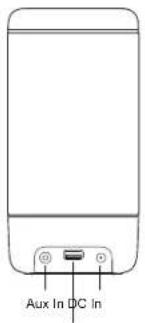
USB (330 only)
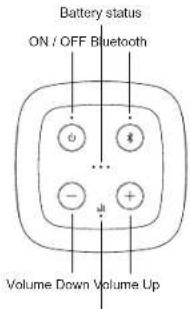
Equalizer (330 only)
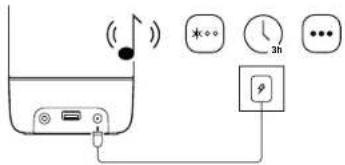
② PLUG IN AND CHARGE
Connect the mains adaptor to the speaker and plug into a suitable mains outlet.
• The battery indicator LEDs will indicate that the battery is being charged.
- When charging is completed the LEDs will stop flashing. The speaker is ready for use away from the mains supply if needed.
• The speaker may also be used whilst charging.
3 POWER ON
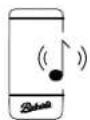
To switch on the speaker, press and release the ON/OFF button (short press).
- The power indicator will light, a tone will confirm power on, and the Bluetooth LED will flash.
- The first time the speaker is used the Bluetooth LED will continue to flash.
- If previously used and paired it will attempt to connect to the previously paired device - see also step 8.

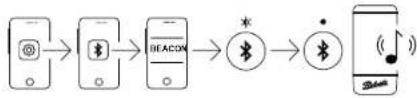
4 CONNECT TO BLUETOOTH
Use Bluetooth settings on your phone / tablet / etc to connect to the speaker.
- The Bluetooth name is Beacon 310, 320, or 330 in line with the model of your speaker.
- When connected there is an acknowledgement tone and the Bluetooth LED will stop flashing and remain on.
- Play audio content from your connected device as you wish.
flowchart
graph LR
    A["App"] --> B["Bluetooth"]
    B --> C["Smartphone"]
    C --> D["Bluetooth"]
    D --> E["•"]
    E --> F["Smartphone"]
5 VOLUME CONTROL
Control the volume using the speaker or the connected device.
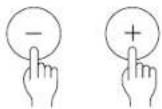
- Control the volume using the Volume Up or Down buttons on the speaker. You can press and hold the buttons to more rapidly change the volume.
- The speaker will flash the battery status LEDs to indicate maximum or minimum volume level is reached.
6 POWER SAVING
Automatic standby feature.
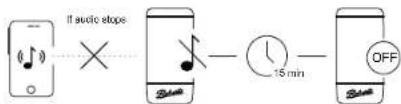
- If the audio from your connected device stops then the speaker will shut down automatically to save power.
• After 10 minutes without audio it will start to flash the power LED.
• After a further 5 minutes without audio it will turn off.
- If audio resumes during this time the power saving timer will be cancelled.
7 POWER OFF
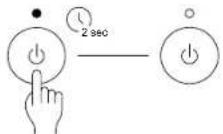
To turn off the speaker, give a long press on the ON/OFF button.
8 BLUETOOTH RECONNECTION
When the speaker is turned on it will attempt to reconnect to the last used device.
• If the speaker cannot connect it becomes discoverable and you may connect another device.
• Alternatively, even when the speaker is already connected, a long press on the Bluetooth button will disconnect the current device and make the speaker discoverable so that a new device may connect.
- Beacon 330 only - A short press on the Bluetooth button will cause the speaker to reconnect to previously paired devices if they are within range (up to 10 devices in total).
9 AUXILIARY INPUT
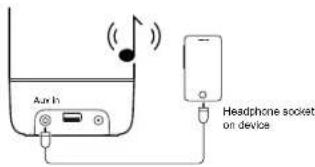
A non-Bluetooth device may be plugged into the speaker using a 3.5mm stereo jack plug (socket at bottom rear).
- Pushing the plug into the socket automatically switches the speaker to Auxiliary input mode and the Bluetooth LED will change from Blue to White.
- Removing the 3.5mm plug will revert to Bluetooth operation.
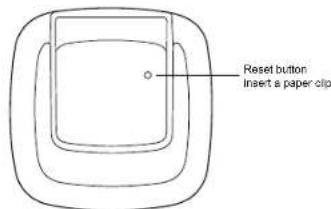
RESETTING THE SPEAKER
To reset your speaker use a paper clip to push the reset switch through the pin hole located underneath the speaker.
BATTERY LIFE AND CHARGE TIME
- Beacon 310 / 320 - 12 hours
- Beacon 330 - 15 hours
• These figures are only approximate and are very dependent on playback volume, battery age, temperature and charge output usage (Beacon 330). - Battery charge time - approximately 3 hours (Beacon 330 may take longer).
Continued overleaf...
- EQ SETTINGS - Beacon 330 only
- STEREO MODE - Beacon 330 only
- USB DEVICE CHARGING - Beacon 330 only
- IMPORTANT - SAFETY INSTRUCTIONS
- GENERAL SAFETY
- BATTERY SAFETY
- MAINS ADAPTOR
- SPECIFICATIONS
- ELECTRO-MAGNETIC COMPATIBILITY ADVICE
- RECYCLING
- WARRANTY
- ROBERTS RADIO LIMITED
- BEACON BLUETOOTH SPEAKER - OPERATING INSTRUCTIONS
- CONTROLS AND PORTS
- ② PLUG IN AND CHARGE
- POWER ON
- CONNECT TO BLUETOOTH
- VOLUME CONTROL
- POWER SAVING
- POWER OFF
- BLUETOOTH RECONNECTION
- AUXILIARY INPUT
- RESETTING THE SPEAKER
- BATTERY LIFE AND CHARGE TIME
Brand : ROBERTS
Model : Beacon 310
Category : Docking Station