Digiface AVB - Processor RME - Free user manual and instructions
Find the device manual for free Digiface AVB RME in PDF.


| Product Type | AVB Audio Interface / Processor |
| Brand | RME |
| Model | Digiface AVB |
| Dimensions (W x D x H) | 215 x 120 x 45 mm |
| Weight | 0.85 kg |
| Power Supply | External 12V DC, 1.5A |
| Sample Rates | 44.1 / 48 / 88.2 / 96 / 176.4 / 192 kHz |
| Number of Audio Channels | 34 channels (16 in + 18 out) via AVB |
| AVB Support | IEEE 802.1 Audio Video Bridging |
| Word Clock I/O | BNC coaxial |
| MIDI Interface | 1 x MIDI IN / OUT (via 5-pin DIN) |
| Headphone Output | 1 x 1/4" TRS stereo jack |
| Analog Outputs | 2 x 1/4" TRS (line out) |
| Digital I/O | 1 x ADAT (optical TOSLINK), 1 x SPDIF (coaxial) |
| Main Functions | AVB network audio streaming, low-latency operation, standalone mixer mode |
| Care and Cleaning | Wipe with a dry or slightly damp cloth; avoid solvents |
| Safety Precautions | Use only supplied power adapter; do not expose to liquids |
| Spare Parts / Repairability | Contact RME support; no user-serviceable parts inside |
| General Information | Designed for professional AVB-based audio systems |
Frequently Asked Questions - Digiface AVB RME
User questions about Digiface AVB RME
0 question about this device. Answer the ones you know or ask your own.
Ask a new question about this device
Download the instructions for your Processor in PDF format for free! Find your manual Digiface AVB - RME and take your electronic device back in hand. On this page are published all the documents necessary for the use of your device. Digiface AVB by RME.
USER MANUAL Digiface AVB RME
Important Safety Instructions

To reduce the risk of fire or electric shock do not expose this device to rain or moisture. Prevent moisture and water from entering the device. Never leave a pot with liquid on top of the device. Do not use this product near water, i. e. swimming pool, bathtub or wet basement. Danger of condensation inside – don't turn on before the device has reached room temperature.

Installation
Surface may become hot during operation – ensure sufficient ventilation. Avoid direct sun light and do not place it near other sources of heat, like radiators or stoves. When mounting in a rack, leave some space between this device and others for ventilation.

To comply with the European CE standard, the Digiface AVB must be used with a CE approved Class B computer. All connecting cables must be shielded. The computer and all cables connected to the Digiface AVB must be properly grounded. Operation with non-certified computers and cables may cause interference to other devices as well as the Digiface AVB.

Unauthorized servicing/repair voids warranty. Only use accessories specified by the manufacturer.

Read the manual completely. It includes all information necessary to use and operate this device.
General
1 Introduction 6
2 Package Contents 6
3 System Requirements 6
4 Brief Description and Characteristics......6
5 First Usage - Quick Start
5.1 Connectors – LEDs....7
5.2 Quick Start 7
Installation and Operation - Windows
6 Driver and Firmware
6.1 Driver Installation 10
6.2 De-installing the Drivers....10
6.3 Firmware Update 11
7 Configuring the Digiface AVB
7.1 Settings Dialog – General 12
7.2 WDM Configuration 14
7.3 AVB Controller 16
7.3.1 Menu File 17
7.3.2 Menu Entity 17
7.3.3 Menu Digiface 17
7.3.3 Menu Help....18
8 Operation and Usage
8.1 Playback....19
8.2 DVD Playback (AC-3 / DTS) 19
8.3 Channel Count under WDM....19
8.4 Multi-client Operation 20
8.5 Digital Recording....20
8.6 Clock Modes - Synchronization....20
9 Operation under ASIO
9.1 General....21
9.2 Channel Count under ASIO 21
9.3 Known Problems 22
10 Using more than one Interface 22
11 DIGICheck Windows 23
12 Hotline – Troubleshooting 24
Installation and Operation - Mac OS X
13 Driver and Firmware
13.1 Driver Installation 26
13.2 De-installing the Drivers....26
13.3 Firmware Update 27
14 Configuring the Digiface AVB
14.1 Settings Dialog....28
14.2 AVB Controller 29
14.3 Channel Count under Core Audio 29
14.4 Various Information....29
15 Using more than one Interface 29
16 DIGICheck Mac 30
17 Hotline – Troubleshooting 31
TotalMix FX
18 TotalMix: Routing and Monitoring
18.1 Overview 34
18.2 The User Interface 36
18.3 The Channels....37
Settings....39
18.4 Section Control Room 40
18.5 The Control Strip 41
18.5.1 View Options 42
18.5.2 Snapshots - Groups 43
18.5.3 Channel Layout – Layout Presets......44
18.5.4 Scroll Location Markers 45
18.6 Preferences....46
18.6.1 Store for Current User or all Users......47
18.7 Settings
18.7.1 Mixer Page 48
18.7.2 MIDI Page....49
18.7.3 OSC Page 50
18.7.4 Aux Devices....50
18.8 Hotkeys and Usage....51
18.9 Menu Options....52
18.10 Menu Window 53
19 The Matrix
19.1 Overview 53
19.2 Elements of the Matrix view 53
19.3 Operation....54
20 Tips and Tricks
20.1 ASIO Direct Monitoring (Windows) 54
20.2 Copy a Submix 54
20.3 Doubling the Output Signal (Mirror)....54
20.4 Delete a Submix....54
20.5 Copy and Paste everywhere 55
20.6 Recording a Submix - Loopback 55
20.7 MS Processing 56
20.8 Program start options (Windows)....56
21 MIDI Remote Control
21.1 Overview 57
21.2 Mapping....57
21.3 Setup....58
21.4 Operation....58
21.5 MIDI Control....59
21.6 Loopback Detection 60
21.7 OSC (Open Sound Control) 60
22 DAW Mode....61
23 TotalMix Remote....62
Miscellaneous
24 Technical Specifications 66
25 Technical Background
25.1 USB Audio....67
25.2 AVB Latency....69
26 Warranty....70
27 Appendix 70
28 Declaration of Conformity 71
User's Guide

INTELLIGENT AUDIO SOLUTIONS
Digiface AVB
General
1. Introduction
Thank you for choosing RME's Digiface AVB. This compact, portable Windows and Mac audio interface is capable of transferring digital audio data into AVB networks. The latest Plug and Play technology guarantees a very simple installation. Numerous unique features as well as RME's robust drivers enable a quick, efficient and comfortable operation of the Digiface AVB.
The package contains drivers for Windows 7 / 8 / 10 and Mac OS X x86 (Intel)..
2. Package Contents
- Digiface AVB
• Cable USB 3.0, 1.8 m (6 ft)
•
3. System Requirements
- Windows 7 or up, Intel Mac OS X (10.11 or up)
• 1 USB 2.0 port or USB 3 port
• Computer with at least Intel Core i3 CPU
4. Brief Description and Characteristics
• RME MADIface series driver with support for WDM, ASIO and multiple interfaces
• 128 channels 48 kHz/24 bit record/playback, 128 channels I/O AVB
- 64 channels 96 kHz/24 bit record/playback, 128 channels I/O AVB
• 32 channels 192 kHz/24 bit record/playback, 64 channels I/O AVB
- Buffer sizes/latencies from 32 up to 8192 samples selectable
• Gigabit ethernet port, 100 Mbit/s compatible
- Outgoing network latency selectable in steps of 8 ns
• Word clock input and output
- Clock modes slave and master
- TotalMix for latency-free submixes and perfect ASIO Direct Monitoring
• TotalMix: 2048 channel mixer with 46 bit internal resolution
- Analog/Line headphone output, separate output for independent submix
• DIGICheck DSP: Level meter in hardware, peak- and RMS calculation
- USB error analysis, displayed in the Settings dialog
• High compatibility to existing AVB devices
• IEEE 1722.1 and Milan compatible
5. First Usage – Quick Start
5.1 Connectors – LEDs
The front of the Digiface AVB features the Gigabit Ethernet port, 2 BNC sockets for Word I/O, 2 status LEDs and the headphone output.
The network connector, RJ45 format, supports both 100 Mbps and 1 Gbps. The integrated LEDs show the states 100 Mbit/s (yellow) and 1 Gbit/s (green), and data traffic by flashing.
The two green LEDs between the network port and BNC light up separately when the device is configured for incoming and outgoing streams. They remain dark when there is no connection, as a quick reference to the cause of no incoming or outgoing audio.
USB 3.0: Standard USB socket for connection to the computer. Please make sure the Digiface AVB can have the full voltage/current delivered from the computer by using hi-quality USB cables (like the one included). USB extension cables and USB hubs should be avoided. When connected to USB 2 the channel count is reduced to 64 channels.
Phones is a low impedance line output. It provides a sufficient and undistorted volume even when used with headphones.
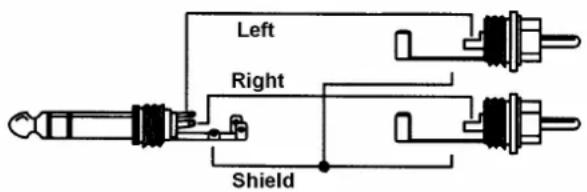
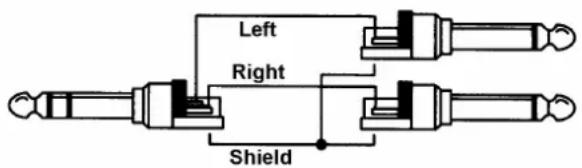
In case this output should operate as Line output, an adapter TRS plug to RCA phono plugs, or TRS plug to TS plugs is required.
The pin assignment follows international standards. The left channel is connected to the tip, the right channel to the ring of the TRS jack/plug.
The rear of the Digiface AVB features the USB 3 port and a status LED. The LED indicates both power supply (USB bus power, green), as well as the USB status (yellow: USB 2, blue: USB 3).
5.2 Quick Start
After the driver installation (chapter 6 / 13) the Digiface AVB has to be connected to an AVB network. An AVB network consists of at least one AVB switch and another AVB device. The AVB controller does not allow any further settings without detecting a network. Some options are available in the Settings dialog of the MADIface series driver.
Level adjustment of the analog output Phones is available in TotalMix FX. The output is optimized for phones, but can also be used as line output
TotalMix FX remembers all settings, and loads these automatically when the Digiface AVB drivers are loaded.
User's Guide

INTELLIGENT AUDIO SOLUTIONS
Digiface AVB
Installation and Operation – Windows
6. Driver and Firmware
6.1 Driver Installation
To simplify installation it is recommended to first install the drivers before the unit is connected to the computer. But it will also work the other way round.
Please download the latest drivers from the RME website at http://rme.to/usbe. Unzip the downloaded file, start rmeinstaller.exe and follow the instructions of the installer. After installation connect computer and Digiface AVB. Windows detects the new hardware as Digiface AVB and installs the drivers automatically.
After a reboot, the icons of TotalMix FX, Settings dialog and the AVB Controller appear in the notification area. Windows might hide them behind the triangle, click on it to access them and to configure their appearance.
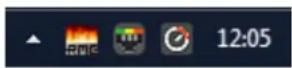
The RME AVB Controller is also available via a link copied to the desktop.

The Digiface AVB uses two drivers. The basic Windows WDM and ASIO driver is the MADIface series driver, which makes the device available in Windows as a USB audio interface. It also contains the Settings dialog and TotalMix FX. Additionally a network driver is installed that makes the device available as a network device and includes the RME AVB Controller.
Chapter 25.1 explains how to find the ideal USB port.
Driver Updates do not require to remove the existing drivers. Simply install the new driver over the existing one.
Possible reasons why a Digiface AVB is not found automatically:
- The USB port is not active in the system (check the Device Manager)
- The USB cable is not, or not correctly inserted into the socket. Check that the LED beside the USB port is lit, it indicates power.
- The Digiface AVB does not receive any or not enough power. Remove current-consuming hard drives from nearby ports. Avoid USB extension cables and USB hubs.
6.2 De-installing the Drivers
A de-installation of the driver files is not necessary. Thanks to full Plug & Play support, the driver files will not be loaded after the hardware has been removed.
Unfortunately Windows Plug & Play methods do not cover the additional autorun entries of TotalMix, the Settings dialog, and the registration of the ASIO driver. These entries can be removed from the registry by a software de-installation request. This request can be found (like all de-installation entries) in Control Panel, Programs and Features. Click on the entry 'RME MADIface', then Uninstall.
6.3 Firmware Update
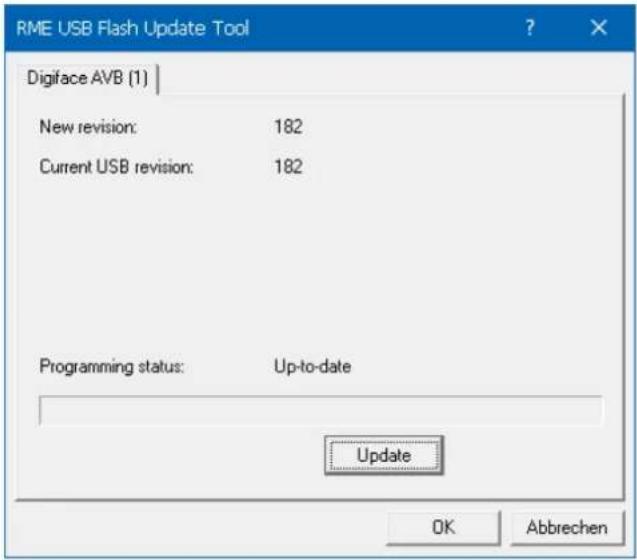
The Flash Update Tool updates the firmware of the Digiface AVB to the latest version. It requires an already installed driver.
Download the latest version from the RME website at http://rme.to/usbe. Unzip the downloaded file and start the program fut_usbplus_avb_dante.exe under Windows, or USB Series Flash Tool under Mac. The Flash Update Tool displays the current revision of the Digiface AVB's firmware, and whether it needs an update or not. If so, then simply press the 'Update' button. A progress bar will indicate when the flash process is finished (Verify Ok).
After the update the Digiface AVB needs to be reset. This is done by powering down the Digiface AVB for 5 seconds. A reboot of the computer is not necessary.
When the update unexpectedly fails (status: failure), the unit's Safety BIOS will be used from the next boot on, the unit stays fully functional. The flash process should then be tried again.
7. Configuring the Digiface AVB
7.1 Settings Dialog - General
Configuration of the Digiface AVB is done via its own settings dialog. The panel 'Settings' can be opened:
- by clicking on the fire symbol in the Task Bar's notification area
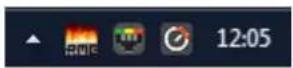
The mixer of the Digiface AVB (TotalMix FX) can be opened:
- by clicking on the FX symbol in the Task Bar's notification area
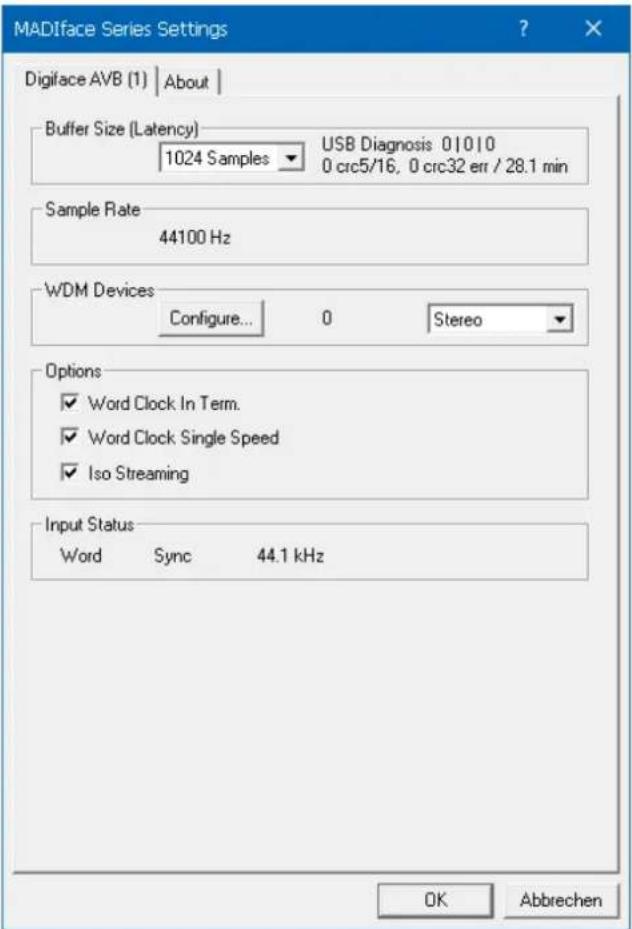
The following is available in the Settings dialog:
- ASIO Latency
- USB error analysis
- Configuration of the WDM devices
- Configuration of the hardware
- State of input
• Display of current sample rate
Any changes made in the Settings dialog are applied immediately - confirmation (e.g. by clicking on OK or exiting the dialog) is not required.
The tab About includes information about the current driver and firmware version plus four more options:
Lock Registry
Default: off. Checking this option brings up a dialog to enter a password. Changes in the Settings dialog are no longer written to the registry. As the settings are always loaded from the registry when starting the computer, this method provides an easy way to define an initial state for the Digiface AVB.
Enable MMCSS for ASIO activates
support with higher priority for the ASIO driver. Note: At this time, activating this option seems to be useful only with the latest Cubase/Nuendo at higher load. With other software this option can decrease performance. The change becomes active after an ASIO reset. Therefore it is easy to quickly check which setting works better.
Sort ASIO Devices
Changes the order only of the ASIO channels when using more than one interface.
Limit ASIO to 32 Channels
Some software crashes when presented with more than 32 ASIO channels. This workaround removes all higher channels, which can still be accessed and used via TotalMix FX.
Buffer Size
The setting Buffer Size determines the latency between incoming and outgoing ASIO and WDM data, as well as affecting system stability (see chapter 7.1).
USB Diagnosis shows specific USB transmission errors (CRC5, usually 0) and general errors. If the unit detects a record or playback error the number shown will no longer be 0. An audio reset is performed automatically. The counter is reset on start of playback/record. More information can be found in chapter 25.1.
Sample Rate
Display of the currently active sample rate. Its setting / change takes place exclusively via the AVB Controller. Neither WDM nor ASIO programs can change the sample rate.
WDM Devices
Allows to freely set which I/Os are available as WDM devices, if these are stereo or multichannel devices (up to 8 channels), and if one or multiple of the currently active WDM devices should have the Speaker property. Digiface AVB provides a maximum of 64 channels under WDM, corresponding to 32 stereo or 8 multichannel devices. More details are found in chapter 7.2.
Options
Word Clock In Term.
Checking this option terminates the word clock input internally with 75 Ohms.
Word Clock – Single Speed
The word clock output signal usually equals the current sample rate. Selecting Single Speed causes the output signal to always stay within the range of 32 kHz to 48 kHz. So at 96 kHz and 192 kHz sample rate, the output word clock is 48 kHz.
Iso(chronous) Streaming (USB 3 only)
The Digiface AVB uses a special transmission mode with error correction in record mode. In case the default mode does not work Isochronous Streaming can be tried. This is the standard's native mode for audio transmission and should work with any USB 3 controller. See also chapter 25.1.
Input Status
Word
Indicates presence of a valid signal at the word clock input (Lock, No Lock) and whether the signal is synchronous (Sync). The third column shows the sample frequency detected by the hardware (coarse recognition, 32 kHz, 44.1 kHz, 48 kHz etc.).
7.2 Option WDM Devices
The WDM Devices configuration has one button to enter the edit dialog, a status display showing the number of currently enabled WDM devices, and a listbox to select between Stereo or Multi-Channel devices.
The number represents both record and playback devices, so '1' means one input and one output device.
The screenshot to the right shows the stereo WDM devices available with the Digiface AVB. Here the first four stereo devices had been activated. Any can be activated. Also only higher numbered devices might be active. For example using 25+26 for system based audio does not require to activate the prior stereo devices. Only AVB (25+26) will show up in the Windows Sound control panel.
The checkbox All to the right allows for a quick check/unchecked of all devices.
![MADiFace Series Settings Digiface AVB (1) | About | Buffer Size (Latency) USB Diagnosis 0.10.10 WDM Device Configuration WDM Devices | Speaker | Device Name AVB [1+2] AVB [3+4] AVB [5+6] AVB [7+8] AVB [9+10] AVB [11+12] AVB [13+14] AVB [15+16] AVB [17+18] AVB [19+20] AVB [21+22] AVB [23+24] AVB [25+26] All OK Abbrechen OK Abbrechen](/content/2026/05/976655/images/0c7d9c9e1b1b18908e04ed17da8fd04b9c32b7659f59ac32b911ae969abed8d6.jpg)
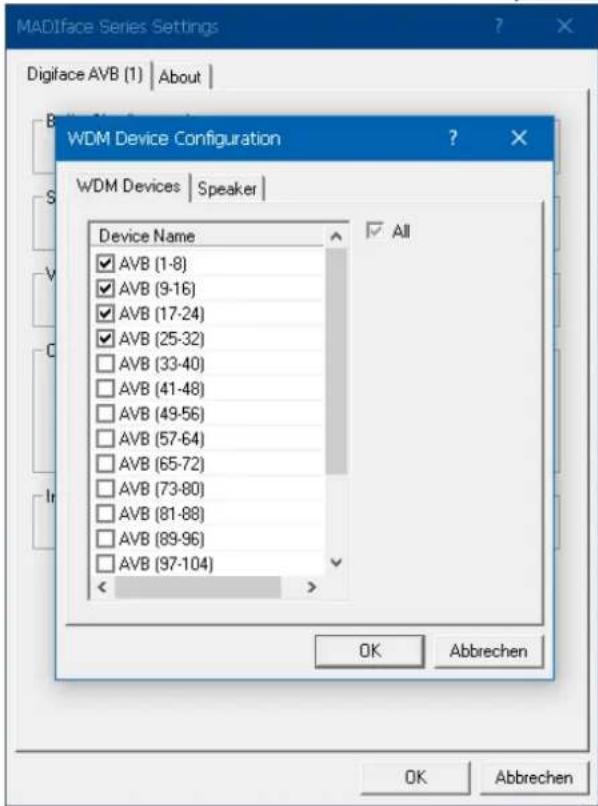
The screenshot to the left shows the multi-channel WDM devices available with the Digiface AVB after selecting 'Multi-Channel' in the WDM Devices listbox and hitting WDM Configure. In this example the devices AVB 1-8, 9-16, 17-24 and 25-32 are active.
Using a multi-channel WDM device allows for the use of multi-channel playback with specialized software as well as Surround sound from DVD or Bluray player software.
Please note that configuring the WDM device to a specific surround mode in the control panel Sound requires the device to have the Speaker property. See next page.
Again the checkbox All to the right allows for a quick check/uncheck of all devices.
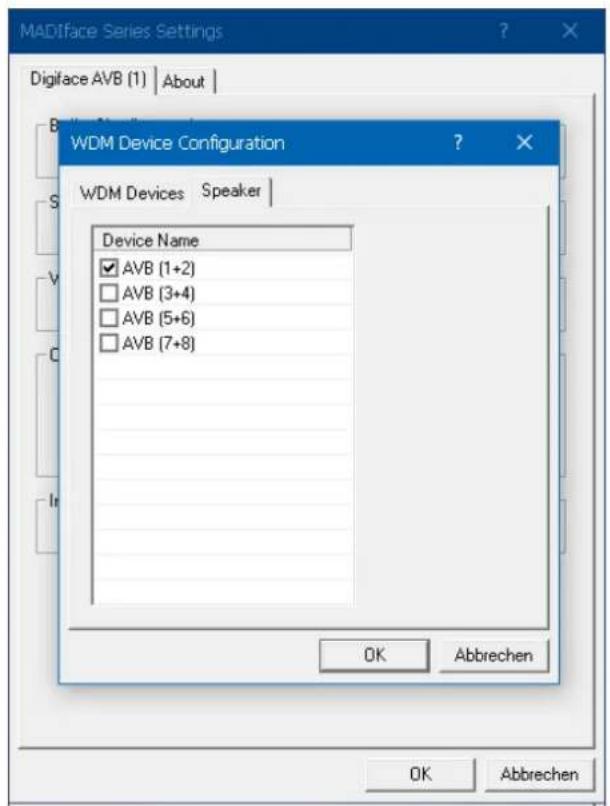
Changing to the tab Speaker presents a list of all currently activated WDM devices. Any of these can now get the Speaker property.
Please note that defining more than one device as Speaker usually makes no sense, and the speakers also don't get numbered or renamed in Windows, so it is impossible to find out which one is which.
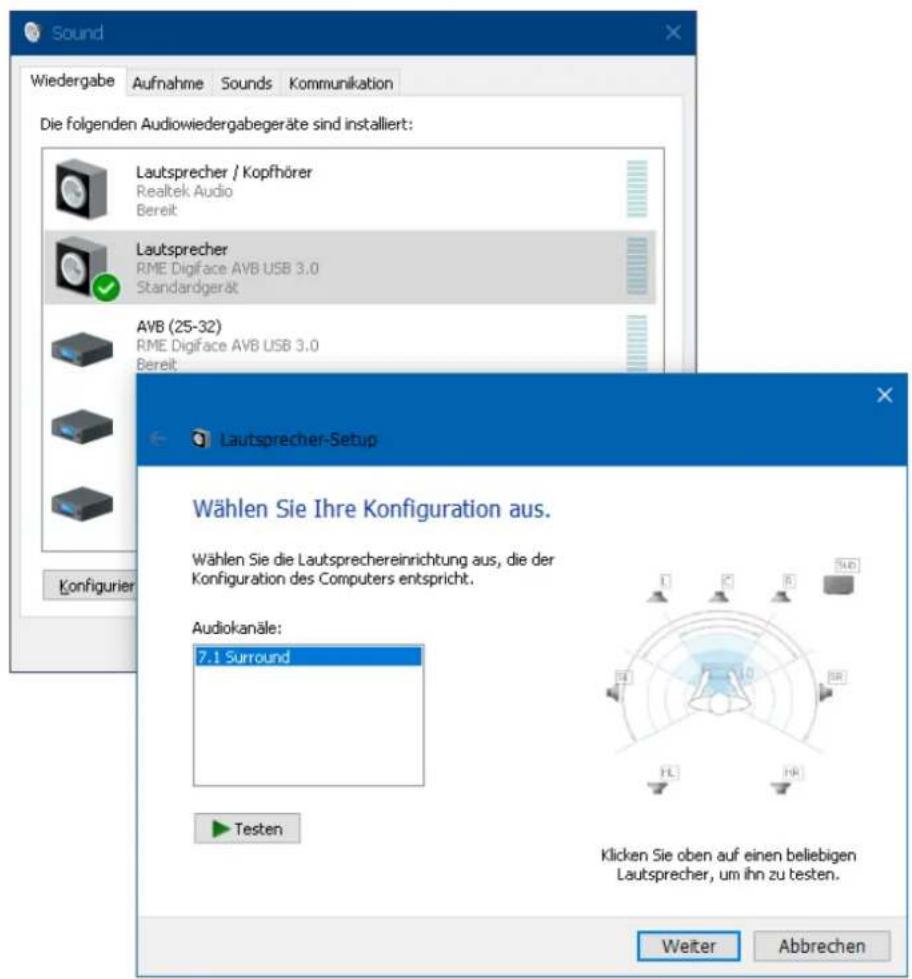
After leaving the dialog with OK the WDM devices are reloaded so Windows sees their new properties. In the Windows Sound control panel the modes Stereo and 7.1 can now be checked by selecting the playback device and clicking the Configure button.
The network or AVB-relevant configuration of the Digiface AVB takes place via the RME AVB Controller. With no detected network an empty window with notice will be shown. If this is still the case after connection to a network and flashing network LED, the AVB controller can be activated manually via menu Digiface – Start.
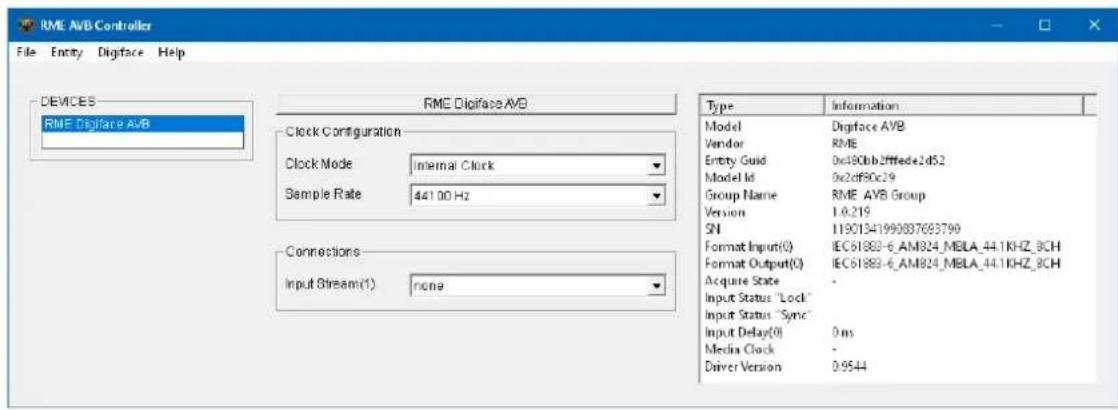
The screenshot shows the basic functions of the AVB Controller, which appear as soon as a network cable is plugged into the Gigabit ethernet port of the Digiface AVB. In case this is not an AVB network no other AVB devices are shown, but the Digiface AVB itself is displayed and the sample rate is now selectable.
Devices
Lists all AVB devices found in the network, and allows a selection to configure one device at a time.
Clock Configuration
Clock Mode
Select the clock source: Internal Clock, Input Stream 1 to 16, word clock.
Sample rate
Setting the sample rate of the internal clock, and of WDM and ASIO. With external clock, this value must be set manually to the present, currently applied value.
Connections
Configuration of up to 16 input streams with up to 32 channels each. These streams are provided by the other (sending) devices in the AVB network.
Type / Information
This window displays information about the currently selected AVB device, such as model, manufacturer, version number, etc. In the Digiface AVB, the last line displays the version number of the currently installed network driver. For input delay the Digiface AVB shows the measured delay of the incoming data for the planned delivery (presentation time of the sending device). A value near zero nanoseconds means that the data in the network has been delayed so much that they can no longer be received.
Note: The RME AVB Controller supports redundancy. Streams are labelled P (Primary) or S (Secondary). A setting that is applied to a Primary stream will be automatically applied to a Secondary stream and vice versa.
7.3.1 Menu File
The configuration of the AVB Controller is stored as XML file. It can be Saved, Saved As and Opened through the menu. Additionally the whole configuration, including all listed devices, can be saved and loaded as Workspace.
7.3.2 Menu Entity
Name / Group Name
Opens a dialog to rename the current device or the group of devices.
Configurations
Opens a dialog to select the configurations offered by the selected device (the Digiface AVB will only show Configuration 0)
Reconnect
The streams of the device are accessible again within the network.
Disconnect
The streams of the device are removed from the network.
Presentation Time Offset (Network Latency)
Allows setting of the delay of outgoing data per stream in steps of 8 nanoseconds. Maximum value is 2 ms, lowest theoretical value is about 0.25 ms. Similar to the ASIO buffer size, higher values are more reliable but cause additional latency. However, unlike ASIO low values do not lead to crackling, but to a complete failure of the audio stream.
| Presentation time offset "RME Digiface AVB" | ||
| Stream[1] | 2,000,000 | ns |
| Stream[2] | 2,000,000 | ns |
| Stream[3] | 2,000,000 | ns |
| Stream[4] | 2,000,000 | ns |
| Stream[5] | 2,000,000 | ns |
| Cancel | OK | |
Stream Format
Opens a dialog to configure the input and output streams of the current device. The available settings depend on the respective device. Each individual stream can have 1 to 32 channels, also in format AAF, or CRF (0 channel).
Note: The streams of the Digiface AVB can not be fully configured here. Instead use the menu Digiface – Configuration for unlimited access.
Reload
The whole state of the network is read again. Sample rate and stream formats are not changed.
7.3.3 Menu Digiface
This menu includes all settings and actions for the Digiface AVB.
Start / Stop
Starts and stops the background service RME AVB Endpoint. As such starts and stops the AVB functionality of the Digiface AVB.
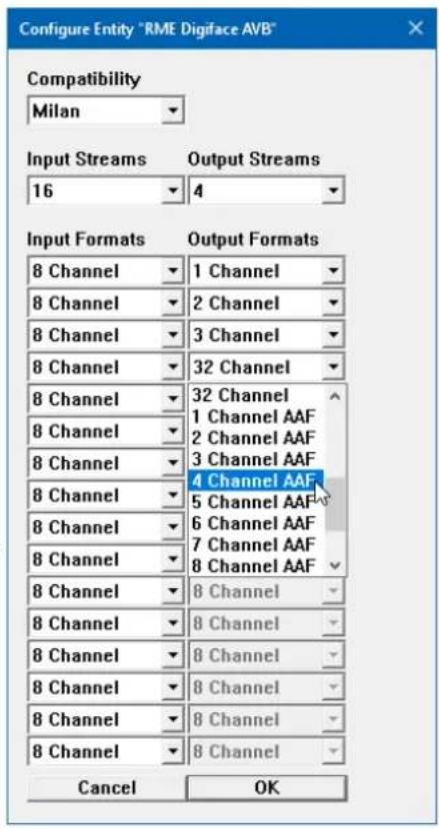
Configure
Opens a dialog to configure the input and output streams of the Digiface AVB.
Compatibility
Choices are IEEE 1722.1 and Milan. IEEE 1722.1 offers compatibility to Apple (Direct Connect, Aquire Entity, Static Mappings), Motu and others. The Milan mode supports CBR (Channel Based Routing) and Dynamic Mappings.
Note: To configure dynamic mappings an AVDECC Controller like Hive is required. Currently the RME AVB Controller can not configure these:
https://github.com/christophe-calmejane/Hive
In Milan mode Hive offers a matrix router for the input side. In IEEE 1722.1 mode the inputs are automatically routed 1:1. At the output side the routing is always 1:1.
Input Streams,
Number of input streams, from 1 to 16.
Output Streams
Number of output streams, from 1 to 16.
Input Formats, Output Formats
Each individual stream can have 1 to 32 channels, also in format AAF, or CRF (0 channel).
J
The maximum number of channels per stream is limited by the 128 channels (at Single Speed) of the Digiface AVB and the number of streams. For example 4 Streams with 32 channels each give a total of 128 channels. After changing this to 16 streams each stream can have no more than 8 channels.
Status
Opens a window showing the current state of the RME AVB Endpoint service.
7.3.4 Menu Help
Includes information of the used software.
8. Operation and Usage
8.1 Playback
In the audio application being used, Digiface AVB must be selected as output device. It can often be found in the Options, Preferences or Settings menus, as Playback Device, Audio Devices, Audio etc.
Increasing the number and/or size of audio buffers may prevent the audio signal from breaking up, but also increases latency i.e. output is delayed.
Note: This is a network audio interface. In a network, clock definition is of particular importance. Therefore neither WDM nor ASIO are allowed to influence the sample rate. That setting is done exclusively by the AVB Controller.
8.2 DVD-Playback (AC-3/DTS)
AC-3 / DTS
Popular DVD software players can send their audio data stream to any AC-3/DTS capable receiver via the Digiface AVB.
The sample rate must be set to 48 kHz in the Digiface AVB Controller, or the software will only playback a stereo 2-channel downmix via SPDIF.
In some cases the Digiface AVB output device has to be selected in >Control Panel / Sound / Playback< and be set as Default, or the software will not recognize it.
The DVD software's audio properties now show the options 'SPDIF Out' or similar. When selecting it, the software will transfer the non-decoded digital multi-channel data stream to a Digiface AVB network channel.
Warning: This 'SPDIF' signal sounds like chopped noise at highest level.
Multichannel
DVD software players can also operate as software decoder, sending a DVD's multichannel data stream directly to the analog and digital outputs of the Digiface AVB. For this to work select the WDM playback device 'Loudspeaker' of the Digiface AVB in >Control Panel/ Sound/ Playback < as 'Standard'. Additionally a Multi-channel WDM device is required, whose property of 7.1 Loudspeaker playback can be verified under >Configuration<.
The audio properties of the playback software now list several multichannel modes. If one of these is selected, the software sends the decoded analog multichannel data to the Digiface AVB. On some software it is not necessary to select the Loudspeaker in the Sound panel.
8.3 Channel Count under WDM
The Digiface AVB supports a maximum of 64 channels under WDM. These can be configured and activated via the Settings dialog - WDM Devices, as Stereo or Multi-channel (8-channel) devices.
8.4 Multi-client Operation
RME audio interfaces support multi-client operation. Several programs can be used at the same time. The formats ASIO and WDM can even be used on the same playback channels simultaneously. As WDM uses a real-time sample rate conversion (ASIO does not), all active ASIO software has to use the same sample rate.
However, a better overview is maintained by using the channels exclusively. This is no limitation at all, because TotalMix allows for any output routing, and therefore a playback of multiple software on the same hardware outputs.
Inputs can be used from an unlimited number of WDM and ASIO software at the same time, as the driver simply sends the data to all applications simultaneously.
RME's sophisticated tool DIGICheck operates like an ASIO host, using a special technique to access playback channels directly. Therefore DIGICheck is able to analyse and display playback data from any software, no matter which format it uses.
8.5 Digital Recording
Unlike analog soundcards which produce empty wave files (or noise) when no input signal is present, digital interfaces always need a valid input signal to start recording. Taking this into account, RME added a comprehensive I/O signal status display to the Digiface AVB, showing sample frequency, lock and sync status in the Settings dialog, and two status LEDs directly at the unit.
The sample frequency shown in the Settings dialog is useful as a quick display of the current configuration of the unit and the connected external equipment. If no sample frequency is recognized, it will read 'No Lock'.
This way, configuring any suitable audio application for digital recording is simple. After connection the Digiface AVB displays the current and external sample frequency. This parameter can then be changed in the application's audio attributes (or similar) dialog.
8.6 Clock Modes - Synchronization
In the digital world, all devices must be either Master (clock source) or Slave (clock receiver). Whenever several devices are linked within a system, there must always be a single master clock.
A digital system can only have one master! If the Digiface AVB's clock mode is set to 'Internal', all other devices must be set to 'Slave'.
This also applies in a network. Typically, a single device is defined as a clock master (Grand Clock), controlling both the network and all connected devices. The Digiface AVB can be synchronized as slave over incoming network streams or an attached word clock. As master, it uses its internal clock, becoming the clock master of the entire network.
RME's exclusive SyncCheck technology (first implemented in the Hammerfall) enables an easy to use check and display of the current clock status. Input Status indicates whether there is a valid signal (Lock, No Lock) for the coaxial input, or if there is a valid and synchronous signal (Sync).
9. Operation under ASIO
9.1 General
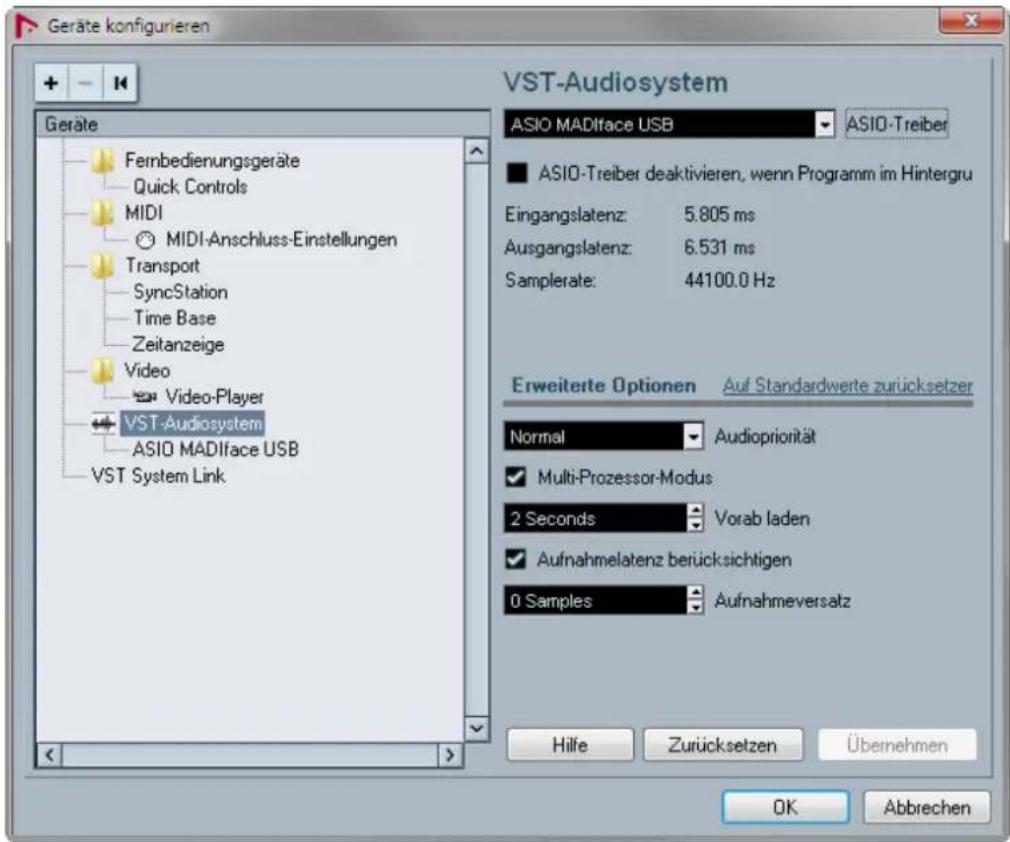
Start the ASIO software and select ASIO MADIface USB as the audio I/O device or the audio driver.
The Digiface AVB supports ASIO Direct Monitoring (ADM).
9.2 Channel Count under ASIO
In Single Speed Speed (44.1 and 48 kHz) 128 input and output channels each are available. Double Speed (88.2 and 96kHz) reduces the number of available channels to 64 each. Quad Speed (176.4 and 192kHz) reduces the number of available channels to 32 each.
Through TotalMix FX, the 128 input and 128 output channels of the network – the AVB channels are fully accessible even at 96 kHz. But at 192 kHz Digiface AVB is limited to access 64 network channels each.
Note: When changing the sample rate range between Single, Double and Quad Speed the number of channels presented from the ASIO driver will change too. This may require a reset of the I/O list in the audio software.
9.3 Known Problems
If a computer does not provide sufficient CPU-power and/or sufficient USB-bus transfer rates, then drop outs, crackling and noise will appear. Such effects can be avoided by using a higher buffer setting/latency in the Settings dialog of the Digiface AVB. Furthermore Plugins should be deactivated temporarily to make sure they do not cause these problems. More information can be found in chapter 25.1.
Another common source of trouble is incorrect synchronization. ASIO does not support asynchronous operation, which means that the input and output signals not only have to use the same sample frequency, but also have to be in sync. All devices connected to the Digiface AVB must be properly configured for Full Duplex operation. As long as SyncCheck (in the Settings dialog) only displays Lock instead of Sync, the devices have not been set up properly!
The same applies when using multiple devices of the MADIface series - they all have to be in sync. Else a periodically repeated noise will be heard.
The Digiface AVB supports ASIO Direct Monitoring (ADM). Please note that not all programs support ADM completely or error-free. The most often reported problem is the wrong behaviour of panorama in a stereo channel. Also try to avoid setting the TotalMix FX hardware outputs (third row) to mono mode. This will most likely break ADM compatibility.
10. Using more than one Interface
The current driver supports up to three RME USB devices of the MADIface series. All units have to be in sync, i.e. have to receive valid digital sync information.
- If the Digiface AVB is in clock mode Internal (= Master) all others have to be set to clock mode Slave, and have to be synced from the Digiface AVB via word clock. The clock modes of all units have to be set up correctly in their Settings dialog.
- If all units are fed with a synchronous clock, i.e. all units show Sync in their Settings dialog, all channels can be used at once. This is especially easy to use under ASIO, as the ASIO driver presents all units as one.
Note: TotalMix is part of the hardware of each RME unit. Up to three mixers are available, but these are separated and can't interchange data. Therefore a global mixer for all units is not possible.
Using more than one Digiface AVB per computer as AVB interface is not possible.
11. DIGlCheck Windows
The DIGICheck software is a unique utility developed for testing, measuring and analysing digital audio streams. Although this Windows software is fairly self-explanatory, it still includes a comprehensive online help. DIGICheck 5.93 operates as multi-client ASIO host, therefore can be used in parallel to any software, with both inputs and outputs (!). The following is a short summary of the currently available functions:
- Level Meter. High precision 24-bit resolution, 2/8/124 channels. Application examples: Peak level measurement, RMS level measurement, over-detection, phase correlation measurement, dynamic range and signal-to-noise ratios, RMS to peak difference (loudness), long term peak measurement, input check. Oversampling mode for levels higher than 0 dBFS. Supports visualization according to the K-System.
- Hardware Level Meter for Input, Playback and Output. Reference Level Meter freely configurable, causing near zero CPU load, because calculated from the Digiface AVB hardware.
- Spectral Analyser. World wide unique 10-, 20- or 30-band display in analog bandpass filter technology. 192 kHz-capable!
- Vector Audio Scope. World wide unique Goniometer showing the typical afterglow of a oscilloscope-tube. Includes Correlation meter and level meter.
- Totalyser. Spectral Analyser, Level Meter and Vector Audio Scope in a single window.
- Surround Audio Scope. Professional Surround Level Meter with extended correlation analysis, ITU weighting and ITU summing meter.
- ITU1770/EBU R128 Meter. For standardized loudness measurements.
- Bit Statistics & Noise. Shows the true resolution of audio signals as well as errors and DC offset. Includes Signal to Noise measurement in dB and dBA, plus DC measurement.
- Channel Status Display. Detailed analysis and display of SPDIF and AES/EBU Channel Status data.
- Global Record. Long-term recording of all channels at lowest system load.
- Completely multi-client. Open as many measurement windows as you like, on any channels and inputs or outputs!
To install DIGICheck, go to the \DIGICheck directory on the RME Driver CD and run setup.exe. Follow the instructions prompted on the screen.
DIGICheck is constantly updated. The latest version is always available on our website www.rme-audio.com, section Downloads / DIGICheck.
12. Hotline – Troubleshooting
The input signal cannot be monitored in real-time
- ASIO Direct Monitoring has not been enabled within the DAW, and/or monitoring has been disabled globally (TotalMix Options).
Playback works, but record doesn't
- Check that there is a valid signal at the input. If so, the current sample frequency is displayed in the Settings dialog.
- Check whether the Digiface AVB has been selected as recording device in the audio application.
- Check whether the sample frequency set in the audio application ('Recording properties' or similar) matches the input signal.
Crackle during record or playback
- Increase the number and size of buffers in the 'Settings' dialog or in the application.
- Try different cables (optical) to rule out any defects here.
- Check that cables/devices have not been connected in a closed loop. If so, set the system's clock mode to 'Master'.
- Check the Settings dialog for displayed Errors.
Driver installation and Settings dialog/TotalMix work, but a playback or record is not possible
- While recognition and control of the device are low bandwidth applications, playback/record needs the full USB transmission performance. Therefore, defective USB cables with limited transmission bandwidth can cause such errors.
Where do I set the sample rate?
- In the RME AVB Controller, for the device that is currently the Master Clock for the whole network. Neither Windows nor programs have control over that.
User's Guide

INTELLIGENT AUDIO SOLUTIONS
Digiface AVB
Mac OS X – Installation and Operation
13. Driver and Firmware
13.1 Driver Installation
Connect computer and Digiface using the supplied USB cable. Mac OS X detects the new Hardware as Digiface AVB (serial number). Install the drivers from the RME Driver CD. The driver files are located in the folder Fireface_USB Sierra. Installation works automatically by a double-click on the file Fireface USB.pkg.
RME recommends downloading the latest driver from the RME website, http://rme.to/usbe.
Note: The driver for High Sierra and higher, V 3.x, must also be installed if 10.11. is used as OS. Driver 2.x does not support the Digiface AVB.
A double-click onto driver_usb_mac_3xx.zip expands the archive file to Fireface USB.pkg. Installation works automatically by a double-click on this file.
During driver installation the programs Fireface USB Settings and Totalmix (TotalMix FX) are copied to the Applications folder. They will automatically start into the dock if a Digiface AVB is connected. A reboot of the computer is not required.
The Digiface AVB uses two drivers. The basic Mac OS X driver is the MADIface series driver, which makes the device available as a USB audio interface. It also contains the Settings dialog and TotalMix FX. Additionally a network driver is installed that makes the device available as a network device.
The software for access and control of the AVB network, RME AVB Controller, also needs to be installed. The latest version is available through the above link as download on the RME website.
Driver Updates do not require to remove the existing drivers. Simply install the new driver over the existing one.
Possible reasons why a Digiface AVB is not found after driver installation:
- The USB port is not active in the system (check in System Report, USB)
- The USB cable is not or not correctly inserted into the socket
13.2 Uninstalling the Drivers
In case of problems the driver files can be deleted manually by dragging them to the trash bin:
/Applications/Fireface USB Settings /Applications/Totalmix /System/Library/Extensions/FirefaceUSB.kext /Users/username/Library/Preferences/de.rme-audio.TotalmixFX.plist /Users/username/Library/Preferences/de.rme-audio.Fireface_USB_Settings.plist /Library/LaunchAgents/de.rme-audio.firefaceUSBAgent.plist
Under the latest Mac OS the User/Library folder is not visible in the Finder. To unhide it start Finder, click on the menu item Go. Hold down the option (alt) key, then click on Library.
13.3 Firmware Update
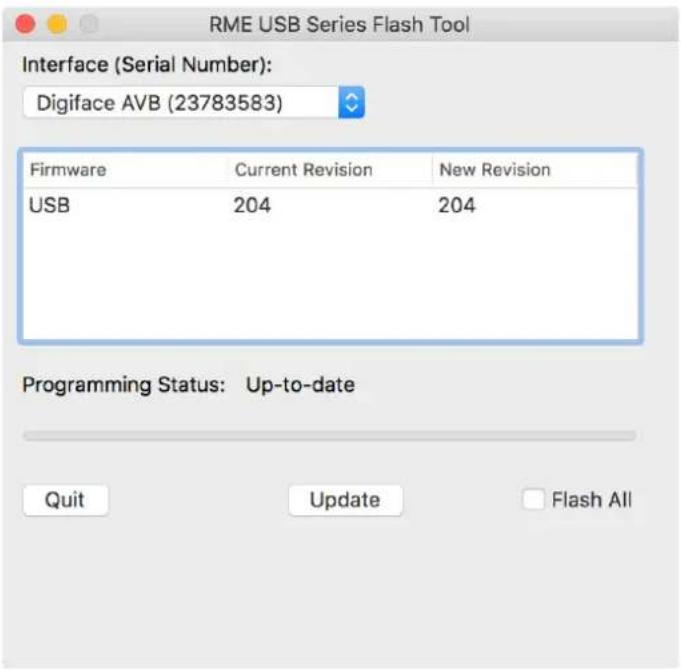
The app RME USB Series Flash Tool updates the firmware of the Digiface AVB to the latest version. It requires an already installed RME USB driver.
After its start the program displays the current revision of the Digiface AVB firmware, and whether it needs an update or not. If so, simply press the 'Update' button. A progress bar will indicate when the flash process is finished (Verify Ok).
After the update the unit needs to be reset. This is done by unplugging the Digiface AVB for a few seconds. A reboot of the computer is not necessary.
To reduce the time needed for the flash process the tool updates only the parts of the firmware that are present in a newer version. The option Flash All forces the tool to update all parts.
When the update fails (status: failure), the unit's Safety BIOS will be used from the next boot on, the unit stays fully functional. The flash process can then be tried again on a different computer.
14. Configuring the Digiface AVB
14.1 Settings Dialog
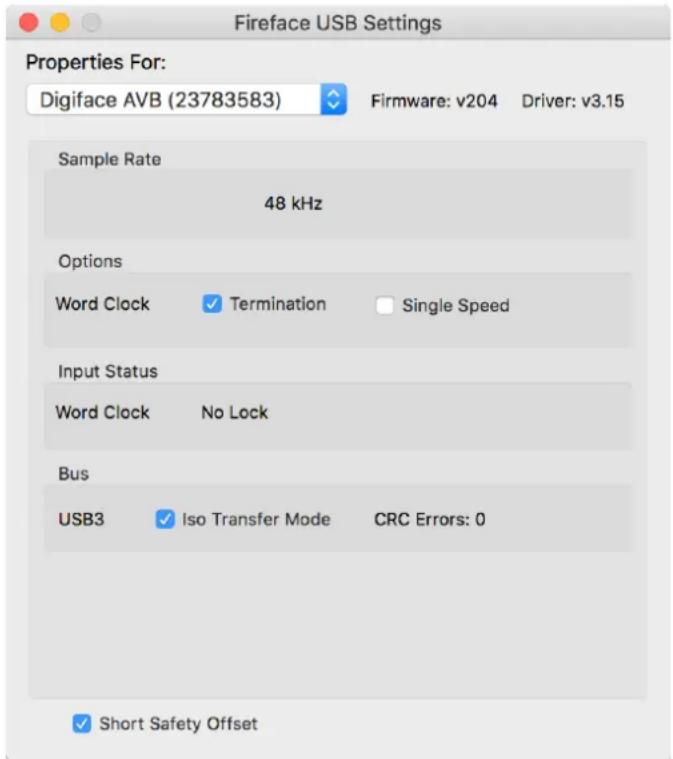
Configuring the Digiface AVB is done via its own Settings dialog. Start the app Fireface USB Settings. The mixer of the Digiface AVB can be configured by starting the app Totalmix. The following is available in the Settings dialog:
- Hardware configuration
- Current sample rate
- State of input
Any changes performed in the Settings dialog are applied immediately - confirmation (e.g. by exiting the dialog) is not required.
Use the drop down menu Properties For to select the unit to be configured.
On the right of it the current firmware and driver version is shown.
Sample Rate
Display of the currently active sample rate. Its setting / change takes place exclusively via the AVB Controller. Neither macOS nor apps can change the sample rate.
Options - Word Clock
Termination
Checking this option terminates the word clock input internally with 75 Ohms.
Single Speed
The word clock output signal usually equals the current sample rate. Selecting Single Speed causes the output signal to always stay within the range of 32 kHz to 48 kHz. So at 96 kHz and 192 kHz sample rate, the output word clock is 48 kHz.
Input Status - Word Clock
Indicates presence of a valid signal at the word clock input (Lock, No Lock) and whether the signal is synchronous (Sync). The third column shows the sample rate detected by the hardware (coarse recognition, 44.1 kHz, 48 kHz etc.).
Bus (USB 3 only)
The Digiface AVB uses a special transmission mode with error correction in record mode. In case the default mode does not work Isochronous Streaming can be tried. This is the standard's native mode for audio transmission and should work with any USB 3 controller (chapter 25.1).
To the right USB 3 transmission errors detected by the hardware will be shown.
Short Safety Offset
Reduces overall latency by using smaller Safety Offsets. Change is performed in real-time. Smaller Safety Offsets might cause clicks and dropouts.
14.2 AVB Controller
The RME AVB Controller Mac is fully identical to the Windows version. Chapter 7.3, AVB Controller, therefore also includes all the details of the Mac version.
14.3 Channel Count under Core Audio
In Single Speed Speed (44.1 and 48 kHz) 128 input and output channels each are available. Double Speed (88.2 and 96kHz) reduces the number of available channels to 64 each. Quad Speed (176.4 and 192kHz) reduces the number of available channels to 32 each.
Through TotalMix FX, the 128 input and 128 output channels of the network – the AVB channels are fully accessible even at 96 kHz. But at 192 kHz Digiface AVB is limited to access 64 network channels each.
It is not possible to change the number of Core Audio devices without a reboot of the computer. So when the Digiface AVB changes to Double Speed (88.2/96 kHz) or Quad Speed mode (176.4/192 kHz) all channels stay present, but are partly inactive.
14.4 Various Information
The driver of the Digiface AVB requires at least Mac OS 11.
Programs that don't support card or channel selection will use the device chosen as Input and Output in the System Preferences – Sound panel.
Via Launchpad – Other – Audio MIDI Setup the MADIface can be configured for the system wide usage in more detail.
Programs that don't support channel selection will always use channels 1/2, the first stereo pair. To access other inputs, use the following workaround with TotalMix: route the desired input signal to output channels 1/2. In the channel settings of outputs 1/2 activate Loopback. Result: the desired input signal is now available at input channel 1/2, without further delay/latency.
Use Configure Speakers to freely configure the stereo or multichannel playback to any available channels.
15. Using more than one Interface
OS X supports the usage of more than one audio device within the audio software. This is done via the Core Audio function Aggregate Devices, which allows to combine several devices into one. This function is found in the Audio MIDI Setup – Audio Window. Click the + sign in the lower left.
The current driver supports up to three RME USB devices of the MADIface series. All units have to be in sync, i.e. have to receive valid sync information (by feeding synchronized signals).
- If the Digiface AVB is set to clock mode Master (Internal), all others have to be set to clock mode Slave, and have to be synced from the master. The clock modes of all units have to be set up correctly in the MADIface Settings dialog.
- If all units are fed with a synchronous clock, i.e. all units show Sync in their Settings dialog, all channels can be used at once.
Note: TotalMix is part of the hardware of each unit. Up to three mixers are available, but these are separated and can't interchange data. Therefore a global mixer for all units is not possible.
Using more than one Digiface AVB is currently not supported.
16. DIGICheck Mac
The DIGICheck software is a unique utility developed for testing, measuring and analysing digital audio streams. Although this Mac software is fairly self-explanatory, it still includes a comprehensive online help. DIGICheck 0.74 operates in parallel to any software, showing all input data. The following is a short summary of the currently available functions:
- Level Meter. High precision 24-bit resolution, 2/8/128 channels. Application examples: Peak level measurement, RMS level measurement, over-detection, phase correlation measurement, dynamic range and signal-to-noise ratios, RMS to peak difference (loudness), long term peak measurement, input check. Oversampling mode for levels higher than 0 dBFS. Vertical and horizontal mode. Slow RMS and RLB weighting filter. Supports visualization according to the K-System.
- Hardware Level Meter for Input, Playback and Output. Reference Level Meter freely configurable, causing near zero CPU load, because calculated from the MADface hardware.
- Vector Audio Scope. World wide unique Goniometer showing the typical afterglow of a oscilloscope-tube. Includes Correlation meter and level meter.
- Spectral Analyser. World wide unique 10-, 20- or 30-band display in analog bandpass filter technology. 192 kHz-capable!
- Totalyser. Spectral Analyser, Level Meter and Vector Audio Scope in a single window.
- Surround Audio Scope. Professional Surround Level Meter with extended correlation analysis, ITU weighting and ITU summing meter.
- ITU1770/EBU R128 Meter. For standardized loudness measurements.
- Bit Statistics & Noise. Shows the true resolution of audio signals as well as errors and DC offset. Includes Signal to Noise measurement in dB and dBA, plus DC measurement.
- Completely multiclient. Open as many measurement windows as you like, on any channels and inputs or outputs!
DIGICheck is constantly updated. The latest version is always available on our website www.rme-audio.com, section Downloads / DIGICheck.
17. Hotline – Troubleshooting
Playback works, but record doesn't:
- Check that there is a valid signal at the input. If so, the current sample frequency is displayed in the Settings dialog.
- Check whether the Digiface AVB has been selected as recording device in the audio application.
- Check whether the sample frequency set in the audio application ('Recording properties' or similar) matches the input signal.
Crackle during record or playback:
- Increase the number and size of buffers in the application.
- Try different cables (coaxial or optical) to rule out any defects here.
- Check that cables/devices have not been connected in a closed loop. If so, set the system's clock mode to 'Master'.
- Check the Settings dialog for displayed Errors.
Driver installation and Settings dialog/TotalMix work, but a playback or record is not possible
- While recognition and control of the device are low bandwidth applications, playback/record needs the full USB transmission performance. Therefore, defective USB cables with limited transmission bandwidth can cause such an error scheme.
Where do I set the sample rate?
- In the RME AVB Controller, for the device that is currently the Master Clock for the whole network. Core Audio has no control over that.
User's Guide
RME
INTELLIGENT AUDIO SOLUTIONS
Digiface AVB
TotalMix FX
18. Routing and Monitoring
18.1 Overview
The Digiface AVB includes a powerful digital real-time mixer, based on RME's unique, sample-rate independent TotalMix technology. It allows for practically unlimited mixing and routing operations, with all inputs and playback channels simultaneously, to any hardware outputs.
Here are some typical applications for TotalMix:
- Setting up delay-free submixes (headphone mixes). The Digiface AVB allows for up to 65 fully independent stereo submixes. On an analog mixing desk, this would equal 130 Aux sends.
- Unlimited routing of inputs and outputs (free utilisation, patchbay functionality).
- Distributing signals to several outputs simultaneously. TotalMix offers state-of-the-art splitter and distributor functions.
- Simultaneous playback of different programs via a single stereo output. The ASIO multi-client driver supports the usage of several programs at the same time. If this happens on different playback channels TotalMix provides the means to mix and monitor these on a single stereo output.
- Mixing of the input signal to the playback signal (complete ASIO Direct Monitoring). RME is not only the pioneer of ADM, but also offers the most complete implementation of the ADM functions.
- Integration of external devices. Use TotalMix to insert external effects devices, be it in the playback or in the record path. Depending on the current application, the functionality equals insert or effects send and effects return, for example as used during real-time monitoring when adding some reverb to the vocals.
Every single input channel, playback channel and hardware output features a Peak and RMS level meter, calculated in hardware. These level displays are very useful to determine the presence and routing destinations of the audio signals.
For a better understanding of the TotalMix mixer you should know the following:
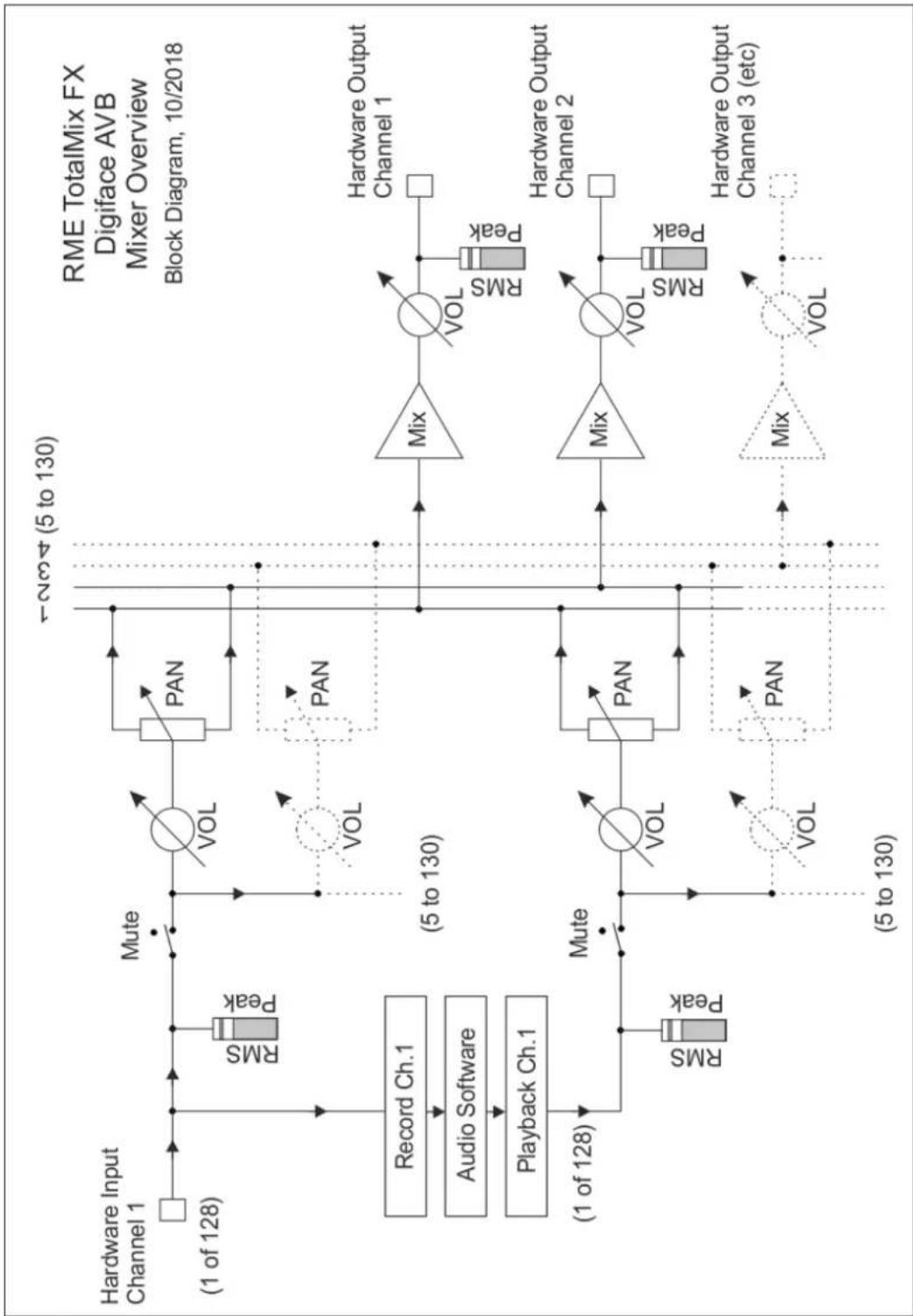
- As shown in the block diagram (next page), the record signal usually stays un-altered. TotalMix does not reside within the record path, and does not change the record level or the audio data to be recorded (exception: Loopback mode).
- The hardware input signal can be passed on as often as desired, even with different levels. This is a big difference to conventional mixing desks, where the channel fader always controls the level for all routing destinations simultaneously.
- The level meters of input and playback channels are connected pre-fader, to be able to visually monitor where a signal is currently present. The level meters of the hardware outputs are connected post-fader, thus displaying the actual output level.
flowchart
graph TD
    A["Hardware Input Channel 1 (1 of 128)"] --> B["Record Ch.1"]
    B --> C["Audio Software"]
    C --> D["Playback Ch.1 (1 of 128)"]
    D --> E["Mute"]
    E --> F["VOL"]
    F --> G["PAN"]
    G --> H["-Q24 (5 to 130)"]
    H --> I["Mix"]
    I --> J["VOL"]
    J --> K["RMS Peak"]
    I --> L["RMS Peak"]
    M["Hardware Output Channel 1"] --> N["Mix"]
    O["Hardware Output Channel 2"] --> P["Mix"]
    Q["Hardware Output Channel 3 (etc)"] --> R["Mix"]
    S["RMS Peak"] --> T["Mute"]
    U["RMS Peak"] --> V["Mute"]
    W["PAN"] --> X["VOL"]
    Y["PAN"] --> Z["VOL"]
    AA["5 to 130"] -.-> AB["(5 to 130)"]
    AC["(5 to 130)"] -.-> AD["(5 to 130)"]
18.2 The User Interface
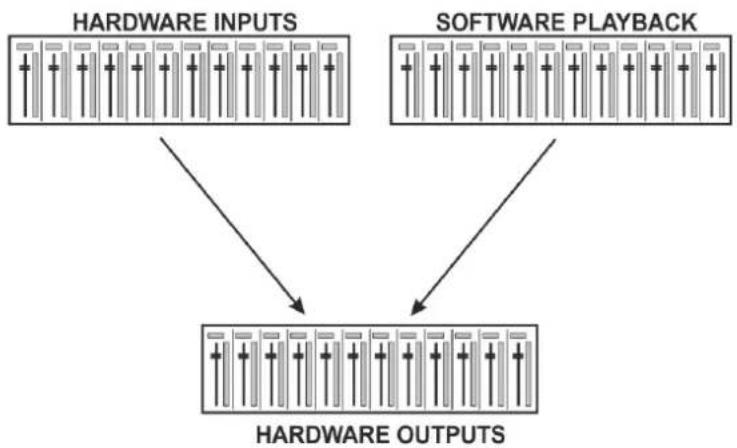
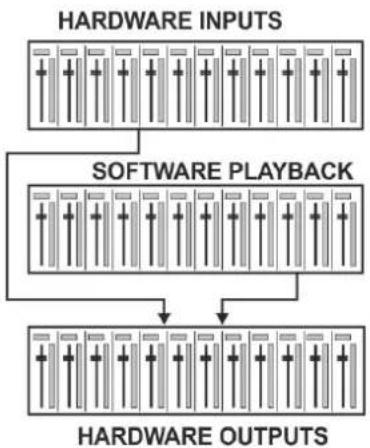
The visual design of the TotalMix mixer is a result of its capability to route hardware inputs and software playback channels to any hardware output. The Digiface AVB has 128 input channels, 128 software playback channels, and 130 hardware output channels:
flowchart
graph TD
    A["Hardware INPUTS"] --> C["Hardware OUTPUTS"]
    B["Software PLAYBACK"] --> C["Hardware OUTPUTS"]
TotalMix can be used in the above view (View Options 2 Rows). However, the default is a vertical alignment in three rows as known from an Inline desk, so that the row Software Playback equals the Tape Return of a real mixing desk:
- Top row: Hardware inputs. The level shown is that of the input signal, i.e. fader independent. Via fader and routing menu, any input channel can be routed and mixed to any hardware output (bottom row).
- Middle row: Playback channels ( playback tracks of the audio software). Via fader and routing menu, any play-back channel can be routed and mixed to any hardware output (bottom row).
- Bottom row: Hardware outputs. Here, the total level of the output can be adjusted. This may be the level of connected loudspeakers, or the level of any submix.
flowchart
graph TD
    A["Hardware INPUTS"] --> B["Software PLAYBACK"]
    B --> C["Hardware OUTPUTS"]
    A --> D["Load 1"]
    A --> E["Load 2"]
    A --> F["Load 3"]
    A --> G["Load 4"]
    A --> H["Load 5"]
    B --> I["Load 6"]
    B --> J["Load 7"]
    B --> K["Load 8"]
    B --> L["Load 9"]
    C --> M["Load 10"]
    C --> N["Load 11"]
    C --> O["Load 12"]
    C --> P["Load 13"]
    C --> Q["Load 14"]
Usage in mode Submix View (Default)
Click on the Hardware Output channel in the third row where the audio signal is supposed to show up. This channel turns brighter, means it is selected as current submix. Now move the faders up from all sources – these are the input and playback channels, in the first and second row. That's it. The input (monitoring) and playback (DAW software) audio signals are now available at that very output, which can be verified immediately from the level meters reacting accordingly.
The following chapters explain step by step all functions of the user interface.
18.3 The Channels
A single channel can be switched between mono and stereo mode. The mode is set in the channel settings.
Channel name. The name field is the preferred place to select a channel by a mouse click. A double click opens a dialog to assign a different name. The original name will be shown when activating the option Names in the View Options.
Panorama. Routes the input signal freely to the left and right routing destination (lower label, see below). The level reduction in center position is -3 dB.
Mute and Solo. Input channels and playback channels each have a mute and solo button.
Numerical level display. Shows the current RMS or Peak level, updated twice per second. OVR means overload. The setting Peak/RMS is changed in the View Options.
Level meter. The meter shows both peak values (zero attack, 1 sample is enough for a full scale display) by means of a yellow line, and mathematically correct RMS values by means of a green bar. The RMS display has a relatively slow time constant, so that it shows the average loudness quite well. Overs are shown in red at the top of the bar. In the Preferences dialog (F2) the Peak Hold time, the over detection and the RMS reference can be set.
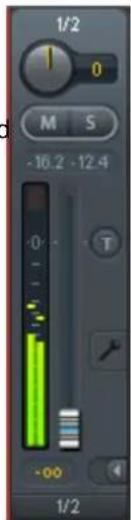
Fader. Determines the gain/level of the signal routed to the current routing destination (lower label). Please note that this fader is not the fader of the channel, but only the fader of the current routing. Compared to a standard mixing desk TotalMix does not have a channel fader, but only Aux Sends, as many as there are hardware outputs. Therefore TotalMix can create as many different Submixes as there are hardware outputs. This concept is understood best in the Submix View, but more on that later.
Below the fader the Gain is shown in a numerical display field, according to the current fader position. The fader can be:
- dragged with the left mouse button pressed
moved by the mouse wheel
set to 0 dB and - by a double click. The same happens with a single click plus held down Ctrl key.
adjusted in fine mode by mouse drag and mouse wheel when holding the Shift key down
A Shift-click on a fader adds the fader to the temporary fader group. All faders now marked yellow are ganged, and move simultaneously in a relative way. The temporary fader group is deleted by a click on the F symbol in the upper right of the window.
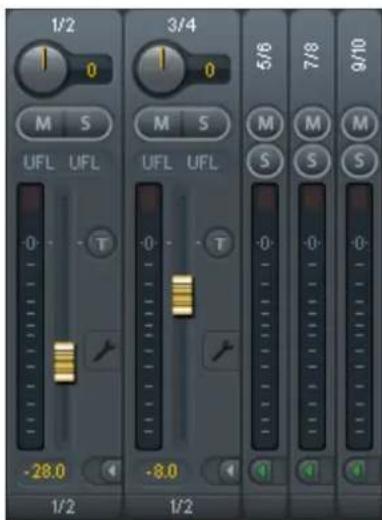
The arrow symbol at the bottom minimizes the channel width to that of the level meters. Another click maximizes it again. A mouse click with held Ctrl key causes all channels to the right to enlarge and minimize at once.
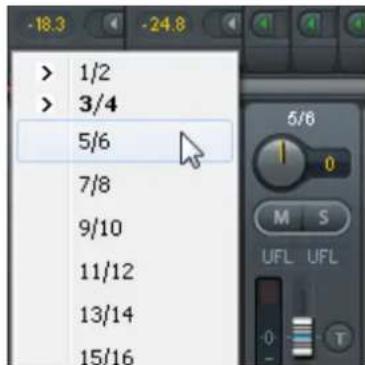
The lowest field shows the current routing target. A mouse click opens the routing window to select a routing target. The list shows all activated routings of the current channel by arrows in front of the listed entries, the current one is shown in bold letters.
An arrow is only shown with an activated routing. A routing is seen as activated when audio data is sent. As long as the fader is set to - the current routing will be shown in bold letters, but not have an arrow in the front.
Trim Gain. After a click on the T-button one channel's faders are all synchronized. Instead of changing only a single routing the fader affects all the channel's active routings. For a better overview the faders currently not visible are indicated by orange triangles beside the fader path. When moving the fader the triangles also move to a new position, equalling the faders new settings.
Note that the fader button is set to the highest routing gain of all routings so that best control is offered. The gain (fader knob position) of the currently active routing (the submix selected in the third row) is shown as white triangle.
Background: TotalMix has no fixed channel fader. In case of the Digiface AVB there are 65 stereo Aux sends, shown alternately as single fader within the channel strip. The high number of Aux sends enables multiple and fully independent routings.
In some cases it is necessary to synchronize the gain changes of these routings. An example is the Post fader function, where a change of the singer's volume shall be performed identical to the volume change of the signal sent to the reverb device, so that the reverb level keeps its relation to the original signal. Another example is the signal of a guitar that is routed to different submixes, means hardware outputs, which gets much too loud during the solo part, and therefore needs to be reduced in volume on all outputs simultaneously. After a click on the Trim button this can be done easily and with a perfect overview.
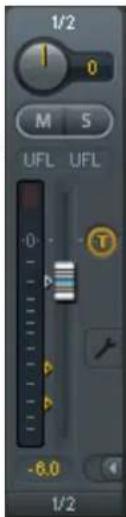
As all channel's routings change simultaneously when Trim is active, this mode basically causes the same behaviour as a trim pot within the input channel, affecting the signal already before the mixer. That's how this function got its name.
In the View Options / Show the function Trim Gains can be globally switched on and off for all channels. The global Trim mode is recommended when using TotalMix FX as live mixing desk.
The Context Menu. With a right click on the input, playback and output channels their context menus provide advanced functionality (these menus are also available in the Matrix, but only directly on the channel labels). The entries are self-explanatory and automatically adjust to where the click is performed. On all of these the first entry opens the Channel Layout dialog. The input channels offer Clear, Copy input and Paste the input mix. On a playback channel Copy, Paste and Clear the playback mix are available. On an output channel Copy and Mirror functionality for the current submix is offered.
A click on the tool symbol opens the channel's Settings panel. The panel includes the following elements:
Stereo. Switches the channel to mono or stereo mode.
Width. Setting the stereo width. 1.00 equals full stereo, 0.00 mono, -1.00 swapped channels.
MS Proc. Activates M/S processing within the stereo channel. Monaural information is sent to the left channel, stereo information to the right.
Phase L. Inverts the phase of the left channel by 180°.
Phase R. Inverts the phase of the right channel by 180°.
Note: the functions Width, MS Proc, Phase L and Phase R affect all routings of the respective channel.
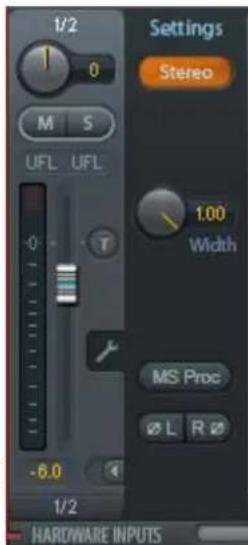
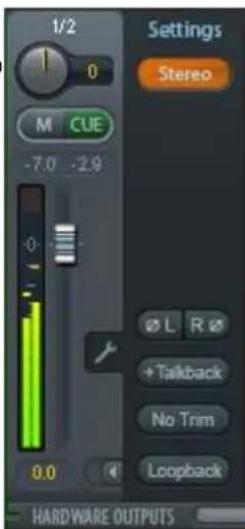
Besides Stereo/Mono, Phase L und Phase R the settings of the Hardware Outputs have further options:
Talkback. Activates this channel as receiver and output of the Talkback signal. This way Talkback can be sent to any outputs, not only the Phones in the Control Room section. Another application could be to send a certain signal to specific outputs by the push of a button.
No Trim. Sometimes channels need to have a fixed routing and level, which should not be changed in any case. An example is the stereo mixdown for recording of a live show. With No Trim active, the routing to this output channel is excluded from the Trim Gains function, therefore is not changed unintentionally.
Loopback. Sends the output data to the driver as record data. The corresponding submix can be recorded then. This channel's hardware input sends its data only to TotalMix, no longer to the recording software.
Another difference to the input and playback channels is the Cue button instead of Solo. A click on Cue sends the respective Hardware Output's audio additionally to the Main Out, or any of the Phones outputs (option Assign / Cue/PFL to in the Control Room section). With this any hardware output can be controlled and listened to through the monitoring output very conveniently.
18.4 Section Control Room
In the section Control Room the menu Assign is used to define the Main Out which is used for listening in the studio. For this output the functions Dim, Recall, Mono, Talkback and External Input are automatically applied.
Additionally the channel will be shifted from the Hardware Outputs into the Control Room section, and renamed Main. The same happens when assigning Main Out B or the Phones. The original name can be displayed by the function Names in the View Options - Show at any time.
Phones 1 to 4 will have dim (set in Settings) and a special routing applied when Talkback is activated. Also putting them beside the Main Out increases the overview within the output section greatly.
Dim. The volume will be reduced by the amount set in the Settings dialog (F3).
Recall. Sets the gain value defined in the Settings dialog.
Speaker B. Switches audio from Main Out to Main Out B. The faders of the channels Main and Speaker B can be ganged via Link. Via Options / Key Commands switching to Speaker B can also be controlled by the F-keys F4 to F8.
Mono. Mixes left and right channel. Useful to check for mono compatibility and phase problems.
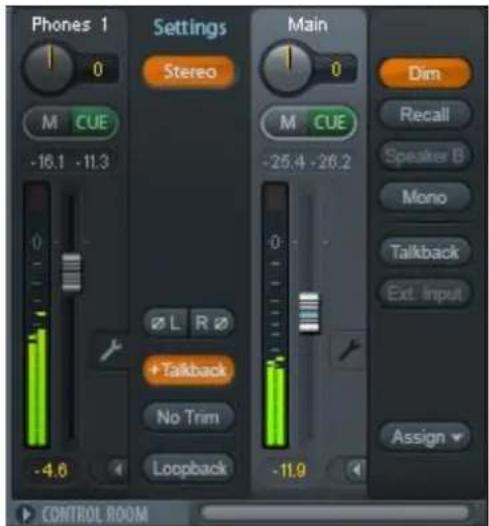
Talkback. A click on this button will dim all signals on the Phones outputs by an amount set up in the Preferences dialog. At the same time the control room's microphone signal (source defined in Settings - Mixer) is sent to the Phones. The microphone level is adjusted with the channel's input fader.
External Input. Switches Main monitoring from the mix bus to the stereo input defined in the Settings dialog (F3). The relative volume of the stereo signal is adjusted there as well.
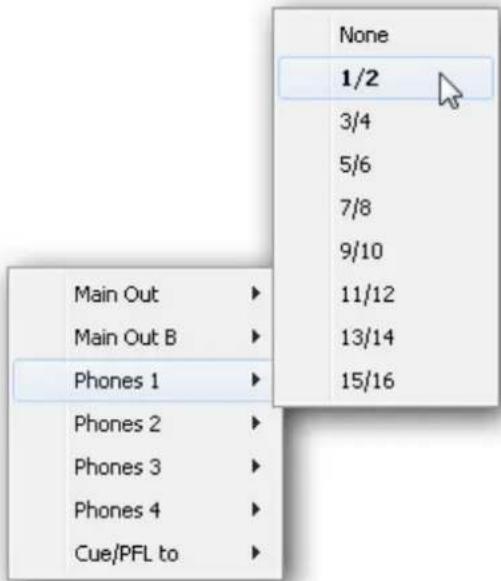
Assign. Allows to define the Main Out, Main Out B, and up to four Phones outs.
The output for the Cue signal, which is usually Main, can also be set to one of the Phones outputs. The setting Cue/PFL to also controls the PFL monitoring.
18.5 The Control Strip
The Control Strip on the right side combines different functions that are either required globally, or constantly used, and therefore should not be hidden in a menu. Still using the menu entry Window, Hide Control Strip, the Control Strip is shifted out of the visible area to gain more space for other elements.
The areas described in the following chapters can be minimized by a click on the arrow in their title bar.
Device selection. Select the unit to be controlled in case more than one is installed on the computer.
FX - DSP Meter. Not available for the Digiface AVB.
Undo / Redo. With the unlimited Undo and Redo changes of the mix can be undone and redone, at any time. Undo/Redo does not cover graphical changes (window size, position, channels wide/narrow etc.), and also no changes to the Layout Presets.
Undo/Redo also operates across Workspaces. Therefore a completely differently set up mixer view can be loaded via Workspace, and with a single click on Undo the previous internal mixer state is returned – but the new mixer view stays.
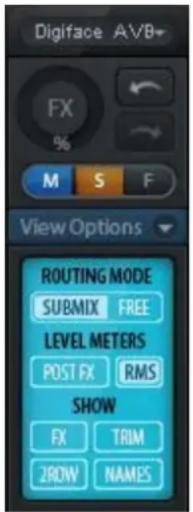
Global Mute Solo Fader.
Mute. Global Mute operates in a pre fader style, muting all currently activated routings of the channel. As soon as any Mute button is pressed, the Mute Master button lights up in the Control Strip area. With this button all selected mutes can be switched off and on again. One can comfortably set up a mute group or activate and deactivate several mute buttons simultaneously.
Solo. As soon as any Solo button is pressed, the Solo Master button lights up in the Control Strip area. With this button all selected Solos are switched off and on again. Solo operates as Solo-in-Place, post fader style, as known from common mixing desks. A typical limitation for mixing desks, Solo working only globally and only for the Main Out, does not exist in TotalMix. Solo is always activated for the current submix only.
Fader. A Shift-click on a fader adds the fader to the temporary fader group, and the Temp Fader Group Master button lights up. All faders now marked yellow are ganged, and move simultaneously in a relative way. The temporary fader group is deleted by a click on the Master Fader button.
18.5.1 View Options
The field View Options combines different functions of routing, the level meters and the mixer view.
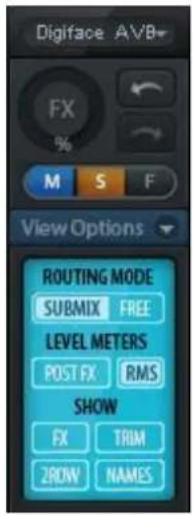
Routing Mode
Submix: The Submix view (default) is the preferred view and delivers the quickest overview, operation and understanding of TotalMix. The click on one of the Hardware Output channels selects the respective submix, all other outputs are darkened. At the same time all routing fields are set to this channel. With Submix view, it is very easy to generate a submix for any output: select the output channel, adjust the fader and pans of first and second row – finished.
Free: The Free view is for advanced users. It is used to edit several sub-mixes simultaneously, without the need to change between them. Here one works with the routings fields of the input and playback channels only, which then show different routing destinations.
Level Meters
➢ Post FX. Not available for the Digiface AVB.
➢ RMS. The numerical level display in the channels displays peak or RMS.
Show
FX. Not available for the Digiface AVB.
Trim. Activates all Trim buttons on all channels. TotalMix thus behaves like a conventional, simple mixing desk. Each fader affects all active routings of the channel simultaneously, as if the fader were a trim-pot in the hardware input.
2 Row. Switches the mixer view to 2 rows. Hardware Inputs and Software Playbacks are placed side by side. This view saves a lot of space, especially in height.
Names. Display of the original names of channels when they had been renamed by the user.
18.5.2 Snapshots - Groups
Snapshots. Snapshots include all mixer settings, but no graphical elements like window positions, window size, number of windows, visible EQs or Settings, scroll states, Presets etc. Only the state wide/narrow of the channels is registered. Moreover the Snapshot is only temporarily stored. Loading a Workspace causes the loss of all stored Snapshots, when these all had not been saved before in a Workspace, or separately via File / Save Snapshot as. Via File / Load Snapshot the mixer states can be loaded individually.
Eight different mixes can be stored under individual names in the Snapshot section. A click on any of the eight buttons loads the corresponding Snapshot. A double click on the name field opens the dialog Input Name to edit the name. As soon as the mixer state is changed the button starts flashing. A click on Store lets all buttons flash, whereby the last loaded one, the base of the current state, flashes inversely. The storage finishes by clicking the desired button (means storage place). The storage process is exited by another click on the flashing Store button.
The area Snapshots can be minimized by a click on the arrow in the title bar.
Groups. The area Groups provides 4 storage places each for fader, mute and solo groups. The groups are valid per Workspace, being active and usable in all 8 Snapshots. But with this they are also lost when loading a new workspace, in case they have not been saved before in a different Workspace.
Note: The Undo function will help in case of an accidental overwrite or deletion of the groups.
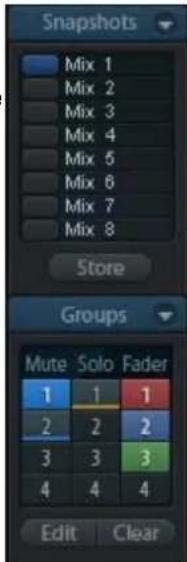
TotalMix uses flashing signals to guide you through the group setup. After a click on Edit and click on the desired storage place all desired functions for this group have to be activated or selected. The storage process is finished by another click on Edit.
When setting up a fader group make sure to not add faders that are at the most top or lowest position, except all faders of that group have this position.
The Mute groups operate – other than the global mute – exclusively for the current routing. This way you can not mute signals on all outputs unintentionally. Instead signals can be muted on specific submixes by the push of a button.
A solo group operates exactly like the global solo, signals outside the current routing are not affected.
18.5.3 Channel Layout - Layout Presets
To maintain overview within TotalMix FX channels can be hidden. Channels can also be excluded from being remoted. Under Options / Channel Layout a dialog lists all I/Os with their current state. Selecting one or several channels enables the options to the right:
➢ Hide Channel in Mixer/Matrix. The selected channels are no longer shown in TotalMix FX, nor are they available via MIDI or OSC remote control.
➢ Hide Channel in MIDI Remote 1-4. The selected channels are hidden for MIDI remote (CC and Mackie Protocol).
➢ Hide Channel in OSC Remote 1-4. The selected channels are hidden for OSC remote control.
Hidden channels in Mixer/Matrix are still fully functional. An existing routing/mixing/FX processing stays active. But as the channel is no longer visible it can not be edited anymore. At the same time the hidden channels are removed from the list of remote controllable channels, to prevent them from being edited unnoticed.
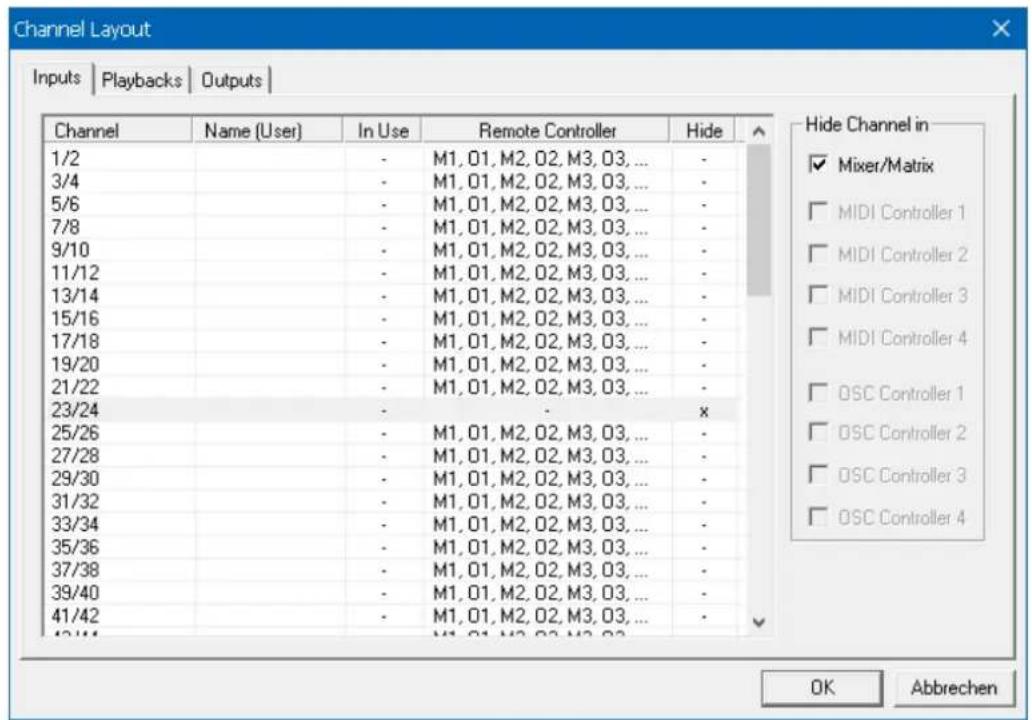
Hidden channels in MIDI Remote x are removed from the list of remote controllable channels. Within an 8-channel block of a Mackie compatible control they are skipped. The control therefore is no longer bound to consecutive orders. For example it will control channels 1, 2, and 5 to 10, when channels 3 and 4 are hidden. The same can be done for OSC. With unnecessary channels made invisible for the OSC remote the more important channels are available as one block on the remote.
The dialog can be called directly from TotalMix by a right mouse click on any channel. The corresponding channel will then be preselected in the dialog.
In the above example channels 23/24 have been made invisible.
Rows Inputs, Playbacks and Outputs are set up individually by the tabs at the top. A double click onto any line opens the edit field for the Name (User) column. Editing channel names in this dialog is quick, Enter jumps to the next line. The names of the channels in the Control Room section can only be changed this way.
After finishing those settings the whole state can be stored as Layout Preset. A click on Store and the desired memory slot makes the current channel layout recallable anytime. The button All makes all channels temporarily visible again.
With a simple click on a button it will then be possible to easily switch views of only the channels involved with the mixing of the drum section, the horn section, the violins, or any other useful view. An optimized remote layout can be activated here as well, with or without visible changes. Double-click the default slot name to enter any other name.
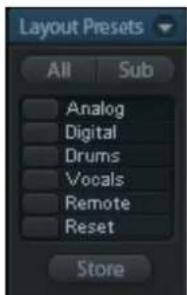
! Layout Presets are stored within the Workspace, so make sure to save the current state before loading a different Workspace!
The button Sub activates another useful special view. When in Submix view, Sub will cause all channels to disappear that are not part of the currently selected Submix/Hardware Output. Sub temporarily shows the mix based on all channels from Inputs and Playback row, independent from the current Layout Preset. That makes it very easy to see and to verify which channels are mixed/routed to the current output. Sub makes checking and verifying of mixes, but also the mix editing itself, a lot easier, and maintains perfect overview even with lots of channels.
18.5.4 Scroll Location Markers
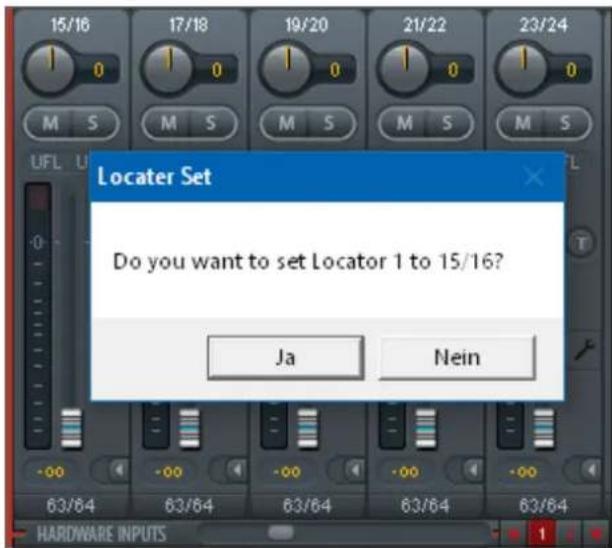
Another feature to improve overview and working with TotalMix FX are scroll location markers (TotalMix view only). These are displayed automatically when the horizontal size of the TotalMix FX window is smaller than the channel display requires. Shown on the right side of the scrollbar of each row they have four elements:
Arrow to the left. A left mouse click let the channels scroll to the very first one, or most left.
1. Marker number 1. Scroll to the desired position and perform a right mouse click on 1. A dialog comes up with precise information. Once stored, a left mouse click will scroll the channels to the stored position.
➢ 2. Marker number 2. See 1 for details.
Arrow to the right. A left mouse click let the channels scroll the last one, or most right.
Scroll Location markers are stored in the Workspace.
Application Examples
- When the TotalMix FX window is intentionally made small in width, so only a few channels are shown.
- When the available screenspace is not sufficient to show all channels.
- When some or all Settings panels are open. Then all relevant settings are always visible, but require a lot of space horizontally.
18.6 Preferences
The dialog Preferences can be opened via the Options menu or directly via F2.
Level Meters
Full scale samples for OVR. Number of consecutive samples to trigger an over detection (1 to 10).
➢ Peak Hold Time. Hold time of the peak value. Adjustable from 0.1 up to 9.9 s.
➢ RMS +3 dB. Shifts the RMS value by +3 dB, so that full scale level is identical for Peak and RMS at 0 dBFS.
Mixer Views
FX Send follows highest Submix.
FX Send follows Main Out. Not available for the Digiface AVB - no FX.
Center Balance/Pan when changing Mono/Stereo. When switching a stereo channel into two mono channels the pan-pots are set fully left and right. This option will set them to center instead.
➢ Disable double click fader action. Prevents unintentional gain settings, for example when using sensitive touch-pads.
➢ Disable mouse wheel operation. Prevents unintentional changes when using the mouse wheel.
Store channel open/close in Layout Preset. Also loads the state of the channel panels (Settings).
Dynamic Meters
Not available for the Digiface AVB.
Snapshots
Do not load - Main Volume, Main/Phones Volumes, Control Room Settings. The selected values stored in the Snapshot are not loaded, so the current setting is not changed.
Device Handling
Always init DSP devices with TotalMix FX settings. For the Digiface AVB: always on, as the unit does not store any. When connecting to a computer TotalMix FX will immediately load its settings into the Digiface AVB.
- Count MADI Channels per port. Not available for the Digiface AVB. - Disable ASIO Direct Monitoring. Disables ASIO Direct Monitoring (ADM) for the Digiface AVB within TotalMix FX.
![Preferences Level Meters 3 Full scale samples for OVR 1.0 Peak Hold Time [s] ✓ RMS +3dB OK Cancel Help... Mixer Views ✓ FX Send follows highest submix ✓ FX Send follows Main Out mix ✓ Center Balance/Pan when changing Mono/Stereo ✓ Disable double click fader actions ✓ Disable mouse wheel operation ✓ Store channel open/cl. in Layout Preset Dynamic Meters ✓ Compressor/Expander ✓ Include Gain setting ✓ Auto Level Snapshots Do not load Main Volume Device Handling ✓ Always init DSP devices with TotalMix FX settings ✓ Count MADI Channels per port ✓ Disable ASIO Direct Monitoring Graphics ✓ Use D2D (Restart required) Brightness correction ● Normal ○ Dark ○ Light 1 ○ Light 2 Store Setting for □ All Users (Restart required) Special Options □ Lock User Interface Enter Password](/content/2026/05/976655/images/f97340ff6e967e76dcbfed66bf76671533b1404695fa9dcd5b4777de82006728.jpg)
Graphics
Use D2D (Change requires restart). Default on. Can be deactivated to use a compatible but CPU-taxing graphics mode, in case graphics problems show up.
➢ Brightness correction. Set TotalMix FX screen brightness to your taste, matching the monitor setting or the environment.
Store Setting for
All Users (Restart required). See next chapter.
Special Options
Lock User Interface. Default off. Can be activated to freeze the current mix state. Faders, buttons and knobs relating to the mix state cannot be moved anymore.
➢ Enter Password (Windows only). Secures the locked user interface with an additional password.
18.6.1 Store for Current or All Users
TotalMix FX stores all settings, workspaces and snapshots for the current user in:
XP: C:\Documents and Settings\Username\Local Settings\Application Data\TotalMixFX
Since Vista: C.\Users\Username\AppData\Local\TotalMixFX
Current User ensures that when workstations are used by several people they all find their own settings. In case the settings should be identical or given for any user, TotalMix FX can be changed to use the All User directory. An admin could even write protect the file lastDigifaceAVB1.xml, which results in a complete reset to that file's content whenever TotalMix FX is restarted. The xml-file is updated on exit, so simply set up TotalMix as desired and exit it (right mouse click on the symbol in the notification area).
Paths under macOS X
Mac Current User: user/Library/Application Support/RME TotalMix FX
Mac All Users: /Library/Application Support/RME TotalMix FX
18.7 Settings
The dialog Settings can be opened via the Options menu or directly via F3.
18.7.1 Mixer Page
On the mixer page some typical settings for the mixer operation are set, like Talkback source, Dim amount when Talkback is active, the stored main volume or the input used for the External Input function.
Talkback
Input. Selects the input channel of the Talkback signal (microphone in control room). Default: None.
Dim. Amount of attenuation of the signals routed to the Phones in dB.
Listenback
Input. Selects the input channel of the Listenback signal (microphone in recording room). Default: None.
Dim. Amount of attenuation of the signals routed to the Main Out in dB.
Main Out
➢ Recall. User defined listening volume, activated by the Recall button at the unit or in TotalMix.
Dim. Amount of attenuation for the Main Out in dB.
External Input. Selects the stereo input that replaces the mix signal on the Main Out when activated. The volume of the stereo signal is adjusted by the slider Gain.
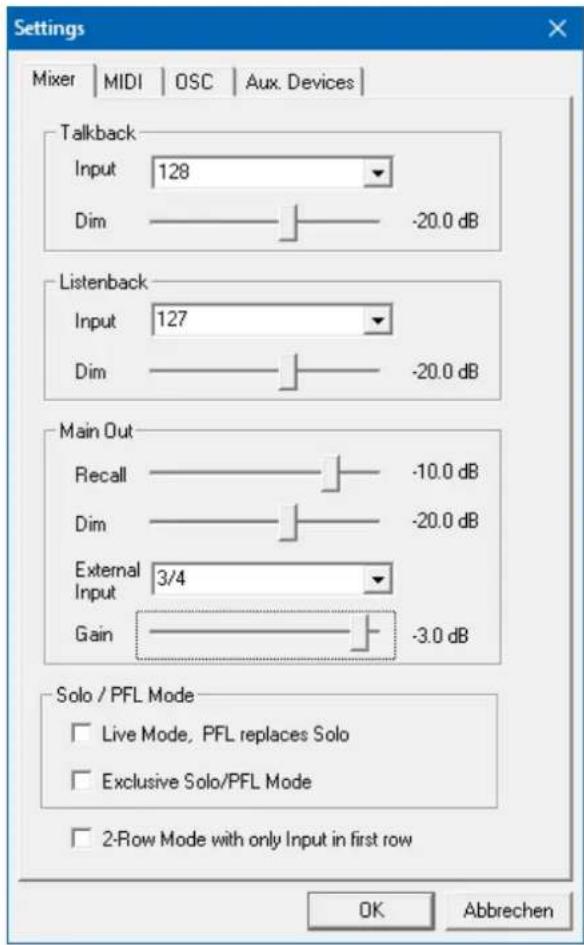
Solo/PFL Mode
Live Mode, PFL replaces Solo. PFL means Pre Fader Listening. This feature is very useful when operating TotalMix in a live environment, as it allows to quickly listen/monitor any of the inputs by hitting the Solo button. Monitoring happens on the output set for the Cue signal via the Assign dialog.
Exclusive Solo/PFL Mode. Only a single Solo or PFL can be active at a time. Activating a different one automatically deactivates the previous one.
2-Row Mode with only Input in first row. The Software Playback channels are shifted to the lower row, beside the Hardware Outputs.
18.7.2 MIDI Page
The MIDI page has four independent settings for up to four MIDI remote controls, using CC commands or the Mackie Control protocol.
Index
Select one of four settings pages and thus remote controls. Settings are remembered automatically. To activate or deactivate any of the four remote controls check or uncheck 'In Use'.
MIDI Remote Control
➢ MIDI In. Input where TotalMix receives MIDI Remote data.
➢ MIDI Out. Output where TotalMix sends MIDI Remote data.
➢ Disable MIDI in background. Deactivates MIDI Remote Control as soon as another application is in the focus, or when TotalMix has been minimized.
Mackie Control Options
Enable Protocol Support. When disabled TM FX will only react on the Control Change commands of chapter 21.5.
Extender to. Sets the current remote to be an extender to the main remote. Both remotes will be shown as one block and navigate simultaneously.
Map Stereo to 2 Mono Channels. One fader controls one (mono) channel. Should be disabled when stereo channels are used.
Submix Selection in Input/Playback Row. Enables a selection of the submix when in first row, without having to change to the third row first. However, when using both mono and stereo channels first and third row usually do not match anymore, so the selection often becomes unclear this way.
Enable full LCD support. Activates full Mackie Control LCD support with eight channel names and eight volume/pan values.
Send User defined Names. Channel names defined by the user will be sent to the remote device via MIDI and – if supported – shown in its display.
Send Level Messages. Activates the transmission of the level meter data. Peak Hold activates the peak hold function as set up for the TotalMix level meters in the preferences.
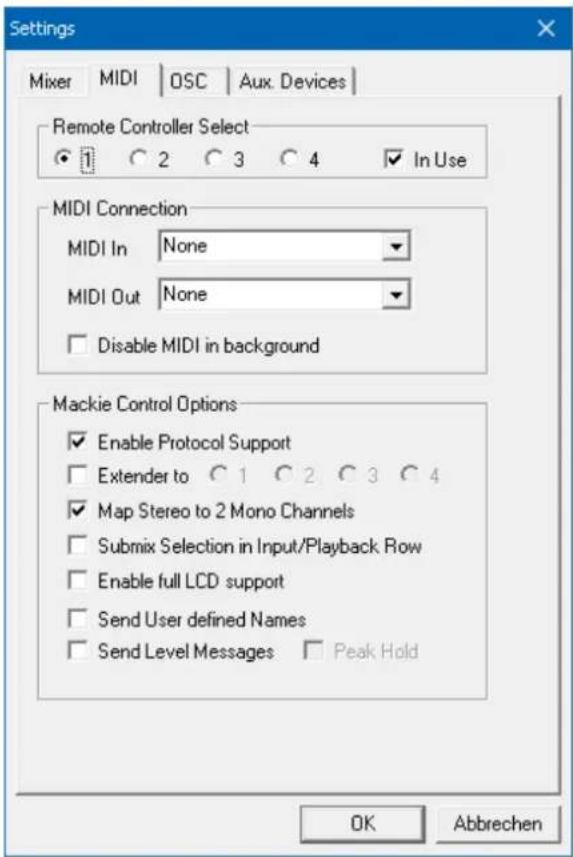
Note: When MIDI Out is set to NONE then TotalMix FX can still be controlled by Mackie Control MIDI commands, but the 8-channel block is not marked as remote target.
18.7.3 OSC Page
The OSC page has four independent settings for up to four MIDI remote controls via Open Sound Control (OSC). This is a network based remote protocol that can be used for example by Apple's iPad with the app TouchOSC or Lemur to wirelessly remote control TotalMix FX running on a Mac or Windows computer.
Index
Select one of four settings pages and thus remote controls. Settings are remembered automatically. To activate or deactivate any of the four remote controls check or uncheck 'In Use'.
TotalMix FX OSC Service
IP. Shows the network address of the computer running TotalMix FX (local host). This address must be entered on the remote side.
Host Name. Local computer name.
Port incoming. Must match the remote entry 'Port outgoing'. Typical values are 7001 or 8000.
Port outgoing. Must match the remote entry 'Port incoming'. Typical values are 9001 or 9000.
Remote Control
IP or Host name. Enter the IP or host name of the remote control. Please note that the IP number usually works better than the host name.
Options
- Send Peak Level. Activates the transmission of the peak level meter data. Peak Hold activates the peak hold function as set up for the TotalMix level meters in the preferences. - Lock Remote to submix. When activated the current remote control can only modify the submix selected from the drop-down list. This prevents havoc in multi-remote monitoring environments.
Number of faders per bank. Available choices are 8 (default), 12, 16, 24, 32 and 48. Note that when working in underperforming networks, especially wireless, a higher number of faders might not work as smooth as expected.
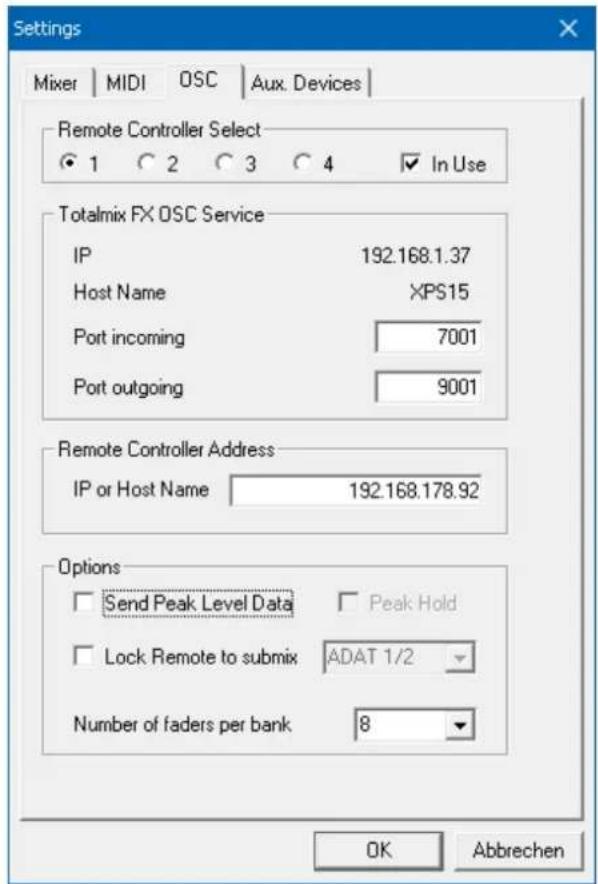
18.7.4 Aux Devices
This page integrates RME's OctaMic XTC into the local TotalMix FX. This feature is not available over network, and therefore not available with the Digiface AVB.
18.8 Hotkeys and Usage
TotalMix FX has many hotkeys and mouse/hotkey combinations to speed up and simplify the usage. The below description refers to Windows. On Mac substitute Ctrl in the below list with the command key (✗).
The Shift key enables a fine-tuning of the gain with all faders and in the Matrix. On all knobs it will speed up the setting.
A click on a fader with held down Shift key adds the fader to the temporary fader group.
A click in the fader path with held down Ctrl key will let the fader jump to 0 dB, at the next click to - . Same function: Double click of the mouse.
Clicking on one of the Panorama or Gain knobs with held down Ctrl key lets the knob jump to center position. Same function: Double click of the mouse.
Clicking on the Panorama knob with held down Shift key lets the knob jump to fully left, with Shift-Ctrl to fully right.
Clicking on one of the channel settings buttons (slim/normal, settings, EQ) with held down Ctrl key lets all channels to the right change their state. For example all panels can be opened/closed simultaneously.
A double click of the mouse on a knob or its numerical field opens the according Input Value dialog. The desired value can then be set by keyboard.
Dragging the mouse from a parameter field increases (move up) or decreases (move down) the value in the field.
Ctrl-N opens the dialog Function Select to open a new TotalMix window.
Ctrl-W opens the dialog File Open of the operating system to load a TotalMix Workspace file.
The key W starts the dialog Workspace Quick Select for a direct selection or storage of up to 30 Workspaces.
The key M switches the active window to Mixer view. The key X switches the active window to Matrix view. Ctrl-M opens a new Mixer window, Ctrl-X opens a new Matrix window. Another Ctrl-M or Ctrl-X closes the new window again.
F1 opens the online help. The Level Meter setup dialog can be opened with F2 (same as in DIGICheck). The dialog Preferences is opened with F3.
Alt-F4 closes the current window.
Alt and number keys 1 to 8 (not on the numeric keypad!) will load the corresponding Workspace from the Workspace Quick Select feature (hotkey W).
18.9 Menu Options
Deactivate Screensaver: When active (checked) any activated Windows screensaver will be disabled temporarily.
Always on Top: When active (checked) the TotalMix window will always be on top of the Windows desktop.
Note: This function may result in problems with windows containing help text, as the TotalMix window will even be on top of those windows, so the help text isn't readable.
Enable MIDI / OSC Control: Activates external MIDI control of the TotalMix mixer. In Mackie Protocol mode the channels which are currently under MIDI control are indicated by a colour change of the name field.
Submix linked to MIDI / OSC controller (1-4). The 8-channel group follows the currently selected submix, means Hardware Output, when a different submix is chosen on the remote as well as when doing this in TotalMix. When using multiple windows it can be useful to deactivate this feature for specific windows. The view will not change then.
Preferences: Opens a dialog to configure several functions of the level meters and the mixer. See chapter 18.6.
Settings. Opens a dialog to configure several functions like Talkback, Listenback, Main Out and MIDI Remote Control. See chapter 18.7.
Channel Layout. Opens a dialog to hide channels visually and from remote. See 18.5.3.
ARC & Key Commands. Opens a dialog to configure the programmable buttons of the optional ARC USB, and of the computer's keyboard keys F4 to F8.
Reset Mix. Offers several options to reset the mixer state:
Straight playback with all to Main Out. All Playback channels are routed 1:1 to the Hardware Outputs. Simultaneously all playbacks are mixed down to the Main Out. The faders in the third row are not changed.
Straight Playback. All Playback channels are routed 1:1 to the Hardware outputs. The faders in the third row are not changed.
➢ Clear all submixes. Deletes all submixes.
➢ Clear channel effects. Not valid for the Digiface AVB.
➢ Set output volumes. All third row faders are set to 0 dB, Main and Speaker B to -10 dB.
➢ Reset channel names. Removes all names assigned by the user.
Set all channels mono. Reconfigures all TotalMix FX channels to mono mode.
➢ Set all channels stereo. Reconfigures all TotalMix FX channels to stereo mode.
Set inputs mono / outputs stereo (ADM). Preferred setup for best ASIO Direct Monitoring compatibility. In most cases mono hardware outputs will break ADM. Mono inputs are in most cases compatible. If not wrong panning might occur.
Total Reset. Playback routing 1:1 with mixdown to Main Out. Switches off all other functions.
Operational Mode. Defines TotalMix FX basic operational mode. Choices are Full Mode (default, mixer active, all routing options available), and Digital Audio Workstation Mode (straight playback routing, no input mix). See chapter 22 for details.
Network Remote Settings. Settings to remote control TotalMix FX by TotalMix Remote via network. See chapter 23.
18.10 Menu Window
Zoom Options 100%, 135%, 200%, 270%. Depending on the size of the monitor and the current resolution TotalMix FX might be much too small and the controls too tiny to easily operate them. Together with the 2 Row mode these options give a lot of different window sizes that suit all monitors and resolutions currently existing.
Hide Control Strip. Shifts the Control Strip out of the visible area to gain more space for other elements.
19. The Matrix
19.1 Overview
The mixer window of TotalMix looks and operates similar to mixing desks, as it is based on a conventional stereo design. The matrix display presents a different method of assigning and routing channels, based on a single channel or monaural design. The matrix view of the Digiface AVB has the look and works like a conventional patchbay, adding functionality way beyond comparable hardware and software solutions. While most patchbays will allow you to connect inputs to outputs with just the original level (1:1, or 0 dB, as known from mechanical patchbays), TotalMix allows you to use a freely definable gain value per crosspoint.
Matrix and TotalMix are different ways of displaying the same processes. Therefore both views are always synchronized. A change in one view is immediately reflected in the other view.
19.2 Elements of the Matrix View
➢ Horizontal labels. All hardware outputs
Vertical labels. All hardware inputs. Below are all playback channels.
➢ Green 0.0 dB field. Standard 1:1 routing
Dark grey field with number. Shows the current gain value as dB
Blue field. This routing is muted
➢ Red field. Phase 180° (inverted)
Dark grey field. No routing.
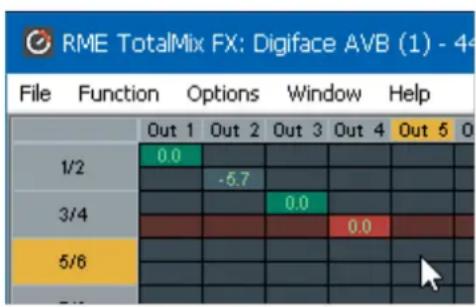
To maintain overview when the window size has been reduced, the labels are floating. They won't leave the visible area when scrolling.
A right mouse click on the labels brings up the context menu with the same options as in the mixer view: Copy / Mirror / Paste / Clear input channels and submixes.
19.3 Operation
Using the Matrix is a breeze. It is very easy to identify the current crosspoint, because the outer labels light up in orange according to the mouse position.
If input 1 is to be routed to output 1, use the mouse and click one time on crosspoint In 1 / Out 1 with held down Ctrl key. Two green 0.0 dB field pop in, another click removes them.
To change the gain (equals the use of a different fader position, see simultaneous display of the mixer view), drag the mouse up or down, starting from the gain field. The value within the field changes accordingly. The corresponding fader in the mixer view is moving simultaneously, in case the currently modified routing is visible.
On the right side is the Control Strip from the mixer window, adapted to the Matrix. The button for the temporary fader group is missing as well as all View options, as they don't make sense here. Instead the button Mono Mode lets you decide whether all the actions performed in the Matrix are valid for two channels or just one.
The Matrix not always replaces the mixer view, but it significantly enhances the routing capabilities and - more important - is a brilliant way to get a fast overview of all active routings. It shows you in a glance what's going on. And since the Matrix can operate monaural, it is very easy to set up specific routings with specific gains.
20. Tips and Tricks
20.1 ASIO Direct Monitoring (Windows)
Programs that support ADM (ASIO Direct Monitoring - Samplitude, Sequoia, Cubase, Nuendo etc.) send control commands to TotalMix. This is directly shown by TotalMix. When a fader is moved in the ASIO host the corresponding fader in TotalMix will move too. TotalMix reflects all ADM gain and pan changes in real-time.
But: the faders only move when the currently activated routing (the selected submix) corresponds to the routing in the ASIO host. The Matrix on the other hand will show any change, as it shows all possible routings in one view. For best ADM compatibility use mono inputs and stereo outputs. This setup can be activated globally under Options, Reset Mix.
20.2 Copy a Submix
TotalMix allows you to copy complete submixes to other outputs. In case a complex submix is needed with only a few changes on a different output, the whole submix can be copied to that output. Right click with the mouse on the original submix output (Hardware Output). In the context menu select Copy Submix. Then right click on the new submix output, choose Paste Submix in the context menu. Now fine tune the submix.
20.3 Doubling the Output Signal (Mirror)
If a mix should be sent out via two (or more) different hardware outputs simply mirror that mix to any number of other outputs. A right click on the original output brings up the option to Copy/Mirror
20.4 Delete a Submix
The easiest and quickest way to delete complex routings is by selection of the according output channel in the mixer view by a right mouse click, and selection of Clear Submix. As TotalMix FX includes an unlimited undo the delete process can be undone without any problem.
20.5 Copy and Paste everywhere
The above three tips use functions found in the right click context menu available on all channels of the TotalMix FX mixer view. These menus are also available in the Matrix, but only directly on the channel labels. They are self-explanatory and automatically adjust to where the click is performed. The input channels offer Clear, Copy input and Paste the input mix. On a playback channel Copy, Paste and Clear the playback mix are available. On an output channel Copy and Mirror functionality for the current submix is offered.
These options are very advanced and mighty tools to quickly do the impossible. Still there is no need to fear breaking something, as a simple click (or several) on the Undo button will get you back to where you started!
20.6 Recording a Submix - Loopback
TotalMix includes an internal loopback function, from the Hardware Outputs to the recording software. Instead of the signal at the hardware input, the signal at the hardware output is sent to the record software. This way, submixes can be recorded without an external loopback cable. Also the playback from a software can be recorded by another software.
The function is activated by the Loopback button in the Settings panel of the Hardware Outputs. In loopback mode, the signal at the hardware input of the corresponding channel is no longer sent to the recording software, but still passed through to TotalMix. Therefore TotalMix can be used to route this input signal to any hardware output. Using the subgroup recording, the input can still be recorded on a different channel.
As each of the 64 stereo hardware outputs can be routed to the record software, and none of these hardware inputs get lost, TotalMix offers an overall flexibility and performance not rivalled by any other solution.
The risk of feedbacks, a basic problem of loopback methods, is low, because the feedback can not happen within the mixer, only when the audio software is switched into monitoring mode.
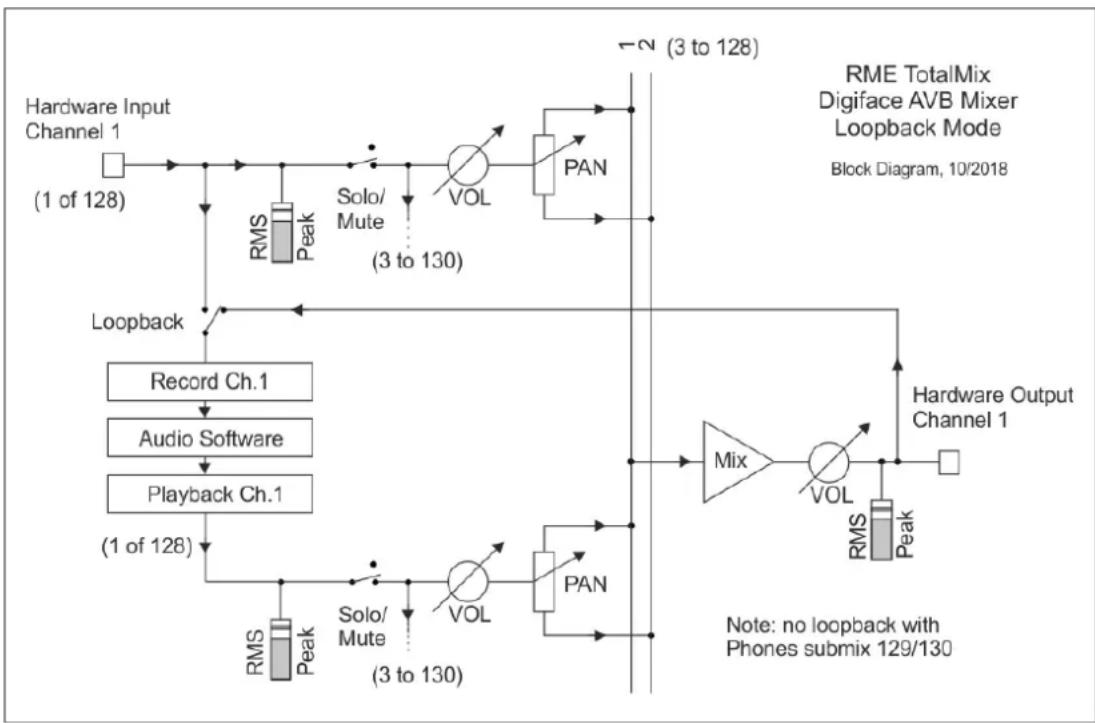
flowchart
graph TD
    A["Hardware Input Channel 1 (1 of 128)"] --> B["RMS Peak"]
    B --> C["Solo/Mute (3 to 130)"]
    C --> D["VOL"]
    D --> E["PAN"]
    E --> F["Record Ch.1"]
    F --> G["Audio Software"]
    G --> H["Playback Ch.1 (1 of 128)"]
    H --> I["RMS Peak"]
    I --> J["Solo/Mute (3 to 130)"]
    J --> K["VOL"]
    K --> L["PAN"]
    L --> M["Mix"]
    M --> N["VOL"]
    N --> O["RMS Peak"]
    O --> P["Hardware Output Channel 1"]
    style A fill:#f9f,stroke:#333
    style P fill:#f9f,stroke:#333
The block diagram shows how the software's input signal is played back, and fed back from the Hardware Output to the software input.
Recording a Software's playback
In real world application, recording a software's output with another software will show the following problem: The record software tries to open the same playback channel as the playback software (already active), or the playback one has already opened the input channel which should be used by the record software.
This problem can easily be solved. First make sure that all rules for proper multi-client operation are met (not using the same record/playback channels in both programs). Then route the play-back signal via TotalMix to a hardware output in the range of the record software, and activate Loopback for recording.
Mixing several input signals into one record channel
In some cases it is useful to record several sources into only one track. For example when using two microphones recording instruments and loudspeakers, TotalMix' Loopback mode saves an external mixing desk. Simply route/mix the input signals to the same output (third row), then redefine this output into a record channel via Loopback. This way any number of input channels from different sources can be recorded into one single track.
20.7 MS Processing
The mid/side principle is a special positioning technique for microphones, which results in a mid signal on one channel and a side signal on the other channel. These information can be transformed back into a stereo signal quite easily. The process sends the monaural mid channel to left and right, the side channel too, but phase inverted (180°) to the right channel. For a better understanding: the mid channel represents the function L+R, while the side channel represents
L-R.
During record the monitoring needs to be done in 'conventional' stereo. Therefore TotalMix also offers the functionality of a M/S-decoder. Activation is done in the Settings panel of the Hardware Input and Software Playback channels via the MS Proc button.
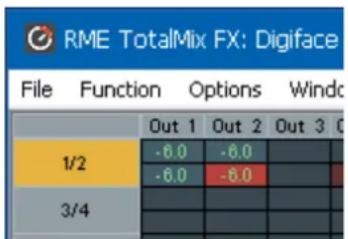
The M/S-Processing automatically operates as M/S encoder or decoder, depending on the source signal format. When processing a usual stereo signal, all monaural information will be shifted into the left channel, all stereo information into the right channel. Thus the stereo signal is M/S encoded. This yields some interesting insights into the mono/stereo contents of modern music productions. Additionally some very interesting methods of manipulating the stereo base and generating stereo effects come up, as it is then very easy to process the side channel with Low Cut, Expander, Compressor or Delay.
The most basic application is the manipulation of the stereo width: a change of the level of the side channel allows to manipulate the stereo width from mono to stereo up to extended.
21. MIDI Remote Control
21.1 Overview
TotalMix can be remote controlled via MIDI. It is compatible to the widely spread Mackie Control protocol, so TotalMix can be controlled with all hardware controllers supporting this standard. Examples are the Mackie Control, Tascam US-2400 or Behringer BCF 2000.
Additionally, the stereo output faders (lowest row) which are set up as Main Out in the Control Room section can also be controlled by the standard Control Change Volume via MIDI channel 1. With this, the main volume of the Digiface AVB is controllable from nearly any MIDI equipped hardware device.
MIDI Remote Control always operates in View Submix mode, even when the View Option Free is currently selected in TotalMix FX.
21.2 Mapping
TotalMix supports the following Mackie Control surface elements*:
Element: Meaning in TotalMix:
Channel faders 1 – 8 volume
Master fader Main Monitor channel's faders
V-Pots 1 - 8 pan
pressing V-Pot knobs pan = center
CHANNEL LEFT or REWIND move one channel left
CHANNEL RIGHT or FAST FORWARD move one channel right
BANK LEFT or ARROW LEFT move eight channels left
BANK RIGHT or ARROW RIGHT move eight channels right
ARROW UP or Assignable1/PAGE+ move one row up
ARROW DOWN or Assignable2/PAGE- move one row down
EQ Master Mute
PLUGINS/INSERT Master Solo
STOP Dim Main Out
PLAY Talkback
PAN Mono Main Out
FLIP Speaker B
DYN/INSTRUMENT TrimGains
MUTE Ch. 1 – 8 Mute
SOLO Ch. 1 – 8 Solo
SELECT Ch. 1 - 8 Select
REC Ch. 1 – 8 select output bus (Submix)
RECORD Recall
F1 - F8 load Snapshot 1 - 8
F9 select Main Out
F10 - F11 select Cue Phones 1 - 2
*Tested with Behringer BCF2000 Firmware v1.07 in Mackie Control emulation for Steinberg mode and with Mackie Control under Mac OS X.
21.3 Setup
Open the Preferences dialog (menu Options or F3). Select the MIDI Input and MIDI Output port where your controller is connected to.
When no feedback is needed select NONE as MIDI Output.
Check Enable MIDI Control in the Options menu.
21.4 Operation
The channels being under Mackie MIDI control are indicated by a colour change of the name field, black turns to brown.
The 8-fader block can be moved horizontally and vertically, in steps of one or eight channels.
In Submix View mode, the current routing destination (output bus) can be selected via REC Ch. 1 – 8. This equals the selection of a different output channel in the lowest row by a mouse click when in Submix View. In MIDI operation it is not necessary to jump to the lowest row to perform this selection. This way even the routing can be easily changed via MIDI.
Full LC Display Support: This option in Preferences (F3) activates complete Mackie Control LCD support with eight channel names and eight volume/pan values. When Full LC Display Support is turned off, a brief information about the first fader of the block (channel and row) is sent. This brief information is also available on the LED display of the Behringer BCF2000.
Disable MIDI in Background (menu Options, Settings) disables the MIDI control as soon as another application is in the focus, or in case TotalMix has been minimized. This way the hardware controller will control the main DAW application only, except when TotalMix is in the foreground. Often the DAW application can be set to become inactive in background too, so that MIDI control is switched between TotalMix and the application automatically when switching between both applications.
TotalMix also supports the 9th fader of the Mackie Control. This fader (labelled Master) will control the stereo output fader (lowest row) which is set up as Main Out in the Control Room section.
Extender support (Settings, tab MIDI) enables the use of the special Extender mixing desk, but also the addition of any other Mackie compatible remote. Setting the main remote as number 2 and the extender as number 1 will cause the extender to be on the left side. Using this function the remotes will be shown as one fader block and navigate as one.
21.5 MIDI Control
The hardware output set up as Main Out can be controlled by the standard Control Change Volume via MIDI channel 1. With this, the main volume of the Digiface AVB is controllable from nearly any MIDI equipped hardware device.
Even if you don't want to control all faders and pans, some buttons are highly desirable to be available in 'hardware'. These are mainly the Talkback and the Dim button, and the monitoring options (listen to Phones submixes). Fortunately a Mackie Control compatible controller is not required to control these buttons, as they are steered by simple Note On/Off commands on MIDI channel 1.
The notes are (hex / decimal / keys):
Dim: 5D / 93 / A6
Mono: 2A / 42 / #F 2
Talkback: 5E / 94 / #A 6
Recall: 5F / 95 / H 6
Speaker B: 32 / 50 / D3
Cue Main Out: 3E / 62 / D 4
Cue Phones 1: 3F / 63 / #D 4
Cue Phones 2: 40 / 64 / E 4
Snapshot 1: 36 / 54 / #F 3
Snapshot 2: 37 / 55 / G 3
Snapshot 3: 38 / 56 / #G 3
Snapshot 4: 39 / 57 / A 3
Snapshot 5: 3A / 58 / #A 3
Snapshot 6: 3B / 59 / B 3
Snapshot 7: 3C / 60 / C 4
Snapshot 8: 3D / 61 / #C 4
Trim Gains: 2D / 45 / A 2
Master Mute: 2C / 44 / #G2
Master Solo: 2B / 43 / G2
Furthermore all faders of all three rows can be controlled via simple Control Change commands. The format for the Control Change commands is:
Bx yy zz
x = MIDI channel
yy = control number
zz = value
The first row in TotalMix is addressed by MIDI channels 1 up to 4, the middle row by channels 5 up to 8 and the bottom row by channels 9 up to 12.
16 Controller numbers are used: 102 up to 117 (= hex 66 to 75). With these 16 Controllers (= faders) and 4 MIDI channels each per row, up to 64 faders can be controlled per row.
Examples for sending MIDI strings:
- Set input 1 to 0 dB: B0 66 68
- Set input 5 to maximum attenuation: B1 6A 0
- Set playback 1 to maximum: B4 66 7F
- Set Output 3 to 0 dB: B8 68 68
Note: Sending MIDI strings requires the use of programmer's logic for the MIDI channel, starting with 0 for channel 1 and ending with 15 for channel 16.
Further functions:
- Trim Gains On: BC 66 xx (BC = MIDI channel 13, xx = any value)
- Trim Gains Off: BC 66 xx or select a submix
Select submix (fader) in third row:
- channel 1/2: BC 68/69 xx
- channel 3/4: BC 6A/6B xx etc.
21.6 Loopback Detection
The Mackie Control protocol requires feedback of the received commands, back to the hardware controller. So usually TotalMix will be set up with both a MIDI input and MIDI output. Unfortunately any small error in wiring and setup will cause a MIDI feedback loop here, which then completely blocks the computer (the CPU).
To prevent the computer from freezing, TotalMix sends a special MIDI note every 0.5 seconds to its MIDI output. As soon as it detects this special note at the input, the MIDI functionality is disabled. After fixing the loopback, check Enable MIDI Control under Options to reactivate the TotalMix MIDI.
21.7 OSC (Open Sound Control)
Besides simple MIDI notes, the Mackie Protocol and Control Change commands, TotalMix FX can also be controlled by the Open Sound Control, OSC. For details on setup and usage see chapter 18.7.3.
An OSC implementation chart can be downloaded from the RME website:
http://www.rme-audio.de/downloads/osc_table_totalmix_new.zip
RME offers an iPad template for the iOS app TouchOSC (by Hexler, available in the Apple App-Store):
http://www.rme-audio.de/downloads/tosc_tm_ipad_template.zip
The RME forum hosts further information, templates (iPhone...) and useful user feedback.
22. DAW Mode
Users that work exclusively with their DAW software, and don't want to use TotalMix FX for additional routing tasks, need a way to be sure that TotalMix FX currently doesn't change the DAW's routing. While Reset Mix can do so, those users would be better served with a very simple surface that offers the interface's hardware controls (gain, phantom control, instrument...), but guarantees a straight 1:1 routing for all playback channels, and has no hardware monitoring of the input channels (which is then done by the DAW software).
For such cases TotalMix FX includes an alternative operating mode. It can be booted into the so called DAW mode. This simplified interface is for anyone performing all monitoring and routing within the DAW. The DAW mode restarts TM FX into a light version with just two rows, no playback row, and no mixing faders in the input row. Routing is 1:1 only. Just the hardware controls (if existing) and hardware output levels are available.
To change the current mode go to the menu, Options, and click on Operational Mode. Choices are Full Mode (default, mixer active, all routing options available), and Digital Audio Workstation Mode (straight playback routing, no input mix).
Several useful, advanced features are still available in TotalMix FX in DAW mode:
▶ Talkback, External Input
➢ Phones definition and handling with Talkback
➢ Speaker A / B
Mute and Solo
➢ Cue / PFL
23. TotalMix Remote
TotalMix Remote is a remote control for TotalMix FX v1.50 and up, to control the hardware mixer and effects in RME audio interfaces. TotalMix Remote mirrors the current state of the host system on the iPad and Windows/Mac computers - the entire mixing state, the complete routing, all FX settings, up to the level meters, and everything in real-time. TotalMix Remote supports up to three hosts with multiple interfaces each, allowing Apple's popular iPad and Windows/Mac computers to adjust all the mixer and FX settings from a distance, via Ethernet and WiFi.
Supported Hardware
TotalMix Remote communicates with TotalMix FX 1.50 or up. Any RME hardware that can be used with TotalMix FX is supported automatically.
Quick Start
On the host (the computer with the connected audio interface) go to the TotalMix FX menu Options, Network Remote Settings. Click Enable TotalMix Remote Server to start this service. Under Windows a Firewall warning will come up. Allow TotalMix FX or it won't work. This dialog also shows the host's IP, like 192.168.1.45.
Make sure both host and remote computer / iPad reside in the same network. Start TotalMix Remote on the remote computer / iPad (not on the host!). On the iPad, tap on the gear symbol in the upper right corner, then on Host Connection Settings. On Windows / Mac either the dialog comes up automatically or can be called from the Search Connected Hosts dialog. Type in the host's IP address (like 192.168.1.45) into the IP field of Host Connection 1, and make sure it is activated. The port defaults to 7009 and usually must not be changed. In case this port is unexpectedly occupied a warning message will be issued. Choose a different port then. Under Windows a Firewall warning will come up. Allow TotalMix Remote or it won't work.
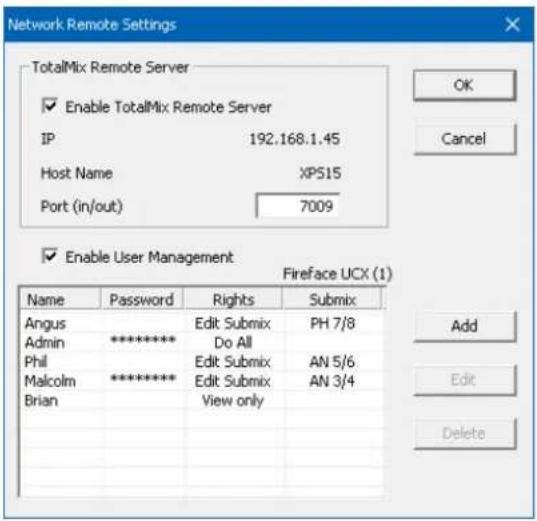
Tap Done on top or click Ok. In the mixer view the state should change from offline to connected within a few seconds.
The Add button provides access to the user-management that can be configured in detail. Here users can be defined, with and without a password, and the rights can be assigned to viewing only, changing a specific sub-mix, or full access. For example, using Total-Mix FX as a monitor controller for all band members, user-management prevents the bassist from changing the guitarist's monitor mix. Or the drummer making himself too loud. Etc.
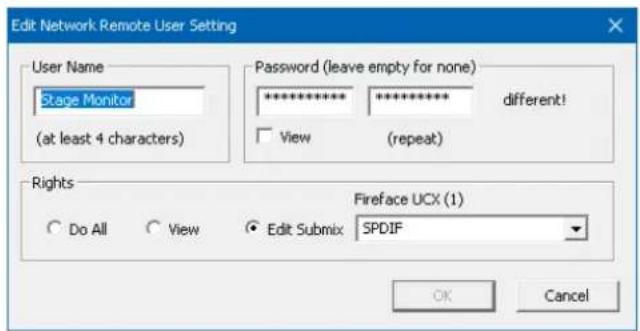
Tip
The remotes have the option Sync Channel Layouts active as default (in Preferences). This option transfers the Layout Presets and the current Channel Layout state from host to remote. Apart from the channel width state this option makes a mirror-style setup most easy. But when using the remote as individual setup, make sure to disable this option to have independent Layout Presets on the remote.
Limitations
- Mixer View & GUI. When connected the remote computer / iPad will immediately have the complete routing and FX settings of the host, including mono and stereo channels, but not the host's GUI setup, like panel states open/closed of Settings/EQ/Dynamic, FX panel visibility, 2-Row or 3-Row mode and channel width. Channel width states can be stored as usual per Snapshot and completely as Workspace, locally on the remote computer. They need to be loaded manually after loading a Workspace on the host in case a 100% identical view is required.
- Workspaces. The Remote shows the Quick Workspaces (hotkey W on Windows/Mac) stored on the host, and allows to remotely load them. It is not possible to save complete Workspaces with mixer state from the Remote, or on the Remote. The Workspaces saved locally include GUI information only (Channel state wide/narrow, Channel Layouts, window size and position) and further local settings, to be able to have personalized views on the remote computer, independent from the view on the host.
• Real-time behaviour. Can suffer when the network is overloaded or the WiFi reception is insufficient. Level Meters will stutter then and faders do not move smoothly. - Background operation on iPad - is not possible. This should not be a problem as the Remote doesn't need to do anything in background, and when called up very quickly reconnects and synchronizes its state.
- State. Is shown in the upper right corner (offline or connected), or the Mac/Windows title bar.
Downloads
Remote Windows http://www.rme-audio.de/download/tmfx_win_remote.zip
Remote Mac http://www.rme-audio.de/download/tmfx_mac_remote.zip
iPad From the Apple App Store, search for 'TotalMix Remote'. This app is free.
User's Guide

INTELLIGENT AUDIO SOLUTIONS
Digiface AVB
▶ Miscellaneous
24. Technical Specifications
Gigabit Ethernet Port
• RJ45
• 100 Mbit/s, 1 Gbit/s
- Standard port LEDs: yellow connected, green data transmission
• Supports straight and crossover cables (Auto MDI-X)
- Up to 16 AVB audio streams
• AVDECC based exchange of status and control data
• Network-based remote control of the unit (TotalMix Remote)
Word Clock In
• BNC, not terminated (10 kOhm)
- Switchable internal termination 75 Ohm
• Automatic Double/Quad Speed detection and conversion to Single Speed
Word Clock Out
• BNC
- Max level: 5 Vss
• Level with termination 75 Ohm: 4.0 Vss
• Internal impedance: 10 Ohm
Output Analog Phones 33/34
• Dynamic range (DR): 110 dB RMS unweighted, 113 dBA
• Frequency response @ 44.1 kHz, -0.5 dB: 0 Hz – 20.8 kHz
- Frequency response @ 96 kHz, -0.5 dB: 0 Hz – 45 kHz
• Frequency response @ 192 kHz, -1 dB: 0 Hz - 89 kHz
• THD @ -1 dBFS: - 96 dB, 0.0016 %
• THD+N @ -1 dBFS: -95 dB, 0.0017 %
• Channel separation: > 100 dB
• Output: 6.3 mm TRS jack, unbalanced
• Output impedance: 2 Ohm
• Output level at 0 dBFS, 1 kOhm load: +9.5 dBu
• Max power @ 0.1% THD: 50 mW
Digital
- Clocks: Internal, AVB, Word
• Supported sample rates: 44.1 kHz up to 192 kHz
General
• Power supply: USB bus power
• Typical power consumption: 1.5 Watts
• Current at 5 V bus power operation: 300 mA
• Max power consumption: 2 Watts (400 mA)
- Dimensions (WxHxD): 112 x 26 x 83 mm (4.41" x 1.02" x 3.27")
• Weight: 300 g (0.49 lbs)
• Temperature range: +5° up to +50° Celsius (41°F up to 122°F)
• Relative humidity: < 75%, non condensing
25. Technical Background
25.1 USB Audio
USB audio is in several ways different from PCI based audio interfaces. Thanks to the high speed of USB 3, typical problems of streamed (isochronous) data transmission can be circumvented. RME's proprietary USB 3 technology makes it possible to achieve performance similar to PCI Express, IF all participating components work perfectly. At this time USB 3 has got a bad reputation because many layouts, cables and connectors are designed badly and lower the maximum throughput. Typical problems are not or randomly detected devices, devices that fail as soon as data is transmitted, transmission errors and following (as required by the USB 3 standard) the reset of the host controller, guaranteeing a drop out for several seconds.
It is therefore not possible to guarantee reliable and highest performance of USB 3 operation with any computer and cable just because they claim to support USB 3. The real performance has to be evaluated on a per USB 3 port (!) and per cable base.
To make this as easy as possible, and to quickly signal problems, RME added an extensive error detection and analysis into the Digiface AVB hardware, detecting errors during transmission via USB 2 and 3, and displaying them in the Settings dialog. Additionally the Digiface AVB provides a special mechanism to continue recording and playback in case of drop-outs, and to correct the sample position in real-time.
While some errors shown here might not cause audible clicks and do not stop record/playback, the golden rule applies: only zero errors are acceptable. If errors show up use a different USB 3 port and exchange the USB 3 cable. Never use simple USB 3 cable extensions!
USB Diagnosis 0|60|0 0 crc5/16, 0 crc32 err / 0.5 min
Current Digiface USB 3 Compatibility Information
Fully compatible to Intel's USB 3 implementation which - on current Windows and Mac computers - is part of the chipset. USB 3 sockets that are connected via an internal cable (not directly soldered onto the motherboard) can cause transmission errors (these are shown in the Settings dialog).
Fully compatible to AMD's USB 3 implementation. USB 3 sockets that are connected via an internal cable (not directly soldered onto the motherboard) can cause transmission errors (shown in the Settings dialog).
Compatible to NEC / Renesas USB 3. Real-world performance and error-free operation depend on the firmware version, driver version and the PCB layout of the respective extension card/motherboard.
➢ Fully compatible to Fresco USB 3 chip.
➢ Fully compatible to Via VL912, very often used in USB 3 hubs
ASMedia - not compatible
➢ Etron EJ168A - not compatible
Texas TUSB7340 - not compatible
Via VL800/805 - not compatible
The Digiface AVB is capable of using two different transmission modes to record data. The Digiface AVB defaults to Bulk Mode, which improves reliability of USB 3 audio tremendously and helps with both less than perfect cabling as well as critical layouts around the USB 3 chip. The standard's default is Isochronous Streaming, which is unreliable as per the standard (errors are to be expected!), unreliable in real-world operation, and not correctly supported by popular USB 3 chips. In very seldom cases, bulk mode can not keep up with the strict timing required for continuous audio streaming. Then, to make the Digiface AVB work at all, isochronous mode must be used (but is still prone to clicks and drop-outs). To make the standard mode available as reference the Settings dialog includes an option to activate Isochronous Streaming.
The Digiface AVB also supports USB 2, where the number of record and playback channels are halfed due to the limited bandwidth (up to 48 kHz: 64 channels, up to 96 kHz: 32 channels, up to 192 kHz: 16 channels). The number of channels accessible via TotalMix FX, the network ins and outs, stays identical to USB 3 operation. Good performance and click-free operation even at low buffer sizes are indeed possible on current computers. However, using older computers a simple stereo playback might cause a CPU load of more than 30%.
Best USB 2 performance is achieved by connecting the Digiface AVB to its own bus, which should be no big problem as most USB 2.0 interfaces are a double bus design. A check in the Device Manager can be done as follows:
Connect the Digiface AVB to a USB 2 port
➢ Start the Device Manager, View set to Devices by Connection
Select ACPI x86-based PC, Microsoft ACPI-Compliant System, expand PCI Bus
This branch normally includes two entries of a USB2 Enhanced Host Controller. A USB Root Hub can be seen, which then connects all USB devices, including the Digiface AVB. By reconnecting to a different port this view shows at which of the two controllers the Digiface AVB is connected. With multiple devices it can be checked if they are connected to the same controller.
Furthermore this information can be used to operate an external USB drive without disturbing the Digiface AVB, by simply connecting the drive to the other controller.
It can also be used to check where and in what combination USB 3 is used. In fact many modern motherboards have an additional chip to the mostly found Intel chipset, adding further USB 3 ports. But documentation is often unclear about which port/socket is connected to which chip. By connecting the Digiface AVB and using the procedure above one can easily see the current connection, ensuring the Digiface AVB is really connected to the Intel chipset and not to some other flaky one.
Especially with notebooks it can happen that all internal devices and all the sockets/ports are connected to the same controller, with the second controller not used at all. In that case all devices have to use the same bus and will interfere with each other.
A computer blocked for a short time – no matter if ASIO or WDM – will lose one or more data packets. Such problems can only be solved by increasing the buffer size (latency).
25.2 AVB Network Latency
All devices in an AVB network share the same time. This allows the sending device (talker) to specify the precise point of time when its audio samples should be played out at the receiver side (listener). This is achieved by adding an offset to the current time and sending the resulting timestamp with each sample transmitted. The timestamp is called "presentation time" and has nanosecond precision. For comparison, a single 48 kHz sample equals 20833 ns.
The receiver compares the incoming presentation time of each sample to the current time and buffers the sample until the presentation time is has come. The offset (maximum transit time) is specified by the AVB standard as 2 ms for class A traffic, which is enough time for the signal to pass through a very large network under full load with up to seven 100 MBit/s switches along the way. By default, most AVB products will use this offset. In smaller networks with less hops or 1 GBit/s link speed, the offset can be adjusted to lower values, such as 0.3 ms, 0.6 ms or 1 ms. In the event that the chosen offset is too low, the listener detects that the requested presentation time has already passed and the audio data is discarded.
The Digiface AVB acts both as a talker with an adjustable offset of 2 ms down to 0.3 ms, and as a listener - where the latency depends on the talker.
In AVB networks, the latency is always specified by the talker and guaranteed by the listener - with nanosecond accuracy. This behaviour is plug & play and does not require any user interaction or monitoring.
Due to the large number of possible listeners and talkers in a network, it is usually not possible under AVB to speak of typical network latency. Rather, depending on the configuration of the individual devices, their current presentation time, and the usually not included AD/DA conversion delay, a large number of possible latencies occur, depending on which device communicates with which one and where the data is fed in and out.
For the maximum presentation time of 2 ms a maximum value of 5 ms can be assumed, including AD/DA conversion. With a setting of 0.625 ms and current low latency converters 1.5 ms can be reached, for the complete path Analog In -> Network -> Analog Out.
26. Warranty
Each individual Digiface AVB undergoes comprehensive quality control and a complete test at IMM before shipping. The usage of high grade components should guarantee a long and trouble-free operation of the unit.
If you suspect that your product is faulty, please contact your local retailer. Do not open the device by yourself as it may get damaged. It has been sealed with tamper-evident material, and your warranty is void if those seals have been damaged.
Audio AG grants a limited manufacturer warranty of 6 months from the day of invoice showing the date of sale. The length of the warranty period is different per country. Please contact your local distributor for extended warranty information and service. Note that each country may have regional specific warranty implications.
In any case warranty does not cover damage caused by improper installation or maltreatment - replacement or repair in such cases can only be carried out at the owner's expense.
No warranty service is provided when the product is not returned to the local distributor in the region where the product had been originally shipped.
Audio AG does not accept claims for damages of any kind, especially consequential damage. Liability is limited to the value of the Digiface AVB. The general terms of business drawn up by Audio AG apply at all times.
27. Appendix
RME news, driver updates and further product information are available on our website:
https://www.rme-audio.com
Worldwide distribution: Audio AG, Am Pfanderling 60, D-85778 Haimhausen, Tel.: (49) 08133 / 918170
Support via e-mail: support@rme-audio.com
List of international supporters: https://www.rme-audio.de/support.html
RME user forum: https://forum.rme-audio.de
Manufacturer: IMM electronics GmbH, Leipziger Strasse 32, D-09648 Mittweida
Trademarks
All trademarks, registered or otherwise, are the property of their respective owners. RME, DIGICheck and Hammerfall are registered trademarks of RME Intelligent Audio Solutions. SyncCheck, ZLM, DIGI96, SyncAlign, TMS, TotalMix, SteadyClock and Digiface AVB are trademarks of RME Intelligent Audio Solutions. Alesis and ADAT are registered trademarks of Alesis Corp. ADAT optical is a trademark of Alesis Corp. Microsoft, Windows XP/ Vista/7/8 are registered trademarks or trademarks of Microsoft Corp. Apple, iPad and Mac OS are registered trademarks of Apple Inc. Steinberg, Cubase and VST are registered trademarks of Steinberg Media Technologies GmbH. ASIO is a trademark of Steinberg Media Technologies GmbH.
Copyright © Matthias Carstens, 01/2021. Version 1.41
Current driver version: Win: 0.9734 & 0.9544, Mac OS X: 3.19 & 0.9544. Firmware 219. TotalMix FX: 1.67
Although the contents of this User's Guide have been thoroughly checked for errors, RME can not guarantee that it is correct throughout. RME does not accept responsibility for any misleading or incorrect information within this guide. Lending or copying any part of the guide or the RME Driver CD, or any commercial exploitation of these media without express written permission from RME Intelligent Audio Solutions is prohibited. RME reserves the right to change specifications at any time without notice.
Note on Disposal
According to the guide line RL2012/19/EU (WEEE – Directive on Waste Electrical and Electronic Equipment), valid for all european countries, this product has to be recycled at the end of its lifetime.
In case a disposal of electronic waste is not possible, the recycling can also be done by IMM electronics GmbH, the manufacturer of the Digiface AVB.
For this the device has to be sent free to the door to:

natural_image
Symbol of a trash bin crossed with two diagonal lines, representing no waste or restriction (no text or labels)IMM electronics GmbH
Leipziger Straße 32
D-09648 Mittweida
Germany

Shipments not prepaid will be rejected and returned on the original sender's costs.
28. Declaration of Conformity
CE
This device has been tested and found to comply with the limits of the European Council Directive on the approximation of the laws of the member states relating to electromagnetic compatibility according to RL2014/30/EU, and European Low Voltage Directive RL2014/35/EU.
FCC
This device complies with Part 15 of the FCC Rules. Operation is subject to the following two conditions: (1) This device may not cause harmful interference, and (2) This device must accept any interference received, including interference that may cause undesired operation.
Warning: Changes or modifications to this unit not expressly approved by the party responsible for compliance could void the user's authority to operate the equipment.
Responsible Party in USA:
Synthax United States, 6600 NW 16th Street, Suite 10, Ft Lauderdale, FL 33313 T.:754.206.4220
Trade Name: RME, Model Number: Digiface AVB
This equipment has been tested and found to comply with the limits for a Class B digital device, pursuant to Part 15 of the FCC Rules. These limits are designed to provide reasonable protection against harmful interference in a residential installation. This equipment generates, uses, and can radiate radio frequency energy and, if not installed and used in accordance with the instructions, may cause harmful interference to radio communications. However, there is no guarantee that interference will not occur in a particular installation. If this equipment does cause harmful interference to radio or television reception, which can be determined by turning the equipment off and on, the user is encouraged to try to correct the interference by one or more of the following measures:
- Reorient or relocate the receiving antenna.
- Increase the separation between the equipment and receiver.
- Connect the equipment into an outlet on a circuit different from that to which the receiver is connected.
- Consult the dealer or an experienced radio/TV technician for help.
Caution: To comply with the limits of the Class B digital device, pursuant to Part 15 of the FCC Rules, this device must be installed in computer equipment certified to comply with Class B limits. All cables used to connect to the computer and peripherals must be shielded and grounded. Operation with non-certified computers or unshielded cables may cause interference to radio or television reception.
RoHS Notice
This product has been soldered lead-free and fulfils the requirements of the RoHS directive.
- Important Safety Instructions
- Installation
- General
- Installation and Operation - Windows
- Installation and Operation - Mac OS X
- TotalMix FX
- TotalMix: Routing and Monitoring
- The Matrix
- Tips and Tricks
- MIDI Remote Control
- Miscellaneous
- Technical Background
- User's Guide
- Digiface AVB
- Introduction
- Package Contents
- System Requirements
- Brief Description and Characteristics
- First Usage – Quick Start
- Connectors – LEDs
- Quick Start
- Driver and Firmware
- Driver Installation
- De-installing the Drivers
- Firmware Update
- Configuring the Digiface AVB
- Settings Dialog - General
- Lock Registry
- Enable MMCSS for ASIO activates
- Sort ASIO Devices
- Limit ASIO to 32 Channels
- Buffer Size
- Sample Rate
- WDM Devices
- Options
- Word Clock In Term.
- Word Clock – Single Speed
- Iso(chronous) Streaming (USB 3 only)
- Input Status
- Word
- Option WDM Devices
- Devices
- Clock Configuration
- Clock Mode
- Connections
- Type / Information
- Menu File
- Menu Entity
- Name / Group Name
- Configurations
- Reconnect
- Disconnect
- Presentation Time Offset (Network Latency)
- Stream Format
- Reload
- Menu Digiface
- Start / Stop
- Configure
- Compatibility
- Input Streams,
- Output Streams
- Input Formats, Output Formats
- Status
- Menu Help
- Operation and Usage
- Playback
- DVD-Playback (AC-3/DTS)
- AC-3 / DTS
- Multichannel
- Channel Count under WDM
- Multi-client Operation
- Digital Recording
- Clock Modes - Synchronization
- Operation under ASIO
- General
- Channel Count under ASIO
- Known Problems
- Using more than one Interface
- DIGlCheck Windows
- Hotline – Troubleshooting
- Driver and Firmware
- Driver Installation
- Uninstalling the Drivers
- Firmware Update
- Configuring the Digiface AVB
- Settings Dialog
- Options - Word Clock
- Termination
- Single Speed
- Input Status - Word Clock
- Bus (USB 3 only)
- Short Safety Offset
- AVB Controller
- Channel Count under Core Audio
- Various Information
- Using more than one Interface
- DIGICheck Mac
- Hotline – Troubleshooting
- RME
- INTELLIGENT AUDIO SOLUTIONS
- Routing and Monitoring
- Overview
- The User Interface
- Usage in mode Submix View (Default)
- The Channels
- Section Control Room
- The Control Strip
- Global Mute Solo Fader.
- View Options
- Routing Mode
- Level Meters
- Show
- Snapshots - Groups
- Channel Layout - Layout Presets
- Scroll Location Markers
- Application Examples
- Preferences
- Mixer Views
- Dynamic Meters
- Snapshots
- Device Handling
- Graphics
- Store Setting for
- Special Options
- Store for Current or All Users
- Paths under macOS X
- Settings
- Mixer Page
- Talkback
- Listenback
- Main Out
- Solo/PFL Mode
- MIDI Page
- Index
- MIDI Remote Control
- Mackie Control Options
- OSC Page
- TotalMix FX OSC Service
- Remote Control
- Aux Devices
- Hotkeys and Usage
- Menu Options
- Menu Window
- The Matrix
- Overview
- Elements of the Matrix View
- Operation
- Tips and Tricks
- ASIO Direct Monitoring (Windows)
- Copy a Submix
- Doubling the Output Signal (Mirror)
- Delete a Submix
- Copy and Paste everywhere
- Recording a Submix - Loopback
- Recording a Software's playback
- Mixing several input signals into one record channel
- MS Processing
- MIDI Remote Control
- Overview
- Mapping
- Element: Meaning in TotalMix:
- Setup
- Operation
- MIDI Control
- Loopback Detection
- OSC (Open Sound Control)
- DAW Mode
- TotalMix Remote
- Supported Hardware
- Quick Start
- Tip
- Limitations
- Downloads
- Technical Specifications
- Gigabit Ethernet Port
- Word Clock In
- Word Clock Out
- Output Analog Phones 33/34
- Digital
- Technical Background
- USB Audio
- Current Digiface USB 3 Compatibility Information
- AVB Network Latency
- Warranty
- Appendix
- Trademarks
- Note on Disposal
- Declaration of Conformity
- CE
- FCC
- RoHS Notice
Brand : RME
Model : Digiface AVB
Category : Processor