
PPHP62LB - Hi-Fi System Pyle - Free user manual and instructions
Find the device manual for free PPHP62LB Pyle in PDF.


| Product Type | Hi-Fi System |
| Brand | Pyle |
| Model | PPHP62LB |
| Dimensions | 10.2 x 8.5 x 12.6 inches |
| Weight | 6.5 lbs |
| Power Supply | AC 120V, 60Hz |
| Bluetooth | Built-in Bluetooth for wireless streaming |
| USB Playback | USB port for MP3 playback |
| FM Radio | Built-in FM tuner with digital display |
| AUX Input | 3.5mm AUX input for external devices |
| Speaker Output | 2-way stereo speakers |
| Display | LED display with controls |
| Remote Control | Includes remote control |
| Maintenance | Clean with a soft, dry cloth |
| Safety | Keep away from water and moisture |
| Spare Parts | Contact Pyle customer service |
| Warranty | 1-year limited warranty |
| General Information | Model PPHP62LB, Pyle Hi-Fi System |
Frequently Asked Questions - PPHP62LB Pyle
User questions about PPHP62LB Pyle
0 question about this device. Answer the ones you know or ask your own.
Ask a new question about this device
Download the instructions for your Hi-Fi System in PDF format for free! Find your manual PPHP62LB - Pyle and take your electronic device back in hand. On this page are published all the documents necessary for the use of your device. PPHP62LB by Pyle.
USER MANUAL PPHP62LB Pyle
VISIT US ONLINE: Have a question? Need service or repair? Want to leave a comment? PyleUSA.com/ContactUs
Questions? Issues?
We are here to help!
Phone: (1) 718-535-1800
Email: support@pyleusa.com
PYLE
PyleUSA.com
natural_image
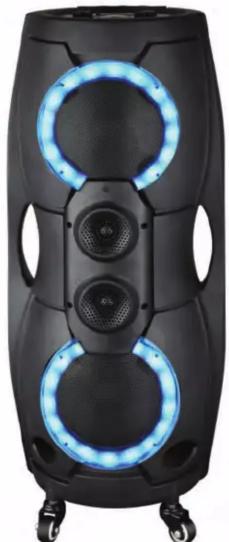
Black cylindrical electronic device with two blue-lit speaker rings and four wheels (no visible text or symbols)PPHP82LB

natural_image
Black electronic device with two blue-lit circular fans (no text or symbols visible)PPHP62LB
☆☆☆☆×☆☆+△☆☆☆☆×☆☆+
★□▼○○★☆○▲▲★☆■▲○
2 Channel Wireless BT, TWS Function, USB/Micro SD/FM/Mic and Guitar Inputs
USER MANUAL
WARNING

- DO NOT place objects on top of the device, as objects may scratch the device.

- DO NOT expose the device to dirty or dusty environments.

- DO NOT insert any foreign objects into the device.

- DO NOT expose the device to strong magnetic or electrical field.

- DO NOT use the device in the rain

- Please check with your Local Authority or retailer for proper disposal of electronic products.

- DO NOT disassemble the device. Only a certified service technician should perform repair.

- The device has apertures to disperse heat. DO NOT block the device ventilation, the device may become hot and malfunction as a result.
Illegal operation may cause personal injury, which could be fatal and may cause damage to property.
Control Board Functions
REMOTE CONTROL
- UNIT STANDBY MODE
- CHOOSE SIGNAL INPUT
- INCREASE MUSIC VOLUME
- NEXT SONG/CHANNEL
- DECREASE MENU VOLUME
- DECREASE MUSIC VOLUME
- INCREASE MENU VOLUME
- MUTE
- REPEAT
- PLAY/PAUSE KEY
- PREVIOUS SONG/CHANNEL
- MENU

H 00 H (-14----+14) Music "treble" volume adjustment,
b b (-14----+14) Music "bass" volume adjustment,
N 100 N1 (00---30) Microphone volume adjustment,
ECOO EC (0---10) Microphone echo volume adjustment,
N200 N2 (00---30) Guitar volume adjustment,
U 30 U (0---30) Music main volume adjustment
TWS FUNCTIONS
For increase sound effect, our unit provides TWS function as follows:
Step-1: Turn ON BT mode on your device and Wireless PA System.
Step-2: Press and hold one of control board/remote control "▶▶1" button more than 3'S, and you will hear "didi", unit will start to connect the other unit automatically, then pair your device BT, now you could enjoy stereo sound, and adjust one unit volume will affect the other unit.
Remark:
- After connection, press and hold again one of control board/remote control "▶▶" button more than 3'S, you will hear "didi", unit's TWS dis-connection.
- TWS connection's distance is about 32.8 in. without obstacle.
Control Board Functions
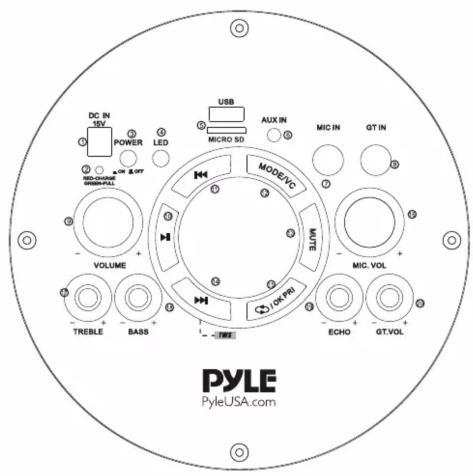
- DC 9V/1.5A input for PPHP62LB, DC 15V/2A input for PPHP82LB
- Charge LED indicator
- Power button
- LED button
- USB and Micro SD could support Mp3
- 3.5MM audio input jack
- 6.5MM microphone input jack
- 6.5MM guitar input jack
- Music volume knob
- Play/Pause on USB/Micro SD mode, scan channel on FM mode
- Last music on USB/Micro SD mode, last channel on FM mode
- Short press for choosing different input signal, long press for voice cancel function on USB/Micro SD/BT MODE
- Mute function
- Next music on USB/Micro SD mode, next channel on FM mode
- Short press to repeat song function, press and hold for microphone priority ON/OFF
- Microphone volume control knob
- Music treble control knob
- Music bass control knob
- Microphone echo control knob
- Guitar volume control knob
Troubleshooting and Warning
| Fault | Possible Cause | Solution |
| No sound | 1. No input sound source2. Volume is too low | 1. Use a better music signal2. Adjust volume |
| Distortion of sound | 1. Volume too high2. Speaker may be damaged | 1. Turn down the volume2. Repair or replace it |
| Karaoke does not work | 1. Microphone plug is not fully inserted.2. Microphone switch is not on3. Microphone volume knob is at the lowest position4. Wireless microphone has low battery | 1. Plug microphone properly into the socket2. Turn on microphone switch3. Adjust microphone volume properly4. Replace battery |
| MP3 does not play | 1. The song format in the U disc is incorrect2. Improper operation has caused a process disorder3. USB disc is disconnected | 1. Transform song format into Mp3 format2. Reboot the machine3. Insert USB disc properly |
PPHP82LB
8" Portable Wireless PA System
2 Channel Wireless BT, TWS Function, USB/Micro SD/FM/Mic and Guitar Inputs (1000 Watts)
Features:
- TWS Function
• 1000 Watts of Peak Music Power Output - Includes Latest DJ LED Light
- USB/Micro SD Card Reader/FM/Aux/MIC and Guitar Inputs
- LED Display
• ON/OFF Switch to Control Multi-Color Racing Lights
• Built-in Rechargeable Battery
• (2) 1/4" -inch (6.5mm) Microphone/Guitar Instrument Inputs - Aux (3.5mm) Input Jack
- Perfect for Karaoke, Parties, Conferences, Indoors/Outdoors and More

PPHP62LB
6.5" Portable Wireless PA System
2 Channel Wireless BT, TWS Function, USB/Micro SD/FM/Mic and Guitar Inputs (800 Watts)
Features:
- TWS Function
• 800 Watts of Peak Music Power Output - Includes Latest DJ LED Light
- USB/Micro SD Card Reader/FM/Aux/MIC and Guitar Inputs
- LED Display
• ON/OFF Switch to Control Multi-Color Racing Lights
• Built-in Rechargeable Battery
• (2) 1/4" -inch (6.5mm) Microphone/Guitar Instrument Inputs - Aux (3.5mm) Input Jack
- Perfect for Karaoke, Parties, Conferences, Indoors/Outdoors and More


WARNING:
This products can expose you to a chemical or group of chemicals, which may include "Lead and lead compounds" which is known in the state of California to cause cancer, birth defects, or other reproductive harm. For more info, go to https://www.p65warnings.ca.gov/.
Brand : Pyle
Model : PPHP62LB
Category : Hi-Fi System