Recognition Server 3.0 - Software ABBYY - Free user manual and instructions
Find the device manual for free Recognition Server 3.0 ABBYY in PDF.


| Product Type | Document Recognition Server Software |
| Brand | ABBYY |
| Model | Recognition Server 3.0 |
| Version | 3.0 |
| Operating System | Windows Server 2008/2012/2016, Windows 7/8/10 |
| Minimum RAM | 4 GB (recommended 8 GB) |
| Minimum CPU | 2 GHz dual-core processor |
| Hard Disk Space | 10 GB for installation |
| Primary Function | High-volume OCR, document conversion, and data capture |
| Supported Input Formats | PDF, TIFF, JPEG, PNG, BMP, and more |
| Supported Output Formats | PDF, Word, Excel, XML, HTML, and plain text |
| Recognition Languages | Over 200 languages including Arabic, Chinese, and Cyrillic |
| Scalability | Supports distributed processing across multiple servers |
| Security Features | User authentication, encrypted data transmission, role-based access |
| Maintenance & Cleaning | Regular software updates and database optimization recommended |
| Spare Parts & Reparability | Not applicable (software); support via ABBYY help desk |
| Warranty | 90 days standard, extended options available |
| Technical Support | Online knowledge base, email, and phone support |
Frequently Asked Questions - Recognition Server 3.0 ABBYY
User questions about Recognition Server 3.0 ABBYY
0 question about this device. Answer the ones you know or ask your own.
Ask a new question about this device
Download the instructions for your Software in PDF format for free! Find your manual Recognition Server 3.0 - ABBYY and take your electronic device back in hand. On this page are published all the documents necessary for the use of your device. Recognition Server 3.0 by ABBYY.
USER MANUAL Recognition Server 3.0 ABBYY
SYSTEM ADMINISTRATOR'S GUIDE
ABBYY®
Recognition Server 3.0
Table of Contents
Introduction......4
Architecture....5
Main Components....5
Server Manager....5
Scanning Station 5
Processing Station 5
Verification Station 6
Indexing Station....6
Remote Administration Console....6
COM-based API 6
Web Service....6
Additional components....6
Google Search Appliance Connector 6
Microsoft Search IFilter....6
Workflows, Jobs, and Documents 6
Document Workflow....7
Centralized Administration....9
Scalability 9
Fault Tolerance....9
Integration Tools....10
Scripts.... 10
XML Tickets....10
Open API....10
Google Search Appliance Connector 10
IFilter for Microsoft Office SharePoint Server and Windows Desktop Search.... 11
Installation 13
System Requirements....13
Installing ABBYY Recognition Server Components....15
Selecting program components.... 15
Selecting a user account.... 16
Specifying the path to the Server Manager.... 17
Installing ABBYY Recognition Server Components via the Command Line.... 18
Installing ABBYY Recognition Server using Microsoft Systems Management Server (SMS)....19
An example of deploying ABBYY Recognition Server using SMS 19
Manual Registration of the SharePoint Connection Library....22
Installing the Hardware Key Drivers....22
Installing Microsoft Search IFilter 23
Installing ABBYY Recognition Server 3.0 IFilter via the Command Line....24
Installing ABBYY Recognition Server 3.0 IFilter using Microsoft Systems Management Server (SMS)....24
Protection Technology and License Activation 26
License Activation....26
How is activation carried out? 26
Activation methods....26
Deactivation....27
License update 27
Administering 28
Getting Started....28
Registering a New Server....28
Registering a New Processing Station 29
Creating a New Workflow....29
Configuring Document Separation....30
Configuring E-mail Processing....30
Configuring Verification 32
Configuring Document Indexing....32
Configuring Publishing Documents to a SharePoint Server....33
Transferring Recognition Server Settings to another Server 34
Managing Licenses 35
Managing User Accounts 35
Setting Up Google Search Appliance Connector....36
Setting Up Microsoft Search IFilter 37
Connection Settings......40
Connection protocols 40
Restarting services under a user account.... 40
Running ABBYY Recognition Server on a computer without a network connection....41
Inbound connections limit in Windows....41
Troubleshooting 42
The Server Manager fails to establish a connection with the Processing Station installed on a different computer 42
The Server Manager fails to establish a connection with the Verification Station, the Indexing Station, or the Remote Administration Console installed on a different computer.... 42
No connection with the external FTP server 42
The workflow does not start with the following error message: "Some of the working folders are inaccessible"... 42
When processing images, a “The Server Manager is out of disk space” warning appears on the computer where the Server Manager is running....43
How to retrieve an image document that is being processed by ABBYY Recognition Server....43
Digits in brackets are appended to the names of output files....43
The Verification Station hangs at startup....43
The Scanning Station fails to export a batch, and the following message appears: "Cannot access the Input folder of the workflow. Use a workflow with a shared folder if the server is on another computer."....43
Recognition Server is unable to retrieve messages from POP3 e-mail server or send messages via SMTP server..43
Document separation by barcodes does not work correctly....43
An access to file error message appears when working with the program....43
Technical Support 45
Introduction
ABBYY Recognition Server is a powerful yet easy document capture system that allows organizations to establish a cost-efficient process of converting paper to searchable and re-usable electronic documents. ABBYY Recognition Server provides functionality for scanning, optical character recognition, document sorting and indexing and delivering the documents into archives, enterprise content management and search systems.
Thanks to its scalable extendable architecture, ABBYY Recognition Server can quickly process huge volumes of documents while remaining simple to deploy and use. No matter what the project time constrains are, ABBYY Recognition Server will ensure the work is done on schedule and with minimal effort.
ABBYY Recognition Server 3.0:
• Takes care of the whole document capture process
ABBYY Recognition Server covers all steps of the document capture, from scanning to image enhancement, indexing and automated routing of documents to archiving and content management systems.
- Based on the ABBYY award-winning technology
ABBYY Recognition Server delivers a highly accurate result, thanks to the ABBYY award-winning OCR technology, which supports recognition of texts in more than 190 OCR languages including Chinese, Japanese, Korean and Arabic. ABBYY Recognition Server converts images and scanned documents into a variety of output formats suitable for archiving, sharing and editing, such as PDF, PDF/A, XML, RTF, and Microsoft® Office formats.
- Designed for processing high volumes of documents
ABBYY Recognition Server is known for its unmatched scalability. This is an unrivaled solution easily extendable to multi-core CPUs or multiple servers, and therefore able to cope with any volume of documents, processing them in scheduled hours or round-the-clock. The priority management and advanced scheduling features allow the administrator to control the order in which the documents are processed and utilize hardware resources in the most efficient way.
• Quick in deployment and easy in use
ABBYY Recognition Server has an intuitive interface and can be set up and operated without preceding training. Processing stages that require minimal user involvement, such as OCR and document conversion are automated, and convenient tools are provided for manual operations like scanning, indexing and verification.
• Compatible with scanners and ECM systems
ABBYY Recognition Server will supplement scanning devices and backend software used in the organization with powerful document capture functionality. Integration with a scanner or another application can be done in various ways, from exchanging e-mails to scripted routing and tight bonding via API.
- Offers ready-made connectors to Microsoft and Google Search systems
ABBYY Recognition Server not only acts as a standalone document capture solution, but also connects as a background OCR server to the enterprise search systems such as Google Search Appliance™ and Microsoft Office SharePoint® Server, as well as Windows® Desktop Search enabling the aforementioned systems with the ability to index and search through the content of image documents.
Architecture
Main Components
ABBYY Recognition Server consists of 8 main components: Server Manager, Scanning Station, Processing Station, Verification Station, Indexing Station, Remote Administration Console, COM-based API, and Web Service.

flowchart
graph TD
    A["Scaning Station"] --> B["Processing Stations"]
    C["Folders"] --> D["Processing Stations"]
    E["Mailbox"] --> F["Verification Station"]
    G["External system"] --> H["Processing Stations"]
    I["Remote Administration Console"] <--> J["Processing Stations"]
    K["Indexing Station"] --> L["Verification Station"]
    M["External system"] --> N["Processing Stations"]
    O["External system"] --> P["Processing Stations"]
    Q["External system"] --> R["Processing Stations"]
    S["External system"] --> T["Processing Stations"]
    U["External system"] --> V["Processing Stations"]
    W["External system"] --> X["Processing Stations"]
    Y["External system"] --> Z["Processing Stations"]
    AA["External system"] --> AB["Processing Stations"]
    AC["External system"] --> AD["Processing Stations"]
    AE["External system"] --> AF["Processing Stations"]
    AG["External system"] --> AH["Processing Stations"]
    AI["External system"] --> AJ["Processing Stations"]
    AK["External system"] --> AL["Processing Stations"]
    AM["External system"] --> AN["Processing Stations"]
    AO["External system"] --> AP["Processing Stations"]
    AQ["External system"] --> AR["Processing Stations"]
    AS["External system"] --> AT["Processing Stations"]
    AU["External system"] --> AV["Processing Stations"]
    AW["External system"] --> AX["Processing Stations"]
    AY["Workflow 1"] --> AZ["Processing Stations"]
    BA["Workflow 2"] --> BB["Folders"]
    BC["Workflow 3"] --> BD["Mailbox"]
    BE["External system"] --> BF["External system"]
    BG["External system"] --> BH["Folders"]
    BI["External system"] --> BJ["External system"]
    BK["External system"] --> BL["Folders"]
    BM["External system"] --> BN["Folders"]
    BO["External system"] --> BP["Folders"]
    BQ["External system"] --> BR["Folders"]
    BS["External system"] --> BT["Folders"]
    BU["External system"] --> BV["Folders"]
    BW["External system"] --> BX["Folders"]
    BY["External system"] --> BZ["Folders"]
    CA["External system"] --> CB["Folders"]
    CC["External system"] --> CD["Folders"]
    DD["External system"] --> DE["Folders"]
    DF["External system"] --> DG["Folders"]
    DH["External system"] --> DI["Folders"]
    DJ["External system"] --> DK["Folders"]
    DL["External system"] --> DM["Folders"]
    DB["External system"] --> DC["Folders"]
    DDY["External system"] --> DY["Folders"]
    DYX["Folders"] --> DYX["Folders"]
Server Manager
This is the main component. It works as a Windows service, manages licenses and all processing options, forms and manages the job queue, distributes the jobs among Processing Stations, Verification Stations, and Indexing Stations, and delivers the output documents after processing. It also coordinates the work of other components (Processing Stations, Verification Stations, and Indexing Stations) and interacts with the Remote Administration Console and the Open API. The Server Manager does not perform recognition, this task is performed by Processing Stations.
ABBYY Recognition Server will not function without the Server Manager. To run the Server Manager, you need an activated and non-expired license. See the Protection Technology and License Activation section for details.
Scanning Station
This component allows you to perform batch scanning and pass images to Recognition Server for further processing.
Processing Station
This component is a Windows service that directly performs recognition. It processes files received from the Server Manager.
The Recognition Server allows you to connect several Processing Stations to one Server Manager in order to increase the processing speed and maximize the throughput. The Server Manager will evenly distribute the workload among the CPUs of the Processing Stations.
Verification Station
This is a client station which allows you to proofread the recognition results. The Verification Station automatically receives the recognized pages that must be verified from the Server Manager. You can connect several Verification Stations to one Server Manager to speed up the verification process.
Indexing Station
This is a client station which allows you to assign a document type and meaningful attributes to recognized documents, so that they can be easily classified and found later in archives and document management systems. The Indexing Station automatically receives the recognized documents that must be indexed from the Server Manager. You can connect several Indexing Stations to one Server Manager to speed up the indexing process.
Remote Administration Console
This is a Microsoft® Management Console (MMC) snap-in that provides a common administration interface for configuration and monitoring Recognition Server.
COM-based API
This API allows you to integrate Recognition Server with other applications in the local area network. The COM-based API component should be installed on the computer on which the client application will run. It can also be distributed together with the client application. See more information about the distribution of the COM-based API in the Open API Help file.
Web Service
This component provides a Web Service API for integrating the Recognition Server with remote applications over the HTTP protocol.
All the Recognition Server components can be installed on the same or on different computers in the local area network.
Additional components
ABBYY Recognition Server includes 2 additional components: the Google Search Appliance Connector and Microsoft Search IFilter, — these allow the Server Manager to interact with Google and Microsoft search systems. Image files the contents of which cannot be indexed directly are sent to ABBYY Recognition Server for OCR. The recognized text data is returned to the search server and included in the full-text index.
Google Search Appliance Connector
This component allows interacting with the Google Search Appliance system.
Microsoft Search IFilter
This component allows interacting with Microsoft Search Server, Microsoft Office SharePoint Server and Microsoft Windows Search.
Workflows, Jobs, and Documents
ABBYY Recognition Server operates with three basic entities: workflows, jobs, and documents.
A workflow is a set of processing parameters that are to be applied to image files. Recognition Server can handle several workflows with different parameters. Each workflow corresponds to a unique input source (a folder or a mailbox). All the images that appear in the source folder/mailbox are processed using the parameters of the corresponding workflow. See Creating a New Workflow.
ABBYY Recognition Server allows setting a schedule and a priority for the workflow. For example, a workflow for old documents can be given the low priority and scheduled to run only at night and on weekends, while a workflow for urgently-required documents will be given the high priority and set to run constantly. A schedule is set in the Input tab of the Workflow Properties dialog of the Remote Administration Console. See also Creating a Schedule in the Main Help.
A job is a processing unit. A job contains an image (or a set of images) and its processing parameters. A job is created when Recognition Server imports images for processing. Usually a job contains one image file and inherits the processing parameters of the workflow in which it was created. However, with the help of the Open API or XML Tickets it is possible to create a job that will contain several image files and will have parameters different from the workflow settings.
A document is obtained as a result of document separation and usually corresponds to one business document. Below are examples of how the documents are formed in case of document separation:
Example 1:

flowchart
graph LR
    A["InputFile Name = "Sample1.tif""]
    B["InputFile Name = "Sample2.tif""]
    C["DocumentSeparationMethod="MergeIntoSingleFile""]
    D["ExportFormat OutputFileFormat="PDF""] --> E["Files merged"]
    E --> F["Document Sample1 .pdf"]
Example 2:

flowchart
graph LR
    A["Job created for single input file\nSample.tif"] --> B["Multipage TIFF separated into documents"]
    B --> C["Document 1\nSample_1.pdf"]
    B --> D["Document 2\nSample_2.pdf"]
    B --> E["Document 3\nSample_3.pdf"]
If no document separation is applied to the job, then one document will correspond to one input image file. One document can be published in several different file formats according to the export settings.
Document Workflow
The following processing steps are performed since the images are submitted to ABBYY Recognition Server 3.0 till they are exported:
- Import
- Recognition
- Verification (optional)
- Document separation (optional)
- Indexing (optional)
- Export

flowchart
graph TD
    A["Scanning Stations"] --> B["Import"]
    C["Verification Stations"] --> D["Recognition"]
    E["Indexing Stations"] --> F["Verification"]
    G["Hot Folder"] --> H["Processing Stations"]
    B --> D
    D --> F
    F --> G
    H --> I["Document Separation"]
    I --> F
    F --> J["Indexing"]
    J --> K["Export"]
Import
On this stage images are placed to the Input folder of the workflow. There are several ways to pass document images for processing. The images can be manually placed to the Input folder, automatically passed from the Scanning Station, or sent by e-mail.
When image documents get in the Input folder or mailbox, they are imported by the Server Manager and transferred to the Images subfolder of the ABBYY Recognition Server 3.0 temporary folder. The path to the Server Manager temporary folder can be viewed and changed in the Recognition Server Properties Dialog Box of the Remote Administration Console.
The image files are kept in the Images subfolder of the Server Manager temporary folder throughout the entire conversion process. The Processing Stations, Verification Stations, and Indexing Stations receive copies of those images for processing. This ensures that no files are lost in case an error occurs during the recognition, verification, or indexing.
When image files are submitted to ABBYY Recognition Server 3.0, the Server Manger creates jobs for them and queues them for processing. If several workflows are set up, ABBYY Recognition Server will process jobs from all the workflows simultaneously, within the single queue. The jobs will be arranged in the queue according to their creation time and priorities.
Recognition
The first job in the queue is sent to the first available Processing Station for recognition. If there are several Processing Stations in the system, the Server Manager evenly distributes the jobs from the queue among these Processing Stations. See Registering a New Processing Station.
A Processing Station can run several OCR processes (their number can be adjusted in the Remote Administration Console). For optimal performance, the recommended number of processes for a station is N+1, where N is the number of CPU cores on the station. Usually each OCR process gets one file at a time. For example, if a Processing Station runs two OCR processes, it will recognize two files in parallel (they can belong to the same job or to different jobs). However, if the file has many pages (e.g. several dozen) and there are no more than 5 jobs waiting in the queue, the big file will be split into several chunks, and the chunks will be sent to different OCR processes, in order to get the work done faster.
When the Processing Station has finished processing the file, it returns the recognized file to the Server Manager and is assigned the next job from the queue.
Verification
If verification is turned on in the workflow settings, pages that require verification will be queued for verification after recognition. If there are Verification Stations connected, the Server Manager will route the queued pages to those stations. If no Verification Stations are currently connected, or the users logged on the stations are not permitted to verify pages from this workflow, the pages will wait in the queue in the "Queued for verification" state. They will not be passed for further processing until they are verified. See Configuring Verification.
Document separation
If document separation is enabled in the workflow settings, the pages in the job queue will be rearranged into documents after recognition and verification according to the separation rule. In this case, each job shown in the Job Log will correspond to one output document and will list all the files that form the output document. In addition to built-in document separation methods (by barcodes, blank pages, etc.) separation using a script can be performed. See
Configuring Document Separation.
Indexing
If there are any document types specified in the workflow settings for indexing, documents from this workflow will be indexed before export. Indexing can be performed automatically with the help of a script or/and manually on an Indexing Station. Firstly indexing using a script is performed if a script is entered, then documents that require manual indexing are queued for indexing. If there are Indexing Stations connected, the Server Manager will route the queued files to those stations. If no Indexing Stations are currently connected, or the users logged on the stations are not permitted to index documents from this workflow, the document files will wait in the queue in the "Queued for indexing" state. The document will not be exported until it is indexed. See Configuring Document Indexing.
Export
When the recognition, verification, and indexing are completed, the output files are handed back to the Server Manager and queued for publishing. The Server Manager delivers the output document to the destination specified in the job settings. After the output file is published to the Output folder, the image copy is removed from the Server Manager temporary folder. Then published files can be sent to appropriate destination depending on input and output files
properties, recognition statistics, etc., if a script for successfully published jobs is specified. If a script for failed jobs is entered, images that failed to be processed are delivered to the destination specified in the script.
Centralized Administration
ABBYY Recognition Server 3.0 is administrated via a separate component, the Remote Administration Console, which is based on the Microsoft Management Console (MMC). The Remote Administration Console allows administrators to change Recognition Server's properties, connect Processing Stations and manage their properties and activity, create and manage workflows, add users to the system and assign Administrator, Verifier, and Indexer permissions to the users, monitor connected Verification and Indexing Stations and the job queue, view and export the job log and the server log, and manage licenses.
If several ABBYY Recognition Servers are installed in the local area network, they can all be registered in the same Remote Administration Console and thus all managed from a single point. See Registering a New Recognition Server.
Scalability
One Server Manager can manage dozens of Processing Stations connected to it and effectively distribute the workload among them. This makes the whole system highly scalable to meet high-volume processing demands. By connecting multiple Processing Stations, you can increase the processing speed up to several hundred pages per minute.

line
| Number of CPUs | Pages per minute | | --------------- | ---------------- | | 0 | 0 | | 10 | 50 | | 20 | 150 | | 30 | 275 | | 40 | 375 | | 50 | 500 | | 60 | 575 | | 70 | 625 | | 80 | 650 |Note: The picture shows the speed increase as measured in ABBYY's internal tests. System performance may vary depending on the complexity and quality of the images, the hardware of the server and the stations, and the network configuration.
Fault Tolerance
As ABBYY Recognition Server 3.0 runs completely unattended, it has a number of fault tolerance features that ensure robustness of the system:
- The system starts automatically at Windows startup. For example, in the case of a temporary power outage, ABBYY Recognition Server will be up and running automatically after the PC is rebooted.
- Documents are processed so that no data are lost in the case of a system failure. All the images that were being processed when the failure occurred will stay in the queue and will be processed again after the system is restarted.
- The Server Manager periodically checks to make sure that the Processing Stations are running and are available. If a Processing Station is temporarily down for some reason, the Server Manager will re-establish connection with it after it becomes operational. No administrator's involvement is required to re-connect a Processing Station.
- If a Processing, Verification, or Indexing Station experiences a failure while processing a document, the document will be automatically re-routed to another available station. If no station is available at the moment, the image will remain in the queue and wait for the first available station.
Integration Tools
Scripts
ABBYY Recognition Server 3.0 provides an easy way of customizing the workflow and integrating with external systems with the help of scripts. The program allows you to use scripts for document separation, automatic document type detection and indexing, and postprocessing of published documents and their attributes. Document processing scripts are defined in the workflow settings and can use various parameters of documents, such as recognized text and its coordinates, image file properties and recognition statistics.
XML Tickets
ABBYY Recognition Server 3.0 provides a convenient way to customize job settings via so-called XML Tickets. An XML Ticket is an XML file that contains a set of processing parameters for the job. The parameters set in the XML Ticket override the workflow settings. If an XML Ticket accompanies one or several input files, these files will be processed using the parameters set in the ticket. XML Tickets can be used to define almost all job parameters, such as priority, recognition languages, output formats, output file name and path, etc.
XML Tickets can be created either manually (in a text editor) or programmatically, via the Open API.
XML Tickets can be used for integration of ABBYY Recognition Server with front-end systems and devices (for example, the processing options that the user sets on the scanner panel can be transferred to ABBYY Recognition Server in an XML Ticket).
Open API
ABBYY Recognition Server provides two types of Open API for integration with external systems: a COM-based API and a Web Services API. Both APIs provide the following functionality:
- submitting images for processing
- creating and submitting XML Tickets for processing
• getting notifications about the job completion and information about the job results
The COM-based API uses RPC technology and can be used for integration with other systems in the local area network.
The Web services API enables communication with remote systems via HTTP, and therefore allows for remote integration over the Internet.
Note: You can use the Open API and XML Tickets only if you have the Open API add-on module enabled in your ABBYY Recognition Server 3.0 license. See the ABBYY Recognition Server 3.0 Licensing page for details.
Google Search Appliance Connector
Finding necessary information scattered across different online resources and electronic document storages in a large organization can be a real challenge unless you use an enterprise search system like the Google Search Appliance. The Google Search Appliance indexes documents in various storage locations across the network, so that people can quickly find any document by keywords. However, a lot of valuable information is typically stored in the form of images (such as scanned TIFF or PDF files) and therefore is inaccessible for indexing by the Google search engine. Examples of such files are faxes, scanned contracts, newspaper and magazine archives. ABBYY Recognition Server and Google Search Appliance perfectly complement each other and allow indexing the both text files/web pages and scanned documents in TIFF, JPEG, PDF, DjVu and other formats. ABBYY Recognition Server unlocks image documents by applying OCR technology, and gives the Google Search Appliance access to their contents.
ABBYY Recognition Server and Google Search Appliance interact via the Google Search Appliance Connector that is installed as part of the Server Manager component. The Connector crawls network folders and sends documents in graphical formats to ABBYY Recognition Server. ABBYY Recognition Server recognizes the incoming documents and
pushes an XML feed with the recognized text to the Google Search Appliance for indexing. When this process is complete, the documents become available for searching.

flowchart
graph LR
    A["File Storage"] -->|Image| B["Recognition Server"]
    B -->|XML feed| C["Google Search Appliance"]
    D["Crawling file storage and copying image to Recognition Server"] --> B
    E["Converting text to XML feed and sending it to Google Search Appliance"] --> B
IFilter for Microsoft Office SharePoint Server and Windows Desktop Search
Search for information is a vital part of any office workflow. As the organization grows, documents scatter across departments, file folders and ECM system, and search takes more and more valuable time. Microsoft® offers effective instruments to organize enterprise search on different levels, from centralized content storages to individual desktops. Microsoft Office SharePoint Server has powerful capabilities to search in SharePoint libraries and folders; Windows Desktop Search is helpful in finding files on desktop computers.
However, SharePoint Server and Windows Desktop Search index contents of files in certain document formats only, like HTML, RTF, DOC, XLS. Information contained in image files, such as JPEGs, or highly popular PDFs and TIFFs, remains uncovered. This means that content of scanned documents, faxes, letters, contracts, is invisible to the server, and those documents may not be displayed in search results.
ABBYY Recognition Server with its IFilter component extends Microsoft search capabilities over image documents. It "unlocks" the content of image files by means of OCR and makes it available for indexing by SharePoint Server and Windows Desktop Search. With ABBYY Recognition Server IFilter, the document search in the organization becomes truly encompassing.
ABBYY Recognition Server is integrated with Microsoft Office SharePoint Server and Windows Desktop Search as described below:
- ABBYY Recognition Server is installed on a server computer (which may be separate from the SharePoint hosting machine). A special component, ABBYY Recognition Server IFilter, is installed on top of the SharePoint Server and/or user desktops to provide communication between the search system and the Recognition Server. The IFilter is a light component which consumes almost no computer resources to make sure it host's performance remains on high level.
- Each ABBYY IFilter receives image documents from the corresponding SharePoint or Windows Desktop search crawler and passes them to the Recognition Server.
- ABBYY Recognition Server in the background performs high-quality OCR on the images and sends the recognized text back to the IFilter.
- Microsoft search engine accepts the document contents from ABBYY IFilter and builds an index. The image then becomes discoverable via full-text search.
With Microsoft Office SharePoint Server:

flowchart
graph LR
    A["Corporate network resources"] -->|Electronic documents, images, web pages| B["Microsoft Office SharePoint Server"]
    B -->|Images| C["ABBYY Recognition Server"]
    B -->|Text| C
With Windows Desktop Search:

flowchart
graph LR
    A["Windows Search"] -->|Images| B["Server"]
    C["Windows Search"] -->|Images| B
    D["Windows Search"] -->|Images| B
    style A fill:#f9f,stroke:#333
    style C fill:#f9f,stroke:#333
    style D fill:#f9f,stroke:#333
Installation
ABBYY Recognition Server 3.0 includes a specialized installation program that automates the setup process. To insure proper installation, always use the ABBYY Recognition Server CD-ROM for installation. The installation program allows you to install ABBYY Recognition Server components on one computer or on several different computers.
System Requirements
Server Manager
- PC with Intel® Pentium®/Celeron®/Xeon™/Core™, AMD K6/Athlon™/Duron™/Sempron™/Opteron™ or compatible processor with a minimum clock speed of 500 MHz
- Operating system: Microsoft® Windows® 7, Windows Server® 2008, Windows Vista®, Windows Server 2003, Windows XP, Windows 2000
- Memory: 1 Gb RAM
- Hard disk space: 20 MB for installation and 1 GB for program operation*
- The account under which the server is running must have read/write permissions to the following registry branches:
o HKEY_CLASSES_ROOT
o HKEY_LOCAL_MACHINE\Software\ABBYY
o HKEY_CURRENT_USER\Software\ABBYY
- Microsoft .NET Framework 2.0 or later is required for saving files to Microsoft SharePoint Server
- Microsoft Outlook 2000 or later is required for processing and sending e-mail messages via Microsoft Exchange Server
Scanning Station
- PC with Intel® Core™2/2 Quad/Pentium®/Celeron®/Xcon™, AMD K6/Turion™/Athlon™/Duron™/Sempron™ processor or compatible processor with a minimum clock speed of 2 GHz
- Operating system: Microsoft Windows 7, Windows Server 2008, Windows Vista, Windows Server 2003, Windows XP (for localized interfaces, corresponding language support is required)
• Memory: 512 Mb RAM minimum; 1 Gb recommended - Hard disk space: 1 Gb (including 125 Mb for installation)
- Scanner supporting TWAIN, WIA or ISIS
• Video card and display with a resolution of 1024×768 - Keyboard, mouse or other pointing device
Processing Station
- PC with Intel Pentium/Celeron/Xeon/Core, AMD K6/Athlon/Duron/Sempron/Opteron or compatible processor with a minimum clock speed of 500 MHz
- Operating system: Microsoft Windows 7, Windows Server 2008, Windows Vista, Windows Server 2003, Windows XP, Windows 2000
• Memory: 512 MB RAM plus an additional 300 MB for each recognition process - Hard disk space: 600 MB for installation and 1 GB for program operation*
Verification Station
- PC with Intel Pentium/Celeron/Xeon/Core, AMD K6/Athlon/Duron/Sempron/Opteron or other compatible processor with a clock speed of 500 MHz or higher
- Operating system: Microsoft Windows 7, Windows Server 2008, Windows Vista, Windows Server 2003, Windows XP, Windows 2000 (for localized interfaces, corresponding language support is required)
• Memory: 128 MB RAM
- Hard disk space: 210 MB for installation and 100 MB for program operation*
Indexing Station
- PC with Intel Pentium/Celeron/Xeon/Core, AMD K6/Athlon/Duron/Sempron/Opteron or other compatible processor with a clock speed of 500 MHz or higher
- Operating system: Microsoft Windows 7, Windows Server 2008, Windows Vista, Windows Server 2003, Windows XP, Windows 2000 (for localized interfaces, corresponding language support is required)
• Memory: 768 MB RAM - Hard disk space: 500 MB for installation and 1 GB for program operation*
Remote Administration Console
- PC with Intel Pentium/Celeron/Xeon/Core, AMD K6/Athlon/Duron/Sempron/Opteron or compatible processor with a minimum clock speed of 200 MHz
- Operating system: Microsoft Windows 7, Windows Server 2008, Windows Vista, Windows Server 2003, Windows XP, Windows 2000 (for localized interfaces, corresponding language support is required)
• Memory: 128 MB RAM - Hard disk space: 30 MB
- Microsoft .NET Framework 2.0 or later is required for saving files to Microsoft SharePoint Server
COM-based API
- PC with Intel Pentium/Celeron/Xeon/Core, AMD K6/Athlon/Duron/Sempron/Opteron or compatible processor with a minimum clock speed of 200 MHz
- Operating system: Microsoft Windows 7, Windows Server 2008, Windows Vista, Windows Server 2003, Windows XP, Windows 2000
• Memory: 128 MB RAM - Hard disk space: 15 MB
Web Service
- PC with Intel Pentium/Celeron/Xeon/Core, AMD K6/Athlon/Duron/Sempron/Opteron or compatible processor with a minimum clock speed of 200 MHz
- Operating system: Microsoft Windows 7, Windows Server 2008, Windows Vista, Windows Server 2003, Windows XP, Windows 2000
• Memory: 128 MB RAM - Hard disk space: 15 MB and 100 MB for program operation*
- Microsoft IIS 5.1 or later
- Microsoft .NET Framework 2.0 or later
Google Search Appliance Connector
- PC with Intel Pentium/Celeron/Xeon/Core, AMD K6/Athlon/Duron/Sempron/Opteron or compatible processor with a minimum clock speed of 500 MHz
- Operating system: Microsoft Windows 7, Windows Server 2008, Windows Vista, Windows Server 2003, Windows XP, Windows 2000
• Memory: 128 MB RAM - Hard disk space: the hard disk space required for program operation depends on the complexity and number of the images.
Microsoft Search IFilter
- PC with Intel Pentium/Celeron/Xeon/Core, AMD K6/Athlon/Duron/Sempron/Opteron or compatible processor with a minimum clock speed of 500 MHz
- Operating system: Microsoft Windows 7, Windows Server 2008, Windows Vista, Windows Server 2003, Windows XP, Windows 2000
• Memory: 128 MB RAM - Hard disk space: 10 MB for ABBYY Recognition Server 3.0 IFilter installation, the hard disk space required for program operation depends on the complexity and number of the images.
* — Note: The hard disk space required for program operation may be larger depending on the complexity, quality, and number of the images.
Installing ABBYY Recognition Server Components
The installation program will guide you through the installation of ABBYY Recognition Server. Please close all applications prior to installing ABBYY Recognition Server.
Note: To communicate with Microsoft SharePoint Server, the Server Manager and the Remote Administration Console require Microsoft .NET Framework 2.0 or higher to be installed. If you are going to configure Recognition Server to publish documents to a SharePoint library, you should install Microsoft .NET Framework prior to installing ABBYY Recognition Server.
If you choose to install Microsoft .NET Framework later, you will have to register the SharePoint connection library manually afterwards. See the Manual Registration of the SharePoint Connection Library section for details.
To install ABBYY Recognition Server:
- Insert the ABBYY Recognition Server 3.0 CD-ROM into the CD-ROM drive. The installation program will launch automatically.
- Follow the installation program instructions.
If the installation program does not launch automatically:
- Click the Start button on the Taskbar and select Settings>Control Panel.
- Select the Add or Remove Programs item.
- Click the Add New Programs button.
Follow the installation program instructions.
Selecting program components
You can select the program components you wish to install. By default the Server Manager, the Remote Administration Console, the Processing Station, the Scanning Station, the Indexing Station, and the Verification Station components are marked for installation.

Note:
- If you select the Web Service component for installation, Microsoft Internet Information Services (IIS) and Microsoft .NET Framework (including Microsoft ASP.NET) must be already installed on your computer.
Microsoft IIS can be installed as a Windows component via the Start>Settings>Control Panel>Add or Remove Programs window.
To install Microsoft .NET Framework 2.0, you may run dotnetfx20.exe file from the DotNet folder on the Recognition Server 3.0 CD and follow the installation program instructions. When installing Microsoft .Net Framework, ASP.NET is copied on the computer but not installed. You should install it manually by running: C:\WINDOWS\Microsoft.NET\Framework\vX.XXXX\aspnet_regiis.exe -i (specify the appropriate version instead of vX.X.XXX).
- The Recognition Server Web Service may require very complex configuration, if it is installed on the same computer with Microsoft Office SharePoint Server. It is not recommended to install them on the same computer.
Selecting a user account
The Server Manager and the Processing Station components of ABBYY Recognition Server are services. If you select at least one of these components, the program will ask you to select a user account under which the services will be run after installation. By default, the Local System account is selected.

You should select User account in the following cases:
- If the Server Manager and the Processing Stations will be installed on different computers in a workgroup network.
- If the Server Manager and the Processing Stations will be installed on different computers in a domain-based network and the TCP/IP protocol will be used instead of Named Pipes (see details in the Connection protocols section).
- If the Input Folder (from which the images will be imported by Recognition Server) and the Output Folder and the Exception Folder (to which the documents will be published by Recognition Server) are located on a computer different from that on which the Server Manager is installed.
In this case you should run the Server Manager and Processing Stations under a user account which has read/write access to these folders.
- If you are going to configure Recognition Server to save output documents to Microsoft Office SharePoint Server.
In this case you should run the Server Manager under a user account which has read/write access to the SharePoint Server libraries.
- If you are going to configure Recognition Server to import images from an Exchange Mailbox, send output documents by e-mail, or send notifications to the administrator by e-mail.
The user account, under which you choose to run the services, must meet the following requirements:
• In the case of a domain-based network, it must be a domain user account.
- In the case of a workgroup network, this user account must be the Administrator or a member of the Power Users group with a non-empty password.
- This user must have read/write access to the Input, Output, and Exceptions Folders of all workflows set up on the Server.
For example, you can create a special user account that will be used only by Recognition Server and grant all the necessary permissions to this account.
Troubleshooting:
- After entering the username and password, the message "No mapping between account names and security IDs was done" appears.
This means the username you have entered does not exist. You must enter an existing username in DOMAIN\username or COMPUTER\username format.
- After entering the username and password, the message "Logon failure: unknown username or bad password." appears.
This means you have entered an invalid password or username. Try entering the username and password again.
- After entering the username and password, the message "Logon failure: the user has not been granted the requested logon type at this computer" appears.
This means the system has failed to run the services under this account. This may happen if the user account you have entered does not have sufficient permissions to run the services. Make sure that the user account meets the requirements described above. If the still message appears, select the Local System account and restart the components under the user account manually after the installation (see the Restarting services under a user account section).
- After entering the username and password on Windows 2000, the message "The required privilege is not held by the client" appears.
This means that the installer failed to check if the specified user has proper credentials. Select the Local System account and restart the components under the user account manually after the installation (see Restarting services under a user account section).
Specifying the path to the Server Manager
If the Verification Station or Indexing Station component is selected for installation and the Server Manager component is not, the installation wizard will request the name of the computer on which the Server Manager is (or will be) installed. Enter the computer's DNS name or its IP address.

This computer name will be stored in a registry key. When launched, the Verification Station or Indexing Station will use it to connect to the Server Manager.
Installing ABBYY Recognition Server Components via the Command Line
You can install ABBYY Recognition Server components from the command line in silent mode. Run the setup.exe file from the installation CD-ROM with the command line options described below.
| Option | Default | Value | Description |
| INSTALLDIR=" | C:\Program Files\ABBYY Recognition Server 3.0\ | The path to the folder where the ABBYY Recognition Server will be installed. | |
| MODULES= | PStation,VStation,SStation,IStation,Server,Console | The list of components that you want to install. The modules must be separated by a comma (). For example, MODULES=PStation,VStation,SStation,IStation,Server,Console,API,WebService. | |
| SERVICELOGIN | The username under which the Server Manager and the Processing Station services will be run. If you do not specify the SERVICELOGIN, the services will be run under the Local System account. | ||
| SERVICEPASSWORD | The password corresponding to the username under which the Server Manager and the Processing Station services will be run. | ||
| SERVERLOCATION | The name of the computer on which the Server Manager is installed. This option is useful only if the Verification Station or/and Indexing Station component is selected for installation and the Server Manager component is not. | ||
| /v | Indicates the beginning of the list of installation parameters. | ||
| /q | Silent mode. Use the /qb option if you want a progress bar to be displayed during the installation. No other dialog boxes will be displayed. | ||
| /L | <locale language> | Installs ABBYY Recognition Server with the interface language specified in the command line.Possible language code values:1033 English1034 Spanish1040 Italian1031 German1049 Russian1036 French |
Note: When you use silent mode, the /q option must precede the /v option, for example: setup.exe /q /v
Examples
setup.exe /q /v MODULES=API
This command line will install (in silent mode) the COM-based API component into the C:\Program Files\ABBYY Recognition Server 3.0 folder.
setup.exe /qb /L1033 /v MODULES=VStation,PStation INSTALLDIR="D:\ABBYY Recognition Server 3.0"
This command line will install (in silent mode) the Verification Station and the Processing Station components into D:\ABBYY Recognition Server 3.0 folder with the English interface. A progress bar will be displayed.
Installing ABBYY Recognition Server using Microsoft Systems Management Server (SMS)
Microsoft Systems Management Server automates software deployment in a network and eliminates the need to go directly to the locations where the software is to be installed (computers, groups, or servers).
Software deployment using SMS includes three stages:
-
Preparing ABBYY Recognition Server for automated installation (creating a so-called "unattended setup").
-
Creating a deployment script (i.e. choosing installation parameters: computer names, time of installation, conditions for installation, etc.).
-
Installing the software on the specified computers using SMS in accordance with the installation parameters specified in the script.
An example of deploying ABBYY Recognition Server using SMS
- Create an administrative installation point:
- Run the setup.exe file with the /a command-line option from the ABBYY Recognition Server installation CD-ROM: setup.exe /a
- Next during administrative installation, specify a shared network folder that can be accessed from any workstation on which you are planning to install the program (e.g. \MyServer\Programs\RecognitionServerAdminSetup).
-
Once the administrative installation point has been created, select the Packages item in the SMS Administrator Console.
-
In the Action menu, select New/Package.
![sms - [Systems Management Server\Site Database (ABY - ABBYY)\Packages] File Action View Help Systems Management Server Site Database (ABY - ABBYY) Site Hierarchy Collections Packages Advertis Product Queries System S Security Tools Open New Package All Tasks Package From Definition View Refresh Export List... Properties Help Select this item to create a new SMS Package. Packages Systems Management Server Packages Name There are no items to show in this view.](/content/2026/05/975821/images/779d116544c06f3dbb9e22c7ffb76169dce4f308ced33a0ffe231d4cec2cd316.jpg)
- In the Package Properties dialog box, enter the required package properties.

- Click the Data Source tab.
- Make sure that the This package contains source files box is not selected and click OK.
- In the package you have just created, select Programs.
- In the Action menu, select New/Program.

- On the General tab of the Program Properties dialog box:
• Enter a descriptive name of the program in the Name field.
- Type setup.exe /q in the Command line field. If you wish to change the set of components to be installed, or specify additional information for the installer, use the additional command line parameters (see the Installing ABBYY Recognition Server Components via the Command Line section for details).
- In the Start in field, enter the path to the administrative installation folder (e.g. \server\RS3.0).
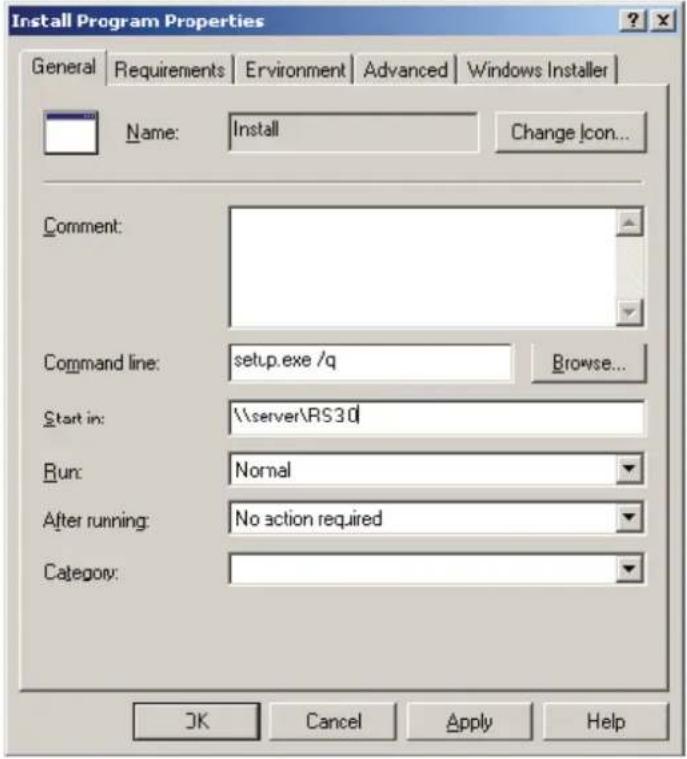
- On the Environment tab of the Program Properties dialog box:
• Clear the User input required box.
- Select Run with administrative rights.
• Make sure that Runs with UNC name is selected.

-
Change the condition in the Program can run field if required and click OK.
-
You can also use the Distribute Software Wizard. To run the wizard, select All Tasks/Distribute Software on the Action menu and follow the instructions of the wizard.
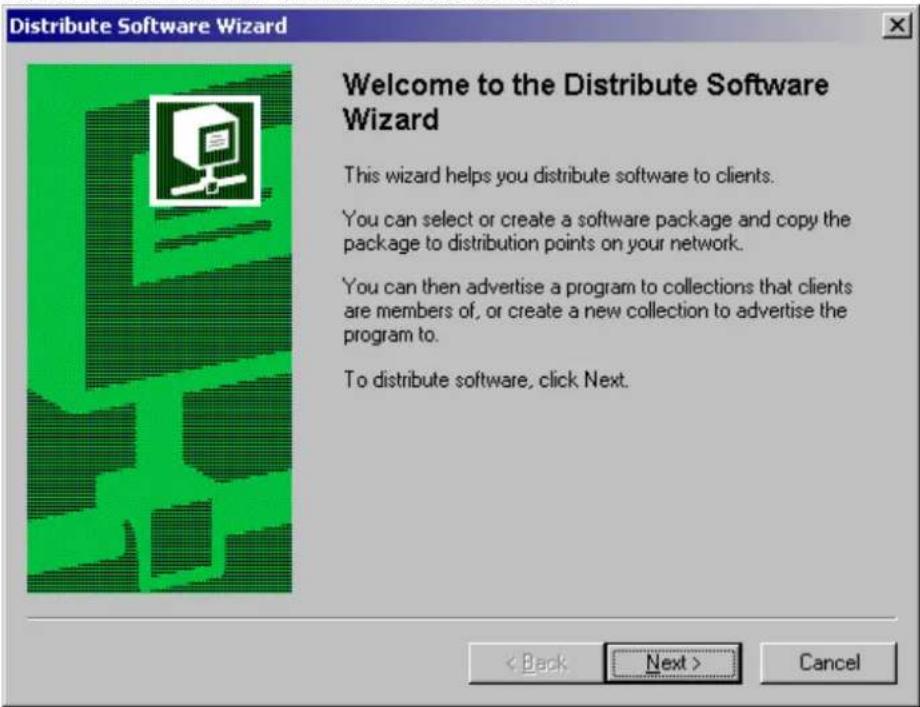
Important! You cannot create Distribution Points.
Manual Registration of the SharePoint Connection Library
To communicate with Microsoft SharePoint Server, the Server Manager and the Remote Administration Console require Microsoft .NET Framework 2.0 or higher to be installed. If Microsoft .NET Framework has not been installed on the computer prior to installing ABBYY Recognition Server, the SharePoint connection library will not be registered during the installation. In this case, prior to configuring Recognition Server to output documents to the SharePoint Server, you should install Microsoft .NET Framework 2.0 or later and then register the SharePoint connection library manually:
- Run dotnetfx20.exe file from the DotNet folder on the Recognition Server 3.0 CD. Follow the installation program instructions.
- After Microsoft .NET Framework 2.0 is installed, to register the SharePoint connection library launch the file SPConnectorLibRegex, which can be found in the \Bin subfolder of ABBYY Recognition Server installation folder.
- Close the Remote Administration Console component and run it again. Restart the Workflows which will be used for saving output files to SharePoint libraries.
Installing the Hardware Key Drivers
If you have a hardware protection key, the hardware key drivers must be installed on your computer before you can run ABBYY Recognition Server 3.0.
In the case of a 32-bit system, the hardware key drivers are automatically installed on your computer during ABBYY Recognition Server installation.
In the case of a 64-bit system, you should install the hardware key drivers manually. The drivers should be installed in non-PCSC mode. To install the drivers in this mode, run the iKeyDrvr.exe file from the ABBYY Recognition Server 3.0\USB Drivers\64Bit folder on the Recognition Server 3.0 CD using the following command line: iKeyDrvr.exe /v" VR=OFF".
Note: If the hardware key drivers are installed in non-PCSC mode (the drivers for 32-bit systems are installed in this mode automatically, while for 64-bit system the drivers can be installed in this mode using the command line referred above), the USB keys cannot be used as smart cards. If you need to use the USB keys as smart cards, you should install the hardware key drivers manually in PCSC mode by running corresponding iKeyDrvr.exe file without the VR=OFF parameter of the command line. In this case, ABBYY Recognition Server can work with the hardware keys, only if the Server Manager service is run under Local System account.
Installing Microsoft Search IFilter
Microsoft Search IFilter consists of two components: the IFilter istelf, which is installed on the same computer with the Microsoft search system (Microsoft Search Server, Microsoft Office SharePoint Server, or Microsoft Windows Search), and the Support for IFilter component which is installed together with the Server Manager and provides interface for configuring settings of the IFilter-dedicated workflow. You may install numerous copies of IFilter in the local network and connect them to one Recognition Server.
To install Microsoft Search IFilter, do the following:
- When installing the Server Manager component select Support for IFilter subfeature.
- Install ABBYY Recognition Server 3.0 IFilter on computer(s) with the Microsoft search system:
a. Select ABBYY Recognition Server 3.0 IFilter for installation from ABBYY Recognition Server 3.0 CD-ROM. Follow the installation instructions.
b. Specify the program you are going to use Microsoft Search IFilter with. Select Indexing Service (Desktop Search) item for Microsoft Windows Search and Microsoft Office SharePoint Search item for Microsoft Search Server or Microsoft Office SharePoint Server. The latter item is disabled if neither Microsoft Search Server nor Microsoft Office SharePoint Server is installed on the computer.
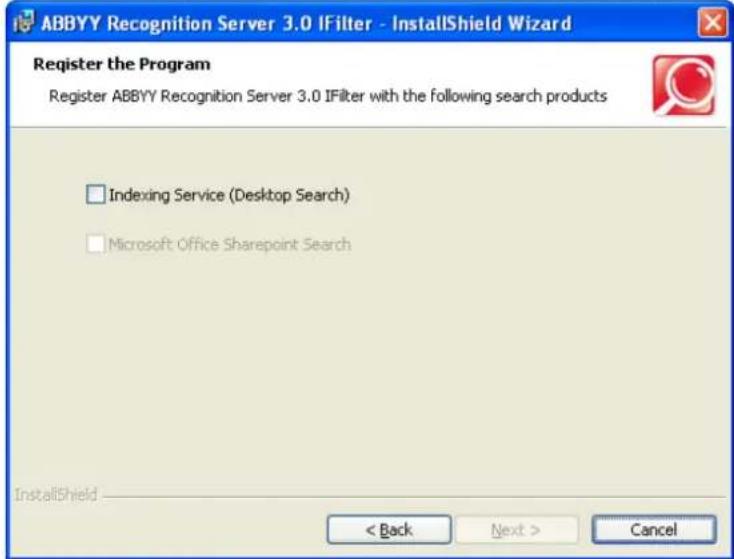
c. The installation wizard requests the name of the computer on which the Server Manager is installed. Enter the computer's DNS name or its IP address.

d. ABBYY Recognition Server 3.0 IFilter includes the ABBYY Recognition Server 3.0 IFilter Backend service. During installation the program will ask you to select a user account under which the service will be run after installation. By default, the Local System account is selected. The conditions when
you need to select User account are similar to those defined in the Selecting a user account section above.
Installing ABBYY Recognition Server 3.0 IFilter via the Command Line
You can install ABBYY Recognition Server 3.0 IFilter from the command line in silent mode. Run the setup.exe file from the ABBYY Recognition Server 3.0 IFilter folder on the installation CD-ROM with the command line options described below.
| Option | Default | Value |
| INSTALLDIR=" | C:\Program Files\ABBYY Recognition Server 3.0 IFilter | The path to the folder where the ABBYY Recognition Server 3.0 IFilter will be installed. |
| SERVICELOGIN | The username under which the ABBYY Recognition Server 3.0 IFilter Backend service will be run.If you do not specify the SERVICELOGIN, the service will be run under the Local System account. | |
| SERVICEPASSWORD | The password corresponding to the username under which the ABBYY Recognition Server 3.0 IFilter Backend service will be run. | |
| SERVERLOCATION | The name of the computer on which the Server Manager is installed. | |
| FORSHAREPOINT=" | Set this option to "yes", if you are going to use IFilter with Microsoft Search Server or Microsoft Office SharePoint Server. If neither Microsoft Search Server nor Microsoft Office SharePoint Server is installed on the computer, this option is ignored. | |
| /v | Indicates the beginning of the list of installation parameters. | |
| /q | Silent mode. Use the /qb option if you want a progress bar to be displayed during the installation.No other dialog boxes will be displayed. | |
| /L | Installs ABBYY Recognition Server 3.0 IFilter with the interface language specified in the command line.Possible language code values:1033 English1034 Spanish1040 Italian1031 German1049 Russian1036 French |
Description
Note: When you use silent mode, the /q option must precede the /v option, for example: setup.exe /q /v
Installing ABBYY Recognition Server 3.0 IFilter using Microsoft Systems Management Server (SMS)
The procedure of installing ABBYY Recognition Server 3.0 IFilter using SMS is similar to that for ABBYY Recognition Server. The difference is in the way of creating an installation point: you should not run an administrative installation of IFilter, but should copy the ABBYY Recognition Server 3.0 IFilter subfolder from the installation CD-ROM to a shared network folder manually.
Once the installation point has been created, follow the further instructions provided in the Installing ABBYY Recognition Server using Microsoft Systems Management Server (SMS) section. When configuring installation
use the additional command line parameters described in the Installing ABBYY Recognition Server 3.0 IFilter via the Command Line section.
Protection Technology and License Activation
A special protection technology is used to protect ABBYY Recognition Server 3.0 from illegal copying and distribution. This technology effectively excludes unauthorized use of ABBYY products by persons who have not signed a License Agreement with the software copyright owner. The protection technology is implemented in the form of protection keys. A protection key binds the product license to the particular hardware configuration of the computer or USB key and therefore prevents using one license on several computers at a time.
ABBYY Recognition Server will not run without a protection key.
Two types of protection keys are available:
- Software key – This is an activation file that should be obtained from the ABBYY server during an Activation process.
- Hardware key – This is a USB dongle that contains the license parameters. In the case of a hardware protection key, activation is not required.
If you have a software protection key, you must activate at least one license in the Licensing node before you can run ABBYY Recognition Server 3.0. After activation ABBYY Recognition Server is launched automatically.
Note: If ABBYY Recognition Server is not launched after activation, click the ▶ (Start) button on the toolbar or select the corresponding item on the shortcut menu.
License Activation
Important! Activation is only required for a software protection key.
When you run the Remote Administration Console for the first time, you are prompted to enter your software license number or plug in your hardware key. If you enter the software license number, the activation process will start automatically.
To activate a license, select this license in the Licensing node and either click (Activate License) on the toolbar or select the corresponding item on the shortcut menu.
How is activation carried out?
Activation takes very little time and is carried out with the help of an Activation Wizard. The Activation Wizard helps you send the necessary activation information to ABBYY.
Activation information is sent as a code (Installation ID) which is generated based on the information about the computer on which the program is being installed. No personal information about the user or the user's computer is used for generating this code and this code cannot be used for identifying the user.
Activation methods
• Via the Internet
Activation is carried out automatically and takes only a few seconds. An Internet connection is required for this type of activation.
- By e-mail
Send an e-mail message generated by the program and containing the information required for activation. To ensure a quick reply from the mail robot, do not alter the information in the message body or the Subject field. After you have received an activation file from ABBYY, enter the path to the file in the corresponding field of the Activation Wizard.
Once the activation is complete, the program can be used without any restrictions.
Important! ABBYY Recognition Server 3.0 can be reinstalled on one and the same computer an unlimited number of times without re-activation. However, if some of the computer parameters are changed, the program should be re-activated.
Deactivation
You can deactivate you ABBYY Recognition Server 3.0 license if you need to reinstall Recognition Server from one computer to another. The deactivated license can be then activated on another computer. The number of allowed deactivations can be restricted by your license.
Deactivation takes very little time and is carried out with the help of the Activation Wizard. The deactivation is performed only via the Internet. It is carried out automatically and takes only a few seconds. An Internet connection is required. Once the deactivation is complete, the license can be activated on another computer.
License update
If you are interested in the newest capabilities of ABBYY Recognition Server 3.0 and your license does not allow you to use them, you need to update the license. The license update process is similar to the activation process. The update process is carried out with the help of the Activation Wizard which helps you to send the necessary update information to ABBYY. The license update can be performed via the Internet or by e-mail. Once the update is complete, the newest functionality of the program can be used.
Administering
ABBYY Recognition Server 3.0 is administrated via a separate component, the Remote Administration Console, which is based on the Microsoft Management Console (MMC). The Remote Administration Console allows administrators to change Recognition Server's properties, connect Processing Stations and manage their properties and activity, create and manage workflows, add users to the system and assign Administrator and Verifier permissions to the users, monitor connected Verification Stations and the job queue, view and export the job log and the server log, and manage licenses.
If several ABBYY Recognition Servers are installed in the local area network, they can all be registered in the same Remote Administration Console and thus all managed from a single point.
Getting Started
If you install the Server Manager and the Remote Administration Console on different computers, you need to register the installed ABBYY Recognition Server in the Remote Administration Console (see Registering a New Server for details).
If you install the Processing Station and the Server Manager on different computers, you will need to register the Processing Station in the Processing Stations node (see Registering a New Processing Station for details).
After you install ABBYY Recognition Server 3.0, a Default Workflow is configured, which has the following settings:
- The Input folder, Output folder and Exceptions folder are set to Default Workflow\Input Folder, Default Workflow\Output Folder, and Default Workflow\Exceptions Folder respectively. The root folder is:
- %ALLUSERSPROFILE%\Application Data\ABBYY Recognition Server 3.0 – for Windows 2000, Windows XP, Windows Server 2003;
o %PUBLIC%\ABBYY\ABBYY Recognition Server 3.0 – for Windows Vista, Windows Server 2008.
- The format of the output file is set to PDF.
- The recognition language is set to English.
- The input image is moved to the Output folder without conversion.
You can view the properties of the Default Workflow in the Workflow Properties dialog box, which can be opened in the Workflows node. You can also create new workflows in this node (see Creating a New Workflow for details).
To recognize a document:
- Copy an image or PDF file into the Input folder of the Default Workflow, or scan images with the Scanning Station and export them to the Default Workflow of ABBYY Recognition Server.
- Shortly (the actual time required depends on the complexity of the document and your hardware resources) the recognition results will be placed into the Output folder.
- If the document cannot be processed (e.g. the image file is corrupted or its format is invalid), the image will be placed into the Exceptions folder. An XML result file with a description of the error will also be placed in this folder.
Registering a New Server
The installed copy of ABBYY Recognition Server must be registered in the Remote Administration Console if the Server Manager and the Remote Administration Console have been installed on different computers.
To register a new Recognition Server:
- Select the ABBYY Recognition Servers node and either click (Register New Server) on the toolbar or select the corresponding menu item on the shortcut menu.
- In the Register New Recognition Server dialog box, provide the name, description, and location (i.e. DNS name or IP address) of the Server Manager component.
- Click the Test Connection button to check the connection. If connection has been successfully established, the word "Connected" will appear next to the button.
- In the Authentication group, provide the correct authentication parameters.
- Click OK. A node corresponding to the registered copy will appear in the ABBYY Recognition Servers node.
Registering a New Processing Station
If the Server Manager and a Processing Station have been installed on different computers, you need to register the Processing Station in the Recognition Server. To register a new Processing Station:
- Select the ABBYY Recognition Servers\Recognition Server\Processing Stations node.
- Click (Register New Processing Station) on the toolbar or select the corresponding item on the shortcut menu.
- In the dialog box that opens, specify the name of the station and the name or IP of the computer on which the Processing Station is installed.
- Click the Test Connection button to check the connection to this computer.
- Click OK. The created Processing Station will be added to the Processing Stations node.
Creating a New Workflow
To create a new workflow, select the Workflows node and either click (New Workflow) on the toolbar or select the corresponding item on the shortcut menu. You can also create new workflows by creating a copy of an existing workflow and changing its options. To create a copy of an existing workflow, select the Duplicate item on the shortcut menu of the workflow.
In the Workflow Properties dialog box, specify the following:
- Input tab:
- Workflow name which will be displayed in the Workflows node
- In the Get images from drop-down list, select the type of Input folder
The path to the Shared Folder, Exchange Mailbox Folder, POP3 E-mail Server or FTP server, the username and password to the POP3 server, the login and password to the FTP server (see Configuring E-mail Processing for more information about the e-mail configuration) - Workflow activity, which can be scheduled (see Creating a Schedule in the Main Help)
- Process tab:
o Recognition language(s)
- Document separation method (see Configuring Document Separation)
o Recognition mode
• Quality Control tab:
o Verification settings (see Configuring Verification)
o Exceptions folder
- Indexing tab:
○ Indexing settings (see Configuring Document Indexing)
- Output tab:
- Output formats and their settings
o Output destination and the file naming rule
To view or adjust the properties of a workflow, select the corresponding node and either click (Properties) on the toolbar or select the corresponding item on the shortcut menu.
Important! If you want to specify a shared folder as the Input folder, Output folder or Exceptions folder, make sure that the user account under which the Server Manager component is started has read/write permissions for all shared folders.
If the Input Folder has subfolders and image files are copied into the subfolders, the output files will be saved in the corresponding subfolders of the Output Folder or Exceptions Folder.
Notes:
- To reduce network traffic, create the Input and the Output folders of the workflow on the same computer on which the Server Manager is installed.
- You should not specify a folder on the network drive as the Input folder, Output folder or Exceptions folder. Use complete real paths for such folders.
Configuring Document Separation
ABBYY Recognition Server 3.0 allows you to separate batches of images scanned by a high-speed scanner into documents. Each document will be saved to a separate output file. You can set the separation options in the Document Separation Options dialog box.
By default document separation is not used. That is one output file is created for each input image file. To separate batches of images into documents, do the following:
- Create a new workflow or modify an existing one (see Creating a New Workflow). On the Process tab of the Workflow Properties dialog box click Document Separation Options button.
Note: Document separation cannot be performed for the jobs which were received by e-mail (either from Exchange Mailbox, or POP3 e-mail server).
-
In the Document Separation Options dialog box that opens select Enable separation option.
-
Select one of the document separation methods:
○ Create a new file after every N page(s)
Use this option if all the documents in the batch have the same number of pages.
- Use blank pages to separate documents
A new file will be created at each blank page found in the document flow. To delete blank pages after separation, select Delete blank pages option.
- Use barcodes to separate documents
A new file will be created at each page with a barcode of the specified type. Select barcode type and specify whether barcode pages should be deleted after separation.
Note: There is a sample of a separation sheet with a barcode in the file SeparatorSheet-Code39.pdf of the Samples folder (Start>Programs>ABBYY Recognition Server 3.0>Samples), which contains barcode of Code-39 type with barcode value 012345.
o Merge files in each subfolder into one file
The files in each subfolder will be merged into one document.
-
In addition to built-in document separation methods you can implement your own more flexible separation scenario with the help of a script. To do this click Script... button, and in the Script Editor dialog box enter the script text. See for details Creating a Script for Document Separation in the Main Help.
-
If necessary specify page arrangement method in Arrange pages in the output file by (Job creation time or Input file name) and a time period in Complete the document if no new pages arrive for N seconds.
Note: Specify a small time-out (several seconds) if all the files are already in the Input folder when the workflow is started. If the documents are placed to the Input folder directly from the scanner, the time-out must be greater than the pause between scanned pages.
Configuring E-mail Processing
ABBYY Recognition Server 3.0 provides the following e-mail-based functionality:
- Import of attachments from e-mail messages (Get images from: Exchange mailbox or Get images from: POP3 E-mail Server option on the Input tab of the Workflow Properties dialog box)
- Sending output documents by e-mail (Send output file via Exchange Server or Send output file via SMTP Server option in the Output Format Setting dialog box of the workflow properties)
- Sending notifications to the administrator (Notify the administrator if a failure occurs and Notify the administrator when all jobs have been processed options in the Recognition Server Properties dialog box). Recognition Server supports sending notifications to the administrator only via Microsoft Exchange e-mail server.
Note: If using e-mail-based functionality provided via Microsoft Exchange Server, Microsoft Outlook 2000 or later must be installed on the computer where the Server Manager is installed.
To configure your Exchange e-mail client:
The e-mail account must be configured correctly on the computer where the Server Manager is installed for Recognition Server to be able to process and send e-mail messages via Microsoft Exchange Server. To configure the e-mail account:
- In the Control Panel, click Services, and then make sure that the ABBYY Recognition Server 3.0 Server Manager service is configured to run under a domain user account. If, during the installation, you chose to run the service under a Local System account, you should restart it under a domain user account (see Restarting Services under a user account).
- On the Microsoft Exchange Server computer, set up a mailbox or several mailboxes for the domain user account under which the ABBYY Recognition Server 3.0 Server Manager service is running.
- On the computer where the Server Manager is installed, log on to Windows by using the same user account under which the ABBYY Recognition Server 3.0 Server Manager service is running, and start Microsoft Outlook. Important! Microsoft Outlook has to be run under this user account on this computer at least once before the workflow is set up.
- Configure Microsoft Outlook to connect to Microsoft Exchange Server. You will need to provide the name of the Exchange Server computer and the mailbox on the Exchange Server. If you wish to use mailboxes other than the default mailbox, you should first connect these mailboxes to the current account. For example, to connect a mailbox in Microsoft Outlook 2003:
- Select Tools > E-mail Accounts...> View or change Existing e-mail accounts and click Next.
- Click the Change... button and then click the More settings... button.
- On the Advanced tab of the Microsoft Exchange Server dialog box, click the Add... button and enter the name of the mailbox you want to connect.
- After the setup is complete, verify that you can send and receive mail interactively. You can then close Microsoft Outlook.
Note: When configuring the workflow to monitor an Exchange Mailbox, you will be prompted to enter the path to the mailbox folder. To be able to navigate to the folder using the Browse for folder dialog box of the Remote Administration Console, you must first connect the desired mailbox in Microsoft Outlook on this computer. Alternatively, you can enter the name of the mailbox folder manually in the following format: Mailbox - Username\Folder. For example: Mailbox - Recognition Server\Inbox.
To set up import of messages from the POP3 e-mail server:
- Create a new workflow or modify an existing one (see Creating a New Workflow). In the drop-down list of the Input tab of Workflow Properties dialog box, select Get images from: POP3 E-mail Server.
- Enter the address of the POP3 e-mail server and if necessary change the port number.
- Enter the user name and password to logon.
- Click OK on the Input tab of Workflow Properties dialog box.
Note: If all the settings are correct but Recognition Server is unable to retrieve messages from POP3 e-mail server, make sure that a firewall does not block connection with the e-mail server. See Recognition Server is unable to retrieve messages from POP3 e-mail server or send messages via SMTP server in the Troubleshooting section for details.
To set up publishing documents to the SMTP server:
- Create a new workflow or modify an existing one (see Creating a New Workflow). In the Output Format Settings dialog box, select Send output file via SMTP server and click the E-mail Account button.
- In the E-mail account dialog box that opens enter the address of the SMTP server and if necessary change the port number.
- Enter the sender address and the password. The password may not be required depending on SMTP server settings.
- Click OK on the Input tab of Workflow Properties dialog box.
Note: If all the settings are correct but Recognition Server is unable to send messages via SMTP server, make sure that a firewall does not block connection with the e-mail server. See Recognition Server is unable to retrieve messages from POP3 e-mail server or send messages via SMTP server in the Troubleshooting section for details.
Configuring Verification
ABBYY Recognition Server 3.0 includes Verification Stations that allow you to check and correct the recognized text. The pages that require verification arrive to the Verification Station automatically after they are recognized. Detailed information about Verification Station operation can be found in the Verification Station Help.
The verification settings in Recognition Server are specified for each workflow. For each Recognition Server workflow, you can select one of the following options:
- No verification – all pages will be exported into the output document after recognition and will not be routed to a Verification Station.
- Verify all pages – all pages will be queued for verification after they are recognized and before they are exported to an output file.
- Verify only pages on which uncertain characters exceed N% - only pages recognized with low confidence will be queued for verification.
If you create a workflow with verification enabled, by default all users are allowed to verify pages from this workflow, which means that if there are some pages queued for verification, any user who runs a Verification Station will receive a page from the workflow.
However, it is possible to restrict the verification permissions for a workflow, so that only a limited number of users (so-called "Verifiers") may verify pages from this workflow.
To restrict the verification permissions for a workflow:
- Select the workflow in the Workflows node and click (Properties) on the toolbar, or select the corresponding item on the shortcut menu.
- In the Workflow Properties dialog box, navigate to the Quality Control tab and click the Assign Verifiers... button.
- In the Assigned Operators dialog box, select the option Restrict access to this workflow for all users except the operators listed below, and then select the desired verifiers from the list. If a username you need is not on the list, you should first add it to the list of Recognition Server Verifiers.
- Click OK and save the workflow properties.
To add a verifier to the Recognition Server:
- In the Users node click (Add User) or select the corresponding item on the shortcut menu.
- Enter the user name in DOMAIN\username or COMPUTER\username format.
- Select the Verifier option and then select the workflows this user should be allowed to verify.
- Select the option Allow the user to choose workflows on the stations if you want the user to be able to select which workflows to verify.
- Click OK and then click the Refresh button. The new verifier will be added to the Users node.
Using the Verification Station in a workgroup network
If the Verification Station and the Server Manager are installed on different computers in a workgroup network, the following requirements should be met:
- The user account under which the Verification Station is run must be the Administrator or a member of the Power Users group with a non-empty password.
- On the computer on which the Server Manager is installed, there must exist user accounts with the same usernames and passwords as those of the users who will run the Verification Station.
Configuring Document Indexing
ABBYY Recognition Server 3.0 includes Indexing Stations that allow you to assign meaningful attributes to recognized documents. The documents that require indexing arrive at the Indexing Station automatically after they are recognized and if necessary verified. Detailed information about Indexing Station operation can be found in the Indexing Station Help.
The indexing settings in the Recognition Server are specified for each workflow. For each Recognition Server workflow, you should specify one or several document types on the Indexing tab of the Workflow Properties dialog box. If you do
not specify any document type, indexing is not performed for the workflow. For each document type you can specify a set of document attributes which should be filled in during indexing. Document attributes may be of the following types:
- Single string. The field contains only one string.
• Multiple strings. The field contains several strings. - Checkbox. The field may possess only two values: true and false.
- List. The field may possess several values. If you select this type, you should specify possible list elements.
- Regular expression. The field contains a string corresponds to a regular expression. If you select this type, you should specify the regular expression.
If you create a workflow with indexing enabled, by default all users are allowed to index documents from this workflow, which means that if there are some documents queued for indexing, any user who runs an Indexing Station will receive a document from the workflow.
However, it is possible to restrict the indexing permissions for a workflow, so that only a limited number of users (so-called "Indexers") may index documents from this workflow.
To restrict the indexing permissions for a workflow:
- Select the workflow in the Workflows node and click corresponding item on the shortcut menu.

(Properties) on the toolbar, or select the
- In the Workflow Properties dialog box navigate to the Indexing tab and click the Operators... button.
- In the Assigned Indexers dialog box, select the option Restrict access to this workflow for all users except the Indexers listed below and then select the desired indexers from the list. If a username you need is not on the list, you should first add it to the list of Recognition Server indexers.
- Click OK and save the workflow properties.
To add an indexer to the Recognition Server:
- In the Users node click

(Add User) or select the corresponding item on the shortcut menu.
-
Enter the user name in DOMAIN\username or COMPUTER\username format.
-
Select the Indexer option and then select the workflows this user should be allowed to index documents from.
-
Select the option Allow user to choose workflows on stations if you want the user to be able to select which workflows to index documents from.
-
Click OK and then click

(Refresh) button. The new indexer will be added to the Users node.
Using the Indexing Station in a workgroup network
If the Indexing Station and the Server Manager are installed on different computers in a workgroup network, the following requirements should be met:
- The user account under which the Indexing Station is run must be the Administrator or a member of the Power Users group with a non-empty password.
- On the computer on which the Server Manager is installed, there must exist user accounts with the same usernames and passwords as those of the users who will run the Indexing Station.
Configuring Publishing Documents to a SharePoint Server
ABBYY Recognition Server 3.0 supports publishing output files to Microsoft Office SharePoint Portal Server 2003 and Microsoft Office SharePoint Server 2007.
Note: In order to be able to communicate with the SharePoint Server, the Server Manager and the Remote Administration Console require Microsoft .NET Framework 2.0 or higher to be installed. If Microsoft .NET Framework has not been installed on the computer prior to installing ABBYY Recognition Server, the SharePoint connection library
will not be registered during the installation. In this case you should install Microsoft .NET Framework 2.0 or later and then register the SharePoint connection library manually. See Manual Registration of the SharePoint Connection Library for details.
To be able to save output documents to a SharePoint Server library, the ABBYY Recognition Server 3.0 Server Manager service must be run under a user account which has read/write access to the SharePoint Server library. If, during the installation, you chose to run the service under a Local System account, you should restart it under a user account (see Restarting Services under a user account section).
To set up the publishing of documents to a SharePoint Server library:
- Run the Remote Administration Console under a user account which has read/write access to the SharePoint Server library.
- Create a new workflow or modify an existing one (see Creating a New Workflow). In the Output Format Settings dialog select Save output file in SharePoint library.
- Enter the URL of the SharePoint Server site (e.g. http://myportal/mysite/) and click Connect. The Remote Administration Console will try to connect to the specified site and download the list of document libraries and folders from there. If connection is successful, you will see the "Connected" message below the button, and the names of the document libraries will appear in the Select document library list.
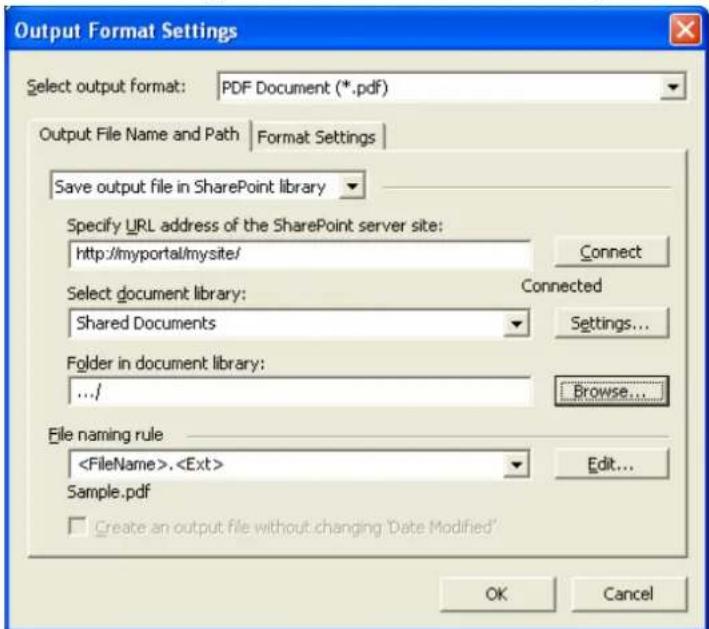
- Select the document library from the list. If you wish to change the content type, or specify the metadata values that should be exported as document properties, click the Settings... button.
Note: Content type selection and setting of the document properties are available only for Microsoft Office SharePoint Server 2007.
- Select the folder in the document library using the Browse... button, or leave the field empty to save documents in the root folder.
- Click OK in the Output Format Settings dialog box.
Note: If the Input Folder has several subfolders containing image files, the output files will be saved in the corresponding subfolders of the Output Folder in the SharePoint Server document library.
Transferring Recognition Server Settings to another Server
You can easily move Recognition Server settings or individual workflows from one Recognition Server to another by exporting them to an XML file.
To export and import Recognition Server settings, use the Export Settings... and Import Settings... buttons in the Recognition Server Properties dialog box of the Remote Administration Console.
To export and import one or several workflows, use the Save Settings and Load Settings items on the shortcut menu of the Workflows node in the Remote Administration Console.
Managing Licenses
License management is carried out in the Licensing node of the Remote Administration Console.

In this node, you can add, remove, activate, swap, and select licenses.
An unlimited number of licenses can be added in this node. Licenses from a hardware key are added to the node automatically when you plug the dongle in a USB port. Licenses with software key protection should be added by clicking (Add New License) on the toolbar or by selecting the corresponding item on the shortcut menu.
A license can have one of the following states:
- Current (only an activated and unexpired license can have "Current" state)
- Activated
- Not activated
- Expired
To activate a non-activated license select it and either click (Activate License) on the toolbar or select the corresponding item on the shortcut menu. See the License Activation section for more information.
At any given moment, only one of the licenses (the "Current" license) is used. If the Current license expires, ABBYY Recognition Server will automatically switch to the next available license. If none is available, ABBYY Recognition Server will stop. Use the "up" and "down" arrows to arrange the licenses in order of availability, and use 📄 (Set As Current License) to switch to the selected license.
Managing User Accounts
In the Users node of the Remote Administration Console, you can view the list of Recognition Server users, add or remove user accounts, and change user roles and permissions.
There are three types of user roles in ABBYY Recognition Server 3.0: Administrator, Verifier, and Indexer. A user can have administrator, verifier, and/or indexer permissions. Administrator has all the setup rights and can add and remove users. Verifier has the permissions to proofread the recognized pages from certain workflows on a Verification Station. Indexer has the permissions to assign attributes to documents from specified workflows on an Indexing Station.
Immediately after the installation of ABBYY Recognition Server 3.0, there is only a Chief Administrator in the system. The password of the Chief Administrator is empty. We strongly recommend changing this password. To change the password: in the Details pane of the Administrators node, select the Chief Administrator item and then select Change Password... on the shortcut menu.
To add a new user:
- Click 📄 (Add User) on the toolbar or select the corresponding item on the shortcut menu.
- In the User Properties dialog box, enter a domain user account in DOMAIN\username format, or a local user account in COMPUTER\username format.
- Assign one or several roles to the user. If you assign a Verifier (Indexer) role to the user, you can select which workflows this user should have the right to verify (to index documents from), and whether the user should be
able to select workflows on a Verification Station (Indexing Station). See Configuring Verification (Configuring Indexing) for details.
- Click OK and refresh the Remote Administration Console. The new account will be added to the list of users.
To remove a user, either click ✗ (Delete) on the toolbar or select the corresponding item on the shortcut menu.
Note: You cannot remove an administrator, if the Remote Administration Console runs under his account, and in the Register New Recognition Server dialog box the Use Windows Authentication option is selected.
Setting Up Google Search Appliance Connector
ABBYY Recognition Server 3.0 incorporates a special Connector to link with the Google Search Appliance. The Google Search Appliance automatically indexes text documents and web pages in the corporate intranet. Folders that contain documents in image formats are additionally crawled by the Google Search Appliance Connector. The image files from these folders are picked up by the Connector and forwarded to ABBYY Recognition Server for OCR. ABBYY Recognition Server recognizes the incoming documents and returns the text to the Connector. For each of the recognized documents, the Connector forms an XML feed containing the text of the document and pushes it to the Google Search Appliance for indexing. Once the process is complete, the documents become available for full-text searching.
The Connector is installed on the computer with the Server Manager. The Connector is based on the ABBYY Recognition Server 3.0 Feed Generator service (Start > Control Panel > Administrative Tools > Services > ABBYY Recognition Server 3.0 Feed Generator) and performs two main functions:
- Crawls folders specified by the administrator, picks images of specified formats and sends them to ABBYY Recognition Server for OCR;
- Generates XML feeds with the recognized text and sends them to the Google Search Appliance for indexing.
To configure Google Search Appliance Connector, do the following:
- On the Remote Administration Console, select the Google Search Appliance Connector node and
click (Properties) on the toolbar or select the corresponding command on the shortcut menu.
-
On the Crawling tab of the Google Search Appliance Connector Properties dialog box, configure the following parameters:
-
Specify the IP-address of the Google Search Appliance server.
- Add image folders to be indexed by the Google Search Appliance server. To add a folder, click Add... and, in the dialog box that opens, enter the path to the folder in UNC format, for example: \hostname\folder. The program will include all specified folders (with subfolders) in the crawl.
Important! A folder with images must be shared, and the user account under which ABBYY Recognition Server 3.0 Feed Generator service is run must have read permissions to this folder. - In the Image formats list, specify the extensions of image files to be indexed. Use the Add... and Remove... buttons. Indexing is carried out for files with specified extensions only. Other files will be ignored.
- Specify the crawling schedule. Crawling can be performed constantly or according to the schedule. For more information on creating a schedule, see Creating a Schedule in the Main Help.
-
Specify the temporary folder for XML feeds used to transfer data to the Google Search Appliance server. Select Delete feeds after pushing them to GSA if necessary.
-
Files for Google Search Appliance are recognized within a hidden workflow. To set the workflow parameters, on the OCR tab, do the following:
-
Select the recognition languages.
- If necessary, select recognition optimization either by speed or quality.
-
Specify the recognition schedule: always active or according to the schedule.
-
If necessary, change the temporary folders for source images and resulting files. Images to be recognized are copied to the Input folder. If crawling and recognition are not carried out simultaneously, images will stack up in the Input folder. The Output folder contains the recognition results and the images that couldn't be recognized. Use folders on the hard drive with enough disk space for Input and Output folders.
Important! For the integration of ABBYY Recognition Server with the Google Search Appliance to work correctly, the following conditions must be met:
- indexing of graphical file formats must be allowed in the Google Search Appliance settings;
- reception of XML feeds from the IP address of the Server Manager computer must be allowed in the Google Search Appliance settings;
- viewing of URL addresses assigned to indexed documents (smb://machine.domain.com/path) must be allowed in the Google Search Appliance settings.
In case any of these conditions is not met, the XML feed submitted by the Connector will be ignored by the Google Search Appliance without notification.
Notes:
- The Connector stores information about crawled files and folders in the FeedGeneratorState.db database file in the
Folder>\Bin\RecognitionServer3Temp folder. Information about the date of the last modification and indexing is available for each indexed file. When crawling the folders, the Connector checks this information in the database for every found file of the specified format. If the file has been created or modified since the last indexing, it will be sent to ABBYY Recognition Server for recognition. The files that haven't changed since the last indexing will not be re-recognized. - Indexing of XML feeds by Google Search Appliance may be performed with delay. Thus, it may take some time (up to a few hours) for the data from the XML feeds to appear in the index.
Information about functioning of the Google Search Appliance Connector is registered in a special log (the FeedGeneratorLog.txt file in the Bin subfolder of the ABBYY Recognition Server 3.0 installation folder). The log contains information about:
• the Connector start and stop occurrences;
- files sent to ABBYY Recognition Server for recognition;
• successfully recognized files with contents sent to the Google Search Appliance for indexing;
- errors of the Connector.
Information about critical errors of the Connector is also written to the Server Log.
Setting Up Microsoft Search IFilter
ABBYY Recognition Server 3.0 incorporates the Microsoft Search IFilter component which allows the program to interact with the following search engines developed by Microsoft: Microsoft Search Server, Microsoft Office SharePoint Server and Microsoft Windows Search.
The search engine by Microsoft indexes documents in specified folders. If these folders contain documents in graphical formats to be indexed, they are sent to ABBYY Recognition Server through the IFilter. ABBYY Recognition Server recognizes documents within a special hidden workflow and exports the results as text. When the recognition results appear, IFilter returns them to the Microsoft engine for indexing. After that the documents become searchable.
The IFilter is based on the ABBYY Recognition Server 3.0 IFilter Backend service (Start > Control Panel > Administrative Tools > Services > ABBYY Recognition Server 3.0 IFilter Backend) and performs two main functions:
- Receives image files from the Microsoft search system crawler and sends them to ABBYY Recognition Server for OCR:
- Returns the recognized text to the Microsoft search system for indexing.
To configure Microsoft Search IFilter, do the following:
-
Configure Microsoft Search Server, Microsoft Office SharePoint Server or Microsoft Windows Search for file indexing:
-
Specify the folders with image files to be indexed.
-
Specify the formats of the files to be indexed.
-
Make sure that the services responsible for indexing are running.
Note: After Microsoft Search IFilter is installed and Microsoft Office SharePoint Server is configured for file indexing (all necessary folders and file formats are specified), you must restart SharePoint Server search service. To do this, open the command line (click Start > Run..., in the dialog box that opens enter "cmd" and click OK) and run the following commands sequentially: "net stop osearch" and "net start osearch".
-
Configure the ABBYY Recognition Server 3.0 IFilter. To do this, in the IFilter Settings dialog box (Start > Programs > ABBYY Recognition Server 3.0 > IFilter Settings), set the following parameters:
-
In the Location field, enter the DNS-name or IP-address of the computer the Server Manager is installed on.
-
Click Test Connection to check if the connection is established. If there is a connection, "Connected" will appear to the left of the button.
-
Select the recognition languages. English will be used by default. When several IFilter copies are installed in the network and use one and the same Recognition Server, different recognition languages may be set for different IFilter copies. For example, each user of the Windows Search may choose recognition languages they need on their own PC.
-
Change the temporary IFilter folder if necessary. This folder stores files with recognition results until they are transferred to Microsoft system, and IFilter data base file.

- File recognition for IFilter is carried out in a special hidden workflow. To set the workflow parameters, on the
Remote Administration Console, select Microsoft Search IFilter node and click (Properties) on the toolbar or choose the corresponding command on the shortcut menu. In the IFilter Workflow Properties dialog box, set the following parameters:
- Change the temporary folders for input and output files if necessary.
Important! Input and Output folders must be shared, and the user account under which ABBYY Recognition Server 3.0 IFilter Backend service is run (on the computer where the ABBYY Recognition Server 3.0 IFilter is installed) must have read/write permissions to these folders.
- Specify the image recognition schedule. Images can be recognized constantly or according to the schedule. For more information on creating a schedule, see Creating a Schedule in the Main Help.
Notes:
- IFilter does not send photos (images obtained by a digital camera) to ABBYY Recognition Server for OCR. Such images are filtered out by EXIF information inside the image file.
- IFilter stores information about previously recognized files in a database and uses it to check if a file has already been recognized. If the file was created or modified since the last indexing, it will be sent to ABBYY Recognition Server for recognition. The files that didn't change since the last indexing will not be re-recognized.
- The Microsoft search system awaits response from ABBYY Recognition Server 3.0 IFilter for a certain period of time. Sometimes, this time period may not be enough for ABBYY Recognition Server to recognize a large file. If this case a two-stage indexing will be performed: at the first request of the Microsoft system the file is transferred to Recognition Server for OCR, and during the next query which happens after a while, the recognized text is returned to the search system for indexing. Thus, the contents of new graphic files can appear in the index and become available for searching with a delay of up to several hours.
Information about the functioning of ABBYY Recognition Server 3.0 IFilter can be written to an event log stored in the IFilterBackendLog.txt file (Bin subfolder of the ABBYY Recognition Server 3.0 IFilter installation folder). The log is disabled by default. To enable it, select the corresponding option in the IFilter Settings dialog box. The log includes information about:
• starting and stopping IFilter;
- files transferred to ABBYY Recognition Server for recognition;
- IFilter errors.
Information on critical errors in the functioning of Microsoft Search IFilter is logged in a system event viewer (Start > Control Panel > Administrative Tools > Event Viewer > Application).
Connection Settings
Connection protocols
ABBYY Recognition Server can use the Named Pipes or TCP/IP protocol to connect to the computers where its components are installed. By default, immediately after installation the Named Pipes protocol is used. If a connection with the computer where one of the components has been installed is not established, you may not be able to register a Processing Station. In order to make this computer available, please make sure that it has file sharing enabled and port 445 opened.
You can also change the protocol to TCP/IP:
- Stop the Server Manager and all the Processing Station services using the Services (Start>Settings>Control Panel>Administrative Tools>Services).
- In the HKEY_LOCAL_MACHINE\Software\ABBYY\RecognitionServer\3.0\ branch of the registry (HKEY_LOCAL_MACHINE\SOFTWARE\Wow6432Node\ABBYY\RecognitionServer\3.0\ for 64-bit systems), create the Protocol key and set its value to "TcpIp".
Note: The value of this key is case-sensitive.
- Specify the values of the ServerPort1, ServerPort2, and StationPort keys which determine the numbers of connection ports. The ServerPort1 and ServerPort2 ports are used by the Server Manager component, the StationPort port is used by the Processing Station components. If a port is not specified, its default value will be used. The default values are "3980", "3981", and "3982" respectively. If the Server Manager and Processing Station components are installed on the same computer, these ports must be different.
- Restart the Server Manager and all the Processing Station services. They must be restarted by means of Services and under the same user account which meets the following requirements:
• In the case of a domain-based network, this must be a domain user account.
- In the case of a workgroup network, this user account must be the Administrator or a member of the Power Users group with a non-empty password.
- Close the Remote Administration Console component and run it again.
- Open the Processing Station Properties dialog box for each Processing Station in the Details pane of the Processing Stations node. Make sure that the current connection status is Connected. Click OK.
- Click the Refresh button on the toolbar of the Remote Administration Console.
Important! On all computers where ABBYY Recognition Server components are installed, the values of the Protocol, ServerPort1, ServerPort2, and StationPort keys must be identical.
To change the protocol back to Named Pipes, you should:
- Stop the Server Manager and all the Processing Station services using the Services (Start>Settings>Control Panel>Administrative Tools>Services).
- Specify "NamedPipes" as the value of the Protocol key. The values of the ports are ignored.
- Restart the Server Manager and all the Processing Station services using the Services, then close the Remote Administration Console component and run it again.
- Open the Processing Station Properties dialog box for each Processing Station in the Details pane of the Processing Stations node. Make sure that the current connection status is Connected. Click OK.
- Click the Refresh button on the toolbar of the Remote Administration Console.
Restarting services under a user account
If during the installation you chose to run the Server Manager and the Processing Station services under the Local System account, you may need to restart them under a user account later. See the Selecting a user account section for details. To restart the Server Manager under another user account:
- Open Services (Start>Settings>Control Panel>Administrative Tools>Services).
- Right-click the ABBYY Recognition Server 3.0 Server Manager service and then click Properties.
- On the Log On tab, select This account and specify a user account.
- Type the password for the user account in the Password box and in the Confirm password box and click OK.
- Restart the Server Manager.
The same actions must be performed to restart the Processing Station under another user account.
After restarting the services do the following:
-
Close the Remote Administration Console component and run it again.
-
Open the Processing Station Properties dialog box for each Processing Station in the Details pane of the Processing Stations node. Make sure that the current connection status is Connected. Click OK.
-
Click the Refresh button on the toolbar of the Remote Administration Console.
Running ABBYY Recognition Server on a computer without a network connection
If ABBYY Recognition Server does not work on a computer without a network connection, make sure that the computer's name was specified as "127.0.0.1" or "localhost" when registering the components. If your computer does not have a network connection, you cannot use its IP address or DNS name.
Inbound connections limit in Windows
For Windows 2000 Professional and Windows XP Professional the maximum number of concurrent network connections that are allowed is 10. Therefore you cannot connect to the computer that run one of these OS more than 10 Processing Stations at the same time. If you need to use more than 10 Processing Stations, install the Server Manager on the computer that run Windows Server, which has no such restrictions.
Troubleshooting
The Server Manager fails to establish a connection with the Processing Station installed on a different computer
- Make sure that the Server Manager and the Processing Stations services are started and run under the same user account which has all the required permissions (see Selecting a user account). In the case of a workgroup network, make sure that this user is the Administrator or a member of the Power Users group and has a non-empty password.
- If the Named Pipes protocol is used (default), make sure that port 445 is open on both computers.
- Make sure that the computer where the Processing Station is installed can be accessed from the computer where the Server Manager is installed, and vice versa. If not, make sure that the option File and Printer Sharing for Microsoft Networks is selected in the Local Area Connection Properties dialog box (Start>Control Panel>Network Connections>Local Area Connection>Properties) on both computers.
- The Windows firewall may be blocking the work of the services. In this case, add the services to the list of exceptions and allow them to be run:
On the computer where the Server Manager is installed, open Start>Control Panel>Network Connections>Local Area Connection>Properties>Advanced>Windows Firewall Settings>Exceptions>Add Program>Browse and select the file OCRServer3.exe.
On the computer where the Processing Station is installed, open Start>Control Panel>Network Connections>Local Area Connection>Properties>Advanced>Windows Firewall Settings>Exceptions>Add Program>Browse and select the file OCRStation3.exe.
- In the case of a workgroup network, make sure that the computers where the Server Manager and the Processing Station are installed belong to the same workgroup.
The Server Manager fails to establish a connection with the Verification Station, the Indexing Station, or the Remote Administration Console installed on a different computer
- In the case of a workgroup network, make sure that the user who runs the Verification Station (or the Indexing Station, or the Remote Administration Console) is the Administrator or a member of the Power Users group and has a non-empty password. Make sure that an account with the same username and password as those of the user who runs the Verification Station (or the Indexing Station, or the Remote Administration Console) exists on the computer on which the Server Manager is installed. If the account does not exist, create it.
- If Named Pipes protocol is used (default), make sure that the 445 port is opened on both computers.
- Make sure that the computer where the Verification Station (or the Indexing Station, or the Remote Administration Console) is installed can be accessed from the computer where the Server Manager is installed, and vice versa. If not, make sure that the "File and Printer Sharing for Microsoft Networks" option is selected in the Local Area Connection Properties dialog box (Start>Control Panel>Network Connections>Local Area Connection>Properties) on both computers.
- In the case of a workgroup network, make sure that the computers where the Server Manager and the Verification Station (or the Indexing Station, or the Remote Administration Console) are installed belong to the same workgroup.
No connection with the external FTP server
If the workflow fails to get images from a folder located on the FTP server, make sure that the user account under which the Server Manager service is started has the rights to access the external network. See also Restarting services under a user account.
The workflow does not start with the following error message: "Some of the working folders are inaccessible"
• Make sure that the folder exists.
- Make sure that the user account under which the Server Manager service is running has read/write permissions to this folder.
- If the path contains a network drive (for example, X:\ Folder), change the path to the complete path to the folder, e.g. \Computer...\Folder.
When processing images, a "The Server Manager is out of disk space" warning appears on the computer where the Server Manager is running
The Server Manager stores all the files queued for processing in its temporary files folder, the default path to which is
How to retrieve an image document that is being processed by ABBYY Recognition Server
You may want to retrieve an image file before ABBYY Recognition Server has finished processing it (for example, if a document is taking too long to process, or if a network connection error has occurred). The image can be retrieved from the Images subfolder of the Server Manager temporary files folder. The path to the Server Manager temporary files folder can be viewed and changed in the Recognition Server Properties dialog. The default path is
Digits in brackets are appended to the names of output files
Job IDs may be appended to filenames in order to avoid a conflict of filenames in the Output Folder. To prevent this conflict, you must ensure that the names of output files are unique. For example, you can enable adding date and time to output file names in the Output Format Settings dialog box.
The Verification Station hangs at startup
If the address of a nonexistent computer is specified in the registry as the server location, the Verification Station may hang at startup. To prevent this, in the registry remove the following values:
HKEY_LOCAL_MACHINE\Software\ABBYY\RecognitionServer\3.0\DefaultServerLocation (HKEY_LOCAL_MACHINE\SOFTWARE\Wow6432Node\ABBYY\RecognitionServer\3.0\DefaultServerLocation for 64-bit systems) and
HKEY_CURRENT_USER\Software\ABBYY\RecognitionServer\3.0\VerificationStation\serverLocation, then restart the Verification Station.
The Scanning Station fails to export a batch, and the following message appears: "Cannot access the Input folder of the workflow. Use a workflow with a shared folder if the server is on another computer."
Make sure that the Input folder of the workflow which is used for export is shared, and the user account under which the Scanning Station is run has writing permissions to this folder.
Recognition Server is unable to retrieve messages from POP3 e-mail server or send messages via SMTP server
This may happen if a firewall blocks network connection with the e-mail server. In order to make Recognition Server receive and send messages, customize the firewall so that it allows the connection with the e-mail server via the specified port. Additionally it may be necessary to restart the Server Manager under a user account, which has permissions to access the remote e-mail server (see Restarting services under a user account for details).
Document separation by barcodes does not work correctly
- Make sure that barcodes of this type are supported by ABBYY Recognition Server 3.0. See Barcode Types in the Main Help.
- Make sure that barcodes position and size are suitable for recognition. See recommendations for working with barcodes in the Main Help.
- If pages contain barcodes of pour print/scanning quality, they cannot be recognized and, therefore, document separation cannot be performed correctly. See recommendations for working with barcodes in the Main Help.
An access to file error message appears when working with the program
When processing a large batch of images, some of these images disappear (they appear neither in the Output folder nor in the Exceptions folder), and at the same time there are a lot of files in the temporary folders of the Server
(
Technical Support
If you have any questions about how to install and use ABBYY Recognition Server 3.0 to which you cannot find answers in this System Administrator's Guide, please contact the ABBYY technical support service or authorized ABBYY partners. For contact information, please refer to the Support section at www.abbyy.com or to the ABBYY Recognition Server 3.0 Help file.
- ABBYY®
- Recognition Server 3.0
- Table of Contents
- Introduction......4
- Architecture....5
- Installation 13
- Protection Technology and License Activation 26
- Administering 28
- Connection Settings......40
- Troubleshooting 42
- Technical Support 45
- Introduction
- ABBYY Recognition Server 3.0:
- Architecture
- Main Components
- Server Manager
- Scanning Station
- Processing Station
- Verification Station
- Indexing Station
- Remote Administration Console
- COM-based API
- Web Service
- Additional components
- Google Search Appliance Connector
- Microsoft Search IFilter
- Workflows, Jobs, and Documents
- Example 1:
- Example 2:
- Document Workflow
- Import
- Recognition
- Verification
- Document separation
- Configuring Document Separation.
- Indexing
- Export
- Centralized Administration
- Scalability
- Fault Tolerance
- Integration Tools
- Scripts
- XML Tickets
- Open API
- IFilter for Microsoft Office SharePoint Server and Windows Desktop Search
- Installation
- System Requirements
- Installing ABBYY Recognition Server Components
- To install ABBYY Recognition Server:
- Selecting program components
- Note:
- Selecting a user account
- Troubleshooting:
- Specifying the path to the Server Manager
- Installing ABBYY Recognition Server Components via the Command Line
- Examples
- Installing ABBYY Recognition Server using Microsoft Systems Management Server (SMS)
- An example of deploying ABBYY Recognition Server using SMS
- Manual Registration of the SharePoint Connection Library
- Installing the Hardware Key Drivers
- Installing Microsoft Search IFilter
- Installing ABBYY Recognition Server 3.0 IFilter via the Command Line
- Installing ABBYY Recognition Server 3.0 IFilter using Microsoft Systems Management Server (SMS)
- Protection Technology and License Activation
- License Activation
- How is activation carried out?
- Activation methods
- • Via the Internet
- - By e-mail
- Deactivation
- License update
- Administering
- Getting Started
- To recognize a document:
- Registering a New Server
- Registering a New Processing Station
- Creating a New Workflow
- Notes:
- Configuring Document Separation
- Configuring E-mail Processing
- To configure your Exchange e-mail client:
- To set up import of messages from the POP3 e-mail server:
- To set up publishing documents to the SMTP server:
- Configuring Verification
- Using the Verification Station in a workgroup network
- Configuring Document Indexing
- Using the Indexing Station in a workgroup network
- Configuring Publishing Documents to a SharePoint Server
- Transferring Recognition Server Settings to another Server
- Managing Licenses
- Managing User Accounts
- Setting Up Google Search Appliance Connector
- Setting Up Microsoft Search IFilter
- Connection Settings
- Connection protocols
- Restarting services under a user account
- Running ABBYY Recognition Server on a computer without a network connection
- Inbound connections limit in Windows
- Troubleshooting
- The Server Manager fails to establish a connection with the Processing Station installed on a different computer
- The Server Manager fails to establish a connection with the Verification Station, the Indexing Station, or the Remote Administration Console installed on a different computer
- No connection with the external FTP server
- The workflow does not start with the following error message: "Some of the working folders are inaccessible"
- When processing images, a "The Server Manager is out of disk space" warning appears on the computer where the Server Manager is running
- How to retrieve an image document that is being processed by ABBYY Recognition Server
- Digits in brackets are appended to the names of output files
- The Verification Station hangs at startup
- The Scanning Station fails to export a batch, and the following message appears: "Cannot access the Input folder of the workflow. Use a workflow with a shared folder if the server is on another computer."
- Recognition Server is unable to retrieve messages from POP3 e-mail server or send messages via SMTP server
- Document separation by barcodes does not work correctly
- An access to file error message appears when working with the program
- Technical Support
Brand : ABBYY
Model : Recognition Server 3.0
Category : Software