TRUST Classics KB-1300 - Keyboard

Classics KB-1300 - Keyboard TRUST - Free user manual and instructions

Find the device manual for free Classics KB-1300 TRUST in PDF.

📄 3 pages English EN Download 💬 AI Question 10 questions ⚙️ Specs
Notice TRUST Classics KB-1300 - page 1
Pick your language and provide your email: we'll send you a specifically translated version.
Product Type Wired Keyboard
Brand Trust
Model Classics KB-1300
Connectivity USB Type-A
Cable Length 1.5 m
Layout Full-size (104 keys) with numeric keypad
Key Type Membrane
Dimensions (W x D x H) 450 x 150 x 20 mm
Weight 500 g
Color Black
Compatible Operating Systems Windows, macOS, Linux
Special Keys Multimedia keys (volume, play/pause, etc.)
Power Source Powered via USB (no batteries required)
Maintenance Wipe with a soft, dry cloth; avoid liquids
Safety Do not expose to water or extreme heat; unplug before cleaning
Spare Parts Not available separately
Repairability Non-user-serviceable; contact support for issues

Frequently Asked Questions - Classics KB-1300 TRUST

How do I clean the Trust Classics KB-1300 keyboard?
Disconnect the keyboard and use a soft, dry cloth to wipe the surface. For stubborn dirt, slightly dampen the cloth with water, but avoid any liquids entering the keys. Do not use alcohol or abrasive cleaners.
Does the Classics KB-1300 work with macOS?
Yes, the keyboard is compatible with macOS. Simply plug it into a USB port and it will work without additional drivers. Some multimedia keys may require configuration.
Why are some keys not responding?
First, ensure the USB cable is securely connected. Try a different USB port or restart your computer. If the issue persists, check for dust or debris under the keys and gently clean around them. If still broken, the keyboard may need replacement.
Can I use this keyboard on a laptop with only USB-C ports?
Yes, but you will need a USB-A to USB-C adapter or a hub, as the keyboard has a standard USB-A connector.
Does the keyboard have a backlight?
No, the Trust Classics KB-1300 does not feature a backlight. It is a basic, affordable keyboard intended for everyday use.
How long is the warranty?
Trust typically offers a 2-year limited warranty for this keyboard. Keep your proof of purchase and contact Trust support for warranty claims.
Is the keyboard spill-resistant?
No, the Classics KB-1300 is not spill-resistant. Avoid placing liquids near the keyboard. If liquid is spilled, unplug immediately and dry thoroughly before reuse.
How do I adjust volume using the multimedia keys?
Press the multimedia keys (usually labeled with speaker icons) to control volume. The mute key toggles sound on/off. These functions work out-of-the-box on Windows and macOS.
Can I remap the keys?
The keyboard does not have native software for key remapping. However, you can use third-party software like SharpKeys (Windows) or Karabiner-Elements (macOS) to customize keys.
What is the difference between membrane and mechanical keyboards?
The Classics KB-1300 uses membrane switches, which are quieter and cheaper but offer less tactile feedback. Mechanical keyboards use individual switches for each key, providing better durability and a distinct typing feel, but are more expensive.

User questions about Classics KB-1300 TRUST

0 question about this device. Answer the ones you know or ask your own.

Ask a new question about this device

The email remains private: it is only used to notify you if someone responds to your question.

No questions yet. Be the first to ask one.

Download the instructions for your Keyboard in PDF format for free! Find your manual Classics KB-1300 - TRUST and take your electronic device back in hand. On this page are published all the documents necessary for the use of your device. Classics KB-1300 by TRUST.

USER MANUAL Classics KB-1300 TRUST

natural_image Modern computer keyboard with black and silver design (no visible text or labels)

V2.1

LIFE IS MORE! TRUST US

TRUST.COM

Trust

KB-1300 PS/2 KEYBOARD

(SILVERLINE DIRECT ACCESS KEYBOARD)

Trust Installer (5.3) SILVERLINE DIRECT ACCESS KEYBOARD ■ Install driver ■ Read manual ■ Registration + online support ■ www.trust.com LIFE IS MORE US TRUST.COM

Fig. 1

TRUST Classics KB-1300 - (SILVERLINE DIRECT ACCESS KEYBOARD) - 2

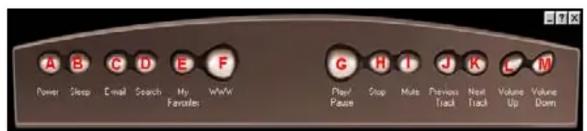
Power Sleep Email Search My Favorites WeW Play/ Pause Stop Mute Previous Track Next Track Values Up Values Down

Fig. 2
Launch Button Customization Choose a function for this button. Select Pre-defined Functions Previous Track Screen Saver Search Stop Video Player Volume Down Volume Up Specify a program or Web page Program path or Web page address: Browse... Button title: OK Cancel

Fig. 4

Fig. 3
Launch Button Customization Choose a function for this button. Select Pre-defined Functions Previous Track Screen Saver Search Stop Video Player Volume Down Volume Up Specify a program or Web page Program path or Web page address: Browse... Button file: OK Cancel

Fig. 5

L I F E I S M O R E ! T R U S T U S TRUST.COM

Trust

KB-1300 PS/2 KEYBOARD

(SILVERLINE DIRECT ACCESS KEYBOARD)

Thank you for your purchase. Register your product via our Internet site at www.trust.com/register, so that you will be eligible for optimal guarantee and service support. You will also be automatically informed of the development of your and other Trust products.

U K

LIFE IS MORE! TRUST US

TRUST.COM

Table of contents Click a title to access it
Manual assistant
Powered by Anthropic
Waiting for your message
Product information

Brand : TRUST

Model : Classics KB-1300

Category : Keyboard