
C400 - Video projector LENOVO - Free user manual and instructions
Find the device manual for free C400 LENOVO in PDF.


| Product Type | Video Projector |
| Brand | Lenovo |
| Model | C400 |
| Display Technology | DLP |
| Native Resolution | 1920 x 1080 (Full HD) |
| Brightness | 3000 ANSI Lumens |
| Contrast Ratio | 15000:1 |
| Lamp Life | Up to 20,000 hours (Normal Mode) |
| Throw Ratio | 1.2:1 |
| Image Size | 40 - 300 inches |
| Keystone Correction | Vertical & Horizontal (±30°) |
| Input Ports | HDMI (x2), USB (x1), VGA (x1), Audio Out (3.5mm) |
| Built-in Speaker | 10W Mono |
| Noise Level | 30 dB (Eco Mode) |
| Power Consumption | 200W (Normal), <0.5W (Standby) |
| Dimensions (W x D x H) | 315 x 230 x 95 mm |
| Weight | 2.5 kg |
| Power Supply | AC 100-240V, 50/60Hz |
| Maintenance | Clean air filter every 500 hours; replace lamp when prompted |
| Safety | Auto-off after inactivity; overheat protection |
| Spare Parts | Replacement lamp (model: LC301), air filter kit |
| Repairability | User-replaceable lamp and filter; professional service for other components |
| Operating Temperature | 5°C to 40°C |
| Warranty | 2 years limited |
Frequently Asked Questions - C400 LENOVO
User questions about C400 LENOVO
0 question about this device. Answer the ones you know or ask your own.
Ask a new question about this device
Download the instructions for your Video projector in PDF format for free! Find your manual C400 - LENOVO and take your electronic device back in hand. On this page are published all the documents necessary for the use of your device. C400 by LENOVO.
USER MANUAL C400 LENOVO
Note: Before using this information and the product it supports, read the information in Appendix E, "Lenovo Statement of Limited Warranty LSOLW-00 05/2005," on page E-1.
First Edition (September 2005)
© Copyright Lenovo 2005.
Portions © Copyright International Business Machines Corporation 2004.
Allrightsreserved.
U.S. GOVERNMENT USERS – RESTRICTED RIGHTS: Our products and/or services are provided with RESTRICTED RIGHTS. Use, duplication or disclosure by the Government is subject to the GSA ADP Schedule contract with Lenovo Group Limited, if any, or the standard terms of this commercial license, or if the agency is unable to accept this Program under these terms, then we provide this Program under the provisions set forth in Commercial Computer Software–Restricted Rights at FAR 52.227-19, when applicable, or under Rights in Data-General, FAR 52.227.14 (Alternate III).
Contents
Safety information . . . . . . . . . . v
General safety guidelines. . . . . . . vii
Service. . . . . . . . . . . . . . . . . . . . vii
Power cords and power adapters . . . . . . . vii
Extension cords and related devices . . . . . . viii
Plugs and outlets . . . . . . . . . . . . . . . viii
Batteries . . . . . . . . . . . . . . . . . . viii
Heat and product ventilation . . . . . . . . ix
CD and DVD drive safety. . . . . . . . . . ix
Registering your option. . . . . . . . xi
Chapter 1. Product description ..... 1-1
Packing checklist . . . . . . . . . . . . . 1-2
Projector features . . . . . . . . . . . . . 1-3
Chapter 2. Setting up the projector . . 2-1
Starting the projector . . . . . . . . . . . 2-1
Turning off the projector. . . . . . . . . . 2-2
Positioning the projector. . . . . . . . . . 2-3
Adjusting the projector level and height . . . . 2-5
Adjusting the image . . . . . . . . . . . 2-5
Adjusting the volume. 2-6
Chapter 3. Using the wireless features 3-1
Installation 3-1
Using the projector software . . . . . . . . 3-1
Starting a wireless projecting session. . . . . 3-1
Wireless software configuration . . . . . . . 3-4
Selecting adapter 3-5
Remote controller emulation . . . . . . . . 3-6
Buttons of the remote emulation controller. . . 3-7
USB image display. 3-7
Ending projection . . . . . . . . . . . . . 3-8
Wireless projector system tray icon . . . . . . 3-8
Exit. 3-9
Uninstallation 3-9
Chapter 4. Connecting devices to the projector . . . . . . . . . . . . . . . . 4-1
Connecting devices 4-1
Remote mouse control using USB. . . . . . . 4-1
Connecting to a computer monitor . . . . . . 4-2
Chapter 5. Maintenance ..... 5-1
Cleaning the projector . . . . . . . . . . . 5-1
Cleaning the lens . . . . . . . . . . . . 5-1
Cleaning the case . . . . . . . . . . . . 5-1
Replacing the projector lamp . . . . . . . . 5-1
Resetting the lamp timer. . . . . . . . . . . 5-3
Using the security slot . . . . . . . . . . . 5-3
Chapter 6. Using the projector features 6-1
Before you begin . . . . . . . . . . . . . 6-1
Using the remote control. . . . . . . . . . . 6-2
Operating range 6-3
Projector and remote control buttons. . . . . 6-3
USB image display. 6-3
Operation description. . . . . . . . . . . 6-3
Open 6-3
Previous . . . . . . . . . . . . . . . 6-4
Next 6-4
Auto Slide Show/Manual Slide Show . . . . 6-4
Optimal Size/Original Size . . . . . . . . 6-4
Full Screen Mode . . . . . . . . . . . . 6-4
Exit. 6-4
Chapter7. 1 On-ScreenDisplaymenu controls ..... 7-1
Navigating the OSD . . . . . . . . . . . . . . 7-1
Language. . . . . . . . . . . . . . . . . 7-1
Quality menu . . . . . . . . . . . . . . 7-1
Properties menu . . . . . . . . . . . . . 7-3
Options menu . . . . . . . . . . . . . . 7-4
Setup menu . . . . . . . . . . . . . . . 7-5
Information settings menu . . . . . . . . . 7-7
Projector wireless configuration . . . . . . . 7-8
Appendix A. Troubleshooting ..... A-1
Common problems and solutions . . . . . . A-1
Tips for troubleshooting. . . . . . . . . . A-1
Troubleshooting information . . . . . . . . A-1
Projector LEDs. A-3
Appendix B. Frequently asked questions (FAQ's) . . . . . . . . . . B-1
Appendix C. Specifications ..... C-1
Appendix D. Service and Support. . . D-1
Online technical support ..... D-1
Telephone technical support ..... D-1
Appendix E. Lenovo Statement of Limited Warranty LSOLW-00 05/2005 . E-1
Part 1 - General Terms . . . . . . . . . . . E-1
Part 2 - Country-unique Terms . . . . . . . . E-4
Part 3 - Warranty Information . . . . . . . E-15
Warranty Period . . . . . . . . . . . . E-15
Types of Warranty Service. . . . . . . . E-15
Worldwide telephone list . . . . . . . . E-17
Guarantee supplement for Mexico . . . . . . E-20
Appendix F. Notices. . . . . . . . . . F-1
Trademarks . . . . . . . . . . . . . . . . . F-2
Federal Communications Commission (FCC) Class
A Statement of Compliance . . . . . . . . . G-1
Appendix G. Electronic emissions
notices . . . . . . . . . . . . . . . . . G-1
Safetyinformation
Before installing this product, read the Safety Information.
Always observe the following precautions to reduce the risk of injury and property damage.
Service
Do not attempt to service a product yourself unless instructed to do so by the Customer Support Center. Use only a service provider who is approved to repair yourparticularproduct.
Note: Some parts can be upgraded or replaced by the customer. These parts are referred to as Customer Replaceable Units, or CRUs. Lenovo expressly identifies CRUs as such, and provides documentation with instructions when it is appropriate for customers to replace those parts. You must closely follow all instructions when performing such replacements. Always make sure that the power is turned off and that the product is unplugged from any power source before you attempt the replacement. If you have any questions or concerns, contact the Customer Support Center.
Power cords and power adapters
Use only the power cords and power adapters supplied by the product manufacturer.
Never wrap a power cord around the power adapter or other object. Doing so can stress the cord in ways that can cause the cord to fray, crack or crimp. This can present a safety hazard.
Always route power cords so that they will not be walked on, tripped over, or pinchedbyobjects.
Protect the cord and power adapters from liquids. For instance, do not leave your cord or power adapter near sinks, tubs, toilets, or on floors that are cleaned with liquid cleansers. Liquids can cause a short circuit, particularly if the cord or power adapter has been stressed by misuse. Liquids can also cause gradual corrosion of the power cord terminals and/or the connector terminals on the adapter which can eventually result in overheating.
Always connect power cords and signal cables in the correct order and ensure that all power cord connectors are securely and completely plugged into receptacles.
Do not use any power adapter that shows corrosion at the ac input pins and/or shows signs of overheating (such as deformed plastic) at the ac input or anywhere on the power adapter.
Do not use any power cords where the electrical contacts on either end show signs of corrosion or overheating or where the power cord appears to have been damaged in any way.
Extension cords and related devices
Ensure that extension cords, surge protectors, uninterruptible power supplies, and power strips that you use are rated to handle the electrical requirements of the product. Never overload these devices. If power strips are used, the load should not exceed the power strip input rating. Consult an electrician for more information if you have questions about power loads, power requirements, and inputratings.
Plugsandoutlets
If a receptacle (power outlet) that you intend to use with your computer equipment appears to be damaged or corroded, do not use the outlet until it is replaced by a qualified electrician.
Do not bend or modify the plug. If the plug is damaged, contact the manufacturer to obtain a replacement.
Some products are equipped with a three-pronged plug. This plug fits only into a grounded electrical outlet. This is a safety feature. Do not defeat this safety feature by trying to insert it into a non-grounded outlet. If you cannot insert the plug into the outlet, contact an electrician for an approved outlet adapter or to replace the outlet with one that enables this safety feature. Never overload an electrical outlet. The overall system load should not exceed 80 percent of the branch circuit rating. Consult an electrician for more information if you have questions about power loads and branch circuit ratings.
Be sure that the power outlet you are using is properly wired, easily accessible, and located close to the equipment. Do not fully extend power cords in a way that will stress the cords.
Connect and disconnect the equipment from the electrical outlet carefully
Batteries
All personal computers manufactured by Lenovo contain a non-rechargeable coin cell battery to provide power to the system clock. In addition many mobile products such as ThinkPad notebook PCs utilize a rechargeable battery pack to provide system power when in portable mode. Batteries supplied by Lenovo for use with your product have been tested for compatibility and should only be replaced with Lenovo approved parts.
Never attempt to open or service any battery. Do not crush, puncture, or incinerate batteries or short circuit the metal contacts. Do not expose the battery to water or other liquids. Only recharge the battery pack strictly according to instructions included in the product documentation.
Battery abuse or mishandling can cause the battery to overheat, which can cause gasses or flame to “vent” from the battery pack or coin cell. If your battery is damaged, or if you notice any discharge from your battery or the buildup of foreign materials on the battery leads, stop using the battery and obtain a replacement from the battery manufacturer.
Batteries can degrade when they are left unused for long periods of time. For some rechargeable batteries (particularly Lithium Ion batteries), leaving a battery unused in a discharged state could increase the risk of a battery short circuit, which could
shorten the life of the battery and can also pose a safety hazard. Do not let rechargeable Lithium-Ion batteries completely discharge or store these batteries in a discharged state.
Heat and product ventilation
Computers generate heat when turned on and when batteries are charging. Notebook PCs can generate a significant amount of heat due to their compact size. Always follow these basic precautions:
- Do not leave the base of your computer in contact with your lap or any part of your body for an extended period when the computer is functioning or when the battery is charging. Your computer produces some heat during normal operation. Extended contact with the body could cause discomfort or, potentially, askinburn.
- Do not operate your computer or charge the battery near flammable materials or inexplosive environments.
- Ventilation slots, fans and/or heat sinks are provided with the product for safety, comfort, and reliable operation. These features might inadvertently become blocked by placing the product on a bed, sofa, carpet, or other flexible surface. Never block, cover or disable these features.
CD and DVD drive safety
CD and DVD drives spin discs at a high speed. If a CD or DVD is cracked or otherwise physically damaged, it is possible for the disc to break apart or even shatter when the CD drive is in use. To protect against possible injury due to this situation, and to reduce the risk of damage to your machine, do the following:
• Always store CD/DVD discs in their original packaging
• Always store CD/DVD discs out of direct sunlight and away from direct heat sources
- Remove CD/DVD discs from the computer when not in use
- Do not bend or flex CD/DVD discs, or force them into the computer or their packaging
- Check CD/DVD discs for cracks before each use. Do not use cracked or damaged discs
Registeringyouroption
Thank you for purchasing this Lenovo ™ product. Please take a few moments to register your product and provide us with information that will help Lenovo to better serve you in the future. Your feedback is valuable to us in developing products and services that are important to you, as well as in developing better ways to communicate with you. Register your option on the Web site:
http://www.lenovo.com/register
Lenovo will send you information and updates on your registered product unless you indicate on the Web site questionnaire that you do not want to receive further information.
Chapter 1. Product description
TheThinkVision ® C400 Wireless Projector projects a bright, quality image that enables you to make professional presentations. Being lightweight and compact in size, the C400 Wireless Projector is a great departmental solution and allows you to move easily from boardroom to the conference room. Some main features of this projector are:
• Extremely powerful, lightweight, and portable at 3.4 kg (7.5 lbs).
- Sharp and clear images with a high contrast ratio of 1200:1.
- Beautiful reproduction of high-quality images from your PC and other media sources (for example, a DVD Player).
Packingchecklist
In addition to this user's guide, your option package contains the following:

Figure 1-1. Standard Accessories
1 Projector with lens cap
2 Video cable (S-video)
3 Power cord
4 Computer cable (DVI-DB15)
5 User's Guide and installation CD
6 Multi-language quick start guide
7 Carrying case
8 USB cable
9 Video cable (Mini-jack RCA)
10 Audio cable (Mini jack-RCA)
11 Remote control batteries
12 Remotecontrol
If any of the items listed above are missing or damaged, contact your place of purchase.
Note: Be sure to retain your proof of purchase; it will be required to receive warranty service.
For information on optional accessories for your projector, go to the http://www.lenovo.com/think Web site.
Important:
- Avoid using the projector in dusty environments
- Leave the power cable plugged in (for 2-5 minutes) until the projector returns to room temperature before placing the projector inside the soft case. Placing the projector into the case too soon after switching off the power could cause the projector to overheat and will shorten lamp life.
- Be sure to attach the lens cap and place the projector into the soft case with the lens facing upward to avoid damaging the lens.
Projectorfeatures
The figures below show the different views and features of the projector.
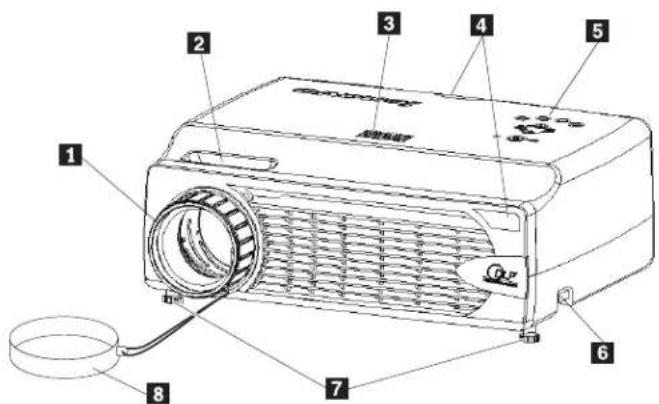
Frontangleofprojector
1 Focus
2 Zoom
3 Speaker
4 Remote control receiver (IR)
5 Keypad
6 Height adjuster button
7 Height adjuster
8 Lenscap
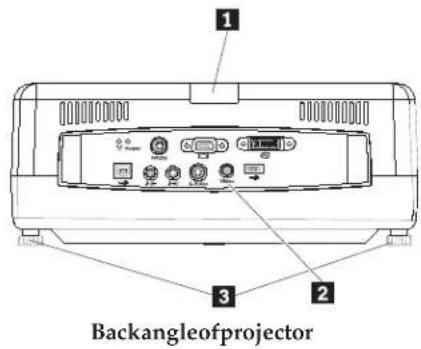
1 IR
2 Connectors
3 Elevator foot/leveling foot

flowchart
graph TD
    A["Power"] --> B["Keystone"]
    C["Ready"] --> B
    D["Menu"] --> E["Re-Sync Source"]
    F["Enter"] --> E
    B --> G["+"]
    E --> G
    style B fill:#f9f,stroke:#333
    style E fill:#ccf,stroke:#333
1 Ready LED
2 Source
3 Enter
4 Keystone/Up button
5 Volume/right button
6 Menu
7 Power LED
8 Power button
9 Re-Sync
10 Volume/left button
11 Keystone/downbutton
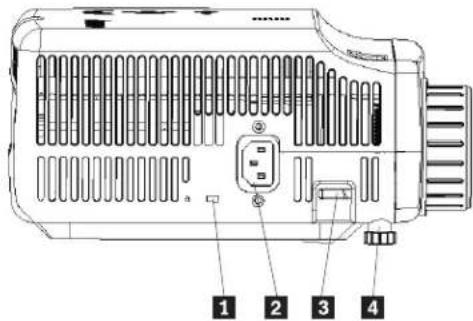
Side view of the projector
1 Kensington lock slot
2 Power
3 Height adjuster button
4 Heightadjuster

Connectors on back of the projector
1 Wireless LED
2 Wireless Power LED
3 RS 232
4 Video Out
5 DVI-I In
6 USB Memory Key connector
7 Composite Video
8 S-Video
9 Audio In
10 AudioOut
11 USBMouse

Bottom view of the projector
1 Height adjuster
2 Height adjuster button
3 Projection lamp cover
4 Mounting bracket holes
Chapter 2. Setting up the projector
This chapter provides information on positioning the projector, connecting a computer source and displaying and adjusting an image.
Startingtheprojector
To start the projector, do the following.
- Connect the power cord to the projector as shown below. Connect the other end of the cord to an electrical outlet. The Power and Lamp-ready LEDs turn on.

natural_image
Diagram of a portable air conditioner unit with connected plug and socket (no text or symbols)- Remove the lens cover.
- Attach any wired input devices.
- Turn on the connected input devices. For more information, go to "Connecting devices" on page 4-1
- Be sure that the Power LED lights steady (not flashing) amber and then press the Power button to turn on the projector.
The projector display window opens and the projector detects connected devices. If you are connecting wirelessly, go to Chapter 3.
If you connected the projector to a ThinkPad® computer, press Fn+F7 on the computer to switch the display output to the projector. If you connected the projector to a non-ThinkPad computer, refer to the documentation that came with your computer for information on how to change the display output.

Attention: Do not look directly into the projection lens when the lamp is turned on. The bright light might harm your eyes.
- If you have connected more than one input device to the projector, toggle the Source button to change devices. (DVD and HDTV are supported through the DVI-Icableconnector.)
- For information on turning off the projector, go to "Turning off the projector."
Attention: Before moving the projector, be sure to power down the projector properly and disconnect the projector from the main power source. See "Turning off the projector" for more information on turning off the projector normally.
Turning off the projector
To turn off the projector, do the following.
- Press the Power button.
The projector prepares for shut-down and the Wait a moment message displays, as shown below. The projector turns off automatically within 5 seconds.

Note: This operation can be cancelled by pressing a button other than the Powerbutton.
- Press the Power button when the Power Off?/Press Power again message displays, as shown below.
Note: Leave the power cable plugged in for at least 2-5 minutes until the projector returns to room temperature before placing the projector inside the soft case. Placing the projector into the case too soon after switching off the power could cause the projector to overheat.

Theprojectorturnsoff.
Positioning the projector
To determine where to position the projector, consider the size and shape of your screen, the location of your power outlets, and the distance between the projector and the rest of your equipment. Following are some general guidelines:
- Position the projector on a flat surface at a right angle to the screen. The projector must be at least 1.5 m (4.9 ft) from the projection screen.
- Position the projector within 2.7 m (9 ft) of your power source and within 1.8 m (6 ft) of any wired video devices (unless you purchase extension cables). To ensure adequate cable access, do not place the projector within .15 m (6 in.) of a wall or other object.
Note: Wireless range may vary depending on environmental conditions.
- Position the projector the desired distance from the screen. The distance from the lens of the projector to the screen, the zoom setting, and the video format determine the size of the projected image.
Attention: Ensure that projector air flow is sufficient and not blocked or using recirculated air. Please also ensure that the projector is not in a confined space.

Figure2-1.
Table2-1.
| Projectiondistance1(m/ft) | Imageheight2(zoommax/min) | ImageWidth3(zoommax/min) | Diagonalimagesize4(zoommax/min) |
| 1.5 m/4.92 ft | 0.7 m/0.5 m25.6in./21.2in. | 0.9m/0.7m33.8in./28.3in. | 1.1m/0.9m42.5in./35.4in. |
| 2.0 m/6.56 ft | 0.9 m/0.7 m34.0in./28.3in. | 1.2 m/ 1.0 m45.3in./37.8in. | 1.4m/1.2m56.7in./47.2in. |
| 2.4 m/7.87 ft | 1.0 m/0.9 m40.5in./34in. | 1.4 m /1.2 m53.9in./45.3in. | 1.7m/1.4m67.7in./56.7in. |
| 2.8 m/9.18 ft | 1.2 m/1.0 m47.4in./39.7in. | 1.6 m/ 1.3 m62.9in./52.7in. | 2.0m/1.7m79.1in./66.1in. |
| 3.2 m/10.5 ft | 1.4 m/1.2 m54.3in./45.3in | 1.8m/1.5m72.4in./60.6in. | 2.3m/1.9m90.5in./75.6in. |
| 3.6 m/11.81 ft | 1.6 m/1.3 m61.0in./51.2in. | 2.1 m /1.7 m81.5in./68.1in. | 2.6m/2.2m101.9in./85.0in. |
| 4.0 m/13.12 ft | 1.7 m/1.4 m68.1in./56.7in. | 2.3m/1.9m90.6in./75.6in. | 2.9m/2.4m113.4in./94.5in. |
| 4.4 m/14.43 ft | 1.9 m/1.6 m74.8in./62.2in. | 2.5m/2.1m99.6in./83.1in. | 3.2m/2.6m124.8in./103.9in. |
| 4.8 m/15.74 ft | 2.2 m/1.9 m81.6in./67.7in. | 2.8m/2.3m108.7in./90.6in. | 3.5m/2.9m135.8in./113.4in. |
| 5.2 m/17.06 ft | 2.2 m/1.9 m88.2in./73.6in. | 3.0m/2.5m117.7in./98.4in. | 3.7m/3.1m147.2in./122.8in. |
| 5.6 m/18.37 ft | 2.4 m/2.0 m95.3in./79.1in. | 3.2m/2.7m126.8in./105.9in. | 4.0m/3.4m158.7in./132.3in. |
| 6.0 m/19.68 ft | 2.6 m/2.2 m101.9in./85.0in. | 3.5m/2.9m135.8in./113.4in. | 4.3m/3.6m170.1in./141.7in. |
| 10.0 m/32.8 ft | 4.3 m/3.6 m170.1in/141.7in. | 5.8m/4.8m226.8in./188.9in. | 7.2m/6.0m283.5in./236.2in. |
Adjusting the projector level and height
To adjust the projector level and height, complete the following procedure:
- To raise the height of the projector, lift the projector 1 and press the height-adjuster buttons 2. The elevator foot 3 drops down.
- To make minor adjustments to the height, rotate the elevator foot.
- To lower the level of the projector, press the height-adjuster button and press down on the top of the projector.

Note:
• The projector table or stand should be level and sturdy.
- Position the projector so that it is perpendicular to the screen.
- Be sure the cables are not in a place where they can knock over the projector.
Adjustingtheimage
To adjust the zoom, focus, and keystone for the image, do the following:
- Twist the rings on the projector to adjust the focus 1 and zoom 2, as shown below.

- Use the Keystone buttons on the projector or the remote to correct image-trapezoid (wider top or bottom) effect.
The keystone control appears on the On Screen Display (OSD), as shown.

Adjustingthevolume
To adjust the volume, do the following:
- Press the Volume +/- buttons on the projector or the remote control. The volume control appears on the OSD.

-
Use the Volume +/- buttons shown below to adjust the level.
-
Press the Mute button (on the remote control only) to turn off the volume.

natural_image
Simple graphic symbol with a yellow arrow and black square inside a red circle on a gray background (no text or numbers)- Press any Volume +/- buttons on the projector or remote control to turn off mute.
Chapter 3. Using the wireless features
This chapter provides information on using the wireless features of the C400 WirelessProjector.
Installation
Follow the instructions below to install the Lenovo Wireless Projecting Software.
Note: If there is a previous version of Lenovo Wireless Projecting Software, it is recommended to first uninstall it, then restart the computer prior to installing the new version.
To install the software from the CD or view the User's guide:
- Insert the C400 Wireless Projector Software & User's Guide CD into the CD or DVD drive. If the CD starts automatically, go to Step 5.
- If the CD does not start, click Start and then click Run.
- Type e:\launch.bat where e is the drive letter of the CD or DVD drive.
- Click OK. The CD browser window opens.
- Follow the on-screen instructions.
Using the projector software
Lenovo Wireless Projecting Software includes many features such as:
• Starting a wireless projecting session
• Searching for a wireless projector
• Binding a wireless projector
• Retrieving the property details of a wireless projector
- Quick projection
- Selecting a WLAN adapter
- Remote control emulation
- USB image display
• Ending a wireless projecting session
Starting a wireless projecting session
To start a wireless projecting session, please follow the steps below:
- Turn on the wireless projector.
- Start the Wireless Projecting Software either through the Start menu or through the desktop icon.
Note: ThinkPad users can press Fn+F7 and use the pre-set scheme; Presentation on Lenovo Wireless Projector.
- The Wireless Projecting Software will then search for wireless projectors and available projectors will be listed. Clicking Refresh will refresh the list.
For a WEP-enabled wireless projector, there will be a lock mark on the top left corner of the projector icon.
Note: If no WLAN adapter is found, the system will give a warning message, and the task tray icon will dim.
- From the list of projectors found, double-click the projector's ID.
- If the projector is WEP-enabled, enter the correct session key from the projector screen. A correct session key is required in order to start a wireless projecting session.
After a successful wireless projecting session, the session key will be remembered until you exit the wireless projecting software.
When a computer tries to start a wireless projecting session to a projector already displaying an image from a wired device, the following prompt will appear:
By clicking OK from a wired device, a wireless projection will begin in the background. The wired projection continues without any interference. You can switch to the wireless projection by pressing the Wireless button on the remote, and press Source to switch back.
During wireless projection, the disconnection prevention mechanism will reduce unexpected disconnections.
Binding and Unbinding a Projector
Binding is an optional setting which allows a user to select one wireless projector and associate it with the user's notebook. If binding is selected, a hotkey combination (Ctrl + F5) can be used to toggle projecting on/off. Also, when binding is selected, the software automatically projects to the selected wireless projector.
To bind a projector, launch the Lenovo Wireless Projector software application, which will automatically search for available wireless projectors.
A list of available projector(s) will appear. Right-click over the projector in the list that you wish to bind and select the Bind option from the pop-up menu (as shown below).
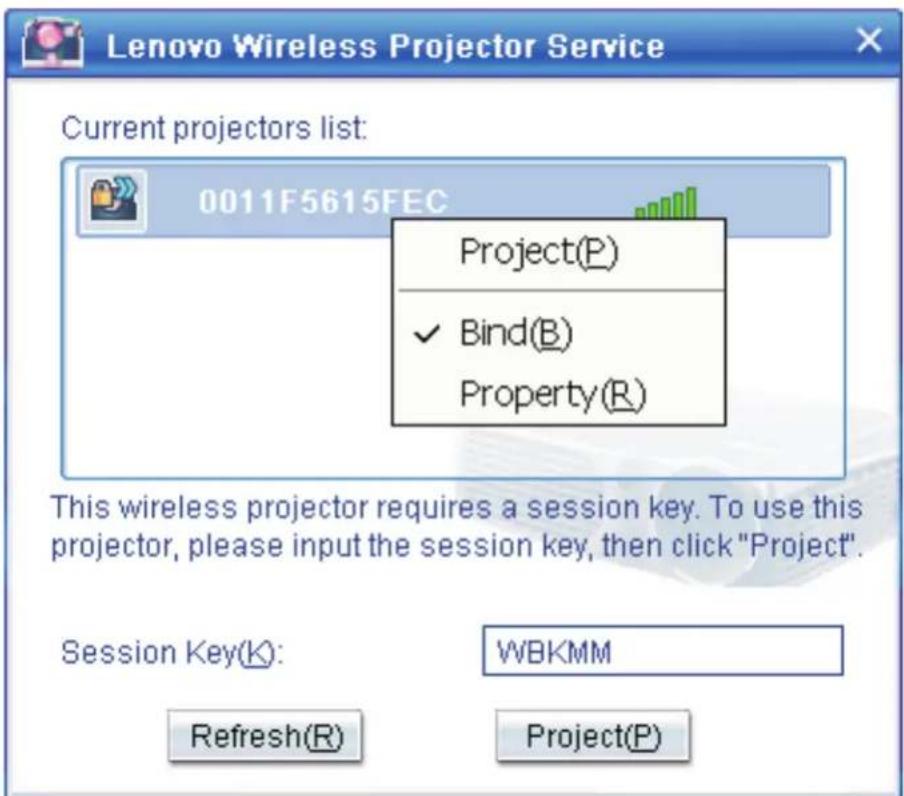
To indicate that binding is on, the projector icon in the list of wireless projectors displays a blue double arrow.
Once binding is selected with one wireless projector, the user can simply toggle projection on/off with the hotkey combination Ctrl+F5 or by selecting Project and End Project from the system tray icon.
To unbind the projector, start the wireless projector software and right-click over the bound projector in the list (indicated by the blue double arrow). De-select Bind. Alternately, the user can right-click the software icon in the system tray and select Configuration. Choose the Setting tab and uncheck the Projector Binding check box. Select OK to confirm and close the window.
Retrieving the property of a projector
After starting the Wireless Projecting Software, right-click the projector found in the Current Projectors List displayed in the system tray, to display the popup menu. Then select Property to show the projector ID, model, version, and status.

Status of the projector
There are five working statuses of the projector:
•Ready
- Wireless projecting
- Wired projecting
- USB image display
•Unknown
Note: Projector property cannot be retrieved during wireless projecting.
Wireless software configuration
Right-click the Lenovo Wireless Projector system tray icon on the bottom right of the screen. Select Configuration to open the Configuration window.
Selectingadapter
In the Adapter tab the current WLAN adapter will be shown.

If there is more than one WLAN adapter in your notebook computer, you can perform wireless projection while browsing the Internet. You can select one of the WLAN adapters to project by clicking the drop-down list box, as shown below:
Note: Anytime you move the mouse pointer over the Lenovo Wireless Projector system tray icon, the information for the selected WLAN adapter will appear.
In the Setting tab, the current binding setting will be shown.

When Projector binding is checked, the projector binding function is enabled.
The ID of the bound projector will appear in the box below Projector binding, as shownabove.
After unchecking Projector binding, Bind Projector in the right-click menu will be gray, and you cannot bind any projector.
To prevent the quick projecting confirmation window from appearing, check Don't show the quick projecting dialog, in the Setting tab.
If you want to disable the binding projector function or quick projection function, please uncheck the Projector binding, then click OK.
Remotecontrolleremulation
Remote controller emulation has the same functions as a remote controller. For example, you can use the remote emulation controller to open the projector menu, configure the projector, and turn off the projector with it.
The Remote controller emulation item can only be shown on the system tray menu on the bottom right corner of the desktop, when the projector is in wireless projecting status. Right-click the Lenovo Wireless Projector system tray icon, and select Emulation remote controller to open the controller panel, as shown below.

Buttons of the remote emulation controller

Listed below are the remote emulation controller buttons and functions:
- Menu: Open the projector OSD menu or go back to the previous menu level.
Note: The OSD menu will only display on the projector screen. For more information go to "Navigating the OSD" on page 7-1.
• Back: Back to previous menu level.
- Close: Click this button and there will be a confirmation message. Click Yes to turn the projector off.
- Up, Down, Left and Right: Operates the same as remote-control keys.
- Enter: Confirm changes.
- Close: Close the remote emulation controller.
USBimagedisplay
The projector has a built-in USB port, which can play pictures from a USB memory key. The USB image display option will only be shown on the Lenovo Wireless Projector tray menu on the bottom right corner of the desktop, while the projector is in a wireless projecting state, as shown below.

Right-click the Lenovo Wireless Projector icon in the system tray and select USB image display to start this function.
Note: You may also start USB image display with the projector OSD menu. For information go to "USB image display" on page 3-7 on page 5-3.
Endingprojection
You can use any of the following procedures to end the current wireless projection session:
- Right-click Lenovo Wireless Projector system tray icon to select End Project.
- Press hotkeys (Ctrl+F5) to end the current projection.
- Double-click the Lenovo Wireless Projector system tray icon, and the following promptwillappear:
Select Yes to end the projection, and No to abort this action. - Press Wireless button on the remote controller to end the projection immediately.
- Right-click Lenovo Wireless Projector system tray icon to select Exit.
Note: This procedure will also end your software session.
After ending the projection, your original network environment will be restored, and other notebook computers can project to the projector.
Wireless projector system tray icon
After starting the Wireless Projecting software, you can right-click the Wireless Projector system tray icon.
- Project: Select Project, or press the hotkey P for the quick projection to the bound projector. If there is no projector to be bound in the wireless projector list, the main window will be shown.
- Configuration: Select Configuration, Setting tab and the Adapters tab can be selected in Configuration dialog.
- About: Select About, you can view the version information of the Lenovo Wireless Projector Service Application.
- Exit: Select Exit to stop Lenovo Wireless Projector program.
After starting the wireless projection, you can right-click Wireless Projector system tray icon on the bottom right of the screen, then the follow tray menu will appear:
- End Project: Select End Project, or press the hotkeys (Ctrl+F5) to end the current wirelessprojection.
- Emulation remote controller: Select Emulation remote controller to open the software remote controller on your computer.
- USB image display: Select USB image display to start projecting images stored on a USB memory key.
- About: Select About, you can view the version information of the Lenovo Wireless Projector Service Application.
- Exit: Select Exit to stop Lenovo Wireless Projector program.
Exit
Right-click Lenovo Wireless Projector system tray icon to select Exit to stop Lenovo Wireless Projector program.
Note: When a ThinkPad user presses Fn+F7 and selects a different display scheme in Presentation Director, this will also stop the Lenovo Wireless Projection Program. You will lose all saved session keys anytime you stop the Lenovo Wireless Projection Software, (even when it is in wireless projection.)
Note: Lenovo Wireless Projecting Software can exit any time even when it is in wireless projection, then, all saved session keys will be lost.
Uninstallation
Please see the steps below to remove uninstall the Wireless Projecting Software:
- Click Start.
- Click Programs.
- Click Lenovo Wireless Projector.
- Click Uninstall Lenovo Wireless Projector.
- Follow the onscreen instructions.
Note: If the Wireless Projecting Software is running, a message box will appear. Close the Wireless Projecting Software, and restart the uninstallation process.
Chapter 4. Connecting devices to the projector
This chapter provides information on connecting devices to the C400 Wireless Projector.
Connectingdevices
Computers and video devices can be connected to the projector at the same time. Refer to the documentation that comes with the connecting device to verify that the device has the appropriate output connector.
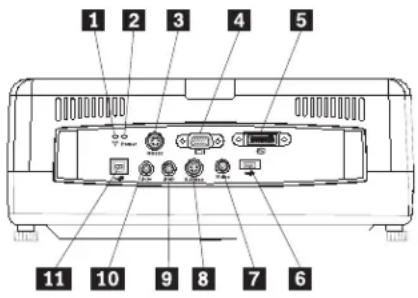
1 Wireless LED
2 Wireless Power LED
3 RS 232
4 Video Out
5 DVI-I In
6 USB Memory Key connector
7 Composite Video
8 S-Video
9 Audio In
10 Audio Out
11 USBMouse
Remote mouse control using USB
Note: For wireless projecting sessions, USB connection is not required.
To control your computer mouse using the projector remote control, connect the projector to the computer with a USB cable as shown below:

natural_image
Diagram showing two electronic devices connected by a cable, one open and one mounted on a panel (no text or symbols visible)Note: USB mouse function is only supported with Microsoft ® Windows ® 2000 and WindowsXP.
Connecting to a computer monitor
If you want to see the image on a separate monitor as well as on the projection screen, plug the monitor cable to the monitor out connector on the projector.
Chapter5.Maintenance
This chapter provides information on projector maintenance.
Cleaningtheprojector
Cleaning the projector to remove dust and grime will help ensure trouble-free operation.
- Be sure to turn off and unplug the projector at least 1 hour before cleaning. Failure to do so could result in a severe burn.
- Use only a dampened cloth when cleaning. Do not allow water to enter the ventilation openings on the projector.
- If a little water gets into the projector interior while cleaning, leave it unplugged in a well-ventilated room for several hours before using.
- If a lot of water gets into the projector interior when cleaning, have the projector serviced.
Cleaningthelens
To clean the lens, complete the following procedure:
- Apply a non-abrasive camera lens cleaner to a soft, dry cloth.
Note: Avoid using an excessive amount of cleaner, and do not apply the cleaner directly to the lens. Abrasive cleaners, solvents or other harsh chemicals might scratch the lens.
- Lightly wipe the cleaning cloth over the lens in a circular motion. If you do not intend to use the projector immediately, replace the lens cap.
Cleaningthecase
Follow the steps below to clean the projector case:
- Wipe off dust with a clean dampened cloth.
- Moisten the cloth with warm water and mild detergent (such as dish detergent), and wipe the case.
- Rinse all detergent from the cloth and wipe the case again.
Note: To prevent discoloration or fading of the case, do not use abrasive alcohol-basedcleaners.
Replacing the projector lamp
The projector lamp should only be replaced with an Lenovo certified replacement part, which you can order from your business partner or go to www.lenovo.com/think.
To replace the projector lamp, complete the following procedure:
- Turn off the projector, unplug the power cord, and allow the projector to cool for at least 1 hour.
- Use a Phillips-head screwdriver to remove the screw from the lamp compartment cover as shown in 1.
- Remove the lamp compartment cover as shown in 2.

- Remove the two screws from the lamp module as shown in 3.
- Lift the module handle up and pull up firmly as shown in 4.
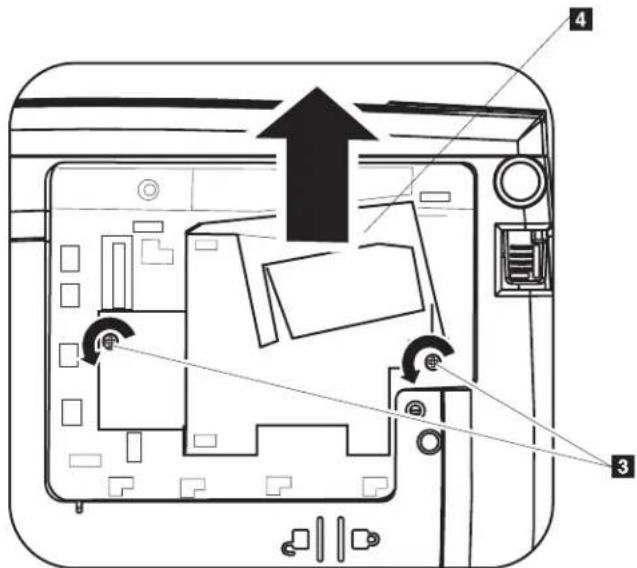
- Reverse steps 1 through 5 to install the new lamp module.
Note: The lamp module should be oriented as shown below when replacing.

Attention: This product contains a Metal Arc Lamp, which contains Mercury. Dispose of it as required by local ordinances and regulations.
The USA restricts or prohibits the disposal of some or all lamps containing mercury in the municipal waste stream. Please visit www.lamprecycle.org for more information on specific state disposal requirements and recycling facilities.
For users in Connecticut, please call Northeast Lamp Recycling toll-free at 1-888-657-5267 to place an order for the delivery of a kit that includes a box for the lamp, tape, and a return shipping label.
Resetting the lamp timer
After replacing the lamp, you should reset the lamp hour counter to zero. Please follow the steps below.
- Press the Menu button to open the main menu.
- Press the cursor left/right button to move to the Info menu.
- Press the cursor up/down button to move down to Lamp Timer.
- Press the Enter button. The screen will show Press Enter to Lamp Timer Reset.
- Press the Enter button again to reset the lamp hours.
Attention: Lamp Life is a measure of brightness degradation only and is not a specification for the time it takes a lamp to fail and cease light output. Lamp Life is defined as the time it takes for more than 50% of a lamp sample population to have brightness decrease by approximately 50% of the rated lumens for the specified lamp. For example, if the defined life of a sample set of lamps is 2000 hours and their brightness is rated at 1100 lumens, then after 2000 hours 50% of the lamps will still be brighter than 550 lumens.
Using the security slot
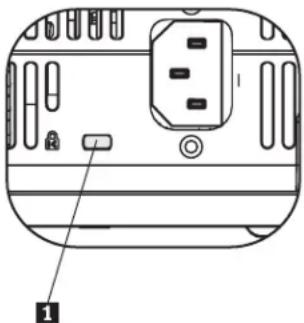
The projector has a security slot, as shown. Refer to the information that comes with the lock for instructions on how to use it.
natural_image
Diagram of a device rear panel with labeled component (no text or symbols beyond label)1 Kensington lock slot
Chapter 6. Using the projector features
This chapter provides information on installing the remote control batteries and using the remote control, audio, keypad buttons, and other projector features.
Beforeyoubegin
Before you can use the remote control, you must install the AAA batteries that come with this projector. To install the batteries, do the following:
Note:
• Use only AAA alkaline batteries.
- Dispose of used batteries according to local government ordinance regulations.
- Remove the batteries when not using the remote control for prolonged periods.
- Remove the battery compartment cover from the remote control as shown.
- Insert the supplied batteries into the remote control battery compartment, aligning the polarity (+/-) of the batteries with the polarity icons in the compartment,asshown.
- Replace the cover, as shown.

Using the remote control
The figure below provides an illustration of the remote.

CAUTION:
To reduce the risk of injury to the eyes, do not look directly into the remote control laser light and do not point the laser light into anyone's eyes. The remote control is equipped with a Class II laser that emits radiation.
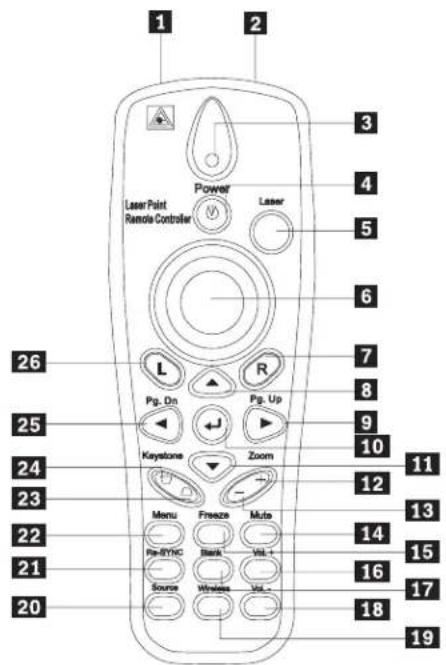
1 Laser transmitter
2 IR transmitter
3 Status LED
4 Power
5 Laser button
6 Cursor pad
7 Right mouse button
8 Up cursor
9 Right cursor/Page up
10 Enter
11 Down cursor
12 Zoom +
13 Zoom -
14 Mute
15 Freeze
16 Volume up
17 Blank
18 Volume down
19 Wireless
20 Source
21 Re-SYNC
22 Menu
23 Keystone bottom
24 Keystone top
25 Left cursor/Page down
26 Left mouse button
Operatingrange
This remote control uses infrared transmission to control the projector. It is not necessary to point the remote directly at the projector. The remote control will function within a maximum radius of 10m (32.8 ft) and 30° above or below the projector level. If the projector does not respond to the remote control, please see Appendix A, "Troubleshooting," on page A-1.
Note: The remote will still work when it is pointed at the projected image.
Projector and remote control buttons
The projector can be operated using the remote control or the buttons on the top of the projector. All operations can be carried out with the remote control.
USBimagedisplay
USB image display can display pictures from a USB memory device. It includes the following functions: scaling, auto-play and displaying in full screen.
USB image display can support five image formats (JPG, BMP, GIF except the animate feature of GIF89a PCX and PNG) and one image index file format (.IDX).
USB image display supports English and Simplified Chinese. When Simplified Chinese is selected in the OSD menu, both English and Simplified Chinese file names will be shown. When a language other than Simplified Chinese is selected in the OSD menu, the interface will be in English and file names in western languages such as English, French, German, Italian, Spanish, etc. can be shown.
Operationdescription
There are two ways of starting the USB image display:
- When the projector is in wireless projecting status, right click Lenovo Wireless Projector system tray icon, and select USB image display in the tray menu.
- Press menu button on the control panel of the projector or remote controller, then select Information →Wireless Setting→USB Image Display in the OSD menu.
In the USB image display status, you can browse pictures using the remote control left mouse button, right mouse button, cursor pad, PgUp and PgDn keys on the remotecontroller.
Menuselections
After you start the USB image display, the menu selections will appear in the toolbar. They are: Open, Auto Slide Show/Manual Slide Show, Previous, Next, Optimal Size/Original Size, Full Screen Mode and Exit.
Open
When clicking Open with the remote control, a window will open displaying all files that can be displayed in USB memory device and directories.
Select the file to be displayed from the list, and then click Confirm to start displaying.
Note: If the selected file is an index file (a plain text file with an .idx extension), the first file listed will be played after clicking Confirm; otherwise, the selected file will be played.
Previous
This opens the previous image stored in the same directory until the first image is displayed.
Next
This opens the next image stored in the same directory until the last image is displayed.
In full screen mode, when the last picture is shown, pressing PgDn key will go back to the first picture.
Auto Slide Show/Manual Slide Show
Selecting the Auto Slide Show/Manual Slide Show function, switches the image display between Manual Slide Show and Auto Slide Show. The default is Manual SlideShow.
In Manual Slide Show mode, the user can step through images using Previous and Nextimages.
In Auto Slide Show status, the images will change automatically every three seconds. After the last image has finished being displayed, it will go back to the firstimage.
OptimalSize/OriginalSize
If you click Optimal Size or double click left button (non full screen mode), images will be shown in optimal size (filling the screen). Click Original Size or double-click left button (non full screen mode), so the image will be shown in its originalsize.
FullScreenMode
After opening a file, you can select Full Screen Mode or click the right button to switch back to full screen mode. Click right button to switch to non-full screen mode.
Exit
Exit stops the USB image display mode. To re-establish projection, select from the Lenovo Wireless Projector system tray icon, and choose project.
Chapter 7. On-Screen Display menu controls
This projector has an On-Screen Display (OSD) that lets you make image adjustments and change various settings.
Note: You must have a display on the screen in order to access some functions of theOSD.
NavigatingtheOSD
You can use the remote control or the buttons on the top of the projector to navigate and make changes to the OSD. The following sections show the menus in the OSD.
Language
To set the OSD language, do the following:
Note: The default OSD language is English.
- Press the Menu button.
- Press the cursor left/right buttons until Language is highlighted.
- Press the cursor up/down buttons until the language you want is highlighted.
- Press Enter to select the language.
- Press the Menu button twice to close the OSD.
The image below shows the Language menu. The default language is English.

Qualitymenu
The Quality menu can be found through the main menu. To access the Quality menu, follow these steps:
-
Press the Menu button to open the main menu.
-
Press the cursor left/right button to move to the Quality menu.
- Press the cursor up/down button to move up and down in the Quality menu. The Quality menu is shown below.

The following table shows the options that you will see in the Quality menu and thedefault.
| ItemDescriptionDefault | ||
| Brightness | Press the cursor left/right button to adjustthebrightness. Range: 0 to 100 | 50 |
| Contrast | Press the cursor left/right button to adjustthecontrast. Range: 0 to 100 | 50 |
| Sharpness | Press the cursor left/right button to adjust the display sharpness. Range: 1 to 5 | 3 |
| Color Temperature | Press the cursor left/right button to adjust the video tint/hue. Range:Cool/Normal/Warm | Normal |
| ColorSaturation Note: Adjustments for this item are only available with Composite Video and S-Video connections. | Press the cursor left/right button to adjust the video saturation. Range: 0 to 100 | 50 |
| ColorTint Note: Adjustments for this item are only available with Composite Video and S-Video connections. | Press the cursor left/right button to adjust the video tint/hue. Range: 0 to 100 | 50 |
| Gamma | Press the cursor left/right button to adjust the gamma correction of the display.Input/Gamma/Brightness:PC/MAC/High/Video/Chart/B&W | PC |
| Color Space | Press the cursor left/right button to adjust the color space.Range:Auto/RGB/YpbPr/YCbCr | Auto |
| Cancel | Press the Enter button to reset Brightness, Contrast, Sharpness, Color Temperature, Color Saturation, Color Tint, Gamma, and Color Space todefaultvalues. | Notapplicable |
Propertiesmenu
The Properties menu can be found through the main menu. To access the Properties menu, follow these steps:
- Press the Menu button to open the main menu.
- Press the cursor left/right button to move to the Properties menu.
- Press the cursor up/down button to move up and down in the Properties menu. The Properties menu is shown below.
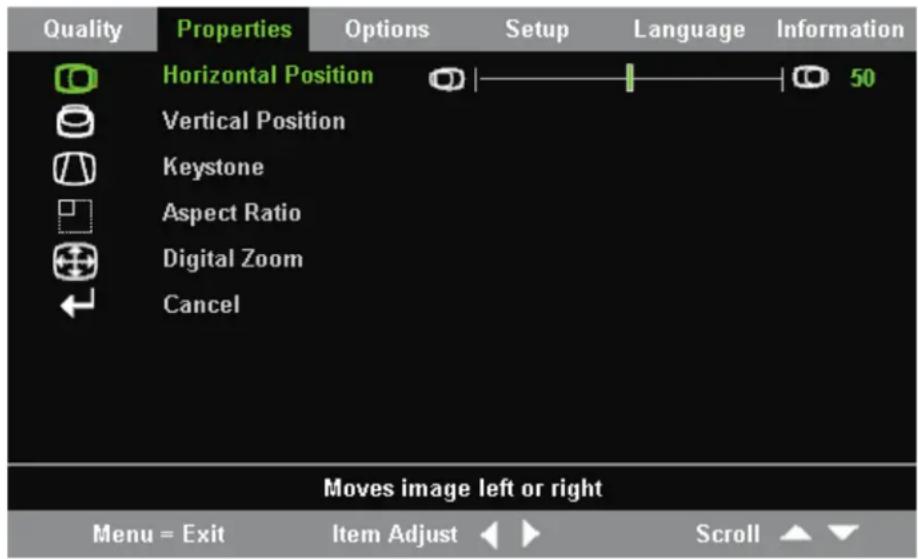
The following table shows the options that you will see in the Properties menu andthedefault.
| ItemDescriptionDefault | ||
| Horizontal position | Press the cursor left/right button to move the image left or right. Range: 0 to 100 | 50 |
| Vertical position | Press the cursor left/right button to move the image up or down. Range: 0 to 100 | 50 |
| Keystone | Press the cursor left/right button to correct distortion of the projected image. Range: -50 to 50 | 0 |
| Aspect Ratio | Press the cursor left/right button to toggle between the 4:3 standard format and 16:9 high Definition TV (HDTV)format. Range:4.3/16.9 | 4:3 |
| Digital Zoom | Press the Enter button to increase or reduceimagesize | Notapplicable |
| Cancel | Press the Enter button to reset Aspect ratio and Digital Zoom to default values. | Notapplicable |
Optionsmenu
To access the Options menu, follow the steps below:
- Press the Menu button to open the main menu
-
Press the cursor left/right button to move to the Options menu.
-
Press the cursor up/down button to move up and down within the Options menu. The Options menu is shown below.

The following table shows the options that you will see in the Options menu and thedefault.
| ItemDescriptionDefault | ||
| Blank Screen | Press the cursor left/right button to select a background color for blank screen. Range: Black/Red/Green/Blue/White | Blue |
| Auto Source | Press the cursor left/right button to enable or disable automatic source detection. Range:On/Off | On |
| Auto Power Off | Press the cursor left/right button to disable automatic shutdown of lamp after 10 minutes of inactivity. Range:On/Off | Off |
| Volume | Press the cursor left/button to adjust theaudiovolume. Range: 0 - 8 | 4 |
| Menu Position | Press the cursor left/right button to position the OSD on screen. Range:Left/Right/Center/Down/Up | Center |
| Menu Display | Press the cursor left/right button to determine timeout delay of OSD. Range:10-30seconds | 15seconds |
| Translucent Menu | Press the cursor up/down button to set menu screen translucency. Range:On/Off | Off |
| Cancel | Resets Auto Power-Off, Volume, Menu Position, Menu Display, and Translucent Menu to default values. | Notapplicable |
Setupmenu
To access the Setup menu, follow the steps below:
- Press the Menu button to open the main menu.
- Press the left/right cursor to move to the Setup menu.
- Press the cursor up/down button to move up and down in the Setup menu. The Setup menu with a single input and the Setup menu with a dual input are shown below:

The following table shows the options that you will see in the Setup menu and the default.
| ItemDescriptionDefault | ||
| VideotypeNote: Adjustments for this item are only available with Composite Video and S-Video connections. | Press the cursor right/left button to select the Video standard.Range:Auto/NTSC/PAL/SECAM | Auto |
| Video automatic gain control (AGC)Note: Adjustments for this item are only available with Composite Video and S-Video connections. | Press the cursor right/left button to enable or disable AGC for video source.Range:On/Off | On |
| Projection | Press the cursor left/right button to select from four projection methods.Range:Desktop mount, front of screenDesktop mount, rear of screenCeiling mount, front of screenCeiling mount, rear of screen | Desktopmount, frontofscreen |
| Frequency | Press the cursor left/right button to adjust the A/D sampling clock.Range:0-100 | Autodetected |
| Tracking | Press the cursor left/right button to adjust the A/D sampling number.Range:0-100 | Autodetected |
| Pip Size | Press the cursor left/right button to adjust the secondary image size.Note: Pip Size is only available when the projector is connected to dualinputsources.Range:Off/Small/Medium/Large | Off |
| Pip Position | Press the cursor left/right button to adjust the secondary image location.Note: Pip Position is only available when the projector is connected to dualinputsources.Range: Upper left to lower right | UpperLeft |
| Pip Input | Press the cursor left/right button to adjust the secondary image source.Note: Pip Input is only available when the projector is connected to dualinputsources.Range:Auto/Video/S-video | Auto |
| Cancel | Resets Video Type, Video AGC, and Projection to default values. | N/A |
Informationsettingsmenu
To access the Information settings menu, follow the steps below:
- Press the Menu button to open the main menu.
- Press the cursor left/right button to move to the Information settings menu.
- Press the cursor up/down button to move up and down in the Information settings menu. The Information settings menu is shown below.

The following table shows the options that you will see in the Information Settings menu.
| ItemDescription | |
| Video Information | Displays the resolution and refresh rate of the connected video device. |
| Software Version | Displays information about the firmware versioninformation. |
| Lamp Hours | Displays lamp hours used information. |
| ID | Displays ID information |
| Wireless Settings | Displays Wireless Settings information. For more information, go to "Projector Wireless Configuration." |
| Lamp Mode | Toggles between Normal and ECO lamp modes. ECO mode uses less power but decreases the lamp brightness. |
| Lamp Hour Reset | Reset this item after replacing the lamp. For more information, refer to "Replacing the projector lamp" on page 5-1 |
| Cancel | Resets Lamp Mode to the default setting. |
Projector wireless configuration
You can configure a wireless projector with OSD menu. C400 wireless OSD menu also includes some special items such as Showing Projector's ID Number, Connecting Reset, Wireless Repair, USB Image Display, Stop USB Image Display, Enable WEP, Disable WEP, Refresh Session Key and Showing Session Key.
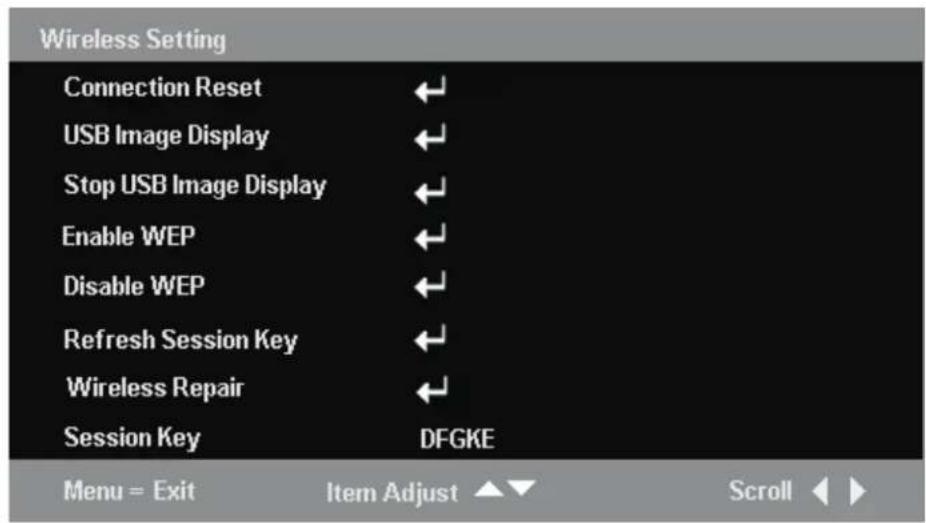
| Item | Description |
| Connection Reset | Disconnects any existing current wireless projectingsession. |
| USB image display | To allow the display of images from a USB memorykey. |
| Stop USB image display | To stop USB image display. |
| ItemDescription | |
| Enable WEP | To enable WEP encryption when WEP is disabled. When it is selected, the prompt "This will disconnect current wireless projecting session." The new setting will take effect in 10 seconds. Continue?" will appear. If select "Yes", any existing wireless projecting session or USB image display will be terminated immediately. When the projector is WEP-enabled, the session key will be shown at the bottom right corner of the projection screen display, you must input the new session key while starting a wireless projecting or retrieving the status of the projector. |
| Disable WEP | To disable WEP encryption when WEP is enabled. When it is selected, the prompt "This will disconnect current wireless projecting session." The new setting will take effect in 10 seconds. Continue?" will appear. If select "Yes", any existing wireless projecting session or USB image display will be terminated immediately. When the projector is WEP-disabled and there is no session key shown at the bottom right corner of the projection screen display, you can start a wireless projecting or retrieve the status of the projector without any session key. |
| RefreshSessionKeyNote: This option will only be available if WEPisenabled. | Replaces the Session key with a new random session key. When it is selected, the prompt "This will disconnect current wireless projecting session." The new setting will take effect in 10 seconds. Continue?" will appear. If select "Yes", any existing wireless projecting session or USB image display will be terminated immediately. When the session key is changed the input is shown at the bottom right corner of the projection screen display. You must input the new session key while starting a wireless projecting or retrieving the status of the projector. |
| Wireless Repair | When this is selected, the prompt "This will restart the wireless Card. The new setting will take effect in 40 seconds. Continue?" will appear. If select "Yes", any existing wireless projecting session or USB image display will be terminated immediately. |
| Session Key | Shows the current session key. It is visible only when WEP is enabled. The session key will be updated when you enable WEP, refresh Session Key, select wireless repair or poweron. |
AppendixA.Troubleshooting
The guidelines below provide tips to deal with problems you may encounter while using the projector. If the problem remains unsolved, contact your dealer for assistance.
Common problems and solutions
Check the following before proceeding to the problem-specific solutions.
- Use a different electrical device in the electrical outlet to confirm that the outlet is working.
- Ensure that the projector is turned on.
- Ensure all connections are securely attached.
- Ensure the attached device is turned on.
- Ensure a connected PC is not in suspend mode.
- Ensure a connected notebook computer is configured for an external display. This is usually done by pressing an Fn-key combination on the notebook.
Tipsfortroubleshooting
In each problem-specific section, try the steps in the order suggested. This may help you to solve the problem faster.
Try to pinpoint the problem and thus avoid replacing non-defective parts. For example, if you replace batteries and the problem remains, put the original batteries back and go to the next step.
Keep a record of the steps you take when troubleshooting: The information may be useful when calling for technical support or for passing on to service personnel.
Troubleshootinginformation
The following table provides troubleshooting information for the projector. In some cases, more than one possible solution is provided. Try the solutions in the order they are presented. When the problem is solved, you can skip the additional solutions.
TableA-1. Troubleshooting
| ProblemSolution | |
| No image appears on the screen. | Make sure your computer and projector are turned on.Verify the settings on your notebook or desktop PC.Turn off all equipment and power up again in the correctorder. |
| The image is blurred. | Adjust the Focus on the projector.Press the Re-Sync button on the remote control or theprojector.Ensure the projector-to-screen distance is within the rangespecified.Check that the projector lens is clean.Make sure the output resolution from the PC is 1024 x 768, the native resolution of the projector. |
| The image is wider at the top or bottom(trapezoideffect). | Position the projector so it is as perpendicular to the screenaspossible.Use the Keystone button on the remote control or projector to correct the problem. |
| The image is reversed or upside down. | Check the Projection setting on the Setup menu of the OSD. |
| The image is streaked. | Set the Frequency and Tracking settings on the Setup menu of the OSD to the default settings.To ensure the problem is not caused by a connected PC's video card, connect to another computer. |
| The image is flat with no contrast. | Adjust the Contrast setting on the Quality menu of the OSD. |
| The color of the projected image does not match the source image. | Adjust the Color Temp. and Gamma settings on the Quality menu of the OSD. |
| There is no light from the projector. | Check that the power cable is securely connected.Ensure the power source is good by testing with anotherelectricaldevice.Restart the projector in the correct order and check that the Power LED is green.If you have replaced the lamp recently, try resetting the lamp connections. Make sure the lamp cover is flush with the projector case when closed.Replace the lamp module."Replacing the projector lamp" on page 5-1Put the old lamp back in the projector and have the projectorserviced. |
| The lamp goes off. | Power surges can cause the lamp to turn off. Press the Power button twice to turn off the projector.When the Lamp Ready LED is on, press the Power button.Replace with a new lamp module."Replacing the projector lamp" on page 5-1.Put the old lamp back in the projector and have the projectorserviced. |
| The projector does not respond to theremotecontrol. | Direct the remote control towards the remote sensor ontheprojector.Ensure the path between remote and sensor is not obstructed.Turn off any fluorescent lights in the room.Check the battery orientation.Replace the batteries.Turn off other Infrared-enabled devices in the vicinity.Have the remote control serviced. |
| There is no sound. | Adjust the volume on the remote control.Adjust the volume of the audio source.Check the audio cable connection.Test the source audio output with other speakers.Have the projector serviced. |
| The sound is distorted. | Check the audio cable connection.Test the source audio output with other speakers.Have the projector serviced. |
ProjectorLEDs
The LED on top of the projector indicates the state of the projector and can help you troubleshoot. There are two-second pauses between the blinking cycles. For more details on LED projector errors, contact your Lenovo representative.
Table A-2. Lamp-ready LED error messages
| Lamp-ready LED number of flashes | Explanation |
| Flashing | Ready- do not press the power button. |
| 1 | Front cover fan error |
| 2 | Lamp fan error |
| 3 | Power board fan error |
| 4 | Blower fan error |
| 5Ballastfanerror |
Table A-3. Power LED error messages
| Power LED number of flashes | Explanation |
| 3Systemoverheating | |
| 4 | System interface error |
| 5Lamerror | |
| 6 | Fan error. Refer to Lamp-ready LED to determine whichfan. |
| 7 | Lamp cover open |
| 8DLPdrivererror. |
Appendix B. Frequently asked questions (FAQ's)
The table below provide solutions for common issues that a user may encounter while using the projector.
| ItemSolution | |
| Starting a wireless projecting session quickly | After launching wireless projecting software, right-click the projector in the list, and select Bind. Now you can start a projection with the hotkey (Ctrl+F5). During wireless projection, you can end the projection with the hotkey (Ctrl+F5). |
| Enabling/Disabling WEP | Select Menu on the control panel of the projector or remote controller, then click Information→ Wireless Setting→ Enable WEP/Disable WEP in the OSD menu. When the prompt "This will disconnect current wireless projecting session.The new setting will take effect in 10 seconds. Continue?" appears, select Yes. |
| Playing videos (for example a DVD) | Please select the wired mode to play videos, since video is not supported in wireless mode. |
| Switching between wired and wireless projectingmode | Select the Source button on the panel of the projector or remote controller to switch from one image source to another, including the wireless and wired sources.When the current projecting mode is a wired one, selecting the Wireless button once on the remote controller will switch to the wireless mode. When the current projecting mode is wireless, selecting Wireless will end current wireless projecting session. |
| If you are unable to browse the Internet after a wireless projection | Select Repair in Windows XP or re-insert the WLAN adapter, then try again. If it still does not work, please restart the laptop. |
| Remote controller acting as a mouse | During the wireless projection, the cursor pad on the remote controller can act as the mouse on the laptop. The PgUp and PgDn keys on the remote controller also take effect. |
| USB image display | This function enables you to automatically or manually display images (JPG, BMP, GIF, PCX, and PNG, except the animate feature of GIF89a) stored in a USB memory device connected to the projector via the USB input. Therefore, you can viewaPowerPoint®(PPT)presentationwithout using a computer. Native (PPT) format is not supported in this mode. To use this function, please save the (PPT) file format as the GIF or JPG format. Then the images can be displayed. Note: You can display standard image file formats (JPG, BMP, GIF, PCX, and PNG) using a USB memory device without a laptop. If you want to display a (PPT) file, you must convert it into GIF or JPG files.) |
| Finding a projector's ID and Session Key | When the wireless projector is idle, its ID is shown at the bottom left corner of the projection screen. For a WEP-enabled projector, the Session Key will also be shown. |
| Wireless projecting software not launchingcorrectly | Make sure that the current user has Administrator's privileges, and that Lenovo WDLP Driver item in My Computer → Property→ Hardware→ Device Management is enabled. Then re-installtheprogram. |
| If the prompt No WLAN adapter appears in the projector list window | Confirm that the WLAN adapter is in the laptop and its drivers are installed. Make sure that WLAN adapter item in My Computer → Property→ Hardware→ Device Management Wireless adapter is enabled. |
| If the ID of a projector does not appear after refreshing several times | Make sure that the antenna of the laptop's WLAN adapter is turned on and try again. Remove and then re-insert the WLAN adapter, repair or disable it, then re-enable. Select Information→ Wireless Setting→ Wireless Repair in the OSD menu. Try to refresh again after the ID of the projector appears on the bottom left corner of the projectionscreen. |
| If wireless projecting fails | Firewall software can interfere with the performance of the wireless projector. Try disabling any firewall software. Make sure that there is no network routing software which may change the network configuration and try again. Repair the WLAN adapter by re-inserting, or enable/disable it and try again. |
| Projected image takes more than 30 secondstorefresh | Strong radio interference can interrupt the operation of the projector. Typically it will recover within30-60seconds. |
| Cannot connect to the Internet while projectingwirelessly | Wireless projection uses a wireless adapter card (WLAN) in your laptop computer. Therefore, you cannot connect to the Internet unless you have a second wireless adapter, or you have a wired connection. |
| During a wireless projection session the WLAN adapter is unplugged or disabled, but the projector screen maintains the last image for several seconds | Due to the possibility of unreliable networks, the projector takes some time to realize that the WLAN adapter in the laptop has been disabled. The projector will wait for about 30 seconds before ending projection. You can quit the wireless projection immediately by selecting the Wireless button on the remote controller. |
AppendixC.Specifications
Following are specifications for the C400 Wireless Projector.
| Temperature (non-operating) | 5° to 35°C (41° to 95°F) at sea level-10° to 60°C (14° to 140°F) |
| Altitude(operating) | 3,048 m (0 to 10,000 ft) |
| Altitude(non-operating) | 12,192 m (0 to 40,000 ft) |
| Humidity(operating) | 5% to 90% relative humidity, non-condensing |
| Humidity(non-operating) | 5% to 95% relative humidity, non-condensing |
| Dimensions | Width: 290 mm (11.4 in.)Height: 115 mm (4.5 in.)Depth: 225 mm (8.8 in.) |
| Weight | 3.4 kg (7.5 lbs) unpacked |
| Optics (focus range) | 1.2 - 9.4 m (4 to 31 ft) |
| Lamp type | 250 W lamp |
| Input power requirements | 100-240V 1.8A 50/60 Hz |
Appendix D. Service and Support
The following information describes the technical support that is available for your product, during the warranty period or throughout the life of the product. Refer to your Lenovo Statement of Limited Warranty for a full explanation of Lenovo warranty terms.
Onlinetechnicalsupport
Online technical support is available during the life of your product through the Personal Computing Support Web site at http://www.lenovo.com/think/support.
During the warranty period, assistance for replacement or exchange of defective components is available. In addition, if your option is installed in a ThinkPad or ThinkCentre computer, you might be entitled to service at your location. Your technical support representative can help you determine the best alternative.
Telephonetechnicalsupport
Installation and configuration support through the Customer Support Center will be withdrawn or made available for a fee, at Lenovo's discretion, 90 days after the option has been withdrawn from marketing. Additional support offerings, including step-by-step installation assistance, are available for a nominal fee.
To assist the technical support representative, have available as much of the following information as possible:
- Option name
- Option number
• Proof of purchase
• Computer manufacturer, model, serial number, and manual
• Exact wording of the error message (if any)
• Description of the problem - Hardware and software configuration information for your system
If possible, be at your computer. Your technical support representative might want to walk you through the problem during the call.
For a list of Service and Support phone numbers, see "Worldwide telephone list" on page E-17. Phone numbers are subject to change without notice. For the most current phone numbers, go to http://www.lenovo.com/think/support and click Support phone list. If the number for your country or region is not listed, contact your reseller or Lenovo marketing representative.
Appendix E. Lenovo Statement of Limited Warranty LSOLW-00 05/2005
Part 1 - General Terms
This Statement of Limited Warranty includes Part 1 - General Terms, Part 2 - Country-unique Terms, and Part 3 - Warranty Information. The terms of Part 2 replace or modify those of Part 1. The warranties provided by Lenovo Group Limited or one of its subsidiaries (called "Lenovo") in this Statement of Limited Warranty apply only to Machines you purchase for your use, and not for resale. The term "Machine" means a Lenovo machine, its options, features, conversions, upgrades or peripheral products, or any combination of them. The term "Machine" does not include any software programs, whether pre-loaded with the Machine, installed subsequently or otherwise. Nothing in this Statement of Limited Warranty affects any statutory rights of consumers that cannot be waived or limited by contract.
What this Warranty Covers
Lenovo warrants that each Machine 1) is free from defects in materials and workmanship and 2) conforms to Lenovo's Official Published Specifications ("Specifications") which are available on request. The warranty period for the Machine starts on the original date of installation and is specified in Part 3 - Warranty Information. The date on your invoice or sales receipt is the date of installation unless Lenovo or your reseller informs you otherwise. Unless Lenovo specifies otherwise, these warranties apply only in the country or region in which you purchased the Machine.
THESE WARRANTIES ARE YOUR EXCLUSIVE WARRANTIES AND REPLACE ALL OTHER WARRANTIES OR CONDITIONS, EXPRESS OR IMPLIED, INCLUDING, BUT NOT LIMITED TO, THE IMPLIED WARRANTIES OR CONDITIONS OF MERCHANTABILITY AND FITNESS FOR A PARTICULAR PURPOSE. SOME STATES OR JURISDICTIONS DO NOT ALLOW THE EXCLUSION OF EXPRESS OR IMPLIED WARRANTIES, SO THE ABOVE EXCLUSION MAY NOT APPLY TO YOU. IN THAT EVENT, SUCH WARRANTIES ARE LIMITED IN DURATION TO THE WARRANTY PERIOD. NO WARRANTIES APPLY AFTER THAT PERIOD. SOME STATES OR JURISDICTIONS DO NOT ALLOW LIMITATIONS ON HOW LONG AN IMPLIED WARRANTY LASTS, SO THE ABOVE LIMITATION MAY NOT APPLYTOYOU.
What this Warranty Does not Cover
This warranty does not cover the following:
- any software programs, whether pre-loaded or shipped with the Machine, or installedsubsequently;
- failure resulting from misuse, accident, modification, unsuitable physical or operating environment, or improper maintenance by you;
- failure caused by a product for which Lenovo is not responsible; and
- any non-Lenovo products, including those that Lenovo may procure and provide with or integrate into a Lenovo Machine at your request.
The warranty is voided by removal or alteration of identification labels on the Machine or its parts.
Lenovo does not warrant uninterrupted or error-free operation of a Machine.
Any technical or other support provided for a Machine under warranty, such as assistance with "how-to" questions and those regarding Machine set-up and installation, is provided WITHOUT WARRANTIES OF ANY KIND.
How to Obtain Warranty Service
Warranty service may be provided by Lenovo, IBM, your reseller if authorized to perform warranty service, or an authorized warranty service provider. Each of them is referred to as a "Service Provider."
If the Machine does not function as warranted during the warranty period, contact a Service Provider. If you do not register the Machine with Lenovo, you may be required to present proof of purchase as evidence of your entitlement to warranty service.
What Lenovo Will Do to Correct Problems
When you contact a Service Provider for service, you must follow the problem determination and resolution procedures that we specify. An initial diagnosis of your problem can be made either by a technician over the telephone or electronically by access to a support website.
The type of warranty service applicable to your Machine is specified in Part 3 - WarrantyInformation.
You are responsible for downloading and installing designated software updates from a support web site or from other electronic media, and following the instructions that your Service Provider provides. Software updates may include basic input/output system code (called "BIOS"), utility programs, device drivers, and other software updates.
If your problem can be resolved with a Customer Replaceable Unit ("CRU") (e.g., keyboard, mouse, speaker, memory, hard disk drive), your Service Provider will ship the CRU to you for you to install.
If the Machine does not function as warranted during the warranty period and your problem cannot be resolved over the telephone or electronically, through your application of software updates, or with a CRU, your Service Provider, will either, at its discretion, 1) repair it to make it function as warranted, or 2) replace it with one that is at least functionally equivalent. If your Service Provider is unable to do either, you may return the Machine to your place of purchase and your money will berefunded.
As part of the warranty service, your Service Provider may also install selected engineering changes that apply to the Machine.
Exchange of a Machine or Part
When the warranty service involves the exchange of a Machine or part, the item your Service Provider replaces becomes Lenovo's property and the replacement becomes yours. You represent that all removed items are genuine and unaltered. The replacement may not be new, but will be in good working order and at least functionally equivalent to the item replaced. The replacement assumes the warranty service status of the replaced item.
Your Additional Responsibilities
Before your Service Provider exchanges a Machine or part, you agree to remove all features, parts, options, alterations, and attachments not under warranty service.
You also agree to:
- ensure that the Machine is free of any legal obligations or restrictions that preventitsexchange;
-
obtain authorization from the owner to have your Service Provider service a Machine that you do not own; and
-
where applicable, before service is provided:
a. follow the service request procedures that your Service Provider provides;
b. backup or secure all programs, data, and funds contained in the Machine; and
c. provide your Service Provider with sufficient, free, and safe access to your facilities to permit Lenovo to fulfill its obligations.
- (a) ensure all information about identified or identifiable individuals (Personal Data) is deleted from the Machine (to the extent technically possible), (b) allow your Service Provider or a supplier to process on your behalf any remaining Personal Data as your Service Provider considers necessary to fulfill its obligations under this Statement of Limited Warranty (which may include shipping the Machine for such processing to other service locations around the world), and (c) ensure that such processing complies with any laws applicable to such PersonalData.
LimitationofLiability
Lenovo is responsible for loss of, or damage to, your Machine only while it is 1) in your Service Provider's possession or 2) in transit in those cases where Lenovo is responsible for the transportation charges.
Neither Lenovo nor your Service Provider are responsible for any of your confidential, proprietary or personal information contained in a Machine which you return for any reason. You should remove all such information from the Machine prior to its return.
Circumstances may arise where, because of a default on Lenovo's part or other liability, you are entitled to recover damages from Lenovo. In each such instance, regardless of the basis on which you are entitled to claim damages from Lenovo (including fundamental breach, negligence, misrepresentation, or other contract or tort claim), except for any liability that cannot be waived or limited by applicable laws, Lenovo is liable for no more than
- damages for bodily injury (including death) and damage to real property and tangible personal property for which Lenovo is legally liable; and
- the amount of any other actual direct damages, up to the charges for the Machine that is subject of the claim.
This limit also applies to Lenovo's suppliers, resellers and your Service Provider. It is the maximum for which Lenovo, its suppliers, resellers, and your Service Provider are collectively responsible.
UNDER NO CIRCUMSTANCES IS LENOVO, ITS SUPPLIERS, RESELLERS OR SERVICE PROVIDERS LIABLE FOR ANY OF THE FOLLOWING EVEN IF INFORMED OF THEIR POSSIBILITY: 1) THIRD PARTY CLAIMS AGAINST YOU FOR DAMAGES (OTHER THAN THOSE UNDER THE FIRST ITEM LISTED ABOVE); 2) LOSS OF, OR DAMAGE TO, DATA; 3) SPECIAL, INCIDENTAL, OR INDIRECT DAMAGES OR FOR ANY ECONOMIC CONSEQUENTIAL DAMAGES; OR 4) LOST PROFITS, BUSINESS REVENUE, GOODWILL OR ANTICIPATED SAVINGS. SOME STATES OR JURISDICTIONS DO NOT ALLOW THE EXCLUSION OR LIMITATION OF INCIDENTAL OR CONSEQUENTIAL DAMAGES, SO THE ABOVE LIMITATION OR EXCLUSION MAY NOT APPLY TO YOU.
GoverningLaw
Both you and Lenovo consent to the application of the laws of the country in which you acquired the Machine to govern, interpret, and enforce all of your and Lenovo's rights, duties, and obligations arising from, or relating in any manner to, the subject matter of this Statement of Limited Warranty, without regard to conflict oflawprinciples.
THESE WARRANTIES GIVE YOU SPECIFIC LEGAL RIGHTS AND YOU MAY ALSO HAVE OTHER RIGHTS WHICH VARY FROM STATE TO STATE OR JURISDICTIONTOJURISDICTION.
Jurisdiction
All of our rights, duties, and obligations are subject to the courts of the country in which you acquired the Machine.
Part 2 - Country-unique Terms
AMERICAS
ARGENTINA
Jurisdiction: The following is added after the first sentence:
Any litigation arising from this Statement of Limited Warranty will be settled exclusively by the Ordinary Commercial Court of the city of Buenos Aires.
BOLIVIA
Jurisdiction: The following is added after the first sentence:
Any litigation arising from this Statement of Limited Warranty will be settled exclusively by the courts of the city of La Paz.
BRAZIL
Jurisdiction: The following is added after the first sentence:
Any litigation arising from this Statement of Limited Warranty will be settled exclusively by the court of Rio de Janeiro, RJ.
CHILE
Jurisdiction: The following is added after the first sentence:
Any litigation arising from this Statement of Limited Warranty will be settled exclusively by the Civil Courts of Justice of Santiago.
COLOMBIA
Jurisdiction: The following is added after the first sentence:
Any litigation arising from this Statement of Limited Warranty will be settled exclusively by the Judges of the Republic of Colombia.
ECUADOR
Jurisdiction: The following is added after the first sentence:
Any litigation arising from this Statement of Limited Warranty will be settled exclusively by the Judges of Quito.
MEXICO
Jurisdiction: The following is added after the first sentence:
Any litigation arising from this Statement of Limited Warranty will be settled exclusively by the Federal Courts of Mexico City, Federal District.
PARAGUAY
Jurisdiction: The following is added after the first sentence:
Any litigation arising from this Statement of Limited Warranty will be settled exclusively by the courts of the city of Asuncion.
PERU
Jurisdiction: The following is added after the first sentence:
Any litigation arising from this Statement of Limited Warranty will be settled exclusively by the Judges and Tribunals of the Judicial District of Lima, Cercado.
Limitation of Liability: The following is added at the end of this section:
In accordance with Article 1328 of the Peruvian Civil Code the limitations and exclusions specified in this section will not apply to damages caused by Lenovo's willful misconduct ("dolo") or gross negligence ("culpa inexcusable").
URUGUAY
Jurisdiction: The following is added after the first sentence:
Any litigation arising from this Statement of Limited Warranty will be settled exclusively by the City of Montevideo Court's Jurisdiction.
VENEZUELA
Jurisdiction: The following is added after the first sentence:
Any litigation arising from this Statement of Limited Warranty will be settled exclusively by the Courts of the Metropolitan Area Of the City of Caracas.
NORTHAMERICA
How to Obtain Warranty Service: The following is added to this Section:
To obtain warranty service from IBM service in Canada or the United States, call 1-800-IBM-SERV(426-7378).
CANADA
Limitation of Liability: The following replaces item 1 of this section:
- damages for bodily injury (including death) or physical harm to real property and tangible personal property caused by Lenovo's negligence; and
Governing Law: The following replaces "laws of the country in which you acquired the Machine" in the first sentence:
laws in the Province of Ontario.
UNITEDSTATES
Governing Law: The following replaces "laws of the country in which you acquired the Machine" in the first sentence:
laws of the State of New York.
ASIAPACIFIC
AUSTRALIA
What this Warranty Covers: The following paragraph is added to this section:
The warranties specified in this Section are in addition to any rights you may have under the Trade Practices Act 1974 or other similar legislation and are only limited to the extent permitted by the applicable legislation.
Limitation of Liability: The following is added to this section:
Where Lenovo is in breach of a condition or warranty implied by the Trade Practices Act 1974 or other similar legislation, Lenovo's liability is limited to the repair or replacement of the goods or the supply of equivalent goods. Where that condition or warranty relates to right to sell, quiet possession or clear title, or the
goods are of a kind ordinarily acquired for personal, domestic or household use or consumption, then none of the limitations in this paragraph apply.
Governing Law: The following replaces "laws of the country in which you acquired the Machine" in the first sentence: laws of the State or Territory.
CAMBODIAANDLAOS
Governing Law: The following replaces "laws of the country in which you acquired the Machine" in the first sentence: laws of the State of New York, United States of America.
CAMBODIA, INDONESIA, AND LAOS
Arbitration: The following is added under this heading: Disputes arising out of or in connection with this Statement of Limited Warranty shall be finally settled by arbitration which shall be held in Singapore in accordance with the Arbitration Rules of Singapore International Arbitration Center ("SIAC Rules") then in effect. The arbitration award shall be final and binding for the parties without appeal and shall be in writing and set forth the findings of fact and the conclusions of law.
The number of arbitrators shall be three, with each side to the dispute being entitled to appoint one arbitrator. The two arbitrators appointed by the parties shall appoint a third arbitrator who shall act as chairman of the proceedings. Vacancies in the post of chairman shall be filled by the president of the SIAC. Other vacancies shall be filled by the respective nominating party. Proceedings shall continue from the stage they were at when the vacancy occurred.
If one of the parties refuses or otherwise fails to appoint an arbitrator within 30 days of the date the other party appoints its, the first appointed arbitrator shall be the sole arbitrator, provided that the arbitrator was validly and properly appointed.
All proceedings shall be conducted, including all documents presented in such proceedings, in the English language. The English language version of this Statement of Limited Warranty prevails over any other language version.
HONG KONG S.A.R. OF CHINA AND MACAU S.A.R. OF CHINA
Governing Law: The following replaces "laws of the country in which you acquired the Machine" in the first sentence: laws of Hong Kong Special Administrative Region of China.
INDIA
Limitation of Liability: The following replaces items 1 and 2 of this section:
- liability for bodily injury (including death) or damage to real property and tangible personal property will be limited to that caused by Lenovo's negligence; and
- as to any other actual damage arising in any situation involving nonperformance by Lenovo pursuant to, or in any way related to the subject of this Statement of Limited Warranty, the charge paid by you for the individual Machine that is the subject of the claim.
Arbitration: The following is added under this heading Disputes arising out of or in connection with this Statement of Limited Warranty shall be finally settled by arbitration which shall be held in Bangalore, India in
accordance with the laws of India then in effect. The arbitration award shall be final and binding for the parties without appeal and shall be in writing and set forth the findings of fact and the conclusions of law.
The number of arbitrators shall be three, with each side to the dispute being entitled to appoint one arbitrator. The two arbitrators appointed by the parties shall appoint a third arbitrator who shall act as chairman of the proceedings. Vacancies in the post of chairman shall be filled by the president of the Bar Council of India. Other vacancies shall be filled by the respective nominating party. Proceedings shall continue from the stage they were at when the vacancy occurred.
If one of the parties refuses or otherwise fails to appoint an arbitrator within 30 days of the date the other party appoints its, the first appointed arbitrator shall be the sole arbitrator, provided that the arbitrator was validly and properly appointed.
All proceedings shall be conducted, including all documents presented in such proceedings, in the English language. The English language version of this Statement of Limited Warranty prevails over any other language version.
JAPAN
Governing Law: The following sentence is added to this section:
Any doubts concerning this Statement of Limited Warranty will be initially resolved between us in good faith and in accordance with the principle of mutual trust.
MALAYSIA
Limitation of Liability: The word "SPECIAL" in item 3 of the fifth paragraph is deleted.
NEWZEALAND
What this Warranty Covers: The following paragraph is added to this section:
The warranties specified in this section are in addition to any rights you may have under the Consumer Guarantees Act 1993 or other legislation which cannot be excluded or limited. The Consumer Guarantees Act 1993 will not apply in respect of any goods which Lenovo provides, if you require the goods for the purposes of a business as defined in that Act.
Limitation of Liability: The following is added to this section:
Where Machines are not acquired for the purposes of a business as defined in the Consumer Guarantees Act 1993, the limitations in this Section are subject to the limitations in that Act.
PEOPLE'S REPUBLIC OF CHINA (PRC)
Governing Law: The following replaces "laws of the country in which you acquired the Machine" in the first sentence:
laws of the State of New York, United States of America (except when local law requires otherwise).
PHILIPPINES
Limitation of Liability: Item 3 in the fifth paragraph is replaced by the following: SPECIAL (INCLUDING NOMINAL AND EXEMPLARY DAMAGES), MORAL, INCIDENTAL, OR INDIRECT DAMAGES FOR ANY ECONOMIC CONSEQUENTIAL DAMAGES; OR
Arbitration: The following is added: under this heading
Disputes arising out of or in connection with this Statement of Limited Warranty shall be finally settled by arbitration which shall be held in Metro Manila, Philippines in accordance with the laws of the Philippines then in effect. The arbitration award shall be final and binding for the parties without appeal and shall be in writing and set forth the findings of fact and the conclusions of law.
The number of arbitrators shall be three, with each side to the dispute being entitled to appoint one arbitrator. The two arbitrators appointed by the parties shall appoint a third arbitrator who shall act as chairman of the proceedings. Vacancies in the post of chairman shall be filled by the president of the Philippine Dispute Resolution Center, Inc.. Other vacancies shall be filled by the respective nominating party. Proceedings shall continue from the stage they were at when the vacancy occurred.
If one of the parties refuses or otherwise fails to appoint an arbitrator within 30 days of the date the other party appoints its, the first appointed arbitrator shall be the sole arbitrator, provided that the arbitrator was validly and properly appointed.
All proceedings shall be conducted, including all documents presented in such proceedings, in the English language. The English language version of this Statement of Limited Warranty prevails over any other language version.
SINGAPORE
Limitation of Liability: The words "SPECIAL" and "ECONOMIC" in item 3 in the fifth paragraph are deleted.
EUROPE, MIDDLE EAST, AFRICA (EMEA)
THE FOLLOWING TERMS APPLY TO ALL EMEA COUNTRIES:
The terms of this Statement of Limited Warranty apply to Machines purchased from Lenovo or a Lenovo reseller.
How to Obtain Warranty Service:
Add the following paragraph in Western Europe (Andorra, Austria, Belgium, Cyprus, Czech Republic, Denmark, Estonia, Finland, France, Germany, Greece, Hungary, Iceland, Ireland, Italy, Latvia, Liechtenstein, Lithuania, Luxembourg, Malta, Monaco, Netherlands, Norway, Poland, Portugal, San Marino, Slovakia, Slovenia, Spain, Sweden, Switzerland, United Kingdom, Vatican State, and any country subsequently added to the European Union, as from the date of accession):
The warranty for Machines acquired in Western Europe shall be valid and applicable in all Western Europe countries provided the Machines have been announced and made available in such countries.
If you purchase a Machine in one of the Western European countries, as defined above, you may obtain warranty service for that Machine in any of those countries from a Service Provider, provided the Machine has been announced and made available by Lenovo in the country in which you wish to obtain service.
If you purchased a Personal Computer Machine in Albania, Armenia, Belarus, Bosnia and Herzegovina, Bulgaria, Croatia, Czech Republic, Georgia, Hungary, Kazakhstan, Kyrgyzstan, Federal Republic of Yugoslavia, Former Yugoslav Republic of Macedonia (FYROM), Moldova, Poland, Romania, Russia, Slovak Republic, Slovenia, or Ukraine, you may obtain warranty service for that Machine
in any of those countries from a Service Provider, provided the Machine has been announced and made available by Lenovo in the country in which you wish to obtain service..
If you purchase a Machine in a Middle Eastern or African country, you may obtain warranty service for that Machine from a Service Provider within the country of purchase, provided the Machine has been announced and made available by Lenovo in that country. Warranty service in Africa is available within 50 kilometers of a Service Provider. You are responsible for transportation costs for Machines located outside 50 kilometers of a Service Provider.
GoverningLaw:
The phrase "the laws of the country in which you acquired the Machine" is replaced by:
1) "the laws of Austria" in Albania, Armenia, Azerbaijan, Belarus, Bosnia-Herzegovina, Bulgaria, Croatia, Georgia, Hungary, Kazakhstan, Kyrgyzstan, FYR Macedonia, Moldova, Poland, Romania, Russia, Slovakia, Slovenia, Tajikistan, Turkmenistan, Ukraine, Uzbekistan, and FR Yugoslavia; 2) "the laws of France" in Algeria, Benin, Burkina Faso, Cameroon, Cape Verde, Central African Republic, Chad, Comoros, Congo Republic, Djibouti, Democratic Republic of Congo, Equatorial Guinea, French Guiana, French Polynesia, Gabon, Gambia, Guinea, Guinea-Bissau, Ivory Coast, Lebanon, Madagascar, Mali, Mauritania, Mauritius, Mayotte, Morocco, New Caledonia, Niger, Reunion, Senegal, Seychelles, Togo, Tunisia, Vanuatu, and Wallis & Futuna; 3) "the laws of Finland" in Estonia, Latvia, and Lithuania; 4) "the laws of England" in Angola, Bahrain, Botswana, Burundi, Egypt, Eritrea, Ethiopia, Ghana, Jordan, Kenya, Kuwait, Liberia, Malawi, Malta, Mozambique, Nigeria, Oman, Pakistan, Qatar, Rwanda, Sao Tome, Saudi Arabia, Sierra Leone, Somalia, Tanzania, Uganda, United Arab Emirates, the United Kingdom, West Bank/Gaza, Yemen, Zambia, and Zimbabwe; and 5) "the laws of South Africa" in South Africa, Namibia, LesothoandSwaziland.
Jurisdiction: The following exceptions are added to this section:
1) In Austria the choice of jurisdiction for all disputes arising out of this Statement of Limited Warranty and relating thereto, including its existence, will be the competent court of law in Vienna, Austria (Inner-City); 2) in Angola, Bahrain, Botswana, Burundi, Egypt, Eritrea, Ethiopia, Ghana, Jordan, Kenya, Kuwait, Liberia, Malawi, Malta, Mozambique, Nigeria, Oman, Pakistan, Qatar, Rwanda, Sao Tome, Saudi Arabia, Sierra Leone, Somalia, Tanzania, Uganda, United Arab Emirates, West Bank/Gaza, Yemen, Zambia, and Zimbabwe all disputes arising out of this Statement of Limited Warranty or related to its execution, including summary proceedings, will be submitted to the exclusive jurisdiction of the English courts; 3) in Belgium and Luxembourg, all disputes arising out of this Statement of Limited Warranty or related to its interpretation or its execution, the law, and the courts of the capital city, of the country of your registered office and/or commercial site location only are competent; 4) in France, Algeria, Benin, Burkina Faso, Cameroon, Cape Verde, Central African Republic, Chad, Comoros, Congo Republic, Djibouti, Democratic Republic of Congo, Equatorial Guinea, French Guiana, French Polynesia, Gabon, Gambia, Guinea, Guinea-Bissau, Ivory Coast, Lebanon, Madagascar, Mali, Mauritania, Mauritius, Mayotte, Morocco, New Caledonia, Niger, Reunion, Senegal, Seychelles, Togo, Tunisia, Vanuatu, and Wallis & Futuna all disputes arising out of this Statement of Limited Warranty or related to its violation or execution, including summary proceedings, will be settled exclusively by the Commercial Court of Paris; 5) in Russia, all disputes arising out of or in relation to the interpretation, the violation, the termination, the nullity of the execution of this Statement of Limited Warranty shall be settled by
Arbitration Court of Moscow; 6) in South Africa, Namibia, Lesotho and Swaziland, both of us agree to submit all disputes relating to this Statement of Limited Warranty to the jurisdiction of the High Court in Johannesburg; 7) in Turkey all disputes arising out of or in connection with this Statement of Limited Warranty shall be resolved by the Istanbul Central (Sultanahmet) Courts and Execution Directorates of Istanbul, the Republic of Turkey; 8) in each of the following specified countries, any legal claim arising out of this Statement of Limited Warranty will be brought before, and settled exclusively by, the competent court of a) Athens for Greece, b) Tel Aviv-Jaffa for Israel, c) Milan for Italy, d) Lisbon for Portugal, and e) Madrid for Spain; and 9) in the United Kingdom, both of us agree to submit all disputes relating to this Statement of Limited Warranty to the jurisdiction of the English courts.
Arbitration: The following is added under this heading:
In Albania, Armenia, Azerbaijan, Belarus, Bosnia-Herzegovina, Bulgaria, Croatia, Georgia, Hungary, Kazakhstan, Kyrgyzstan, FYR Macedonia, Moldova, Poland, Romania, Russia, Slovakia, Slovenia, Tajikistan, Turkmenistan, Ukraine, Uzbekistan, and FR Yugoslavia all disputes arising out of this Statement of Limited Warranty or related to its violation, termination or nullity will be finally settled under the Rules of Arbitration and Conciliation of the International Arbitral Center of the Federal Economic Chamber in Vienna (Vienna Rules) by three arbitrators appointed in accordance with these rules. The arbitration will be held in Vienna, Austria, and the official language of the proceedings will be English. The decision of the arbitrators will be final and binding upon both parties. Therefore, pursuant to paragraph 598 (2) of the Austrian Code of Civil Procedure, the parties expressly waive the application of paragraph 595 (1) figure 7 of the Code. Lenovo may, however, institute proceedings in a competent court in the country of installation.
In Estonia, Latvia and Lithuania all disputes arising in connection with this Statement of Limited Warranty will be finally settled in arbitration that will be held in Helsinki, Finland in accordance with the arbitration laws of Finland then in effect. Each party will appoint one arbitrator. The arbitrators will then jointly appoint the chairman. If arbitrators cannot agree on the chairman, then the Central Chamber of Commerce in Helsinki will appoint the chairman.
EUROPEANUNION(EU)
THE FOLLOWING TERMS APPLY TO ALL EU COUNTRIES:
The warranty for Machines acquired in EU countries is valid and applicable in all EU countries provided the Machines have been announced and made available in such countries.
How to Obtain Warranty Service: The following is added to this section:
To obtain warranty service from IBM service in EU countries, see the telephone listing in Part 3 - Warranty Information.
You may contact IBM service at the following address:
IBM Warranty & Service Quality Dept.
POBox30
SpangoValley
Greenock
ScotlandPA160AH
CONSUMERS
Consumers have legal rights under applicable national legislation governing the sale of consumer goods. Such rights are not affected by the warranties provided in this Statement of Limited Warranty.
AUSTRIA, DENMARK, FINLAND, GREECE, ITALY, NETHERLANDS, NORWAY, PORTUGAL, SPAIN, SWEDEN AND SWITZERLAND
Limitation of Liability: The following replaces the terms of this section in its entirety: Except as otherwise provided by mandatory law:
- Lenovo's liability for any damages and losses that may arise as a consequence of the fulfillment of its obligations under or in connection with this Statement of Limited Warranty or due to any other cause related to this Statement of Limited Warranty is limited to the compensation of only those damages and losses proved and actually arising as an immediate and direct consequence of the non-fulfillment of such obligations (if Lenovo is at fault) or of such cause, for a maximum amount equal to the charges you paid for the Machine.
The above limitation shall not apply to damages for bodily injuries (including death) and damages to real property and tangible personal property for which Lenovo is legally liable.
- UNDER NO CIRCUMSTANCES IS LENOVO, ITS SUPPLIERS, RESELLERS OR SERVICE PROVIDERS LIABLE FOR ANY OF THE FOLLOWING, EVEN IF INFORMED OF THEIR POSSIBILITY: 1) LOSS OF, OR DAMAGE TO, DATA; 2) INCIDENTAL OR INDIRECT DAMAGES, OR FOR ANY ECONOMIC CONSEQUENTIAL DAMAGES; 3) LOST PROFITS, EVEN IF THEY ARISE AS AN IMMEDIATE CONSEQUENCE OF THE EVENT THAT GENERATED THE DAMAGES; OR 4) LOSS OF BUSINESS, REVENUE, GOODWILL, OR ANTICIPATED SAVINGS.
FRANCEANDBELGIUM
Limitation of Liability: The following replaces the terms of this section in its entirety: Except as otherwise provided by mandatory law:
- Lenovo's liability for any damages and losses that may arise as a consequence of the fulfillment of its obligations under or in connection with this Statement of Limited Warranty is limited to the compensation of only those damages and losses proved and actually arising as an immediate and direct consequence of the non-fulfillment of such obligations (if Lenovo is at fault), for a maximum amount equal to the charges you paid for the Machine that has caused the damages.
The above limitation shall not apply to damages for bodily injuries (including death) and damages to real property and tangible personal property for which Lenovo is legally liable.
- UNDER NO CIRCUMSTANCES IS LENOVO, ITS SUPPLIERS, RESELLERS OR SERVICE PROVIDERS LIABLE FOR ANY OF THE FOLLOWING, EVEN IF INFORMED OF THEIR POSSIBILITY: 1) LOSS OF, OR DAMAGE TO, DATA; 2) INCIDENTAL OR INDIRECT DAMAGES, OR FOR ANY ECONOMIC CONSEQUENTIAL DAMAGES; 3) LOST PROFITS, EVEN IF THEY ARISE AS AN IMMEDIATE CONSEQUENCE OF THE EVENT THAT GENERATED THE DAMAGES; OR 4) LOSS OF BUSINESS, REVENUE, GOODWILL, OR ANTICIPATED SAVINGS.
THE FOLLOWING TERMS APPLY TO THE COUNTRY SPECIFIED:
AUSTRIA
The provisions of this Statement of Limited Warranty replace any applicable statutory warranties.
What this Warranty Covers: The following replaces the first sentence of the first paragraph of this section:
The warranty for a Lenovo Machine covers the functionality of the Machine for its normal use and the Machine's conformity to its Specifications.
The following paragraphs are added to this section:
The limitation period for consumers in action for breach of warranty is the statutory period as a minimum. In case your Service Provider is unable to repair a Lenovo Machine, you can alternatively ask for a partial refund as far as justified by the reduced value of the unrepaired Machine or ask for a cancellation of the respective agreement for such Machine and get your money refunded.
The second paragraph does not apply.
What Lenovo Will Do to Correct Problems: The following is added to this section: During the warranty period, Lenovo will reimburse you for the transportation charges for the delivery of the failing Machine to IBM Service.
Limitation of Liability: The following paragraph is added to this section:
The limitations and exclusions specified in the Statement of Limited Warranty will not apply to damages caused by Lenovo with fraud or gross negligence and for expresswarranty.
The following sentence is added to the end of item 2:
Lenovo's liability under this item is limited to the violation of essential contractual terms in cases of ordinary negligence.
EGYPT
Limitation of Liability: The following replaces item 2 in this section:
as to any other actual direct damages, Lenovo's liability will be limited to the total amount you paid for the Machine that is the subject of the claim.
Applicability of suppliers, resellers, and Service Providers (unchanged).
FRANCE
Limitation of Liability: The following replaces the second sentence of the first paragraph of this section:
In such instances, regardless of the basis on which you are entitled to claim damages from Lenovo, Lenovo is liable for no more than: (items 1 and 2 unchanged).
GERMANY
What this Warranty Covers: The following replaces the first sentence of the first paragraph of this section:
The warranty for a Lenovo Machine covers the functionality of the Machine for its normal use and the Machine's conformity to its Specifications.
The following paragraphs are added to this section:
The minimum warranty period for Machines is twelve months. In case your Service Provider is unable to repair a Lenovo Machine, you can alternatively ask for a partial refund as far as justified by the reduced value of the unrepaired Machine or ask for a cancellation of the respective agreement for such Machine and get your money refunded.
The second paragraph does not apply.
What Lenovo Will Do to Correct Problems: The following is added to this section:
During the warranty period, transportation for delivery of the failing Machine to Lenovo or IBM service will be at Lenovo's expense.
Limitation of Liability: The following paragraph is added to this section:
The limitations and exclusions specified in the Statement of Limited Warranty will not apply to damages caused by Lenovo with fraud or gross negligence and for expresswarranty.
The following sentence is added to the end of item 2:
Lenovo's liability under this item is limited to the violation of essential contractual terms in cases of ordinary negligence.
HUNGARY
Limitation of Liability: The following is added at the end of this section:
The limitation and exclusion specified herein shall not apply to liability for a breach of contract damaging life, physical well-being, or health that has been caused intentionally, by gross negligence, or by a criminal act.
The parties accept the limitations of liability as valid provisions and state that the Section 314.(2) of the Hungarian Civil Code applies as the acquisition price as well as other advantages arising out of the present Statement of Limited Warranty balance this limitation of liability.
IRELAND
What this Warranty Covers: The following is added to this section:
Except as expressly provided in these terms and conditions, all statutory conditions, including all warranties implied, but without prejudice to the generality of the foregoing all warranties implied by the Sale of Goods Act 1893 or the Sale of Goods and Supply of Services Act 1980 are hereby excluded.
Limitation of Liability: The following replaces the terms of section in its entirety:
For the purposes of this section, a “Default” means any act, statement, omission, or negligence on the part of Lenovo in connection with, or in relation to, the subject matter of this Statement of Limited Warranty in respect of which Lenovo is legally liable to you, whether in contract or tort. A number of Defaults which together result in, or contribute to, substantially the same loss or damage will be treated as one Default occurring on the date of occurrence of the last such Default.
Circumstances may arise where, because of a Default, you are entitled to recover damages from Lenovo.
This section sets out the extent of Lenovo's liability and your sole remedy.
-
Lenovo will accept unlimited liability for death or personal injury caused by the negligence of Lenovo.
-
Subject always to the Items for Which Lenovo is Not Liable below, Lenovo will accept unlimited liability for physical damage to your tangible property resulting from the negligence of Lenovo.
-
Except as provided in items 1 and 2 above, Lenovo's entire liability for actual damages for any one Default will not in any event exceed 125% of the amount you paid for the Machine directly relating to the Default.
Items for Which Lenovo is Not Liable
Save with respect to any liability referred to in item 1 above, under no
circumstances is Lenovo, its suppliers, resellers or Service Providers liable for any of the following, even if Lenovo or they were informed of the possibility of such losses:
- loss of, or damage to, data;
- special, indirect, or consequential loss; or
- loss of profits, business, revenue, goodwill, or anticipated savings.
SLOVAKIA
Limitation of Liability: The following is added to the end of the last paragraph: The limitations apply to the extent they are not prohibited under §§ 373-386 of the SlovakCommercialCode.
SOUTH AFRICA, NAMIBIA, BOTSWANA, LESOTHO AND SWAZILAND
Limitation of Liability: The following is added to this section:
Lenovo's entire liability to you for actual damages arising in all situations involving nonperformance by Lenovo in respect of the subject matter of this Statement of Warranty will be limited to the charge paid by you for the individual Machine that is the subject of your claim from Lenovo.
UNITEDKINGDOM
Limitation of Liability: The following replaces the terms of this section is in its entirety: For the purposes of this section, a "Default" means any act, statement, omission, or negligence on the part of Lenovo in connection with, or in relation to, the subject matter of this Statement of Limited Warranty in respect of which Lenovo is legally liable to you, whether in contract or tort. A number of Defaults which together result in, or contribute to, substantially the same loss or damage will be treated as oneDefault.
Circumstances may arise where, because of a Default, you are entitled to recover damages from Lenovo.
This section sets out the extent of Lenovo's liability and your sole remedy.
- Lenovo will accept unlimited liability for:
a. death or personal injury caused by the negligence of Lenovo; and b. any breach of its obligations implied by Section 12 of the Sale of Goods Act 1979 or Section 2 of the Supply of Goods and Services Act 1982, or any statutory modification or re-enactment of either such Section. - Lenovo will accept unlimited liability, subject always to the Items for Which Lenovo is Not Liable below, for physical damage to your tangible property resulting from the negligence of Lenovo.
- Lenovo's entire liability for actual damages for any one Default will not in any event, except as provided in items 1 and 2 above, exceed 125% of the total purchase price payable or the charges for the Machine directly relating to the Default.
These limits also apply to Lenovo's suppliers, resellers and Service Providers. They state the maximum for which Lenovo and such suppliers, resellers and Service Providers are collectively responsible.
Items for Which Lenovo is Not Liable
Save with respect to any liability referred to in item 1 above, under no circumstances is Lenovo or any of its suppliers, resellers or Service Providers liable for any of the following, even if Lenovo or they were informed of the possibility of such losses:
-
loss of, or damage to, data;
-
special, indirect, or consequential loss; or
- loss of profits, business, revenue, goodwill, or anticipated savings.
Part 3 - Warranty Information
This Part 3 provides information regarding the warranty applicable to your Machine, including the warranty period and type of warranty service Lenovo provides.
WarrantyPeriod
The warranty period may vary by country or region and is specified in the table below. NOTE: "Region" means either Hong Kong or Macau Special Administrative RegionofChina.
ThinkVision C400 Wireless Projector
| Machine Type | Country or Region of Purchase | Warranty Period | Typeof Warranty Service |
| C400 Wireless Projector | Worldwide3years7 |
A warranty period of 3 years on parts and 3 years on labor means that Lenovo provides warranty service without charge for parts and labor during the 3 year warranty period.
ThinkVision C400 Wireless Projector Lamp
| Machine Type | Country or Region of Purchase | Warranty Period | Typeof Warranty Service |
| C400 Wireless Projector Lamp | Worldwide3months7 |
A warranty period of 3 months on parts and 3 months on labor means that Lenovo provides warranty service without charge for parts and labor during the 3 month warranty period.
Types of Warranty Service
If required, your Service Provider will provide repair or exchange service depending on the type of warranty service specified for your Machine in the above table and as described below. Scheduling of service will depend upon the time of your call and is subject to parts availability. Service levels are response time objectives and are not guaranteed. The specified level of warranty service may not be available in all worldwide locations, additional charges may apply outside your Service Provider's normal service area, contact your local Service Provider representative or your reseller for country and location specific information.
1. Customer Replaceable Unit ("CRU") Service
Lenovo will ship CRUs to you for you to install, Tier 1 CRUs are easy to install whereas Tier 2 CRUs require some technical skill and tools. CRU information
and replacement instructions are shipped with your Machine and are available from Lenovo at any time on your request. You may request that a Service Provider install CRUs, at no additional charge, under the type of warranty service designated for your Machine. Lenovo specifies in the materials shipped with a replacement CRU whether a defective CRU must be returned. When return is required, 1) return instructions and a container are shipped with the replacement CRU, and 2) you may be charged for the replacement CRU if Lenovo does not receive the defective CRU within 30 days of your receipt of thereplacement.
2. On-site Service
Your Service Provider will either repair or exchange the failing Machine at your location and verify its operation. You must provide suitable working area to allow disassembly and reassembly of the Lenovo Machine. The area must be clean, well lit and suitable for the purpose. For some Machines, certain repairs may require sending the Machine to a designated service center.
3. Courier or Depot Service \*
You will disconnect the failing Machine for collection arranged by your Service Provider. A shipping container will be provided to you for you to return your Machine to a designated service center. A courier will pick up your Machine and deliver it to the designated service center. Following its repair or exchange, the service center will arrange the return delivery of the Machine to your location. You are responsible for its installation and verification.
4. Customer Carry-In or Mail-In Service
You will deliver or mail as your Service Provider specifies (prepaid unless specified otherwise) the failing Machine suitably packaged to a designated location. After the Machine has been repaired or exchanged, it will be made available for your collection or, for Mail-in Service, the Machine will be returned to you at Lenovo's expense, unless your Service Provider specifies otherwise. You are responsible for the subsequent installation and verification of the Machine.
5. CRU and On-site Service
This type of Warranty Service is a combination of Type 1 and Type 2 (see above).
6. CRU and Courier or Depot Service
This type of Warranty Service is a combination of Type 1 and Type 3 (see above).
7. CRU and Customer Carry-In or Mail-In Service
This type of Warranty Service is a combination of Type 1 and Type 4 (see above).
When a 5, 6 or 7 type of warranty service is listed, your Service Provider will determine which type of warranty service is appropriate for the repair.
* This type of service is called ThinkPad EasyServ or EasyServ in some countries.
To obtain warranty service contact a Service Provider. In Canada or the United States, call 1-800-IBM-SERV (426-7378). In other countries, see the telephone numbers below.
Worldwidetelephonelist
Phone numbers are subject to change without notice. For the most current phone numbers, go to http://www.lenovo.com/think/support and click Support phone list.
| Country or Region | Telephone Number |
| Africa | Africa: +44 (0)1475-555-055South Africa: +27-11-3028888 and 0800110756Central Africa: Contact the nearest IBM Business Partner |
| Argentina | 0800-666-0011 (Spanish) |
| Australia131-426(English) | |
| Austria | Up and running support: 01-24592-5901Warranty service and support: 01-211-454-610(German) |
| Belgium | Up and running support: 02-210-9820 (Dutch)Up and running support: 02-210-9800 (French)Warranty service and support: 02-225-3611 (Dutch, French) |
| Bolivia0800-0189(Spanish) | |
| Brazil | Sao Paulo region: (11) 3889-8986Toll free outside Sao Paulo region: 0800-7014-815(BrazilianPortuguese) |
| Canada | 1-800-565-3344 (English, French)In Toronto only call: 416-383-3344 |
| Chile | 800-224-488 (Spanish) |
| China | 800-810-1818 (Mandarin) |
| China(HongKong S.A.R.) | HomePC:852-2825-7799CommercialPC:852-8205-0333ThinkPad and WorkPad: 852-2825-6580(Cantonese, English, Putonghua) |
| Colombia | 1-800-912-3021 (Spanish) |
| Costa Rica | 284-3911 (Spanish) |
| Croatia | 0800-0426 |
| Cyprus | +357-22-841100 |
| Czech Republic | +420-2-7213-1316 |
| Denmark | Up and running support: 4520-8200Warranty service and support: 7010-5150(Danish) |
| Dominican Republic | 566-4755566-5161ext.8201Toll Free within the Dominican Republic: 1-200-1929(Spanish) |
| Ecuador1-800-426911(Spanish) | |
| El Salvador | 250-5696 (Spanish) |
| Estonia | +386-61-1796-699 |
| Finland | Up and running support: 09-459-6960Warranty service and support: +358-800-1-4260(Finnish) |
| France | Up and running support: 0238-557-450Warranty service and support (hardware): 0810-631-213Warranty service and support (software): 0810-631-020(French) |
| Germany | Up and running support: 07032-15-49201Warranty service and support: 01805-25-35-58(German) |
| Greece+30-210-680-1700 | |
| Guatemala335-8490(Spanish) | |
| Honduras | Tegucigalpa & San Pedro Sula: 232-4222San Pedro Sula: 552-2234(Spanish) |
| Hungary+36-1-382-5720 | |
| India1600-44-6666 | Alternate Toll Free: +91-80-2678-8940(English) |
| Indonesia800-140-3555 | +62-21-251-2955(English,Bahasa,Indonesian) |
| Ireland | Up and running support: 01-815-9202Warranty service and support: 01-881-1444(English) |
| Italy | Up and running support: 02-7031-6101Warranty service and support: +39-800-820094(Italian) |
| JapanDesktop: | Tollfree:0120-887-870For International: +81-46-266-4724ThinkPad:Tollfree:0120-887-874For International: +81-46-266-4724Both of the above numbers will be answered with a Japanese language voice prompt. For telephone support in English, please wait for the Japanese voice prompt to end, and an operator will answer. Please ask for "English support please," and your call will be transferred to an English speaking operator.PCSoftware:0120-558-695Overseas calls: +81-44-200-8666(Japanese) |
| Korea | 1588-5801 (Korean) |
| Latvia | +386-61-1796-699 |
| Lithuania | +386-61-1796-699 |
| Luxembourg | +352-298-977-5063 (French) |
| Malaysia | 1800-88-8558 (English, Bahasa, Melayu) |
| Malta | +356-23-4175 |
| Mexico | 001-866-434-2080 (Spanish) |
| Middle East | +44 (0)1475-555-055 |
| Netherlands | +31-20-514-5770 (Dutch) |
| New Zealand | 0800-446-149 (English) |
| Nicaragua255-6658(Spanish) | |
| Norway | Up and running support: 6681-1100 Warranty service and support: 8152-1550 (Norwegian) |
| Panama206-6047(Spanish) | |
| Peru0-800-50-866(Spanish) | |
| Philippines1800-1888-1426 +63-2-995-8420 (English,Philipino) | |
| Poland+48-22-878-6999 | |
| Portugal | +351-21-892-7147 (Portuguese) |
| Romania+4-021-224-4015 | |
| Russian Federation | +7-095-940-2000 (Russian) |
| Singapore | 1800-3172-888 (English, Bahasa, Melayu) |
| Slovakia | +421-2-4954-1217 |
| Slovenia | +386-1-4796-699 |
| Spain | 91-714-7983 91-397-6503 (Spanish) |
| Sri Lanka | +94-11-2448-442 (English) |
| Sweden | Up and running support: 08-477-4420 Warranty service and support: 077-117-1040 (Swedish) |
| Switzerland | Up and running support: 058-333-0900 Warranty service and support: 0800-55-54-54 (German,French,Italian) |
| Taiwan | 886-2-8723-9799 (Mandarin) |
| Thailand1-800-299-229(Thai) | |
| Turkey | 00800-4463-2041 (Turkish) |
| United Kingdom | Up and running support: 01475-555-055 Warranty service and support (hardware): 08705-500-900 Warranty service and support (software): 08457-151-516 (English) |
| United States | 1-800-426-7378 (English) |
| Uruguay | 000-411-005-6649 (Spanish) |
| Venezuela | 0-800-100-2011 (Spanish) |
| Vietnam | For northern area and Hanoi: 84-4-8436675 For southern area and Ho Chi Minh City: 84-8-829-5160 (English,Vietnamese) |
Guarantee supplement for Mexico
This supplement is considered part of Lenovo's Statement of Limited Warranty and shall be effective solely and exclusively for products distributed and commercialized within Territory of the Mexican United States. In the event of a conflict, the terms of this supplement shall apply.
All software programs pre-loaded in the equipment shall only have a thirty- (30) day guarantee for installation defects from the date of purchase. Lenovo is not responsible for the information in such software programs and/or any additional software programs installed by you or installed after purchase of the product.
Services not chargeable to the guarantee shall be charged to the final user, prior an authorization.
In the event that warranty repair is required please call the Customer Support Center at 001-866-434-2080, where you will be directed to the nearest Authorized Service Center. Should no Authorized Service Center exist in your city, location or within 70 kilometers of your city or location, the guarantee includes any reasonable delivery charges related to the transportation of the product to our nearest Authorized Service Center. Please call the nearest Authorized Service Center to obtain the necessary approvals or information concerning the shipment of the product and the shipment address.
To obtain a list of Authorized Service Centers, please visit:
Lenovo may not offer the products, services, or features discussed in this document in all countries. Consult your local Lenovo representative for information on the products and services currently available in your area. Any reference to a Lenovo product, program, or service is not intended to state or imply that only that Lenovo product, program, or service may be used. Any functionally equivalent product, program, or service that does not infringe any Lenovo intellectual property right may be used instead. However, it is the user's responsibility to evaluate and verify the operation of any other product, program, orservice.
Lenovo may have patents or pending patent applications covering subject matter described in this document. The furnishing of this document does not give you any license to these patents. You can send license inquiries, in writing, to:
Lenovo (United States), Inc.
500 Park Offices Drive, Hwy. 54
Research Triangle Park, NC 27709
U.S.A.
Attention: Lenovo Director of Licensing
LENOVO GROUP LTD. PROVIDES THIS PUBLICATION "AS IS" WITHOUT WARRANTY OF ANY KIND, EITHER EXPRESS OR IMPLIED, INCLUDING, BUT NOT LIMITED TO, THE IMPLIED WARRANTIES OF NON-INFRINGEMENT, MERCHANTABILITY OR FITNESS FOR A PARTICULAR PURPOSE. Some jurisdictions do not allow disclaimer of express or implied warranties in certain transactions, therefore, this statement may not apply to you.
This information could include technical inaccuracies or typographical errors. Changes are periodically made to the information herein; these changes will be incorporated in new editions of the publication. Lenovo may make improvements and/or changes in the product(s) and/or the program(s) described in this publication at any time without notice.
The products described in this document are not intended for use in implantation or other life support applications where malfunction may result in injury or death to persons. The information contained in this document does not affect or change Lenovo product specifications or warranties. Nothing in this document shall operate as an express or implied license or indemnity under the intellectual property rights of Lenovo or third parties. All information contained in this document was obtained in specific environments and is presented as an illustration. The result obtained in other operating environments may vary.
Lenovo may use or distribute any of the information you supply in any way it believes appropriate without incurring any obligation to you.
Any references in this publication to non-Lenovo Web sites are provided for convenience only and do not in any manner serve as an endorsement of those Web sites. The materials at those Web sites are not part of the materials for this Lenovo product, and use of those Web sites is at your own risk.
Any performance data contained herein was determined in a controlled environment. Therefore, the result obtained in other operating environments may
vary significantly. Some measurements may have been made on development-level systems and there is no guarantee that these measurements will be the same on generally available systems. Furthermore, some measurements may have been estimated through extrapolation. Actual results may vary. Users of this document should verify the applicable data for their specific environment.
Trademarks
The following terms are trademarks of Lenovo in the United States, other countries, or both:
Lenovo
ThinkPad
ThinkCentre
ThinkVision
The following terms are trademarks of International Business Machines Corporation in the United States, other countries, or both and are used under license:
IBM is a trademark of International Business Machines Corporation in the United States, other countries, or both and is used under license.
Microsoft, Windows and PowerPoint are trademarks of Microsoft Corporation in the United States, other countries, or both.
Other company, product, or service names may be trademarks or service marks of others.
Appendix G. Electronic emissions notices
The following information refers to the C400 Wireless Projector.
Federal Communications Commission (FCC) Class A Statement of Compliance
This equipment has been tested and found to comply with the limits for a Class A digital device, pursuant to Part 15 of the FCC Rules. These limits are designed to provide reasonable protection against harmful interference when the equipment is operated in a commercial environment. This equipment generates, uses, and can radiate radio frequency energy and, if not installed and used in accordance with the instruction manual, may cause harmful interference to radio communications. Operation of this equipment in a residential area is likely to cause harmful interference in which case the user will be required to correct the interference at his own expense.
Lenovo is not responsible for any radio or television interference caused by using other than recommended cables and connectors or by unauthorized changes or modifications to this equipment. Unauthorized changes or modifications could void the user's authority to operate the equipment.
This device is complies with Part 15 of the FCC Rules. Operation is subject to the following two conditions: (1) this device may not cause harmful interference, and (2) this device must accept any interference received, including interference that may cause undesired operation.
Industry Canada Class A emission compliance statement
This Class A digital apparatus complies with Canadian ICES-003.
EU-EMC Directive (89/336/EG) EN 55022 class A Statement of Compliance
European Union - EMC directive
This product is in conformity with the protection requirements of EU Council Directive 89/336/ECC on the approximation of the laws of the Member States relating to electromagnetic compatibility.
Lenovo cannot accept responsibility for any failure to satisfy the protection requirements resulting from a non-recommended modification of the product, including the fitting of non-Lenovo option cards.
This product has been tested and found to comply with the limits for Class A Information Technology Equipment according to CISPR 22/European Standard EN 55022. The limits for Class A equipment were derived for commercial and industrial environments to provide reasonable protection against interference with licensed communication equipment.
Warning: This is a Class A product. In a domestic environment this product may cause radio interference in which case the user may be required to take adequate measures.
Japan VCCI Class A Compliance
AdditionalCompliancesNotices
警告使用者:

- Contents
- Safety information . . . . . . . . . . v
- General safety guidelines. . . . . . . vii
- Registering your option. . . . . . . . xi
- Chapter 1. Product description ..... 1-1
- Chapter 2. Setting up the projector . . 2-1
- Chapter 3. Using the wireless features 3-1
- Chapter 4. Connecting devices to the projector . . . . . . . . . . . . . . . . 4-1
- Chapter 5. Maintenance ..... 5-1
- Chapter 6. Using the projector features 6-1
- Chapter7. 1 On-ScreenDisplaymenu controls ..... 7-1
- Appendix A. Troubleshooting ..... A-1
- Appendix B. Frequently asked questions (FAQ's) . . . . . . . . . . B-1
- Appendix C. Specifications ..... C-1
- Appendix D. Service and Support. . . D-1
- Appendix E. Lenovo Statement of Limited Warranty LSOLW-00 05/2005 . E-1
- Safetyinformation
- Service
- Power cords and power adapters
- Extension cords and related devices
- Plugsandoutlets
- Batteries
- Heat and product ventilation
- CD and DVD drive safety
- Registeringyouroption
- Chapter 1. Product description
- Packingchecklist
- Important:
- Projectorfeatures
- Chapter 2. Setting up the projector
- Startingtheprojector
- Turning off the projector
- Positioning the projector
- Adjusting the projector level and height
- Note:
- Adjustingtheimage
- Adjustingthevolume
- Chapter 3. Using the wireless features
- Installation
- Using the projector software
- Starting a wireless projecting session
- Binding and Unbinding a Projector
- Retrieving the property of a projector
- Status of the projector
- Wireless software configuration
- Selectingadapter
- Remotecontrolleremulation
- Buttons of the remote emulation controller
- USBimagedisplay
- Endingprojection
- Wireless projector system tray icon
- Exit
- Uninstallation
- Chapter 4. Connecting devices to the projector
- Connectingdevices
- Remote mouse control using USB
- Connecting to a computer monitor
- Chapter5.Maintenance
- Cleaningtheprojector
- Cleaningthelens
- Cleaningthecase
- Replacing the projector lamp
- Resetting the lamp timer
- Using the security slot
- Chapter 6. Using the projector features
- Beforeyoubegin
- Using the remote control
- CAUTION:
- Operatingrange
- Projector and remote control buttons
- Operationdescription
- Menuselections
- Open
- Previous
- Next
- Auto Slide Show/Manual Slide Show
- OptimalSize/OriginalSize
- FullScreenMode
- Chapter 7. On-Screen Display menu controls
- NavigatingtheOSD
- Language
- Qualitymenu
- Propertiesmenu
- Optionsmenu
- Setupmenu
- Informationsettingsmenu
- Projector wireless configuration
- AppendixA.Troubleshooting
- Common problems and solutions
- Tipsfortroubleshooting
- Troubleshootinginformation
- ProjectorLEDs
- Appendix B. Frequently asked questions (FAQ's)
- AppendixC.Specifications
- Appendix D. Service and Support
- Onlinetechnicalsupport
- Telephonetechnicalsupport
- Appendix E. Lenovo Statement of Limited Warranty LSOLW-00 05/2005
- Part 1 - General Terms
- What this Warranty Covers
- What this Warranty Does not Cover
- How to Obtain Warranty Service
- What Lenovo Will Do to Correct Problems
- Exchange of a Machine or Part
- Your Additional Responsibilities
- You also agree to:
- LimitationofLiability
- GoverningLaw
- THESE WARRANTIES GIVE YOU SPECIFIC LEGAL RIGHTS AND YOU MAY ALSO HAVE OTHER RIGHTS WHICH VARY FROM STATE TO STATE OR JURISDICTIONTOJURISDICTION.
- Jurisdiction
- Part 2 - Country-unique Terms
- AMERICAS
- ARGENTINA
- BOLIVIA
- BRAZIL
- CHILE
- COLOMBIA
- ECUADOR
- MEXICO
- PARAGUAY
- PERU
- URUGUAY
- VENEZUELA
- NORTHAMERICA
- CANADA
- UNITEDSTATES
- ASIAPACIFIC
- AUSTRALIA
- CAMBODIAANDLAOS
- CAMBODIA, INDONESIA, AND LAOS
- HONG KONG S.A.R. OF CHINA AND MACAU S.A.R. OF CHINA
- INDIA
- JAPAN
- MALAYSIA
- NEWZEALAND
- PEOPLE'S REPUBLIC OF CHINA (PRC)
- PHILIPPINES
- SINGAPORE
- EUROPE, MIDDLE EAST, AFRICA (EMEA)
- THE FOLLOWING TERMS APPLY TO ALL EMEA COUNTRIES:
- How to Obtain Warranty Service:
- GoverningLaw:
- Jurisdiction: The following exceptions are added to this section:
- EUROPEANUNION(EU)
- THE FOLLOWING TERMS APPLY TO ALL EU COUNTRIES:
- CONSUMERS
- AUSTRIA, DENMARK, FINLAND, GREECE, ITALY, NETHERLANDS, NORWAY, PORTUGAL, SPAIN, SWEDEN AND SWITZERLAND
- FRANCEANDBELGIUM
- AUSTRIA
- EGYPT
- FRANCE
- GERMANY
- HUNGARY
- IRELAND
- SLOVAKIA
- SOUTH AFRICA, NAMIBIA, BOTSWANA, LESOTHO AND SWAZILAND
- UNITEDKINGDOM
- Items for Which Lenovo is Not Liable
- Part 3 - Warranty Information
- WarrantyPeriod
- Types of Warranty Service
- Customer Replaceable Unit ("CRU") Service
- On-site Service
- Courier or Depot Service \*
- Customer Carry-In or Mail-In Service
- CRU and On-site Service
- CRU and Courier or Depot Service
- CRU and Customer Carry-In or Mail-In Service
- Worldwidetelephonelist
- Guarantee supplement for Mexico
- Trademarks
- Appendix G. Electronic emissions notices
- Federal Communications Commission (FCC) Class A Statement of Compliance
- Industry Canada Class A emission compliance statement
- European Union - EMC directive
- AdditionalCompliancesNotices
Brand : LENOVO
Model : C400
Category : Video projector