50UF1 - Television FFalcon - Free user manual and instructions
Find the device manual for free 50UF1 FFalcon in PDF.


| Product Type | LED Television |
| Model | 50UF1 |
| Screen Size | 50 inches (diagonal) |
| Resolution | 3840 x 2160 (4K UHD) |
| Refresh Rate | 60 Hz |
| Backlight Type | Direct LED |
| Smart TV Platform | FFalcon OS (based on Android TV) |
| Wi-Fi | 802.11 b/g/n |
| Ethernet | 1 x RJ45 |
| HDMI Ports | 3 x HDMI 2.0 |
| USB Ports | 2 x USB 2.0 |
| Audio Output | 2 x 8W speakers |
| Power Supply | AC 100-240V, 50/60Hz |
| Power Consumption (Typical) | 100 W |
| Standby Power | <0.5 W |
| Dimensions (with stand) | 1125 x 710 x 250 mm |
| Dimensions (without stand) | 1125 x 655 x 80 mm |
| Weight (with stand) | 11.5 kg |
| Weight (without stand) | 11.0 kg |
| VESA Mount | 200 x 200 mm |
| Supported Video Formats | MPEG-4, H.264, H.265, VP9 |
| Supported Audio Formats | MP3, AAC, WMA |
| Supported Image Formats | JPEG, PNG, BMP |
| Operating Temperature | 5°C to 35°C |
| Cleaning Instructions | Wipe with a soft, dry cloth; avoid liquids |
| Safety Warning | Do not block ventilation openings; keep away from heat sources |
| Repairability | User replaceable: power cord, batteries (remote) only |
Frequently Asked Questions - 50UF1 FFalcon
User questions about 50UF1 FFalcon
0 question about this device. Answer the ones you know or ask your own.
Ask a new question about this device
Download the instructions for your Television in PDF format for free! Find your manual 50UF1 - FFalcon and take your electronic device back in hand. On this page are published all the documents necessary for the use of your device. 50UF1 by FFalcon.
USER MANUAL 50UF1 FFalcon
natural_image
Abstract geometric logo with three white chevron shapes on a dark blue background (no text or symbols)FFALCON
LED TV
OPERATION MANUAL
UF1 SERIES
Figures and illustrations in this User Manual are provided for reference only and may differ from actual product appearance. Product design and specifications may be changed without notice.
Chapter 1 - Introduction
Precautions....3
Warning 3
Product 3
Power and Plug 3
Power Cord and Signal Cable 3
Use Environment....3
Cleaning.... 3
Hanging the TV Set on the Wall.... 3
Buttons on the TV....4
Initial Setup 4
Sockets....5
Remote Control Functions 6
Chapter 2 - Getting Started
Switching On 7
Switching Off 7
Network Connection 8
Connecting to a Wired Network 8
Connecting to a Wireless Network 8
Chapter 3 - Basic Operation
Accessing Channels 9
Watching Connected Devices 9
Adjusting Volume 9
Using TV Settings....9
Selecting Menu Language 9
Instant Power On 9
Automatic Channel Search....9
Chapter 4 - Homepage Operation
Using Homepage-Home 10
Using Homepage-Videos 11
Using Homepage-TV 11
Using Homepage-Apps 12
Chapter 5 - Using More of Your TV
Setting up Your Favourite Channels....13
Energy Saving 13
SPDIF Type 13
Audio Description 13
Diagnostics on Digital TV Channels 13
Using Subtitles....13
Using Teletext....14
Software Update....14
Changing to Shop or Home Mode 14
Reset Shop....14
T-Link....14
Time Shift....15
Using EPG (Electronic Programme Guide) 15
PVR (Personal Video Recorder)....15
Network Waking up....16
Password in Parental Control 16
E-Manual 16
Netflix Settings....16
T-CAST 16
Share & See 16
HbbTV 17
Freeview Plus....17
Chapter 6 - Other information
Problems and Solutions....18
Troubleshooting....19
Legal statement....20
Licence 20
Precautions
Read all of the instructions before operating the set. Keep these instructions well for future use.
Warning
Never place a television set in an unstable location. A television set may fall, causing serious personal injury or death. Many injuries, particularly to children, can be avoided by taking simple precautions such as:
- Using cabinets or stands recommended by the manufacturer of the television set.
- Only using furniture that can safely support the television set.
- Ensuring the television set is not overhanging the edge of the supporting furniture.
- Not placing the television set on tall furniture (for example, cupboards or bookcases) without anchoring both the furniture and the television set to a suitable support.
- Not placing the television set on cloth or other materials that may be located between the television set and supporting furniture.
- Educating children about the dangers of climbing on furniture to reach the television set or its controls.
If your existing television set is being retained and relocated, the same considerations as above should be applied.
Product
- Do not block or cover the ventilation openings on the back cover.
- Do not push objects of any kind into this unit through the cabinet slots as they could touch the current carrying parts or short-circuit parts, resulting in fire, electric shock, or damage to the unit.
- Do not attempt to open the cabinet as this may cause damage. There are no parts inside you can service by yourself. Refer all servicing to qualified personnel.
- Do not touch the screen surface with fingers as this may scratch or mar the TV screen.
- Do not impact the TV screen with hard pressure as this may damage the TV screen severely.
- This appliance is not intended for use by young children or infirm persons without supervision. Young children should be supervised to ensure that they do not play with the appliance.
Power and Plug
- Unplug the set under the following conditions:
- If the set will not be used for a long period of time.
- If the power cord or the power outlet/plug is damaged.
- Follow the instructions to install and adjust the product. Adjust those controls that are covered in these operating instructions as improper adjustment of other controls may result in damage. If this happens, unplug the set and refer to the service personnel.
- If the set is subject to impact or has been dropped
and the cabinet has been damaged.
- Where the mains plug or an appliance coupler is used as disconnect device, the disconnect device shall remain readily operable.
Power Cord and Signal Cable
- Do not allow anything to rest on or roll over the power cord and the signal cable.
- Protect the power cord and the signal cable from being trampled.
- Do not overload the power cord or the power outlet.
- Do not expose the power cord and the signal cable to moisture.
Use Environment
- Do not place the set on an unstable cart, stand, or table.
- Place the set on a place that allows good ventilation.
- Do not use the set near damp, and cold areas.
- Do not expose the set to excessive heat such as direct sunlight, fire, or the like and no naked flame sources, such as lighted candles, should be placed on the apparatus.
- Do not expose the set to dripping or splashing and no objects filled with liquids, such as vases, shall be placed on the apparatus.
- Do not use the set in dusty environments.
- Operating Temperature: 5^ to 35^ (41°F to 95°F) Operating Humidity: 20% to 80% , non-condensing Storage Temperature: -15^ to 45^ (5°F to 113°F) Storage Humidity: 10% to 90% , non-condensing
Cleaning
- Dust the set by wiping the screen and the cabinet with a soft, clean cloth or some special liquid cleaner.
- Do not apply excessive force to the screen when cleaning.
- Do not use water or other chemical cleaner to clean the screen as this may damage the surface of the TV screen.
Hanging the TV Set on the Wall
Warning: This operation requires two people.
To ensure a safe installation, observe the following safety notes:
- Check that the wall can support the weight of the TV set and wall mount assembly.
- Follow the mounting instructions provided with the wall mount.
- The TV set must be installed on a vertical wall.
- Make sure to use only screws suitable for the material of the wall.
- Make sure that the TV set cables are placed so that there is no danger of tripping over them.
All other safety instructions about our TV sets are also applicable here. Wall mount bracket not included.
(Note: Certain TV models are not designed to be mounted to the wall.)
Buttons on the TV
If the batteries in your remote control are run down, you can use the buttons on your TV set. They have the following functions:
For models with below buttons on the set: For models with below buttons on the set:
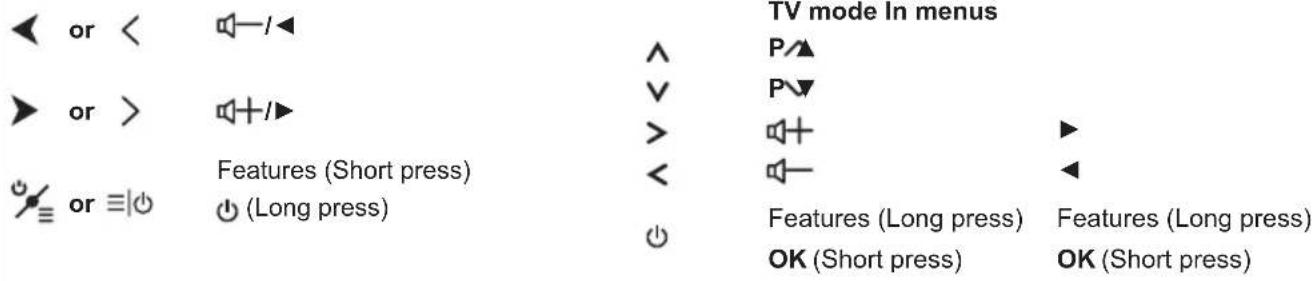
For models with only one button on the set:

or ⏻
Power on/Standby
Note:
Figures and illustrations are provided for reference only and may vary depending on the model.
Initial Setup
The first time you switch the set on, the Hello screen appears, which guides you through the initial setup process. Follow the on-screen instructions to finish the initial setup process such as selecting the language, connecting to the network, and more. During each step, either make a choice or skip the step. If you skip a step, you can perform the setup later from the settings menu.
Note: if the channel search retrieved only the analogue channels it could be caused by poor broadcasting and therefore is not covered by manufacturer warranty. Manufacturers cannot be held responsible for lack of or poor broadcasting in some areas.
Sockets
Note: The location and names of the sockets on the TV may vary according to TV model, and not all sockets available on all models.
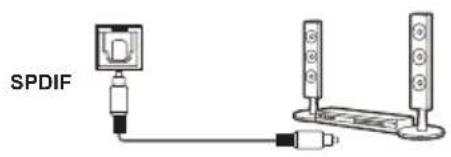
SPDIF socket (output)
The SPDIF socket can be used to connect a compatible digital audio receiver.
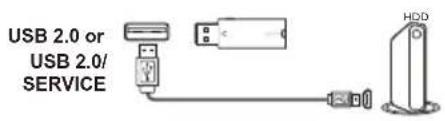
USB2.0 or USB2.0/SERVICE socket (input)
These USB sockets can be used to connect an USB device.
Note: the number of USB sockets on the TV may vary according to TV model.
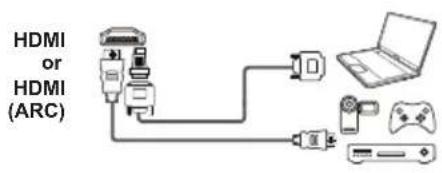
HDMI or HDMI (ARC) socket (input)
The HDMI (High-Definition Multimedia Interface) socket can be used to connect a PC with a compatible video card installed, certain DVD players or a high-definition compatible digital satellite decoder. This socket provides an uncompressed digital connection that carries both video and audio data by way of an integrated mini-plug cable.
flowchart
graph TD
    A["AV IN"] --> B["Video"]
    A --> C["Audio"]
    D["AV IN adapter"] --> E["Video"]
    D --> F["Audio"]
    G["or"] --> H["Video"]
    G --> I["Audio"]
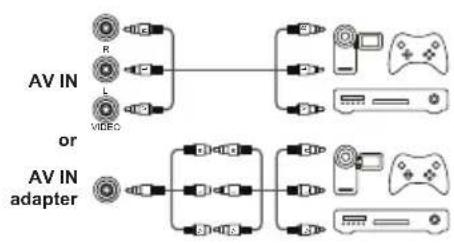
AV RCA audio + video sockets (input)
The AV IN sockets can be used to connect a range of equipment, including video recorders, camcorders, decoders, satellite receivers, DVD players, or games consoles. The VIDEO IN socket provides composite video connection.
AV IN adapter socket
The AV IN adapter socket can be used to connect the attached AV adapter cable with VIDEO and AUDIO L & R IN sockets.
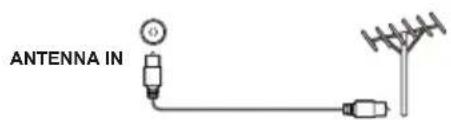
ANTENNA IN socket (input)
This socket can be used to connect the outside aerial.
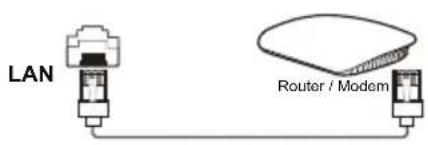
LAN
RJ45 plug for connecting to external modem or network access equipment.

Headphone socket (output)
This socket can be used to connect headphones or stereo earphones.
Note: When the Headphone socket is connected, the speakers will be muted.
Warning: excessive sound pressure from earphones and headphones can cause hearing loss.
Remote Control Functions
Most of your television's functions are available via the menus that appear on the screen. The remote control supplied with your set can be used to navigate through the menus and to configure all the general settings.
Note: Figures and illustrations in this operation manual are provided for reference only and may differ from actual product appearance. The remote control type may be changed without notice.

| To switch the sound off and back on. | |
| Standby / quit standby. | |
| Numeric buttons | To enter channel numbers or a digit. |
| PRE-CH | To return to the previous channel in TV mode. |
| LIST | To display the channel list. |
| To control the volume. | |
| To display programme information, if available. | |
| To display the Settings menu. | |
| PANV | To change channels. |
| To access or exit the Smart TV homepage. | |
| To display the Option menu. | |
| ▲/▼/◄► | Navigation direction buttons. |
| OK | To confirm an entry or selection. |
| To return to the previous menu or quit an App. | |
| To select input source. | |
| EXIT | To exit the Settings menu. |
| ○LANG | To select a sound type available for selected analogue TV programme; to select an audio language available for selected digital TV programme. |
| GUIDE | To toggle the Electronic Programme Guide on or off (only available for digital channels). |
| TEXT | To toggle Teletext on or off. |
| SUBT. | To select a subtitle language available for selected digital TV programme. |
| Colour buttons | To select tasks or Teletext pages; to be used for HbbTV function. |
| To start fast reverse. | |
| To pause playback. | |
| To start fast forward. | |
| ●REC | To record programs under DTV source. |
| To start playback. | |
| To stop playback. | |
| NETFLIX | To access the NETFLIX application. (Not available for some models.) |
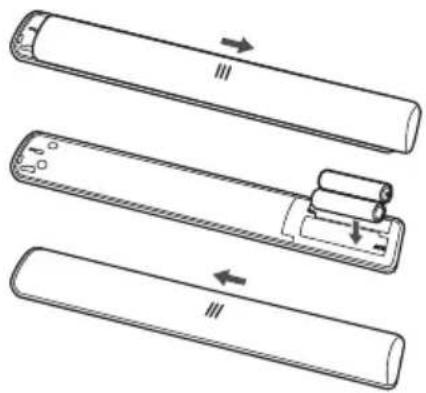
Installing Batteries
- Push to open the back cover as illustrated.
- Insert two AAA batteries according to the polarities marked on the battery case.
- Replace the back cover as illustrated.
natural_image
Diagram showing three sequential steps of a cylindrical device with arrows indicating motion direction (no text or symbols)Switching On
Follow the instructions on this page on how to switch on your TV set and the remote control before going on to following pages describing how to use the channel set-up procedure.
- Insert two AAA batteries in the remote control.
Precautions on using batteries:
- Only use the battery types specified.
- Make sure you use the correct polarity.
- Do not mix new and used batteries.
- Do not use rechargeable batteries.
- Do not expose batteries to excessive heat such as sunshine, fire or the like, throw them in a fire, recharge them or try to open them, as this could cause them to leak or explode.
- Remove the batteries from the remote control if you are not using it for a long period of time.
- Attention should be drawn to the environmental aspects of battery disposal.
natural_image
Line drawing of an open computer monitor with cable and power outlet (no text or symbols)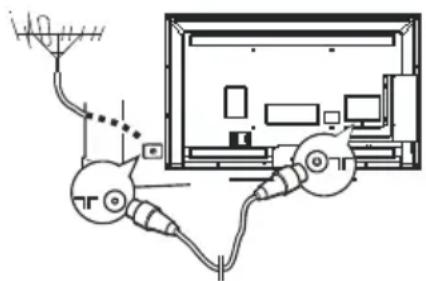
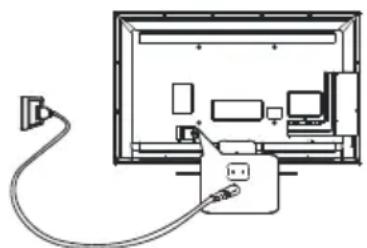
- Connect the power cable FIRST to the television, THEN to a mains socket. (Note: If the power cable is connected to the television, please only connect the power cable to the mains socket.)
Your TV set should only be connected to an AC supply. It must not be connected to a DC supply. If the plug is detached from the cable, do not, under any circumstances, connect it to a mains socket, as there is a risk of electric shock.
Note: The figures are for representation only, the location of power socket of the television might differ depend on the model.
- Connect an outside aerial to the ANTENNA IN socket at the back of the TV set.
The aerial socket (75 OHM - VHF / UHF / cable) can be used for connecting an external aerial or other equipment fitted.
Note: If you want to receive the signal from your cable or cable box, please connect a coaxial cable to the ANTENNA IN socket at the back of the TV set.
- When powered on, the TV will be turned on directly or be in standby mode.
If the power indicator lights up, the TV set is in standby mode. Press the button on the remote control or on the TV set to turn on the TV.
Switching Off
- To put the TV set into standby mode, press the button on the remote control. The TV set remains powered up, but with low energy consumption.
- To switch off the TV set, unplug the mains socket from the mains outlet.
Network Connection

Your TV will require an internet connection to operate all functions. Data usage charges may apply.
Please refer to your Internet Service Provider (ISP) for additional information.
To access the internet, you must subscribe high speed broadband internet service from your internet service provider.
Your TV can be connected to your home network in two ways:
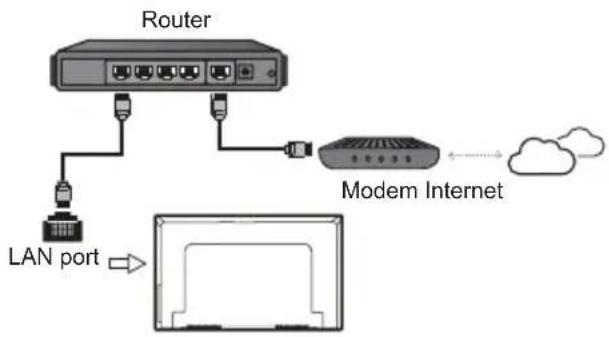
- Wired, using the RJ45 (LAN) connector on the back panel.
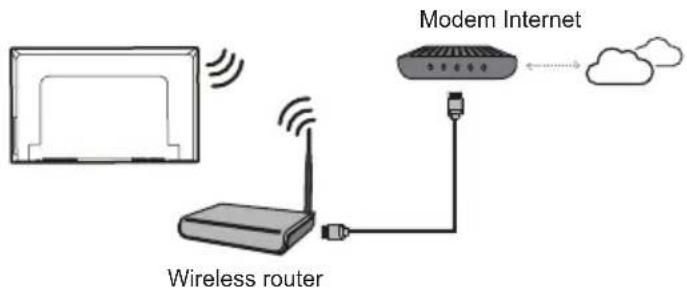
- Wireless, using the internal wireless or external wireless USB adapter and your home wireless network.
Note: The following instructions are just the usual ways to connect your TV to the wired or wireless network. The connection method may be different depending on your actual network configuration. If you have any questions about your home network, please refer to your ISP(Internet Service Provider).
Connecting to a Wired Network
To connect to a wired network:
- Ensure you have:
• An Ethernet cable long enough to reach your TV
• A router or modem with an available Ethernet port
• A high-speed internet connection
• An Ethernet (LAN) port on the back of the TV
- Connect your Ethernet cable to the router and to the Ethernet port on the back of the TV.
- Use the Network Settings to configure the TV.
Connecting to a Wireless Network
To connect to a wireless network
- Ensure you have:
• A router broadcasting a high-speed wireless signal
• A high-speed internet connection
- Use the Network Settings to configure the TV.
flowchart
graph TD
    A["Router"] --> B["LAN port"]
    B --> C["Modem Internet"]
    C --> D["Cloud"]
Note: press ⚙️ on the remote control, select Network and press OK/▶ to enter the Network menu.
Accessing Channels
Using the numeric buttons: press the corresponding numeric buttons on the remote control to access the channels.
Using the P∧∨ buttons: press the P∧∨ buttons on the remote control or the corresponding buttons on the TV set to scroll through the channels.
Using the LIST button: press the LIST button on the remote control to display the channel list and press ▲/▼/◄/► and OK to select channels.
Watching Connected Devices
Press ☐ (SOURCE) on the remote control to display the source list. Use ▲/▼ to toggle between TV and other input sources, press OK to confirm. Or you can press P∧∨∨ to cycle through all TV channels and other input sources.
Adjusting Volume
Volume control: press the V+/- buttons or the ◀/▶ on the remote control or the corresponding buttons on the TV set to increase or decrease the volume.
Sound mute: press the 📋 button to temporarily mute the sound. Press this button again or the V+ button to restore the sound.
Using TV Settings
- Press ⚙️ on the remote control to display the Settings menu.
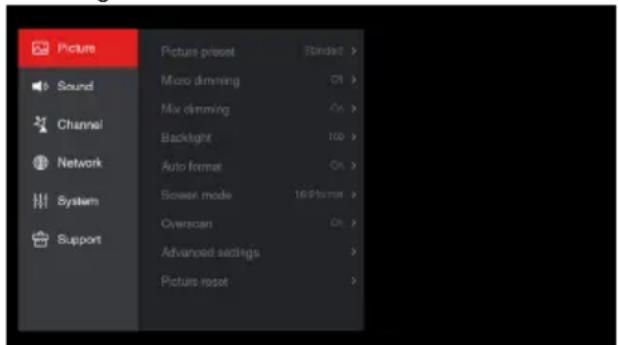
- Press ▲/▼ to select the desired item, then press OK/▶ to enter the corresponding submenu.
- In submenus, press ▲/▼ to select menu options, then press OK/▶ to enter the option list, the adjustment interface, or the corresponding submenu.
- Press to return to the previous menu.
- Press EXIT or ⚙ to close the menu.
Note:
You can also press ☐ on the remote control, select Settings (if available) and press OK to enter the Settings menu. Some options may not be available for certain signal sources.
Selecting Menu Language
You can choose your preferred menu language following the instructions below.
- Press ⚙️ on the remote control, select System > Menu language and press OK/▶ to enter.
- Press ▲/▼ to select your desired language to display the menus and press OK to confirm.
- Press EXIT or 📂 to close the menu.
Instant Power On
This function enables you to turn on your TV quickly.
- Press ⚙️ on the remote control, select System > Advanced settings > Instant power on and press OK/▶ to enter.
- Press ▲/▼ to select On and press OK to confirm.
- Press EXIT or 📂 to close the menu.
Automatic Channel Search
This section describes how to search and store channels automatically. This may be done in any of the cases below:
- you have selected Skip" in channel installation part when doing the initial setup;
- you see No channels, please press OK key and scan!" in TV mode;
-
you want to update your channels.
-
In TV mode, press ⚙️ on the remote control and select Channel > Channel scan. Press OK/▶ to enter.
-
The TV installs and arranges channels according to your country. Press ▲/▼ to select Country/Region, and press OK/▶ to enter. Enter the default password 1234 or your own password in case you have changed the password in the System >Lock menu. Press ▲/▼ to select your country and press OK/▶ to confirm.
-
Press ▲/▼ to select Automatic search, then press OK/▶ to enter.
-
Press ▲/▼ to select Channel type (Digital & Analogue, Digital or Analogue), press ▲/▼ to highlight Search, then press OK to start the automatic search for all digital and/or analogue channels.
-
The channel search may take a few minutes. During the process, you can press OK to stop the search halfway.
-
After the automatic search, channels are arranged in a preset order. If you wish to skip channels, modify the preset order, rename or delete channels, press 🌐 on the remote control, select Channel > Channel organiser and press OK/▶ to enter.
Chapter 4 Homepage Operation
Note: This manual is for common use. Figures and illustrations in this User Manual are provided for reference only and may differ from actual product appearance. And for some models, certain options are not available.
You can select all the features from homepage.
- Press to display homepage.
- Press ▲/▼/◄/► to select icons from the screen list.
- Press OK to enter each option.
- To exit the menu, press EXIT or ▲ repeatedly.
Homepage contains 4 parts: Home, Videos, TV, and Apps. Use ◀/▶ to switch among them.
Shortcut: Press ▲ to move the cursor to the very top of the screen under any homepage, the → (Source Manager) option will appear. You can access source menu directly here.
WARNING:
- Configure the network settings before using Smart TV.
- Slow responses and/or interruptions may occur, depending on your network conditions.
- If you experience a problem using an application, please contact the content provider.
- According to circumstances of the contents provider, an application's updates or the application itself may be discontinued.
- Depending on your country's regulations, some applications may have limited service or not be supported.
This section explores the most commonly used menu of your TV.
Press ▲ on the remote control to display the homepage. Press ▲/▼/◄/► to enter the Home page and select icons from the screen list. Press OK to enter each option. To exit the menu, press EXIT or ▲ repeatedly.
![Status: 10:52 Search Search Netflix NETFLIX Recent Recent Home Videos TV Apps Bruno Mars - Finesse (Remix) [Fei] Arsenal vs Chel BIGGEST TRO First Look! Silver O Recommendations](/content/2026/05/975355/images/9a3d4f0847c16c83d68bc19be4dd31e292db999382f6a90068a6ee98bdbda061.jpg)
Recent: This page shows your recently viewed programmes. To delete the history, press≡ to display the submenu, choose Delete one/ Delete all and operate according to screen display.
Search: You can search for your desired programmes using the virtual keyboard.
Netflix: With a Netflix unlimited membership, you can instantly watch TV episodes & movies streamed over the Internet watch TV episodes & movies streamed over the Internet from Netflix right to your TV.
Note: Netflix is available in certain countries. Unlimited membership required. More information at www.netflix.com.
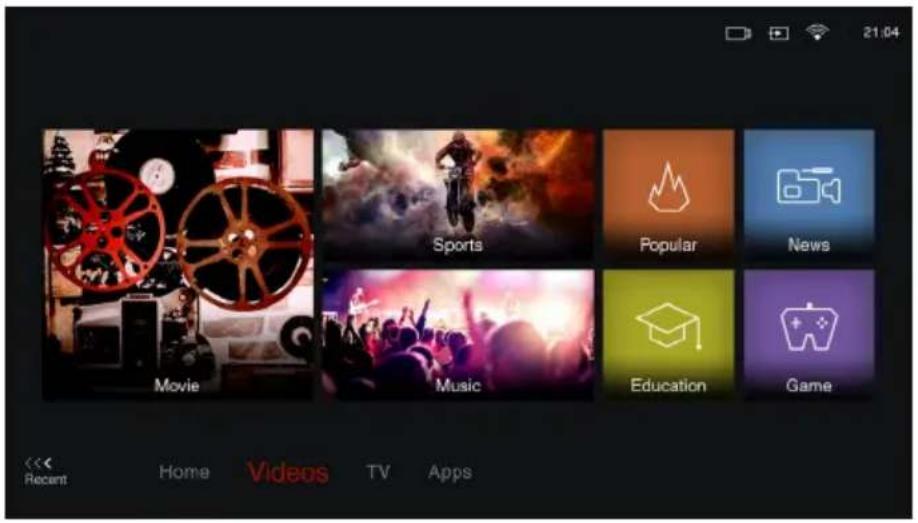
Press ▲ on the remote control to display the homepage. Press ▲/▼/◄/► to enter the Videos page and select icons from the screen list. Press OK to enter each content To exit the menu, press EXIT or ▲ repeatedly.
This interface enables you to search for videos by genre, such as movie, sport, music, popular, news, education, and game, etc. For details, refer to your local platform.
Using Homepage- TV
Note: Some options may not be available for certain signal sources.
This section explores the input sources of your TV.
Press ▲ on the remote control to display homepage. Press ▲/▼/◄/► to enter TV page and select input source you want from the screen list, then press OK to confirm. To exit TV page, press EXIT or ▲ repeatedly.
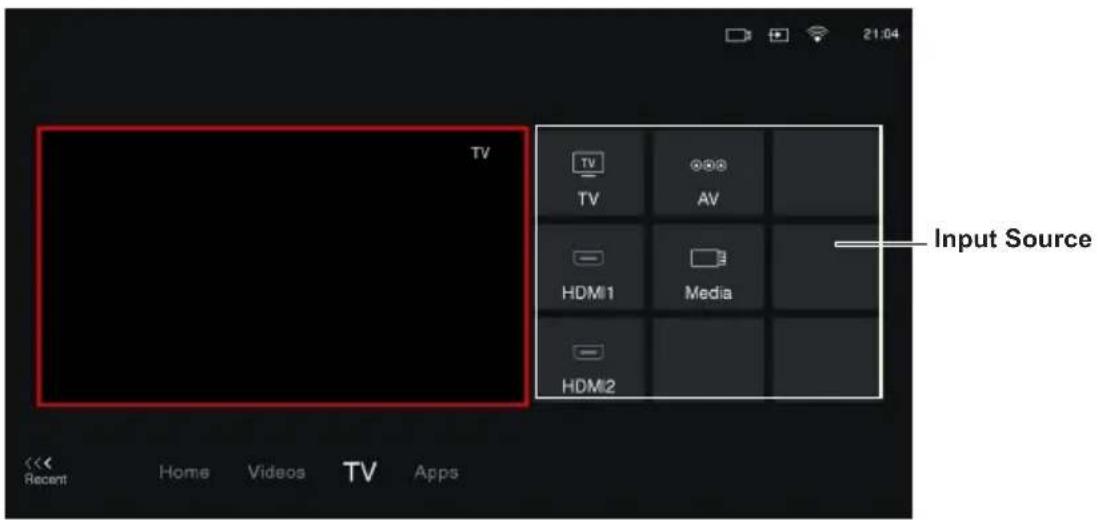
TV window
Displays the current selected TV broadcast programme.
Input Source
Select the input source from devices connected to TV through different ports, including TV, AV, HDMI1, HDMI2, and Media. Press ▲/▼/◄/► to select your desired source, and then press OK to confirm.
Note: The available source might differ depending on the model.
Chapter 4 Homepage Operation
Using Homepage- Apps
Note: The pre-installed apps or items can not be deleted. And the apps (regardless of order) listed in the below figure may differ from actual product. For some models, certain apps are not available.
Press ▲ on the remote control to display the homepage. Press ▲/▼/◄/► to enter the Apps page and select icons from the screen list. Press OK to enter each option. Press EXIT or ▲ repeatedly to return to the homepage.
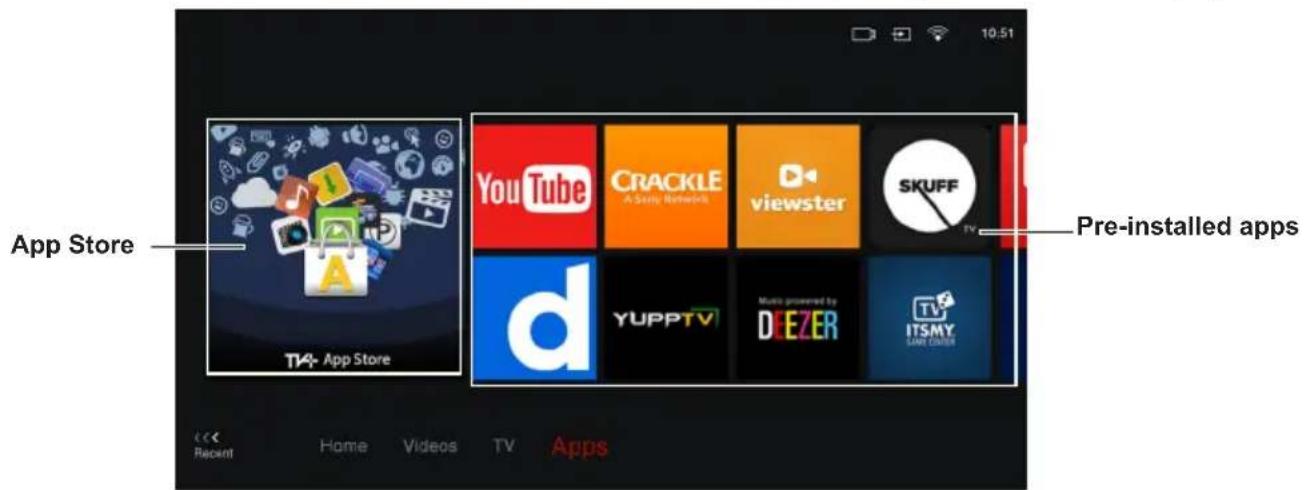
App Store: Many useful and entertaining apps are available for downloading. After entering the App Store, you will see the recommendations. Press ▲/▼/◄/► to select, press OK to enter.
Pre-installed apps: These are recommended Apps. Highlight an app and press OK to open it.
Note: The pre-installed apps or items can not be deleted.
Note: You may need a webcam to use certain apps. The webcam is an optional accessory, and is available by separate purchase. Only use the specified webcam. Some external devices like webcam, smartphone and joystick may not be supported.
Setting up Your Favourite Channels
You can create a list of your favourite TV channels.
- Press LIST.
- Press ▲/▼/◄/► to scroll through the channel list and press the green button to add the selected channel to your favourite list.
- Repeat this procedure to set up other favourite channels.
- Press ▲/▼/◄/► to select a channel, press OK to watch it or press the green button to remove it from your favourite list.
- Press ≡ to organize the channels. Use ▲/▼/◄/► to select a channel, then press the green button to remove or add it to your favourite channels. Or press OK button to do more operations such as swap, insert, hide, edit or delete the selected channel.
- Press LIST or EXIT to exit.
Energy Saving
- Press ⚙️ on the remote control, select Picture > Advanced settings > Dynamic backlight and press OK/▶ to enter.
- Press ▲/▼ to select On to activate power saving mode.
- Press EXIT or to close the menu.
SPDIF Type
Connect the TV to an audio device through the SPDIF output. To select a proper sound type for your SPDIF output, press 🌐 on the remote control, select Sound > Advanced settings >SPDIF type and press OK/▶ to enter. Press ▲/▼ to select an option and press OK to confirm.
- If you selectAuto, the SPDIF output format is
- Dolby Digital when the programme's sound format is Dolby Digital or Dolby Digital Plus or HE-AAC.
- PCM when the programme's sound format is MPEG.
- If you selecPCM, the SPDIF output format is PCM, regardless of the programme's sound format.
- If you selectOff, this turns off the audio output from the audio device connected to the SPDIF output.
Note: The options you may choose depend on the programme you are watching. If the sound is ahead of the picture, you can select SPDIF delay from the Sound menu, press OK/▶ then press ◀/▶ to adjust the delay time to synchronize the sound with the picture.
Audio Description
Audio description refers to an additional narration track for blind and visually impaired viewers of visual media, including television programmes and movies. The description narrator talks through the presentation describing what is happening on the screen during the natural pauses in the audio (and during dialogue if deemed necessary).
You can use this feature if the current broadcast contains audio description.
- Press 🎨 on the remote control, select Sound > Advanced settings > Audio description and press OK/▶ to enter.
- Select Speaker, Headphone or BT device, press OK/▶ to enter, press ◀/▶ to select Audio description and press OK to confirm. (Note: BT device is only available in selected products with Bluetooth module.)
- To adjust the volume for audio description in case this function is turned on, press ▲/▼ to select AD volume, press OK/▶ then press ◀/▶ to set the volume. Press ➔ to return.
- Press EXIT or 📄 to close the menu.
Diagnostics on Digital TV Channels
- Press ⚙ on the remote control and select Channel > Channel diagnostics.
- Press OK/▶ to display some signal information on the current digital channel, such as signal strength, frequency, etc.
- Press OK to confirm.
- Press EXIT or ☑ to close the menu.
Using Subtitles
You can enable subtitles for each TV channel. Subtitles are broadcast via Teletext or DVB-T digital broadcasts. With digital broadcasts, you have the additional option of selecting a preferred subtitle language.
Turning On/Off Subtitles
- Press ⚙️ on the remote control, select Channel > Subtitle and press OK/▶ to enter.
- Select the Subtitle option, press OK/▶ to enter, press ▲/▼ to select On or Off and press OK to confirm.
- Press EXIT or 📞 to close the menu.
Turn on the subtitle before doing below operations.
Enabling Subtitle Languages on Digital TV Channels
-
Press ⚙️ on the remote control, select Channel > Subtitle > Digital subtitle language 1st and press OK/▶ to enter.
-
Press ▲/▼ to select a subtitle language as your preferred language and press OK to confirm.
- Press ▲/▼ to select 2nd Digital subtitle language and press OK/▶ to enter.
- Press ▲/▼ to select a secondary subtitle language and press OK to confirm.
- Press EXIT or 📄 to close the menu.
Shortcut operation: Press SUBT. on the remote control to directly select a subtitle language available for the selected digital TV programme.
Selecting a Subtitle Type on Digital TV Channels
- Press ⚙️ on the remote control, select Channel > Subtitle > Subtitle type and press OK/▶ to enter.
- Press ▲/▼ to select a subtitle type and press OK to confirm. You can select Hearing Impaired to display the hearing impaired subtitles with your selected language.
- Press EXIT or 90 close the menu.
Using Teletext
Selecting Decoding Page Language
- Press ⚙️ on the remote control, select Channel > Teletext > Decoding page language and press OK/▶ to enter.
- Press ▲/▼ to select a proper type of language in which Teletext will display and press OK to confirm.
- Press EXIT or to close the menu.
Digital Teletext Language
On digital TV channels, depending on the broadcaster, you may be able to enjoy a service with multiple initial Teletext pages in different languages. This function allows you to select an available language as primary language, which relates to different initial Teletext pages.
- Press ⚙️ on the remote control, select Channel > Teletext > Digital teletext language and press OK/▶ to enter.
- Press ▲/▼ to select a language and press OK to confirm.
- Press EXIT or ☑ to close the menu.
Software Update
Note: Do not switch off or unplug the TV until the upgrade is completed.
Press 📍 on the remote control, select Support > Software update and press OK/▶ to enter. You have the following options to update the software.
- By USB: Enables you to install a new version software from a USB stick. Insert the USB stick in which a new version software is stored into a
USB socket of the set. Select By USB and press OK/▶ to enter. Follow the on-screen instructions to complete the process.
- By channel: Enables you to install the latest version software if available from the broadcast. Select By channel and press OK/▶ to enter. Follow the on-screen instructions to complete the process.
- By network: Enables you to download and install the latest version software from the Internet. Make sure to set up a wired or wireless network connection first then select By network and press OK/▶ to enter. Follow the on-screen instructions to complete the process.
Note: Do not disconnect power and network connection during the upgrade.
Changing to Shop or Home Mode
- Press ⚙️ on the remote control, select System > Environment and press OK/▶ to enter.
- Press ▲/▼ to select Home, Shop or Shop with demo and press OK to confirm.
- Press EXIT or to close the menu.
Note: If Shop or Shop with demo mode was selected, it is not MEPS compliant. In Home mode, TV will be put into standby mode automatically if there is no operation in 4 hours when this feature is activated to ON in the System > Timer > Auto standby menu.
Reset shop
Allows you to reset the TV to factory default settings.
- Press ⚙️ on the remote control, select Support > Reset shop and press OK/▶ to enter.
- Use the numeric buttons to enter the password 1234 or your own password incase you have changed the password.
- Press ◀/▶ to select OK and press OK to confirm.
- The Initial setup wizard appears. Follow the instructions in the section Initial setup.
T-Link
Use this function to search for CEC devices connected to the HDMI sockets in your TV and enable one-touch play and one-touch standby between CEC devices.
Enabling or Disabling T-Link
- Press ≡ on the remote control, press ▲/▼ to select T-Link and press OK/▶ to enter.
- Press ▲/▼ to select T-Link and press OK/▶ to enter.
- Press ◀/▶ to select On or Off and press OK to confirm.
4. Press EXIT to close the menu.
Using Auto Power On
Enables the TV to automatically power on when you power on a CEC device (e.g. DVD) with the device's remote. Select On to enable this function.
Using Auto Standby
Enables all CEC devices to automatically go to the standby mode when you turn off the TV with the TV remote. Select On to enable this function.
Note: The CEC functions depend on the devices connected and it is possible that some devices may not interoperate correctly when connected to this TV. The user manual or the manufacturer of the problematic devices should be consulted for further information.
Time Shift
Allows you to pause, fast forward and rewind live TV, so you don't have to miss any part of your favourite programs. Before you use the function, connect a USB drive to the TV first. For the first time, you should complete the disk setup for the USB drive.
- Press ≡ on the remote control and select Time Shift, then press OK to confirm.
- Follow the directions on the screen to do the disk setup if you use time shift for the first time.
- After the disk setup is done, time shift will start, and the time shift menu displays on the screen.
- For later use, press ≡ and select Time Shift. press OK to display the time shift menu and operate according to the on-screen prompt.
- Pressing Stop button stops the time shift and exits.
- When the time shift menu disappears and only the timing of the time shift remains on the screen, you can press ◀◀/▶▶/▶/11 to call out the time shift menu.
Notes:
- Before you plug the USB drive to TV, make sure you have backed up the data on the drive to avoid unforeseen malfunction and data loss.
- We recommend that you use a USB drive with at least 1GB free space and a disk speed faster than 5.0MB/sec.
- The bigger the USB drive free space for time shift, the bigger the recording length.
Quick Access of Time Shift:
Insert a USB disk, press PAUSE(I) on the remote control, it will access Time Shift automatically.
Using EPG (Electronic Programme Guide)
EPG is an on-screen guide that displays scheduled digital TV programmes. You can navigate, select, view and record programmes.
Note: The DTV EPG does not require an internet connection. To use the DTV EPG, HbbTV must be set to Off. when HbbTV is set to On, then it will enter the HbbTV EPG directly. Please refer to "HbbTV" part of this manual for assistance to set HbbTV to on or off.
-
Press 📍 on the remote control, select Channel > EPG and press OK/▶ to enter, or press GUIDE on the remote control, the Program Guide menu will appear, which allows you to get information about the current or next programme playing on each channel. Navigate through the different programmes using the ▲/▼/◀/▶ buttons on the remote control.
-
Use the related buttons shown at the bottom of the screen to view EPG.
-
More: Press OK to view more information.
- Program filter: Press ≡ to display programme filter for digital TV programmes.
- Custom schedule: Press the red button to set a schedule.
- Select date: Press the green button and OK to select date.
-
Schedule list: Press the yellow button to view your schedule list.
-
Press GUIDE or EXIT to exit EPG.
PVR (Personal Video Recorder)
Allows you to record your favourite TV programs. Before you use the function, connect a USB drive to the TV first.
Note: The feature is available only in selected products and, due to specific TV network limitations and country technical requirements, might not be available in product or place of installation. Feature might also be blocked by TV network due to copyright protection (HD content, recording protection). Please use on the remote control to check if the feature is available in your product.
- Press ≡ on the remote control and select PVR.
- Press OK/▶ to enter and select Record. It starts to record automatically.
- Press BLUE button on the remote control to access Settings and use ▲/▼/◄/► to adjust the recording duration.
- Press ■ to stop recording manually, the recorded file will be saved. In normal operation, the recording will stop automatically when the recording duration expires.
-
In recording, the PVR mini pane will also show on the screen to indicate the recording progress.
-
To watch the recorded program, exit PVR mode first, Press and go to TV > Media > PVR, then select the related record file. Press OK to play. (It is the same if you record a digital radio program).
Notes:
- This feature is available only for digital non encrypted channels.
- Before you connect the USB drive to the TV, make sure you have backed up the data in the drive to avoid the loss of your important data due to unforeseen malfunction.
- The bigger the USB drive free memory for the PVR function, the bigger the recording length.
- If you want to change channel or signal source during recording, store the recording data before changing the channel or source.
- The TV cannot play files normally if the parameters of the file exceed the limitations of the system, the file format is not supported, the file is damaged, or the file cannot be decoded.
- Do not disconnect the USB drive when the system is reading a file or transmitting data, otherwise the system or the drive may be damaged.
Network Waking up
This function allows you to turn on your TV from standby mode via a network. To use this function, please make sure:
- Your TV is connected to an effective home network;
- The desired controller, such as a smartphone, is connected to the same network as your TV;
- An App which supports network waking up function, has been installed into the controller;
- Network standby is set to On in the Network menu.
When the TV is in networked standby mode, you can use the App to wake up the TV remotely.
Password in Parental Control
- The default password is 1234. You can change it to a new one.
- The super password is 0423. If you forget your code, enter the super password to override any existing codes.
E-Manual
E-Manual is an electronic user manual for the product. You can find instructions for the features of this TV set.
-
Press 📍 on the remote control, select Support > E-Manual and press OK to enter.
-
Press ◀/▶ to select the contents and press OK to enter, then press ▲/▼ to view the instruction pages. Press →to return to the contents.
- Press EXIT to exit.
Netflix Settings
Netflix provides on-demand movies and TV shows delivered via the Internet. Netflix is available in certain countries. Unlimited membership is required. More information can be found at www.netflix.com http://www.netflix.com/.
T-CAST
T-Cast lets you enjoy plenty of videos, rich of applications, and share great contents on large screen. It also allows you to turn a smart device into a sophisticated remote control, providing more features than your normal TV remote control. You can then control your TV through your smart device.
Follow the on-screen instructions to scan the QR code on the TV screen and download T-Cast.
Note: Make sure the smart device and your TV are in the same home LAN (local area network) or network segment to use TV remote function.
Share&See
Note: Share&See is DLNA-compatible.
Connecting to your PC
Make sure to set up a wired or wireless connection from your TV to a router first. Then connect your PC to your router either through a network cable or wirelessly.
Adding media from your PC for sharing
Install a DLNA media server on your PC. The simple and familiar server you may install is Microsoft Windows Media Player 11 and above. Follow the instructions below to allow your TV to access the designated files on your PC.
-
Open the Microsoft Windows Media Player 11.
-
Select Library > Media sharing.
-
Check the checkbox Share my media to.
-
Select the icon of the TV set connected to your PC.
-
Select Allow to allow the TV set to access your PC, and select OK to enable the access. Note: Use the Settings button to customize your desired settings.
-
Select Library > Add to Library.
-
Select your personal folders or folders of other users that you can access for sharing.
-
Select Add and press OK to enable the addition.
Share&See application
Select Media from the homepage and press OK to enter. Then you can view pictures, listen to music or watch videos, which are stored on your PC.
Supported file formats:
Picture JPEG, PNG, BMP
Music MP3, WMA, LPCM
Video FLV, TS, MP4
Notes:
- Share&See function is set to on by default, the TV will display the list of available DLNA servers which are available in local network.
- Content from third-party DLNA servers may not play correctly on your TV due to compatibility problems.
- When sharing media files from a PC, certain features may be unavailable and, due to the file and encoding formats used, playback issues may occur.
- Because of network related conditions, playback of media files may not be error-free. When this happens, play them from a USB drive.
HbbTV
HbbTV (Hybrid broadcast broadband TV) is a service offered by certain broadcasters and available only on some digital TV channels. HbbTV delivers interactive television over broadband Internet. These interactive features are added to and enrich the normal digital programmes, and include services such as digital teletext, electronic programme guide, games, voting, specific information related to the current programme, interactive advertising, information magazines, catch-up TV, etc.
To use HbbTV please ensure your TV is connected to Internet and HbbTV is switched on.
Notes:
HbbTV services are broadcast- or country-dependent and may be unavailable in your area. You cannot download files to your TV with HbbTV function.
Application provider or broadcasting related conditions may cause an HbbTV application to be unavailable momentarily.
To access HbbTV applications you must connect your TV to the Internet via a broadband link. HbbTV applications may not work correctly in case of network related issues.
HbbTV access
-
Press ⚙️ on the remote control, select System > HbbTV Settings and press OK/▶ to enter.
-
Press ▲/▼ to select HbbTV and set it to On.
-
When you tune to a TV digital channel that offers HbbTV, this will be signalled to you by an on-screen indication (generally a red button, but other colour buttons may also be used). Press the indicated colour button to open the interactive pages.
- Use ▲/▼/◄/► and the colour buttons to navigate through the HbbTV pages and press OK to confirm.
HbbTV deactivation
To avoid disturbances that may be caused by HbbTV broadcasting tests, you can turn off the HbbTV function:
-
Press ⚙️ on the remote control, select System > HbbTV and press OK/▶ to enter.
-
Press ▲/▼ to select Off and press OK to confirm.
Freeview Plus
FreeviewPlus is a new television service which provide a state of the art EPG and seamless access to Catch Up TV from free-to-air networks with the simple press of a button. FreeviewPlus provides an unrivalled user experience and places free to air television at the forefront of innovation, with services that include:
-A 7-day, easy-to-use EPG
-All available Catch Up TV on the TV screen
-Featured recommendations
-Ability to browse by genre and search programmes for the next 7 days
-A favourite function with reminders for live and Catch Up programmes
What you need
You need a high-speed (broadband) internet connection to the TV.
To launch Freeview Plus
When you are watching TV, you will briefly see a prompt at the top left of the screen. Press the corresponding colour key on the remote control to launch FreeviewPlus. Follow the on-screen instructions and use the colour keys, arrow keys, and OK button to navigate.
*FreeviewPlus uses HbbTV technology which combines broadcast and broadband. Internet connection is required. Data usage and conditions apply.
**FreeviewPlus is available through out Austrilia but Catch Up services vary by region – please check www.freeview.com.au to see what's available in your area.
***More information about FreeviewPlus can be found on www.freeview.com.au.
Problems & Solutions
Note: Problems & solutions 1 to 2 are for the TV models which have network functions, so users of non-connected TV models can disregard them.
1. Fail to link to the network.
- Check if your TV is connected with the network;
- Reboot your TV;
- Consult your internet service provider, to confirm if access of your router is supported. Refer to the operation manual of your router.
- Make sure if your TV is connected with the router. if the router is well connected and powered on, try to change a new router and network line, and use your PC to have a test. Should your problem persists, try to consult Client Service Centre.
2. The video could not be played smoothly.
- Videos from your USB flash drive --- It may result from data transmission, or its code flow is far beyond the supported formats of this TV set.
- Videos downloaded from internet, or online videos.
a. It may be caused by the lower bandwidth of your network. A high network speed is required to handle online videos.
b. Peak internet usage times may affect the bandwidth.
c. Check if any other computers on the same network are also operating, as they may be using up bandwidth. Especially if they are downloading or displaying on-line videos.
d. The video may not be smooth itself, it is not the problem of your TV or network.
3. When two mobile hard disks are connected with the TV at the same time, they will not be recognized some times.
- All mobile hard disks consume a lot of power, which may result in power supply problems. We recommend inserting only one hard disk, or a low power consumption mobile hard disk.
4. The video from a mobile hard disk (USB) is playing with no sound.
- The audio format of the video in your mobile hard disk is not supported by the TV player.
5. Some videos fail to play.
- The formats of the videos may not be supported by the TV, especially videos shot by certain kinds of cameras, generally with their private protocol of formats, which are not compatible with your TV.
6. Video stops playing midway.
- Mistakes may occur when videos are copied or compressed, so they may automatically stop playing during playback.
7. What should I pay attention to, when I do SW updating
- No power cuts when SW updating;
- Avoid any operations with your remote control when SW updating;
- Be patient because the SW updating process may takes a little bit longer time.
8. There are no distinct changes of TV interface after SW updating.
- Under certain conditions, SW updating may not only update or add new functions but also improve the performance of the TV set, without distinct changes of interface. Also, there may be no changes to the user interface at all.
9. External device cannot be recognized
- Some external devices (e.g. webcam, smart phone, tablet, game handle, and external wireless adapter) may not be compatible with the TV and cannot be supported for certain functions (nScreen, wireless display, gesture control, face recognition, if any). Please try a similar device. If it does not work, contact your local dealer.
Troubleshooting
Note: Most problems you encounter with your TV can be corrected by consulting the following troubleshooting list.
No picture, no sound
- Check if the fuse or circuit breaker is working.
- Plug another electrical device into the outlet to make sure it is working or turned on.
- Power plug is in a bad contact with the outlet.
- Check the signal source.
No color
- Change the color system.
- Adjust the saturation.
- Try another channel. Black-white programme may be received.
Remote control does not work
- Change the batteries.
- Batteries are not installed correctly.
No picture, normal sound
- Adjust the brightness and contrast.
- Broadcasting failure may happen.
Normal picture, no sound
- Press button▶ to increase volume.
- Volume is set to mute, press the Mute button to restore sound.
- Change the sound system.
- Broadcasting failure may happen.
Unorderly ripples on the picture
It is usually caused by local interference, such as cars, daylight lamps and hair driers. Adjust the antenna to minimize the interference.
Snowy dots and interference
If the antenna is located in the fringe area of a television signal where the signal is weak, the picture may be marred by dots. When the signal is extremely weak, it may be necessary to install a special antenna to improve the reception.
- Adjust the position and orientation of the indoor/outdoor antenna.
- Check the connection of antenna.
- Fine tune the channel.
- Try another channel. Broadcasting failure may happen.
Ignition
Black spots or horizontal streaks appear, or the picture flutters or drifts. This is usually caused by interference from car ignition system, neon lamps, electric drills, or other electrical appliance.
Ghost
Ghosts are caused by the television signal following two paths. One is the direct path, the other is reflected from tall buildings, hills, or other objects. Changing the direction or position of the antenna may improve the reception.
Radio frequency interference
This interference produces moving ripples or diagonal streaks, and in some case, loss of contrast in the picture. Find out and remove the radio interference source.
* To bring you better visual experience, please remove all labels, if any, from TV front panel and screen before use.
* Figures and illustrations in this User Manual are provided for reference only and may differ from actual product appearance. Product design and specifications may be changed without notice.
Legal Statement
[Legal Statement] of manufacturer of this TV set
Due to the various capabilities of products featuring the SmartTV - Services, as well as limitations in the available content, certain features, applications, and services may not be available on all devices or in all territories. Some features on SmartTV may also require additional peripheral devices or membership fees that are sold separately. Please visit our website for more information on specific device information and content availability. The services and availability of content through SmartTV are subject to change from time to time without prior notice.
All content and services accessible through this device belong to third parties and are protected by copyright, patent, trademark and/or other intellectual property laws. Such content and services are provided solely for your personal noncommercial use. You may not use any content or services in a manner that has not been authorized by the content owner or service provider. Without limiting the foregoing, unless expressly authorized by the applicable content owner or service provider, you may not modify, copy, republish, upload, post, transmit, translate, sell, create derivative works, exploit, or distribute in any manner or medium any content or services displayed through this device.
You expressly acknowledge and agree that use of the device is at your sole risk and that the entire risk as to satisfactory quality, performance and accuracy is with you. The device and all third party content and services are provided “as is” without warranty of any kind, either express or implied. Manufacturer expressly disclaims all warranties and conditions with respect to the device and any content and services, either express or, implied, including but not limited to, warranties of merchantability, of satisfactory quality, fitness for a particular purpose, of accuracy, of quiet enjoyment, and non-infringement of third party rights. Manufacturer does not guarantee the accuracy, validity, timeliness, legality, or completeness of any content or service made available through this device and does not warrant that the device, content or services will meet your requirements, or that operation of the device or services will be uninterrupted or error-free. Under no circumstances, including negligence, shall manufacturer be liable, whether in contract or tort, for any direct, indirect, incidental, special or consequential damages, attorney fees, expenses, or any other damages arising out of, or in connection with, any information contained in, or as a result of the use of the device, or any content or service accessed by you or any third party, even if advised of the possibility of such damages.
Third party services may be changed, suspended, removed, terminated or interrupted, or access may be disabled at any time, without notice, and manufacturer makes no representation or warranty that any content or service will remain available for any period of time. Content and services are transmitted by third parties by means of networks and transmission facilities over which manufacturer has no control. Without limiting the generality of this disclaimer, manufacturer expressly disclaims any responsibility or liability for any change, interruption, disabling, removal of or suspension of any content or service made available through this device. Manufacturer may impose limits on the use of or access to certain services or content, in any case and without notice or liability. Manufacturer is neither responsible nor liable for customer service related to the content and services. Any question or request for service relating to the content or services should be made directly to the respective content and service providers.
Licence

The terms HDMI and HDMI High-Definition Multimedia Interface, and the HDMI logo are trademarks or registered trademarks of HDMI Licensing Administrator, Inc.
DOLBY AUDIO™
Manufactured under license from Dolby Laboratories. Dolby, Dolby Audio, and the double-D symbol are trademarks of Dolby Laboratories.

H.265-HIGH EFFICIENCY VIDEO CODING
HEVC, or H.265 is the successor to H.264 and strives to deliver video with equivalent quality with bitrate savings of up to 50 percent. HEVC is critical for streaming high-quality video even in congested network environments, and will be a driving factor in the delivery of 4K content to new Ultra HD displays.

Freeview Plus uses HbbTV technology which combines broadcast and broadband. Internet connection is required. Data usage charges and conditions apply.

natural_image
Abstract geometric pattern of three dark blue chevron shapes arranged in a triangular formation (no text or symbols)FFALCON
Incredible Smart Life
www.ffalcon.com.au
Customer Support:1300 170 540

- FFALCON
- Chapter 1 - Introduction
- Chapter 2 - Getting Started
- Chapter 3 - Basic Operation
- Chapter 4 - Homepage Operation
- Chapter 5 - Using More of Your TV
- Chapter 6 - Other information
- Precautions
- Warning
- Product
- Power and Plug
- Power Cord and Signal Cable
- Use Environment
- Cleaning
- Hanging the TV Set on the Wall
- Warning: This operation requires two people.
- Buttons on the TV
- Note:
- Initial Setup
- Sockets
- SPDIF socket (output)
- USB2.0 or USB2.0/SERVICE socket (input)
- HDMI or HDMI (ARC) socket (input)
- AV RCA audio + video sockets (input)
- AV IN adapter socket
- ANTENNA IN socket (input)
- LAN
- Headphone socket (output)
- Remote Control Functions
- Installing Batteries
- Switching On
- Switching Off
- Network Connection
- Connecting to a Wired Network
- Connecting to a Wireless Network
- Accessing Channels
- Watching Connected Devices
- Adjusting Volume
- Using TV Settings
- Selecting Menu Language
- Instant Power On
- Automatic Channel Search
- Chapter 4 Homepage Operation
- WARNING:
- Using Homepage- TV
- TV window
- Input Source
- Using Homepage- Apps
- Setting up Your Favourite Channels
- Energy Saving
- SPDIF Type
- Audio Description
- Diagnostics on Digital TV Channels
- Using Subtitles
- Turning On/Off Subtitles
- Enabling Subtitle Languages on Digital TV Channels
- Selecting a Subtitle Type on Digital TV Channels
- Using Teletext
- Selecting Decoding Page Language
- Digital Teletext Language
- Software Update
- Changing to Shop or Home Mode
- Reset shop
- T-Link
- Enabling or Disabling T-Link
- Press EXIT to close the menu.
- Using Auto Power On
- Using Auto Standby
- Time Shift
- Notes:
- Quick Access of Time Shift:
- Using EPG (Electronic Programme Guide)
- PVR (Personal Video Recorder)
- Network Waking up
- Password in Parental Control
- E-Manual
- Netflix Settings
- T-CAST
- Share&See
- Connecting to your PC
- Adding media from your PC for sharing
- Share&See application
- HbbTV
- HbbTV access
- HbbTV deactivation
- Freeview Plus
- What you need
- To launch Freeview Plus
- Problems & Solutions
- Fail to link to the network.
- The video could not be played smoothly.
- When two mobile hard disks are connected with the TV at the same time, they will not be recognized some times.
- The video from a mobile hard disk (USB) is playing with no sound.
- Some videos fail to play.
- Video stops playing midway.
- What should I pay attention to, when I do SW updating
- There are no distinct changes of TV interface after SW updating.
- External device cannot be recognized
- Troubleshooting
- No picture, no sound
- No color
- Remote control does not work
- No picture, normal sound
- Normal picture, no sound
- Unorderly ripples on the picture
- Snowy dots and interference
- Ignition
- Ghost
- Radio frequency interference
- Legal Statement
- Licence
- DOLBY AUDIO™
- Incredible Smart Life
Brand : FFalcon
Model : 50UF1
Category : Television