
BDCCF18N - Flashlight BLACK & DECKER - Free user manual and instructions
Find the device manual for free BDCCF18N BLACK & DECKER in PDF.


| Product Type | Flashlight (Cordless LED) |
| Brand | Black & Decker |
| Model | BDCCF18N |
| Power Source | Cordless (18V Li-Ion battery, not supplied) |
| Light Source | LED |
| Brightness | 90 lumens |
| Battery Voltage | 18 V |
| Battery Compatibility | BL1518, BL2018, BL4018 (Li-Ion) |
| Pivoting Head | Yes, adjustable to multiple positions |
| On/Off Button | Yes, push button |
| Charging Indicator | Green LED: slow flash = charging, solid = full; red fast flash = defective battery |
| Intended Use | Consumer illumination |
| Maintenance | Clean ventilation slots with soft brush; wipe housing with damp cloth; no solvents |
| Safety Features | Do not look directly into light; use only recommended batteries; do not expose to water |
| Environmental Protection | Separate collection at end of life; recycle batteries |
| Warranty | 24 months from purchase date (EU/EFTA) |
Frequently Asked Questions - BDCCF18N BLACK & DECKER
User questions about BDCCF18N BLACK & DECKER
0 question about this device. Answer the ones you know or ask your own.
Ask a new question about this device
Download the instructions for your Flashlight in PDF format for free! Find your manual BDCCF18N - BLACK & DECKER and take your electronic device back in hand. On this page are published all the documents necessary for the use of your device. BDCCF18N by BLACK & DECKER.
USER MANUAL BDCCF18N BLACK & DECKER

natural_image
Line drawing of a hand pressing down on a device component with an arrow indicating the process (no text or symbols present)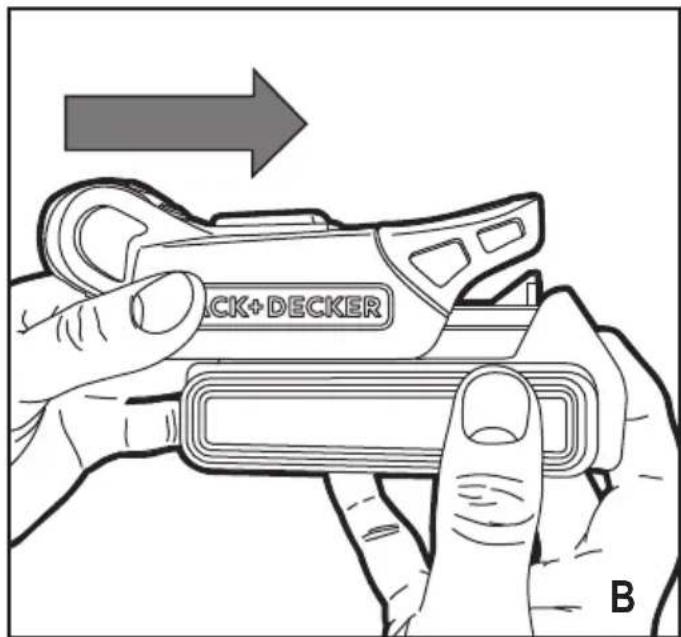
natural_image
Technical line drawing of a mechanical component with curved arrows indicating motion or force (no text or symbols)Intended use
Your BLACK+DECKER BDCCF18 torch has been designed for providing illumination. This tool is intended for consumer, use only.
Safety instructions
General power tool safety warnings

Warning! Read all safety warnings and all instructions. Failure to follow the warnings and instructions listed below may result in electric shock, fire and/or serious injury.
Save all warnings and instructions for future reference.
The term "power tool" in all of the warnings listed below refers to your mains operated (corded) power tool or battery operated (cordless) power tool.
1. Work area safety
a. Keep work area clean and well lit. Cluttered or dark areas invite accidents.
b. Do not operate power tools in explosive atmospheres, such as in the presence of flammable liquids, gases or dust. Power tools create sparks which may ignite the dust or fumes.
c. Keep children and bystanders away while operating a power tool. Distractions can cause you to lose control.
2. Electrical safety
a. Power tool plugs must match the outlet. Never modify the plug in any way. Do not use any adapter plugs with earthed (grounded) power tools. Unmodified plugs and matching outlets will reduce risk of electric shock.
b. Avoid body contact with earthed or grounded surfaces such as pipes, radiators, ranges and refrigerators. There is an increased risk of electric shock if your body is earthed or grounded.
c. Do not expose power tools to rain or wet conditions. Water entering a power tool will increase the risk of electric shock.
d. Do not abuse the cord. Never use the cord for carrying, pulling or unplugging the power tool. Keep cord away from heat, oil, sharp edges or moving parts. Damaged or entangled cords increase the risk of electric shock.
e. When operating a power tool outdoors, use an extension cord suitable for outdoor use. Use of a cord suitable for outdoor use reduces the risk of electric shock.
f. If operating a power tool in a damp location is unavoidable, use a residual current device (RCD) protected supply. Use of an RCD reduces the risk of
electric shock.
3. Personal safety
a. Stay alert, watch what you are doing and use common sense when operating a power tool. Do not use a power tool while you are tired or under the influence of drugs, alcohol or medication. A moment of inattention while operating power tools may result in serious personal injury.
b. Use personal protective equipment. Always wear eye protection. Protective equipment such as dust mask, non-skid safety shoes, hard hat, or hearing protection used for appropriate conditions will reduce personal injuries.
c. Prevent unintentional starting. Ensure the switch is in the off-position before connecting to power source and/or battery pack, picking up or carrying the tool. Carrying power tools with your finger on the switch or energising power tools that have the switch on invites accidents.
d. Remove any adjusting key or wrench before turning the power tool on. A wrench or a key left attached to a rotating part of the power tool may result in personal injury.
e. Do not overreach. Keep proper footing and balance at all times. This enables better control of the power tool in unexpected situations.
f. Dress properly. Do not wear loose clothing or jewellery. Keep your hair, clothing and gloves away from moving parts. Loose clothes, jewellery or long hair can be caught in moving parts.
g. If devices are provided for the connection of dust extraction and collection facilities, ensure these are connected and properly used. Use of dust collection can reduce dust-related hazards.
4. Power tool use and care
a. Do not force the power tool. Use the correct power tool for your application. The correct power tool will do the job better and safer at the rate for which it was designed.
b. Do not use the power tool if the switch does not turn it on and off. Any power tool that cannot be controlled with the switch is dangerous and must be repaired.
c. Disconnect the plug from the power source and/or the battery pack from the power tool before making any adjustments, changing accessories, or storing power tools. Such preventive safety measures reduce the risk of starting the power tool accidentally.
d. Store idle power tools out of the reach of children and do not allow persons unfamiliar with the power tool or these instructions to operate the power tool. Power tools are dangerous in the hands of untrained users.
ENGLISH
(Original instructions)
e. Maintain power tools. Check for misalignment or binding of moving parts, breakage of parts and any other condition that may affect the power tools operation. If damaged, have the power tool repaired before use. Many accidents are caused by poorly maintained power tools.
f. Keep cutting tools sharp and clean. Properly maintained cutting tools with sharp cutting edges are less likely to bind and are easier to control.
g. Use the power tool, accessories and tool bits etc. in accordance with these instructions, taking into account the working conditions and the work to be performed. Use of the power tool for operations different from those intended could result in a hazardous situation.
5. Battery tool use and care
a. Recharge only with the charger specified by the manufacturer. A charger that is suitable for one type of battery pack may create a risk of fire when used with another battery pack.
b. Use power tools only with specifically designated battery packs. Use of any other battery packs may create a risk of injury and fire.
c. When battery pack is not in use, keep it away from other metal objects, like paper clips, coins, keys, nails, screws, or other small metal objects, that can make a connection from one terminal to another. Shorting the battery terminals together may cause burns or a fire.
d. Under abusive conditions, liquid may be ejected from the battery; avoid contact. If contact accidentally occurs, flush with water. If liquid contacts eyes, additionally seek medical help. Liquid ejected from the battery may cause irritation or burns.
6. Service
a. Have your power tool serviced by a qualified repair person using only identical replacement parts. This will ensure that the safety of the power tool is maintained.
Additional power tool safety warnings

Warning! Additional safety warnings for torches
- Never attempt to remove or replace any parts other than those specified in this manual.
- Do not operate without the lens in place or with a damaged lens.
- Never look directly into the light or shine the light into another persons eyes.

Warning! Fire hazard. Do not operate worklight or charger near flammable liquids or in gaseous or explosive atmospheres. Internal sparks may ignite fumes causing personal injury.
- Do not expose light or charger to wet or damp areas. Do not expose light or charger to rain or snow.
- Do not wash light or charger with water or allow water to get inside light or charger. Do not submerge light in water at any time.

Caution! When not in use, place tool on its side on a stable surface where it will not cause a tripping or falling hazard.
Some tools with large battery packs will stand upright on the battery pack but may be easily knocked over.
- Never view directly with optical instruments into the light source.
Residual risks.
Additional residual risks may arise when using the tool which may not be included in the enclosed safety warnings. These risks can arise from misuse, prolonged use etc.
Even with the application of the relevant safety regulations and the implementation of safety devices, certain residual risks can not be avoided. These include:
◆ Injuries caused by touching any rotating/moving parts.
◆ Injuries caused when changing any parts, blades or accessories.
- Injuries caused by prolonged use of a tool. When using any tool for prolonged periods ensure you take regular breaks.
◆ Impairment of hearing.
- Health hazards caused by breathing dust developed when using your tool (example:- working with wood, especially oak, beech and MDF.)
Labels on tool
The following pictograms along with the date code are shown on the tool:

Warning! Read all safety warnings and all instructions. Failure to follow the warnings and instructions listed below may result in electric shock, fire and/or serious injury.
Additional safety instructions for batteries and chargers
Batteries (Not supplied)
◆ Never attempt to open for any reason.
◆ Do not expose the battery to water.
- Do not store in locations where the temperature may exceed 40 °C.
◆ Charge only at ambient temperatures between 10 °C and 40 °C.
◆ Charge only using the charger provided with the tool.
- When disposing of batteries, follow the instructions given in the section "Protecting the environment".

Do not attempt to charge damaged batteries.
Chargers (Not supplied)
◆ Use your BLACK+DECKER charger only to charge the battery in the tool with which it was supplied. Other batteries could burst, causing personal injury and damage.
◆ Never attempt to charge non-rechargeable batteries.
◆ Have defective cords replaced immediately.
◆ Do not expose the charger to water.
◆ Do not open the charger.
◆ Do not probe the charger.

The charger is intended for indoor use only.

Read the instruction manual before use.
Electrical safety

Your charger is double insulated; therefore no earth wire is required. Always check that the mains voltage corresponds to the voltage on the rating plate. Never attempt to replace the charger unit with a regular mains plug.
If the supply cord is damaged, it must be replaced by the manufacturer or an authorised BLACK+DECKER Service Centre in order to avoid a hazard.
Features
This tool includes some or all of the following features.
-
On / Off button
-
Pivoting LED light housing
Assembly
Fitting and removing the battery (Not supplied) (fig. B)
- To fit the battery, line it up with the receptacle on the tool. Slide the battery into the receptacle and push until the battery snaps into place.
◆ To remove the battery, push the release button (3) while at the same time pulling the battery out of the receptacle.
Use
Warning! Let the tool work at its own pace. Do not overload.
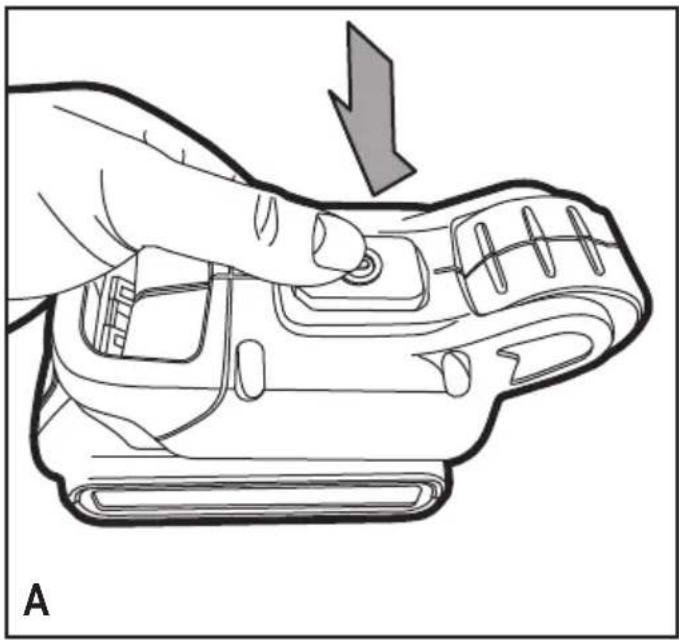
Charging the battery (Not supplied) (fig. A)
The battery needs to be charged before first use and whenever it fails to produce sufficient power on jobs that were easily done before. The battery may become warm while charging; this is normal and does not indicate a problem.
Warning! Do not charge the battery at ambient temperatures below 10 °C or above 40 °C. Recommended charging temperature: approx. 24 °C.
Note: The charger will not charge a battery if the cell temperature is below approximately 0 °C or above 40 °C. The battery should be left in the charger and the charger will begin to charge automatically when the cell temperature warms up or cools down.
◆ To charge the battery, insert it into the charger. The battery will only fit into the charger in one way. Do not force. Be sure that the battery is fully seated in the charger.
◆ Plug in the charger and switch on at the mains.
The charging indicator will flash green (slowly).
The charge is complete when the charging indicator lights green continuously. The charger and the battery can be left connected indefinitely with the LED illuminated. The LED will change to flashing green (charging) state as the charger occasionally tops up the battery charge. The charging indicator will be lit as long as the battery is connected to the plugged-in charger.
◆ Charge discharged batteries within 1 week. Battery life will be greatly diminished if stored in a discharged state.
Leaving the battery in the charger
The charger and battery pack can be left connected with the LED glowing indefinitely. The charger will keep the battery pack fresh and fully charged.
Charger diagnostics
If the charger detects a weak or damaged battery, the charging indicator will flash red at a fast rate. Proceed as follows:
◆ Re-insert the battery.
- If the charging indicators continues flashing red at a fast rate, use a different battery to determine if the charging process works properly.
- If the replaced battery charges correctly, the original battery is defective and should be returned to a service centre for recycling.
- If the new battery gives the same indication as the original battery, take the charger to be tested at an authorised services centre.
Note: It may take as long as 60 minutes to determine that the battery is defective. If the battery is too hot or too cold, the LED will alternately blink red, fast and slow, one flash at each speed and repeat.
Switching on and off
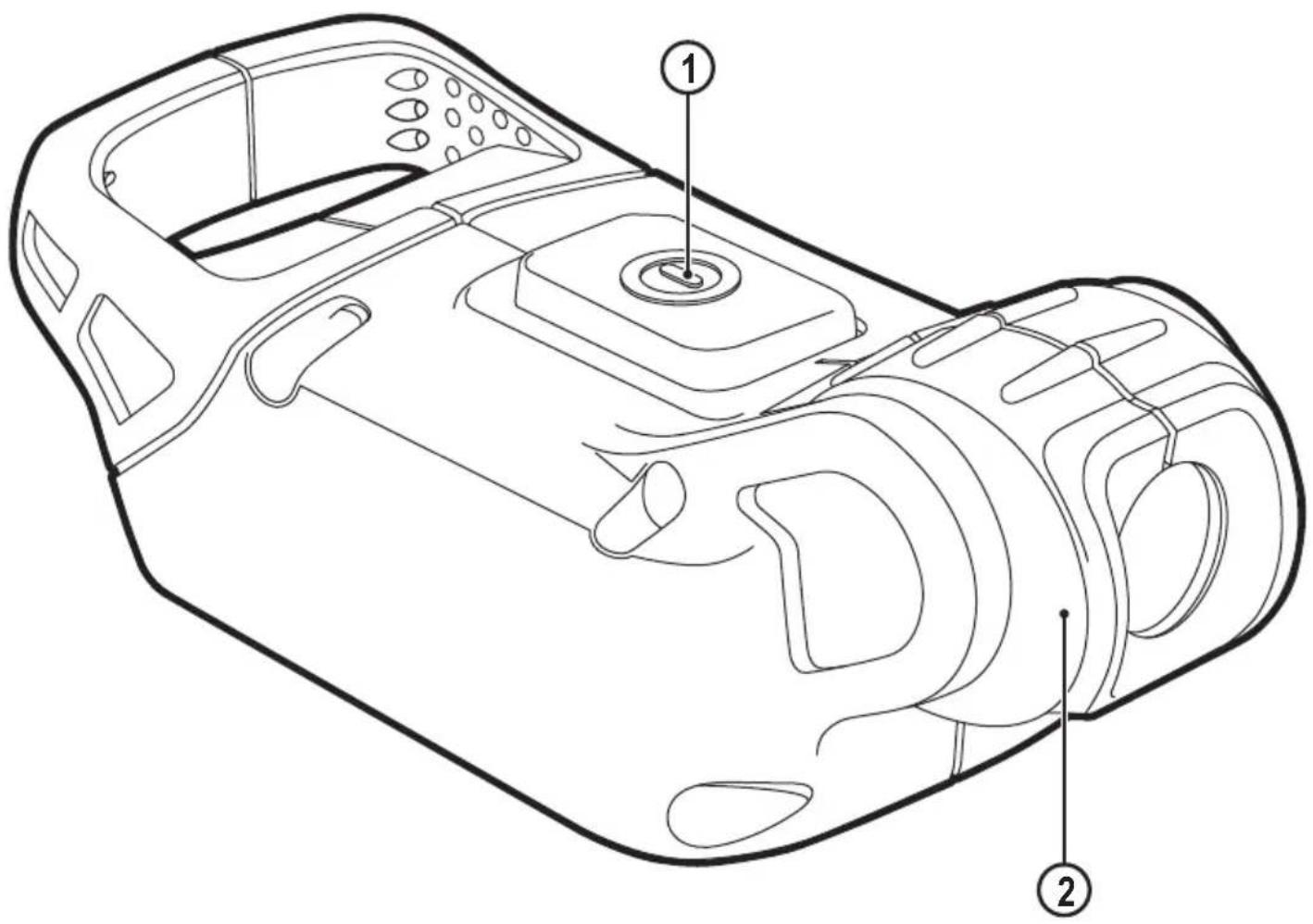
◆ To switch the torch on press in the switch (1)
◆ To switch the torch off press in the switch (1)
The pivoting lens
- For your convenience, the lens (2) can be pivoted into a range of positions.
Maintenance
Your BLACK+DECKER tool has been designed to operate over a long period of time with a minimum of maintenance. Continuous satisfactory operation depends upon proper tool care and regular cleaning.
Your charger does not require any maintenance apart from regular cleaning.
Warning! Before performing any maintenance on the tool, remove the battery from the tool. Unplug the charger before cleaning it.
- Regularly clean the ventilation slots in your tool and charger using a soft brush or dry cloth.
◆ Regularly clean the motor housing using a damp cloth.
◆ Do not use any abrasive or solvent-based cleaner. - Regularly open the chuck and tap it to remove any dust from the interior.
Protecting the environment

Separate collection. This product must not be disposed of with normal household waste.
Should you find one day that your BLACK+DECKER product needs replacement, or if it is of no further use to you, do not dispose of it with household waste. Make this product available for separate collection.

Separate collection of used products and packaging allows materials to be recycled and used again. Re-use of recycled materials helps prevent environmental pollution and reduces the demand for raw materials.
Local regulations may provide for separate collection of electrical products from the household, at municipal waste sites or by the retailer when you purchase a new product.
BLACK+DECKER provides a facility for the collection and recycling of BLACK+DECKER products once they have reached the end of their working life. To take advantage of this service please return your product to any authorised repair agent who will collect them on our behalf.
You can check the location of your nearest authorised repair agent by contacting your local BLACK+DECKER office at the address indicated in this manual. Alternatively, a list of authorised BLACK+DECKER repair agents and full details of our after-sales service and contacts are available on the Internet at: www.2helpU.com
Batteries

BLACK+DECKER batteries can be recharged many times. At the end of their useful life, discard batteries with due care for our environment:
◆ Run the battery down completely, then remove it from the tool.
◆ NiCd, NiMH and Li-Ion batteries are recyclable. Take them to any authorised repair agent or a local recycling station.
Technical data
| BDCC18 | |
| Voltage | 18V |
| Lumens | 90 |
| Charger (Not Supplied) 905902** Type 2 905998** Type 1 | |||
| Input voltage | V_AC | 100 - 240 230 | |
| Output voltage | V_DC | 8 - 20 18 | |
| Current | mA 400 1 | ||
| Approx. charge time | Hours 3 - 5 1 - 5 | ||
| Battery (Not Supplied) BL1518 BL2018 BL4018 | |||
| voltage V_AC | 18 18 18 | ||
| Capacity Ah | 1.5 2.0 4.0 | ||
| Type | Li-Ion Li-Ion Li-Ion | ||
Guarantee
Black & Decker is confident of the quality of its products and offers an outstanding guarantee. This guarantee statement is in addition to and in no way prejudices your statutory rights. The guarantee is valid within the territories of the Member States of the European Union and the European Free Trade Area.
If a Black & Decker product becomes defective due to faulty materials, workmanship or lack of conformity, within 24 months from the date of purchase, Black & Decker guarantees to replace defective parts, repair products subjected to fair wear and tear or replace such products to ensure minimum inconvenience to the customer unless:
◆ The product has been used for trade, professional or hire purposes;
◆ The product has been subjected to misuse or neglect;
- The product has sustained damage through foreign objects, substances or accidents;
◆ Repairs have been attempted by persons other than authorised repair agents or Black & Decker service staff.
To claim on the guarantee, you will need to submit proof of purchase to the seller or an authorised repair agent. You can check the location of your nearest authorised repair agent by contacting your local Black & Decker office at the address indicated in this manual. Alternatively, a list of authorised Black & Decker repair agents and full details of our after-sales service and contacts are available on the Internet at: www.2helpU.com
Please visit our website www.blackanddecker.co.uk to register your new BLACK+DECKER product and to be kept up to date on new products and special offers. Further information on the BLACK+DECKER brand and our range of products is available at www.blackanddecker.co.uk
Australia Black & Decker (Australia) Pty. Ltd. Tel. 03-8720 5100 20 Fletcher Road, Mooroolbark, Fax 03-9727 5940 Victoria, 3138
New Zealand Black & Decker Tel. +64 9 259 1133 5 Te Apunga Place Fax +64 9 259 1122 Mt Wellington Aukland 1060
United Kingdom & Republic Of Ireland www.blackanddecker.co.uk emeaservice@sbdinc.com Black & Decker Tel. 01753 511234 210 Bath Road Slough, Berkshire SL1 3YD Fax 01753 512365
- Intended use
- Safety instructions
- General power tool safety warnings
- Save all warnings and instructions for future reference.
- Work area safety
- Electrical safety
- Personal safety
- Power tool use and care
- ENGLISH
- (Original instructions)
- Battery tool use and care
- Service
- Additional power tool safety warnings
- Warning! Additional safety warnings for torches
- Residual risks.
- Labels on tool
- Additional safety instructions for batteries and chargers
- Batteries (Not supplied)
- Chargers (Not supplied)
- Electrical safety
- Features
- Assembly
- Fitting and removing the battery (Not supplied) (fig. B)
- Use
- Charging the battery (Not supplied) (fig. A)
- Leaving the battery in the charger
- Charger diagnostics
- Switching on and off
- The pivoting lens
- Maintenance
- Protecting the environment
- Batteries
- Guarantee
Brand : BLACK & DECKER
Model : BDCCF18N
Category : Flashlight