ATH-SPORT90BTBK - Earphones Audio-Technica - Free user manual and instructions
Find the device manual for free ATH-SPORT90BTBK Audio-Technica in PDF.


| Product Type | Wireless In-Ear Headphones with Music Player |
| Model | ATH-SPORT90BTBK |
| Driver Diameter | 6 mm |
| Frequency Response | 20 to 25,000 Hz |
| Impedance | 16 ohms |
| Sensitivity | 90 dB/mW |
| Microphone Type | MEMS type, omnidirectional |
| Microphone Sensitivity | -42 dB (1 V/Pa, at 1 kHz) |
| Microphone Frequency Response | 100 to 8,000 Hz |
| Bluetooth Version | 5.0 |
| Supported Bluetooth Profiles | A2DP, AVRCP, HFP |
| Supported Codecs | AAC, SBC |
| Internal Memory | 4 GB (actual capacity lower) |
| Supported Audio Formats (Music Player) | MP3, WMA, WAV, FLAC, APE |
| Power Supply | DC 3.7 V lithium polymer battery |
| Charging Time | Approx. 3 hours |
| Operating Time (Bluetooth) | Max. approx. 5 hours (music playback) |
| Operating Time (Music Player) | Max. approx. 8 hours (MP3 128 kbps) |
| Waterproof Performance | IPX5 (sweat and water resistant) |
| Weight | Approx. 22 g (0.8 oz) |
| Operating Temperature | 5 °C to 40 °C (41 °F to 104 °F) |
| Accessories Included | Exclusive USB cable (40 cm), eartips (XS/S/M/L), ear fins (XS/S/M/L), pouch |
| Cleaning | Wash with fresh water (10–35 °C), avoid direct water on sound port; dry thoroughly |
| Safety Precautions | Do not use near medical equipment; avoid high volume to prevent hearing loss; keep away from small children |
| Repairability | Internal battery not user-replaceable; contact Audio-Technica dealer for repair |
Frequently Asked Questions - ATH-SPORT90BTBK Audio-Technica
User questions about ATH-SPORT90BTBK Audio-Technica
0 question about this device. Answer the ones you know or ask your own.
Ask a new question about this device
Download the instructions for your Earphones in PDF format for free! Find your manual ATH-SPORT90BTBK - Audio-Technica and take your electronic device back in hand. On this page are published all the documents necessary for the use of your device. ATH-SPORT90BTBK by Audio-Technica.
USER MANUAL ATH-SPORT90BTBK Audio-Technica
natural_image
Line drawing of a pair of wireless earbuds with attached straps (no text or symbols)Introduction
Thank you for purchasing this Audio-Technica product.
Before using the product, please read through the Quick Start Guide and Caution Guide, as well as this user manual when necessary, to ensure that you use the product correctly.
Safety precautions
Although this product was designed to be used safely, failing to use it correctly may result in an accident. To ensure safety, observe all warnings and cautions while using the product.
Cautions for the product
- Do not use the product near medical equipment. Radio waves may affect cardiac pacemakers and medical electronic equipment. Do not use the product inside medical facilities.
- When using the product in aircraft, follow airline instructions.
- Do not use the product near automatic control devices such as automatic doors and fire alarms. Radio waves may affect electronic equipment and cause accidents due to malfunction.
- Do not disassemble, modify or attempt to repair the product to avoid electric shock, malfunction or fire.
- Do not subject the product to strong impact to avoid electric shock, malfunction or fire.
- Disconnect the product from a device if the product begins to malfunction, producing smoke, odor, heat, unwanted noise or showing other signs of damage. In such a case, contact your local Audio-Technica dealer.
- Do not put foreign matter such as combustible materials, metal, or liquid in the product.
- Do not cover the product with a cloth to avoid fire or injury by overheating.
- Follow applicable laws regarding mobile phone and headphone use if using headphones while driving.
-
Do not use the product in places where the inability to hear ambient sound presents a serious risk (such as at railroad crossings, train stations, and construction sites).
-
The product effectively shields external sound, so you may not hear sound around you clearly while wearing the product.
Adjust the volume to a level where you can still hear background sound and monitor the area around you while listening to music. - Store the eartips out of the reach of small children.
- When charging, make sure to use the included dedicated USB cable.
- Do not charge with devices that have quick-charge functionality (with a voltage of 5 V or more). Doing so may cause the product to malfunction.
- To prevent damage to your hearing, do not raise the volume too high. Listening to loud sound for an extended period may cause temporary or permanent hearing loss.
- Discontinue use if skin irritation results from direct contact with the product.
- If you begin to feel unwell while using the product, discontinue use immediately.
- When removing the product from your ears, check to make sure the eartips are still attached to the main unit. If the eartips become lodged in your ears and you are unable to remove them, consult a physician at once.
- If you develop an itch from wearing the product, discontinue use.
Cautions for rechargeable battery
The product is equipped with a rechargeable battery (lithium polymer battery).
- If battery fluid gets into eyes, do not rub them. Rinse thoroughly with clean water such as tap water and consult a doctor immediately.
- If battery fluid leaks, do not touch fluid with bare hands. If fluid remains inside the product, it may cause malfunction. If battery fluid leaks, contact your local Audio-Technica dealer.
- If fluid gets in your mouth, gargle thoroughly with clean water such as tap water and consult a doctor immediately.
- If your skin or clothing comes in contact with fluid, immediately wash the affected skin or clothing with water. If you experience skin irritation, consult a doctor.
- To avoid leakage, generation of heat or explosion:
- Never heat, disassemble or modify the battery, nor dispose of it in a fire.
- Do not attempt to pierce with a nail, hit with a hammer or step on the battery.
- Do not drop the product or subject it to strong impact.
- Do not get the battery wet.
- Do not use, leave or store the battery in the following places:
– Area exposed to direct sunlight or high temperatures and humidity
– Inside of a car under the blazing sun
– Near heat sources such as heat registers
- Charge only with the included USB cable to avoid malfunction or fire.
- The internal rechargeable battery of this product cannot be replaced by the user. The battery may have reached the end of its service life if the usage time becomes significantly shorter even after the battery has been fully charged. If this is the case, the battery needs to be repaired. Contact your local Audio-Technica dealer for repair details.
- When the product is disposed of, the built-in rechargeable battery needs to be discarded properly. Contact your local Audio-Technica dealer to learn how to properly dispose of the battery.
For customers in the USA
FCC Notice
Warning
This device complies with Part 15 of the FCC Rules. Operation is subject to the following two conditions: (1) This device may not cause harmful interference, and (2) this device must accept any interference received, including interference that may cause undesired operation.
Caution
You are cautioned that any changes or modifications not expressly approved in this manual could void your authority to operate this equipment.
Note: This equipment has been tested and found to comply with the limits for a Class B digital device, pursuant to part 15 of the FCC Rules. These limits are designed to provide reasonable protection against harmful interference in a residential installation. This equipment generates, uses and can radiate radio frequency energy and, if not installed and used in accordance with the instructions, may cause harmful interference to radio communications. However, there is no guarantee that interference will not occur in a particular installation. If this equipment does cause harmful interference to radio or television reception, which can be determined by turning the equipment off and on, the user is encouraged to try to correct the interference by one or more of the following measures:
– Reorient or relocate the receiving antenna.
– Increase the separation between the equipment and receiver.
- Connect the equipment to an outlet on a circuit different from that to which the receiver is connected.
- Consult the dealer or an experienced radio/TV technician for help.
RF Exposure Statement
This transmitter must not be co-located or operated in conjunction with any other antenna or transmitter used in other systems. This device complies with FCC radiation exposure limits set forth for an uncontrolled environment and meets the FCC radio frequency (RF) Exposure Guidelines. This equipment has very low levels of RF energy that is deemed to comply without testing of specific absorption rate (SAR).
For customers in Canada
IC statement
CAN ICES-3 (B)/NMB-3(B)
This device complies with INDUSTRY CANADA R.S.S. 247.
Operation is subject to the following conditions: (1) This device may not cause harmful interference, and (2) this device must accept any interference received, including interference which may cause undesired operation.
Under Industry Canada regulations, this radio transmitter may only operate using an antenna of a type and maximum (or lesser) gain approved for the transmitter by Industry Canada. To reduce potential radio interference to other users, the antenna type and its gain should be so chosen that the equivalent isotropically radiated power (e.i.r.p.) is not more than that necessary for successful communication.
This device complies with RSS-102 radiation exposure limits set forth for an uncontrolled environment.
Notes on use
- Be sure to read the connected device's user manual before use.
- Audio-Technica will not be liable in any way for any loss of data in the unlikely event that such losses should occur while using the product.
- On public transportation or in other public places, keep the volume low so as not to disturb other people.
- Minimize the volume on your device before connecting the product.
- When using the product in a dry environment, you may feel a tingling sensation in your ears. This is caused by static electricity accumulated on your body, not by product malfunction.
- Do not subject the product to strong impact.
- Do not store the product in direct sunlight, near heating devices, or in hot, humid, or dusty places.
- When the product is used for a long time, the product may become discolored due to ultraviolet light (especially direct sunlight) and wear.
- If the product is placed in a bag while the dedicated USB cable is still connected, the dedicated USB cable may become caught, severed, or broken.
- Make sure to hold the plug when connecting and disconnecting the dedicated USB cable. The dedicated USB cable may become severed or an accident may occur if you pull on the cable itself.
-
When you are not using the dedicated USB cable, disconnect it from the product.
-
When you are not using the product, store it in the included pouch.
- This product can be used to talk on the phone only when using a mobile telephone network. Support for telephony apps that use a mobile data network is not guaranteed.
- If you use the product near an electronic device or transmitter (such as a mobile phone), unwanted noise may be heard. In this case, move the product away from the electronic device or transmitter.
- If you use the product near a TV or radio antenna, noise may be seen or heard in the television or radio signal. In this case, move the product away from the TV or radio antenna.
- To protect the built-in rechargeable battery, charge it at least once every 6 months. If too much time passes between charges, the life of the rechargeable battery may be reduced, or the rechargeable battery may no longer be able to be charged.
- Charging the product or transferring music files while the product is wet should be avoided. Doing so may result in malfunction.
- The hear-through mode of the product allows you to hear the sounds around you through the built-in microphone. Depending on the volume of the music being played back, the surrounding sounds may be difficult to hear. In this case, turn down the volume of the music.
- Depending on your surroundings, the ambient sounds may be difficult to hear even when using the product's hear-through mode. Do not use the product in places that are dangerous if you cannot hear the surrounding sounds, such as places with heavy traffic.
Waterproof performance
- The waterproof performance of the product is designed to prevent the ingress of liquids from sweating and simple washing (equivalent to IPX5).
- Although the product has waterproof capabilities equivalent to IPX5, there may be no sound or the sound may be difficult to hear if water enters the headphones because the part where the sound comes from is not water-resistant.
- The product is not completely waterproof. Do not intentionally submerge or use it in water. Also, do not expose it to liquids other than sweat and water (such as soapy water).
- If dirt such as sweat or sand adheres to the product, wash it with normal temperature (10 to 35°C) fresh water or gentle-flowing tap water instead of soapy water. Do not directly expose the "part where the sound comes from" to water (not water-resistant). For details on removing dirt, refer to "Cleaning" (p.18).
- The product is not designed to be dampproof. Do not use the product in environments with high humidity (such as bathrooms or saunas). Doing so may result in malfunction.
About the internal memory
- The product is compatible with computers running Windows OS and macOS.
- This product can play MP3, WMA, WAV, FLAC, and APE audio files. All other formats cannot be played back. Convert unsupported audio files to a supported format.
- Do not start or restart a computer, wake it up from sleep mode, or shut it down while this product is connected via USB. Doing so may cause this product to malfunction. Disconnect this product from the computer before performing these operations.
- Be careful, as data may be lost if the computer goes to the sleep, standby, or hibernation state during a data transfer.
- According to copyright law, you cannot use music content for purposes other than personal enjoyment without permission from the copyright holders.
- Audio-Technica will not be liable in any way in the unlikely event that the product's memory (such as music data) is damaged or erased due to product or computer malfunction.
- If you reset the product's internal memory, all data stored in the product will be deleted. Store important data in a computer before resetting the memory.
- Please understand that the internal memory will be reset if the product is sent to Audio-Technica for repairs.
For a more comfortable Bluetooth® communication experience
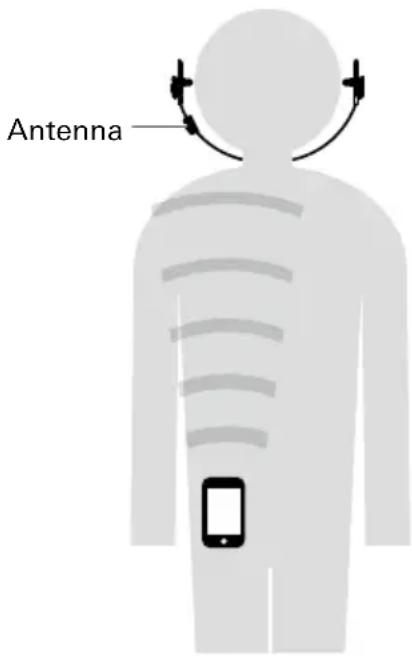
The effective communication range of this product varies depending on obstructions and radio wave conditions.
For a more enjoyable experience, please use the product as close as possible to the Bluetooth device. To minimize noise and sound disruptions, avoid placing your body or other obstacles between the product's antenna and the Bluetooth device.
Part names and functions
Power supply/control button
Use to turn the power supply ON/OFF, play/pause music and videos, answer/end phone calls, and change the playback mode in music player mode.
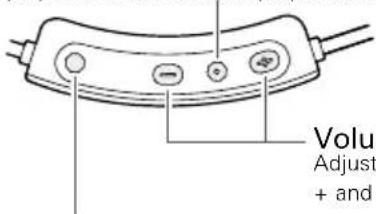
Volume buttons
Adjust the volume using + and -.
Mode switch button
Use to turn hear-through mode on/off or switch between Bluetooth communication mode and music player mode.
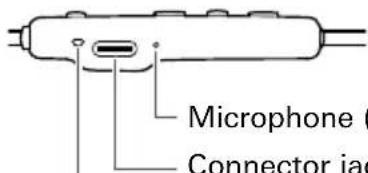
Microphone (for talking)
Connector jack
Use to connect the included exclusive USB cable and charge the product or transfer music files.
Indicator lamp
Displays the operating status and battery level of the product.
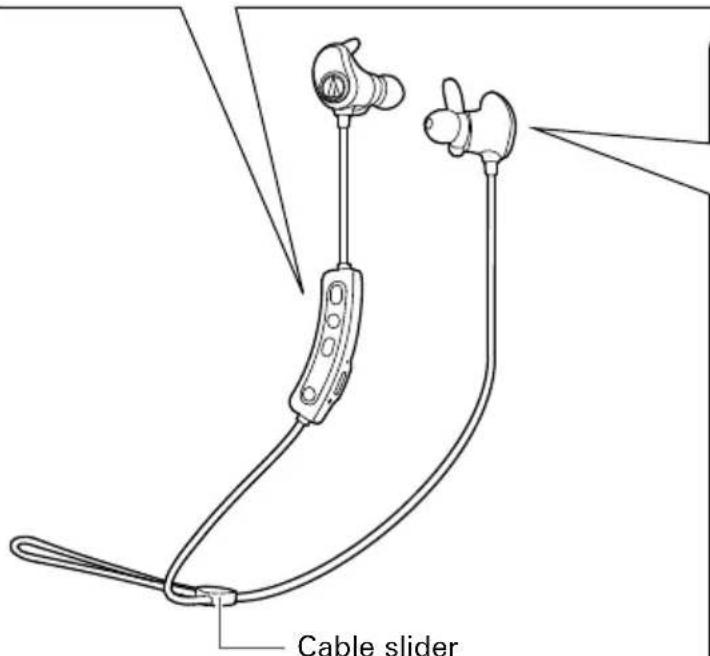
Use to adjust the length of the cable. It can also be removed.
Magnet sensor
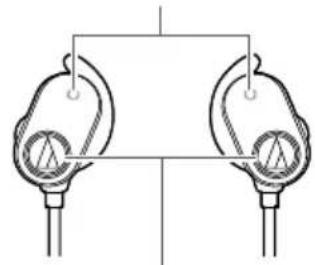
natural_image
Simple line drawing of two identical flanged devices connected to a blank rectangular frame (no text or symbols)Microphone ^1 (for hear-through mode)
L/R (left/right) indicator
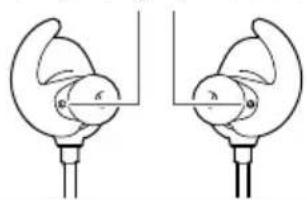
natural_image
Two identical diagrams showing a curved object with internal structure, possibly a device or device, connected to a vertical line (no text or symbols present)■ Accessories
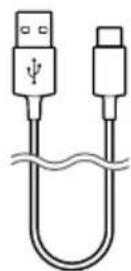
- Exclusive USB cable (40 cm (16"), USB Type-A / USB Type-C™)
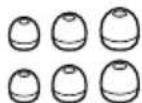
- Eartips ^* (XS, S, M, L)
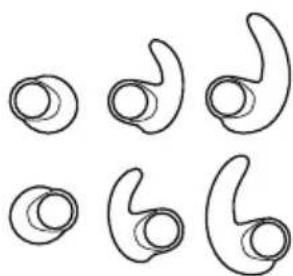
natural_image
Six abstract curved line drawings arranged in a grid, resembling stylized ear or ear shapes (no text or symbols)- Ear fins* (XS, S, M, L)
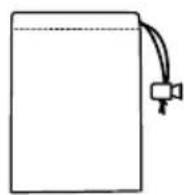
- Pouch
*At the time of purchase, M-size is attached to the product.
Charging the battery
- Fully charge the battery when using it for the first time.
- When the rechargeable battery is running low, the headphones will play a confirmation tone and voice guidance notifying you of low battery level, and an indicator lamp will flash in red. When you hear/see these notifications, charge the battery.
-
It takes about 3 hours to charge the battery fully. (This time may vary depending on usage conditions.)
-
Connect the included exclusive USB cable (USB Type-C side) to the product's connector jack.
-
The included exclusive USB cable is designed for exclusive use with the product. Do not use other USB cables.
- When inserting the exclusive USB cable into the USB port or connector jack, insert it directly (horizontally).
- Charging in wet conditions should be avoided. Doing so may cause the product to malfunction.
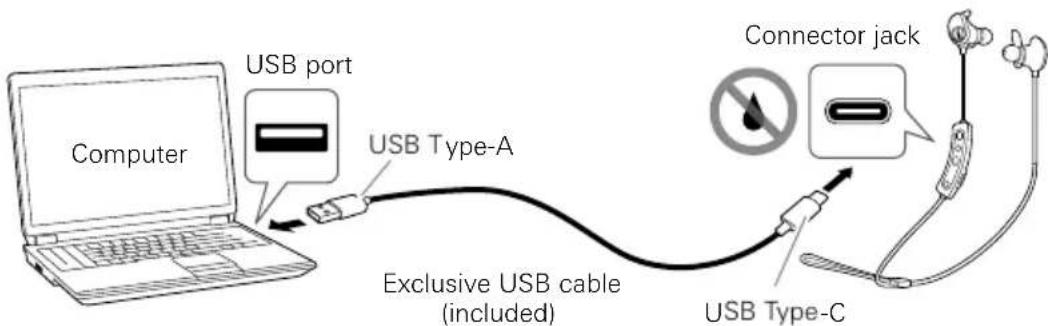
- Connect the included exclusive USB cable (USB Type-A side) to the computer to start charging.
- While charging, the indicator lamp lights as follows.
Lit in red : Charging in progress
Off : Charging complete
- When charging is complete, disconnect the exclusive USB cable (USB Type-A side) from the computer.
- When removing the exclusive USB cable, remove the hardware from the computer side first.
-
Remove the exclusive USB cable (USB Type-C side) from the product's connector jack.
-
If you charge while the product is on, it will turn off. When charging is complete, remove the exclusive USB cable and turn on the product again.
- When charging, make sure to use the included exclusive USB cable. The product may not charge with cables other than the included exclusive USB cable.
Connective via Bluetooth wireless technology
To connect the product to a Bluetooth device, the product needs to pair (register) with the device.
Pairing a Bluetooth device
- Read the user manual for the Bluetooth device.
- Place the device within 1 m (3.3') of the product to perform pairing correctly.
-
To confirm the progress of the pairing process, wear the product while performing this procedure and listen for the confirmation tone.
-
Starting with the product turned off, slide the power supply button to the "ON" position.
• The indicator lamp will quickly flash in blue.
- Use your Bluetooth device to begin the pairing process and search for the product.
When your Bluetooth device finds the product, "ATH-SPORT90BT" will be displayed on the device.
- For information about using your Bluetooth device, refer to the device's user manual.
- Select "ATH-SPORT90BT" to pair the product and your Bluetooth device.
- Some devices may ask for a passkey. In this case, enter "0000". The passkey may also be called a passcode, PIN code, PIN number, or password.
- The product plays a confirmation tone and voice guidance when pairing is complete.
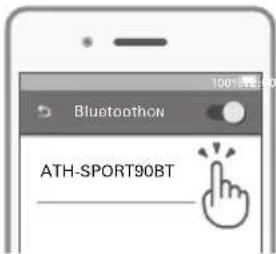
About pairing
When connecting a new Bluetooth device, you need to pair it with the product. Once the Bluetooth device and the product are paired, you do not need to pair them again. The product supports multipairing, which saves pairing history. However, in the following cases, pairing is necessary even if the Bluetooth devices have been paired previously.
- If the product is deleted from the Bluetooth device's connection history.
- If the product is sent out for repair.
- When switching Bluetooth devices, you may not be able to pair because the previously connected Bluetooth device cannot be disconnected. In this case, press and hold (for about 6 seconds) the volume buttons simultaneously (+ / -). The product will search for devices and you can pair with the desired Bluetooth device.
Using the product
The product can use Bluetooth wireless technology to connect to your device and play music, receive phone calls, etc. Use the product for whichever of these purposes suits your needs.
Note that Audio-Technica cannot guarantee the operation of displays, such as the battery level display, or applications via Bluetooth devices.
Power ON/OFF switching
| Power supply Power supply/control button operation Indicator lamp | |||
| ON^*1 | Press and hold (for about 3 seconds)blue, then turns off^*3 | 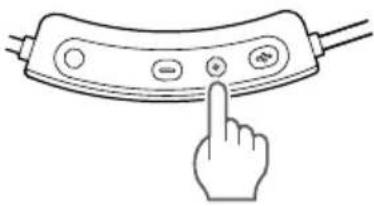 | Lights in blue, then flashes in blue^*2 *3 |
| OFF^*1 Lights in blue, then turns off^*3 | |||
*1 If the product is being worn, it will play a confirmation tone and voice guidance to notify when it is turning on or off.
*2 It may take several seconds for the indicator lamp to light.
*3 For details, please refer to "Indicator lamp display" (p.17).
Wearing the product
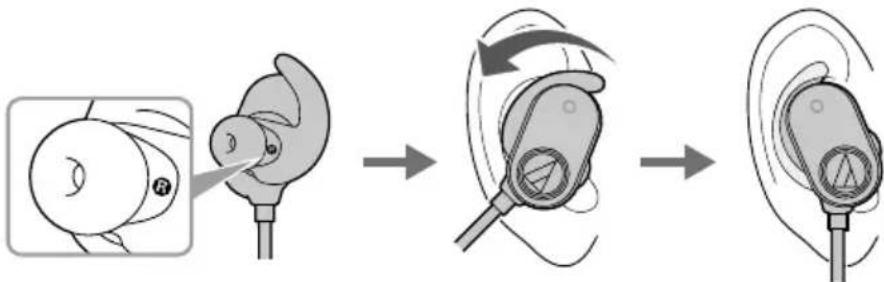
Insert the headphone marked "L" (LEFT) into the left ear, and the headphone marked "R" (RIGHT) into the right ear as shown in the figure.
flowchart
graph LR
    A["Initial earbuds with surgical instrument"] --> B["Step 1: Acute surgical tool"]
    B --> C["Step 2: Surgical device with surgical tools"]
    C --> D["Step 3: Surgical device with surgical tools"]
Using the product
Attaching/removing the ear fins
The product includes silicone ear fins in four sizes (XS, S, M, and L). At the time of purchase, M-size silicone ear fins are attached.
Select ear fins that fit your ear, and attach them.
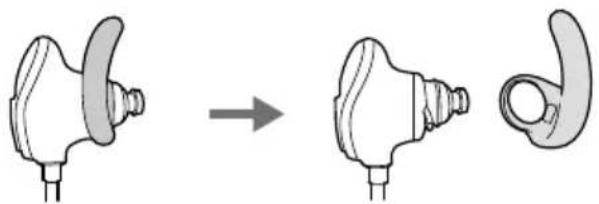
- Remove the eartip, and then remove the ear fin already attached to the headphone.
- Remove the ear fin by pulling it off from the rear of the headphone.
natural_image
Diagram showing a medical device before and after transformation, with no visible text or symbols.- Attach the ear fin of your preferred size to the headphone.
- Confirm that you are attaching the left and right ear fins to the correct headphones.
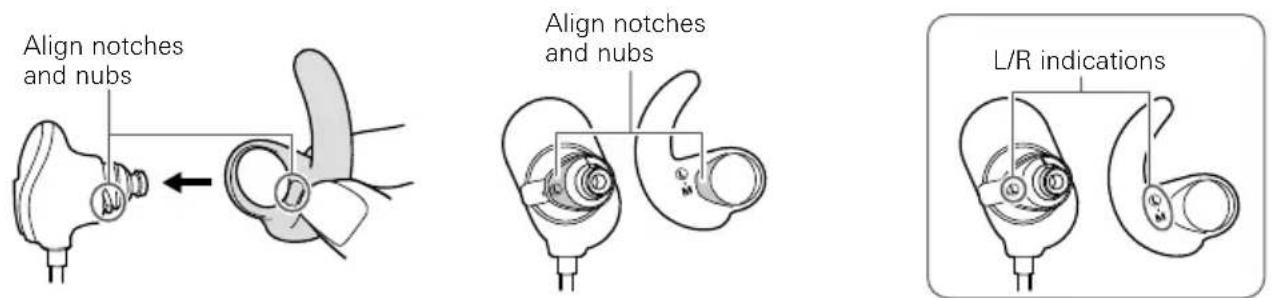
- Confirm that the notches and nubs are aligned.
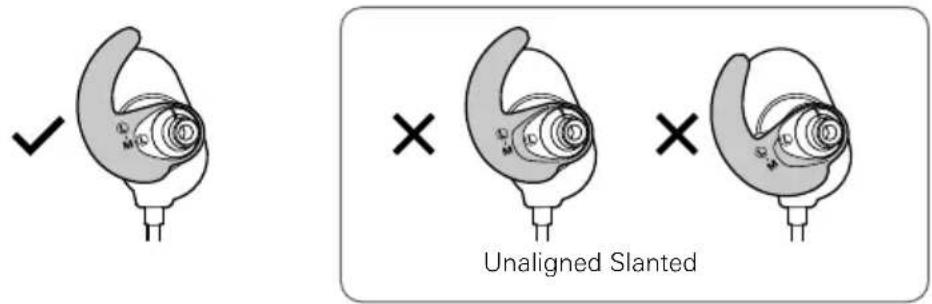
- Wear the headphones.
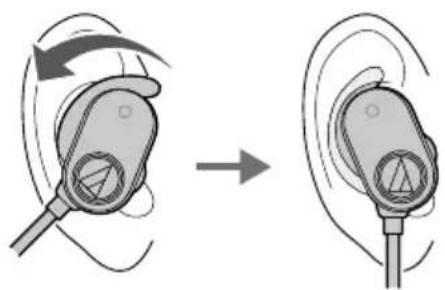
natural_image
Illustration of a medical or earpiece device before and after rotation, showing no text or symbolsUsing the product
Listening to music
The product has a Bluetooth communication mode and music player mode.
| Bluetooth communication mode | Connect the product and Bluetooth device and play back music from the Bluetooth device.To connect for the first time, pair the product and your device by Bluetooth wireless technology. If you have already paired the product and your Bluetooth device, turn on the Bluetooth device's Bluetooth connection and turn on the product.Use your Bluetooth device to start playback, referring to the device's user manual as necessary. |
| Music player mode | Transfer music files to the product's internal memory and play back music with only the product. |
Power supply/control button
| Press Plays or pauses music. *1 | |
| Press (twice) | In Bluetooth communication mode, activates the connected device's speech recognition feature (such as Siri for compatible iOS devices) depending on the device. |
| In music player mode, changes the playback mode (Repeat all/Shuffle/Repeat track). | |
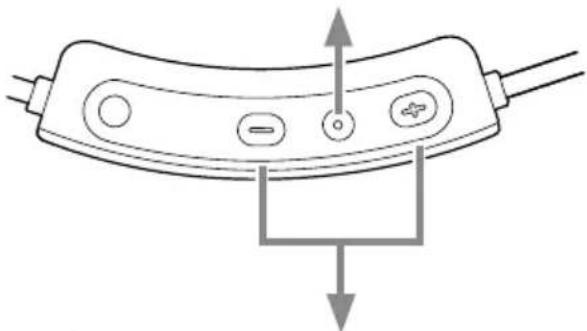
natural_image
Diagram of a device handle with buttons and arrows indicating movement or force (no text or symbols)Volume buttons
| + button | Press Increases the vo | level. *2lume by 1 |
| Press and hold (for about 2 second) | Plays the next track. *1 | |
| - button | Press Decreases the volume by 1 level. *2 | |
| Press and hold (for about 2 second) | Plays the previous track. *1 | |
*1 Some controls may not be available for music playback on some devices.
*2 A confirmation tone is heard when the volume is at the maximum or minimum level.
- The volume control of some devices may not work well with the product.
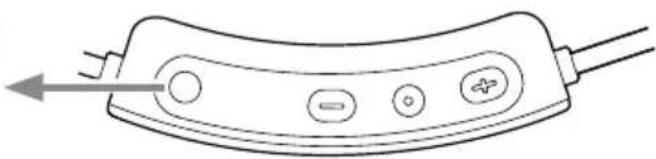
Mode switch button
| Press Turns hear-through mode on/off. | |
| Press and hold (for about 2 second) | Switches between Bluetooth communication mode and music player mode. |
natural_image
Line drawing of a device handle with buttons and wires (no text or symbols)Using the product
Using the product's magnet to pause music
The left and right headphones can be secured with their magnet sensors. When the headphones are secured, music pauses. To resume playback, separate the headphones and then press the power supply/control button.
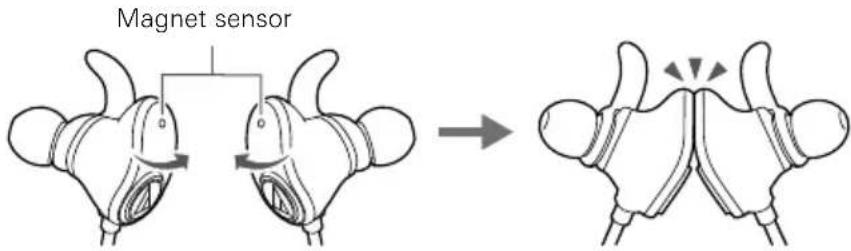
- The product uses magnets. Keep it away from other magnetic objects such as magnetic cards. Their magnetic properties may change, rendering them useless.
Using hear-through mode
In the hear-through mode of the product, the ambient sound is audible through the built-in microphone even with the headphones on.
- The ambient sound may at times be hard to discern depending on the volume of the music you are playing. In that case, turn down the volume of the music.
-
Even when you use the hear-through mode of the product, the surrounding sound may be difficult to hear depending on the surrounding situation. Do not use this product in locations where it may be dangerous if you cannot hear surrounding sound, such as places with heavy traffic.
-
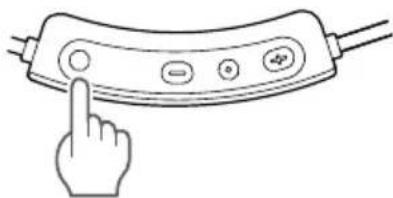
Press the mode switch button.
-
Hear-through mode turns on and the headphones play a confirmation tone and voice guidance.
- With the hear-through mode on, the volume of music automatically turns down to capture the ambient sound.
- When using hear-through mode, do not cover the microphone (for hear-through) with your hand. Doing so will emit a loud sound (howling) and may adversely affect your hearing ability.
natural_image
Line drawing of a hand pressing a button on a device (no text or symbols)- To turn off hear-through mode, press the mode switch button again.
- Hear-through mode turns off and the headphones play a confirmation tone and voice guidance.
Using the product
Using music player mode
Transfer music files to the product's internal memory and listen to them.
Supported music file formats
The following formats can be played back.
| MP3 (.mp3) | Sampling frequency: 8 to 48 kHzBit rate: 8 kbps to 320 kbps |
| WMA (.wma) | Sampling frequency: 8 to 44.1 kHzBit rate: 24 kbps to 256 kbpsLossless (Pro not supported) |
| WAV (.wav) | Sampling frequency: 8 to 48 kHzBit rate: 256 kbps to 1536 kbps |
| FLAC (.flac) | Sampling frequency: 8 to 48 kHzL0 to L8 |
| APE (.ape) | Sampling frequency: 8 to 48 kHzFast/Normal/High compression (Extra High/Insane not supported) |
- Unsupported formats cannot be played back. Use conversion software to convert unsupported music files.
- Depending on the method used to convert to a supported format, there may be reduced audio quality or noise, or the file may not be able to be played back.
- Under copyright law, do not use music content for purposes other than personal enjoyment without permission from the copyright holder.
- Music files protected by copyright cannot be played back.
Using the product
Transferring music
-
Connect the product and a computer with the included exclusive USB cable.
-
When the product is connected correctly, the computer will recognize it as "SPORT90BT" automatically.
- The included exclusive USB cable is designed for exclusive use with the product. Do not use other USB cables.
-
Connecting in wet conditions should be avoided. Doing so may cause the product to malfunction.
-
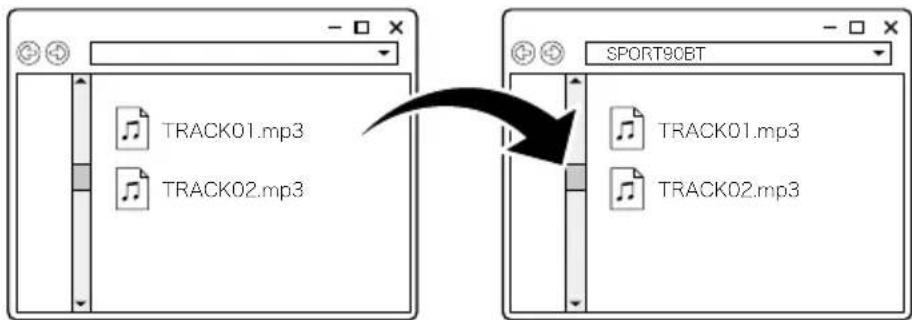
Transfer music files in the computer to a folder in the product.
- You can play back music files by creating a folder in the internal memory and saving them in that folder.
Folder in the productMusic files in the computer
- When removing the exclusive USB cable, remove the hardware from the computer side first.
Switching to music player mode
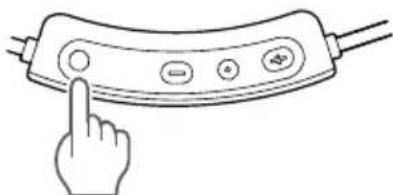
- Press and hold (for about 2 seconds) the mode switch button to switch to music player mode.
natural_image
Line drawing of a hand pressing a button on a device (no text or symbols)- Press and hold (for about 2 seconds) the mode switch button again to switch to Bluetooth communication mode.
- Every time you switch the mode, the headphones play a confirmation tone and voice guidance.
- When you turn on the product, it starts in the mode that was set when it was turned off.
- If there are no music files that can be played back in the product's internal memory, the product switches to Bluetooth communication mode automatically.
-
The product includes sample audio at the time of purchase.
-
Press the power supply/control button to play music.
- Press the power supply/control button twice to change the playback mode in the following order: [Repeat all > Shuffle > Repeat track > Repeat all > ...].
Repeat all: After playing all tracks, return to the first track.
Shuffle: Play all tracks in no specific order.
Repeat track: Play the current track repeatedly.
- Every time you change the playback mode, the headphones play a confirmation tone and voice guidance.
- When you turn on the product, it starts in the playback mode that was set when it was turned off.
Using the product
Playing music
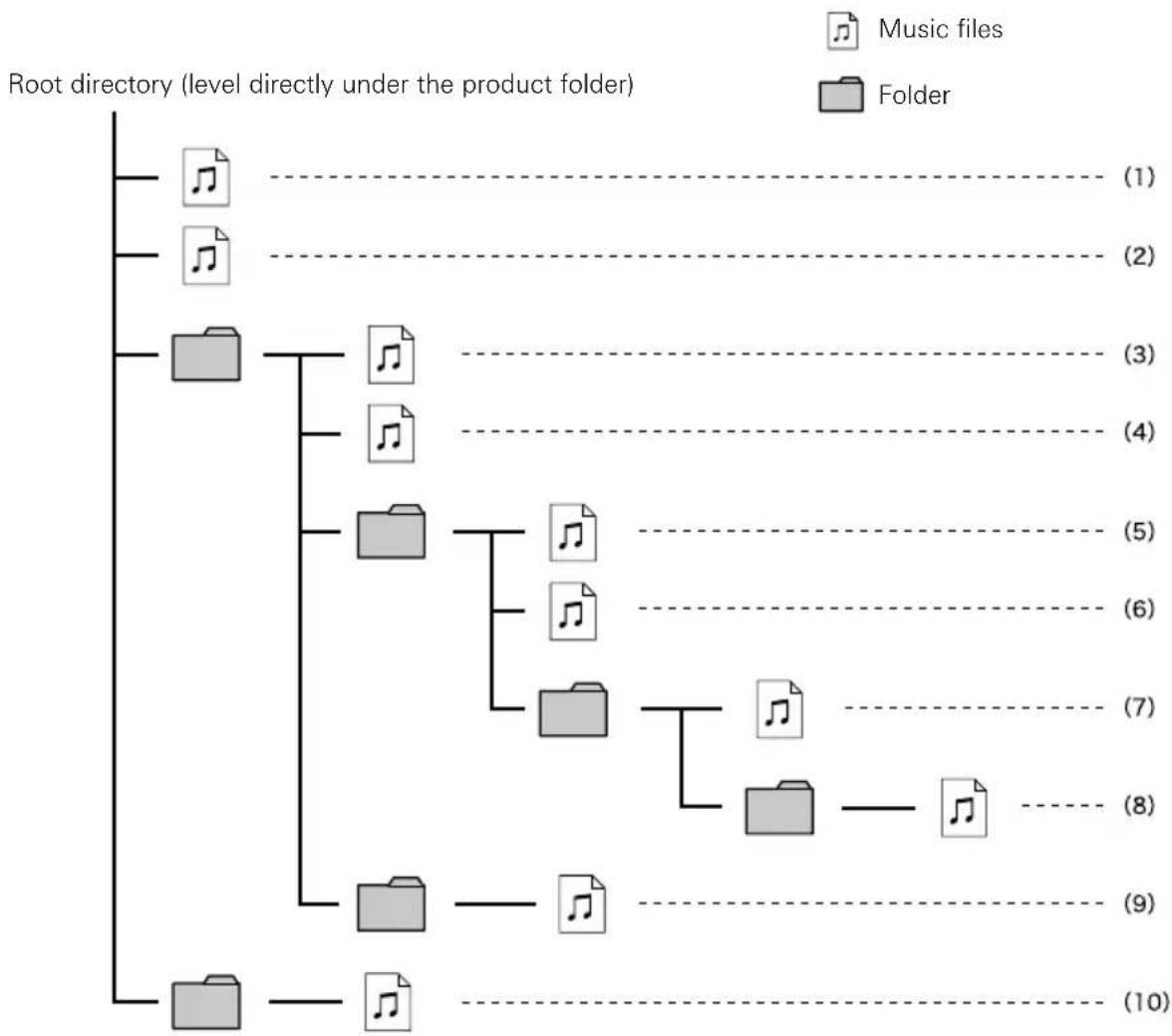
If the playback mode is Repeat all, the transferred music files are played in the following order.
- Music files (1) to (10) are played in order. (Refer to figure below)
- For data in the same level, content is played in the order of music files > folders.
- Music files and folders in the same level are played in the order of the date in which they were loaded.
- Music files in directories up to 8 levels deep can be played back.
flowchart
graph TD
    A["Root directory (level directly under the product folder)"] --> B["1"]
    A --> C["2"]
    A --> D["3"]
    A --> E["4"]
    A --> F["5"]
    A --> G["6"]
    A --> H["7"]
    A --> I["8"]
    A --> J["9"]
    A --> K["10"]
    B --> L["1"]
    C --> M["2"]
    D --> N["3"]
    E --> O["4"]
    F --> P["5"]
    G --> Q["6"]
    H --> R["7"]
    I --> S["8"]
    J --> T["9"]
    K --> U["10"]
• Music files that cannot be played back are skipped.
- If there is data other than music files in the internal memory, music playback may take some time. We recommend that you do not load unnecessary files other than music files or do not create deep folder levels.
- Corrupted data may be incorrectly recognized and played back with large amounts of noise. Do not give music file extensions to files other than music files.
Using the product
Talking on the phone (in Bluetooth communication mode)
- If your Bluetooth device supports telephone features, you can use the product to talk on the phone.
- When your Bluetooth device receives a phone call, the product's ringtone sounds.
- If a call is received while you are listening to music, music playback is paused. When you finish the call, music playback resumes. *
| When | Function Operation | |
| Receiving a call | Press the power supply/control button. Answers the call. | call. |
| Press and hold the power supply/control button (for about 2 seconds). | Rejects the call. | |
| Talking on the phone | Press the power supply/control button. Ends the call. | |
| Press a volume button (+ or -). Adjusts the volume (+ or -) of the call. |
*Depending on your Bluetooth device, music playback may not resume.
• These phone call controls may not be available on some smartphones.
Auto power off function
| Bluetooth communication mode | The product automatically turns off after 5 minutes of not being connected to a device that has its power turned on. |
| Music player mode The product automatically turns off after being paused for 15 minutes. | |
Indicator lamp display
The indicator lamp of the product indicates the product's status as explained below.
About voice guidance
The product provides English voice guidance in the following situations.
| When Voice guidance | |
| Power on Power on | |
| Power off Power off | |
| Bluetooth is connected Bluetooth connected | |
| Bluetooth is disconnected Bluetooth disconnected | |
| Battery level low | Low battery |
| Hear-through ON | Hear-through |
| Hear-through OFF | Off |
| Music player mode | Player mode |
| Bluetooth communication mode | Bluetooth mode |
| Repeat all tracks | Repeat all |
| Shuffle | Shuffle |
| Repeat track | Repeat one |
Cleaning
Get into the habit of regularly cleaning the product to ensure that it lasts for a long time. Do not use alcohol, paint thinners, or other solvents for cleaning purposes.
Headphones/controller
- When cleaning the headphones, remove the eartips.
- If the product becomes soiled with sweat or dirt, wash it away with fresh water at room temperature (10 to 35 °C), or weak running water, instead of using soapy water.
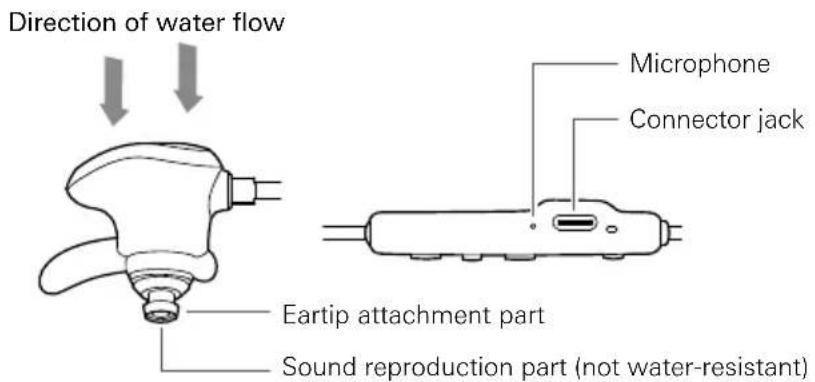
- Position the headphones so that the outer surface is facing the water flow (see figure below), and avoid pouring water directly on the sound reproduction part, which is not water-resistant. Also avoid pouring water directly on the microphone and connector jack of the controller.
- Be sure to wash the product with your hands instead of using a brush or sponge.
- Although the product has waterproof capabilities equivalent to IPX5, there may be no sound or the sound may be difficult to hear if water enters the headphones, because the part where the sound comes from is not water-resistant.
- Natural oils from the skin are particularly likely to build up on the areas where the eartips attach to the headphones (see figure below). If these areas are not cleaned, the eartips can become detached. Clean them regularly. Do not touch the areas where sound is produced as they are delicate. Doing so may cause the product to malfunction.
After washing, wipe the product clean following the steps listed below:
- Wipe off the water from the surfaces with a dry, clean cloth.
- Hold the headphones firmly, and shake off the water about 20 times until no drops of water sprinkle off.
-
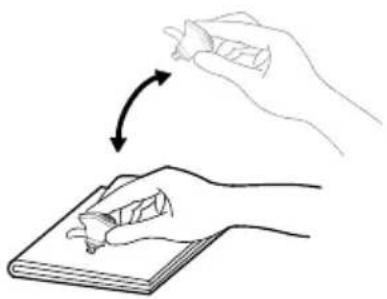
Moisture left in the sound reproduction part may cause the product to make no sound. If that is the case, lay out a dry cloth and shake the sound reproduction part downward toward the cloth about 20 times each.
-
If water is left in a space in the sound reproduction part, press a dry, clean and soft cloth gently to the headphones to wipe off the moisture.
-
Dry them thoroughly in the well-ventilated shade.
-
Do not apply hot air from a dryer onto the product.
- Do not use a cotton swab to forcibly wipe off the moisture left in a space between the parts of the product.
natural_image
Illustration of a hand holding a pen and erasing its tip, with an arrow indicating rotation (no text or symbols)Cleaning
Cable/eartips
- Wipe away dirt from the cable with a dry cloth immediately after use. Failure to clean the cable may cause it to deteriorate and harden over time, resulting in malfunction.
- Wipe the exclusive cable's USB plug with a dry cloth if dirty.
- Clean the eartips by removing them from the headphones and manually cleaning them with a diluted mild detergent. After cleaning, dry before using again.
- If the product will not be used for an extended period of time, store it in a well-ventilated place free from high temperatures and humidity.
Eartips
Eartip size
The product includes silicone eartips in four sizes (XS, S, M, and L). At the time of purchase, M-size silicone eartips are attached.
To ensure the best sound quality, select the eartip size that is best suited for you, and adjust the eartips inside your ears for a snug fit. It may be difficult to hear bass sounds if the eartips do not fit snugly in your ears.
Replacing the eartips
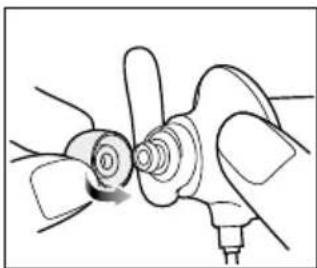
Remove the old eartip and attach the new eartip by pushing it onto the headphone at an angle (see figure).
Push firmly on the eartip so that the inside of the eartip expands, and push the eartip onto the post as far as it will go.
natural_image
Diagram of a mechanical component with rotating parts and a base, no visible text or symbols- Periodically remove and clean the eartips as they become dirty easily. Using dirty eartips may cause the headphones themselves to become dirty, resulting in deteriorated sound quality.
- Eartips are consumable parts that degrade through storage and use. If the eartips are loose and easily removed or if they appear to have degraded, purchase replacements.
- When reattaching eartips that were previously removed, be sure to check that they are securely attached. Injury or illness may occur if the eartips become detached and are left inside the ear.
Troubleshooting
Problem Solution
| Power is not supplied. • Charge the product. | |
| Unable to pair. • Confirm that the Bluetooth device communicates using Ver. 2.1+EDR or higher. | • Place the product and the Bluetooth device within 1 m (3.3') of each other. |
| • Set the profiles for the Bluetooth device. For procedures on how to set profiles, refer to the Bluetooth device's user manual. | |
| • Remove the pairing information for the Bluetooth device then pair the product with this device again. | |
| • When switching Bluetooth devices, you may not be able to pair because the previously connected Bluetooth device cannot be disconnected. In this case, press and hold (for about 6 seconds) the volume buttons simultaneously (+ / -). The product will search for devices and you can pair with the desired Bluetooth device. | |
| No sound is heard / Sound is faint. | • Turn on the power of the product and the Bluetooth device. |
| • Turn up the volume. | |
| • Make sure that the product and Bluetooth device are connected by the A2DP (or audio connection). | |
| • Remove the pairing information for the product and Bluetooth device, then pair the product with this device again. | |
| • Place the product and the Bluetooth device close together and keep such obstacles as people, metal, and walls from coming between the two. | |
| • Switch the output of the Bluetooth device to the product. | |
| Sound is distorted / Noise is heard / Sound cuts out. | • Turn down the volume. |
| • Keep this product away from devices that emit radio waves such as microwaves and wireless routers. | |
| • Keep TVs, radios, and devices with built-in tuners away from the product. These devices can also be affected by the product. | |
| • Turn off the equalizer settings of the Bluetooth device. | |
| • Remove obstacles between the product and the Bluetooth device and place them closer together. For details, refer to “For a more comfortable Bluetooth communication experience” (p.5). | |
| No sound is heard / Noise is heard / Sound cuts out. (Music player mode) | • Make sure that the format of the transferred music files is supported. For details, refer to “Supported music file formats” in “Using the product” (p.13). |
| • Make sure that the transferred music files are not corrupted. | |
| • Check the folder structure. Music files transferred to folders 9 levels down or deeper cannot be played back. | |
Troubleshooting
Problem Solution
| Cannot hear the voice of the caller / Voice of the caller is too quiet. | Turn on the power of the product and the Bluetooth device.Turn up the volume.Make sure that the product and Bluetooth device are connected by the HFP (or call connection).Remove the pairing information for the product and Bluetooth device, then pair the product with this device again.Switch the output of the Bluetooth device to the product. |
| The product cannot be charged / Music files cannot be transferred. | Securely connect the included exclusive USB cable. |
| Hear-through mode does not work | Turn off the product and then turn it on again. |
- For details about how to operate your Bluetooth device, refer to the device's user manual.
Troubleshooting
SBC priority connections (for when sound is delayed significantly)
When the connection codec is AAC, significant sound delays can be alleviated by changing the connection codec to SBC, which comes standard with Bluetooth devices. *1
Connecting to a SBC priority connection
In Bluetooth communication mode, perform the procedure when the product and Bluetooth device are paired.
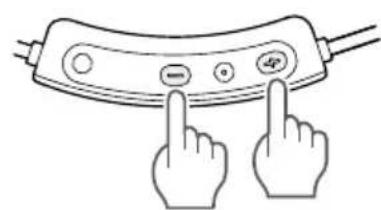
-
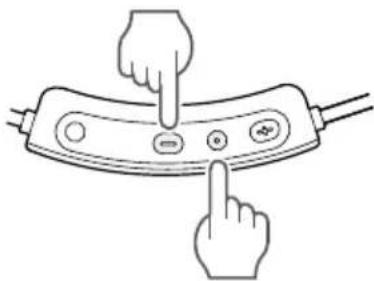
Turn the product power to "ON".
-
With the music paused, press and hold (for about 6 seconds) the power supply/control button and the volume button (-).
-
The headphones play a confirmation tone and then turn off.
They will turn on again and be connected to the Bluetooth device automatically. * - After settings are complete, the only available connection codec will be SBC. Connections using other codecs will not be possible. *3
natural_image
Line drawing of two hands pointing at a device with buttons and display (no text or symbols)*1 Depending on the usage environment, changing to an SBC priority connection may not alleviate sound delays.
*2 If they are not connected automatically, refer to "Pairing a Bluetooth device" (p.8) and pair again.
*3 Turning the power off and then turning it back on will result in a return to a normal connection and enable connections using other codecs. Please connect using an SBC priority connection when necessary.
Specifications
Headphones
| Type Dynamic |
| Driver 6 mm |
| Sensitivity 90 dB/mW |
| Frequency response 20 to 25,000 Hz |
| Impedance 16 ohms |
Microphone
| Type MEMS type |
| Polar pattern Omnidirectional |
| Sensitivity -42 dB (1 V/Pa, at 1 kHz) |
| Frequency response 100 to 8,000 Hz |
Communication specifications (Bluetooth)
| Communication system Bluetooth version 5.0 | |
| Maximum RF output 10 mW EIRP | |
| Maximum communication range Line of sight - approx. 10 m (33') | |
| Frequency band 2.402 GHz to 2.480 GHz | |
| Modulation method FHSS | |
| Compatible Bluetooth profiles A2DP, AVRCP, HFP | |
| Support codec AAC, SBC | |
| Supported content protection method SCMS-T | |
| Transmission band 20 to 20,000 Hz |
Internal memory (music player)
| Supported OS | Windows OS, macOS |
| Supported formats | MP3*1, WMA*1, WAV*1, FLAC*1, APE*1 |
| Memory capacity | 4 GB*2 |
*1 MP3 (8 kHz to 48 kHz / 8 kbps to 320 kbps), WMA (8 kHz to 44.1 kHz / 24 kbps to 256 kbps, Lossless/Pro not supported), WAV (8 kHz to 48 kHz / 256 kbps to 1536 kbps), FLAC (8 kHz to 48 kHz / L0 to L8), APE (8 kHz to 48 kHz / Fast / Normal / High compression; Extra High / Insane not supported)
*2 Actual available capacity is lower because some of it is used for data management.
Specifications
Other
| Power supply DC 3.7 V lithium ion battery |
| Charging time Approx. 3 hours* |
| Operating time Continuous transmission time (music playback): Max. approx. 5 hours*, Music player (when playing MP3 / 128 kbps): Max. approx. 8 hours* |
Weight Approx. 22 g (0.8 oz)
Waterproof performance IPX5
Operating temperature 5 °C to 40 °C (41 °F to 104 °F)
| Accessories • Exclusive USB cable (40 cm (16"), USB Type-A / USB Type-C) |
| • Eartips (XS, S, M, L) |
| • Ear fins (XS, S, M, L) |
| • Pouch |
Sold separately • Eartips
* The time may vary depending on usage conditions.
For product improvement, the product is subject to modification without notice.
- The Bluetooth® word mark and logos are owned by Bluetooth SIG, Inc. and any use of such marks by Audio-Technica Corporation is under license. All other trademarks are property of their respective owners.
- USB Type-C™ is a trademark of the USB Implementers Forum.
- Introduction
- Safety precautions
- Cautions for the product
- Cautions for rechargeable battery
- For customers in the USA
- FCC Notice
- Warning
- Caution
- RF Exposure Statement
- For customers in Canada
- IC statement
- Notes on use
- Waterproof performance
- About the internal memory
- For a more comfortable Bluetooth® communication experience
- Part names and functions
- Power supply/control button
- Mode switch button
- Charging the battery
- Connective via Bluetooth wireless technology
- Pairing a Bluetooth device
- About pairing
- Using the product
- Wearing the product
- Attaching/removing the ear fins
- Listening to music
- Using the product's magnet to pause music
- Using hear-through mode
- Using music player mode
- Supported music file formats
- Transferring music
- Switching to music player mode
- Playing music
- Talking on the phone (in Bluetooth communication mode)
- Auto power off function
- Indicator lamp display
- About voice guidance
- Cleaning
- Headphones/controller
- Cable/eartips
- Eartips
- Eartip size
- Replacing the eartips
- Troubleshooting
- SBC priority connections (for when sound is delayed significantly)
- Connecting to a SBC priority connection
- Specifications
- Sold separately • Eartips
Brand : Audio-Technica
Model : ATH-SPORT90BTBK
Category : Earphones