
XL-PG39RD - CD Player JVC - Free user manual and instructions
Find the device manual for free XL-PG39RD JVC in PDF.


| Product Type | Portable CD Player |
| Brand | JVC |
| Model | XL-PG39RD |
| Dimensions (approx.) | 130 x 130 x 25 mm (5.1 x 5.1 x 1.0 in) |
| Weight (approx.) | 200 g (7.1 oz) without batteries |
| Power Supply | 2 x AA batteries (1.5V each) or AC adapter (3V DC, center positive) |
| Battery Life (approx.) | Up to 8 hours of continuous playback |
| Disc Formats | CD, CD-R, CD-RW |
| Playback Modes | Normal, Repeat (1/All), Random, Program |
| Anti-Skip Protection | Yes, electronic shock protection (ESP) |
| Audio Output | 3.5 mm stereo headphone jack |
| Controls | Play/Pause, Stop, Skip/Seek (Forward/Back), Volume, Mode, Program |
| Display | LCD with track number, elapsed time, battery indicator |
| Construction | Plastic body with sliding lid |
| Operating Temperature | 5°C to 35°C (41°F to 95°F) |
| Storage Temperature | -20°C to 60°C (-4°F to 140°F) |
| Maintenance | Clean disc with soft cloth; wipe exterior with dry cloth; avoid solvents |
| Safety | Do not expose to moisture, extreme heat, or direct sunlight; use only specified power source |
| Repairability | Limited user-serviceable parts; refer to qualified technician for repairs |
| Accessories Included | User manual, earphones (may vary by region) |
Frequently Asked Questions - XL-PG39RD JVC
User questions about XL-PG39RD JVC
0 question about this device. Answer the ones you know or ask your own.
Ask a new question about this device
Download the instructions for your CD Player in PDF format for free! Find your manual XL-PG39RD - JVC and take your electronic device back in hand. On this page are published all the documents necessary for the use of your device. XL-PG39RD by JVC.
USER MANUAL XL-PG39RD JVC
Using the Unit with Optional Accessories
Using the unit with a car audio system
XL-PV390SL comes with the car adaptor and car audio cassette adapter.
- Car adaptor (CA-R450) or (CA-R451) - Car audio cassette adaptor (CA-RC6)
To connect to a car audio system:
Connect the car audio cassette adaptor to the unit's headphones jack. (When doing this, keep the unit's VOLUME control at a medium setting.)
2.1
Depending on the automobile used, noise may occur, and in that case, it is recommended that a KS-U32 noise filter (optional) be used.

It may not be possible to use the unit with some types of car stereo owing to restrictions imposed by the construction of the car audio
(1) 2017.12.31
For further details, refer to the instructions of the part concerned.
Maintenance
Maintaining the unit
Wipe the unit with a soft cloth. Remove stubborn dirt using a
cloth which has been dipped in water or soapy water and wrang out, and then wipe dry.
- If you intend to use a chemically treated cleaning cloth, read its directions first.
- Do not use alcohol or paint thinner
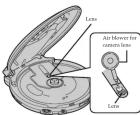
Maintaining the lens
Open the lid and clean the lens as shown in the figure.
Use a cotton swab to gently wipe on any high-printed. Recommended product: Lens cleanser kit
Accidental Operation Prevention Function (Hold Mode)
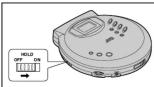
This function causes the unit to ignore short, accidental button groups.
The accidental operation, prevention function switch setting in the main unit, “●” lights up if the ▶-■ is
The accidental operation prevention function prevents the following:
- Powering on the unit accidentally (which can cause the butter-
- Pass being cut off unexpectedly in the middle of a track.
■ 2017年1月1日
To use the accidental operation prevention function
• To prevent the unit from powering up accidentally, set the
- HOLD/SHOLD TO THE ON POSITION. - To percent the unit from unexpected operation during play.
set the HOLD switch to the ON position after you starts play-
ing the disc.

Move the HOLD switch back to Off Position.

If the HOLD switch on the unit is set to the ON position, you
(1) 2017年1月1日
[Non-Text]
[Non-Text]
[Non-Text]
Specifications
Portable CD player
Type : Compact disc player
Signal detection system : Non-contact optical pickup (semiconductor laser) Pickup system : 3 bores lasers
Number of channels: 2 channels (stereo)
Frequency response: 20 Hz to 20-600 Hz
Outrest: Headphones (3.5 mm dia
9 mW/clk at 10 % THD/16 Ω matching impedance (16 Ω to 1 kΩ)
(with Anti-Shock (BN-R1211J) charged for 10 hours,
(Protection EX OFF) Approx. 20 hours when using two alkaline batteries
Truocor corrigements : DC 3V (AAA
DC 2.4 V (rechargeable battery × 2)
DC IN 4.5 V Dimension (WxMoF) = 124 mm x 30 mm x 144 mm / Ω ^1/2
(Excluding buttons and controls)
Mass : 237 g (0.53 lbs)
(Atkazal Baderies)
AC adaptor
Input power source : AC 120 V, 60 Hz
Output voltage : DC 45 V, 100 mA
★ Design and specifications are subject to change without notice.
Troubleshooting Guide
Before requesting service for this unit, check the chart below for a possible cause of the problem
you are experiencing. Some simple checks or a minor adjustment on your part may eliminate the problems and further money operations.
If you are in doubt about some of the check points, or if the remedies indicated in the chart do not
solve the problem, refer to the directory of Authoritzen Service Centers dedicated with this unit to locate a convenient service center, or consult your dealer for instructions.
•
Problem Check this
| Does not turn on. | • Are the batteries charged?• Is the JAC adapter (not included) securely connected?• Is the HOLD switch set to HOLD position? |
| Not close cover. | Is the disc properly secured in place? |
| Cannot play discs. | • Is the disc properly secured in plane?• Is the dislocation condensation on the lens?• Wait for about an hour and try again. |
| Cannot hear music—too noisy. | • Is the headphone plug inserted at the eye?• Is the plug dirty? (Wipe every dirt on the plug.) |
| TV picture is distorted. Radio reception is noisy. | Are you using the unit body too near a TV or tone? If the TV or tone is connected to a simple indoor antenna, connect if it is an outdoor antenna. |
| “disc” or “Er”is displayed when a disc is in the player. | • Is the disc damaged?• Is the disc playable on this player?• Has the disc been inserted upside down? |
Cautions
Listening precautions


Do not play your headphones or earphones at a high volume.
The following table provides the information obtained by:
If you exp
(1) 欧族
Do not use while operating a motorized
(四)本次股东大会的召集、召开程序
You should use extreme claim or temporarily discontinue use in potentially dangerous situations.
The following table is provided in the image:
with a year's emphasis on emphasis on an open as type is signed to let you hear outside sounds, don't turn up the volume
so high that you can't hear what's around you.
Sound can be deceiving. Over time your hearing “comfort level”
As soon as highest evidence of social. So what socialize "normal" can actually be load and harmful to your hearing.
Guard against this by setting your equipment at a safe level BE-
To establish a safe level:
- Start your volume control at a low setting.
clearly, and without distortion.
Once you have established a comfortable wound ligand
- Set the dial and leave it there.
- When recharging batteries for the first time or when they have not been used for a long period of time, the play time may be
shorter than usual. In a case like this, repeatedly recharge and discharge the hotspots. This will return from their normal
(4a)6):
- Do not allow any initial objects to touch the terminals or rechargeable batteries since this may cause short-circuiting
which is dangerous.
- All other parties the party referring to the international authorities. Short-circuiting may occur which is dangerous.
(No text)
Dry cell batteries / rechargeable
batteries
To prevent damage to the batteries and electrolyte leakage, bred
the following points.
- Aged the and points properly when inserting the button
- Do not mix different types or makers of batteries or old and
- Remove the battery if you do not plan to use the unit for a
long period of time.
- DO NOT THROW BANKES AND A LIME, AND DO NOT MOURCER, UN-assemble or subject them to excessive heat.
- Do not attempt to exchange dry cell batteries.
(No text)
Carrying dry cell batteries /
rechargeable batteries around
When putting dry cell or recharging membranes in a pocket of bar, ensure that no other metal objects such as a necklace are
placed together with them. Contact with metal may cause short-stricting which in terms, may serve a free
When purchasing rechargeable
batteries
As a safety acquisition, the portable CD players made by DC
have a construction designed to make it impossible to recharge or-
To use rechargeable batteries, be absolutely sure to purchase the
rechargeable N
special rechargeable Ni-Cb battery PVI-P1211-I (set of 7)
For details, che
(1) _2
Special recharging batteries ⊕ ⊕ ⊕ ⊕
|
|
Ordinary dry cell
batteries/rechargeable
Batteries
(No text)
When purchasing AC adaptor
To use 4C adapter, be absolutely sure to purchase the 4C adu-
tor designed especially for this unit.
AC adaptor: AA-R4513
For discussion, check with your answer.
(No text)
When driving a car
In the interest of traffic safety, do not operate the unit while drive
ing
[Non-Text]
[Non-Text]
[Non-Text]
In this view, the devices that power drive, plug back, and heat.
- Blacking - DO not juice any objects on top or the unit.
[Non-Text]
Concerning Compact Discs

However, confined use of interpolar shape CDs (heart-shape, octagonal, etc.) can durate
the unit.
CD format can be played back, though some may | X(∞) | X(∞)
Not be played back, because of the use characteristics or recording condition.
How to remove a disc from its case How to store the disc in
The Case
-
-
-
-
-
-
-
-
-
-
-
-
-
-
-
-
-
-
-
-
-
-
-
-
-
-
-
-
-
-
-
-
-
-
-
-
-
-
-
-
-
-
-
-
-
-
-
-
-
-
-
-
-
-
-
-
-
-
-
-
-
-
-
-
-
-
-
-
-
-
-
-
-
-
-
-
-
-
-
-
-
-
-
-
-
-
-
-
- 90.
-
-
-
-
-
-
-
-
-
-
-
-
-
-
-
-
-
-
-
-
-
-
-
-
-
-
-
-
-
-
-
-
-
-
-
-
-
-
-
-
-
-
-
-
-
-
-
-
-
-
-
-
-
-
-
-
-
-
-
-
-
-
-
-
-
-
-
-
-
-
-
-
-
-
-
-
-
-
-
-
-
-
-
-
-
-
-
-
-
-
-
-
-
-
-
-
-
-
-
-
-
-
-
-
-
-
-
-
-
-
-
-
-
-
-
-
-
-
-
-
-
-
-
-
-
-
-
-
-
-
-
-
-
-
-
-
-
-
-
-
-
-
-
-
-
-
-
-
-
-
-
-
-
-
-
-
-
-
-
-
-
-
-
-
-
-
-
-
-
-
-
-
-
-
-
- 90.
-
-
-
-
-
-
-
-
-
-
-
-
-
-
-
-
-
-
-
-
-
-
-
-
-
-
-
-
-
-
-
-
-
-
-
-
-
-
-
-
-
-
-
-
-
-
-
-
-
-
-
-
-
-
-
-
-
-
-
-
-
-
-
-
-
-
-
-
-
-
-
-
-
-
-
-
-
-
-
-
-
-
-
-
-
-
-
How to hold a disc
0.5×
C ×
If the disk surface is dirty
Wipe it with a damp cloth and then wipe dry.
(一)本次股东大会的召集和召开程序
Pay balance (fully market)
U ×
The Ground Truth image displays a single, solid horizontal line, which is a stylistic or background element (like a rule line on paper). According to Rule 2, such lines must be ignored by the OCR result. The provided OCR content is "____", which consists of underscores. Underscores are not equivalent to a solid line and are not permitted under the “Stylistic/Background Lines (Ignore)” rule. Outputting underscores for a stylistic line is incorrect because it misinterprets the line as a placeholder fill-in-the-blank area. Since the OCR output incorrectly rendered a stylistic line as underscores (which should be ignored), this violates the rule. Therefore, the OCR result is inconsistent with the Ground Truth.
If moisture has formed on a disc
When moisture has formed because the • On the label side (the side with writing)?
rooms from a cold environment, wipe off ball-point pen, etc. Do not use adhesive
the moisture using a soft dry cloth. paper or labels. When storing glass
Avoid locations which are Handle this side carefully to keep it free
- Exposed to direct sunlight. from fingerprints or scratches. Do not
- Sustepalise to high levels of humidity or dust - Do not attach labels or stickers in CTh.
- Directly exposed to heat from a heating Do not use CDs with exposed adhesive
Applicable. • On top of a grey doubled or near the . Do not use scratch-mail protectors or
near window. covers other than those specified for use
Waltus dist.
JVC
PORTABLE CD PLAYER
XL-PG39BK/XL-PG39RD/XL-PV390SL
(二) 2017年1月1日
Enter below the Model No. and Serial
No, which are located either on the rear,
Information for all the reference
2、本次股东大会的召集和召开程序
Model No.
Serial No.
(No text)
ПРОДРАСТ
music
DIGITAL AUDIO
INSTRUCTIONS

100
Supplied Accessories
Check the packing carton for these accessories
Svrgo bivafnghes
Car adaptor (CA-R456) or CA-R457) (XL-PV390SL)
Car audio cassette adaptor (CA-RC6) (XL-PV39rSL) ____
Use numbers in parentheses when asking for replacement parts.
The following table is in the English section of the United Kingdom:
operation to be sure to obtain optimum performance and a longer service life from the unit
Precautions
Before using this unit, be sure to read the applicable items of the
operating instructions and these safety-suggestions carefully. Maintenance Afterwards keep them hands for future reference. Take special
care to follow the warnings indicated on the unit itself as well as (See page 5 for details.)
Clean the cabinet, panel and controls with a soft cloth slightly moistened with mild detergent solution.
Safety
- Care of AC adaptor (not included) - The cord of the AC colon
for should be routed so that they are not likely to be walked or
or parched by hands place upon or against them. Never dash hold of the AC adaptor if your hand is wet, and always grasp
the plug when connecting or disconnecting it. 1. S Maintenance Requiring Service - The unit should be served by qualified service personnel where
- Disconnect when not in use - When not in use, be sure to (1) The AC adoption is damaged; or (2) Obiseds have fallen or liquid has been spilled into the unit; or
disconnect the AC adaptor (not included) from the AC power outlet. (c) The unit has been exposed to rain; or
- Batteries. If a unit is not used (or a hedged or fixed stock price), the unit does not appear to operate normally or exclusively a marked change in performance; or
(c) The unit has been dropped, or the enclosure damaged.
prevent potential damage due to battery leakage. Do not mix (old and new) batteries or different types of batteries.
TO REDUCE THE RESK OF FIRE OR ELECTRIC SHOCK, DO
Installation NOT EXPOSE THE APPLIANCE TO RAIN OR MOBURE.
■ Environment
- Condensation - Moisture may form on the lens in the follow: CAUTION! THIS PROJECT LTPI
• immediately after a heater has been turned on. USE OF CONTROLS OR ADJUSTMENTS OR PERFORMANCE
- in a steamy or very humid room. OF PROCEDURES OTHER THAN THOMS SPECIFIED HEREIN MAY RESULT IN HAZARDOUS RADIATION EXPOSURE.
DO NOT OPEN COVERS AND DO NOT REPAIR YOURSELF. REFER SERVICING TO QUALIFIED PERSONNEL
operate properly. To correct this problem wait about one hour for the moisture to evaporate
- CLASS 1 LASER PRODUCT
■ Placement 1 Foreign Material - Cure should be taken so that objects do not 2. DANGER: Invisible laser radiation when open and in-
fall into and liquids are not spilled into the unit. Do not subject
- CAUTION: Do not open the top cover. There are no shock.
2.Magnetism - The unit should be situated away from equip- user serviceable parts inside the unit; leave all servicing to qualified service personnel
ment or devices that generate strong magnetic fields.
- Stacking - Do not place any objects on top of the unit.
The Ground Truth image displays a single, solid horizontal line. According to Rule 2 (UNDERSCORE & LINE RULES), this is a stylistic or background line, not a placeholder underscore. Therefore, the OCR result must ignore it and output nothing or only meaningful text. The provided OCR content is "____", which consists of four underscores. This is an incorrect interpretation of the line as a placeholder, violating the rule that stylistic lines must be ignored. The OCR has hallucinated placeholder underscores where none exist in the GT. Hence, the result is inconsistent with the Ground Truth.
0103SKMCREORI
EN ©2003 VICTOR COMPANY OF JAPAN, L
Theorem 1.2. (Theorem of [10, Theorem 1.1]) Let be a finite field and let (x) be the set of all elements of such that
THE FOLLOWING NOTICES ARE APPLIED ONLY FOR U.S.A.
[EMPTY]
POWERED BY MICREL-CADMIUM BATTERY. MUST BE RECYCLED OR DISPOSED OF PROPERLY.
ATTENTION:
The product that you have purchased is powered by a re-
It's useful life, under various state and local laws, it may be
interest to dispose of this facility into the municipal district
Check with your local solid waste officials for details in
(2)
1
1
Ni-Cd
CAUTIONI
CAUTION: This equipment has
the limits for a Class B digital device, pursuant to Part 13 of
These limits are designed to provide reasonable protection
against barriers interference in a residential installation. This equipment amputes, two and one radiate radio fans
quency energy and, if not installed and used in accordance with the instructions, we have handled into account to
bio communications. However, there is no guarantee that
equipment does cause harmful interference. In radio or tele-
vision reception, which can be determined by turning the environment all and on, the way is answered to try to use.
rect the interference by one of the following measures:
- Reorient or relocate the receiving antenna. - Increase the acquisition between the assignment and re
- The following table provides the information and the source of
- Connect the equipment into an outlet on a circuit different
• Consult the dealer or an experienced radio/TV technician
for help.
Ary, unauthorized, charges or modifications in this origin.
ment would void the user's authority to operate this device.
|
LVT0978-008A [J]


Power Supply Preparations
able batteries or dry-octil batteries
When using rechargeable batteries
(not included)
Be sure to recharge the rechargeable batteries IN-R1211J (not in-
cluded) before using them. For information about these, see "When purchasing rechargeable
barknas' on page 6.
Recharging procedure
1 Insert the special rechargeable batteries
into th
Caution:
Do not open the battery lid too wide. It can break if you forcibly


when recharging is complete, unplug the AC adaptor from the power outlet and the
lower outlet and the
。


connected from the DC IN jack.
- It takes approximately to hours to recharge the rechargeable batteries.
- Rechargeable batteries have a service life of approximately 300 charge-discharge cycles. If the operating time on one full
charge becomes noticeably shorter than it used to be, the batteries
• Recharging takes place only when the unit is powered off. (It is
not possible to rechange the batteries while playing a CD.) The AC adaptor and rechargeable batteries may become warm
while recharging is in progress. This is normal and is not a mal-
function.


Brand : JVC
Model : XL-PG39RD
Category : CD Player