
ICD-UX560F - Dictaphone SONY - Free user manual and instructions
Find the device manual for free ICD-UX560F SONY in PDF.


| Product Type | Digital Voice Recorder (Dictaphone) |
| Model | ICD-UX560F |
| Brand | Sony |
| Recording Format | MP3, Linear PCM (LPCM) |
| Built-in Memory | 4 GB |
| Expandable Memory | microSD / microSDHC (up to 32 GB) |
| Microphone | Built-in stereo microphone |
| Speaker | Built-in speaker (10 mm) |
| Playback Modes | Normal, Voice Plus (noise reduction), Quick mode |
| Scene Selection | Auto, Voice, Music, Meeting, Lecture, Interview |
| Voice Activation (VOR) | Yes (Variable Recording Control) |
| Noise Cut | Yes (Low Cut Filter and Voice Plus) |
| Display | Backlit LCD (1.6-inch, monochrome) |
| Connectivity | USB 2.0 (micro-B), microSD slot, 3.5mm earphone jack |
| Power Source | Built-in rechargeable Li-ion battery (220 mAh) |
| Battery Life (Recording) | Up to 74 hours (MP3 192 kbps) |
| Dimensions (W × H × D) | 102.4 × 36.6 × 14.6 mm |
| Weight | Approx. 57 g (including battery) |
| Included Accessories | USB cable, earphones, carrying case, LR03 AAA battery (for backup clock?) |
| Warranty | 1 year limited (depending on region) |
Frequently Asked Questions - ICD-UX560F SONY
User questions about ICD-UX560F SONY
0 question about this device. Answer the ones you know or ask your own.
Ask a new question about this device
Download the instructions for your Dictaphone in PDF format for free! Find your manual ICD-UX560F - SONY and take your electronic device back in hand. On this page are published all the documents necessary for the use of your device. ICD-UX560F by SONY.
USER MANUAL ICD-UX560F SONY
Operating Instructions
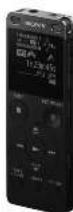
ICD-UX560F
(4-5/3-5H-22T)
GB
联系人
公
Let's try out your new IC recorder
Charge
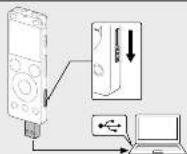
① Change the IC recorder.
Slide the USB slide lever in the direction of the arrow, and insert the USB connector into the USB port of a running computer. When the battery is fully charged, the battery indicator will indicate "把"
(2) Discover the IC scanner.
Since sure that the operation indicator does not light, then refer to the help battle to remain the E. common sales.
Power on
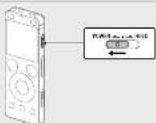
Side and held the PMS@10.2 software implementation of "PMS?"
To turn the power off, side the POWER-HOLD switch to "POWER" and hold unit. Power "H" appears on the drive window.
The following table is presented in the following table:
To prevent unitheminal operational (HOLD)
Save the PD/SHB+K1E switch in the electrical (HOLD)
2017年1月1日
文
[Table_Title]
To monitor the E record from the HCD screen, side the PONER-HCD switch to update the case.
(1) 2017年1月1日
Refer to the Help Guide
This is the Operating Instructions, which provides you with instructions on
the basic operations of the 12-score
The basic functions are online man-ai.
Refer to the Help Guide when you would like to know further details, operations and possible solutions when a problem occurs.
Figure 10. The following table includes the following table:
http://rd1.sony.net/help/lcd/u56/h_2z/

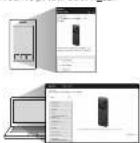
Check the supplied items
• IC Recorder [7]
• Carrying pouch [1]
• Stampsly call for the customers in (orea)
• Application Software. Sound Organizer 2 installed file stored in the built-in memory so that you are installed. You are computers.
memory, so marked can start 10,300 computer.
Optional accessories
• USB AC select: AC-UDX
D. Ery
Impending on the country region, some of the markets rationally securities are not available.
2.1.1 2017年1月1日
Parts and controls
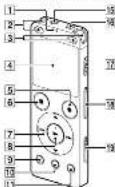
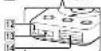
-
Resolution and area
-
0-11-nm:calcene(vinose):0
[3. Built in microchones stereo: (R)
4 Display window
B ● FEC/PAUSE (recom/pause) button
b ■ SICPharton
[7] Control button ▲ DPC (Digital Floor Control),
▼ A B (repeat A B) [review last backward] [cuclast forward]
S. [invente]
五. B6X15K1 button
- T-4432 (work market data)
11 OPTION button
- Strap holds the strap is supplied with your E. I. corner.
Built-in speaker
- LMI connectivity arrest (from car and the LMI connection relapsed period)
THE CONCIL
- O (institute), ack
图 6 [M10p-0-e]
-
PAX-04-11-13
-
9.3 LKT -7-130mm-R = 4,1 mm/20
- USB clds. com
12 Use SIO. (c)
Fig. 10. (2) and slot, the one slot is inside under the current
- PRT. GENTALTY (1974) - A CNT. 100%
The 100% of the 100% of the 100% of the 100% of the 100% of the 100% of the 100% of the 100% of the 100% of the 100% of the 100% of the 100% of the 100% of the 100% of the 100% of the 25% of the 25% of the 25% of the 25% of the 25% of the 25% of the 25% of the 25% of the 25% of the 25% of the 25% of the 25% of the 25% of the 25% of the 25% of the 25% of the 25% of the
"Sliding the PC/CE®10.0.2. Switch to 'POCK' and holding info 0 seconds or longer networks are focused by which they use a link to this
Initial settings
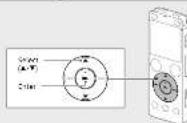
When you turn on your IC recorder for the first time, the "Config" initial Settings screen appears on the display window. You can then select the display language, set the clock, and turn on/off the loop sound.
(1) Select "Yes" to start the initial settings.


② Select the display language.
You can select from the following languages:
Deutsch (Germany, English), Ecofirst (Spanish), Francs (France), Italy (Italy), Preece (Russia), Turkey (Turkish) (unknown Korea).
English (Simplified Chinese), International Chinese,
*Based on
③ Set the current year, month, day, hour, and minute.


To go back to the previous clock setting them press BACK/102M
④ Select "Non."


⑤ Select 'ON' or 'OIE' to burn on or off the beep sound.
When the initial settings finish, the completion message and then



■ Valors
- If you have 30 seconds or inner before preceding to the next step, the
days' windows will turn off, 100 on the days' windows for coming up
• 2010 (China) of the British company, which is
Inwestor, el: mira delas de
The display window turns off
automatically
The "Screen O" Time" setting on your Creccella b set to "50 sec."
by default in case hallway power. If you leave the IT recorder
In school the 30 seconds, the display window will turn off, but
(1) 12 (2) 12 (3) 12 (4)


You can keep the display window from turning all or rotate the
When selling to any other market, Price and Rate 2032
home and school - Savings - Common Savings - School on
The following table contains the text '2015' and '2016' in brackets, which are derived from the results of the sum of the two components.
• Before you start using the computer, make sure that the presentation
switch is at the center dot position.
1. 2017年,公司与上海中联集团有限公司(以下简称“中联集团”)签署《股份转让协议》,标的资产为:
3.2.1.1.
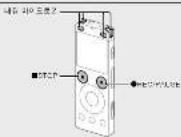
① Turn the IC recorder so that its built-in microphones point in the direction of the recording course.
(5) 1987-DEC/2015
Recording starts and the operation indicator lights in red.


During the increasing the new motor uses to adjust the speed on
burn, the scoring keel US in diagnosis.
Please adjust the adhesion of the built-in microphones, the
distance from the sound source, the sensitivity setting of the
multiplication, or the "Scenic Solut" setting so that the level is clear.
15-12 of which his own is a best option in range is influenced.
③ Press ■ STOP to stop recording.
"Please Wait," and then the record standby screen appears.
After you stopped recording, you can press ▶ to play the file you
here just over-deal.
2、本次股东大会的召集和召开情况
Listen
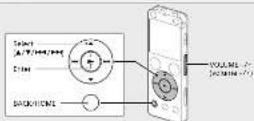
① Select "Recorded Files" from the HOME menu.
②. Select "Latest Recording" Search by REC Date "Search by
REC Scene, or "Folders."
⑤ Selaguys desired Aio
(2) Select your desired me.
[Unreadable]


④ Press VOLUME -/+ In adjust the volume.
⑤. Print ■ STOP to stop playback.
In this book,
You can add a track mark at a point at which you want to find it a file
laser or loose during payback. You can add a maximum of 95 mck
marco in each the
Tell that was the first time coming at a brief.
Delete
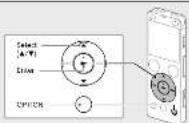
17 Note
inc a file book, you cannot have it
① Select the file you want to delete from the list of recorded files
in play back the line you want to delete.
② Select "Delete a File" from the OPTION menu.


"Don't express and the minister. He is pregnant in you."
(5)
② Select Yes.
318.56


The following text in the source image is a non-textual graphic element, not standard alphanumeric characters. According to Rule 4 (Edge Noise Strategy), since no text is clearly present, the OCR should output nothing.
Therefore, the corrected OCR text is:
```text [No text detected]
Using the HOME menu
You can save the F05M mini for every of operations, including having
and playing a second file and keeping the sales of your K. revies.
-
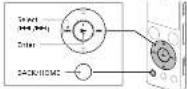
①
Press and hold BACKHOME.
The HOME menu screen appears
-

口

54

[Non-Text]

10

HC

1

•

•

[Non-Text]

Sul

-

J

•

[Non-Text]

7

E

[Non-Text]

。

一

5

一

-

5

1

□

[Non-Text]

[Non-Text]

-

No.2

TM

[Non-Text]

sin

SITI

1.4

ng

[Unreadable]

[Non-Text]

[Non-Text]

[Non-Text]

[Non-Text]

[Non-Text]

[Non-Text]

[Non-Text]

[Non-Text]

[Non-Text]

[Non-Text]

SONY.
IC 신코디 사용 설명서
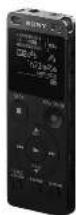
ICD-UX560F
도움말 안내 참조
[Unreadable due to severe distortion and noise]
B
EACKOPONE
1-0.8416
H. 11:16:24
m = 311
m = 311
5
© "Label Preview". Speech by PEC Data. *Speech by PEC
[Unreadable due to severe distortion and noise]
The Ground Truth image displays a single, solid horizontal line. According to Rule 2 (UNDERSCORE & LINE RULES), if the GT contains lines used for stylistic emphasis or as background elements (like ruled paper), the OCR result must ignore them. The provided OCR content is "____", which consists of four underscores. This is incorrect because underscores are not equivalent to a solid line and are not permitted under the “Stylistic/Background Lines (Ignore)” rule. The OCR has hallucinated underscores where none should exist in the GT, violating the “Stylistic/Background Lines (Ignore)” rule. Therefore, the OCR result is inconsistent with the Ground Truth.
The following table contains the text 'Phen' and the Chinese characters for the character 'B' in the image. The OCR result is empty, as there is no actual text content to extract.
7人八
(1) 2018年1月1日
HOME 메뉴 사용하기
- Stock and Real Estate Options to FX
- Flies, Eagle, Eagle, and XX-
"Search by FEC Date", "Search by FEC Scope"
트는 "Gold"를 선택합니다.
B. 10000
있습니다
Score Correct Executive Cains
PBC Unit
GARJ에서 Access Policy Model Diagnostics Source is available on https://www.
BUTDA Source Organization
Sound Organize: 사동하여 1230000000000000000000000000000000000000
인수니다.
(3) Sound Organizer has been installed successfully.
[Unreadable due to severe distortion and noise]
[Unreadable due to severe distortion and noise]
Brand : SONY
Model : ICD-UX560F
Category : Dictaphone