
CA-MICROUSB-001 - Detector COBRA - Free user manual and instructions
Find the device manual for free CA-MICROUSB-001 COBRA in PDF.


| Product Type | Vehicle Hardwire Kit |
| Brand | Cobra |
| Model | CA-MICROUSB-001 |
| Compatible Devices | Micro USB powered devices (radar detectors, dash cams) |
| Input Voltage | 12V DC (vehicle electrical system) |
| Output Voltage | 5V DC via Micro USB |
| Output Current | 2A (typical) |
| Cable Length | Approx. 3.5 m (12 ft) |
| Connector Type | Micro USB male plug |
| Fuse Type | Blade fuse (included) |
| Fuse Rating | 2A (typical) |
| Installation | Hardwired to vehicle fuse box |
| Mounting Position | Interior only (not under hood) |
| Safety Features | Overcurrent protection, polarity protection |
| FCC Compliance | Part 15 compliant |
| Industry Canada | RSS-310 compliant |
| Operating Temperature | -20°C to 60°C (estimated) |
| Storage Temperature | -30°C to 70°C (estimated) |
| Care and Maintenance | Keep dry, avoid harsh chemicals, inspect wires periodically |
| Spare Parts Available | Fuses (2A blade type) |
| Professional Installation Recommended | Yes |
| Warranty | Contact Cobra support for details |
Frequently Asked Questions - CA-MICROUSB-001 COBRA
User questions about CA-MICROUSB-001 COBRA
0 question about this device. Answer the ones you know or ask your own.
Ask a new question about this device
Download the instructions for your Detector in PDF format for free! Find your manual CA-MICROUSB-001 - COBRA and take your electronic device back in hand. On this page are published all the documents necessary for the use of your device. CA-MICROUSB-001 by COBRA.
USER MANUAL CA-MICROUSB-001 COBRA
HARDWIRE KIT INSTALLATION GUIDE
WARNING: Cobra is not responsible for damages to the vehicle or any connected products or accessories. Working with your vehicle's power system can be dangerous to both you and your vehicle. Cobra recommends professional automotive installation to avoid damage.
This Vehicle Hardwire Kit connects your Micro USB powered device directly to your fuse box, freeing up your cigarette lighter adapter and eliminating clutter on your dash board. This Hardwire Kit should work with any Micro USB powered device, but is designed and tested specifically for Micro USB powered Radar Detectors and Dash Cams from Cobra.
Note: Fuse box locations, fuse types, and interior designs vary greatly by vehicle. This guide is intended to outline basic steps for installation but the process may differ depending on your car's make and model.
Installation Instructions:
- Position your device in its desired location on the windshield, ensuring that it does not obstruct your view of the road ahead.
Consult your vehicle's manual to locate your fuse panel. Run the hardwire kit from your device, up and around the windshield, and to your fuse box. Generally you'll want to position the hardwire kit so that excess cable can be coiled near the fuse box side.
Note: The DC Converter Box is not designed to withstand the harsh environment under the hood of your vehicle and should not be installed there.
- You need to decide whether you want your device wired to a switched or un-switched fuse. Switched circuits only have power when the vehicle is ON. Un-switched circuits always have power.
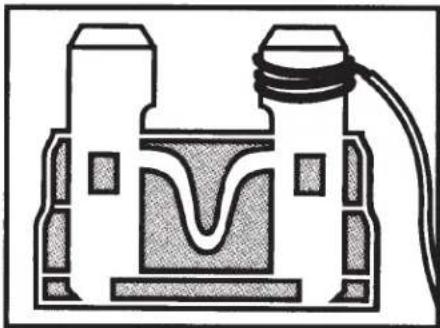
Make sure your vehicle is off and the key is not in the ignition. Choose your desired fuse. You can verify if it's switched or un-switched using a simple circuit tester. Pull the fuse, wrap exposed copper part of the red (+) wire around the fuse tooth, and re-insert the fuse.
natural_image
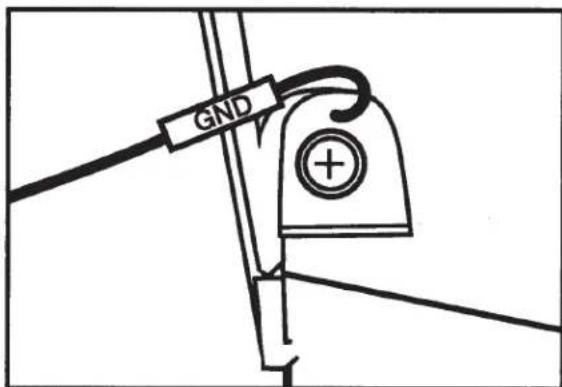
Cross-sectional diagram of a mechanical or electrical component with no visible text or symbols- Locate a ground point near the fuse box. There is usually either an obviously labeled ground point or a nut/bolt that connects directly into the car frame. Loosen the nut, wrap the exposed copper part of the black (-) wire around the bolt, and tighten the nut.
Now you can test to make sure the connections have been made properly. Plug your device into the hardwire kit and ensure that it powers up and shuts down according to your expectations. If so, you are ready to clean up your installation. Cover any exposed copper with electrical tape, secure excess wire using zip ties, and tuck away all visible wire inside the headliner.
FCC STATEMENT:
This device complies with Part 15 of the FCC Rules. Operation is subject to the following two conditions:
(1) This device may not cause harmful interference, and
(2) This device must accept any interference received, including interference that may cause undesired operation.
WARNING: Changes or modifications not expressly approved by the party responsible for compliance could void the user's authority to operate the equipment.
NOTE: This equipment has been tested and found to comply with the limits for a Class B digital device, pursuant to Part 15 of the FCC Rules. These limits are designed to provide reasonable protection against harmful interference in a residential installation. This equipment generates uses and can radiate radio frequency energy and, if not installed and used in accordance with the instructions, may cause harmful interference to radio communications. However, there is no guarantee that interference will not occur in a particular installation. If this equipment does cause harmful interference to radio or television reception, which can be determined by turning the equipment off and on, the user is encouraged to try to correct the interference by one or more of the following measures:
Reorient or relocate the receiving antenna.
Increase the separation between the equipment and receiver.
Connect the equipment into an outlet on a circuit different from that to which the receiver is connected.
Consult the dealer or an experienced radio/TV technician for help.
Cobra Electronics Corporation™ is a trademark of Cobra Electronics Corporation, USA.
This device complies with RSS-310 of Industry Canada. Operation is subject to the condition that this device does not cause harmful interference.
CAN ICES-3B/NMB-3B.
TRADEMARK ACKNOWLEDGMENT
Cobra, the snake design, Drive HD™, the d design, and Record your ride™ are proprietary trademarks of Cobra Electronics Corporation, USA. Other trademarks and trade names are those of their respective owners.
Cobra Electronics Corporation™ is a trademark of Cobra Electronics Corporation, USA.
DISPOSAL OF ELECTRONICS EQUIPMENT: This product may contain hazardous substances that could impact health and the environment if not disposed of properly.
The crossed out wheeled bin symbol indicates that the product should not be disposed of along with household waste. It should be handed over to an applicable collection point for the recycling of electrical equipment. By ensuring that this product is disposed of correctly you will help/prevent potential negative impact on the environment.
If you need more information on the collection, reuse and recycling systems, please contact your local civic office or the shop where it was originally purchased.
WARNING: This product contains chemicals know to the State of California to cause cancer and birth defects or other reproductive harm.
PRODUCT SERVICE AND SUPPORT
For any questions about operating or installing this new Cobra product, PLEASE CONTACT COBRA FIRST...do not return this product to the retail store. The contact information for Cobra will vary depending on the country in which you purchased and utilize the product. For the latest contact information, please go to www.cobra.com/support. For products purchased in the U.S.A. you may also call 1-800-262-7212 (1-800-COBRA-12).
For products purchased in the U.S.A., if your product should require factory service, please go to www.cobra.com/support and follow the instructions for returning your product to the Cobra Factory Service Department.
CONGRATULATIONS!
We trust you will enjoy your Cobra product. If you have questions about your product or its many features, our Customer Care Experts are here to assist you.
NEED HELP? WAIT!

natural_image
Simple red line drawing of a human hand with fingers extended (no text or symbols)PLEASE DO NOT RETURN THIS PRODUCT TO THE STORE!
Please contact Cobra directly for service and support.
By phone:
1-800-262-7212 (1-800-COBRA-12)
Online:
www.cobra.com/support
S Cobra®
Brand : COBRA
Model : CA-MICROUSB-001
Category : Detector