HDSP-2012-4K - Receiver Kopul - Free user manual and instructions
Find the device manual for free HDSP-2012-4K Kopul in PDF.


| Product Type | HDMI Splitter (Receiver) |
| Model | HDSP-2012-4K |
| Brand | Kopul |
| HDMI Inputs | 1 |
| HDMI Outputs | 2 |
| HDMI Version | 1.4 |
| HDCP Version | 1.4 |
| Maximum Resolution | 4K UHD (3840x2160) at 30p |
| Supported Resolutions | 4K UHD, 1080p, 1080i, 720p, 576p, 480p, 576i, 480i |
| Color Depth | Up to 36-bit deep color |
| Audio Formats | LPCM, Dolby AC-3, DTS 7.1, DSD |
| Video Data Transfer Rate | 6.75 Gbps |
| EDID Management | Built-in dip switches for selecting 8 preset EDID modes or copy output |
| IR Remote Port | Yes (compatible with optional Kopul HDS-IRKIT) |
| Chassis Material | Heavy-duty metal housing |
| Power Supply | Input: 100-240V AC, 50/60Hz, 0.5A; Output: 5V DC, 1.2A (included) |
| Power Consumption | 2 W |
| Dimensions (W x H x D) | 4.4 x 0.9 x 3.0 inches (11.1 x 2.4 x 7.5 cm) |
| Weight | 0.6 lb (250 g) |
| Operating Temperature | -5°C to 35°C (41°F to 95°F) |
| Operating Humidity | 5% to 90% RH (no condensation) |
| Maintenance | Clean with soft, dry cloth only |
| Safety Precautions | Keep away from water, moisture, flammable gases, open flames, heat sources; well ventilated; unplug during storms |
| Included Accessories | Power adapter, user manual |
| Warranty | 1-year limited warranty (to original purchaser) |
Frequently Asked Questions - HDSP-2012-4K Kopul
User questions about HDSP-2012-4K Kopul
0 question about this device. Answer the ones you know or ask your own.
Ask a new question about this device
Download the instructions for your Receiver in PDF format for free! Find your manual HDSP-2012-4K - Kopul and take your electronic device back in hand. On this page are published all the documents necessary for the use of your device. HDSP-2012-4K by Kopul.
USER MANUAL HDSP-2012-4K Kopul
natural_image
Abstract red and white geometric shape with curved and angular forms (no text or symbols)Thank you for choosing Kopul.
The Kopul HDMI splitter accepts one HDMI input signal and directs it to multiple displays, so you can view your HD video source on two or more HD monitors or HDTV sets. This professional splitter supports full 4K and 3D video, as well as LPCM, Dolby AC-3, DTS 7.1, and DSD audio. Integrated Extended Display Identification Data (EDID) control allows the splitter to output a signal that screens with different sizes, resolutions, and formats will accept. The splitter is easy to use and requires no setup beyond attaching your devices and the included power adapter. Its durable, heavy-duty metal housing is perfect for professional installations, but is also appropriate for home use.
The HDSP-2014-4K splitter also features an IR remote port, which is compatible with the optional Kopul HDS-IRKIT infrared transmitter and receiver kit. This kit extends normal IR capability, so you can wirelessly control your HDMI devices even when they're out of view or beyond the reach of your IR remote control.
Note: This splitter does not support HDMI with Ethernet.
Precautions
- Please read and follow these instructions, and keep this manual in a safe place.
- Keep this product away from water and moisture, any flammable gases or liquids, open flames, and heat sources such as radiators or stoves.
- Use only the correct, recommended voltage.
- Clean this product with only a soft, dry cloth.
- Do not install or place this product in a bookcase, built-in cabinet, or any other confined space. Ensure that this product is well ventilated.
- Unplug this product during lightning storms or before long periods of disuse.
- Do not walk on or pinch the power cord, especially at the plugs.
- Use only attachments and accessories recommended by the manufacturer.
- All images are for illustrative purposes only.
Overview HDSP-2012-4K
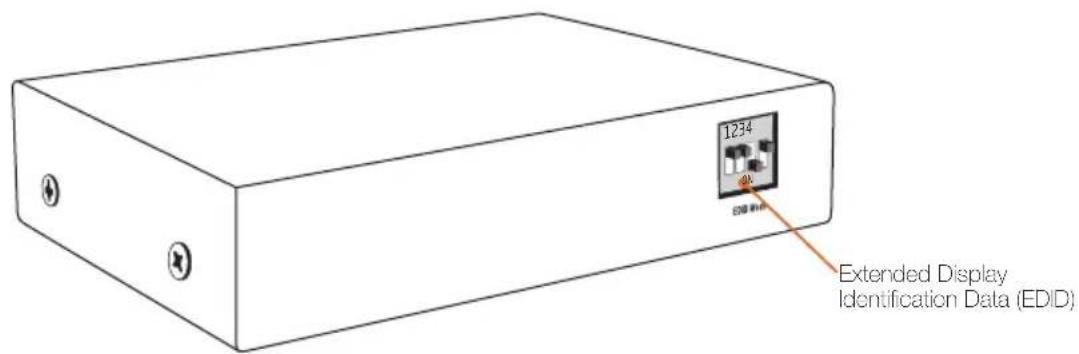
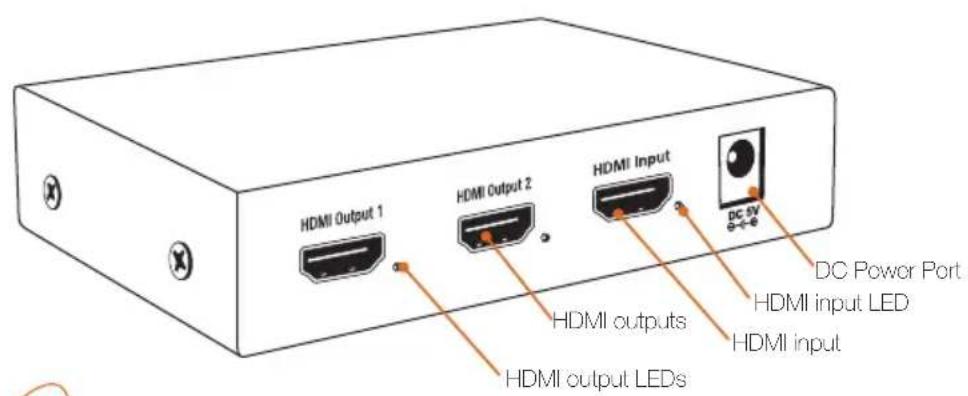
Also Included
- Power adapter
- User manual
Overview HDSP-2014-4K
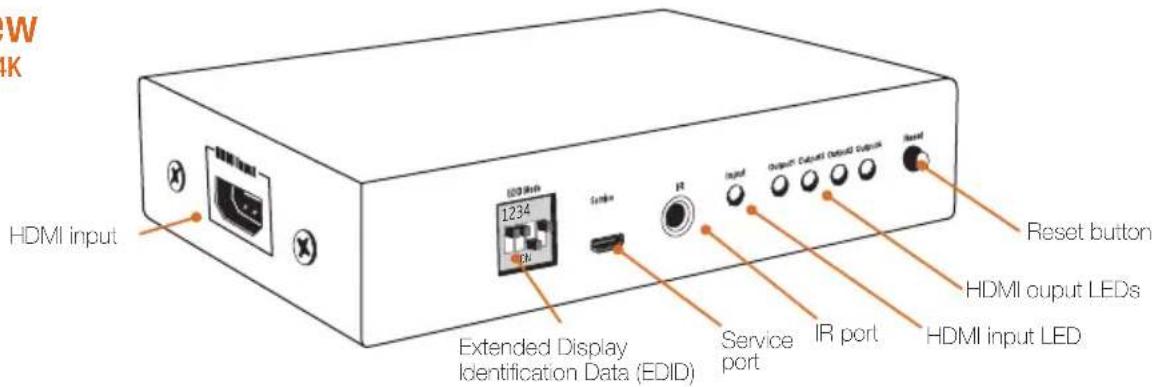
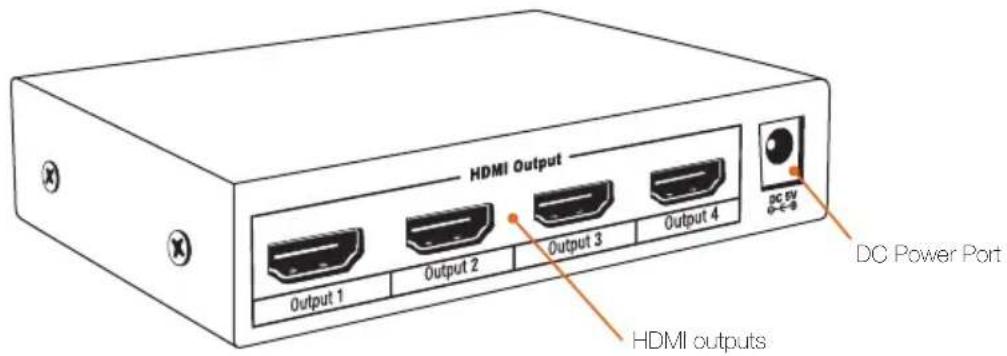
Also Included
- Power adapter
- User manual
Plugging In and Setting Up
- Use the included power adapter to connect the splitter to an AC power source.
- Use an HDMI cable to connect a signal source to an available HDMI input on the splitter.
- Use an HDMI cable to connect an output from your splitter to an available HDMI input on your display device.
The status LEDs will glow green to indicate that the corresponding connections are live.
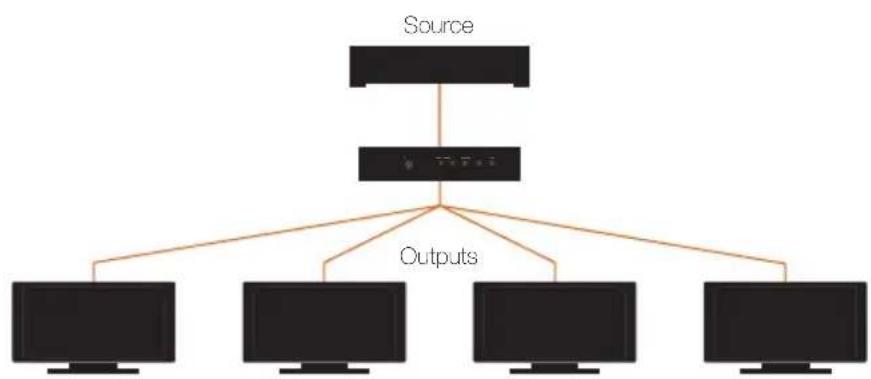
flowchart
graph TD
    A["Source"] --> B["Computer"]
    B --> C["Outputs"]
    C --> D["Computer 1"]
    C --> E["Computer 2"]
    C --> F["Computer 3"]
    C --> G["Computer 4"]
Extended Display Identification Data (EDID)
EDID data, such as size, format, and resolution of the screen, is information stored in your display, monitor, or TV. The EDID controls on the splitter allow your source to output a signal that your screens will accept.
Important! We recommend that you leave the dip switches in the default position.
If you encounter a problem or lack of signal on one of your screens, your source is outputting a signal that is not compatible with it. The solution is to select an output option that all your screens will accept.
To select the appropriate EDID settings, follow these steps:
- For the input specifications, consult the user manual of the monitor or TV in question.
- Refer to the chart on page 7 to select the appropriate EDID setting on the switcher.
Alternatively, refer to the chart on page 7 and select the "Copy Output" setting for the channel of the screen having the problem. This automatically sends a signal that is compatible with that screen, and copies it to all of the other channels.
HDSP-2012-4K EDID Management
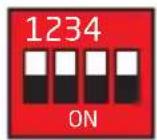
4KUHD 30p 24bit Color
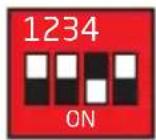
1080p60 36bit Color 2.1CH Audio
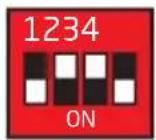
Copy Output 1 Copy Output 2
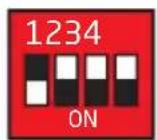
3D 1080p60 24bit Color 2.1CH Audio
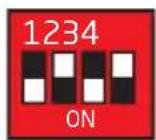
1080p60 36bit Color 7.1CH Audio
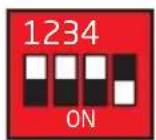
Copy Output 2
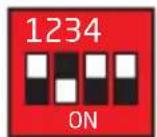
1080i60 720p60 24bit Color 2.1CH Audio
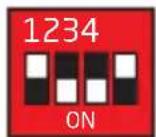
1080p60 24bit Color 2.1CH Audio
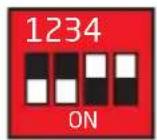
1080i60 720p60 24bit Color 7.1CH Audio
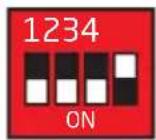
1080p60 24bit Color 7.1CH Audio
HDSP-2014-4K EDID Management
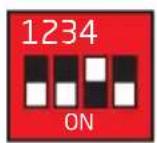
4KUHD 30p 24bit Color
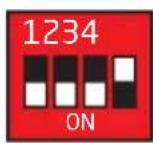
1080p60 36bit Color 2.1CH Audio
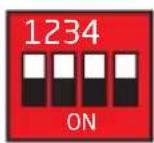
Copy Output 1
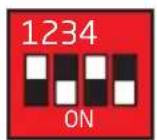
3D 1080p60 24bit Color 2.1CH Audio
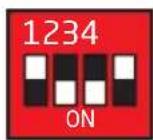
1080p60 36bit Color 7.1CH Audio
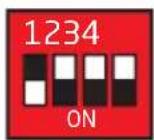
Copy Output 2
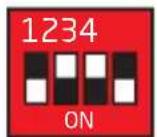
1080i60 720p60 24bit Color 2.1CH Audio
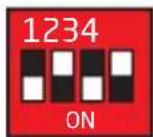
1080p60 24bit Color 2.1CH Audio
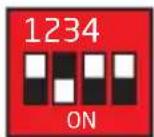
Copy Output 3
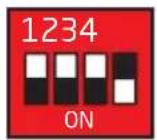
1080i60 720p60 24bit Color 7.1CH Audio
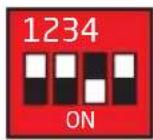
1080p60 24bit Color 7.1CH Audio
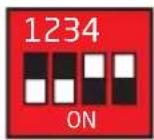
Copy Output 4
Specifications
HDMI inputs 1
HDMI outputs HDSP-2012-4K: 2
HDSP-2014-4K: 4
HDMI version 1.4
HDCP version HDSP-2012-4K: HDCP 1.4
HDSP-2014-4K: HDCP 1.3
EDID version 1.3
Resolution 4K UHD, 1080p, 1080i, 720p, 567p, 480p, 576i, 480i
Color depth Up to 36-bit deep color
Audio format LCPM, Dolby AC3, DTS 7.1, DSD
Video data transfer rate 6.75 Gbps
Operating temperature -41°F to 95°F (-5°C to 35°C)
Operating humidity 5% to 90% RH (no condensation)
Power adapter Input: 100 to 240 V AC, 50/60 Hz, 0.5 A
Output: 5 V DC, 1.2 A
Power consumption 2 W
Dimensions 4.4" × 0.9" × 3.0" (11.1 × 2.4 × 7.5 cm)
Weight 0.6 lb. (250 g)
FCC Statement
This device complies with Part 15 of the FCC Rules. Operation is subject to the following two conditions: (1) this device may not cause harmful interference, and (2) this device must accept any interference received, including interference that may cause undesired operation.
One-Year Limited Warranty
This KOPUL product is warranted to the original purchaser to be free from defects in materials and workmanship under normal consumer use for a period of one (1) year from the original purchase date or thirty (30) days after replacement, whichever occurs later. The warranty provider's responsibility with respect to this limited warranty shall be limited solely to repair or replacement, at the provider's discretion, of any product that fails during normal use of this product in its intended manner and in its intended environment. Inoperability of the product or part(s) shall be determined by the warranty provider. If the product has been discontinued, the warranty provider reserves the right to replace it with a model of equivalent quality and function.
This warranty does not cover damage or defect caused by misuse, neglect, accident, alteration, abuse, improper installation or maintenance. EXCEPT AS PROVIDED HEREIN, THE WARRANTY PROVIDER MAKES NEITHER ANY EXPRESS WARRANTIES NOR ANY IMPLIED WARRANTIES, INCLUDING BUT NOT LIMITED TO ANY IMPLIED WARRANTY OF MERCHANTABILITY OR FITNESS FOR A PARTICULAR PURPOSE. This warranty provides you with specific legal rights, and you may also have additional rights that vary from state to state.
To obtain warranty coverage, contact the Kopul Customer Service Department to obtain a return merchandise authorization ("RMA") number, and return the defective product to Kopul along with the RMA number and proof of purchase. Shipment of the defective product is at the purchaser's own risk and expense.
For more information or to arrange service, visit www.kopulcables.com or call Customer Service at 212-594-2353.
Product warranty provided by the Gradus Group.
www.gradusgroup.com
KOPUL is a registered trademark of the Gradus Group. © 2016 Gradus Group LLC. All Rights Reserved.

KOPUL™ A Gradus Group Brand

Brand : Kopul
Model : HDSP-2012-4K
Category : Receiver