
BY-WM4 PRO RXU - Receiver BOYA - Free user manual and instructions
Find the device manual for free BY-WM4 PRO RXU BOYA in PDF.


| Product Type | Wireless microphone receiver |
| Brand | BOYA |
| Model | BY-WM4 PRO RXU |
| Dimensions (approx.) | 60 x 20 x 10 mm |
| Weight (approx.) | 30 g |
| Power Source | Built-in rechargeable lithium-ion battery |
| Battery Life | Up to 8 hours |
| Charging | USB-C port |
| Audio Output | 3.5mm TRS jack |
| Wireless Range | Up to 50 meters (line of sight) |
| Frequency Band | 2.4 GHz |
| Channels | Automatic pairing |
| LED Indicator | Power and pairing status |
| Compatibility | Cameras, smartphones, audio recorders with 3.5mm input |
| Included Accessories | Receiver unit, charging cable, wind foam |
| Cleaning Instructions | Wipe with a soft, dry cloth. Avoid moisture and solvents. |
| Safety Precautions | Do not expose to extreme temperatures or liquids. Keep away from children. |
| Spare Parts & Repairability | Contact BOYA support for any repairs or replacement parts. |
| General Information | Wireless receiver for the BY-WM4 PRO system. Suitable for vlogging, interviews, and content creation. |
Frequently Asked Questions - BY-WM4 PRO RXU BOYA
User questions about BY-WM4 PRO RXU BOYA
0 question about this device. Answer the ones you know or ask your own.
Ask a new question about this device
Download the instructions for your Receiver in PDF format for free! Find your manual BY-WM4 PRO RXU - BOYA and take your electronic device back in hand. On this page are published all the documents necessary for the use of your device. BY-WM4 PRO RXU by BOYA.
USER MANUAL BY-WM4 PRO RXU BOYA
natural_image
Three black BOYA brand earphones with earbuds, displayed against a white background (no visible text or symbols on devices)BY-WM4 PRO
Dual-Channel Digital Wireless Microphone
Instruction Manual
Thank you for purchasing BOYA BY-WM4 PRO system!
Designed for videographers on a limited budget and video hobbyists, BY-WM4 PRO is a new generation 2.4GHz wireless microphone system, dual-Channel for capturing audio with dual subjects to your smartphones, tablets, DSLR cameras, consumer camcorders, PCs etc.
The BY-WM4 PRO system is suitable for a wide range of wireless applications such as interviews, mobile journalisms, reporting, vloggings, podcasts and more.
The BY-WM4 PRO system is a expandable evolution system that allows the user to mix and match different kinds of receivers while using with the TX4 Pro transmitter.
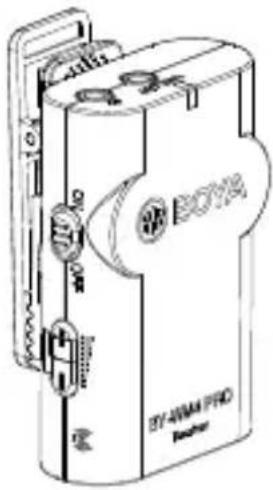
BY-WM4 Pro consists of one body-pack transmitter(TX4 Pro), a portable receiver (RX4 Pro), and their accessories as following:

natural_image
Line drawing of a BOYA No. 1078 microcontroller device (no text or symbols on the device body)Transmitter(TX4 Pro) Receiver(RX4 Pro)
natural_image
Line drawing of a BOYA 87-4WMA PRO printer device (no text or symbols on the device itself)

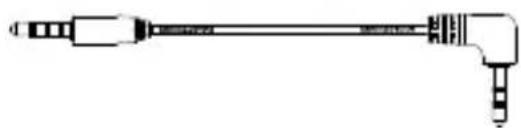
Lavalier/lapel microphone 3.5mm to TRS audio output cable
natural_image
Pure mechanical component diagram without any text, numbers, or symbols3.5mm to TRRS audio output cable

natural_image
Technical line drawing of a mechanical component with no visible text or symbolsCold-shoe mount


Microphone Holder clipWind screen
BY-WM4 Pro-K2 consists of two body-pack transmitters(TX4 Pro), a portable receiver (RX4 Pro), and their accessories as following:


natural_image
Line drawing of a BOVA-branded electronic device with ports and buttons (no text or symbols on body)Transmitter(TX4 Pro) x2 Receiver(RX4 Pro)


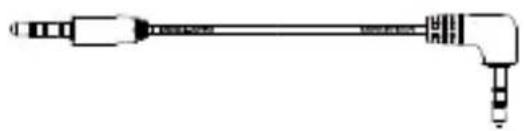
Lavalier/lapel microphone x2 3.5mm to TRS audio output cable
natural_image
Pure mechanical component diagram without any text, numbers, or symbols3.5mm to TRRS audio output cable

natural_image
Technical line drawing of a mechanical component with no visible text or symbolsCold-shoe mount


Microphone Holder clip (x2)Wind scr
BY-WM4 Pro-K3 is specially designed for Lightning iOS Devices.
It consists of one body-pack transmitter (TX4 Pro), wireless receiver with a Lightning connector (BY-WM4 PRO RXD), and their accessories as following:

Receiver(BY-WM4 PRO RXD) Transmitter(TX4 Pro)

Lavalier/lapel microphone

Wind screen
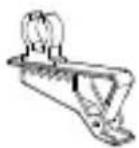
Microphone Holder clip

Pairing Pin
BY-WM4 Pro-K4 is specially designed for Lightning iOS Devices.
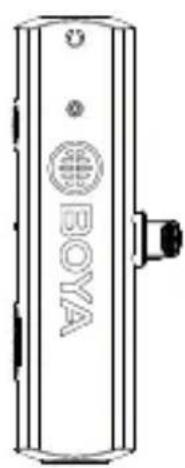
It consists of two body-pack transmitter (TX4 Pro), wireless receiver with a Lightning connector (BY-WM4 PRO RXD), and their accessories as following:

natural_image
Line drawing of a BOYA 8019 BFI-WMA PRO device with no visible text or symbols on the body itselfReceiver(BY-WM4 PRO RXD) Transmitter(TX4 Pro) x2

Lavalier/lapel microphone x2
Wind screen x2

Microphone Holder clip x2
Pairing Pin
BY-WM4 Pro-K5 specially designed for Andriod and other Type-C devices.
It consists of one body-pack transmitter (TX4 Pro), wireless receiver with a USB Type-C connector (BY-WM4 PRO RXU), and their accessories as following:


natural_image
Line drawing of a BT-WMI PRO electronic device with no visible text or symbols on the bodyReceiver(BY-WM4 PRO RXU) Transmitter(TX4 Pro)

Lavalier/lapel microphone

Wind screen
Microphone Holder clip
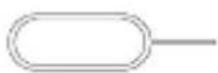
Pairing Pin
BY-WM4 Pro-K6 specially designed for Andriod and other Type-C devices.
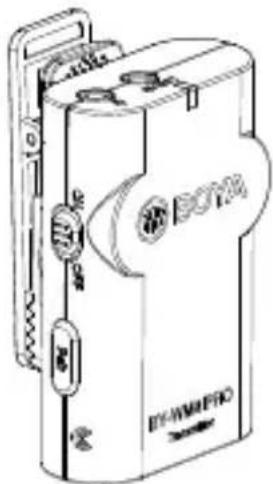
It consists of two body-pack transmitter (TX4 Pro), wireless receiver with a USB Type-C connector (BY-WM4 PRO RXU), and their accessories as following:

natural_image
Line drawing of a portable electronic device with buttons and ports (no readable text or symbols)Receiver(BY-WM4 PRO RXU) Transmitter(TX4 Pro) x2

Lavalier/lapel microphone x2

Wind screen x2

Microphone Holder clip x2

Pairing Pin
Transmitter (TX4 Pro)
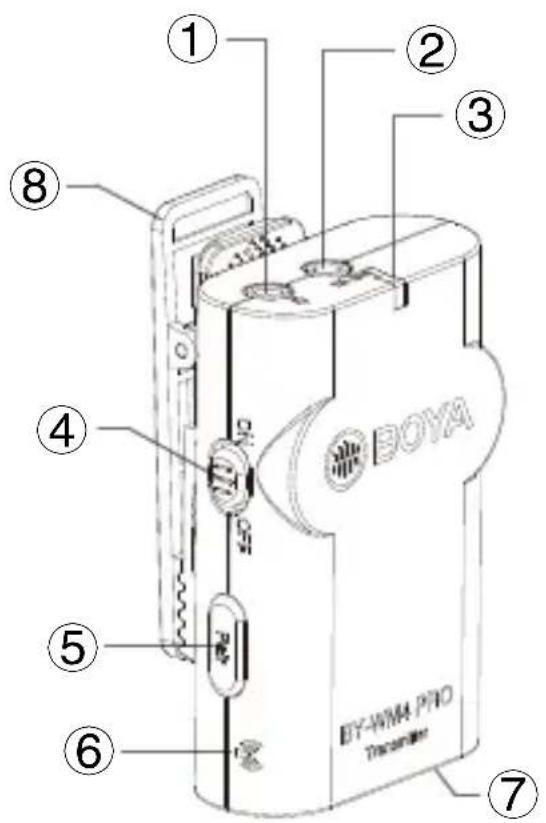
1. Microphone input
- Connect the supplied lavalier microphone here.
- Fully insert the microphone's 3.5mm plug and make sure it clicks into place.
2. Line In
3. Power LED
1) The power LED flash blue when the unit is on.
2) The power LED glows red when low power.
For more details about LED indicator, please refer to as following:
| Status | Receiver | Transmitter | |
| The transmitter and the receiver connects. | Stays blue | Flashes continually every 2.5 seconds. | |
| The transmitter and the receiver disconnects. | Flashes continually every 1 second. | Flashes continually every 1 second. | |
| Receiver unit is turned OFF(Transmitter is still ON) | Flashes in blueOf | ||
| Transmitter unit is turned OFF(Receiver is still ON) | Flashes in blue | Off | |
| Flashes in redLow power | |||
4. Power OFF/ ON
5. Pair
This botton is for connecting signal.
For details, please see “How to connect transmitter and receiver” on page 13.
6. Antenna

Please don't touch here during using, otherwise, it will effect signal.
7. Battery compartment
Accommodates two pieces of AAA batteries.
For more details, please see “Installing batteries” on page 11.
8. Clip
For more details, please see “Installing or uninstalling clip” on page 15.
Receiver (RX4 Pro)

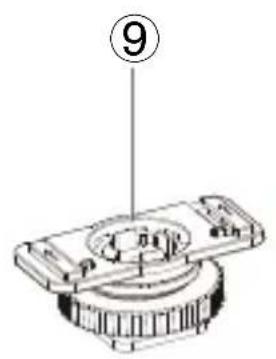
1. Earphone Jack
(3.5mm diameter stereo mini jack)
To monitor the receiver output, connect the headphones to this connector.

NOTE:
Do not connect headphones with a monaural mini jack. This may lead to short-circuiting of the headphone output, resulting in distorted sound output.
2. LINE OUT (audio output) Jack
- For using smartphone, tablet or Mac Connect one end (90° plug) of the supplied TRRS stereo 3.5mm mini output cable here, and the other end (straight plug) to smartphone.
- For cameras, camcorders, audio recorders and other audio/Video recording devices. Connect one end of the supplied TRS stereo 3.5mm mini output cable here, and the other end to camera.
3. Power LED
For more details, please see "Power LED" on page 7.
4. Power OFF/ ON
5. Volume + / -
Press these buttons to set the attenuation level of the input signal.
6. Antenna

Please don't touch here during using, otherwise, it will effect signal.
7. Battery compartment
Accommodates two pieces of AAA batteries.
For more details, please see “Installing batteries” on page 11.
8. Clip
For more details, please see “Installing or uninstalling clip” on page 15.
9. Shoe mount adapter
What's difference?
① 3.5 mm TRRS connector
- For Smartphone, tablet, Mac or laptop with combo headphone/Mic jack

② 3.5 mm TRS connector
- For cameras, camcorders, audio recorders and other audio/video recording devices.

natural_image
Pure diagram of two connected cylindrical objects with no text or symbolsHow to use it
Installing batteries
- Both transmitter and receiver requires two AAA size batteries.
- Slide and remove the transmitter's battery compartment cover.
- Insert two pieces of batteries.
- Close the battery compartment cover.
- Do the same ways as step 2 to 4 to insert battery into receiver.

natural_image
Technical line drawing of a mechanical device with a handle and mounting bracket (no text or symbols)Connecting the transmitter and receiver Using the microphone with smartphone, tablet, Mac or laptop with combo headphone/ Mic jack.
Receiver
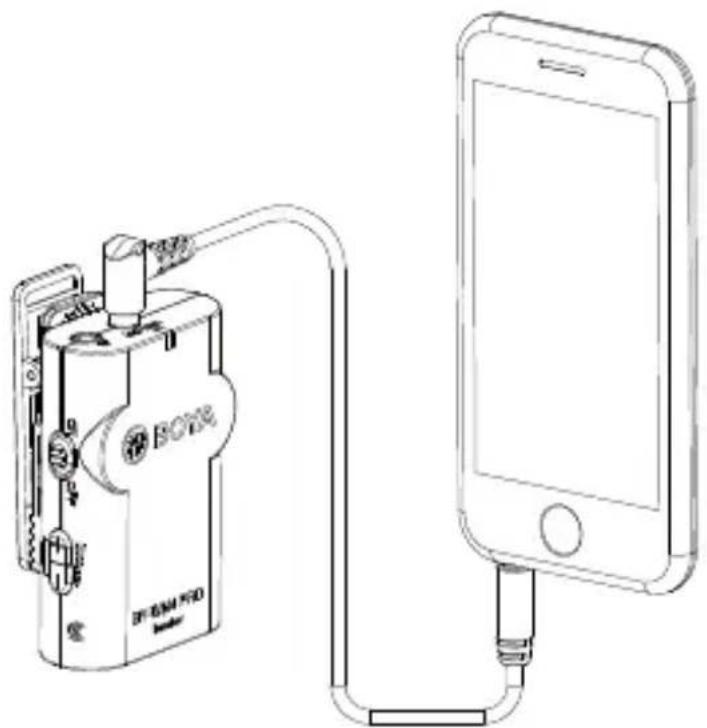
- Mount receiver to Smartphone, tablet, Mac or laptop.
- Using TRRS cable, plug the 3.5 mm connector(straight plug) into the audio jack of your smartphone.
- Insert the 90° plug of the connecting cable into the receiver "LINE OUT" jack.
- Insert earphone into receiver “ 🔍 ” for monitoring Sound if you need.
- Slider the power ON/OFF switch to ON position (the LED indicator will light in blue)
Caution: Please do not mix up plug, for details, please refer to "What's difference" on page 8.
natural_image
Line drawing of a device connected to a smartphone via cable (no text or symbols)
NOTE:
Not all Android devices support external microphone when taking video, and you may need to download a third-party app and set up sound source as external microphone.
How to connect transmitter and receiver?
Before leaving factory, the connection of transmitters and receiver will be established.
If transmitters and receiver disconnect, please follow below steps:
- Turn on the receiver and the transmitters.
- Press the button “+” and “-” for 3 seconds for receiver and press "Pair" of one transmitter for 3 seconds at the same time.
- When transmitter and receiver connects, the light of receiver will stay blue, the light of transmitters will flash every 2.5 seconds.
- Repeat step 2 for the other transmitter.
Otherwise, the light for receiver and transmitters will flash continually every 1 second, then try 1-4 steps again.
Using the microphone with cameras, camcorders, audio recorders and other audio/video recording devices.
Receiver
- Mount receiver to cameras, camcorders, audio recorders and other audio/video recording devices.
- Using TRS cable, plug the 3.5 mm connector into the audio jack of your camera.
- Insert the other end of the connecting cable into the receiver "LINE OUT" jack.
- Insert earphone into receiver “ 📋 ” for monitoring Sound if you need.
- Slider the power ON/OFF switch to ON position (the LED indicator will light in blue)
Caution: Please do not mix up audio cable, for details, please refer to "What's difference on page 8".

natural_image
Technical line drawing of a DSLR camera with visible mechanical components and no text or symbolsInstalling or uninstalling clip
- Clip is mounted on the microphone before leaving factory.
- Both transmitter and receiver include clip, that means you can mount them in any place you want.
- Adjust the direction of the microphone to your mouth by rotating the Microphone.

natural_image
Technical line drawing of a mechanical device with rotating components and directional arrows (no text or symbols)If receiver need to be mounted onto camera hot/cold shoe, please follow below steps:
- Push the clip to right side.

natural_image
Technical line drawing of a device with two views: front view and side view, showing internal components (no text or symbols)
- Push the cold shoe mount on the position.
- Mounted receiver onto camera hot/cold shoe
BY-WM4 PRO RXD
2.4 GHz Wireless Receiver For iOS devices

Receiver (BY-WM4 PRO RXD)

1. Headphone Jack
(3.5mm diameter stereo mini jack)
To monitor the receiver output, connect the headphones to this connector.

NOTE:
Do not connect headphones with a monaural mini jack. This may lead to short-circuiting of the headphone output, resulting in distorted sound output.
2. Power LED
For more details about LED indicator, please refer to as following:
| Status | Receiver | Transmitter | |
| The transmitter and the receiver connects. | The indicator won't light up until you turn on the audio/video app. | Flashes continually every 2.5 seconds. | |
| The transmitter and the receiver disconnects. | Flashes continually every 1 second. | Flashes continually every 1 second. | |
| Receiver unit is turned OFF(Transmitter is still ON) | Flashes in blueOff | ||
| Transmitter unit is turned OFF(Receiver is still ON) | Flashes in blue | Off | |
| Low power | / | Flashes in red | |
| Flashes quickly in blue lightThe trans | |||
3. Lightning Connector
4. Volume + / -
Press these buttons to set the attenuation level of the input signal.
5. Pair Bottom
For more details, please see “Connecting the transmitter and the receiver” on page 21.
6. M/ S Switch
7. Built-In Internal Antenna
Set Up Guide
- Plug the BY-WM4 PRORXD directly into the lightning port of smartphone.
- Open the audio/video app on mobile device, then the indicator of receiver should be light up.
- The Power LED flashes slowly waiting for connecting with the transmitter.

Connecting the transmitter and the Receiver
Before leaving factory, the connection of transmitters and receiver will be established.
If transmitters and receiver disconnect, please follow below steps:
- Turn on the transmitter and plug the receiver into smartphone.
- Long press the pair bottom of receiver with pair pin, the indicator of receiver will flash quickly when entering paring mode.

-
Long press the pair button on the side of the transmitter entering the pairing mode.
-
When the transmitter and receiver connected, the light of receiver stays blue, and transmitter flashes every 2.5 seconds.
Otherwise, the light of receiver and transmitter will flash continually every 1 second, then try 1-3 steps again.

NOTE:
1) Please adjust the monitoring audio volume of RXD before recording.
BY-WM4 PRO RXU
2.4GHz Wireless Receiver
For Android and other Type-C devices

Receiver (BY-WM4 PRO RXU)
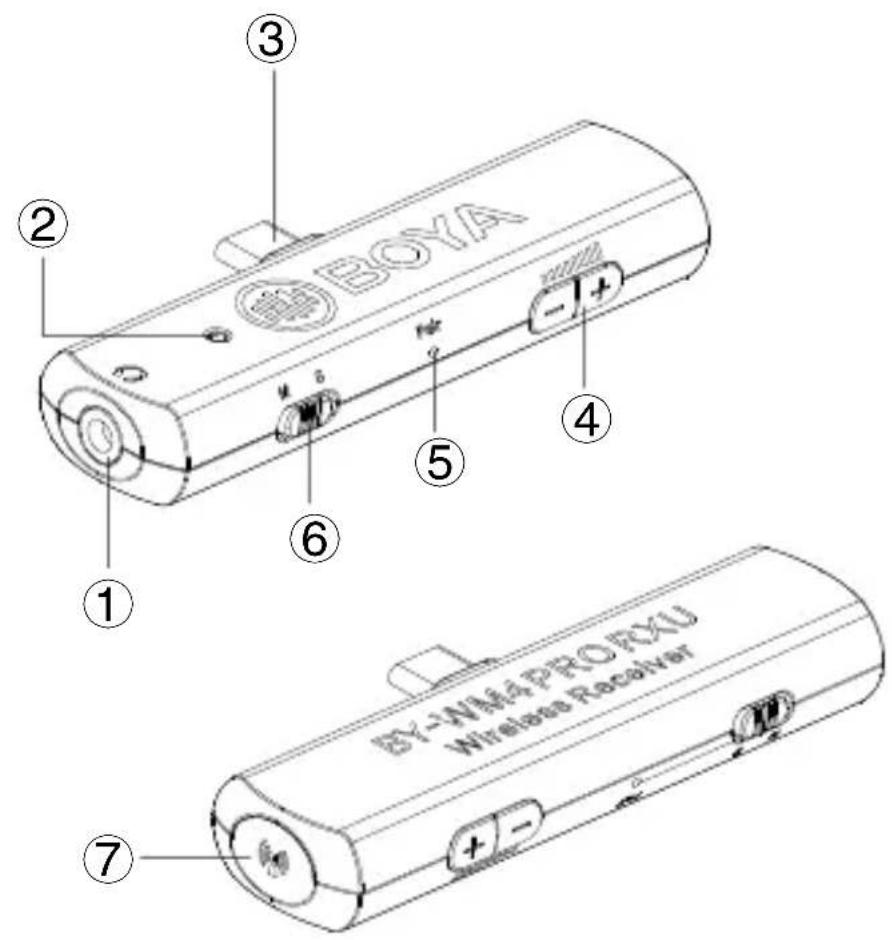
1. Headphone Jack
(3.5mm diameter stereo mini jack) To monitor the receiver output, connect the headphones to this connector.

NOTE:
Do not connect headphones with a monaural mini jack. This may lead to short-circuiting of the headphone output, resulting in distorted sound output.
2. Power LED
For more details about LED indicator, please refer to as following:
| Status Receiver | Transmitter | |
| The transmitter and the receiver connects. | Stays blue | Flashes continually every 2.5 seconds. |
| The transmitter and the receiver disconnects. | Flashes continually every 1 second. | Flashes continually every 1 second. |
| Receiver unit is turned OFF(Transmitter is still ON) | Flashes in blueOff | |
| Transmitter unit is turned OFF(Receiver is still ON) | Flashes in blue | Off |
| Low power | / | Flashes in red |
| Flashes quickly in blue lightThe transm | ||
3. USB Type-C Connector
4. Volume + / -
Press these buttons to set the attenuation level of the input signal.
5. Pair Bottom
For more details, please see “Connecting the transmitter and the receiver” on page 26.
6. M/ S Switch
7. Built-In Internal Antenna
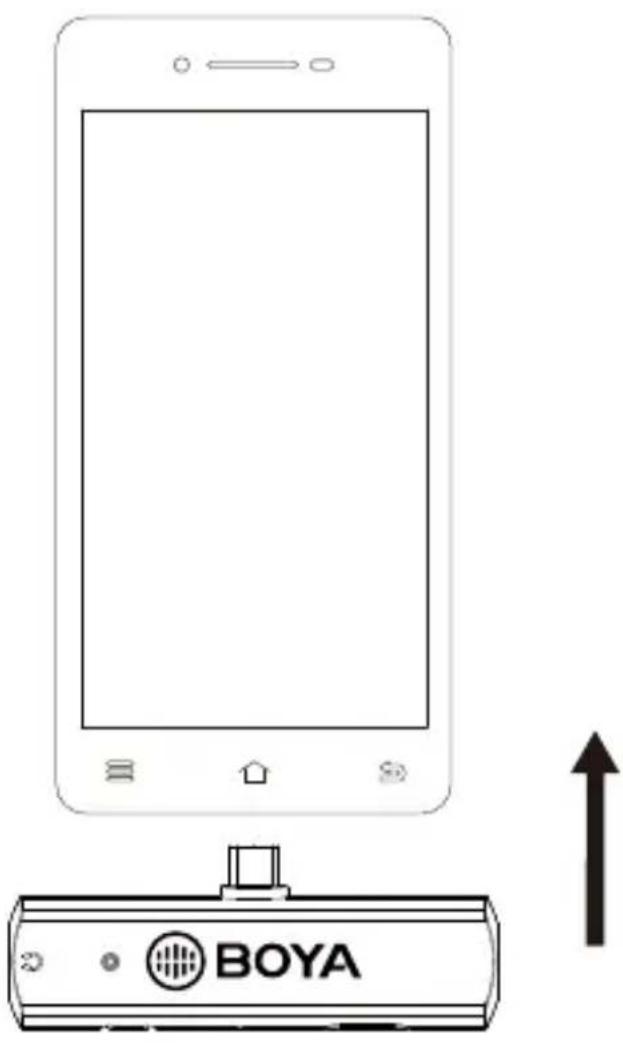
Set Up Guide
- Plug the BY-WM4 PRO RXU directly into the lightning port of smartphone.
- The Power LED flashes slowly waiting for connecting with the transmitter.
Connecting the transmitter and the Receiver
Before leaving factory, the connection of transmitters and receiver will be established.
If transmitters and receiver disconnect, please follow below steps:
- Turn on the transmitter and plug the receiver into smartphone.
- Long press the pair bottom of receiver with pair pin, the indicator of receiver will flash quickly when entering paring mode.
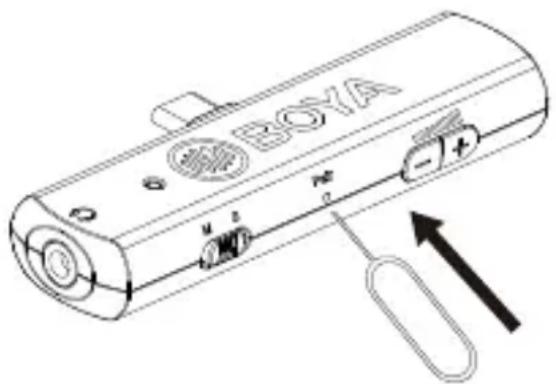
- Long press the pair button on the side of the transmitter entering the pairing mode.
- When the transmitter and receiver connected, the light of receiver stays blue, and transmitter flashes every 2.5 seconds.
Otherwise, the light of receiver and transmitter will flash continually every 1 second, then try 1-3 steps again.

NOTE:
1) Please adjust the monitoring audio volume of RXU before recording.
Troubleshooting
If you have any problem using the BY-WM4 Pro components, use the following checklist. If any problem persist, please consult our local dealer, or contact us directly.
| Status Cause | Measure | |
| The units does not turn on. | The batteries of BY-WM4 PRO TX exhausted. | Replace the batteries with new ones. |
| The Power LED of BY-WM4 PRO RXD doesn't light up while connecting with the iOS devices. | Open the audio/video app on mobile device, then the indicator of receiver should be light up. | |
| The Power LED of BY-WM4 PRO RXU doesn't light up while connecting with the Android devices. | The receiver hasn't get a well connection with the devices. Please try to reconnect it again . | |
| The batteries become drained quickly. | The BY-WM4 Pro components is being used under extremely cold conditions. | The batteries drain quickly under extremely cold conditions. |
| The BY-WM4 Pro components is being used under extremely hot conditions. | The batteries drain quickly under extremely hot conditions. | |
| There is no sound. | The transmitter and receiver are not in pairing mode. | Please refer to the Connecting the transmitter and the Receiver. |
| There do not have a good connection with the lavalier. | Please try to reconnect it again. | |
| There do not have a good connection with the earphone. | Please try to reconnect it again. | |
| The sound is weak. | The input level of the receiver is low. | The input level of the transmitter is low. Adjust the audio output level on the transmitter. Keep this level as high as possible without distortion to reach best Sound and Noise Ratio. |
| There is distortion in the sound. | The input level of the receiver is inappropriate. | Adjust the audio output level on the transmitter. Keep this level as high as possible without distortion to reach best Sound and Noise Ratio. |
| Headphones with a monaural mini jack is used. | Use the headphones with a stereo mini jack. | |
| Too much ambience is being picked up. | When using an omnidirectional microphone like the one included with this system, the microphone may be picking up too much ambience. | Make sure the microphone is as close as to the subject as possible. |
| The audio is noisy or distorted. This can include dropouts, white noise, bursts, pops and clicks. | RF interference | There can be a lot of RF interference outdoors.Try moving indoors, where there is less RF interference.Overhead telephone lines, fluorescent lighting, and metal fences can all cause interference.Turn off all nearby computers and mobile phones. |
| RF signal is weak. | Make sure there is an unobstructed line of sight between the transmitter and the receiver.Keep in mind that your body, clothes, and onstage sets are possible obstructions.Make sure the receiver and the transmitter are within 197' (60m) range. If there are obstructions, you may need to move closer. |
Feature :
BY-WM4 Pro System
- Ideal for Youtubes, vloggings, facebooks, podcasts, mobile journalisms and more
• Digital 2.4 GHz frequency band
• Dual-Channel wireless receiver
• Ultracompact and miniature-size for receiver
• Super-clear recording sound - Up to 60m (197ft) operation range (without obstacle)
• Monitoring sound by 3.5mm headphone output - Master volume control
- Selectable stereo and mono mode (For BY-WM4 PRO RXD/RXU only)
- Omnidirectional lavalier microphone
- Standard camera shoe mount and clip included (For BY-WM4 PRO/BY-WM4 PRO-K2 only)
- Hard case included
- Compatible with smartphones, DSLR cameras, consumer camcorders, PCs etc (For BY-WM4 PRO/BY-WM4 PRO-K2 only)
- Compatible with smartphones, tablets, laptops (For BY-WM4 PRO-K3/K5 only)
Specifications:
BY-WM4 Pro System
| RF Modulation: | GFSK (Gauss frequency Shift Keying) |
| Frequency band: | 2.4 GHz (2405-2478MHz) |
| Frequency response: | 35Hz-14KHz±3dB |
| Signal/Noise: | 84dB or more |
| Distortion: | 0.05% or less (32Ω,1 KHz,65mW output) |
| RF output level: | 3mW |
| Earphone output level: | 32Ω,65mW |
| Reception sensitivity: | -90dB +/- 3dB / 0dB= 1V/Pa, 1kHz |
| Audio input connector: | 3.5mm mini jack |
| Operation range: | 60m (197ft) (without obstacle) |
| Power requirements: | TX4 Pro/RX4 Pro: 3V DC (Two AAA size batteries) |
| BY-WM4 PRO RXD: Supplied by iOS device | |
| BY-WM4 PRO RXU: Supplied by USB Type-C device | |
| Plug: | BY-WM4 PRO RXD: Apple MFi Certified Lightning Connect |
| BY-WM4 PRO RXU: USB Type-C Connector | |
| Consumption power: | Receiver: 3V/70mA Transmitter: 3V/70mA |
| Dimensions: | TX4 Pro/RX4 Pro: 45x70x35mm (1.8x2.8x1.4") |
| BY-WM4 PRO RXD: 82×30.7×12mm (3.2×1.2×0.5") | |
| BY-WM4 PRO RXU: 82×30.7×12mm (3.2×1.2×0.5") | |
| Weight: | TX4 Pro/RX4 Pro: 47g (1.7 oz) |
| BY-WM4 PRO RXD: 12g (0.4oz) | |
| BY-WM4 PRO RXU: 9.5g (0.3oz) |
CAUTION
- Please use our original audio signal cable which is equipped, it's more compatible with the wireless microphone, and make the sound better.
- The figure given is only the approximate value that applies when there are no obstructions between the transmitter and receiver. This distance will vary depending on metal objects, people and other obstructions and on the signal strength.
- Battery life may vary depending on the type of battery used.
IMPORTANT
- If you do not intend to use the wireless microphone for a long period time, please remove the batteries from both the transmitter and receiver.
- Do not touch the lavalier/lapel microphone, transmitter and receiver while recording, as this will cause noise to be recorded.
- Do not let the transmitter close to high-voltage equipment or to devices that emit strong electromagnetic fields, otherwise, it may cause the noise to be recorded.
- Do not use or leave the transmitter and receiver in hot, humid places.
- Do not leave the receiver attached to the camera when storing the camera in a case.
- Do not mix up to use the transmitter and receiver.
WARNING
- Keep the wireless microphone out of the reach of children.
- Never use leaking batteries and never expose batteries to excessive heat or fire.
MAINTENANCE
- Do not operate the device with wet hands or feet.
- Clean the equipment only in the way described in the instructions for use.
- Take care to prevent the equipment from dropping down. Make sure that the device is properly fastened and reliably mounted. If the device has dropped down on the floor have it inspected by a skilled electrician before you switch it on again.
- Should the equipment be damaged or defective, or if you notice a scorching smell:
Interrupt the electric power supply immediately by removing the batteries. Do not operate the device with a damaged housing, do not repair the device yourself. Have the device only repaired by a skilled electrician. - Always keep your device in good condition, as specified in these in-structions for use.
- Do not open the device.
WARNING
FCC STATEMENT :
This device complies with Part 15 of the FCC Rules. Operation is subject to the following two conditions:
(1) This device may not cause harmful interference, and
(2) This device must accept any interference received, including interference that may cause undesired operation.
Warning:
Changes or modifications not expressly approved by the party responsible for compliance could void the user's authority to operate the equipment.
NOTE:
This equipment has been tested and found to comply with the limits for a Class B digital device, pursuant to Part 15 of the FCC Rules. These limits are designed to provide reasonable protection against harmful interference in a residential installation.
This equipment generates uses and can radiate radio frequency energy and, if not installed and used in accordance with the instructions, may cause harmful interference to radio communications. However, there is no guarantee that interference will not occur in a particular installation. If this equipment does cause harmful interference to radio or television reception, which can be determined by turning the equipment off and on, the user is encouraged to try to correct the interference by one or more of the following measures:
Reorient or relocate the receiving antenna.
Increase the separation between the equipment and receiver.
Connect the equipment into an outlet on a circuit different from that to which the receiver is connected.
Consult the dealer or an experienced radio/TV technician for help.
RF warning statement:
The device has been evaluated to meet general RF exposure requirement. The device can be used in portable exposure condition without restriction
- BY-WM4 PRO
- Instruction Manual
- BY-WM4 Pro consists of one body-pack transmitter(TX4 Pro), a portable receiver (RX4 Pro), and their accessories as following:
- BY-WM4 Pro-K2 consists of two body-pack transmitters(TX4 Pro), a portable receiver (RX4 Pro), and their accessories as following:
- BY-WM4 Pro-K3 is specially designed for Lightning iOS Devices.
- BY-WM4 Pro-K4 is specially designed for Lightning iOS Devices.
- BY-WM4 Pro-K5 specially designed for Andriod and other Type-C devices.
- Transmitter (TX4 Pro)
- Microphone input
- Line In
- Power LED
- Power OFF/ ON
- Pair
- Antenna
- Battery compartment
- Clip
- Receiver (RX4 Pro)
- Earphone Jack
- NOTE:
- LINE OUT (audio output) Jack
- Volume + / -
- Shoe mount adapter
- What's difference?
- ① 3.5 mm TRRS connector
- ② 3.5 mm TRS connector
- How to use it
- Installing batteries
- Connecting the transmitter and receiver Using the microphone with smartphone, tablet, Mac or laptop with combo headphone/ Mic jack.
- Receiver
- How to connect transmitter and receiver?
- Installing or uninstalling clip
- BY-WM4 PRO RXD
- Receiver (BY-WM4 PRO RXD)
- Headphone Jack
- Power LED
- Lightning Connector
- Volume + / -
- Pair Bottom
- M/ S Switch
- Built-In Internal Antenna
- Set Up Guide
- Connecting the transmitter and the Receiver
- BY-WM4 PRO RXU
- 2.4GHz Wireless Receiver
- For Android and other Type-C devices
- Receiver (BY-WM4 PRO RXU)
- USB Type-C Connector
- Troubleshooting
- Feature :
- BY-WM4 Pro System
- Specifications:
- CAUTION
- IMPORTANT
- WARNING
- MAINTENANCE
- FCC STATEMENT :
- Warning:
- RF warning statement:
Brand : BOYA
Model : BY-WM4 PRO RXU
Category : Receiver