
DP2K-15CLP - Video projector Barco - Free user manual and instructions
Find the device manual for free DP2K-15CLP Barco in PDF.


| Product Type | Digital Cinema Projector |
| Display Technology | DLP |
| Native Resolution | 2048 x 1080 (2K) |
| Brightness | 14,000 lumens |
| Contrast Ratio | 2000:1 |
| Light Source | Xenon Lamp |
| Lamp Power | 1.5 kW |
| Lamp Life | 1500 hours |
| Power Consumption | 2.5 kW (max) |
| Input Compatibility | DVI, HDMI, SDI |
| Dimensions (W x D x H) | 1020 x 626 x 472 mm |
| Weight | 98 kg |
| Cooling System | Liquid cooling |
| Operating Noise | 55 dB |
| Safety Certifications | CE, FCC, RoHS |
| Maintenance | Filter cleaning every 1000 hours; lamp replacement when needed |
| Spare Parts | Lamp, air filters, fan |
| Features | 3D support, built-in diagnostics, lens shift |
| Warranty | 3 years (limited) |
Frequently Asked Questions - DP2K-15CLP Barco
User questions about DP2K-15CLP Barco
0 question about this device. Answer the ones you know or ask your own.
Ask a new question about this device
Download the instructions for your Video projector in PDF format for free! Find your manual DP2K-15CLP - Barco and take your electronic device back in hand. On this page are published all the documents necessary for the use of your device. DP2K-15CLP by Barco.
USER MANUAL DP2K-15CLP Barco
Checklist for laser illuminated RG3 projector installations performed in the USA
Checklist can be filled out electronically or can be printed and filled out manually.
Reporter
| Date of report | |
| Name of reporter |
Installer information
| Installing company | ||
| Address | ||
| Phone | ||
| Email contact | ||
| The installer confirms to be a valid laser show variance holder | ☐ YES | ▼ Variance No. ▼ |
| OR The installer confirms to be trained and authorized (e.g. by Barco NV) | ☐ YES | ▼ Authority name ▼ |
| ▼ Authority Variance No. if not Barco ▼ | ||
NOTE: If the end user intends to change the installation, the end user shall be a laser light show variance holder or shall be trained and authorized by a laser light show variance holder.
Installers' on-site representative responsible for safety and compliance
| Name | |
| Title | |
| Phone |
Venue information
| Permanent installation (e.g. cinema theatre) or temporary installation (e.g. show, gig) | □ PERMANENT □ TEMPORARY |
| Name of venue | |
| Room number (if applicable) | |
| Address | |
| Phone | |
Safety Officer, Person responsible for safety of show and operator
| Name | |
| Title | |
| Phone | |
Training and documentation provided to Operator/Owner
| Training on the safe operation and maintenance | □PASS |
| FDA/CDRH installation requirements – Any modifications must be approved | □PASS |
Checklist for laser illuminated RG3 projector installations performed in the USA
List of state, local, and other agencies notified if applicable for RG3 installations
| A | |
| B | |
| C | |
| D |
Projectors in scope of this registration form
Per projector a Details Projector form page must be filled in this registration document! (see following pages)
Total number of projectors included in this registration form:
Signatures
Installer's signature
| Name: | |
| Date: |
Signature
Safety officer/ Owner signature
| Name: | |
| Date: |
Signature
!!! In case the installer is not a laser light show variance holder then this installation checklist must be completed after the installation and sent to pvg@barco.com !!!
P 2 / 22
Checklist for laser illuminated RG3 projector installations performed in the USA
Details Projector 1.
Projector information
| Manufacturer | Barco NV | |
| Model | ||
| Serial Number | ||
| Manufacturing date | ||
| Laser Hazard Classification | ☐ CLASS 1 RG3☐ CLASS 2 RG3☐ OTHER CLASS → | CLASS: |
Projector and restricted access area inspected
| Projector securely mounted | ☐PASS |
| Projector housing is assembled properly | ☐PASS |
| Restricted access area and RG3 product warning signs provided | ☐PASS |
| Readily accessible control provided to immediately terminate projection light (e.g. mains switch, circuit breaker) | ☐PASS |
| Restricted access control implemented (including physical means e.g. key, pass code) | ☐PASS |
Clearance distances confirmed
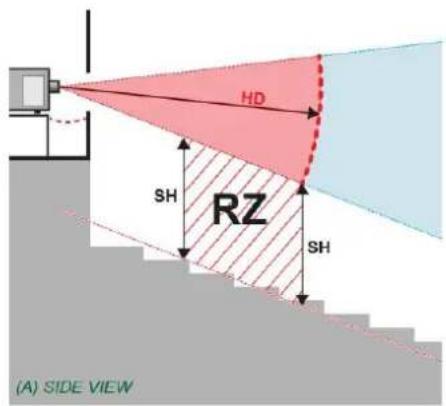
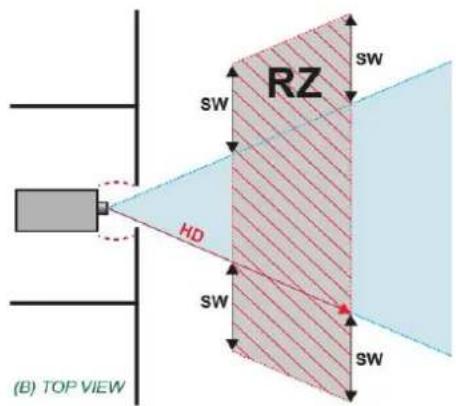
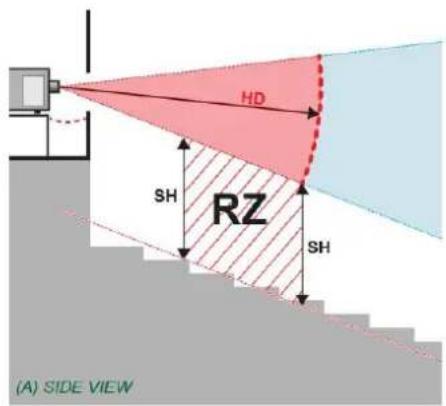
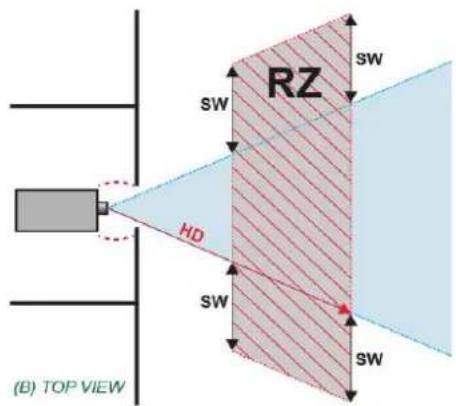
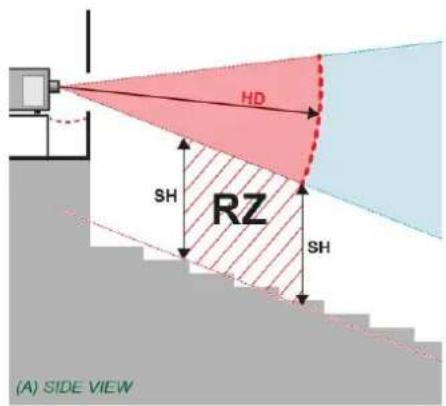
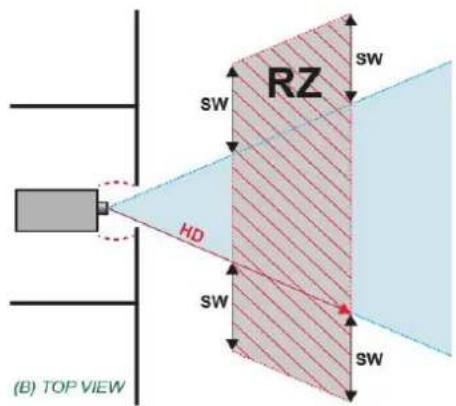
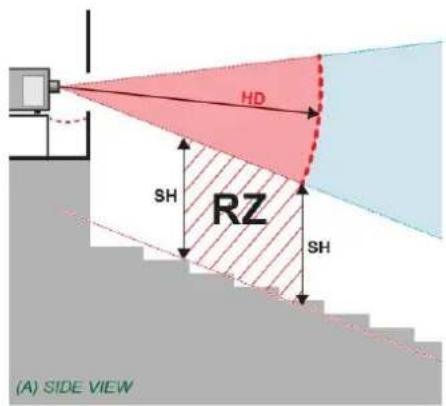
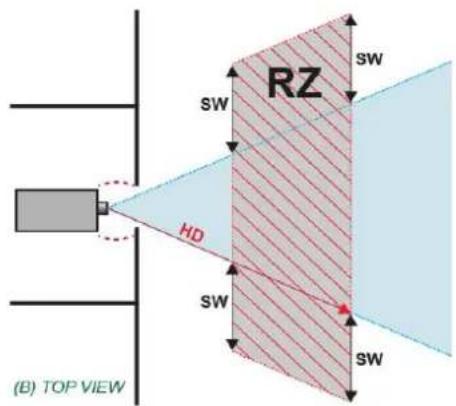
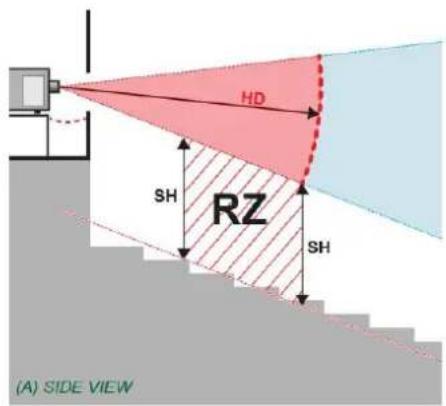
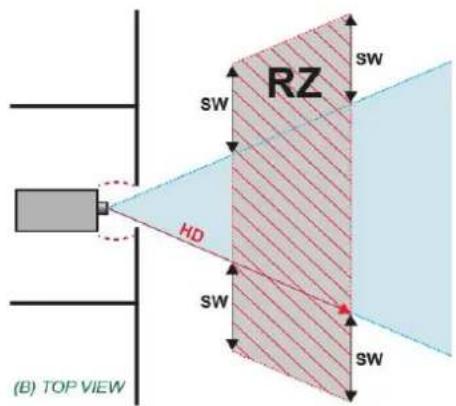
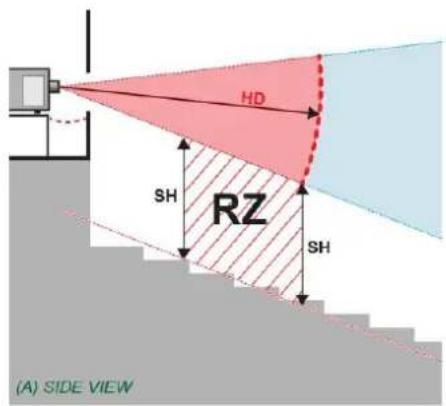
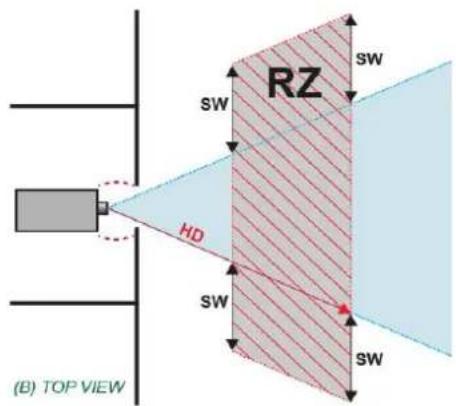
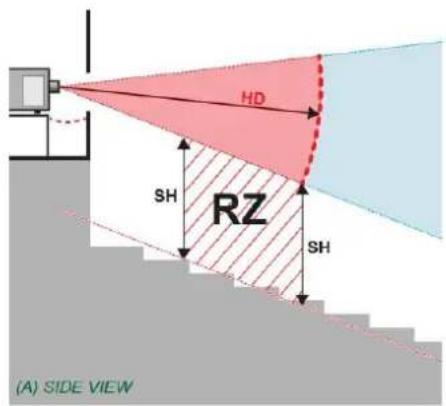
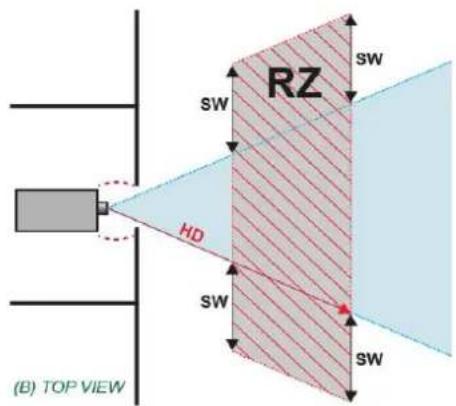
| The Hazard Distance (HD) is confirmed to be | □ Meter□ Foot | |
| How high is the lower part of the projected beam above floor level where audience is permitted to stand (=Separation Height SH) | □ Meter□ Foot | |
| If applicable: How wide is the lateral distance between the projected beam from where audience is permitted to stand (=Separation Width SW) | □ Meter□ Foot |
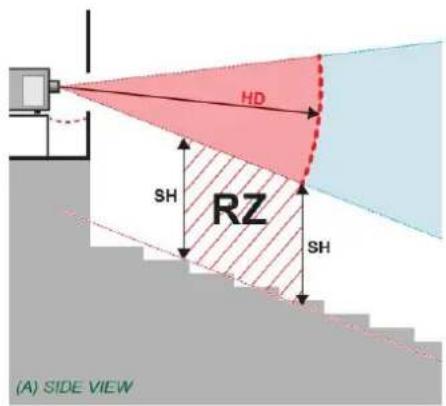
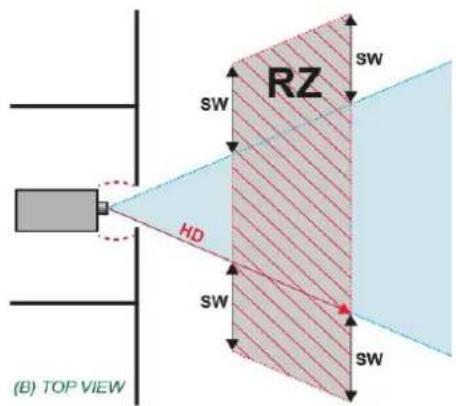
The installer confirms that the Restriction Zone (RZ) is respected
□ YES □ NO
Checklist for laser illuminated RG3 projector installations performed in the USA
Details Projector 2.
Projector information
| Manufacturer | Barco NV | |
| Model | ||
| Serial Number | ||
| Manufacturing date | ||
| Laser Hazard Classification | ☐ CLASS 1 RG3☐ CLASS 2 RG3☐ OTHER CLASS → | CLASS: |
Projector and restricted access area inspected
| Projector securely mounted | ☐PASS |
| Projector housing is assembled properly | ☐PASS |
| Restricted access area and RG3 product warning signs provided | ☐PASS |
| Readily accessible control provided to immediately terminate projection light (e.g. mains switch, circuit breaker) | ☐PASS |
| Restricted access control implemented (including physical means e.g. key, pass code) | ☐PASS |
Clearance distances confirmed
| The Hazard Distance (HD) is confirmed to be | □ Meter□ Foot | |
| How high is the lower part of the projected beam above floor level where audience is permitted to stand (=Separation Height SH) | □ Meter□ Foot | |
| If applicable: How wide is the lateral distance between the projected beam from where audience is permitted to stand (=Separation Width SW) | □ Meter□ Foot |
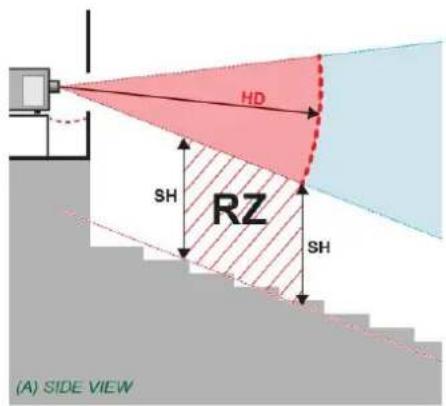
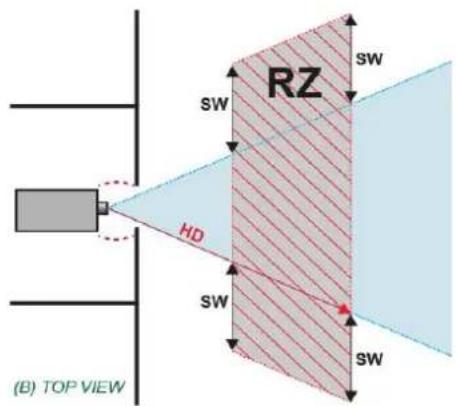
The installer confirms that the Restriction Zone (RZ) is respected
□ YES □ NO
Checklist for laser illuminated RG3 projector installations performed in the USA
Details Projector 3.
Projector information
| Manufacturer | Barco NV | |
| Model | ||
| Serial Number | ||
| Manufacturing date | ||
| Laser Hazard Classification | ☐ CLASS 1 RG3☐ CLASS 2 RG3☐ OTHER CLASS → | CLASS: |
Projector and restricted access area inspected
| Projector securely mounted | ☐PASS |
| Projector housing is assembled properly | ☐PASS |
| Restricted access area and RG3 product warning signs provided | ☐PASS |
| Readily accessible control provided to immediately terminate projection light (e.g. mains switch, circuit breaker) | ☐PASS |
| Restricted access control implemented (including physical means e.g. key, pass code) | ☐PASS |
Clearance distances confirmed
| The Hazard Distance (HD) is confirmed to be | □ Meter□ Foot | |
| How high is the lower part of the projected beam above floor level where audience is permitted to stand (=Separation Height SH) | □ Meter□ Foot | |
| If applicable: How wide is the lateral distance between the projected beam from where audience is permitted to stand (=Separation Width SW) | □ Meter□ Foot |
The installer confirms that the Restriction Zone (RZ) is respected
□ YES □ NO
Checklist for laser illuminated RG3 projector installations performed in the USA
Details Projector 4.
Projector information
| Manufacturer | Barco NV | |
| Model | ||
| Serial Number | ||
| Manufacturing date | ||
| Laser Hazard Classification | ☐ CLASS 1 RG3☐ CLASS 2 RG3☐ OTHER CLASS → | CLASS: |
Projector and restricted access area inspected
| Projector securely mounted | ☐PASS |
| Projector housing is assembled properly | ☐PASS |
| Restricted access area and RG3 product warning signs provided | ☐PASS |
| Readily accessible control provided to immediately terminate projection light (e.g. mains switch, circuit breaker) | ☐PASS |
| Restricted access control implemented (including physical means e.g. key, pass code) | ☐PASS |
Clearance distances confirmed
| The Hazard Distance (HD) is confirmed to be | □ Meter□ Foot | |
| How high is the lower part of the projected beam above floor level where audience is permitted to stand (=Separation Height SH) | □ Meter□ Foot | |
| If applicable: How wide is the lateral distance between the projected beam from where audience is permitted to stand (=Separation Width SW) | □ Meter□ Foot |
The installer confirms that the Restriction Zone (RZ) is respected
□ YES □ NO
Checklist for laser illuminated RG3 projector installations performed in the USA
Details Projector 5.
Projector information
| Manufacturer | Barco NV | |
| Model | ||
| Serial Number | ||
| Manufacturing date | ||
| Laser Hazard Classification | ☐ CLASS 1 RG3☐ CLASS 2 RG3☐ OTHER CLASS → | CLASS: |
Projector and restricted access area inspected
| Projector securely mounted | ☐PASS |
| Projector housing is assembled properly | ☐PASS |
| Restricted access area and RG3 product warning signs provided | ☐PASS |
| Readily accessible control provided to immediately terminate projection light (e.g. mains switch, circuit breaker) | ☐PASS |
| Restricted access control implemented (including physical means e.g. key, pass code) | ☐PASS |
Clearance distances confirmed
| The Hazard Distance (HD) is confirmed to be | □ Meter□ Foot | |
| How high is the lower part of the projected beam above floor level where audience is permitted to stand (=Separation Height SH) | □ Meter□ Foot | |
| If applicable: How wide is the lateral distance between the projected beam from where audience is permitted to stand (=Separation Width SW) | □ Meter□ Foot |
The installer confirms that the Restriction Zone (RZ) is respected
□ YES □ NO
Checklist for laser illuminated RG3 projector installations performed in the USA
Details Projector 6.
Projector information
| Manufacturer | Barco NV | |
| Model | ||
| Serial Number | ||
| Manufacturing date | ||
| Laser Hazard Classification | ☐ CLASS 1 RG3☐ CLASS 2 RG3☐ OTHER CLASS → | CLASS: |
Projector and restricted access area inspected
| Projector securely mounted | ☐PASS |
| Projector housing is assembled properly | ☐PASS |
| Restricted access area and RG3 product warning signs provided | ☐PASS |
| Readily accessible control provided to immediately terminate projection light (e.g. mains switch, circuit breaker) | ☐PASS |
| Restricted access control implemented (including physical means e.g. key, pass code) | ☐PASS |
Clearance distances confirmed
| The Hazard Distance (HD) is confirmed to be | ☐ Meter☐ Foot | |
| How high is the lower part of the projected beam above floor level where audience is permitted to stand (=Separation Height SH) | ☐ Meter☐ Foot | |
| If applicable: How wide is the lateral distance between the projected beam from where audience is permitted to stand (=Separation Width SW) | ☐ Meter☐ Foot |
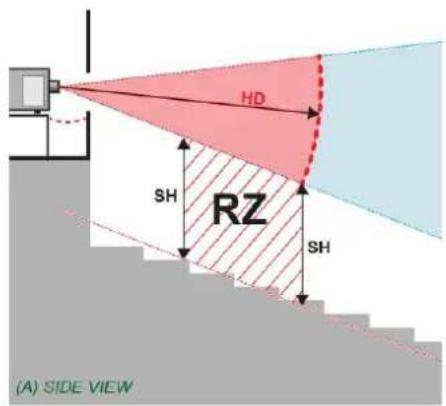
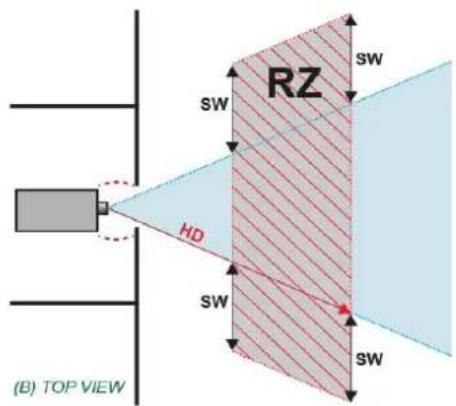
The installer confirms that the Restriction Zone (RZ) is respected
□ YES □ NO
Checklist for laser illuminated RG3 projector installations performed in the USA
Details Projector 7.
Projector information
| Manufacturer | Barco NV | |
| Model | ||
| Serial Number | ||
| Manufacturing date | ||
| Laser Hazard Classification | ☐ CLASS 1 RG3☐ CLASS 2 RG3☐ OTHER CLASS → | CLASS: |
Projector and restricted access area inspected
| Projector securely mounted | ☐PASS |
| Projector housing is assembled properly | ☐PASS |
| Restricted access area and RG3 product warning signs provided | ☐PASS |
| Readily accessible control provided to immediately terminate projection light (e.g. mains switch, circuit breaker) | ☐PASS |
| Restricted access control implemented (including physical means e.g. key, pass code) | ☐PASS |
Clearance distances confirmed
| The Hazard Distance (HD) is confirmed to be | □ Meter□ Foot | |
| How high is the lower part of the projected beam above floor level where audience is permitted to stand (=Separation Height SH) | □ Meter□ Foot | |
| If applicable: How wide is the lateral distance between the projected beam from where audience is permitted to stand (=Separation Width SW) | □ Meter□ Foot |
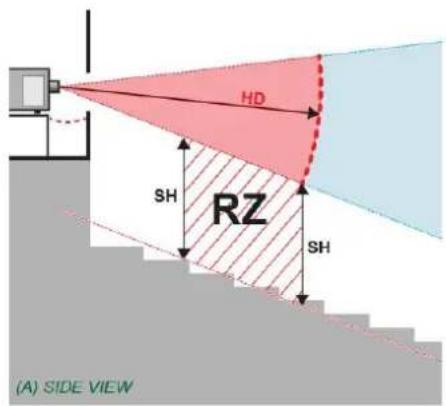
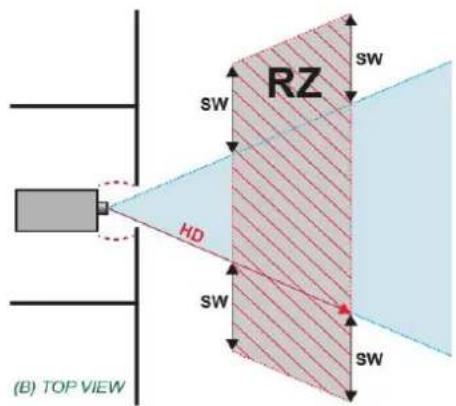
The installer confirms that the Restriction Zone (RZ) is respected
□ YES □ NO
Checklist for laser illuminated RG3 projector installations performed in the USA
Details Projector 8.
Projector information
| Manufacturer | Barco NV | |
| Model | ||
| Serial Number | ||
| Manufacturing date | ||
| Laser Hazard Classification | ☐ CLASS 1 RG3☐ CLASS 2 RG3☐ OTHER CLASS → | CLASS: |
Projector and restricted access area inspected
| Projector securely mounted | ☐PASS |
| Projector housing is assembled properly | ☐PASS |
| Restricted access area and RG3 product warning signs provided | ☐PASS |
| Readily accessible control provided to immediately terminate projection light (e.g. mains switch, circuit breaker) | ☐PASS |
| Restricted access control implemented (including physical means e.g. key, pass code) | ☐PASS |
Clearance distances confirmed
| The Hazard Distance (HD) is confirmed to be | □ Meter□ Foot | |
| How high is the lower part of the projected beam above floor level where audience is permitted to stand (=Separation Height SH) | □ Meter□ Foot | |
| If applicable: How wide is the lateral distance between the projected beam from where audience is permitted to stand (=Separation Width SW) | □ Meter□ Foot |
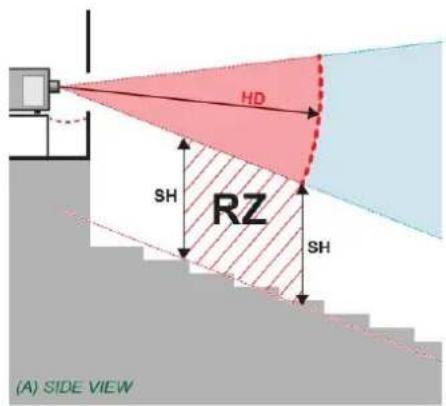
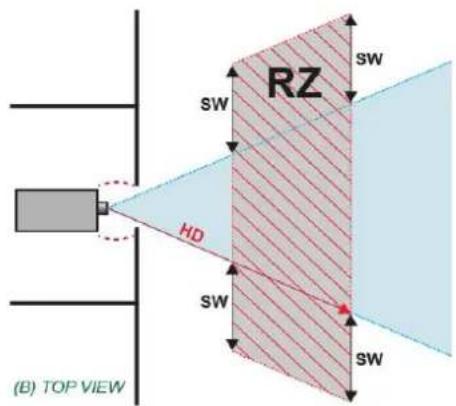
The installer confirms that the Restriction Zone (RZ) is respected
□ YES □ NO
P 10 / 22
Checklist for laser illuminated RG3 projector installations performed in the USA
Details Projector 9.
Projector information
| Manufacturer | Barco NV | |
| Model | ||
| Serial Number | ||
| Manufacturing date | ||
| Laser Hazard Classification | ☐ CLASS 1 RG3☐ CLASS 2 RG3☐ OTHER CLASS → | CLASS: |
Projector and restricted access area inspected
| Projector securely mounted | ☐PASS |
| Projector housing is assembled properly | ☐PASS |
| Restricted access area and RG3 product warning signs provided | ☐PASS |
| Readily accessible control provided to immediately terminate projection light (e.g. mains switch, circuit breaker) | ☐PASS |
| Restricted access control implemented (including physical means e.g. key, pass code) | ☐PASS |
Clearance distances confirmed
| The Hazard Distance (HD) is confirmed to be | □ Meter□ Foot | |
| How high is the lower part of the projected beam above floor level where audience is permitted to stand (=Separation Height SH) | □ Meter□ Foot | |
| If applicable: How wide is the lateral distance between the projected beam from where audience is permitted to stand (=Separation Width SW) | □ Meter□ Foot |
The installer confirms that the Restriction Zone (RZ) is respected
□ YES □ NO
P 11 / 22
Checklist for laser illuminated RG3 projector installations performed in the USA
Details Projector 10.
Projector information
| Manufacturer | Barco NV | |
| Model | ||
| Serial Number | ||
| Manufacturing date | ||
| Laser Hazard Classification | ☐ CLASS 1 RG3☐ CLASS 2 RG3☐ OTHER CLASS → | CLASS: |
Projector and restricted access area inspected
| Projector securely mounted | ☐PASS |
| Projector housing is assembled properly | ☐PASS |
| Restricted access area and RG3 product warning signs provided | ☐PASS |
| Readily accessible control provided to immediately terminate projection light (e.g. mains switch, circuit breaker) | ☐PASS |
| Restricted access control implemented (including physical means e.g. key, pass code) | ☐PASS |
Clearance distances confirmed
| The Hazard Distance (HD) is confirmed to be | □ Meter□ Foot | |
| How high is the lower part of the projected beam above floor level where audience is permitted to stand (=Separation Height SH) | □ Meter□ Foot | |
| If applicable: How wide is the lateral distance between the projected beam from where audience is permitted to stand (=Separation Width SW) | □ Meter□ Foot |
The installer confirms that the Restriction Zone (RZ) is respected
□ YES □ NO
P 12 / 22
Checklist for laser illuminated RG3 projector installations performed in the USA
Details Projector 11.
Projector information
| Manufacturer | Barco NV | |
| Model | ||
| Serial Number | ||
| Manufacturing date | ||
| Laser Hazard Classification | ☐ CLASS 1 RG3☐ CLASS 2 RG3☐ OTHER CLASS → | CLASS: |
Projector and restricted access area inspected
| Projector securely mounted | ☐PASS |
| Projector housing is assembled properly | ☐PASS |
| Restricted access area and RG3 product warning signs provided | ☐PASS |
| Readily accessible control provided to immediately terminate projection light (e.g. mains switch, circuit breaker) | ☐PASS |
| Restricted access control implemented (including physical means e.g. key, pass code) | ☐PASS |
Clearance distances confirmed
| The Hazard Distance (HD) is confirmed to be | □ Meter□ Foot | |
| How high is the lower part of the projected beam above floor level where audience is permitted to stand (=Separation Height SH) | □ Meter□ Foot | |
| If applicable: How wide is the lateral distance between the projected beam from where audience is permitted to stand (=Separation Width SW) | □ Meter□ Foot |
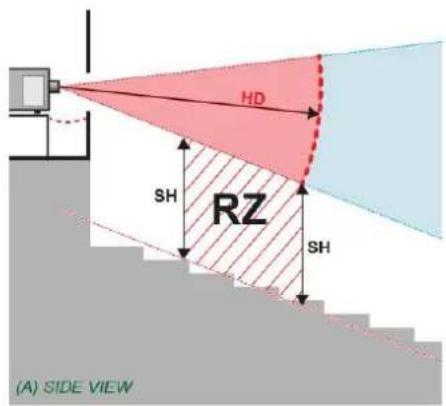
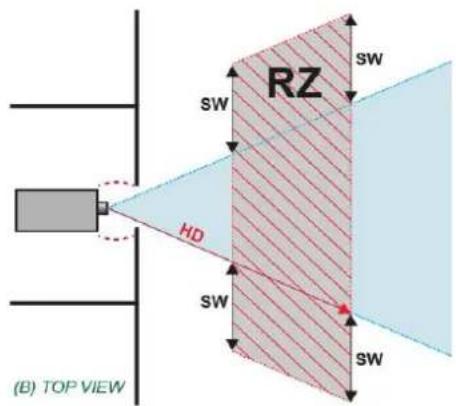
The installer confirms that the Restriction Zone (RZ) is respected
□ YES □ NO
P 13 / 22
Checklist for laser illuminated RG3 projector installations performed in the USA
Details Projector 12.
Projector information
| Manufacturer | Barco NV | |
| Model | ||
| Serial Number | ||
| Manufacturing date | ||
| Laser Hazard Classification | ☐ CLASS 1 RG3☐ CLASS 2 RG3☐ OTHER CLASS → | CLASS: |
Projector and restricted access area inspected
| Projector securely mounted | ☐PASS |
| Projector housing is assembled properly | ☐PASS |
| Restricted access area and RG3 product warning signs provided | ☐PASS |
| Readily accessible control provided to immediately terminate projection light (e.g. mains switch, circuit breaker) | ☐PASS |
| Restricted access control implemented (including physical means e.g. key, pass code) | ☐PASS |
Clearance distances confirmed
| The Hazard Distance (HD) is confirmed to be | □ Meter□ Foot | |
| How high is the lower part of the projected beam above floor level where audience is permitted to stand (=Separation Height SH) | □ Meter□ Foot | |
| If applicable: How wide is the lateral distance between the projected beam from where audience is permitted to stand (=Separation Width SW) | □ Meter□ Foot |
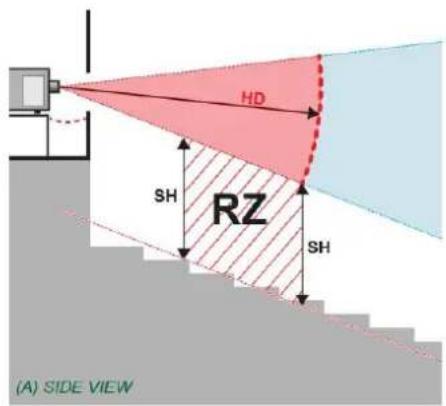
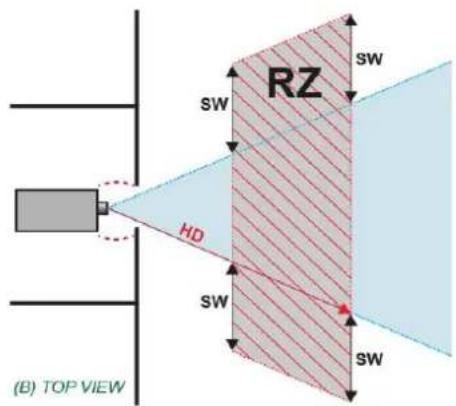
The installer confirms that the Restriction Zone (RZ) is respected
□ YES □ NO
P 14 / 22
Checklist for laser illuminated RG3 projector installations performed in the USA
Details Projector 13.
Projector information
| Manufacturer | Barco NV | |
| Model | ||
| Serial Number | ||
| Manufacturing date | ||
| Laser Hazard Classification | ☐ CLASS 1 RG3☐ CLASS 2 RG3☐ OTHER CLASS → | CLASS: |
Projector and restricted access area inspected
| Projector securely mounted | ☐PASS |
| Projector housing is assembled properly | ☐PASS |
| Restricted access area and RG3 product warning signs provided | ☐PASS |
| Readily accessible control provided to immediately terminate projection light (e.g. mains switch, circuit breaker) | ☐PASS |
| Restricted access control implemented (including physical means e.g. key, pass code) | ☐PASS |
Clearance distances confirmed
| The Hazard Distance (HD) is confirmed to be | □ Meter□ Foot | |
| How high is the lower part of the projected beam above floor level where audience is permitted to stand (=Separation Height SH) | □ Meter□ Foot | |
| If applicable: How wide is the lateral distance between the projected beam from where audience is permitted to stand (=Separation Width SW) | □ Meter□ Foot |
The installer confirms that the Restriction Zone (RZ) is respected
□ YES □ NO
P 15 / 22
Checklist for laser illuminated RG3 projector installations performed in the USA
Details Projector 14.
Projector information
| Manufacturer | Barco NV | |
| Model | ||
| Serial Number | ||
| Manufacturing date | ||
| Laser Hazard Classification | ☐ CLASS 1 RG3☐ CLASS 2 RG3☐ OTHER CLASS → | CLASS: |
Projector and restricted access area inspected
| Projector securely mounted | ☐PASS |
| Projector housing is assembled properly | ☐PASS |
| Restricted access area and RG3 product warning signs provided | ☐PASS |
| Readily accessible control provided to immediately terminate projection light (e.g. mains switch, circuit breaker) | ☐PASS |
| Restricted access control implemented (including physical means e.g. key, pass code) | ☐PASS |
Clearance distances confirmed
| The Hazard Distance (HD) is confirmed to be | □ Meter□ Foot | |
| How high is the lower part of the projected beam above floor level where audience is permitted to stand (=Separation Height SH) | □ Meter□ Foot | |
| If applicable: How wide is the lateral distance between the projected beam from where audience is permitted to stand (=Separation Width SW) | □ Meter□ Foot |
The installer confirms that the Restriction Zone (RZ) is respected
□ YES □ NO
P 16 / 22
Checklist for laser illuminated RG3 projector installations performed in the USA
Details Projector 15.
Projector information
| Manufacturer | Barco NV | |
| Model | ||
| Serial Number | ||
| Manufacturing date | ||
| Laser Hazard Classification | ☐ CLASS 1 RG3☐ CLASS 2 RG3☐ OTHER CLASS → | CLASS: |
Projector and restricted access area inspected
| Projector securely mounted | ☐PASS |
| Projector housing is assembled properly | ☐PASS |
| Restricted access area and RG3 product warning signs provided | ☐PASS |
| Readily accessible control provided to immediately terminate projection light (e.g. mains switch, circuit breaker) | ☐PASS |
| Restricted access control implemented (including physical means e.g. key, pass code) | ☐PASS |
Clearance distances confirmed
| The Hazard Distance (HD) is confirmed to be | □ Meter□ Foot | |
| How high is the lower part of the projected beam above floor level where audience is permitted to stand (=Separation Height SH) | □ Meter□ Foot | |
| If applicable: How wide is the lateral distance between the projected beam from where audience is permitted to stand (=Separation Width SW) | □ Meter□ Foot |
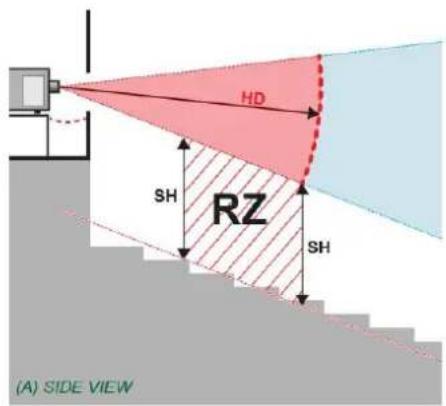
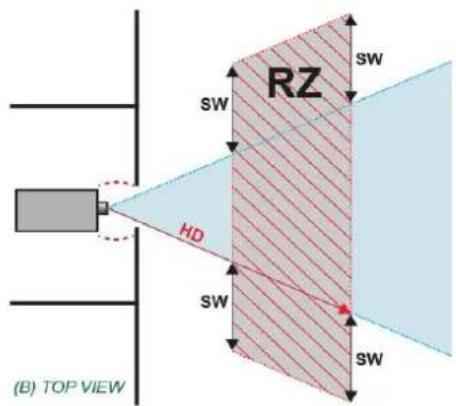
The installer confirms that the Restriction Zone (RZ) is respected
□ YES □ NO
P 17 / 22
Checklist for laser illuminated RG3 projector installations performed in the USA
Details Projector 16.
Projector information
| Manufacturer | Barco NV | |
| Model | ||
| Serial Number | ||
| Manufacturing date | ||
| Laser Hazard Classification | ☐ CLASS 1 RG3☐ CLASS 2 RG3☐ OTHER CLASS → | CLASS: |
Projector and restricted access area inspected
| Projector securely mounted | ☐PASS |
| Projector housing is assembled properly | ☐PASS |
| Restricted access area and RG3 product warning signs provided | ☐PASS |
| Readily accessible control provided to immediately terminate projection light (e.g. mains switch, circuit breaker) | ☐PASS |
| Restricted access control implemented (including physical means e.g. key, pass code) | ☐PASS |
Clearance distances confirmed
| The Hazard Distance (HD) is confirmed to be | □ Meter□ Foot | |
| How high is the lower part of the projected beam above floor level where audience is permitted to stand (=Separation Height SH) | □ Meter□ Foot | |
| If applicable: How wide is the lateral distance between the projected beam from where audience is permitted to stand (=Separation Width SW) | □ Meter□ Foot |
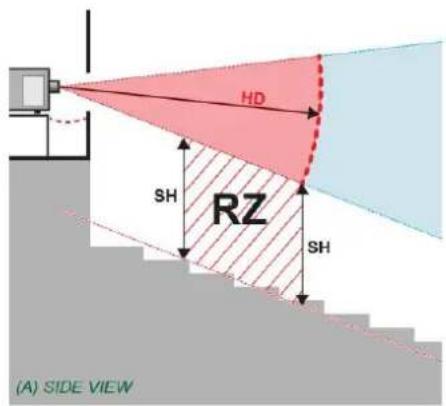
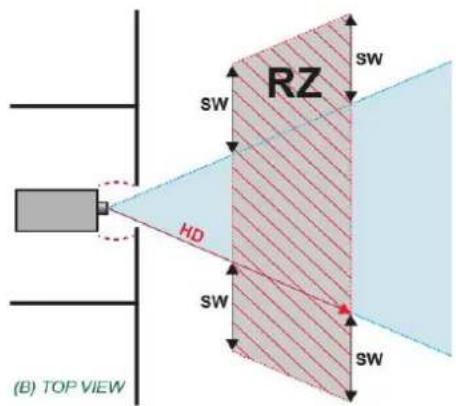
The installer confirms that the Restriction Zone (RZ) is respected
□ YES □ NO
P 18 / 22
Checklist for laser illuminated RG3 projector installations performed in the USA
Details Projector 17.
Projector information
| Manufacturer | Barco NV | |
| Model | ||
| Serial Number | ||
| Manufacturing date | ||
| Laser Hazard Classification | ☐ CLASS 1 RG3☐ CLASS 2 RG3☐ OTHER CLASS → | CLASS: |
Projector and restricted access area inspected
| Projector securely mounted | ☐PASS |
| Projector housing is assembled properly | ☐PASS |
| Restricted access area and RG3 product warning signs provided | ☐PASS |
| Readily accessible control provided to immediately terminate projection light (e.g. mains switch, circuit breaker) | ☐PASS |
| Restricted access control implemented (including physical means e.g. key, pass code) | ☐PASS |
Clearance distances confirmed
| The Hazard Distance (HD) is confirmed to be | □ Meter□ Foot | |
| How high is the lower part of the projected beam above floor level where audience is permitted to stand (=Separation Height SH) | □ Meter□ Foot | |
| If applicable: How wide is the lateral distance between the projected beam from where audience is permitted to stand (=Separation Width SW) | □ Meter□ Foot |
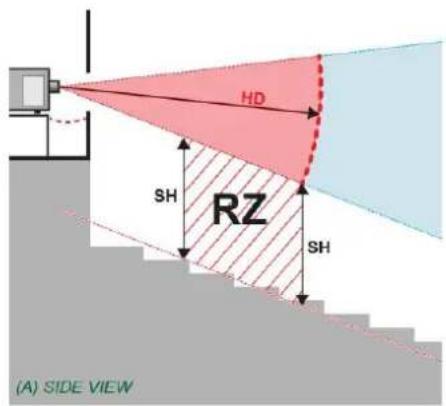
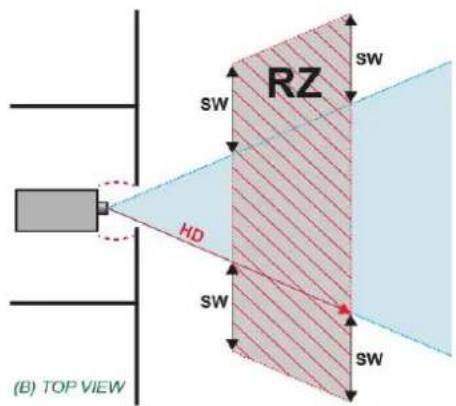
The installer confirms that the Restriction Zone (RZ) is respected
□ YES □ NO
P 19 / 22
Checklist for laser illuminated RG3 projector installations performed in the USA
Details Projector 18.
Projector information
| Manufacturer | Barco NV | |
| Model | ||
| Serial Number | ||
| Manufacturing date | ||
| Laser Hazard Classification | ☐ CLASS 1 RG3☐ CLASS 2 RG3☐ OTHER CLASS → | CLASS: |
Projector and restricted access area inspected
| Projector securely mounted | ☐PASS |
| Projector housing is assembled properly | ☐PASS |
| Restricted access area and RG3 product warning signs provided | ☐PASS |
| Readily accessible control provided to immediately terminate projection light (e.g. mains switch, circuit breaker) | ☐PASS |
| Restricted access control implemented (including physical means e.g. key, pass code) | ☐PASS |
Clearance distances confirmed
| The Hazard Distance (HD) is confirmed to be | □ Meter□ Foot | |
| How high is the lower part of the projected beam above floor level where audience is permitted to stand (=Separation Height SH) | □ Meter□ Foot | |
| If applicable: How wide is the lateral distance between the projected beam from where audience is permitted to stand (=Separation Width SW) | □ Meter□ Foot |
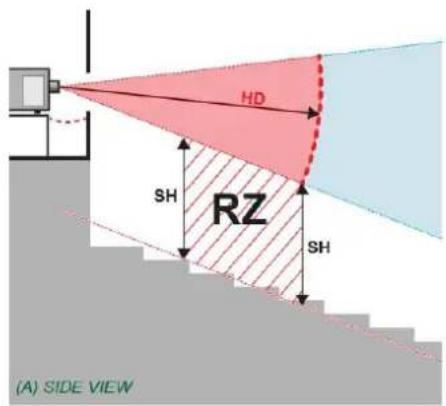
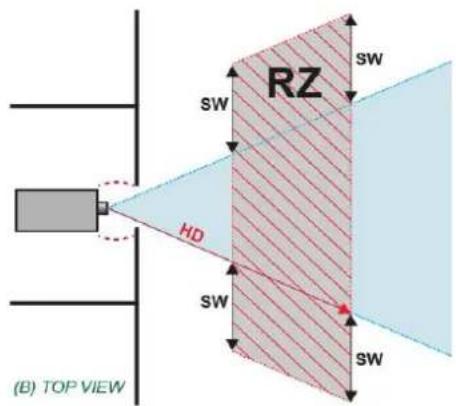
The installer confirms that the Restriction Zone (RZ) is respected
□ YES □ NO
P 20 / 22
Checklist for laser illuminated RG3 projector installations performed in the USA
Details Projector 19.
Projector information
| Manufacturer | Barco NV | |
| Model | ||
| Serial Number | ||
| Manufacturing date | ||
| Laser Hazard Classification | ☐ CLASS 1 RG3☐ CLASS 2 RG3☐ OTHER CLASS → | CLASS: |
Projector and restricted access area inspected
| Projector securely mounted | ☐PASS |
| Projector housing is assembled properly | ☐PASS |
| Restricted access area and RG3 product warning signs provided | ☐PASS |
| Readily accessible control provided to immediately terminate projection light (e.g. mains switch, circuit breaker) | ☐PASS |
| Restricted access control implemented (including physical means e.g. key, pass code) | ☐PASS |
Clearance distances confirmed
| The Hazard Distance (HD) is confirmed to be | □ Meter□ Foot | |
| How high is the lower part of the projected beam above floor level where audience is permitted to stand (=Separation Height SH) | □ Meter□ Foot | |
| If applicable: How wide is the lateral distance between the projected beam from where audience is permitted to stand (=Separation Width SW) | □ Meter□ Foot |
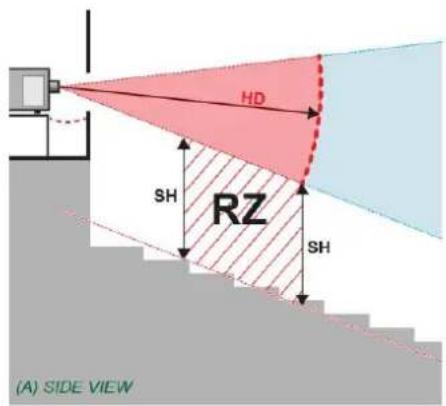
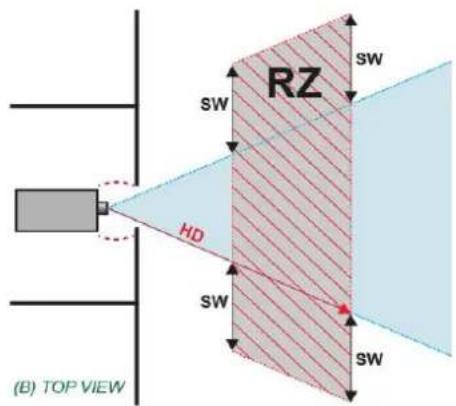
The installer confirms that the Restriction Zone (RZ) is respected
□ YES □ NO
P 21 / 22
Checklist for laser illuminated RG3 projector installations performed in the USA
Details Projector 20.
Projector information
| Manufacturer | Barco NV | |
| Model | ||
| Serial Number | ||
| Manufacturing date | ||
| Laser Hazard Classification | ☐ CLASS 1 RG3☐ CLASS 2 RG3☐ OTHER CLASS → | CLASS: |
Projector and restricted access area inspected
| Projector securely mounted | ☐PASS |
| Projector housing is assembled properly | ☐PASS |
| Restricted access area and RG3 product warning signs provided | ☐PASS |
| Readily accessible control provided to immediately terminate projection light (e.g. mains switch, circuit breaker) | ☐PASS |
| Restricted access control implemented (including physical means e.g. key, pass code) | ☐PASS |
Clearance distances confirmed
| The Hazard Distance (HD) is confirmed to be | □ Meter□ Foot | |
| How high is the lower part of the projected beam above floor level where audience is permitted to stand (=Separation Height SH) | □ Meter□ Foot | |
| If applicable: How wide is the lateral distance between the projected beam from where audience is permitted to stand (=Separation Width SW) | □ Meter□ Foot |
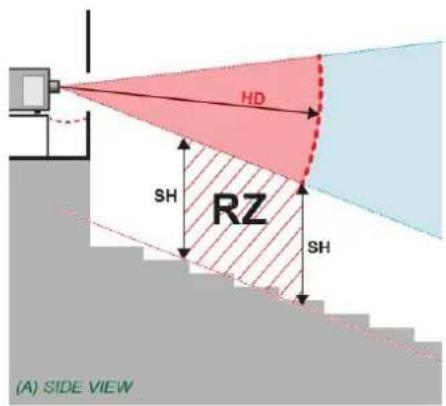
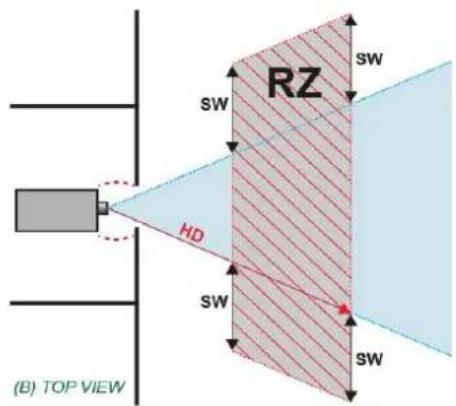
The installer confirms that the Restriction Zone (RZ) is respected
□ YES □ NO
P 22 / 22
- Checklist for laser illuminated RG3 projector installations performed in the USA
- Projectors in scope of this registration form
- Signatures
- Details Projector 1.
- Details Projector 2.
- Details Projector 3.
- Details Projector 4.
- Details Projector 5.
- Details Projector 6.
- Details Projector 7.
- Details Projector 8.
- Details Projector 9.
- Details Projector 10.
- Details Projector 11.
- Details Projector 12.
- Details Projector 13.
- Details Projector 14.
- Details Projector 15.
- Details Projector 16.
- Details Projector 17.
- Details Projector 18.
- Details Projector 19.
- Details Projector 20.
Brand : Barco
Model : DP2K-15CLP
Category : Video projector