COM-5708 - Mouse Steren - Free user manual and instructions
Find the device manual for free COM-5708 Steren in PDF.


| Product Type | Wireless Mouse |
| Brand | Steren |
| Model | COM-5708 |
| Connectivity | Wireless 2.4 GHz via USB Nano Receiver |
| Power Source | 2 x AAA Batteries |
| Mouse Input Voltage | 3 V DC |
| Receiver Input Voltage | 5 V DC, 50 mA |
| Number of Buttons | 3 (Left, Right, Scroll Wheel) |
| Scroll Wheel | Yes |
| DPI (Resolution) | 800-1200 DPI (estimated) |
| Wireless Range | Up to 10 meters |
| Dimensions (approx.) | 10.5 x 6 x 3.5 cm |
| Weight (without batteries) | Approx. 60 g |
| Compatibility | Windows, Mac, Linux (USB plug and play) |
| Operating Temperature | 0°C to 40°C (estimated) |
| Storage Temperature | -20°C to 60°C (estimated) |
| Power Switch | On/Off slide switch |
| Battery Life | Approx. 6 months (typical use) |
| Warranty | 1 year |
| Package Contents | Mouse, USB Receiver, Manual |
| Safety Precautions | Do not drop, avoid extreme temperatures, keep away from children |
| Maintenance | Clean with dry cloth; avoid liquids |
Frequently Asked Questions - COM-5708 Steren
User questions about COM-5708 Steren
0 question about this device. Answer the ones you know or ask your own.
Ask a new question about this device
Download the instructions for your Mouse in PDF format for free! Find your manual COM-5708 - Steren and take your electronic device back in hand. On this page are published all the documents necessary for the use of your device. COM-5708 by Steren.
USER MANUAL COM-5708 Steren
natural_image
Line drawing of a computer mouse with a pen resting on the screen (no text or symbols)natural_image
Illustration of a medical or laboratory device with a pen and bulb, no visible text or symbolsnatural_image
Illustration of a laptop with a USB flash icon, a mouse, and a wireless signal symbol (no text or labels)ESPECIFICACIONES
STEREN PRODUCTO EMPACADO S.A. DE C.V.
Autopista México-Querétaro. Km 26.5 Sin número, Nave Industrial 3-A, Col. Lomas de Boulevares, Tlalnepantla de Baz, Estado de México, C.P. 54020, RFC: SPE-941215-H43
natural_image
Illustration of a computer mouse with a pen resting on it (no text or symbols)User Manual V1.1/0818v
HOW TO USE
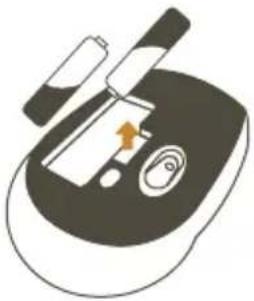
Remove the cover from the batteries compartment. Remove the USB receiver. Insert 2 "AAA" batteries ensure that place it with the correct polarity.
natural_image
Illustration of a medical or laboratory device with a tool and arrow indicating a process (no text or symbols)Place the cover again.
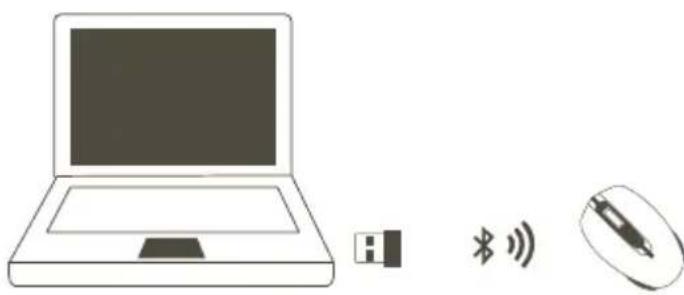
Connect the receiver into an USB port of your PC. Slide the switch to ON position.
natural_image
Illustration of a laptop with a USB flash icon, a mouse, and a wireless signal symbol (no text or labels)SPECIFICATIONS
Input: 3 V---(2 x AAA)
Receiver input: 5 V---50 mA (x USB)
Before to use the product, please read carefully this manual to avoid any malfunction.
The info in this manual is shown as reference. Consult our website www.steren.com to obtain the current version of this manual.
- The children should be supervised to ensure that don't use it like a toy.
- This device is not designed for be using by people (including children) with physical capacities, sensorial or mental reduced, or they don't have the necessary experience or knowledge.
- Avoid the drops may cause serious damages.
- Don't expose the device to extreme temperatures.
The operation of this equipment is subject to the following two conditions: (1) it is possible that this equipment or device may not cause harmful interference and (2) this equipment or device must accept any interference, including interference that may cause its undesired operation.

STEREN®
Product: Wireless mouse
Number part: COM-5708
Brand: Steren
This Steren product is warranted under normal usage against defects in workmanship and materials to the original purchaser for one year from the date of purchase.
CONDITIONS
- This warranty card with all the required information, invoice or purchase ticket, product box or package, and product, must be presented when warranty service is required.
- If the product is in the warranty time, the company will repair it free of charge.
- The repairing time will not exceed 30 natural days, from the day the claim was received.
- Steren sell parts, components, consumables and accessories to customer, as well as warranty service, at any of the addresses mentioned later.
THIS WARRANTY IS VOID IN THE NEXT CASES:
If the product has been damaged by an accident, acts of God, mishandling, leaky batteries, failure to follow enclosed instructions, improper repair by unauthorized personnel, improper safe keeping, among others.
a) The consumer can also claim the warranty service in the purchase establishment.
b) If you lose the warranty card, we can reissue it, if you show the invoice or purchase ticket.
RETAILER INFORMATION
Name of the retailer
Address
Product
Brand
Serial number
Date of delivery
In case your product fails or have questions, please contact your nearest dealer. If you are in Mexico, please call to our Call Center.
01 800 500 9000
Brand : Steren
Model : COM-5708
Category : Mouse