
IAN 91041 - Switch SILVERCREST - Free user manual and instructions
Find the device manual for free IAN 91041 SILVERCREST in PDF.


| Brand | SilverCrest |
| Model | IAN 91041 |
| Product Type | Switch |
| Rated Voltage | 250 V AC |
| Rated Current | 10 A |
| Number of Poles | 1 |
| Actuation Type | Toggle |
| Mounting Type | Flush mount |
| Material | Plastic |
| Color | White |
| Dimensions (approx.) | 85 x 85 x 45 mm |
| Weight (approx.) | 50 g |
| Protection Class | IP20 |
| Operating Temperature | -20°C to +60°C |
| Functions | On/Off switching for lighting or appliances |
| Maintenance | Wipe with a dry cloth; do not use abrasive cleaners |
| Safety Features | Snap-on cover to prevent accidental contact |
| Spare Parts Available | Replacement switch mechanism (SKU: 91041-SP) |
| Repairability | Replaceable actuator |
| Certification | CE, RoHS |
Frequently Asked Questions - IAN 91041 SILVERCREST
User questions about IAN 91041 SILVERCREST
0 question about this device. Answer the ones you know or ask your own.
Ask a new question about this device
Download the instructions for your Switch in PDF format for free! Find your manual IAN 91041 - SILVERCREST and take your electronic device back in hand. On this page are published all the documents necessary for the use of your device. IAN 91041 by SILVERCREST.
USER MANUAL IAN 91041 SILVERCREST
Operation and Safety Notes
IAN91041
GB
Timer Switches
- Timer operation
☐ Plug the time switch into a mains power socket and connect the household appliance to it.
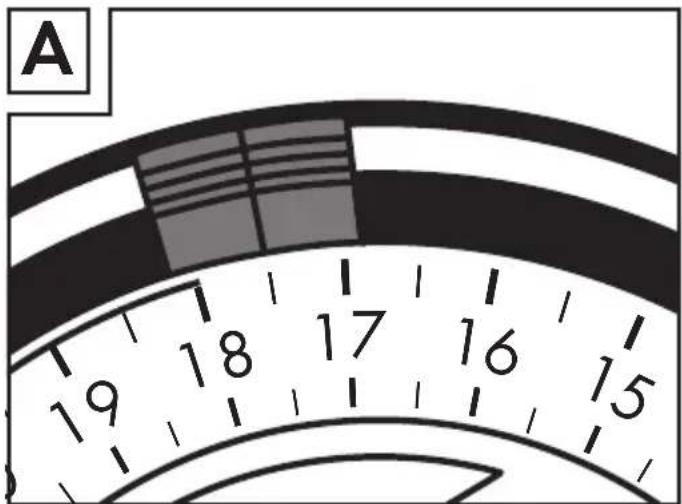
☐ Pull the setting keys up to set the switching time (30 minutes for each key, can be set over 24 hours (Example: On: 17.00 - Off: 18.00, see Fig A)).
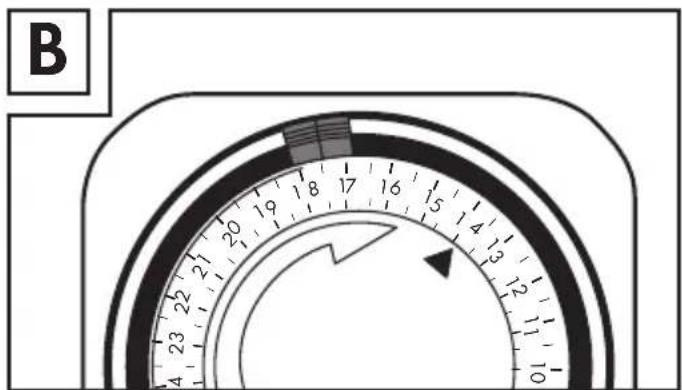
☐ Turn the arrow mark on the disc to the position of the current time (Example: 14.00, see Fig B).
Caution: Only use with appliances up to max. 3120W.
LED lights up in operating mode
Sliding switch:
visible = continuous operation
visible = timer operation

UNI-ELEKTRA GMBH
Jahnstr. 20
72513 Hettingen
Germany
Last Information Update: 06/2013
Brand : SILVERCREST
Model : IAN 91041
Category : Switch