
600125 - Uncategorized MONOPRICE - Free user manual and instructions
Find the device manual for free 600125 MONOPRICE in PDF.


Pick your language and provide your email: we'll send you a specifically translated version.
| Product Type | Passive Direct Box (DI Box) |
| Input Connector | 1/4" unbalanced TS jack |
| Input Impedance | 50 kilohms |
| Main Output Connector | Balanced XLR jack |
| Main Output Impedance | 600 ohms |
| Parallel Output Connector | 1/4" unbalanced TS jack |
| Parallel Output Impedance | 50 kilohms |
| Attenuation | Switchable: 0dB, -20dB, -40dB |
| Ground Lift | Switchable |
| Construction Material | Steel |
| Dimensions (H x W x D) | 4.7" x 3.0" x 1.8" (120 x 76 x 45 mm) |
| Weight (approx.) | 0.8 lb (0.36 kg) |
| Power Supply | Passive, no power required |
| Main Function | Converts unbalanced high-impedance signal to balanced low-impedance signal |
| Additional Functions | Reduces high-level outputs up to 50W; isolates sound system; provides parallel output |
| Care and Maintenance | Wipe with dry cloth; keep away from moisture and extreme temperatures |
| Safety Precautions | Use with proper cables; avoid short circuits; turn off equipment before connecting |
| Repairability and Spare Parts | No user-serviceable parts inside; contact Monoprice for service |
| Included Accessories | None specified |
Frequently Asked Questions - 600125 MONOPRICE
What is a DI box used for?
A DI (Direct Interface) box converts an unbalanced, high-impedance signal from instruments like guitars into a balanced, low-impedance signal suitable for professional audio systems. It also helps minimize noise and ground loops.
How do I connect the Monoprice 600125 DI box?
Connect a balanced XLR cable from the mixer to the XLR output of the DI box. Optionally, connect a 1/4" cable from the parallel output to your amp. Then plug your instrument into the 1/4" input. Ensure volumes are low before connecting.
When should I use the ground lift switch?
Use the ground lift switch when you hear a hum or buzz caused by a ground loop between your instrument and the sound system. Lifting the ground can isolate the instrument and eliminate the noise.
What does the attenuator switch do?
The attenuator switch reduces the input signal level by -20dB or -40dB. Use it if the input from your instrument is too hot and causes distortion at the mixer input.
Can I use the parallel output while using the XLR output?
Yes, the parallel output sends an identical copy of the input signal to a separate device, such as an amplifier on stage, while the XLR output sends a balanced signal to the mixer.
Is the Monoprice 600125 powered?
No, it is a passive DI box and does not require any external power. It uses a transformer to balance the signal.
What impedance does the input expect?
The input impedance is 50 kilohms, which is suitable for most high-impedance sources like electric guitars and keyboards.
Can I connect a speaker output to this DI box?
Yes, the DI box can handle high-level outputs up to 50 watts, but it is designed for line-level signals. For speaker-level signals, use the -20dB or -40dB attenuation to avoid distortion.
How do I clean the DI box?
Wipe the exterior with a dry or slightly damp cloth. Do not use any liquids or abrasives. Keep it away from moisture and extreme temperatures.
What cables are recommended for use?
Use a standard 1/4" TS instrument cable for the input and parallel output. For the main output, use a balanced XLR microphone cable.
User questions about 600125 MONOPRICE
0 question about this device. Answer the ones you know or ask your own.
Ask a new question about this device
No questions yet. Be the first to ask one.
Download the instructions for your Uncategorized in PDF format for free! Find your manual 600125 - MONOPRICE and take your electronic device back in hand. On this page are published all the documents necessary for the use of your device. 600125 by MONOPRICE.
USER MANUAL 600125 MONOPRICE
Sound Block Passive Direct Box with Ground Lift and Attenuator
P/N 600125
User's Manual
INTRODUCTION TO DI
- DI has many names, including Direct Input, Direct Injection, Direct Induction, and most commonly, Direct Interface.
- More than a simple 1/4" to XLR adapter, a DI box also matches level and impedance to minimize noise in professional live and studio sound systems.
- It converts an unbalanced signal into a balanced signal.
- It converts a High Impedance (Hi-Z) signal into a Low Impedance (Lo-Z) signal.
- It reduces high level outputs from Digital Pianos, Active Acoustic Guitars, and even Low Power Speaker Outputs (up to 50 watts).
- It isolates the sound system from the equipment on stage.
- It provides a parallel output, so performers can retain local control of their instruments.
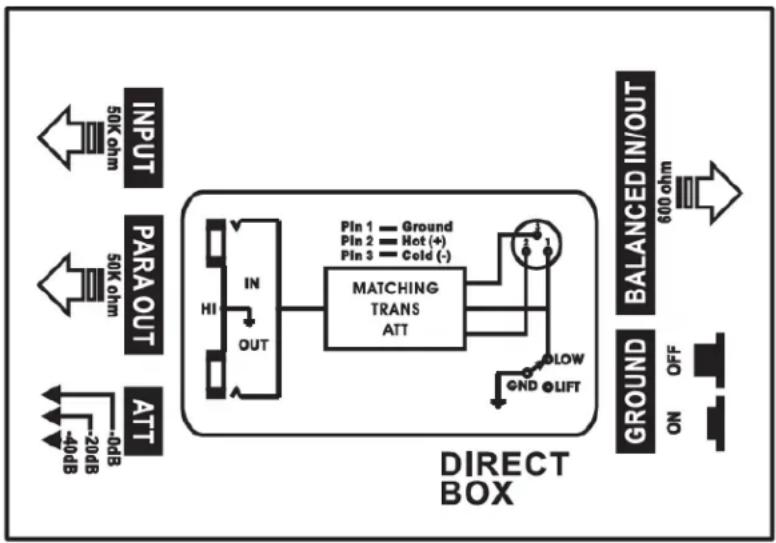
flowchart
graph TD
    A["INPUT 50K ohm"] --> B["PARAOUT 50K ohm"]
    B --> C["ATT -20dB"]
    C --> D["MATCHING TRANS ATT"]
    D --> E["Ground 600 ohm"]
    E --> F["BALANCED IN/OUT"]
    F --> G["ON ON OFF"]
    style A fill:#f9f,stroke:#333
    style B fill:#f9f,stroke:#333
    style C fill:#f9f,stroke:#333
    style D fill:#ccf,stroke:#333
    style E fill:#cfc,stroke:#333
    style F fill:#fcc,stroke:#333
    style G fill:#ffc,stroke:#333
OPERATION
- Ensure that the volume levels of your instrument and sound system are set to the minimum.
- Plug a balanced XLR connector into your mixing console or stage snake, then plug the other end into the XLR Output jack on the sound block.
- (Optional) Plug one end of a 1/4" cable into the 1/4" input on your amp, then plug the other end into the 1/4" Parallel (Link) Output on the sound block.
- Plug a 1/4" TS cable into the 1/4" Input on the sound block, then plug the other end into any unbalanced sound source (e.g., instrument).
- Increase the volume level of your sound source (e.g., instrument) to the 50% \~ 75% range.
- Increase the volume on your sound system to the desired level.
- If there is a buzz in the system originating from your instrument, use the Ground Lift Switch to isolate your instrument from the sound system.
- If there is distortion from the input of the sound system, use the Attenuator Switch to reduce the instrument's level by -20dB or -40dB.
SPECIFICATIONS
| Instrument Input | 1/4" unbalanced TS jack |
| Input Impedance | 50 kilohms |
| Main Output | Balanced XLR jack |
| Main Output Impedance | 600 ohms |
| Parallel (Link) Output | 1/4" unbalanced TS jack |
| Parallel Output Impedance | 50 kilohms |
| Input Attenuation | Switchable (0dB, -20dB, -40dB) |
| Ground Lift | Switchable |
| Construction | Steel |
| Dimensions | 4.7" x 3.0" x 1.8" (120 x 76 x 45 mm) |
Table of contents
Click a title to access it
Manual assistant
Powered by Anthropic
Waiting for your message
Product information
Brand : MONOPRICE
Model : 600125
Category : Uncategorized