
SP-PSCM - Soundbar NEC - Free user manual and instructions
Find the device manual for free SP-PSCM NEC in PDF.


Pick your language and provide your email: we'll send you a specifically translated version.
| Product Type | Collaborative Soundbar |
| Brand | NEC |
| Model | SP-PSCM |
| Power Supply | External power adapter (included) |
| Connectivity | USB 2.0 (for camera and microphone) |
| Included Accessories | 2x USB cables, power supply, wall mount, 4x M3 screws with washers |
| Mounting | Wall-mountable with included bracket |
| Compatible Devices | External devices with USB 2.0 ports (e.g., computers) |
| Audio Playback Device Name | 2 – Phnx MT103_16k |
| Recording Device Name | 2 – Phnx MT103_16k |
| Camera Connection | USB 3.0 to USB 2.0 |
| Microphone Connection | USB 2.0 to USB 2.0 |
| Intended Use | Collaborative audio/video conferencing |
| Operating Environment | Indoors, dry location |
| Cleaning Instructions | Wipe with dry soft cloth; do not use liquids or abrasives |
Frequently Asked Questions - SP-PSCM NEC
What is included in the box?
The package includes the collaborative soundbar, 2 USB cables, a power supply, a wall mount, and 4 M3 screws with washers.
Can the soundbar be mounted on the wall?
Yes, the SP-PSCM comes with a wall mount bracket and screws for secure installation.
How do I connect the soundbar to my computer?
Connect the soundbar's camera USB (3.0) to a USB 2.0 port on your computer, and the microphone USB (2.0) to another USB 2.0 port. Then select the appropriate playback and recording devices in your system settings.
What are the playback and recording device names?
Both playback and recording devices are labeled as 2 – Phnx MT103_16k.
Is the soundbar compatible with video conferencing apps?
Yes, it works as a standard USB audio/video device, compatible with most conferencing software like Zoom, Teams, and Skype.
Do I need to install drivers?
No additional drivers are required; the soundbar is recognized as a standard USB audio and camera device.
How do I clean the soundbar?
Use a dry, soft cloth to gently wipe the surface. Do not use water, cleaning solvents, or abrasive materials.
What type of power supply does it use?
It uses an external power adapter (included) that connects to a standard AC outlet.
Can I use the soundbar without the wall mount?
Yes, the soundbar can be placed on a desk or shelf, but the wall mount provides optimal positioning for conferencing.
Where can I find the user manual?
The user manual is available for free download in PDF format from the product page on notice-facile.com.
User questions about SP-PSCM NEC
0 question about this device. Answer the ones you know or ask your own.
Ask a new question about this device
No questions yet. Be the first to ask one.
Download the instructions for your Soundbar in PDF format for free! Find your manual SP-PSCM - NEC and take your electronic device back in hand. On this page are published all the documents necessary for the use of your device. SP-PSCM by NEC.
USER MANUAL SP-PSCM NEC
natural_image
Line drawing of a rectangular mechanical component with a circular opening and internal slot (no text or symbols)1) Delivery
| Collaborative Soundbar including 2x USB-Cable + power supply | Wallmount |
| 4x M3 Screws + washers | |
2) Assembly to the wall

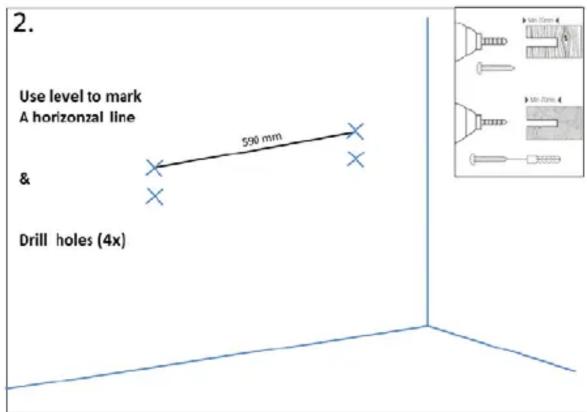

natural_image
3D diagram showing two vertical connectors with spring-like elements, positioned at a corner with a blue line (no text or symbols)
natural_image
Technical line drawing of a rectangular metal bracket with mounting holes and mounting points (no text or symbols)3) Connection
| Camera USB (3.0) | → | USB port 2.0 of the external device |
| Microphone USB (2.0) | → | USB port 2.0 of the external device |
4) Devices
| Playback device | → | “2 – Phnx MT103_16k” |
| Recording device | → | “2 – Phnx MT103_16k” |

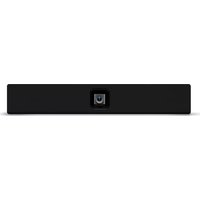
Table of contents
Click a title to access it
Manual assistant
Powered by Anthropic
Waiting for your message
Product information
Brand : NEC
Model : SP-PSCM
Category : Soundbar